 Problems? See this thread at archive.org.
My Y570 has been running strong for the last couple years. Figured I come back in here and see whats going on. I will be installing 8.1 on it in the near future so I can see if I have any issues similar to yours (Nemix77). Also for the gamer out there the laptop does play Battlefield 4 fairly well. It auto-sets the settings to Medium and it actually is quite decent. I will tweak it some more and post videos like I did with BF3.
Oh and for those who have motherboard issues or GPU issues and do not want to buy a new motherboard, you could always try baking your motherboard in an oven. Google it. I would definitely do it to try and save the laptop before replacing it.
-
-
Hey guys. Just watned to report an overclock that scores 11k on 3dmark06
NVIDIA GeForce GT 555M video card benchmark result - Intel Core i7-2670QM Processor,LENOVO Base Board Product Name
904mhz core, 1828mhz memory using MSI afterburner. Not a bad overclock. Also, to the guy above me windows 8.1 runs really well on the y570 -
Nice OC. Extremely few Y570 can achieve that. How's 3D Mark 11 Performance preset?
I'm guessing around P1600.
On Windows 7, my Y470 GT 550M stock everything, I can score P1416 with a game booster turned on. I never bother to overclock though. -
What are these mobo/gpu issues? -
Someone posted that they get BSOD if the dGPU is used. The issue extends to the motherboard as the GPU is soldered to the motherboard, so the entire motherboard needs to be replaced.
-
Anyone know how to get OneKey Recovery working? I've installed the OneKey software and tried booting into OneKey recovery but always boots back into Windows. Tried with Windows 7, even tried formatting everything back to factory (made backup DVDs on 1st day).
Not really important, but kind of annoying that a feature on my laptop doesn't work -
Does anyone know where to get BIOS updates with the EC update (or just the EC updates)?
-------- Scratch that - finally found the 2.10 EC update -------------
For those who care: I made a 2.12 BIOS with white list removed and UEFI enabled.
Download: https://dl.dropboxusercontent.com/u/1198269/Y470_Y570_47CN34WW(V2.12)_WL_&_WL_UEFI.zip
-
So, I'm wondering if anyone else has had this problem: basically, where one of the hinges is located, the top halve and bottom halve of the laptop are separating and move whenever I close the lid. This causes the hinge to wobble, and right now its not an issue but I'm afraid it will start getting worse
I'm tempted to just superglue the two halves back together since that seems how they were joined in the first place (glue), but I won't just yet -
Not trying to worry you or anything, but... I had exactly the same thing, couple of weeks later the plastic cover of hinges fell off, the 'separation' of laptop halves really worsened over time and the power supply to the screen was cut. So yeah...
-
Hi Can you where did you buy the missing screw? Or the model of that screw. I have been trying to find that for months...Could not find it anywhwere
-
Hello everyone... I'm in quite a fix with my y470 laptop! The thing is its touch buttons (those at the top of the keyboard) and its Synaptics Touchpad. Its only 3 years old machine kept in a very fine manner, but its touch pad doesn't work very well.. The laptop has to be kept at a certain orientation for the touchpad to work which is pretty annoying. I've tried reinstalling the drivers and stuff but it doesn't work! Secondly those touch buttons are also causing problems. The energy management drivers are installed and everything is fine with them, but the volume keys (being one of the touch buttons) constantly get pressed so the volume always gets down to minimum level so I cant even watch movies or play games on this thing! The problem being with the hardware, I dont want to proceed on my own. So just asking if anyone has the same problem or how to get this fixed. I'm not very well with laptops so just wanted expert opinion before taking it to the market to get it fixed! Any help guys?
-
The best way is to uninstall the energy management then disassemble your laptop all the way up to "removing the power button and touch sensitive button panel". Reattach the plug and see if the volume still goes down. It might been that the capacitor (not sure) is charged and as such the laptop thinks that there's a finger touching those buttons. Also reattach the cables for the touchpad and see if it does the trick as well. If not, you just lucked out. My Y470 is still problem free after 2.8 years and counting.
-
Hello all,
I will soon be purchasing a Crucial M500 SSD mSATA (240gb) and installing it in my Y470. I plan to dual boot Windows 7 and Xubuntu from the SSD and use the OEM 2.5 HDD (500gb) as a data drive.
1) I've read that there is a need for a screw to install the mSATA. Where can I find one of these screws?
2) Will I need to do anything with the BIOS (change boot order and the like)? Unfortunately I am unable to access my BIOS (And that alone makes me want to tear out my eyeballs). Separate issue, but I'd also appreciate insight on that...
Thank you ahead of time.
@asadullah.butt911
I too have experienced issues with the trackpad. The pad and the left/right click buttons were unresponsive (didn't even show up as connected) in both Windows and Linux. Sometimes (once a week maybe?) they would work for about 15 seconds, but then it would be back to being frozen. Then, after months of this continuing, the buttons magically they fixed themselves....I hope...
-
1) There should be a screw in the empty bay when you open up your 470. If the screw isn't there, the Crucial SSD will come with 2 screws so don't worry about them.
2) You may have to change the boot order, my mSATA was listed as disk 1 in Windows, and the BIOS chose the HDD as boot drive before I changed the order in BIOS.
I'm sure you tried, but try pressing on the F2, F8, and other function buttons before the computer boots into Windows. Are you able to select which drive to boot from by pressing F12?
Updating BIOS may help, but I wouldn't take chances with that until trying everything else. -
Unfortunately, my BIOS is password protected which is why I was asking. I don't recall ever setting the password, and resetting or cracking it seems out of question for Lenovo Insyde H2O BIOSes. I guess I'll just have to use F12 all the time then.
-
You should be able to reset the BIOS settings including password if you remove the CMOS battery in the laptop. The 470 may have a user removable battery.
The only relevant post on the Lenovo community forums was this: Anyway to reset the CMOS on y570? - Page 2 - Lenovo Community
The lenovo thread also talks about resetting password from Windows, but no idea if it works or not. -
I've done a fair amount of research, and looking through the maintanence manual, it looks like the CMOS either is soldered to the motherboard or disconnecting it does not reset the BIOS. I'll take a look at the link that you sent me, however. Thank you!
-
Based on what I've read in this thread and everywhere else on the web, as well as through my own experiences, the BIOS password is impossible to reset without a full motherboard replacement.
Here is a relevant CMOS/BIOS password reply in this thread: http://forum.notebookreview.com/ide...0-official-owners-thread-284.html#post8633262 -
My mSATA SSD arrived, and I just screwed it in. Thankfully BIOS recognized it as a primary boot drive, and was immediately seen as /dev/sda while the OEM SATA3 HDD is /dev/sdb. I'm soooooo happy
mSATA blows my mind, let alone the up and coming M.2.
I just need to install everything and I'm all set! -
is it possible to upgrade a better cpu on my y470 which has 2630qm? which cpus can i choose from?
thanks -
I have the Y470 too and my original hard drive seems to be failing. (Bluescreen couple of times already). Can you please provide instructions on how you installed mSATA SSD? Also, please let me know if you had to make any configuration changes after the installation to make the SSD work? I am a novice in hardware and is looking for some help.
Thanks!
-
My 3 year extended warranty, on my Y470, just ran out. Oh well, I haven't used it in the last 3 years, because she's running just as great today, as the first day I unpacked her!
With the Boot Optimizer, my boot times are still under 30 seconds, and no I don't have a SSD, just the 7200 RPM 500gb hard drive. I still have all the (what most of you consider bloatware), Lenovo R.I.C., Smile Dock, VariFace 4.0, YouCam, One Key Theater, installed, but I don't have them in the startup menu. My maximum temps never got above 60C, and my shipped original battery only has 8% wear level.
I've used my Y470 daily. I boot it up around noon, and shut her down at 2 AM. (She never sleeps)
Here's her Smart Attributes:
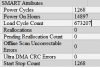
All-In-All I've been very happy with this Y470 machine. I'm not a gamer, but I do a ton of very intensive video editing, satellite tracking, and compiling codes. (Hacking & Cracking).
Some people buy machines to impress their peer group, then they stress the heck out of their GPU/CPU till the MoBo cooks. I buy a machine to get the maximum performance, and longevity, so I don't need to invest another $1,000.00 for a replacement every 1-2 years. :yes:Jobine likes this. -
Does anyone know where I can purchase an optical bay faceplate for the Y470? I broke mine when swapping the optical drive, for a sata hard drive bay
-
So... any y570 owners going to switch to windows 10? how exactly do we do that, when it comes to driver support, will all our old drivers work or do we need new ones?
Lenovo Y470 and Y570 Official Owners Thread
Discussion in 'Lenovo' started by nightspearx, May 10, 2011.


![[::AP::]](images/avatars/[__AP__])


