Problems? See this thread at archive.org.
ah my damn luck hah. Well thank you i will try with the overclocking.But again i have some questions,my core clock is 753mhz how much would be normal and not dangerous for the core to be clocked? and any good solutions for the thermal problem that will come with that?I have a Thermaltake massive 23gt cooling pad but im not that happy with it as it's not doing such a good job of cooling at the moment.
-
You can have a look at this thread: http://forum.notebookreview.com/showthread.php?t=599817
I have no experience with overclocking that card but those guys have. They mention what clocks are stable and what not. Be careful though. You should look at some threads first and overclock little at a time, do stress tests and monitor your temps. A better cooling pad might be worth getting if you have temperature problems. -
a month ago i started playing hitman absolution on my Y470 and it went well when the graphics card trigger was on and froze when the trigger was off. Recently the game freezes at the start whenever i play it with the trigger on and im able to play it when the trigger is off. also, the game, when i was able to play it with the trigger on, worked fine, but with the trigger off, lagged frequently. i think there's a problem with the graphics card.
-
No, that is a feature called nvidia optimus. When the trigger is off (light off) then the computer will use the integrated Intel 3000 graphics. When the trigger is on (light on) it will use the Nvidia 555m to play the games. When you play your games make sure to have the trigger on so it will use your Nvidia GPU
-
In the meantime try this patch
-
Fixed thanks.
I wouldn't touch that patch even if my laptops life depended on it, I would just convert back to Windows 7 in the case but like said I got it fixed thanks again. -
holy. guaca-flippin moly. THANK YOU! THANK YOU THANK YOU I didn't even KNOW realtek had an option there to turn line levels on! I always always always suspected the opamp in the laptop was causing that static, I just never knew an easy way to bypass it, especially with software too!
-
Please do tell me how you got the thermal management buttons to work w/o the patch, because when I was on Win8 the patch was very buggy and I ended up pulling out my copy of Win 7 ultimate which I am accually enjoying very much. Not nearly as many bugs or problems as Windows 8
-
For those of you having stuttering issues, is your battery fully charged? I noticed that while charging, I would have stuttering issues. When I game I normally set Lenovo Energy Management to best battery health which keeps battery at 50%. I have only ever experienced stuttering/lag when battery was charging. I've had this laptop for over a year now and it has been nothing short of great for me. Still runs strong and playing all the games I throw at it with decent settings.
-
[Reposting from the "Y470p Coming Soon" thread due to no response after a couple weeks]
Hey all. I've got a Y470p with i7, and a major graphics (I think) problem. NOT the same as any other graphics issues I've seen on here - yes I searched. But maybe part of the same Y470p graphics mediocrity.
Long story short, one day I shut my screen to carry the laptop into the other room, smelled a mild burning smell, opened the screen, and found a BSOD mentioning the display driver not recovering, atikmpag.sys, and other stuff. After that I could not boot windows except in safe mode, otherwise I would get an infinite loop of the same BSOD every time windows tried to boot. After a bunch of BS on the phone, I sent the computer to Lenovo where they confirmed my hunch of a burned up GPU. They replaced the mainboard and send it back to me with the HDD wiped and restored to factory default - basically like pulling a new computer out of the box.
I STILL have BSOD issues that seem to be related to when I close the screen or when I suspend the computer (and occasionally just random). I've seen a couple different BSOD messages as well, such as Bad Pool Caller. But it appears the "atikmpag.sys" BSOD is back for good, and I'm waiting for it to fry my GPU again. I have upgraded to the latest graphics drivers on Lenovo's site, 96vp05ww.exe...no difference.
Has anyone heard of this exact issue? If not, I'm inclined to take advantage of my warranty and ask for a completely new computer - a different model, not a Y470p. I figure if a new mainboard (which basically IS the whole computer, right?) and completely restored windows installation (plus messing with drivers) didn't fix my issue, then this is a design flaw or some kind of crazy fluke with my particular computer. My head hurts thinking about how my computer could be this unstable, fresh out of the box, twice in a row...with a seemingly unknown issue. Other cruddy things like randomly-breaking display hinges, a speaker that occasionally cuts out, and a crackly headphone jack make me more likely to ditch this whole machine. Now accepting friendly advice, thanks!
-
install the windows 7 version of the energy management program..remove the windows 8 version if you currently have it installed..remove "lenovo theatre" if you have it installed at the moment ( it crashes a lot of programs on windows 8, i had this issue when i first installed win8 back in december)..Windows 8 has been amazing for me so far and all my games have no problems
here it is link to the windows 7 link for lenovo energy management program.
http://download.lenovo.com/UserFiles/Driver/en/Downloads and Drivers/Y470Y570/Win7/IN8STW11WW5.exe -
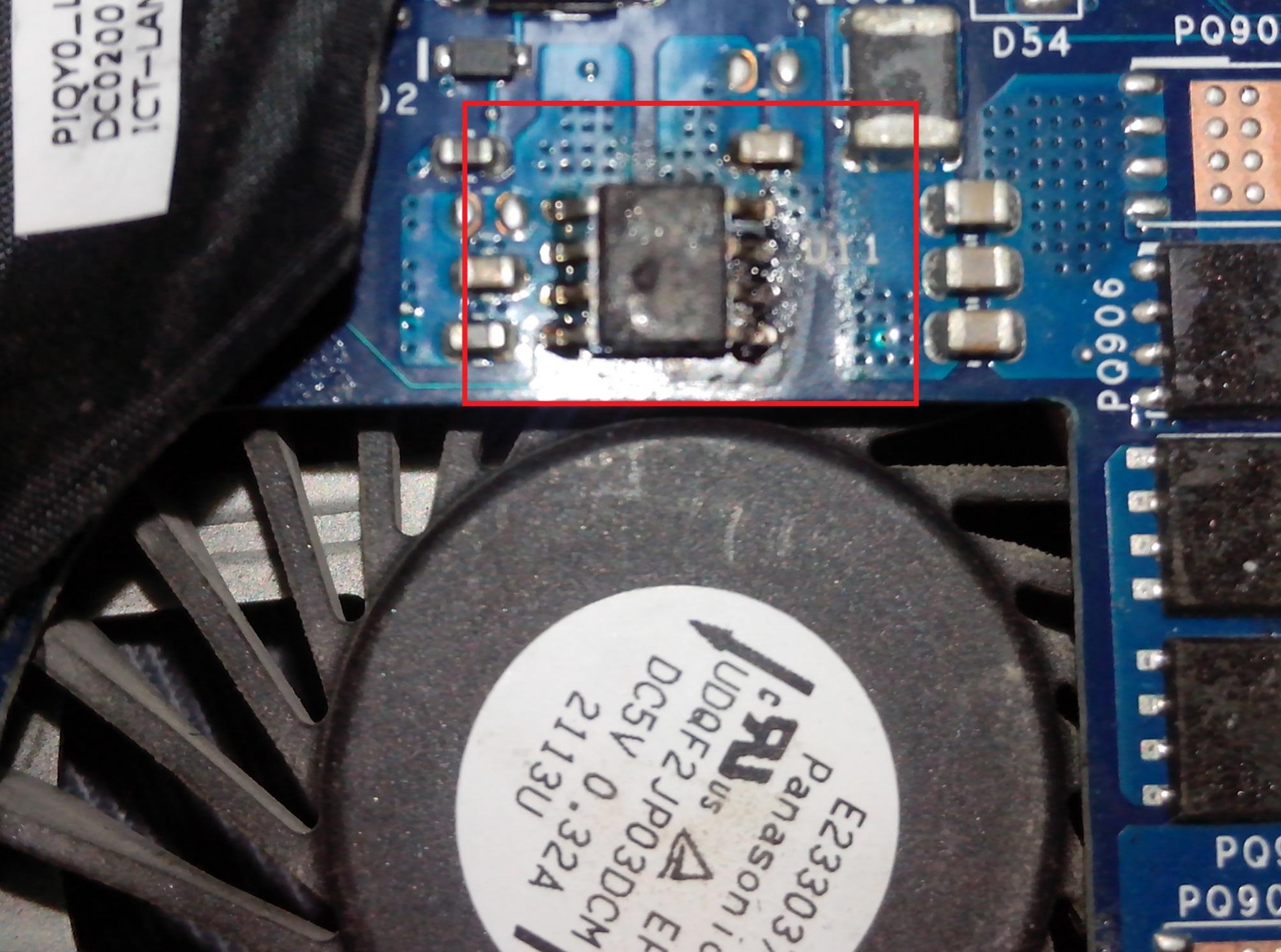
Hello ,
my Y470 was broken burn one of integrated circuits ... can someone help me with identify this broken circuit (what is a name of this integrated circuit) ( black sqaure with 8 legs near U11mark , upper side of motherboard , behind keyboard near main FAN hole)
see atached picture . i will very gratefulll for any help . Thank YouAttached Files:
-
-
does anyone have a color profile or calibration settings for the y570 with the LG panel?
-
I'm having a Code 43 error for my nvidia display. Laptop is 2 years old now. Can anyone help?
Code 43 for Video Card, repeated BSOD 116 - Tech Support Forum -
UPDATE:
GREAT NEWS
I just fixed itself, and I have no idea why. What the... -
Was wondering if the Y570 provides a sleep-and-charge function? as in while the computer is in sleep mode , it will continue charging my phone , etc using usb?
-
My Y470's 2 year birthday party. :smile:

Today, it's been 2 years since I bought my Y470. Overall, I've been really happy with my Lenovo laptop. I don't have a SSD, but using Lenovo's boot optimizer, it maintains around a 30 second cold boot from the hard drive. I never had to use the One Key Recovery, and I didn't do a "clean install" of the Windows 7. In fact, I didn't even delete any of the bloatware that Lenovo ships with the Y470. I take that back, I DID get rid of McAfee, and installed MSE. However, I don't have any, what most of you think is, bloatware running on this system. I used the start up, and services tools, to disable most of this so called bloatware. Who knows? Sometime in the future, I may just want the Smile Dock, or Lenovo's R.I.C. :laugh:
As most of you know, I'm not a gamer. I bought this machine for the speed of the I7-2630QM, and to watch videos on my Panasonic 50" plasma through the net. Heck, I don't even have the Nvidia GT 550M turned on, except for my weekly testing. Yeah, I know I could have spent a whole lot less on another platform, without the Nvidia GPU. Still, I do a lot of other CPU intensive programming, and the quad I7 makes these programs fly. :yes:
Why did I buy this Lenovo Y470 ideapad? Well, I had an IBM ThinkPad for over 6 years, at my previous job as a Systems Analyst. It was rock solid, and it took a lot of abuse. When I retired, I was thinking about getting another ThinkPad, for my personal use. While shopping for the ThinkPad, I was intrigued by the ideapad. I wanted the I7 processor, and all the porting options (2 x USB 3.0, 1 USB 2.0 port and one eSATA/USB combo port, HDMI, VGA, MultiCard Reader). I also knew that I didn't need a laptop as robust as a ThinkPad, because I wasn't going to carry around this system. Once I put it down on my nightstand, I haven't moved it at all. So I decided to go with this Y470.
The only 2 problems I've ever encountered on my Y470 are:
1. I fried my HDMI port in a lightning strike. I forgot to disconnect the HDMI port from the laptop, to the TV, during a storm. A big bolt hit a tree outside my window. The resonant charge was picked up by the HDMI cable, and transmitted to both of the ports. The laptop, and the TV's ports went by-by. I'm just glad it didn't fry either of the 2 mother boards. After that I used the VGA cable for a while, and then I bought a Belkin Screen Cast to do the WiDi connection. Since I've gone "cordless", I haven't looked back.
2. I really want a dual band wireless card. When I bought this laptop, I assumed it had both the 2.4 GHz, and the 5.0 GHz wireless card. I didn't know about the BIOS white list. Even so, I figured that I could just order an upgrade through Lenovo. Boy was I wrong! There is NO WAY to order any wireless card from them. I even tried every service provider within 200 miles from my zip, and all I get is "sorry". I don't want a modified BIOS. I just want to buy a card with the proper FRU. If Big Blue were still running the show, I know all I would need to do, was to call their parts department, and within a week I'd have it in my mailbox.
The big question is, would I buy another Lenovo product? I really dont know. I still have 1 year left on my 3 year warranty. I expect this laptop to last me for a long time. It meets my long term needs, but who knows who long the hardware will last? I'm really happy with my Y470, and I use it 10-12 hours every day.
This is just my opinion, however I think that many of the problems Ive read in these threads, have to do with excessive heat, frying their GPUs. I dont know why Lenovo sells their laptops as gaming. You cant game on battery, without extreme loss of FPS, and the battery barely provides enough power to last for over an hour. Then, if you game while plugged in, the heat can cook your bacon! I still stand by my posts in the Y500 sucks thread. A lemon is a lemon, although some of its problems have already been ironed out. (Synaptics vs Elan pads, yeah! WiDi, and the ability to use the Intel 4000, neigh).
Sorry this post is wordy. I only wanted to celebrate my Y470s anniversary, and to let you know how pleased I am with my acquisition of this laptop. How about you? Are you long time Y470/Y570 owners swearing by, or swearing at Lenovo?
Thanks,
DragonRider -
This is what I have in my Y470P (not using a modded bios) IBM Lenovo Thinkpad Intel Advanced N Wimax 6250 622ANX | eBay
-
Thanks for the link. I actually found this posting, when I was searching non-usa ebay sites. I rejected this card because it states:
Fru: 60Y3195
For IBM LENOVO ThinkPad only.
Intel PROSet/Wireless Software4 v.13.0 (And I'm running v.15.4 to connect to my WiDi)
Nice try, but no cigar.
Thanks anyways. -
Works fine for me, that's just the dirver and software version it comes with. I dont use widi so I can't confirm. But that card does work great for me, I get a solid 270-300mbps on my 2.4ghz an 5ghz bands.
-
Don't know if I posted this link before.
It has a lot of "how to" videos. :thumbsup:
RIPW1010 IdeaPad Y570 Service Training Course -
First time I've seen that. Thanks!
-
Hey guys,
I have a problematic Y470 (i7 2670QM model). Had experienced multiple BSODs/No display and had the mobo repaired. The PC repair guy said there was a problem with the GPU/video card. Thankfully he was able to restore the display.
After some time, however, I realized that the nvidia card can't be detected and the GPU switch couldn't be activated. Worse, the laptop continues to have intermittent display problems i.e. it rarely turns on when running on batteries. Repair guy says that I may have to replace my mobo. According to him a cheaper but risky option is to reprogram the BIOS chip or replace the video card with a brand new one.
Now my question is: Do you think it's worth it/practical to replace the (possibly defective) video card?
Repair guy says there's a 50/50 chance that the GPU will be repaired. Or it could get bricked. Intermittent display aside, the laptop is still usable to some extent.
Buying a new mobo is a far-fetched notion (i'd rather buy a lower spec'd laptop). Bought my Y470 originally in Dec 2011 for roughly $1,089. Where I live a new mobo would cost me around $400, excluding repair costs.
Your opinions and suggestions would be greatly appreciated! -
My answer is, no. Did you do a lot of power gaming on your machine? Did it get so hot, that you could have used the heat output vent to make your morning toast?
Lenovo has a lot of good deals now, as they try to unload their Y500 stock. For the price you quoted to replace the mobo, plus the repair cost, you could pick up a nice replacement system. Once you have the new machine, transfer your files from the old one, then sell it on e-bay, or gift it to a needy friend. :thumbsup:
That's just my opinion, I could be wrong.
-
Thanks for the reply. No, not a gamer at all. I use the Y470 mainly for word processing, browsing, movies and occasional video editing though I did play Diablo II (!) ocassionally. I'm guilty of overcharging it at times however.
I failed to mention that mobo repair here in manila is rather cheap ($90-115) and most repair shops have a "no repair, no pay" policy. So money-wise, there's nothing to lose. The only real risk is that the unit will be bricked.
It's either I let the unit be - usable but with display and GPU issues - and risk further damage to the mobo (?) OR have it repaired at a minimal cost and have a 50% chance that it will be repaired
But at its current condition, I don't think I am willing to sell the Y470 in ebay or whatever. -
Hey guys, so recently after i reformatted my y470 with win8, throttling temps became very weird. I used to only throttle at 100degrees, but now my cpu multiplier goes down to 8x at just 80 degrees celcius.
What's more absurd if that I flashed a modded bios along with it, tried changing throttling temps, but to no avail. Is it important to actually downgrade to 2.03 bios and turn off the wifi switch before changing bios versions either? I didnt actually do that =P
I've also updated my power performance profiles to high performance, all drivers updated from lenovo,nvidia and intel's websites, still, the issue persists.
I've also noticed that my cpu multipliers dont go above 28x once the cpu hits 60 degrees ( its supposed to be 31x at max )
Anyone has any solution to this? I wanna try flashing the 2.03 bios but i cant seem to find a working link for it =P -
Whoa. You let your CPU reach 100 degrees Celsius frequently? It must be nice baking your motherboard and your CPU lol. Get a cooler ASAP lol. Anyways flashing a BIOS earlier than 2.08 will render your Turbo Boost only reach 2.8 GHz even on 1 core due to bugs. You need to flash 2.10 to make your CPU use full Turbo Boost again. Here's the link for you: "https://www.dropbox.com/s/enf4yd6k4ozjn7i/IQY0210AX64.exe" https://www.dropbox.com/s/enf4yd6k4ozjn7i/IQY0210AX64.exe
-
Hi, thanks for the reply. Yes I let it reach 100 degrees celcius before, but that was before I swapped thermal paste and did a thorough cleaning of my internals, along with a reformat.
Updating the bios to v2.10 dosen't seem to work though. My multiplier is still stuck at 28x when running cpu intensive applications =\.
Should I try plucking the cmos battery out and putting it back in? -
I think you should. Just wait a couple of minutes after you remove the battery to ensure the capacitors are discharged. Maybe with the BIOS update, it didn't clear some of the settings the older bios due to the CMOS chip still getting power. I'm running BIOS 2.10 too but getting full Turbo at 3.1 GHz when prime 95 on one thread is stressed.
-
Alright. I ran into a little trouble though. I found the cmos battery ( supposedly, which is located near the fan ), but I cant seem to pull it out.
-
Hey guys,
Not sure if this has been answered alerady but I've recently installed W8 on my ideapad y470 and have been having a few issues. Firstly, I am no longer able to change my charging to "Optimized for Battery Health" and so it always charges to full. Secondly, I am unable to play with some of the controls, mainly to change the fan. I am getting really low FPS in some games and I think it is because of that.
Are there any fixes to these issues?
Thanks! -
- I have the Y470 as well and I have running windows 8 since its inception. For the fan controls, make sure to install the original "Lenovo energy mangament" software that came with the computer ( if you haven't partitioned your harddrive in any way, the drivers are located in the "LENOVO" partiton of your hard drive)
- Install the original "energy management" software will make your fan possible to use with the buttons and the battery options to come back.. One key recovery doesn't work anymore in windows 8 ( I use easeus todo backup btw ) and installing "one key theater" will give your issues.
- For the graphics card, I currently have driver version 314.07 installed and all my games (Splinter cell blacklist, fifa 13, tomb raider, deadspace 3, re6 and etc.) work with no problems. I am assuming you know how to turn on the silver switch the activates the NVIDIA gpu since it's optimus plus you sometimes have to go the nvidia control and set apps to use the nvidia card. If you need help, I can help make a video for you on that. Also one thing I do, to prevent overheating and maintain solid fps in games is to set the CPU speed to 90.
PICTURES TO HELP
1. go to the nvidia settings and make sure that the game is set to "prefer maximum performance...
![[IMG]](images/storyImages/preferhighperformance_zps4f83df7d.png)
or
2. make sure the computer is set to high performance (which I assume you already know but just for clarification)...right click the battery icon in the status area and go to power options. and click "change plan settings" under "High Performance"..
![[IMG]](images/storyImages/changeplansettings_zps2cb199f9.png)
"click Change advanced power settings" and click the "plus sign" next to "processor Power management"...change your settings to match what I have in the screenshot.
![[IMG]](images/storyImages/changeplansettings2_zps4dfdd0ae.png)
I ran into the a lot of problems when I originally installed win 8 but I fixed my issues in a short period.
p.s. make sure to uninstall any prior "lenovo energy management software" on your computer before installing the stock ones that came with the computer -
yea and it is located under power management..it is version 6.0.2.0 btw
Drivers and software - IdeaPad Y470 Notebook -
Hello,
recently decided to buy ssd mSata to insert it inside my Y570 and surprisingly found that slot is absent i have made a rough search and found that Y570A has some limitations
could you answer to the question pls. if would be enough to solder a slot ? Or it doesnt support msata ssd at all (absent not only slot but also tracks, controller or whatever required to support msata ssd) ?
here is how it looks like: link to the image
also according to the limitations of the Y570A, i read that guys successfully install 16GB ram into Y570 ... Will my Y570A support 16 GB as well ?
Should i update bios to the latest one to have 16GB ram support (didnt change it since purchase in 2011)? could you provide me a link to download the best version (i read exists locked and unlocked versions but all links are broken coz pretty old) -
Here's BIOS 2.10 which should be able to support 16 GB RAM although the BIOS can only display the last 4 digits so it will display 6384 instead of 16384 MB of RAM. https://www.dropbox.com/s/enf4yd6k4ozjn7i/IQY0210AX64.exe
-
thanks, do you have any ideas about the msata ssd support on y570a ?
-
I don't know exactly. I know that if you order y570/y570a with TV tuner or the one with RapidDrive technology, you get the mSATA port. If you don't have either TV tuner or rapiddrive, you won't have the mSATA. This case the same for Lenovo Y510p where if you buy the SLI model without the M.2 SSD as cache, you won't get the M.2 port. That's all I know so far.
-
Hey guys, just a bit of a random question. My GPU died on my 470p and I assume I will have to replace the motherboard to get it fixed. Does anyone know how much it costs to have it repaired by Lenovo out of warranty? It costs 80 dollars to get it checked, and I assume if it costs 500+ to replace the board, at that point it probably isn't worth it and I can save the 80 dollars.
Thanks. -
How did it die? Maybe you accidently just slide off the GPU switch. Anyways if the GPU is dead, the whole motherboard has to be replaced since the GPU is soldered. It isn't worth to purchase another motherboard since there are Haswell gaming laptops around for a bit more money (eg. Y510p/Y410p or Clevo).
-
Hi! I'm not sure how it died, but essentially Windows will BSOD if I do anything using the ATI card. After deleting the drivers and forcing Windows to run on the Intel card, the system is stable. I've also tried it with an older and definitely stable clone of my OS and it exhibits the same behaviour. I also ran the Video Memory Test thing that tests the GPU's memory specifically and got errors.
I haven't checked recently, but in the summer a lot of the laptops cost 1000+... would a new motherboard cost as much?
Thanks! -
I'm not sure about the motherboard price, but you have to get a price quote from Lenovo. I'm guessing the price is going to be $400 or more including labor and shipping. $80 for diagnosis is asking for too much. Try different catalyst drivers and see if it would work.
-
Yeah, unfortunately I can't get a quote unless I send it in and pay the 80 dollars. Although, the 80 dollars is specifically for shipping... but it's still pretty pricey if I don't end up doing the repair. I've tried a few official and some of the leshcat drivers... no go unfortunately. My system is only stable if I remove the ATI drivers completely and stick to the Intel card.
-
Hey guys quick question. The default D: partition (just labelled LENOVO) is only for recovery, right? If I have other methods of backup/recovery, I safely delete that entire partition with no harm?
-
The D:/Lenovo only contains backup drivers. Feel free to relocate these drivers and wipe the partition.
-
I'm surprised this thread is still on going...here's some links:
Y470/570 BIOS 2.12 (non-ECC White-Listed): Insyde bios mod requests. - Page 1515
There's also a link to the original BIOS 2.12 (non-ECC) on that thread (the above link).
Y470/Y570 Energy Management 6.0.1.2 for Windows 8 (does not need to run in compatibility mode), select Windows 8 (64-Bit); download file is two slots above USB 3.0:
èæ³IdeaPadY570驱å¨ä¸è½½ Windows XP,Windows 7 32-bit,Windows 7 64-bit,Windows 8 32-bit,_èæ³ä¸å½(lenovo china)æå¡é¢é
Cheers, -
Hi all,
I just sold my Y470 on eBay after restoring to factory settings using One Key Recovery. I assumed this would have deleted my personal files (all stored in My Documents), but now I'm not so sure. The computer is now out of my hands, so I can't check, but figure someone out there would know.
I don't think that the new owner, who will be prompted to set up a new user account, will see my files in his "My Documents" folder. But are they still there, in Users\(My User Name)\Documents? I guess that One Key deletes files on one of the drives (C or D) but not the other, and I don't remember where the User folders were stored. I used all original out-of-the-box settings and partitions.
Thanks for your help!
P.S. I wasn't concerned about "wiping" the data so it could never be recovered, just that it be deleted in the layman's sense, i.e., not be accessible through Windows Explorer. -
Hi all,
I just sold my Y470 on eBay after restoring to factory settings using One Key Recovery. I assumed this would have deleted my personal files (all stored in My Documents), but now I'm not so sure. The computer is now out of my hands, so I can't check, but figure someone out there would know.
I don't think that the new owner, who will be prompted to set up a new user account, will see my files in his "My Documents" folder. But are they still there, in Users\(My User Name)\Documents? I guess that One Key deletes files on one of the drives (C or D) but not the other, and I don't remember where the User folders were stored. I used all original out-of-the-box settings and partitions.
Thanks for your help!
P.S. I wasn't concerned about "wiping" the data so it could never be recovered, just that it be deleted in the layman's sense, i.e., not be accessible through Windows Explorer. -
So anyone test out arkham origins on the y570 and gf555m? I tried it on day 1 when my friend lent me his steam account. it was a day or two after it came out but the game ran horribly. anyone else try it after it patched? Not sure if i want to buy it or not.
edit
runs a lot better now with normal/med-high settings after they patched it to optimize it. -
Has anyone here upgraded their Y470/Y570 to Windows 8.1 and have problems with Windows hanging at the Windows logo at boot with 'Fast Startup' enabled?
I'm trying to find a solution and the main reason why it's doing so on my laptop.
Lenovo Y470 and Y570 Official Owners Thread
Discussion in 'Lenovo' started by nightspearx, May 10, 2011.