 Problems? See this thread at archive.org.
Hello folks, starting this thread for owners of the Y50 or those who want information on the machine. Feel free to comment and provide constructive feedback and assistance to one another, thank you.
Lenovo Y50 Touch Indepth Video Review
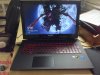
Here are some of my pics of my Y50 Multi-touch
Viewing Angle Pictures
![[IMG]](images/storyImages/9K2d2gjl.jpg)
![[IMG]](images/storyImages/FIkjjTul.jpg)
![[IMG]](images/storyImages/aQDEF8hl.jpg)
![[IMG]](images/storyImages/SWPKbosl.jpg)
Screen Quality Pics with HD Wallpapers
More pics here.
![[IMG]](images/storyImages/AeFC2zOl.jpg)
![[IMG]](images/storyImages/jUTSZZJl.jpg)
![[IMG]](images/storyImages/dgZMQkQl.jpg)
http://i.imgur.com/7xidb0ll.jpg[/IMG
][/spoiler]
[SIZE=4][B]Detailed Shots[/B][/SIZE]
[spoiler]
[IMG]http://i.imgur.com/RL8OfvEl.jpg
![[IMG]](images/storyImages/Uecj3aSl.jpg)
![[IMG]](images/storyImages/pEG854Il.jpg)
![[IMG]](images/storyImages/uAAWQwSl.jpg)
Internal Shots
![[IMG]](images/storyImages/UXq2naJl.jpg)
![[IMG]](images/storyImages/Aomn1Vjl.jpg)
![[IMG]](images/storyImages/E3663gtl.jpg)
![[IMG]](images/storyImages/iQwsIm5l.jpg)
![[IMG]](images/storyImages/U1rcjjZl.jpg)
3DMark Demo Benchmark Results
3D Mark Results
![[IMG]](images/storyImages/MUj1vV0l.jpg)
![[IMG]](images/storyImages/QbaLUkgl.jpg)
![[IMG]](images/storyImages/DKZ8ah8l.jpg)
-
-
Coming from a Y500, I dont find the screen that bad.
kingfirejet and ChowMeow like this. -
Dibs on vice president. Mines comin in tommorrow. Would it be wise to order a cooling pad?
-
Foreal?
I always thought they helped. Huh. More money for the summer sale I guess. -
I always use them
-
Nice shots!
-
i use a coolermaster x3, but i also spend 70+ hours week with the laptop on my lap for work, for me its made huge difference over the past 7 years, i used to get burns on my lap/lower abdomen, never owned a hard core gaming laptop either just vaio sz, z1, and then se 15. aside from the physical burns there would be times my laptops would overheat and shutdown because i had forgotten to turn on or plug in the cooler, but never had that happen with it on.
-
Is that an 840 Pro? Anything tricky to the install?
-
For reference you can include my videos:
https://www.youtube.com/watch?v=WpF8c7vm-IE
https://www.youtube.com/watch?v=dfAxP7Y9el0 -
Last edited by a moderator: May 12, 2015
-
Overall pretty disappointed with the battery life. I seem to get 2.5 - 3 hour max.
-
Is that using integrated graphics? Is there a way to switch off the graphics card? How high is your brightness? Thanks.
-
Man, i thought the touch model would have less/no bezel from the other thread
:/ -
kingfirejet, thanks for the tutorial!
I just ordered my Y50 Touch from Klick also, and had a few questions if you don't mind answering them.
1) What was the point of the last screw? Why was it okay to take it off with the last screw still in?
2) I've always seen the storage at 8GB SSHD. Your specs listed is the first time I've seen it listed as "up to 512GB". Does that mean the size of the SSHD is adjustable (I didn't think that was possible)?
3) Do you have links for the components (specifically the RAM) you upgraded?
4) Do you have any links on how to clone the HDD to the SSD? I usually do a fresh install, but I know we're not given a key so it doesn't seem that simple. (I know I can google it, but any help would be appreciated!)
Thanks!fantasticzig likes this. -
That's a pretty awesome background. Do you have a link?
-
for some reason king, you posted all viewing angles except for the one i was looking for lol! The vertical one with the screen tilted down (away from the keyboard)!
-
I just ordered a y50 touch, i'll be upgrading the HD when it arrives. both the enclosure, as well as the SSD include transfer instruction & software. it's fairly easy. After you install the SSD and transfer windows, you can reformat the SSHD that comes stock and put it in the enclosure as an external HD for your X1/PS4.. or just for additional storage.
HD Enclosure (turns your internal HD into an external one) so you can transfer windows:
Amazon.com: Sabrent USB 3.0 To 2.5-Inch Sata Aluminum Hard Drive Enclosure Case (for 9.5mm, 12.5mm 2.5-Inch SATA-I, SATA-II, SATA-III HDD and SSD) Black (EC-TB4P): Computers & Accessories
SSD i'm replacing my HHSD drive with:
Amazon.com: Samsung Electronics 840 EVO-Series 500GB 2.5-Inch SATA III Single Unit Version Internal Solid State Drive MZ-7TE500BW: Computers & Accessoriesfantasticzig likes this. -
nice pics. still I find it sad from Lenovo not to integrate a mSATA-slot. that would have brought that NB very close to fullfill all of my wishes.
-
Just a fact of the moment. It seems I have 4hrs and 40mins of battery life on power saver with 50% brightness and the touch I turned off.
-
Is it just me or does the Glossy Touch Display have way more colour vividness and brightness than the Anti-Glare Non-Touch Display? The reds on your background pop out a lot more to me than the ones on the Anti-Glare screens seem to. I am going to cancel my order of the top 512 GB SSD Non-Touch model (currently due to ship on June 19th in Canada) because a decently vivid screen is important to me as long as reflections aren't THAT bad. How reflective is the touchscreen by the way, kingfirejet? More than the Y500's screen?
A screens is really hard to find a compatible replacements for, replacing it is a pretty big hassle, and using a different screen on a laptop it isn't meant for can reduce display brightness and not look as good as the native screen regardless of specs. Meanwhile, upgrading to SSD and adding an extra 8GB of RAM doesn't seem that hard, the difference between an i7-4710 and an i7-4700 is pretty minimal, and the difference between 4GB VRAM and 2GB VRAM is even less (should be completely unnoticeable to me). So I think I'll probably be getting the base Touch Y50 either from Klick or from the Lenovo Canada website when it becomes available. Just to have the colour vividness I've grown accustomed to and like. Matte screens are so boring unless they're super high quality like the Y510's.
kingfirejet, please post more colourful pictures or videos ASAP!
-
I think the glossy touchscreen allows for more accurate color and a "clearer" display since the matte/anti-glare versions don't let as much light through. Matte<Glossy when it cones to accurate color reproduction. The panel itself should be the same, though.
-
is that with light usage such as web surfing and word and regular stuff?
-
Yeah, I posted that when I was in class and I opened the laptop. I had like 5 Chrome tabs on a window. And it was more like 30% brightness, my bad not 50%.
-
I wish this machine had a mute button.... really underrated key.
BlazeHN likes this. -
Go make the video review already dude! Waiting is driving me nuts!
-
I'm also contemplating getting this model. How is the heat when gaming? Can you use it on your lap?
-
Yes, would also like to know this. Heat is my main concern that I have with this, so I'd like to know how bad it is.
-
Nice job. Thanks for taking the time and sharing.
Sent from my GT-N7100 using TapatalkLast edited by a moderator: May 12, 2015 -
Can someone please run demo 3dmark 11 and post performance score?
Msi gs60 860m gets 5200 overall score -
Got my y50 yesterday! Can someone help with controlling the management of when the 860m and when the intel graphics run? Is there a setting where when it plugged in it uses 860 but when unplugged only does certain programs. Also what apps is the 860 necessary for, such as is there any situation where chrome would work better with the 860 on.? Or should i just change which graphics from auto to 860 all the time?
Edit: Also has anyone been able to upgrade the nvidia driver yet? -
Here's my review of my base model y50: Benchmarks and game performances in the future
Last edited by a moderator: May 12, 2015s0ysauce45, fragpic, ChowMeow and 8 others like this. -
beeho, you're a champ! Honestly, the screen doesn't even look that bad. But I've already cancelled my Non-Touch 512GB model (was due to ship on June 19th) and since I watch a lot of movies I prefer glossy anyways. The computer looks so awesome! I'll be ordering the Touch model soon.
-
I just ran it and got 4800.
-
Editing my review on the touch model at the moment. Will be quite long but divided into small parts for easier navigation. 1080p as well.
fragpic and PsylentStorm like this. -
Are you using Firestrike?????
-
While I'm editing. I took some nice screen shots with 4k resolution wallpapers.
More pics here.
http://i.imgur.com/7xidb0ll.jpg[/IMG
][/spoiler]l-16b, LanceAvion and PsylentStorm like this. -
Looks great! Although, I think you mean 1080p resolution. Even if the wallpapers could be displayed at 4k, they are only 1080p since that's the max resolution of your screen. Unless you already somehow have a 4k Lenovo screen?
-
No that was 3d mark 11 demo.
-
thanks
that is in line with the online review with the i5 processor y50
seems the gs50 is tweaked to be a bit faster, but i'm sure you can overclock yours since it is maxwell -
It doesn't have an extruding bezel, its located under the glass. That's what was meant, it makes for a much more sleek design, and keeps fingers from catching they navigate the touchscreen.
-
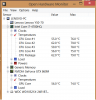
After playing BF4 high/medium settings for half an hour. Great Temps!ChowMeow, xenth, PsylentStorm and 1 other person like this. -
Urgg....the package was pushed back to monday.
-
-
Anyone test out battery life under light usage?
-
Pictures look great guys! How does the glare do in the sun? My tell touchscreen's backlight isn't bright enough and when it's sunny I can't see anything...
-
Glossy screens do not bode well in the sun
If you are usually outside, I recommend the matte screen version
-
How hot did the machine feel when you were playing?
-
For my hand? not bad. A lot of the heat will be felt at the aswd area. A chinese (or was it belgium?) early review shows the infrared of the hot spots.
The heat is very tolerable. The exhaust vents do get pretty warm -
yes because the cpu is right under where WASD is, a really stupid thing for them to do
Lenovo Y50 Owners and Information Thread
Discussion in 'Lenovo' started by kingfirejet, Jun 5, 2014.


