 Problems? See this thread at archive.org.
That review is pretty spot on. I like how all the reviewers praise the cooling when it's really only cool because it's throttled. Take the throttling away and it gets pretty hot long term.
Just curious, why would anyone get the g550jk over the n550jk. They are both the same price but the n550jk has touch and a subwoofer. Is there something I'm missing?
-
Hey... Lol... I like the looks on the g550jk more

And I don't see myself carrying an external subwoofer much around... So yea..
And I actually meant in which program or application did you find the performance lacking due to the underclocking... Did it make that huge an impact? -
I told all of you about the cooling months ago and no one paid attention.
and I have recently found out that the throttling is not only determined by the CPU temp, but also GPU.
lenovo was too program the EC differently from before
I asked Prema for an unlocked bios but don't know when will that come out.
however, is there any reason to not get a g550jk over n550jk? g550jk comes with a subwoofer also, a matte PLS display that's also used on gs60 which is better than LG panel used on n550jk.
touch is honestly not that big of a deal, most people don't even want/need touch
if you have to choose between one of the two, the only reason to be turned away from g550jk would be that ROG logo which is too flashy. -
Is the display really so bad that it is unusable for art and photography?
-
I actually haven't found the throttling to be a problem in any practical situations .. Was aware of it before I bought the laptop.. But the drop in performance doesn't make it a huge deal breaker.. I think I prefer the lower temps.... The fact that you can override it with throttle stop anyway also negates the issue...
And I think the model with external sub woofer costs a bit more than the n550jk?
But I agree with you on the touch... Don't see myself using touch on a laptop... Not anytime soon atleast.. -
Check those reviews out... Coz display is a kind of personal preference... So yea.. Those reviews should help make your decision easier...
-
I was paying attention - I remember you saying that way way back before I even got one. It's really not the end of the world because it didn't affect me all that much but it kind of defeats the purpose of having a nice CPU/GPU if they handicap it. It would be nice to have as a power plan option and call it "Lap gaming mode", but I would prefer Lenovo just do what everyone else does and allow the CPU/GPU to reach it's designed limits. Us end users can decide whether or not to throttle. That was only a minor issue and didn't really contribute to why I returned it.
Thanks for clarifying that the G550jk has a sub. I think that's a nice feature with those laptops. I can't believe after all this I'm back to considering the n/g550jk. I want to give the GX500 a chance but I think 4k on a gaming laptop is just too much of a pain in the neck for now. I wanted something thin and with a good GPU because I travel but it's looking like everything I want has something that prevents it from being a laptop I can be productive on. Maybe the work+play laptop still doesn't exist for me yet. -
My wife is a photographer. She laughed at the FHD display and said there was no chance she could do any serious work with that screen. On the UHD screen, she liked it but Photoshop doesn't scale well at all and is pretty much impossible to use(at least the version of PS she had). She noticed the yellows were off and thought the display as a whole had a different tone to it compared to her desktop and laptop monitors. She could probably get by if Photoshop was usable but it wasn't. She uses a Q501LA for road editing which only has roughly 98% sRGB and 75% aRGB gamut but it looks pretty much identical to her desktop monitor. The colors match perfectly. Putting the Y50 next to her desktop monitor, the colors looked off even after all the tweaks I tried making. The killer was how bad the colors changed when changing the brightness. Only at 90-100% brightness did it look relatively close. If you take pictures of people, it's pretty important to edit with their correct skin tone or they print out really funny looking(too tan, too pale, yellow skin, etc.) I think if you're not dealing with paying customers, you could probably get by with the UHD panel but you still might have scaling issues depending on the software you use.
-
I am thinking of purchasing the y50 FHD non-touch screen version and replacing the screen with AUO B156HAN01.2 which will cost me around 80€ . This display is used in acer v5 573. It is FHD IPS matte display with 97% sRGB and it has very good viewing angles. According to the tutorials the replacement shouldn't take more then 10 minutes and it wont even void the warranty. I will still end with low priced high end laptop with good screen. The only thing that bothers me is the throttling issue. I see that the GPU has no issues but the CPU has literally no Turbo Boost due to the EC throttling. The good thing is that you can use TS to go through it. I am just waiting now for my payment and I will go and grab one from the store. Then I will do all possible tests to see how it runs and if I like it I will keep it and replace the screen if I dont I will return it and wait for something else. I like the gx500 but I dont really need 4k screen on 15'6" and it will be way overpriced because of that and the raid ssd/pci xpress storage. Another alternative is the GS60 but I dont like it either. It has too big screen frame and I doubt that it will get better termals then the lenovo.
I will update you as soon as I get one to play with. -
Q501LA has a LTN156HL01-101, GS60, GE60 and G550JK all have LTN156HL01-102, the only difference is the finishing surface
I guess there are two main reasons lenovo did this
1. it was done before back to the y500 days, so they probably just got too lazy to reprogram the embedded controller to lift the throttling limit
2. they are not just that confident on their CPU cooling. big corps like these tend to be more conservative on things. for example, I have yet to hear an intel cpu breaking. usually when a computer fails, it's the other components, unless you physcially step on the cpu or just OC it like crazy there's almost no way to break a cpu. regardless of that intel still only offers a 3 year warranty, even when their stuff is pure solid.
on the other hand, y50's cooling setup for cpu is very questionable. if it wasn't for the copper heatsink it would've a lot more screwed. I'm fine with a temp limit, but it's just too low for now. turbo turns off at 60-70 which is too soon. they should've set it for like 85C for turbo at least.
there are solutions to it, but it's just annoying. I've also asked Prema for a modded bios and apparently he has the vbios ready for unlocking OCing but I have yet to know if he took out the throttling limit or not, and he still needs to package it.
there are alternatives to y50, but you just need to pay the price. gigabyte p34g and p35g v2 are good, but the later has a kepler 860m. p35w throttles with 870m. razer is an overkill in various ways, but it's solid. nx500 has its own set of problems... gx500 is yet unknown. aorus x3 sounds nice but I really don't think they can handle that 870m. -
Thank you, that is enormously informative. I'd rather take scaling issues with a high-resolution display than a FHD panel that will be obsolete in high-quality laptops within the next couple years. However, what I find strange is that Toshiba's 4K P50 or whatever laptop, which I thought had the same screen, has been Technicolor Certified by Technicolor, which means that colors are consistent with reality. So does Lenovo use a different 4K panel, is Technicolor Certification rubbish, or did Lenovo do something to the screen that Toshiba didn't?
-
I'm in the same boat as you. I needed something for photoshop while also have high spec for games and programs like 3ds max. Unfortunately the g550jk 850m graphics card was the deal breaker for me, and I needed something for school, unable to wait for the gx500 and g551. The UHD is amazing for sure, but for the price listed I guess there would be problems. So far my replacement unit has a better yellow, and for some reason, my color only changes with brightness below 50% or 60%. But if asus had their gx500 or gx500 release release by the end of August, I would jump ship.
-
Where did you see they had the same panel? I can't find any info.
I'm not sure about the whole technicolor thing. It looks like a website that is trying to standardize displays and give them certification based on sRGB compliance. Just because a notebook isn't technicolor, doesn't mean it's not a good display. I'd argue the opposite too, mainly because they don't really say how they are certifying. If they go through every color in the spectrum, then great, but if they are just measuring RGB colors, then it's not entirely accurate to say ALL the colors are real. The Y50 UHD panel, by colorimeter, measures 96-98% sRGB. In general, that's great but the test my colorimeter uses to get that score doesn't even touch yellows. In fact, the yellows are just assumed to be good based on how well the RGB values score. And after having the Y50, I can see that's not necessarily the case anymore. The yellows do look much different even though the greens, reds and blues look identical to other calibrated displays. It's even more apparent when the brightness is turned down, where the reds, blues and greens get darker as you would expect but the yellows get REALLY dark. The only way to get the yellows to look normal is to turn the saturation up. But for a photographer, that's a big no-no because all the pictures will "look" saturated on the screen but will actually print desaturated. From what I've researched, the only thing I can think of is the RGBW leds produce different colors than standard RGB leds and the manufacturers haven't ironed out the fine details yet. It may be a physical impossibility to get fixed or it could be that colorimeters aren't ready for these displays yet - who knows. In short though, I'd be cautious of trusting certifications like that. Peer reviews are generally more trustworthy and far more informative than just saying it's certified. Notebookcheck.com gives you values usually and other reviewers like ultrabookreview.com are starting to as well. Even more to the point, if real looking displays are important to you, I suggest spending some time learning what's really needed in a display for what you need it for. There's a lot of loose terms out there that cause confusion like "real colors", "natural colors", "colors that pop", "black blacks", etc. Some of this stuff is not really applicable for photographers and can actually make things worse. I could go on for hours about this, but needless to say there's a lot of info out there. If you need help, you can always PM me. I don't want to clutter up this thread with too much display talk.
-
The WiDi tools says everything is good, i am thinking it might be the adapter, it's a Netgear BETA Model because i am a tester for them, I'll just get another adapter off Amazon and see if that doesn't do the trick.
-
y50 UHD Touch - After trying to find a way of fixing this yellow on the UHD, I came to a conclusion that it is most likely impossible. I tried to compare several rendering pictures on the y50 with my desktop monitor to see if the sunlight and oranges are somewhat tolerable, it was not even close. Pictures look significantly different if some sort of yellow is present, this is not good for people working with graphics. For the price, this UHD touch version is hard to beat, but it does come with flaws (scaling and off-yellow are the too significant ones in my opinion). If you are looking for something to game, watch movies and are not going to be doing photo editing, this machine will suit you pretty well. Other than that, be prepare for clients complaining about why their house is so mustard and dull. I don't think I will try my chance with a 3rd replacement and will return it to get a refund. I will wait a bit and maybe Lenovo will fix this issue with another version or a miracle update.
I think I will end up buying the new Asus N550jk that comes with 16Gb ram,256 SSD, and =/ 850m. -
Photoshop CC 2014 and 2014.1 are the only versions with the setting to scale the UI 200% for high-density displays. It scales beautifully with the UHD display. With that setting turned off the program is unusable. One of the only programs I know of with such a feature. Without it you're at the mercy of how windows scales it.

-
Anyone know if its possible to replace the Y50 touch best buy models monitor? I dont care about retaining touch...anyone?
As for the photoshop issue. The scaling is bad on UHD for their current release code, but i Believe there is some beta code out that many surface pro 3 users (resolution is between the UHD and 1920x1080 i forget the exact number) with success and better scaling menus.
Also my touch pad/screen still seem really bad. Its detection of multitouch is finicky at best, and ive noticed the touch part of the monitor and windows 8 arent working well together. Edge swipes only open the charms menu maybe 60% of the time on the right edge of the screen. Also swiping from the top down to close an application isnt working 100% of the time either.
Im not sure I want to exchange it unless it is in fact defective. Ive already done multiple exchanges...i5 128gb Surface pro 3 -> i5 256 gb SP3 -> y50 to try to find the right model...its a bit excessive at this point and it sounds like theres no gaurantee i would get the better touch pad (i do have the synaptics pad) -
Yeah, we may eventually do cc. I'm kind of annoyed that they won't add a simple feature like that to older versions though. $1600 is a lot for software and it's not that hard of a thing to fix.
-
This is actually ridiculous. I just purchased this Lenovo y50 and the wifi is awful.
This what I get on my five year old mac on speedtest.net
Ping 51
Download Speed 16.58
Upload Speed 10.20
on the Lenovo I get
Ping 51
Download Speed 4.47
Upload Speed 2.68
Any suggestions, comments etc? -
Doesn't make sense. Maybe someone else is using the internet at the same time you're trying the test? QOS is on? You're connected to the 2.4ghz signal and not the 5ghz signal? Connected to the wrong wifi network? Your cable company lowered your download/upload speeds (damn you comcast and time warner!)? Technically, both the broadcom and intel cards have a data transfer rate over 800mbps. So a difference should not be surfacing on such a low stream. Have you tried setting up a wireless network and transferring files (while no-one else is home and all other wifi enabled electronics are turned off)?
Also consider uninstalling all bloatware/wifi programs and letting windows take care wireless connections.
If you're still having issues. It's a bad card. Mine works fine. 7260intel. -
Photoshop's current version of 2014.1 is perfect for UHD displays. They incorporated a scale to 200% in version 2014 and after. Hopefully they will release an update for earlier versions to include it.
-
Plug it into the router with a patch cable and I have a feeling your speeds will be just fine. I doubt it's a bad card.... probably a setup issue with the network. Do you have any kind of Media Prioritization setting on your router?
-
New member to the forum here.
I am experiencing this "low power ticking issue" as well. Any news on a fix?
Thanks. -
You can do the monthly $9.99 subscription for their Creative Cloud Photography plan. It includes Photoshop and Lightroom. I was lucky in that I got a developer version through my company not tied to their cloud.
-
Problem being is I am not anywhere near the router. This wifi issues regarding Windows 8.1 is honestly alienating me from keeping this laptop. This is my second F-ing laptop in a month because I had wifi issues with the Asus N550JK, atleast the Asus the monitor was alright better the one on the lenovo y50. I honestly want to switch to Windows to have the freedom that Mac didn't have plus gaming and I'm finding myself debating returning this thing to newegg, losing the 15% restocking fee, shipping fee, and just going with a mac. Try and fix this tomorrow, when im in a better mood (I hope)
-
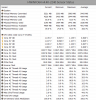
So I just experienced a 1.2Ghz throttle on the CPU cores playing Bioshock infinite on Very High. Might I mention I am on v1.09 bios.
-
What is the best way to monitor whether or not your system throttles? Both CPU and GPU?
-
But you just said you had wifi issues with an Asus laptop and now a Lenovo... two completely different pieces of hardware having the same issue. It's not the laptop.
-
that may happen, but at least not what you are showing here. the minimum could be way before you started the game. it would be better if you can record a log when you play the game because one screenshot like this doesn't indicate much
nevertheless I still think it's time for a prema mod -
Try updating the intel proset driver, the one it comes with is outdated. it helped the range and speed for me.
-
Well it seems like nobody knows or has even tried to upgrade the monitor in the Y50 Touch. I cant live with the display quality it is really really poor which means im going to have to return this laptop...another return ugh, that coupled with my touch pad issues and i just noticed that the right edge of the screen the glass is popping out. The left side the glass is below the bezzal but on the right starting from the bottom corner and up 7/8ths of the way the glass is above the bezzel. I can push it down but it doesnt stay, which makes me believe it may be glued so it seems as though the monitor cant be replaced.
What are other options to the Y50 with at least an 860m but a much better screen? I dont know if i want to go through the hassle of ordering one from amazon when i dont know which models can or cant have the LCD replaced, i do need something thats thing but better build quality than this seems to have. -
Get the cheapest y50 you can find. Replace the screen. Ridiculously easy. I've already done it. MUCH better.
-
people have changed the tn pannel with an ips pannel., go search this thread,
-
Got mine yesterday. Model name: 20378
i7 4710, 16GB RAM, 4GB 860M and a 1TB mechanical drive. Oh, and the much maligned FHD screen.
Replaced the mechanical drive with a Samsung EVO 840 and repasted the CPU/GPU before using it. Struggled a bit to find a way to use the included windows 8 since I got no DVDs and there is no physical key sticker. Cloning the drive didn't work for me so I just tried my luck with a copy of Windows 8.1 Pro I had laying around. It worked, and Windows activated automatically. Added bonus of not having to clean up bloatware.
Haven't had a chance to run any proper tests on it yet but I'm pretty happy. The build quality is better (at least thats my impresson so far) than my two previous (Clevo and MSI) laptops and it looks really nice too. Feels like a lot of bang for relatively few bucks.
I considered replacing the screen because so many of the posters on here were complaining about it, but I'm happy with it. Sure, it could be better but for a laptop I'm only going to be using for coding and the odd BF4/D3/whatever session on the run this is more than good enough.
Oh, and regarding keyboard and touchpad issues; I can't say either has bothered me. I thought the touchpad was god awful but I had forgot to install the drivers. With the drivers installed I think it works very well. Not experiencing any missed keystrokes but maybe I type a bit harder than everyone else.heibk201 likes this. -
I'm sure it was not before the game. I opened up the game first and played and later started monitoring with HWINFO + Rivatuner.
-
this brought up a question that I always wanted to ask, do you people actually get two different version of touchpads or did you just different drivers?
those who got the synaptics touchpad, did you actually go to hwinfo or aid64 to check or did you just see a synaptics driver in the control panel? they might just pull another stupid move and installed a synaptics driver on a ELAN touchpad...which has actually has been done before...
I checked the HMM and there's only one FRU number for touchpad, which means it doesn't make any sense for there to be both synaptics and ELAN
if you want you can grab the elan driver from asus...
yep that means you throttled a bit, which means we kinda do need prema's moded bios now -
I'm considering repasting mine. I had the 4k version which rarely throttled but it was also pushing fewer frames since I enable vsync. This FHD i7 throttles in 5 seconds of full cpu load. I would ask for your temps but everyone's temps are about the same since it's throttling at 65C so I will ask, how often does yours throttle? -
I have searched this thread. The only display replacements ive seen have been on the non-touch versions because the bezel is different.
-
I don't think you can replace the touch panel. Pretty sure it's glued in.
-
Hey all,
I think my hd 4600 is throttling (I think somebody mentioned this before), at least on the MS uhd touch @ 600 mhz max. And 5W TDP -- 550 is seemingly more often sustained. It flutters between 500-600mhz.
This is not enough out of the hd 4600 for youtube encoding (playback) of 4k videos, and i.e. troubled MPC basic 4k playback as well.. igpu load will remain @ 60-100%, usually 75+%
Again just to reiterate; 600mhz hd 4600 is dropping youtube video 4k frames (1 gigabit ethernet connection)
Has/did somebody already mention/fix this before?
Are your igpu's (GPU-z) throlling at 600mhz? Or do they hit 1000-1.15ghz like they're supposed to? I believe that would be more than adequate to playback all 4k : ) [unless adding substantial Maxwell worthy post processing.]
Thanks
So moreover,
Assuming that you're having these problems as well, what are you guys doing to run your igpu frequency; I Tried intel drivers? : ) It's not hot at all. 59C. -
Hey all,
According to GPU-Z, my hd 4600 is only hitting a core of 600mhz max. And 5W TDP -- 550 is seemingly more often sustained. It flutters between 500-600mhz.
This is not enough out of the hd 4600 for youtube (playback) encoding of 4k videos, for example, (and MediaPlayer-Classic 4k playback as well..)
600mhz hd 4600 is dropping youtube video 4k frames
Has/did somebody already mention/fix this before?
Are your igpu's (GPU-z) throlling at 600mhz? Or do they hit 1000-1.15ghz as they're supposed to? I believe that would be more than adequate to playback all 4k : ) [unless adding substantial Maxwell worthy post processing.] Right now my gpu usage flutters between 70-100% igpu usage when rastering any type/medium 4k.
; 0
I would like to fix this igpu problem so i don't have to always use the Maxwell gpu to raster/render 4k, unless using more stressful htpc equipment.
Thanks for checking right now in advance. -
Toshiba 4K panel is Sharp IGZO IPS LED which runs at 60Hz with no problem.
Lenovo uses Samsung for the UHD model so it is definitely NOT the same panel.
Page 136 of this very thread shows the info:
http://forum.notebookreview.com/ide...lenovo-y50-owners-information-thread-136.html -
Is there a way to change the automatic throttling at low temp in the Y50?
Where do I find the latest 1.09 Bios (it fixes throttling issues with the Y50?)? -
Hi does anyone know if its possible to replace the y50 uHD version screen with fHD ips display and whether or not it will still be capped at 48hz?
-
Been following the y50 threads here for a while. Ready to pull the trigger. How can I contact KlickOnline via these forums?
-
See sig below.
-
For those in Canada, it turns out that you can get a student discount from Microsoft if you:
a) Call them and make the purchase over the phone
b) Buy it normally and bring in the receipt to a Microsoft store within x days (I think it was within the two-three week range) and they will refund you the 10% back
All you really need to do is prove that you're a student. -
Got my Y50 about a week ago from Klick Online. I own the UHD Model which ends in 1859. The specs are: i7-4710HQ, 16G RAM, GTX 860M 4G. I really am in love with it, but that might be that I have been stuck with a Dell Inspiron 1525 for the past 6 years! Also, I don't know if touchpads are a lottery or not, but I got the Elan Touchpad on my model.
KlickOnline likes this. -
You can contact them via Amazon. That's how I did it.
-
Ugh I'm getting so much bad luck with buying pc. The second laptop I have ordered in a month, first one was Asus N550JK returned it due to audio card issues. Now I get this and the Wi-Fi is just awful. I honestly don't know what the problem is I have updated the drivers and speeds drop constantly on steam from 2.1mb down to 300kb. Wanting to switch back to Windows yet I have so much bad luck its really pissing me off, off to University in a week and bringing a laptop that can't even keep a solid bar of connection. Should just stick to a MacBook for Uni, then build a desktop once I'm done my first year. The monitor on this bothers my eyes compared to my 5 year old MacBook pro. Hell the hard drives are the exact same speed, the monitor in the mac is better, never had any major issues with it. Sorry for venting but this is so frustrating. I'm on the verge of returning this and stick to Mac just for a portable notebook if anything.
Lenovo Y50 Owners and Information Thread
Discussion in 'Lenovo' started by kingfirejet, Jun 5, 2014.


