Problems? See this thread at archive.org.
Old question, rather updated reply.This is working for me, good for changing music but you need to have itunes or wmp focused.
leshcat blog IT Tips & Tricks: Slidenavmedia: override default behavior of Slidenav.
The updated 11.3 ati (installs with Intel HD graphics 8.831.2.0 3/8/2011) and Realtek 2.57 with srs audio package works great as well. SRS really brings in a whole new sound for our lenovo.
-
guru3d doesnt host the driver sweaper anymore(for a while now, just checked). but you can get it here
Phyxion.net - Driver Sweeper -
Hi Everyone, I really need some advice and assistance here.
I purchased a Lenovo Y560 off Amazon at the end of December 2010. I've had to change the battery twice already as the battery keeps depleating rapidly. I've updated all the drivers (including the latest BIOS) but this doesn't seem to be working.
I am using the Lenovo Energy Management program to keep the screen display at a low level. I only use this laptop for internet browsing and Microsoft applications - that is all. No gaming, etc. It's set to the 80% battery life rate (the battery charges to 80%) to increase the lifespan of the battery (as per Lenovo's suggestions). It's also on Super Energy Saver. I'm using all the energy saving options to it's fullest and not running it in a high power state.
I changed the battery twice and only charge it when it's at a critical state. I never leave it plugged in over it's time. The battery would work well for 1.5 months, then it would begin to only last for 30 minutes at a time. I've noticed that when I have plugged in an HDMI cord into my laptop to my TV a few times to watch a movie off Netflix, a few weeks after, is when the battery starts to act up.
Can anyone please offer some suggestions here? Any tests I can do or do you think it's the HDMI cable causing this? When I'm watching a movie off Netflix, the laptop is plugged in for the duration of the movie.
Please help! This laptop is only 4.5 months old
-
browngirl82- What are the specs of your laptop?
-
Hi AboutThreeFifty, I have this laptop:
Lenovo Ideapad Y560 Series 064654U 15.6-Inch Laptop (Grey): Amazon.ca: Electronics -
Well, the quad core processors eat up a huge amount of power along with the Ati 5730. I would open up the task manager to see if anything running in the background that might be impacting battery life. Like an anti-virus program, etc.
Just to be clear; What are you doing when you're getting the 30 mins. of battery life? -
I am only on the Internet browsing and checking email. I don't have McAfee or Norton installed on my computer. Only the Rogers Anti Virus that comes with my Internet. (Rogers doesn't use Norton anymore as their contract expired.)
This rapid decease of battery life happens 1.5 months after I get a new battery from Lenovo. Do you think it's the HDMI that has caused this (i.e. I have the computer plugged into an outlet when watching a movie off netflix)? The HDMI cable is plugged into the TV and the laptop. -
That shouldn't have any effect on the battery. If it keeps happening, I would ask Lenovo for a replacement system. I had awful luck with the x100e and after sending in many times, I asked for replacement. You may want to do the same as this isn't normal and something inside the laptop may be faulty. You could send it in for repair, but I doubt they could fix it or find the problem. (Most likely they would just give you another battery.)
-
Thank you - they have offered to take the laptop in for repairs but I was against it as I was worried they would damage my computer. I am still under warranty and hope they would be able to replace the entire computer. I'll try that route, thanks.
-
When you set the battery to stop charging at 80%, you should just leave it plugged it, that's what the main purpose of stop charging at 80%. To make the battery last longer in the long term, while still having it pluged in.
Maybe you have some stuff running in the background that uses a lot of cpu/gpu, at 80% full it wouldnt last that long especially with a quad core + discrete gpu.
Well, good luck with the replacement.
Edit: And another thing, don't always charge it when it gets to critical state , this actually ruins the battery life more quickly if you do it all the time.
Edit2: You should uninstall that roger's anti-virus. Heard bad things about it.
for free anti-virus use, AVG, or Avast.
for paid use NOD32 or Kaspersky -these 2 are always rated in the top 5 anti-virus. -
Hi supremekai, A few questions for you:
(1) Thanks for your feedback - so you mean have it set to the "battery lifespan option" of 80% and always keep it plugged in? When my computer is on and in use, shall I plug out the AC adapter or leave it plugged in at all times?
I don't actually have anything running in the background while on the computer - just internet sites for email and browsing. Nothing else.
(2) At what point should I recharge my battery? Currently, it gives me a warning sign at 5%. Shall I increase that?
(3) I will use AVG. Had it on my old laptop. Thanks!
Please let me know re: the above. I'll order another battery in the interim and see if this 4th one does the same thing again. Do you also think it could be the Windows 7 issue (i.e. that everyone is talking about - Windows 7 battery life failures:
Microsoft looking into Windows 7 battery life failures -
did anyone update their y460 video drivers to the newer one 11.3+? if so could you explain the process how you did it? and has anyone modified mjoner's link to try 11.5? thanks
-
1) yes, keep it plug in when you select that option, when you can, of course.
2) It is better to charge it when it gets down to around 10%-20%. Once in a while [maybe once every few months or so] let it go down to 3-5% and recharge to full. Or use Lenovo's "battery gauge reset", it's in the same panel as to change the "optimize battery lifespan/runtime"
3) no problem.
I never heard of anyone's battery dying out like that, from y460/y560 users. However, your laptop may have a defect.
Edit: here's a battery guide [I based my thoery's from that guide]
Edit2: if you still have the laptop, you may try using Lenovo's battery guage reset. -
Thanks supremekai for helping me out here. Just a few more questions, (sorry for the multiple questions about this - I just want to get my head around the battery issue).
(1) If you keep a laptop plugged in all the time, doesn't this decrease the life of the battery (i.e. because it's going through so many charging cycles?)
(2) And please confirm, can a Lithium Ion battery ever be overcharged? Through research, I've heard both yes and no. No, meaning some people have claimed that a computer can accurately detect when the battery charge cycle is completed and will terminate the charge. The yes side has claimed that overcharging is a bad thing with any battery.
(3) And yes, I still have the laptop and have noticed the battery gauge reset. However I looked on Lenovo's website and noticed they wrote the following:
Conditioning Nickel Metal Hydride (NiMH) batteries may improve their capacity, but will not help Lithium Ion (Li-Ion) batteries. To condition NiMH batteries completely discharge them (also called a deep discharge) and recharge them every few months. Do not do this to Li-Ion batteries because it will actually damage them Website: Lenovo Support - Troubleshooting battery issues - ThinkPad
What do you think? -
1) If you can, taking the battery out will help extend the life of it. (Not by much.) Heat, charging/discharging, and time all affect the health of a battery.
2) I would say no unless something is wrong with the battery. You may want to download batterybar if you're worried about this. Osiris Development - BatteryBar, the most accurate battery meter for Windows
3) Conditioning a battery and a battery gauge reset are two completely different things. Using the battery gauge reset shouldn't harm your battery. I wouldn't perform this more than a few times as it may damage it. -
What aboutthreefifty said.
To add
1/2) I believe, im not 100% sure, the lenovo enengry management stops the charge at 80% or 100%[optimize for lifespan/runtime] and doesnt go through the battery afterwards when you have it plugged in. Since the battery is cool to the touch. -
Firstly, thank you both supremekai and AboutThreeFitty for ALL of your help and advice here. You are both very helpful and it is much appreciated. So a big thank you!!
If conditioning a battery and a battery gauge reset are two completely different things, can you please tell me what the difference is? I tried looking up the definitions on the internet, but cannot find a decent explanation. Please tell me what both do. -
Condition is for the battery while calibrate is for the battery chip that reads the % of the battery.
Conditoning is use for NiMH/NiCad, when you get a new battery, you fully discharge at a steady rate, and recharge it to 100%(for 10hrs+), repeat this cycle a few times.
Calibrate is to let the chip 'know' how much is really 0% and how much is 100%. -
Thank you once again!!!
-
Hey, I'm going to format my Y560 soon. I was concerned about about all the nifty little features I have right now. I have used the 'One Key Recovery' program to create a recovery disk on 2 DVD's just incase. But I was still wondering how much would I loose?
I'm most concerned about 'all' the fn keys functionality. I've gone over the drivers folder, and they have drivers for the Energy Management which probably also makes the touch button usable.
What I cant find are drivers for the Home theatre touch key. I dont care much for the slide nav and Im not going to install that.
Also what about those little icons you get on screen every time you use the fn keys?
Thanks. -
Those fn+key is related to the energy management, i believe
you would need the one-key theatre, mute-sync (if you don't install it, using the mute button will have a delay, if u repetitedly press mute) ..
Edit:
You won't lose anything if you install all the drivers in the D drive. -
BUMP please!
-
You can get the missing driver's here
-
But all of the important stuff will work right? like Fn Keys etc? Just want to make sure before I format it.
And thanks for the link. -
Yes, it will.
-
I have just ordered a Y560p 4397 from Tigerdirect. It will be here tomorrow. I've skimmed through this thread and saw a little info from a year ago but nothing updated or completed on my inquiry.
I'm wondering about the empty PCIe Mini slot in the bottom of the laptop... the model I purchased doesn't have have the pre-installed "rapid drive" but I was hoping to purchase and install one of these: Newegg.com - Intel 310 Series (Soda Creek) SSDMAEMC040G2C1 mSATA 40GB mSATA (mini PCIe form factor) MLC Internal Solid State Drive (SSD) - SSD
to use as a system drive... has anyone done this? is it possible? is there a thread/post that addresses this? Any info would be greatly appreciated.
Thanks in advance!
Shawn Ames -
It should work. I have not seen anyone try it yet though. You can be the first and report back =]
-
I got the ideapad today and the ssd will be here tomorrow. There are actually two empty msata or pcie mini slots in the bottom. This laptop is already very impressive. I can't wait to get the ssd in it with afresh install of win7 withou the bloatware.
I will report what I find. -
I was always curious about this question and never bothered to ask it. Couldn't find an answer either.
Since I'm planning on doing a clean install with the windows 7 free download..
I did make a One Key recovery cd but without all the bloatware on it and settings/stuff how I would normally configure. So essentially just do windows updates and reinstall programs.
Could I do a clean install to get rid of the second partition, which I want back to make different partitions. Then right away install One Key recovery, and reboot with the recovery cd's so I don't have to go through installing every driver? Then everything will be set as before.
Or I guess I could use partition magic. Unless if there's a better program than that; which I'm sure there is.
any ideas? -
My report:
Alright... I got it going.
Here is my journey... I purchased the Y560p. As well as this mSata drive:
MyDigitalSSD 64GB 50mm Bulletproof mSATA SSD | My Digital Discount
I attempted to remove the spinning sata drive and install the mSata SSD but the Win7 disks I have are upgrade only therefore, I could not get the machine to boot straight to them.
So I put the 500gb drive back in and eventually I upgraded (with fresh install) windows 7 ultimate over the Home Premium. Once I got all the drivers installed, I re-inserted the mSata SSD and utilized MiniTool Partition Wizard from Download.com to copy the boot drive and system drive over to the SSD. Once I made the boot drive on the SSD active I shut down the machine and removed the spinning drive. I then went into bios and changed the boot order so it will boot to the SSD over the spinning drive in the future and restarted the machine. The master boot record still wasn't quite right so I used a startup repair disk I had made from a running machine with x64Ultimate. The startup repair did it's deal the laptop booted SUPER fast to the mSata / Mini PCIe SSD drive. Right at a 20 second boot for sure.
Software now loads CRAZY fast installing software from the hard disk feels wrong it is so fast.
I have since installed a 7200rpm 750gb drive as a storage drive and I getting ready to configure the machine as outlined here to save the SSD from getting filled up too fast:
How to: Setup SSD boot drive with secondary Hard disc optimization - Overclock.net - Overclocking.net
I can't wait to install Adobe Production CS4 to see how it runs from the SSD. Also sofware like Pro Tools should be a load of fun! This machine is a beast!
Related to the mSata drive, there are 2 open PCIe Mini or mSata drives but the mSata drive only shows up in the boot menu if it is in the one near the wireless controller. I need to look into what the other slot is intended for but the mSata drive does not work right if it is there. -
Sweet, thanks for reporting back! I might try this in the future. Kind of expensive at the moment for me =[
I believe the drive needs to be the same size(partition wise) for onekey recovery to work. correct me if im wrong. -
Sorry for the late reply, just formatted it, installing drivers now, lenovo support site seems to be down atm.
And thanks a lot for all the info, appreciate it xD -
Just picked up the Y560p from Frys for $679 a couple days ago.
I'm pretty impressed with the specs and build for a sub-$700 laptop, although bummer of bummers is I had to pay tax. Sigh.
The price is back up to $849
FRYS.com|LENOVO
But it was definitely a worthwhile purchase at that price. Has some interesting specs and really the only bummers about it that I'm finding was the lack of a 1080p screen and no BDROM drive, but that's to be expected from a laptop that inexpensive.
The little slidebar at the top of the laptop is an interesting touch (no pun intended). -
I have one question if someone can answer me.
I have i3 330m and im planing to buy i5 560 or i7 720qm/740qm, depends of how much money im gonna have. Will Im gonna notice any difference in games and other stuff?
I saw impressions of people who have i5 or i7 and ati 5730 and from what i've seen, games works like with 10+ frames for them more than on my i3 330m (2.13ghz).
So is upgrading worth it? -
Most games are GPU dependent and don't need a strong CPU to run well as the GPU is still the bottleneck. Rendering videos or anything where the CPU is at/near 100% is the only time you're going to see a noticeable difference.
-
Hm so better thing is to save up money for y570 or something like that i guess...
Tnx
-
Is the build quality and screen quality for the Y570 the same than the Y560 or they have done improvements?
-
@chuck y570 is of better build quality (imo) so much so a that I wouldn't purchased a y560 simply because of all the glossy plastic. Seeing as they're both the same price, I would opt for the y570 simply because it has some better materials...
-
Searched the thread and couldn't find an answer to my question. Can anyone please confirm whether the Y460P will be able to output to 2 external monitors via vga and hdmi while the laptop display is turned on or off? I tried looking up the specs of the 6550M to see if it could but I failed there too.
Thanks, this is pretty much the deciding factor for me before taking the plunge! -
If i not wrong, just nvidia quadro NVS can use 2 monitors more the laptop monitor ate the same time.
maybe in thinkpad you can do this.
BR -
Do you mean for a total of 3 monitors running simultaneously? I just need this laptop to output 2 at the same time, one via vga and one via hdmi.
Thanks!
-
2 monitors, you can use it in the ideapad, the own lcd of the notebook and one more.
you can choose the HDMI or VGA output.
BR -
When I leave my y460 and get back to it after lets say, 3 hours it can no longer recognize my sd card *microsd with adaptor. It also doesnt work with regular sd card.
![[IMG]](images/storyImages/n327av.jpg)
Using an sd card adaptor, y460 sees it again. A restart enables the built in sd card reader to read again.
Using the lenovo approved driver version and latest doesnt make a difference. ftp://driver.jmicron.com.tw/CardReader/Windows/ -
Any info if the ati video card in our y460 is compatible to dynamic switchable graphics like those on the new hp? See this link HP Notebook PCs - How to Configure ATI Mobility Radeon Switchable Graphics - c02731962 - HP Business Support Center
-
Does anyone know of any way to manually control the fan speed? right now my CPU is at 50C just idling because the fan refuses to speed up.
-
You're doing far better, Im at 65C. Btw, do you guys have an issue with the keyboard and upper panel scratching the lcd screen?
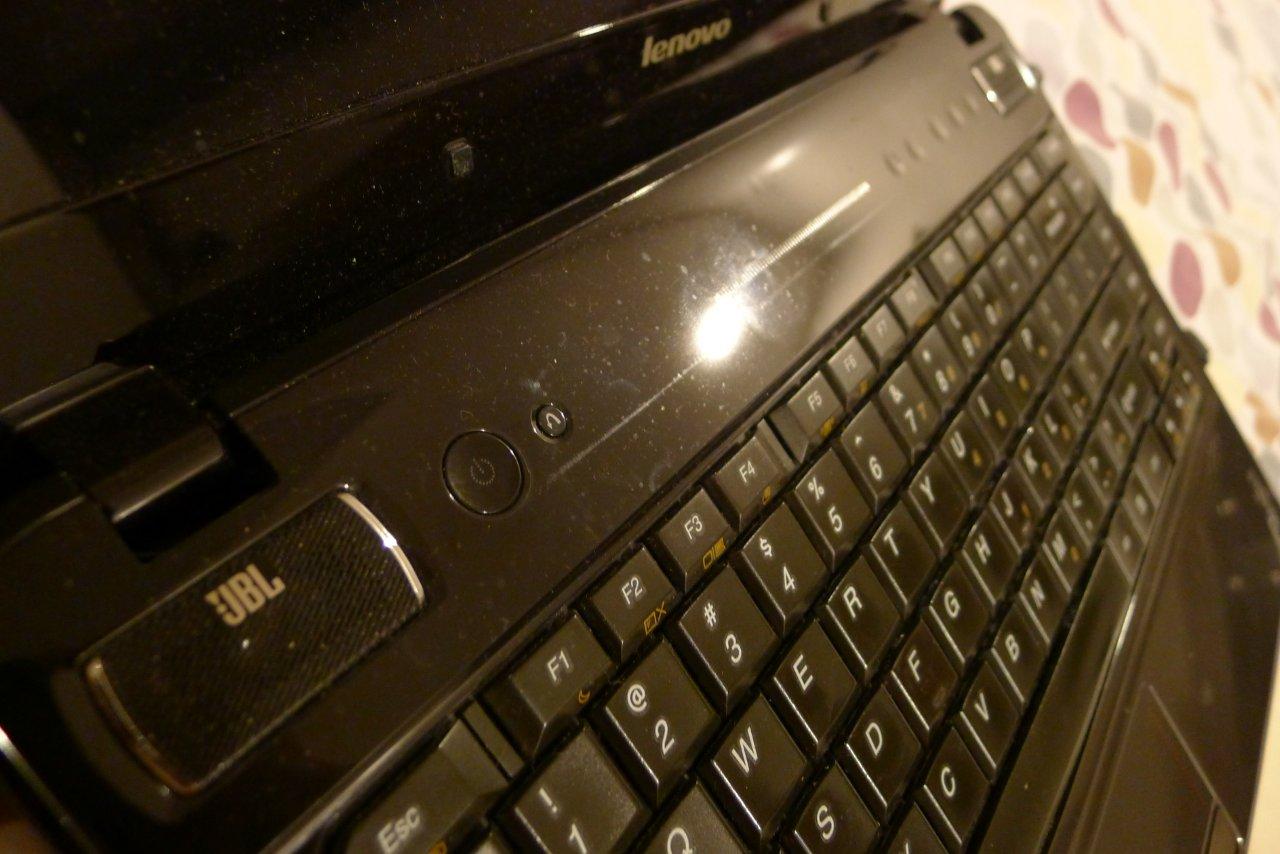
Attached picture shows the upper keyboard panel with a horizontal scratch that came from the LCD frame. The lcd is just too close to the keyboard panel. They have already installed bigger rubber boots on the lcd as not to make it come in contact with the keyboard side. The proximity of the lcd frame (when closed) to the keyboard eventually also scratched the jbl speaker cover.
Our local lenovo office already replaced my LCD screen due to this. The keyboard upper panel which includes the jbl speaker cover was replaced as well. Now with my 2nd set of replacement parts, scratches from keyboard and lCD are now coming back. Lenovo insists that I am the only one with this problem.
The only thing I do is to put my y460 in the Lenovo supplier computer bag together with my documents for work. They're sending me a service unit so I can swap in my harddrive. They want to see what's different with my unit.
What ticked me off is that the Lenovo staff said that he is concerened that he may still be giving me warranty support even after my 1 year period has expired. I reacted by telling him that Im the one who should be more concerned as I bought a defective product that cant be fixed since its "by design" to have those scratches. If there's another model without this problem then I rather have that.Attached Files:
-
-
I have never noticed any scratches like that.
-
that memory card thing happen to me before too. it could be related to heat? the wifi card is below the card reader.
Never heard of anyone that had scatches like that/at all. could be the bevel has a indent in your particular laptop? are you putting pressure on to the lid (i.e stacking heavy books inside bag etc)? -
No pressure, I just put in the bag when not in use. Lenovo Phils already looking at this and hopefully I will get replacement parts to address this issue. It could be a design problem with my lcd bezel and key board. They just hit each other , also scratching the screen. Our local Lenovo service dept already attempted putting on bigger rubber boots to prevent contact. However it doesnt work, still gets scratched.
My model is the y460 450 core i5 with switchable ati graphics. -
^good luck with your replacement
ok, the card reader problem isn't related to heat (atleast not from the wifi card) it happen to me when i was using ethernet cord. I left my laptop on for a long period of time. So something is happening during the long period that is causing the problem. I'm using the newest driver from the manufacturer.
New Y460 and Y560 Ideapads
Discussion in 'Lenovo' started by Rustican, Jan 22, 2010.