 Problems? See this thread at archive.org.
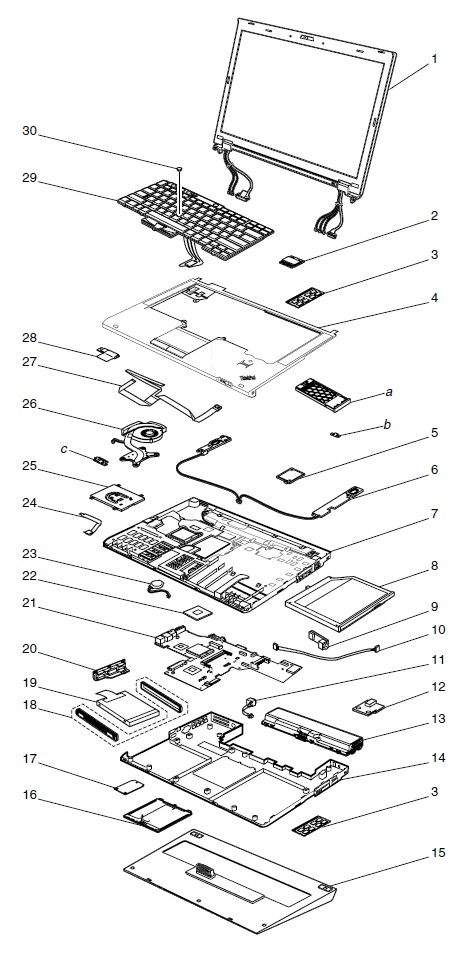
T440s (starting with the T431s) has no roll cage, there's no internal structure at all. The X-series don't have it (but the keyboard bezel does run inside the machine and partially serve that function) and are solid. The T-series is quite a bit larger however, hopefully it's fine without it.
The T431s I used didn't have great keyboard feel (T440s and T431s use the same keyboard, and it at least had some structure built into the keyboard bezel like the X-series. Having already removed the roll cage in the T431s, they've gone further and have removed that keyboard bezel structure in the T440s.
They really are just deleting things that used to define Thinkpad's, first keys on the keyboard, now structural parts.
T420/T430, T431s, T440s
-
Attached Files:
-
-
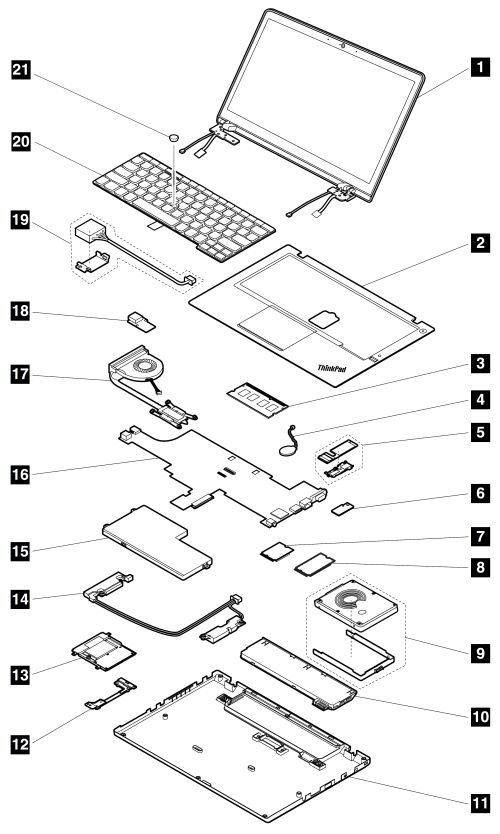
The T431s keyboard wasn't great and it had a frame structure under it. Instead of that frame, the T440s has a foam! under the entire keyboard (they call it 'moisture seal')
Look at the keyboard removal/replacement videos. It's very clear.
T440s:
ThinkPad T440s Service Training RTPW1150 v.0826
T431s:
ThinkPad T431s Service Training Course -
You can't compare the T420/T430 to the slim versions; there's no roll cage because there's no room for it. The T440s is about 30% thinner than the T430/T420. If you still want a roll cage, you'd need a thicker/heavier notebook. I'm not sure if the T440p has one, but I would expect it to.
The foam would only be an issue if there was significant keyboard flex and the keys actually hit the foam, creating a mushy feeling. The reviews I've read report no such issues, so I would take the benefit of increased spill resistance with the foam.
I don't have an answer for you if you still prefer the old style keyboard. -
@vinuneuro,
of course there is an internal Roll-Cage. Like all former T4xxs, the Roll-Cage is connected with the keyboard bezel, and additionaly, like on X-Series, these machines have a Magnesium Backcover. See these pictures, the first shows the inner structure, thats direct bonded to the palmrest, the second shows the Magnesium Backcover:
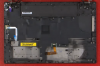
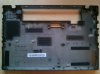
And about the keyboard: This is not a "foam". The moister seal is only the part under the keyboard where the keyboard cable is guided through (it is made out of rubber). This is actually not a removal of a feature, it is adding of a new feature, as with the new design, the system can take much more water than before, 500ml before it starts to fail, cause the keyboard is now seperated from the mainboard. And as I said, there is virtually no keyboard flex on the T440s, so it works also pretty well as the internal strucutre.
The T440s is a very stable system with a good workmanship. -
The new ThinkPad uses a magnesium exoskeleton rather than internal support structure like the old T6x and T400/T500. This simplifies servicability, and allows for easier assembly (thus reducing assembly cost). The new palmrest is bonded to the magnesium structure, which reduces creaking issues like the old T4xx machines.
-
I'm excited to see these new high resolution screens, mainly because I'm wondering if they can increase my productivity. I use programs like Photoshop and Premiere, which often require opening new windows in order to work on projects. I find that I'm forced to overlap a lot of windows and switch programs in the task bar with my notebook's wimpy 1366x768 display, rather than just being able to resize windows so that I can work in programs side-by-side. I'm assuming that the higher resolution would give me more work area, but I'm also wondering if it would result in everything just being noticeably smaller and harder to see since I am still working on a 14" screen. I guess I'll know soon enough!
-
so is it out yet ? xD
-
Empirically speaking (one year's usage, travel), it's about 5:30 - 6 hours.
-
Do you use the bay battery? The hard drive setup in your sig precludes that.
What settings do you typically use to get that result. Screen brightness, Power Manager profile, etc? -
When traveling, in the air, etc., yes, I swap out the 1TB HDD caddy for the battery in the bay. That number is still 100% brightness, high performance profile for the 5:30 - 6 hrs.
-
Anyone know if there is a weight difference between the FHD non-multitouch and FHD multitouch screens?
I seem to recall that other Thinkpads have about a 0.5lbs difference in weight for non-multitouch vs. multitouch. -
According to the PSREF, the Multitouch option makes the T440s 170g heavier. Instead of 1.59 kg it weights 1.76 kg with the Multitouch screen.
-
I was just reading this article and I saw this: Lenovo outs five new ThinkPads, including a 15-inch business Ultrabook
Is it really going to be that expensive? Knowing Lenovo the 1920x1080 non multi touch option will cost $50 to upgrade to as well, and it will probably come with a baseline ULV i3. -
There is no i3 option for the T440s as far as I know. The lowest processor used is the i5-4200U (the one I have in my T440s).
This price seems realistic, but of course, there will be some discounts, as always- -
The discount is usually 10% also. I added the ThinkPad L440 to my cart and I got sent an email for 10% off. I did buy the laptop for my brother and I'm still waiting on the T440s. The rep said it should be out on Oct. 29th which is exactly what Lenovo said.
-
So nice to have the opinions of someone who actually has and uses the system. Thanks again.
S -
I certainly hope you prove me wrong.
-
Hi, I have a question regarding the M.2 slot!
I really want the new T440s, but as dumbed down as possible, for parts I can upgrade myself. Am I correct in assuming that upgrades are cheaper if you make them yourself? - upgrades such as SSD, more RAM.
I have an option to buy a T440s with HDD, however only as 1TB HDD + M.2 16GB SSD (ideally I'd want one without M.2, but it's not available). I want to buy the HDD one so I save some money and buy the SSD myself. So the question is: will I be able to simply remove the M.2 SSD and HDD and install my own SSD without any problems? Am I correct that this won't void my warranty?
Thanks for your answers! -
I figure someone more authoritative will confirm my answer. I'd say yes, it will be cheaper, and no problem for the warranty, though I'm not sure if you need to keep the cache SSD to put back into the system if you need to have it repaired. You can put the 1 TB HDD into a USB3 enclosure to have a handy external drive, or sell it. Once larger M.2 drives become available (should be before the end of the year) you'll be able to have an SSD as your main drive and HDD as second if that suits you.
For those waiting for the Intel Pro 1500 M.2 SSDs, it seems the drives may be SATA and not PCIe, which will limit performance.
Anyone know if the M.2 slot will be compatible with both types of SSDs? -
L440 is now available in US
ThinkPad L440 | Mainstream Performer With Aggressive Pricing Optimized for Windows 8 | | Lenovo (US)
hopefully the T440s is going to be available soon -
The Intel Pro 1500 M.2 drives might not be PCIe, but they're 6 Gb/s SATA so still much faster than the previous mSATA drives and when it comes to running an OS I suspect most people would not notice a difference.
Your question about compatibility is a good one though... and I have no idea, although Intel having an entire line of M.2 drives not compatible with current generation laptops would be strange since Intel basically created the ultrabook specs. There's no sign of Intel M.2 SSDs with a PCIe controller, but some other manufacturers have both SATA and PCIe versions (Samsung, Toshiba), so maybe there are compatibility issues. Then again, maybe Windows native drivers don't care what controller is on the SSD
I just hope that something over 80GB in M.2 (42mm) format appears quickly and fits the T440/s/p. The thought of having to wait many more months so I can simply have the same dual drive system I've had for years already is making me angry!
Wait... just found this for $99: MyDigitalSSD 128GB Super Cache 2 42mm SATA III 6G M.2 NGFF SSD. Sounds promising.nicolaim likes this. -
I don't recall this Japanese review being posted here.
Google Translate
The machine translation is quite bad, but here are a few points I noticed:
They tested an i5-4200U FHD 128 GB SSD 8 GB.
There are some good photos of how lame the PC looks with the 6-cell battery.
Video playback battery life 3+3 cell 6h39; 3+6 cell 14h24.
They measured only 220 cd / m^2 brightness and say it's not enough for bright outdoor use.
Key stroke/travel 2 mm.
Touchpad is good, but TrackPoint sucks due to buttons.
The 65 W AC adapter weighs 297 grams. [That sucks because the 65 W one of my T410s weighs 273 g.]
Weight 3 cell 1398 g, 3+3 cell 1545 g, 3+6 cell 1720 g.
6-cell battery adds 12 mm thickness.
The SD card reader is fast.
Very cool and quiet.
The 128 GB SSD is a Samsung. The Crystal Diskmark numbers are quite bad,
They wish there were a slimmer 46 Wh external battery because the 72 Wh is too thick. -
Interesting review. I actually don't mind the look of the 6 cell. Might make typing more comfortable at home. Possibly even just throw the 6 cell in a bag and rock 2x of the 3 cells while travelling.
Also the 3+3 cell battery life is surprising (-ly good). I wonder if they had wifi on at the same time.... -
Here's a review of the Dell Latitude E7440 (which has been mentioned here several times as a competitor.) It has a Trackpoint and touchpad with real buttons.
Review Dell Latitude E7440 Notebook - NotebookCheck.net Reviews -
I'm in the same boat.
Awesome!
(Strange the performance is worse than the 64 GB model, but the price is reasonable!)
According to AnandTech, this brand is OK. The shop you linked to is the manufacturer's own store. -
I love the line about the trackpad/pointer buttons: "Fortunately, they have not been waived in favor of a click pad." Jab at Lenovo, perhaps?!
-
I also hope that 42mm M.2 SSDs will be available soon.

-
The first one IS, so you can stop waiting unless you want more selection
-
Well, not in Germany.
-
MyDigital ship to Germany for $48 (less if you call and ask for Priority Mail.)
-
I'm typing on a 2011 T420s right now and I wonder how the T440s is an upgrade...
It's heavier than the T420s (1.85kg vs 1.79kg), the battery life is similar and they've now done away with the traditional keyboard/keypad buttons and optic drive/ optional third HDD. The only upgarde I can think of are the FHD screen (long overdue and inferior to competitors eg MBP retina).
Hmm... not very attractive at all -
Isn't the T440s 1.55 kg? That's 300g less than the T420s. Also 6h 40m video playback on the 3+3 cell seems better than the ~5 hours I see quoted for the T420s on the 6-cell battery (that's with Wi-Fi off). The Japanese review mentioned last page also measured over 14 hours on the 3+6 cell combination, playing video. That is quite an improvement keeping in mind that's tested battery life and not Lenovo's claims.
Just my 2 cents.lead_org and iofthestorm like this. -
I agree with you to some extent. There are some improvements and some things are worse.
Here's what's better:
FHD IPS LCD (definitely the biggest selling point.)
Weight ~200g less (though AC adapter may weigh more.)
Better battery life.
More max RAM.
More USB3 ports.
Much better video card if your T420s doesn't have discrete graphics.
Slightly smaller and much thinner.
Longer warranty.
Better build quality. -
^ Ouch, 64bit version. It will be slower than 735 or 8750 in its competitors, not to mention 128bit 730.... Oh well, I guess we won't be getting them anyway in U.S.. Still, thanks for the post!
-
Oh wow, that's waaay too much travel on the trackpad. My X220 travels a bit when clicked, but that thing looks like it moves down over 3/16th of an inch. That's too much for accurate pointing. Can it use tap rather than press for both left and right click? (The X220 does tap for left, but requires unstable hacks to get two-finger tap for right-click, so I just use press for right-click)
Really the X220 was perfection, great battery life, very compact, the only issue was the heat and the small size of the trackpad. I don't understand why Lenovo has failed its own brand with its latest offerings.Last edited by a moderator: May 12, 2015 -
The TrackPad is really good, and the travel is alright. The guy in the video presses way to hard on the TrackPad, thats why it is so loud. It is also louder in the middle than on the upper side where you normaly click for the TrackPoint.
IMHO the new lineup is much better than the old one. The only real step backwards is the limitation of the X240 to 8 GB RAM instead of 16. -
that trackpad seriously clicks in that far? wow.
-
notebookcheck seems to be ok with the touchpad on T440s.
-
These types of arguments have no meaning, really. One guy says one thing and the other says the opposite. These are all opinions. Everyone is entitled to them. Why are we so defensive? Why do we care so much?
If someone says something good about a laptop, let it go. You can't convince him otherwise. The opposite is true as well. Respect their opinions. Always convincing everyone doesn't work anyway since they won't be convinced.
Very sorry for this mess of a post.iofthestorm and Tirilwen like this. -
delete 123
-
So if someone says complete BS about a product they never use, you are fine with that? There are fact like how loud the new trackpad is. It is slightly louder than the traditional buttons. There are also fact about the travel distance of the keyboard. An opinion is whether they like the old design or the new design.
-
Did you even actually used the product before calling it a failure?
-
There is a reason why Lenovo called it a clickpad and not trackpad.
-
I'll be interested to play with this myself. The clickpad/touchpad on my X220 was very similar to the one in the video (I think...it's hard to tell since the guy was pounding on it). It was very easy to move--too easy. So that the pad moved when using it for pointing/scrolling/gestures. It was really annoying. My X230, on the other hand, is perfect. You have to exert just enough pressure to get it to click. Thing is, the touchpads are actually the exact same unit--the differences were just due to manufacturing tolerances.
I fixed this by removing the palm rest and touchpad and shimming the touchpad with well-placed strips of paper; it stiffened it right up. While kinda lame for a $1,000 laptop, I guess this is what happens when $3,000 laptops become $1,000 laptops... I imagine the same could be done for this machine. -
This is pretty much what I suggested a few weeks back. If it's possible to jam something under the clickpad to block the movement completely, it would become a normal touchpad.
-
It would've been nice to have some keyboard button presses for comparison. On its own I don't think it's conclusive.
S -
Another T440s owner in a German forum loves his new laptop. He says the Trackpoint buttons aren't as good as before but that they still work for him. His biggest disappointment is the battery life, around 5 hours for him.
-
Clickpad or not, there seems to be few alternatives to the T440s. E.g. X1 Carbon has a terrible screen, no Haswell, too few ports, etc. Personally, I use a mouse 99.9% of the time, so it's not an issue for me.
-
Dell E7440 and HP Elitebook 840. It's a pity though that they have no cheap configuration with FHD screen and backlit keyboard (i.e. i5-4200 or 4300, 4 GB RAM, HDD)
T440s up on Lenovo website (IPS Screen, 1080p)
Discussion in 'Lenovo' started by bdoviack, Jul 8, 2013.


![[IMG]](images/storyImages/3OMh0WX.jpg)


