 Problems? See this thread at archive.org.
Few alternatives?
I can't find the post with the list of competitors. but the following come to mind:
Acer Aspire V7
Fujitsu Lifebook U904
Fujitsu Lifebook S904
HP ZBook 14
HP EliteBook 840 G1
HP Folio 940 G1
Dell Latitude E7440
Sony Vaio Pro 13
ASUS Zenbook UX301 and UX302
Upcoming Haswell MacBook Pros
Each system has its pros and cons, but from looking at the competition it's obvious Lenovo could have done better. Battery life could be significantly better, weight could be lower, there could be an Ultrabay-type bay, the LCD could maybe be 16:10, (or even better, the 3:2 panel of the Chromebook Pixel.)
-
I don´t think that Lenovo could have made the T440s much better. There is no room for an Ultrabay (and the stability would suffer from this), and the battery life is very good for a system this thin and small.
The only real competitors in this list are the Dell E7440, the HP 840 G1 and the HP ZBook 14 (and maybe the Fujitsu S904). -
I'm assuming you're narrowing the options to those with Trackpoints, but not everyone uses that.
The Fujitsu S904 is thicker, but lighter, and has an "ultrabay," much higher res screen, and should have significantly better battery life. I think most competitors have better battery life, sometimes much better.
My 3-year-old T410s is only slightly heavier and larger, yet has a larger 16:10 screen, more ports, no underside vents, a CPU that isn't much slower, Ultrabay, dedicated media keys, WiFi on/off switch, status LEDs, page forward/back keys, real Trackpoint buttons, etc. Three years of technological progress means the T440s should easily trump the T410s, but it doesn't. -
No, not only. Consumer Ultrabooks like the Acer V7 or the Zenbooks are no competitors to the T440s. The Sony Vaio Pro is way too fragile and flexible when it comes to the chassis. The new Macbooks will have everything soldered on the motherboard, glued or propritary (like the SSDs). The U904 is more of a X1 Carbon 2 competitor, and the HP 940 indeed lacks a pointing stick.
Nobody tested the S904 yet, but with no doubt the chassis will suffer from the "Ultrabay". The high res screen is nice, but the question is, how much it will consum and if the scaling really works well (many people can´t use this resolution).
I don´t see where it will have an higher battery life. Bith T440s and S904 top at ~ 100 Wh battery capacity (95 Wh for the T440s, 110 Wh for the S904 with the 2. battery), but considering it will have a brighter screen with a higher resolution, the difference is probably only there in idle.
Of course, the S904 does not offer a TrackPoint, and the key-stroke of the keyboard is only 1mm, compared with 2 mm on the T440s´s ThinkPad keyboard (which means a very shallow typing feel).
Really?
- T440s: 47 Wh standard, 95 Wh with optional 6-cell, Hot-Swappable batteries
- E7440: 34 Wh standard, 45 Wh optional with optional bigger battery
- HP Zbook 14 & Elitebook 840: 24 Wh standard, 50 Wh with optional bigger battery, 110 Wh with optional bigger battery and Slice battery (which makes the system a lot thicker)
The T440s is much better than the T410s. In our German forum we also have on user who upgraded from the T410s, he likes the T440s much more.
- Much bigger maximum battery capacity and longer battery life
- Much better FHD AHVA display
- Much better build-quality and materials
- Smaller chassis, still 14"
- Dustless fan, much more quiet and cool
- Glass ClickPad, Backlight keyboard, better keyboard
And by the way, the T410s has underside vents, as mentioned many times before.
There is nothing wrong with the T440s and no reason to complain about it, there is not much that Lenovo could have done better with it, apart from the keyboard area, if you prefer the old design, which I not do. But thats not something about the T440s, it is about all new ThinkPads.
The T410s has much more problems and reasons to complain about it:
- Loud fan
- Bad display with nearly zero contrast
- "So-So" chassis quality
- Bad TouchPad
- Palmrest and display with cracking-issues
- Short battery lifeJeniczek, Tirilwen, phamhlam and 1 other person like this. -
I stopped reading further, haha.
-
I see plenty of vents on the underside Notebook Reviews - Laptop Reviews and Netbook News Picture
-
The CPU fan vents are on the side and back. The tiny vents on the underside are of no importance.
-
So the release date for the US is late October? I am getting anxious and the word late is very broad as each day becomes harder and harder to hold out.
-
Why such anxiousness? Is your computer not doing something the T440s will do?ajkula66 likes this.
-
Hello, longtime lurker here.
I'm planning on getting a t440s, but have noticed in many of the configurators that upgrading from the 500gb to the 128 ssd can add as much as $250 to the price, when it seems that I can get a similar ssd from crucial for $110.
http://www.crucial.com/store/partspecs.aspx?IMODULE=CT120M500SSD1
Does it make sense to order it with the 500 gb hd and upgrade myself? (Maybe turn the hd into an external). Or will Lenovo offer the ssd for a more reasonable amount, like they seem to do for the x230 models. Looking for people who've had experience with this.
Also, this same question could apply to RAM.
Thanks, and apologies if this has already been discussed ad naseum. -
All indicators point to Oct. 28 or 29.
-
Welcome to the forum!
Buy the most basic configuration in the respect of HDD and RAM, upgrade yourself and call it a day.
Happy shopping. -
Just make sure you keep the original parts, I have a friend with an extended warranty Thinkpad and they refused to service it without the original hard disk. It was pretty treacherous since the problem clearly had nothing to do with the disk, he's a super cautious type who had it replaced at a reputable dealer., and anyway Thinkpad hard disks are so easy to swap.
-
Where was this?
I've *never* sent a machine with a hard drive to depot, and I've had hundreds of ThinkPads serviced over the past decade...
-
It was in Canada. I don't know the exact details but he's not one to make things up. There can be a luck-of-the-draw element to these experiences.
-
I know numerous ThinkPadders in Canada and have never heard anything like that.
There is NO luck of the draw in such matters. One is not required to send the machine with the hard drive in when it comes to ThinkPads.
This has held true since the dawn of ThinkPadding 20 years ago:
Quoted from: forum.thinkpads.com • FAQ (thinkpads.com - Frequently Asked Questions) -
OK, so after some research I see I wasn't quite right, but have a look at this:
All figures are from NoteBookCheck for consistency
Sony Vaio Pro 13, 37.5, 5h16, 8.4 minutes/Wh
Dell E7440, 34 Wh, 5h17, 9.3 minutes/Wh
Acer V7, 53.6 Wh, 5h32, 6.2 minutes/Wh
T440s, 47 Wh, 5h57, 7.6 minutes/Wh
Samsung ATIV book 9, 55 Wh, 6h12, 6.8 minutes/Wh
ASUS UX301, 50 Wh, 6h25, 6.5 minutes/Wh
Dell E7440, 45 Wh, 6h59h (estimate), 9.3 minutes/Wh
Macbook Air, 54 Wh, 10h23, 11.5 minutes/Wh
So the T440s appears to be middle-of-the-pack for battery life with the 3+3 cell batteries. In terms of minutes/Wh, however, Sony is a bit better, Dell a lot better, and Apple just insanely great. The ASUS has a more powerful 28 W CPU but still beats the T440s. The Acer has an i7 and GeForce GT 750M yet is only 25 minutes below the T440s. The Sony weighs 500 g less, so the comparison isn't fair. If we leave out the Sony and the Dell with the 3-cell battery, the T440s is second last, ahead only of the much more powerful Acer. (I did not take screen resolution into consideration.) -
Shrug. You are still dealing with anecdotes. Thinkpads.com is not an official site.
For all your bluster, you might have searched the Lenovo site, where you can find the "keep your drive" service is a pay extra. After you pay Lenovo a fee,
«Regardless of failure type, the drive can be removed prior to sending your PC in for repair. Personal and business data never leaves your premises and remains secure.»
So, like I said, luck of the draw. -
Get your facts straight. "Keep your drive" is the type of service where one gets to keep their hard drive in case of its failure, and doesn't have to return it to Lenovo once the replacement drive has been issued. Highly loved by government agencies large and small, as well as by business that maintain sensitive data.
No it's not. Not in any country that I know of, anyway.
-
OK, you're right about "keep your drive," but my acquaintance's experience was not made up, and others have apparently had this experience. Don't replace your internal components - it VOIDS ... - Lenovo Community
Unless it is spelled out somewhere, there's some risk in not keeping your old drive to swap in, in case of the warranty repairs. -
-
Of course. You are replacing a hard drive that they have installed. That's why it's a CRU and not a FRU which you wouldn't be allowed to replace on your own.
There's nothing in this discussion that is inconclusive.
Let me spell it out for you again:
-
My current laptop is 6 years old and I am at graduate school... I have been waiting for two months for this laptop. Please, Lenovo, start selling it as soon as possible in USA!
-
The HP and Dell "trackpoints" are quite a bit inferior to the Lenovo ones, last time I checked.
The "unraised" buttons are also irritating: the raised buttons on, say, a W520 are much easier to use.
It got the same castrated keyboard Lenovo now uses. Using that crap is like eating raw carrots with half your molars gone.
It lacks eSata, it got as much USB ports as my T61; only HDMI and Displayport means you're out of luck with 80% of projectors out there. And why did they wrap the adapter in aluminum foil???
And the final whopper: it got a whole sheet of plastic above and under top of the display, just like all other 16:9 notebooks, to put your post-it notes on. Great!!!
As for the "keep your harddrive"; when my T61 got picked up for repairs, I kept battery, harddrive and DVD drive. I did take out my own RAM, although that was not really necessary. As a nice service Lenovo also replaced the trackpoint cap
-
When it come to SSDs, larger HDDs and RAM it's always generally better to NOT buy/upgrade through Lenovo UNLESS they're having one of their periodic, often unannounced, sales on a specific component (free RAM upgrades happen occasionally, for example). Your math is correct... you can usually buy the same SSD/HDD/memory for considerably less elsewhere. Obviously it will not be covered by any extended Lenovo warranty you might have also purchased, only by the component manufacturer's warranty, which is one reason some people do buy through Lenovo.
Sometimes Lenovo does have reasonable prices, however. Upgrading from a 500GB HDD to a 1TB HDD on the L440 is only $60 right now, for example, which is a good deal IMO when you consider the $40-$50 real-world difference in price between the two and then factor in the hassle of having to buy your own new drive under a separate warranty then sell the Lenovo one to recoup some of the cost. SSDs are usually horrendous deals through Lenovo -- even the "sale" price offered on the X230's 256GB SSD upgrade is at least $100 more than you'd pay aftermarket, and that doesn't even factor in the value of the standard 500GB HDD you'd be upgrading from. RAM is also usually a pretty expensive upgrade through Lenovo -- I always order additional RAM from Crucial the same day I order a computer from lenovo -
Seems like most of the time you really don't get to pick. Like if you choose the model with the best processor, you're also stuck with the most expensive hard drive.
-
I've not come across that much with Lenovo. In my experience the same base components and upgrades are available whatever the configuration, though I don't doubt that sometimes this might not be the case for some specific components (I've never come across this for the basics like RAM, HDD, and CPU, however).
-
(this might not be the best place for this discussion, but a lot of this thread has been off track so just tell me to delete and I will)
Alright so I've narrowed it down to two laptops for myself. The T440s and the soon to be released rMPB 13", both becoming available near the same time I believe. I think that they're actually comparable on many levels, and on others they are not.
I want both with an i7, and maxxed out RAM, & 512 GB SSD.
Macbook Pro... Pros:
- Better Battery Life (comparing to the 3+3 cell config)
- HD5000 iGPU
- Higher Rez Screen
T440s Pros:
- Marginally Better keyboard
- User upgradable RAM + SSD (sorta, MBP is a doable upgrade)
- Marginally Cheaper (I'm guessing by 10%)
Honestly I think they both have comparable build qualities. This will be mostly a personal laptop that I use sometimes for work. The dock connections aren't important to me. And since I'd be installing Win8 on the macbook, I think the graphics gain is only marginally better, while the battery life would be comparably better (but not huge).
I know most of you will be more swayed to the thinkpad because of where we are, but can I get a little feedback to flesh this comparison out, and settle my mind on what to get? -
We don't yet know what will change on the new rMBP, but based on the current model, here are my thoughts:
The rMBP has one fewer USB port, and you'll need a dongle for Ethernet. No fingerprint reader. No separate backspace/delete key, no PgUp/PgDn keys. No TrackPoint.
I think the rMBP will have significantly better battery life, even with Windows. See my post above regarding battery life.
Depending what apps you use, the high resolution might be problematic.
Depending on which CPU Apple chooses, both CPU and GPU performance could be a lot better than the T440s.
The Mac's 16:10 screen gives it a vertical display area similar to the 14" panel on the ThinkPad. -
If you are running windows on rmbp, then i think t440s will have a better battery life.
Also, the biggest adv of the rmbp is the full power cpu and better integrated graphic.
t440s has a slightly bigger screen than the 13' rmbp and a so MUCH BETTER keyboard. Have you ever type on a macbook? or a thinkpad?
And I think t440s will be considerably cheaper.
IMO, it's the choice of the system. Both should be great machines. -
We can pretty much assume a few things about the refreshed rMBP. Especially that it'll have haswell and at least an HD5000. Everything else though, you are correct.
USB port I can handle. Ethernet dongle is... kindof a pain, but I'll be using Wi-Fi 99.9% of the time. Fingerprint reader is not really an issue, especially if you can't use it to turn on the thinkpad anymore. I use my own encryption on my data anyways. And yes, the keyboard / physical UI is better on the thinkpad.
Battery life is definitely better on the rMBP. I can see myself getting the external 6 cell for the thinkpad, but it ruins the sizing and aesthetic qualities.
I heard win 8.1 will have excellent DPI scaling, have you heard otherwise? If so the retina display (idiotic name) shouldn't be an issue.
I have no doubt the 13.3" rMBP will have at least an iris 5000. Makes no sense to have something crappier than the GPU in the macbook Air. So yes it'll be significantly improved than the T440s.
So... Since I'm a standard user... which one would you lean towards? right now I'm marginally siding with the new rMBP. -
The HD 5000 is no big improvement over the HD 4400. In Benchmarks there is a visible diference, but in Games (or other real-world applications), the difference is nearly 0 %. Even the Iris 5100 only is ~15-20 % better than the HD 4400. Only the Iris Pro 5200 has really much more power (mainly because of the additional dedicated memory).
-
Intel HD Graphics 4400 - NotebookCheck.net Tech
Intel HD Graphics 5000 - NotebookCheck.net Tech
IMBThink I do really love all your great input on this thread, but in this case you're dead wrong. At least a 5-10 fps gain on games with the 5000, if not more. (sometimes substantial gains. And if we're talking ~12 fps gain on a 40, that's over 25%. It's all how you dice the numbers though) -
Review Samsung ATIV Book 9 Plus 940X3G Ultrabook - NotebookCheck.net Reviews
See the GPU part.
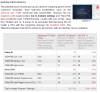
As I said, almost 0 %, only 1 - 2 FPS in the most cases. In some cases the HD 4400 is even 2 % faster than the HD 5000.
The difference is so little, that I would say that the HD 5000 is not worth it. -
I think with these Haswell GPUs a lot depends on the cooling system and CPU load since the TDP is shared. It may be that with a lower clocked CPU the GPU actually has more thermal headroom to run at higher clocks. Interesting tradeoffs abound. I think though that basically you can't assume that the HD5000 is necessarily faster than the HD4400, it really depends on the whole system. Definitely though the hardware bump is not so significant until you get to Iris though, (and as you said, it really only becomes usable for more than low end gaming with the 5200 with embedded DRAM). I think with the 4400 vs 5000 it's really not going to make a difference in the kinds of games you can play, if it's unplayable on the 4400 it won't be playable on the 5000 either. Though if it's like 25fps to 32fps for instance (just throwing random numbers out there) that might tip the scales but either way you're still better off lowering the settings.
-
Regardless of the hardware pros and cons of the T440 vs rMBP, surely the price differential is gonna be more than 10%. T440s starts at $1149. Current rMBP 13" starts at $1499. That's a huge difference (30%)
-
Did you see some of the price tables from earlier in the thread? IPS + i7 + SSD is going to be running over $1700 easy for the t440s. (not to mention any other upgrades) I'd say both systems upgraded to i7s + RAM + 512 GB SSDs will be pretty comparable, with apple marginally more expensive. Hence the 10%. IF you take the base $1149 T440s you get... a crap notebook really.
IBMThink. I read that, and it just seems our sources state different performance! I dunno who to believe anymore
-
That review is really weird, because on their dedicated HD 5000 page, Intel HD Graphics 5000 - NotebookCheck.net Tech, the HD 4400 is ~15-20% slower in most games. I think the Samsung may be better than average? (On diablo 3 low settings, HD4400 has an average of 49 fps vs HD5000's 57)
-
One thing to keep in mind is that the scaling issues will be better on the Macbook than Lenovo. 1080p on a 14" screen is very small and even 125% might be small for some people. Zooming in further can distort images. I would let others speak of their experience regarding Windows 8.1 but I believe the scaling issues might not be solved completely. So if this is the case, the screen might be more comfortable to use in a Macbook.
-
According to the rumor mill, new rMBP (small) will have slightly smaller screen, thinner, and comes with LV (not ULV) Haswell with Iris 5100 (which, as ibmthink said, is going to be about 20% faster than 4400/5000). Of course, these are just rumors -- but it will be nice (and expensive) laptops if they are true. That being said, I would not recommend getting a Mac if you want to use it as a Windows machine. 8.1's scaling is nicer than 8, but OSX has way more QHD-friendly softwares, and Bootcamp drivers typically aren't that great.
By the way, if you are planning to get 512gb SSD out of factory, I think your purchasing price will be affected more by the price of 512gb SSD than their base prices, which makes it less predictable.
By the way, another option would be HP Elitebook 840; it basically has the same feature set as T440s, but has internals that are easier to upgrade and can be configured with dGPU (though they removed it from non CTO models, hm). -
We can also be pretty sure the rMBP won't have a ULV CPU, so it will be more powerful. You didn't say what you use the computer for, so the difference may not matter.
If you need more than 5 hours of battery life, compare the T440s with the ugly 6-cell to the rMBP. (I'm saying 5 instead of 6 since you won't get 6 for long as the battery ages.) Also add the cost of that battery.
I haven't followed the developments closely since I don't really want a retina-class display, but it seems 8.1 improves things, but it's still not very good. It really depends on whether the apps you use scale well or not.
I agree, at least 5000, very likely better. I wouldn't be surprised if they had a 16 GB RAM option, which would be more than the T440s.
When you say standard user, you mean web browsing, office tasks, few CPU-intensive apps?
I think the battery life will be a big factor if you need long battery life. The Macbook will also have a higher resale value later, but as others have said, the purchase price difference is likely going to be more than 10%, especially if you get the SSD from Apple vs the ThinkPad with your own RAM and SSD.
For me, the Macs have many qualities, especially the 16:10 LCD and battery life, but I just can't get over the missing keys on the keyboard. I also need 3 USB ports. Needing a dongle for Ethernet is lame. I'm also a bit biased against owning Apple products because they're so trendy, hehe.
I don't know how the MBPs are for noise, but my gf's Air is much louder under full load than my T410s, and the T440s seems very quiet.
No one has mentioned the surface coating of the LCD. I may be wrong, but it seems the rMBP is kind of in between glossy and matte. I prefer matte.
I don't know about the quality of Apple's Windows drivers, but a company that collected statistics on crashes came to the conclusion that the MBP was the most reliable Windows laptop.
An important difference between the two systems is that the T440s will let you have a 128 GB SSD (larger later) and a 1 TB hard drive.
Lastly, I find the aluminum on the Macs cold and somewhat uncomfortable.
If you're not in a rush, wait for both systems to be available in-store so you can fondle them.Tirilwen likes this. -
Pretty much. I travel a bit for work, so I need to run a VM or two every once and a while, but mostly I'm a data jockey so I crank out excel to teh max.
Also like I said, I believe it'll be 10% because of that lenovo pricing table previously in the thread. i7+IPS on the T440s jacks up the price tremendously. $1700+ at least. And I'd do an aftermarket upgrade to the SSD for both systems (I think highest apple aftermarket is 480GB though) so that shouldn't factor price.
WHERE DO YOU GUYS GET TO FONDLE LENOVOS? Never ever seen one in Arizona. best buy doesn't even bother to stock them.
Also I'm hogging this thread. Sorry everyone
-
I was looking into the t440s for over a month but I just ordered an Elitebook 840. Got tired of Lenovo announcing so long ago but not having it for order yet. Pricing also looks to be too high for specs. Got this one. Has dedicated GPU, better battery life, better trackpoint (REAL BUTTONS!!!), fully upgradeable (2 dimm RAM, SSD, m.2 slot, WAN, WWAN, battery. Easy access to parts. FHD UWA matte screen, and fingerprint reader.
Does the t440s have NFC? Seems like that might be the only thing it has over the 840. Lenovo lost their way when they got rid of the real buttons for the trackpoint and moved to chiclet keyboard, so I'm going with a manufacturer that understands why someone would by a Lenovo, for build quality and modularity. -
The T440s is also available through the same website: Search - PC Connection
Enlighten us. Have you compared both side-by-side? (Oh, wait, it seems that you does not have got your 840 yet.)
I doubt that HPs design is better. The TrackPoint itself is inferior to the ThinkPad TrackPoint, HPs is using flat buttons (the same buttons as the use for the TouchPad) and most HPs including the 840 lack the middle buttons, so you can´t scoll with the TrackPoint, which destroys the hole idea of a TrackPoint IMHO.
Where are your battery tests / benchmarks? I have not seen a review on the 840 yet. -
Write us a little review when you receive it! The bottom is so easy to remove it doesn't look solid to me; curious to hear what you find.
I also thought the T440s would have NFC, but now not so sure any more. -
The T440s will have NFC, but the models on the market for now does not come with NFC support.
In my experience it is very solid (from prior Elitebooks). -
Have you even looked at the price comparison between these 2 models to what you just linked to?
Lenovo T440s with i7-4600U, 8GB RAM & 256GB SSD = $2,485.94
HP Elitebook 840G1 i7-4600U, 16GB RAM & 256GB SSD & AMD Radeon HD 8750M 1GB= $1,899.07
Seems the HP is almost $600 cheaper with twice the ram & a discrete GPU. -
Good choice!
HP also kept the discrete buttons for WiFi on/off & Speaker Mute, as well as a full array of indicator lights for WiFi, Bluetooth, network & drive activity on the front left to retain it's enterprise roots.
Lenovo removed all of these on the T440s to reduce costs and essentially turned this into a consumer notebook.nicolaim likes this. -
The T440s is only an ultrabook with a ULV cpu. It's Mac competitor would be a Macbook Air.
Macbook Pro has with a full power mobile CPU.
Rumor has it that Intel agreed to supply Apple with specially binned Haswell cpu with Iris Pro 5200 gpu on an exclusive basis for their soon to be released Macbook Pro lineup.
The T440s actually has a very small battery capacity in it's 3+3 configuration of only 47Whrs. Despite the Macbook Air's ultra thin profile, Apple somehow managed to increase it's battery capacity to 57Whrs on the last refresh. 10Whrs is a huge difference. The current 13" rMBP has a whopping 74Whr internal battery and rumors are that Apple will increase that capacity on the next refresh as well.
Anyways, if your interested in following the rumors of what's to be expected on the next Macbook Pro refresh, here's some info.
T440s up on Lenovo website (IPS Screen, 1080p)
Discussion in 'Lenovo' started by bdoviack, Jul 8, 2013.


