 Problems? See this thread at archive.org.
Does anyone know the difference between these two drive options:
- 256 GB Solid State Drive, Serial ATA3 eDrive Capable
- 240GB Solid State Drive, Serial ATA3 Opal [add $50.00]
The second one is $50 more, even though it's 16GB smaller.
There isn't much useful information on Lenovo's site. From what I can tell, both Opal and eDrive make Bitlocker more efficient if you use it to encrypt the HD. And eDrive and Opal 2.0 are somehow equivalent.
If I want to encrypt the HD, is there any advantage of one or the other? Are they from different manufacturers?
If they're the same, clearly the 256GB at $50 less and 16GB more is the way to go.
-
So I got tired of all this T440s nonsense and just ordered a brand new in box T430s with 3 year international warranty from authorized reseller on eBay for 1199$.
Thanks everyone! -
As promised, here are some photographs to demonstrate the level of backlight bleed on the t440s. This may vary from unit-to-unit, so it may not be representative of your experience.
Note that when I took these photographs, I forgot to remove the UV filter from my lens. As a result, there are some double reflections present, primarily in the lower center portion of the image. This is an artifact of the lens, and not something that is present in real life viewing.
The t440s was set to the maximum brightness level to try to demonstrate the worst-case backlight bleed. At lower brightness levels, the bleed is less visible. The camera was positioned at a height similar to my eye level when I use a laptop on my lap. If you have the laptop elevated so the bottom of the screen is at eye level (which of course no one would do in normal use), the bleed appears worse.
The first image is exposed to be approximately the same as the screen appeared to my naked eye:
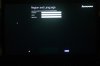
Backlight bleed is present, but faint. The location of the worst bleed is on the left side of the bottom edge of my screen. Again, the light in the bottom center is a reflection, and not bleed.
Some people may be unable to see the backlight bleed under realistic lighting conditions. To highlight the locations where bleed is present, I also took a shot with the exposure time cranked up. Keep in mind that this image is not representative of what you can see with a normal human eye.
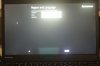
My personal opinion is that the amount of backlight bleed on my unit is a non-issue. It is barely detectable with my eyes on a black background under normal conditions. It can be noticeable on a black background from unusual angles, such as when you have the display tilted back to near 180 degrees. With almost any other color, including the royal blue that is the default of Windows 8, I am not able to detect it at all, from any angle.iofthestorm likes this. -
The 240GB is an Intel Pro 1500 and the 256GB are either Liteon (Plextor) M6S or Samsung PM841 TLC Drives (OEM 840s).
Internally they'll have the same amount of flash but the Intel is more over-provisioned.
The cost difference is pretty much down to supply cost - Intel SSDs are expensive. -
I am so confused. So I understood that the computer has a base 4 Gb and can take a max of user installed 8gb for a total of 12 gb.
Well Kingson and Crucial (two most reliable) memory costs $85 and $75 on Amazon currently.
But Lenovo is offering 8gb base and 4gb which equals 12 gb for $80. SO same price as upgrading myself without the hassle of unprying the cover
Is there any reason to not buy that upgrade? Am I missing something? It is actually not over priced but right in line with user upgrade price.. And technically I could add more ram in the future since 8GB base would be soldered I could replace the 4gb with and 8gb for a total of 16 GB, -
I think you may be misunderstanding their admittedly poor wording unless you are seeing something different than me.
They are all 4GB base config, and the 8GB total (4GB base) is $80 up charge. 12GB is $210.

-
I certainly am. lol. How sad. There needs to be a space. between total ram and breakdown of configuration. Makes total sense.Same as any manufacturer easier and cheaper to upgrade on your own.
-
I hope you enjoy it. It is a bummer you won't get to enjoy the FHD IPS screen though.
-
Wow, such a difference between markets. Here in Switzerland that same memory upgrade costs 90 francs (~$98, or about £60).

-
I've been unable to find backlight bleed on my FHD MultiTouch display. As far as I can tell, it's a beautiful screen.
-
OPAL = hardware based drive encryption that conforms to the standard. You will not have performance decrease when using encryption with a configuration that supports OPAL drive encryption.
Any other form of drive encryption is not hardware based at OS level. The Samsung 840 Pro has drive level encryption that is set via HDD Boot Password but this is not the same. -
They all offer full disk encryption transparently in the background, just different flavours. And they all limit access via the HDD boot password which stops the data being transparently decrypted.
If you looked at the raw data on the NAND in any of these drives it would appear to just be random. You can only read it via the keys in the controller. That's how they implement 'enhanced secure erase' - the keys in the controller are wiped and replaced with new ones making the data unreadable. -
My order has shipped. I placed the order Thursday November 7th and I got the email notification today Wednesday 11/20/13. According to the Lenovo website it is supposed to arrive next Wednesday the 27th. According to UPS it is supposed to arrive Tuesday the 26th. I will open it and play with it but may return it.
Will see if there is a 20% off Black Friday/Cyber Monday sale (you know LEnovo sales last forever lol) versus the 15% off I got the first time Since my model 500GB HDD is $300 more now (why we have no diea) I cannot do a price match as intended and save about $80-$100 as intended. Therefore, I iwill buy a new one with the standard 256 GB SSD + extended battery for 20%. It will costs me more than this one but technically I will be getting more for my money due to the price match. I stated why a few days earlier on here. -
Could somebody comment on the following price I got by calling in. I am in Canada BTW. The same config on Lenovo Canada costs $1529 so I am basically getting an 11% discount. Thoughts?
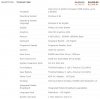
For those who dont want to click on the image thumbnail, its the base T440s with 2 upgrades - FHD screen (non-touch) and Corei5 - 4300U CPU. The price they quoted me is $1360. -
Just a side question, can the Samsung 840 pro 256GB SSD run well in T440s ? I saw some issues with Samsung SSD but not sure if they are real or which model(s) have issues. I think they have regular, EVO and pro. Thanks.
-
There have been some reports of 840 Pro causing problems (discussed earlier in this thread). So far EVO seems to work fine.
I just got the 500GB EVO while I'm waiting for my T440s. -
Lenovo just delivered my 2 docking stations and spare ac adapter... they look nice - now I just need my T440s - they keep on changing the ship date!!!!
-
I'm already enjoying 27" 2560x1440p NEC PA271W IPS screen on my desktop, so not a big loss for me personally...

This lappy is for my wife - that is web browsing, watching some shows, beadwork design, office work & casual stuff. So the screen quality didn't really matter much (but she wanted at least 14" with good resolution). Then we were mostly looking for a good value, future proof performance, size/weight, reliability and usability (great keyboard). And I think T430s has it all.
She also very likes the old-school boxy Thinkpad designs. We have a very similar taste.
-
I think it has to do with the price..the 440s is too expensive any way you look at it and I think they know they will get lots of criticism from reviewers
-
Yes, I got the 4300U and FHD screen and a 2yr depot warranty. (No Intel-AC or other decent upgrades). It was $1200 for the unit before tax and $59 for the 2yr warranty to $1259 pre-tax total. Ordered Nov. 4, arrives tomorrow! Try Live Sales Chat; that is what I used and I was just nice and persistent about a lower price and not needing accessories. Based on other options in the market (rMBP/ASUS/Acer/HP/Dell ultrabooks) I didn't really want to pay more than $1200 for the difference in specs and build-quality, and I was fortunate that they agreed to my offer without hassle.
-
I am about to order a T440s and I can find 4 options for docking station.
I can't really get what are the difference between them. I needs to connect 2 external screens (1920x1080), and network/mouse/keyboard.
Obviously the 1st one is USB 3.0, and I'd rather use the dock port under the laptop which brings the last 3.
- ThinkPad USB 3.0 Dock
- ThinkPad Basic Dock - 90W US / Canada / Mexico
- ThinkPad Pro Dock - 90 W US / Canada / Mexico
- ThinkPad Ultra Dock - 90W US -
Depends on the cables you want to use. If you're fine with one screen using VGA (which provides a less sharp image than DisplayPort or DVI), you can get the Pro Dock. The second screen would then use DisplayPort or DVI (you can't use both of these at the same time). If you want the best image on both screens, get the Ultra Dock. It has two DisplayPorts and two DVIs of which you can use two simultaneously.
Basic only has one VGA and no other video ports so you don't want it.
USB 3.0 docks should only be considered if dedicated docking is not an option because their performance leaves much to be desired. They do provide DP or DVI but they're laggy and they consume CPU cycles. -
you can probably swap the screen in a few months after parts become available, would be worth doing if you plan to keep it for a few years.
-
I need 2 DVI ports - so I guess ULTRA it is, thank you.
-
I made a mistake. Ultra Dock doesn't have two DVI ports. It has 2xDP, 1xDVI, 1xHDMI. It's still the right choice for you, you'll just need to use a DP->DVI adapter or cable for one of the monitors. Those are passive so they aren't expensive.
-
I have the Ultra Dock and I'm having an issue where when I first dock the laptop it will not activate the 2nd external screen. One is hooked up by DVI, the other via Displayport. I've also tried HDMI and moved all the cables around. Had no problem with these same monitors with my T410s and dock right up till last week.
When this happens, the ONLY way to get the 2nd monitor to turn on is to unplug it and plug it back in. Kind of a PITA.
Anyone else? -
On the 256GB eDrive vs 240GB Opal drive:
According to this: Encryption Alphabet Soup | SecureSpeak | WinMagic Data Security Blog
And some information on BitLocker and hardware encryption on an eDrive-capable disk: AnandTech | Hardware Accelerated BitLocker Encryption: Microsoft Windows 8 eDrive Investigated with Crucial M500
Based on what I can find, an eDrive will do hardware-accelerated encryption under BitLocker. Has anyone who's gotten their T440s enabled BitLocker? Which drive did you get, and can you tell if it's using hardware encryption?
So if both support hardware encryption, is there any advantage to the Intel 240GB drive to justify its higher cost? From performance numbers I could dig up, it looks like it might not be better (and may be worse) than the cheaper option:
Sources: (the last one was all I could find on that exact model of the LiteOn drive. Not sure how trustworthy it is)Intel Pro 1500 Samsung 840 LCS-256M6S Size 240GB 256GB 256GB Sequential Read 540 MB/s 540 MB/s 530 MB/s Sequential Write 490 MB/s 520 MB/s 430 MB/s Random Read 41k IOPS 100k IOPS 74k IOPS Random Write 80k IOPS 90k IOPS 70k IOPS
- http://www.intel.com/content/dam/ww.../product-briefs/ssd-pro-1500-series-brief.pdf
- AnandTech | Samsung SSD 840 (250GB) Review
- FS: *SSD* LITE-ON *256GB* SATA 6.0Gb/s 2.5" 7mm - [H]ard|Forum
-
Right click on desktop---> screen resolution--->click on monitor ---> multidisplay setting -->extend desktop to this display--->apply.
You can only use either the first displayport or HDMI and the second DP port or DVI. -
Good research! There's not much obvious info around about edrive.
Personally the Intel would be my last choice. It has an old controller and it's geared up for compressible data. The Samsung has the best performance but it's TLC which means its longevity (read/write cycles) are not as good as the other 2.
If you choose the 256GB option you won't be disappointed with either option but you'll have no way of knowing which you'll get. -
When this happens the display doesn't even show up as connected. Once I unplug its power cord and plug it in, it comes right on as previously configured.
-
The T440s seems a great machine. I was looking for a silent, lightweight notebook with low heat emissions and a nice screen, and it seems that the T440s fulfills all of my expectations. So I ordered one from lapstars.de on 26/10 (this one in particular: Thinkpad T440s 20AQS00600). However, the status of my order is still "open" and thus it is starting to become frustrating because I need the laptop for work. Has anyone a similar experience?
-
Thanks. I'm still hesitant to trust it all until I hear about people's own experiences with that drive option on the T440s. It was hard to find definitive answers on Bitlocker and the eDrive and OPAL standards, and I know know if what I found applies to this particular configuration.
Also from that Anand article about the Intel Drive:
I'm leaning in that direction too. Thanks
-
If you're security conscious I wouldn't bother with Bitlocker at all. The drives have built in very strong encryption with zero performance overhead. The only disadvantage being that you'll need to enter a password every time you power on the machine (and after reboots and wake from sleep if you're doing it properly). They are all Opal compliant which means the encryption keys are very hard to extract even by someone with very advanced capabilities - I think the Opal standard dictates that the keys can't travel across any bus on the drive at any point.
-
Oh, I didn't realize you could have the system prompt for the BIOS FDE password on wake from sleep.
I agree: setting up the encryption from the BIOS sounds like the best option, so I won't bother with Bitlocker.
I'm sure in the end I won't notice much difference no matter which drive I choose. I think I over-thought all the options
-
I don't know how to help you then. Your monitor must not be sending a signal to your computer saying it is in standby. I have two DP monitor and they both show up and power on as soon as I dock. Does your two monitor function properly with your old dock?
-
Yep, as I said originally, here monitors work perfectly with my old dock.
-
Any idea if/when student discounts will come to Canada?
-
I don't think the price is going to come down anytime soon, at the moment, the base price for this laptop is $1,199.00 in US while it is $1,309.00 in Canada
-
But the student price in US is $1079.10, while in Canada it is $1309.00
-
yeah, but the machine has been on US website for about a month now while it has been on the Canadian website for about 2 weeks
I hope Lenovo brings some real discounts for students, right now, students can buy the new Macbook Pro ( 2.4 GHz/ 4GB RAM/ 128GB SSD) for $1249 if you buy it from the school apple store, you also get $100 discount, which brings the price down to $1149 -
Call up the sales number if you are interested to order. Lots of people here on the forums including myself have been able to get a good deal through the sales reps. I got a 18% discount and placed my order yesterday (I am in Canada). Goodluck!
-
Thank you, that's what I'll probably do. Any idea if/when black friday specials will be posted in Canada? Or is it only an American thing?
-
For all those waiting to pull the trigger on the T440s, it has just gone on sale on the US and Canada website. Coupon code: DOORBUSTER.
iofthestorm likes this. -
Thanks for reminding. Now I get $100+ back!
-
Awesome, $100 for me. Anybody have experience with Lenovo price-matching?
-
Oh man, what's the price match time limit? Is it 21 days or 30 days, after order date I assume? I ordered 11/2 so if it's 21 days I'm screwed but if it's 30 days I might be able to get $100 back
.
Edit: Oh, here's some conflicting info from an earlier page: http://forum.notebookreview.com/lenovo/724451-t440s-up-lenovo-website-ips-screen-1080p-263.html
To summarize, one guy was told that the price protection starts from the day they ship, but another was told that it's from the day you order, and that 30 days after ship date is for returns. I suppose it's still worth a shot to try to convince a customer service rep or whatever, and you could perhaps say that you might consider returning it and ordering a new one at the lower price and that Lenovo could just save everyone the hassle by refunding you $100. Or you might be able to just confuse them into giving you money in general. I guess since they've already sold you the laptop they technically have the upper hand but if you suggest that you'll return it to reorder they might acquiesce? Who knows. Personally I don't really have the time to do this in the next couple days (lots of school work before Thanksgiving, I hate my professors right now, and also my procrastinating self) so if someone else could try it I'm sure everyone here would greatly appreciate it. -
I just placed my order on Friday after negotiating with the sales rep for 2 days. My initial configuration was coming at $1529 and i thought I got a deal at $1249 for the same config. Now, the exact same config is coming up at $1107 with the sale prices.
When I was placing my order, I remember the rep saying something in the lines of "we will price match for 30 days given that the lower price is before any eCoupons applied". So today I am going to call them up and if they dont credit me the difference, I will ask them to cancel my order and then I will re-order from the webpage.
T440s up on Lenovo website (IPS Screen, 1080p)
Discussion in 'Lenovo' started by bdoviack, Jul 8, 2013.


