 Problems? See this thread at archive.org.
nx500 doesn't have bottom vents, so we don't know how it's even draw up air for cooling, gx500 has a small vent on the bottom.
so far the best cooling setup I've seen for anything below 23mm is the razer blade 2014, I doubt asus can do anything better than that without a bottom grill
-
I don't understand how they do that. I thought port multiplier was no longer an option with Intel chipsets.
-
Guys, have we confirmed that the 48Hz lock is simply on the software side and CAN be fixed with a future driver update without the need to replace any hardware?
-
Judging from 1:27 of this video( https://www.youtube.com/watch?v=w06p6qAHtE8) I'd say that vent isn't going to do anything. No fans that I can see of. I hope someone's leg hair doesn't touch those copper pipes!
I agree though, Razer has managed to do the best with the thin design so far. -
not even just that, just look at g550jk's cooling setup. that's about as best as what asus can do with hinge vents, and the result of that is very obvious. if they don't change drastically nx500 and gx500 will be significantly hotter than the g550jk with thinner all metal chassis.
another important thing though, I have yet to see a copper heat sink on any of these high end products, so asus better implement these or else they are gonna have to bring out another briefcase nuke.
the whole thing with cooling is just funny, y50 has the right materials, but a problematic design. razer has an excellent design but still got aluminum heat sink. asus already has a very questionable design and I hope they realize they better choose the right materials -
If you uninstall the intel driver it runs at 60hz so it's not a hardware issue.
-
but has it been verified that the panel is actually running at 60hz with a camera?
-
You mentioned you use your laptop for editing before I think. Do programs like Photoshop, Sony Vegas, After Effects work well on the 4K or when resizing to FHD or does it look different etc...
Can you please post screenshots of your desktop screen when changing from UHD to 1920 x 1080. Also can you give examples of programs that are "wonky"? Is it something that makes it very annoying or would you describe it as casual annoyance. My only concern for the UHD screen is that the DPI wont scale right which will make things look to big too small etc... Thanks. -
The 870m turns it into a frying pan.... It touches 90+ while gaming(heard of it throttling even) ... Why would you say it's cooling setup is good???
It most probably is..... I was just curious how arrived at that conclusion -
Photoshop CC 2014 has a setting in Experimental: Scale UI 200% for high-density displays. It works perfectly. Without the scale the program is unusable in UHD mode. Photoshop is all I've needed thus far with the contact work I've been doing so I haven't needed Vegas, etc yet. From what I've read Sony doesn't scale their programs yet. This is a screen shot of CC 2014 w/200% enabled in UHD.
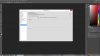
-
What panel is used on the 4k model?
-
I had one. Yes the CPU gets that hot but the laptop itself doesn't feel all that bad on your lap and the fan noise is relatively quiet. It's not as cool as the Y50 but when you consider it's thinner, has an 870M on top of it being Kepler, the RB's cooling system is pretty impressive
-
Meh, I think ill pass on this one, especially with broadwell processors so close and possibly even skylake by next year. I was quite interested in purchasing a 4k model till the 48 fps cap became an issue. IPS at 1080p for around $900-1000 would have been perfect but for an investment which is to last me 3-5 years, I don't mind waiting.
-
Any news about the boost freq of the CPU. From what i was reading the boost frequency is only achieved for short amounts of time and when the core temp goes higher than 65 degrees C it goes back to base clock...2.4Ghz. I am buying this laptop for BF4 and i know this game to be very CPU dependent. Can someone explain if there is a solution to this, any BIOS update or something like that. I really find it unnecessary to back down to base clock at only 65C.
Did anyone fiddled with the vcore of the CPU? Maybe make it a little lower and it will boost a bit higher due to lower temperatures. -
How were you able to use ebates with the student discount? I thought deals like that weren't compatible.
-
to see why the cooling setup on razer is good, you can go here http://forum.notebookreview.com/razer/747532-razer-blade-2014-owner-s-lounge-158.html#post9725866
to see why y50 has a problematic setup, read this http://forum.notebookreview.com/ideapad-essential/741832-y50-thread-595.html -
What is the color accuracy and brightness of the 4K model?
-
I got what you're saing... but razer used an aluminium heatsink... they could've opted for a copper one... especially considering the cost ...
anyway ... im pretty sure you know you're stuff.... im kinda fine as long as the laptop doesnt overheat and i think the y50 has impressed me so far....
the CPU being gimped is kinda sad... but it hasnt impacted me practically in anyway .. so far atleast but i do see your point
-
razer should, but they didn't. almost all those high end products don't go for copper heat sink, even AW and g750 series.
y50's cooling is unsatisfactory, but almost everyone else with the same price and same spec sucked too...or even worse... -
It evolves every 6 months at this point, the cycle never ends. The 48Hz is a software not hardware issue. I got mine for $1200 and I'm on a 3 year upgrade cycle at this point.
-
gHey guys sorry I've been busy this weekend.
Bought a Timbuk2 bag at REI, the commute 2.0 bag in large version. Medium doesn't fit the Y50.
Medium sized command bag does fit the Y50 but doesn't have as many pouches and such as the commute.
I will get some pictures of the touch 4K Y50 viewing angles shortly. -
Same here about I just ordered my Y50 but I think a 3 year cycle is sufficient at this point in time.
-
Same. Two years stays strong. The third is okay. Fourth is usable but not really up to par.
-
Im starting to get really pissed off at Lenovo because I waited too long for the y50 touch 4gb860m and 16gb ram, and now they went out of stock and back in stock with only the base touch model and I talked to one of the reps and they said they were planning on not offering that model again but because of such a demand for it they probably will but It wont be out till the first week in august and I need it by august 22. Ugh......
-
We have a bunch on order with an ETA of the first week of August as well, so that date seems accurate.
-
So tho may have already been covered but I have the y50 with the 4k display, and I was wondering if anyone knows why 2560x1440 (1440p) isn't a resolution option? Because I like to game, and at 4k most games run on the slowish side, but at 1080p an 2k it runs the games at 50+ fps all the time, so I would like to try a higher resolution without going straight to 4k, but I can't. If any one knows or can help it would be much appreciated.
Sent from my iPhone using Tapatalk -
I didn't even realize it but I bought my Y50 exactly 3 years to the day after I bought my Dell XPS L702x. I paid $1200 for it, with a huge $600 off coupon, and sold it last week for $590. Didn't think I would get anywhere near that. I didn't want another 17" laptop..too big and too heavy.
-
I came REALLY close to getting a Timbuk2. I travel a lot for my company and I carry so much stuff I got the Wenger Ibex instead. It holds everything possible including a change of clothes..lol Plus with my company discount I snagged it for $50. I have a case logic sleeve for the Y50 and it fits perfectly in the laptop pocket.
-
Haha yeah My current laptop is a ASUS N61jq with the first gen I7 and a HD5730
But I am not selling mine I am being a good son and giving it to my parents lol. I am also moving away from the 17 inch laptops (which I currently have) time to go smaller.
Note: Kinda bummed that the iphone 6 will be a 4.7 inch I hate big phones. 4 inch screen is perfect!cpatlynch likes this. -
Does anyone know how good the 4K display is in terms of color accuracy and brightness? Are the touch and non-touch 4K panels equivalent in terms of color gamut and brightness?
-
Have anybody managed to get over 48hz(60hz real) on the Lenovo y50 UHD using old version of the intel drivers(like the one initially preinstalled in Windows 8) ?
I have been waiting so long for this model(1080p version has an awful display) but 48hz for gaming, no way(so another crappy display by lenovo =/).
Best Regards! -
As of yet, no nobody has managed to get over 48hz on the 4k version
-
That sucks...
:cry: -
I'm planning to buy the ssd version from amazon.de at €999 http://www.amazon.de/Lenovo-Noteboo...PAT8/ref=sr_1_1?ie=UTF8&qid=1405956217&sr=8-1
I'll use it mostly for work for both coding and sysadmin stuff, I know it's a gaming laptop but I need something fast, what do you think? -





Viewing angles on the 4K Touch from MS as requestedShunsai, rupeshwar, PsylentStorm and 1 other person like this. -
I'm not sure if it's the exposure on the camera or not, but the colours of the straight on view look horrible.
-
Also I should mention that there doesn't seem to be any viewing angles. The default yellow desktop on windows 8.1 looks like crap, but it's more than likely a 1080p image so its not its fault. Everything about this laptop is a dream. The speakers are the best I have heard on a laptop hands down (although the last laptop I owned was an ibuypower model from maybe 2005.) And the construction is excellent. Keyboard is great, no missing strokes issues like people have said, it's really just a typing style thing, it seems akin to blaming a netbook keyboard for your keystrokes registering the wrong keys because its so much smaller. Screen is beautiful, touch works great, I speak chinese and need it for dictionary use. I plan on eventually buying one of those 2.5 double msata caddies to raid 2gb but for now everything is great. I haven't tried any games on it yet because I am busy with my BA thesis but when I finish I will test it more.
-
Hey guys. I found an interesting description of the Y50 on a german website. They claim that all their models have glossy screens (glänzend), even the non-touch 1080p models. It is probably an error, but maybe something to look into. Here is the link: Cyberport.de - Computer, Notebooks, Fernseher, Apple, Handys & Digitalkameras
-
It's my cell phone, there's plenty of data about the colors so I wasn't concerned with that
-
I was wondering how good is the 1TB HDD + 8GB SSD that comes with the laptop. Is it any good? boot time?
-
Microsoft store back in stock
-
Bad yellows are becoming a lot more common, especially with Lenovo. I kind of noticed it when I had my unit but it wasn't the worst I've seen. It usually gets fixed with bios updates but that can take some time.
See here for an example: http://www.ultrabookreview.com/4248-asus-zenbook-ux303ln-impressions/Zarley Z likes this. -
Nice to hear that this is a solvable issue. Hopefully Lenovo gets on it sooner than later.
-
If you guys are that stressed about color accuracy and vividness, just go to the control panel of the Intel HD video -> Color -> Advanced -> Saturation and increase it be 6-7 points. For me that worked perfectly and I see the vivid colors I saw on my old Inspiron N5010
Might be ok for only 1% of you, but that solved my problem
-
Sure, if you're fine with completely destroying all detail and getting MASSIVE black crush. In my experience, contrast can only be raised 1-2 points before image detail starts taking a big hit. It's nice to raise it to 51 or 52 but beyond that any dark movie or game will be practically unwatchable/unplayable. What I would recommend instead is increasing colour saturation: this produces more vivid colours without the drawbacks of contrast boosting. Note that at a certain point colours start looking less natural (more artificial) but there is quite a lot of leeway, in my opinion, and it makes the display look a lot better.
-
Oh sorry I mistyped the option. I ment SATURATION, not contrast. Try SATURATION
-
Yeah, I've done that before. It helps a little bit murky colors are murky no matter what until the actual hardwire drivers are told to output the correct hue.
-
I thought the problem is with the monitor not being able to display a wider spectre of colours... How would a hardware driver fix such issue? I read all matte displays have washed out colours
-
They do, but we are talking about the 4K IPS Touch display.
-
The yellows on mine are nothing like the zenbook lol. They look fine in person and I confirmed on my qhd IPS that the image just sucks, its grainy and gross.
The UHD display is superb
Y50 Thread
Discussion in 'Lenovo' started by Jobine, Jan 4, 2014.


