 Problems? See this thread at archive.org.
REAL men compile from source! Why do you think apt-get source is there?
-
-
REAL men don't use GUI's!
-
Thanks dude. Post up a pic when you get the stickers and stick em on your comp!

-
****, i use gui's and i sure as hell don't use source
=p i has the noob skillz -
SUDO RM -rf /!!!!!SUDO RM -RF /!!!!!!!!!!! WHY ARN"T YOU SUDOING!!!!!!!!!
-
never was taught?
-
And you call yourself a linux user.....
-
Thanks for the link, rep for you ^^.
-
Well, it's faster.
-
Real men don't use computers, but a stick and 2 rocks....lol
-
Lol!!!!!!!!!!!!!!!!!1
-
![[IMG]](images/storyImages/screenshot1ro2.th.png)
![[IMG]](images/storyImages/screenshot2lx9.th.png)
Added a Widget layer. -
Pidgin and Rythmbox. That's what I use.
Btw, I just sent in for my free Ubuntu stickers!
-
That's awesome.
EDIT: You just now have that or is this something else that I don't know of, linky? -
Gonna give slackware 12.0 a go soon, any comments on slack??
-
Nope, except I'm trying it as well
-
Top of the page.
-
Hows the package management? Any gui for it?
Too bad the iso is a dvd, theres no mini version -
I haven't tried it yet, but I will this weekend.
I can't wait to get a new HDD.
-
Read this tut then, might help you out. They have a series on "The Perfect Setup" aimed at installing a complete linux alternative to windows.
http://howtoforge.com/the_perfect_desktop_slackware12
Illustrated wit pics as well ! -
Where?
(filler) -
if our looking for the ubuntu sticker link its here
http://forum.notebookreview.com/showpost.php?p=3242650&postcount=401 -
That looks like too much work...
-
Well, it took everyone long enough
-
On the top of the last page, there was a link to free Ubuntu stickers.
-
Thats why im still wondering whether to go through with it or not, they also have other perfect setup guides for easier distros.
-
You're baiting me, ok, I'll bite...how many disks do I download? lol
-
![[IMG]](images/storyImages/screenshotqd0.png)
changed it up a bit =] -
Just starting, but thought I'd keep this great time waster alive and well
Attached Files:
-
-
Wow. You should be called the distro-hopper, theZoid!
Btw, I notice you like to have your taskbar and whatnot the same every time.
Nice pic, too. -
Mandriva Spring is my choice, but a glitch with VirtualBox during the XP install where it freezes...others had it...wait until it's worked out yep, hop like a rabbit....lol I copy all my wallpaper, icons, themes, kickers, etc to vista before I do a wipe....same taskbar...I also replaced Kmenu with TastyMenu that Mint uses...like it much much better
-
Messy
![[IMG]](images/storyImages/f_Screenshotm_a9d6f06.jpg)
Tidy
![[IMG]](images/storyImages/f_tidym_4ea5924.jpg)
-
I like those beach and open air type themes....have that one actually in my collected collection
-
where would I find that wallpaper?
-
Here
http://interfacelift.com/wallpaper/details.php?id=1508
Choose your resolution as download size -
Awesome.... Post number 500.
-
Beat me to it....being a distro vagabond, I know all those wallpapers by memory....lol
-
I always end up in Arch.
Ive used may distro's but none beat the simplicity / ease of use (relative) / speed / customizability / stableness of ARCH.
At first it was horrible installing it as I actually had to read stuff and understand how the terminal works, but it was well worth it.
Everything in Arch is configured via one config file to keep things simple if your system crashes or need to do some manual modification.
Package management is top notch and the user repository AUR is full with tons of kewl stuff and is updated frequently, soo many packages plugins to do just what you were looking for.
theZoid, I suggest you try it, even if it is in Virtual Box
==========================================================================================================
Right now in the process of making my gnome menu bar look like the one in this screenshot (resembles mac look)
![[IMG]](images/storyImages/04_13_2008_by_PurposeOfReason.png)
-
blackbird..
My first distro was Slackware 9, and i really liked it... well, after trying some others distros, i am missing the simplicity of it. i miss the KISS ^^
You think the Arch is a good one for me? I really like to tweak my system, and this one looks good for that.
My only problem is that i have much more experience with KDE, but i want something new, so i will try gnome.. you have some useful link were i can learn howto tweak and configure it? -
@blackbird....do you know how VB works in Arch? i.e. can I enable usb devices?
EDIT: What version should I try? link? -
Arch and Slackware are very close, both follow the KISS. Arch however doesnt have a live gui environment cd
Arch package management is much better than Slackware's, it handles dependencies and is based on a rolling release.
Beauty of Arch is that you install what you want to and everything from network to daemon configuration is all done via one file "rc.conf" to keep things simple.
The user community is one of the best and the user created packages are phenomenal, there are so many which are tweaked to do just what you want.
As for desktop environments, you install the one you want, there is no default. There is a special version of KDE for Arch dubbed KDEMOD which is more visually appealing and extremely fast, like on steroids.
Best way to get started is visit their official site and have a read through the forums and WIKI, might I add the wiki is excellent. The forums are very helpful as well
When ready to install follow the beginners guide which is superb, explains everything so you get familiar and indexes more sections for advanced users.
For the latest iso's visit the ftp closest to you, the latest official is 2008.03
Some may argue that the installation is complicated, well really its not. The guide is very self explanatory and the end user learns much more about the OS.
Give it a proper try, you wont regret it
====================================================================================================
@ theZoid, I am running Arch in virtualbox for windows xp. I thought Id see if it worked on my laptop in VB before. How do I test the things you mentioned ?? As for the Arch version get 2008.04-rc -
@blackbird
Thanks!
I will surely give a try ~.o
First i´m gonna install it in a VM , and after i will try to install on mey laptop. -
if it's already in a VM I'm not sure....an install you would download the VB non free binaries from their site and see if USB options comes up in settings. For Ubuntu you have to add usbusers group with yourself in it, and hack a couple of files. Mandriva it seemed nothing to get usb working, but I had XP install freezes and couldn't figure it out, or didn't have the patience haha....Zenwalk had a howto in their wiki that worked really great and usb was up no problem. I've the Arch Core 2008.04RC downloaded and currently downloading slack via torrent...Slack was great and simple with Zenwalk
-
Well I just downloaded the normal VB for windows. In the VB menu, where you install guest additions I have otion for USB devices.
Basically you want me to see if I plug a usb thing like my psp, will arch in the VB recognize it yea?? -
yes, for example I need to print from my virtual XP machine because of work programs...that's why I need usb...you have virtualbox running in arch, right?
-
I have VB installed on XP and its running ARCH
-
I'm not a big fan of beach wallpapers, but that one looks OK. So Arch uses Gnome?
-
Thats the thing, ARCH doesnt have an official DE, it looks just as good in any DE.
Thats why there are no remaster versions.
I will be making a video guide on getting arch up and running soon. -
Oh. Cool.
-
Vid should be done by tomoz, for those interested do you use static IP's or IP is automatically assigned via dhcp?
Till then, here is a new screenie, updated icons and theme, love the orange scrollbars. (click thumbnail for full res)
![[IMG]](images/storyImages/f_Screenshotm_37b5f1d.jpg)
![[IMG]](images/storyImages/264135_Screenshot.jpg)
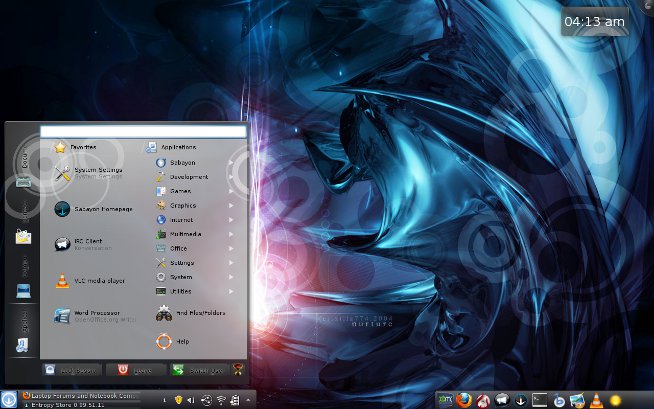
Show off your Linux desktop
Discussion in 'Linux Compatibility and Software' started by pixelot, Mar 22, 2008.


![[IMG]](http://img177.imageshack.us/my.php?image=screenshot1ro2.png)
![[IMG]](http://img144.imageshack.us/my.php?image=screenshot2lx9.png)



![[IMG]](http://www.turboimagehost.com/p/264135/Screenshot.jpg.html)