Problems? See this thread at archive.org.
Dang..... you have something weird going on...... and this is one of those times I wish I could get behind your keyboard. You should have no problem with AHCI, and for your set-up, RAID is not the answer. Now I am wondering about the set-up of your primary SSD, and if your bios flash was done correctly.
Who was your reseller...... can you get with them on this?
Any Pros out there with an idea to help jimlenz..... Ken.... Rob.... Justin...... Donald...... anyone? I'm drawing a blank here, and it's the holiday weekend ('hic-up'..... BURP! Dang Good Beer!), LOL!

-
-
I think he just can't change to AHCI without reinstalling windows? I mean, is like installing a new motherboard on your desktop???, windows wont boot up
-
I was thinking my problem may be with the bios but no this is what I am running. Thanks
-
That is what I thought. I bought from Ken over at gentech and have an email out to him. Remember I had the problem with the old and new bios.
The primaryvssd is a ocz vertex 3. I was having freezing problems so updated the firmware and it is fine now.
I ordered a new hard drive and should get that midvweek, figured would try a fresh one in bay 2.
On the bios adjusting from raid to ahci is strange. I thought it shouldnt be a problem changing but obviouslynit is. Notvworried about the speed as the vertex 3 is very fast.
I appreciate eveyones help. Thanks
Jim -
This bios is so the raid controller will work, I have not seen any other feature changes as the mobo's are the same regardless if raid is installed or not. Even if the mobo has the raid controller it still can create problems for people that use it when they reinstall windows without raid.
So to answer the following posts, what is happening is that people have the 3** version of the bios installed, it sets raid by default. This bios is fine, but if you are not going to use raid and wish to change the SATA configuration to AHCI it must be done before installing windows. I think the problem here is more to do with windows than the bios. If you use the 1** version bios the raid controller is not installed and by default the SATA setting is AHCI from the beginning, eliminating the problem. -
You are using the correct bios version, and even though some suggest you can use the other bios, your main board does in fact have a RAID controller. I can not speak to differences in GT780 RAID, and Non-RAID mainboards..... or the possible differences in their Bios coding. I can say that MSI very specifically states that the 1761_10B.zip is "For Non-Raid Systems use only", which are main boards lacking a RAID controller..... ergo, I cannot recommend it's usage on your system.
Ours systems are very much alike (same model, Non-RAID, SSD primary, HDD secondary), and when I upgraded to the 1761_30B.zip bios, my system did not boot correctly. I immediately went into bios and discover it was set to RAID by default, so I quickly changed this to AHCI, and all was good again. You should be able to do the same, and this is why I suspect something screwy with your SSD set-up, or your bios flash. Also, I note you have a OCZ Vertex 3. I too had this SSD with my first GT780R, and experienced recognition and boot priority issues...... and this was after the latest firmware flash. Ken will confirm this, and this is why I quickly changed course to the Intel 510 series.
Anyhow, since Ken was your reseller, I am 100% certain he will assist you in resolving this issue quickly. Presently he is taking a much needed, and well deserved holiday vacation, but will return soon. Occasionally, he is still checking his email or popping in the forum, so be patient..... HELP IS ON THE WAY, LOL!
-
All of the USA GT780, GT780R, GT780DX, GT780DXR are capable of using either the raid or no-raid bios. The system boards are exactly the same on the non-raid & raid models, the only difference is the bios is either enabling or disabling the feature. The reason that MSI is very specific on the bios download page is if a customer who has a raid array flashes with 1.xx he will loose that array and possibly corrupt his data. If a customer who has a non-raid flashes with a 3.xx bios it is possible they can corrupt the data on their single disk system.
We flash all our systems with the 3.xx bios when they require an update regardless if the customer is currently using raid or not. We then just change it to AHCI in the bios. If the customer ever wants raid in the future all they have to do is change the selection in the bios and add the second drive. -
Good Info! Thanks Rob!
-
I would suggest updating to the 10B BIOS version. Tried it on my RAID system and it disables raid perfectly. Re-updated with 30B and raid was restored. I think the 10B version will solve the problem.
-
Question about installing a ssd as a primary drive. Am I going to need a SATA III cable or does the ssd just plug in? I would check my gt780dxr, but it's still en route. Thanks in advance! By the way, I was planning on getting a Crucial M4.
-
just plug it in either 2 HDD slots
-
Thanks! I also noticed some talking about a HD caddy. I'm assuming this is only needed for 1 HD standard models that are adding a secondary drive? Or is it an upgrade from the rubber HD mounts?
-
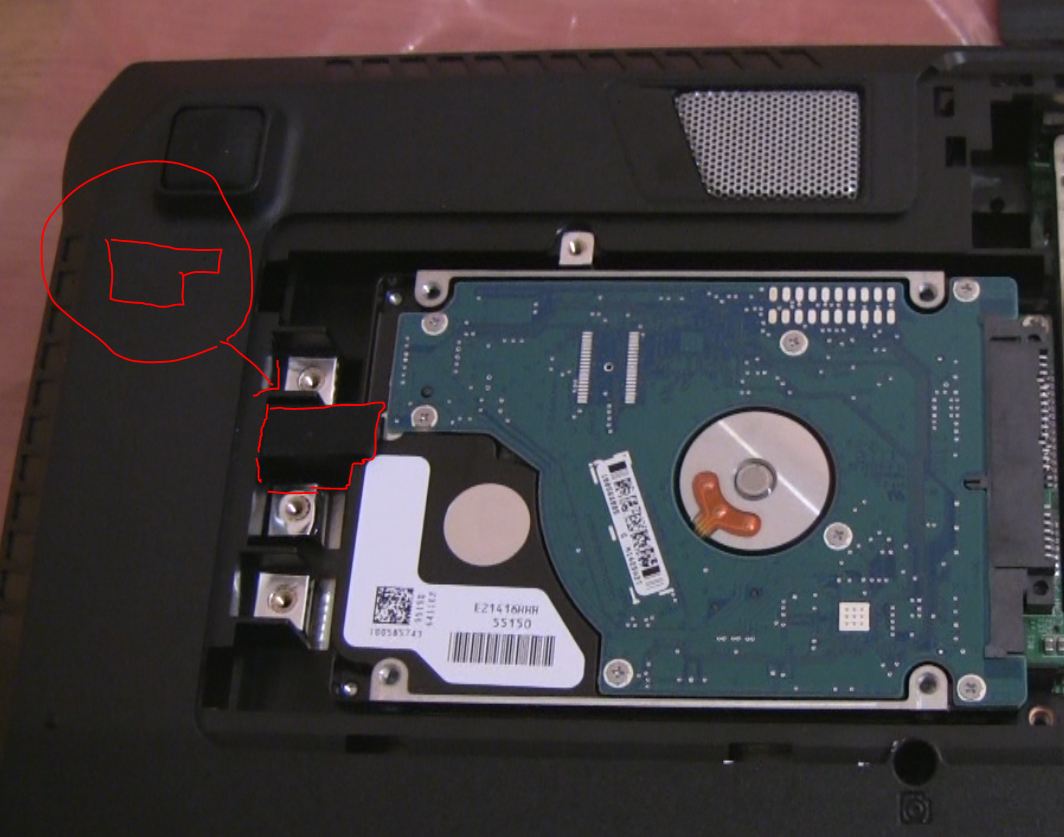
The primary drive has the metal HDD bracket, the secondary in some models has a rubber block. In the GT780DX-215 model if you purchased it with only 1 HDD there is no bracket or block.
-
Checked the vBios. Its voltage table has 5 values: 0.80v/0.84v/0.85v/0.90v/0.92v
Stock voltages are 0.80v and 0.85v used by different profiles.
It may run at higher voltage(0.90v or 0.92v) if flashed with a modified vbios. -
I truly appreciate everyone's assistance with this. A lot of great information. Looks like I should wait for Ken and hear back.
I did try to change to AHCI mode again and this is what happens.
System reboots
Shows realtek controller
Client mac address xxxxx
dhcp (then cursor spinning)
px-mot exit rom
start windows
bsod
reboots
Not a big deal as raid works fine. -
I tried switching the hard drives by putting the 1tb samsung drive in bay 1 and the ocz vertex 3 in bay 2. Both showed up in the bios when I rebooted. It looks like the issue with the samsung in bay 2 is there is no way I can get it tight enough in there. the rubber block doesn't do it. I may have to get a caddy for it.
Any thoughts or ideas on how to secure other then spending $46 on the caddy?
Thanks
Jim -
3 grand comes from the 25% import tax there is in sweden because it's not a shengern country. so it's 2100+ import tax
-
Wow, then if it is going to be around the same price, buy it in Sweden.
-
Touchpad jumping/non-responding issue seems to be improved, if not fixed, by installing the Synaptics driver over the Syntellic.
-
Could someone with a GT780DXR do me a massive favour and measure the external dimensions and weight of the MSI retail box?
I'm thinking about an upgrade and need to check out shipping costs
-
Did anyone manage to get a picture of the heatsink (side that contacts the GPU) for the DXR?
-
Can someone please tell me the difference between model #GT780DX and GT780DXR besides memory, hard drive & optical drive. It seems that once you upgrade/change those on the DX model you will get a DXR, unless there is some other special features that I am missing?
-
That's it, it is just a difference in install ram and hdd.
-
19"L x 14"H x 6.5"W
about 10Lbs -
hi,
just ordered a GT780DXr-095US, I hope I will not be disappointed
Just a question, does this laptop comes with updated bios/firmware/drivers or should I start to look at the newest version and dl them? -
Also after you recover your laptop, will the driver's stay at the latest? Or will it go back to stock drivers?
-
Bios and firmware should be up to date. As for the drivers then there is no official driver for the GPU. On the other hand there are no bios/firmware/drivers on the MSI site so you should stay with the original ones (check it here).
-
All the drivers are under the GT780 page which is referenced in the first post of this thread.
@DoDeH1 - MSI is doing a good job of keeping them up to date. Unless a fresh reinstall is done there should not be much of a problem with the stock drivers. Just get the video driver from nvidia and update the Intel chipset driver that is on the MSI driver page. -
you can request keyboard to be fully tested before ship.
Jim,
Maybe you want to check or post a picture of how rubber stop was installed, does the orientation looks like on this screenshot?
That's how MSI installed 2nd hard drive with the rubber stop and never have anyone report it's not secure.
http://www.youtube.com/watch?v=As3vOZmuzVY
For the BIOS just stick with 30B with RAID controller and set to AHCI if you don't want to use RAID controller.
FYI for GT780DX-215 users, the DX and DRX mainboard and different, DX does not have RAID controller ingetraged in the mainboard, therefore, even you flash 30B BIOS you will not be able to use RAID function.
FYI 2 for for GT780DX-215 uses, it does not comes with 2nd hard drive bracket or rubber stop, however, if you purchase 2nd hard drive we will installed with the bracket.
This might be inconvenient for GT780DX-215 users who purchased without 2nd hard drive, however, we already request future shipments from MSI to include 2nd hard drive bracket or rubber stop.Attached Files:
-
-
Ups. Sorry for not noticing that.
-
Does no one know about the compatibility and/or the potential availability for any of these new sandy bridge CPUs with the GT780DXR ?
i7-2760QM
i7-2860QM
i7-2960XM -
The new Intel processors you mention were released on Sunday and are available now in all Sandy Bridge based laptops including the MSI GT780DX.
-
Cool, thanks for the info
-
Ken,
I am sure everyone here appreciates the information you provide and the help to forum members as I do. We try to do the same and make sure the information and answers we post is accurate at the time of the post.
This information you are posting is not accurate and can be confusing members who may opt for the less expensive GT780DX-215US but are taking your word that it is not raid capable. The GT780DX-215US is EXACTLY the same board as the GT780DXR (HM67 Chipset) and fully supports raid.
The raid function is part of the HM67 chipset which ALL USA GT780, GT780DX, and GT780DXR models use. The raid function is NOT hardware raid; it is firmware/software raid. (My technical terms may not be exact so someone please correct me if it is off).
The 3.xx bios allows access to the onboard ROM/firmware making the raid function active and functional. I own a GT780DX-215US model which I have upgraded to raid, I also upgraded and installed raid in another GT780DX-215US model today with the MSI restore disks for WHP 7 x64 again to confirm (completely functional 2 x 750-7200 with raid 0). We have also delivered many with raid upgrades over the past weeks.
After the raid bios has been flashed onto a non-raid model (3.xx) and two drives are installed you will see the Intel raid utility. "Rapid storage technology ROM Ver. # 10.1.0.1008" if the chipset were not capable of raid it would not be reporting a ROM firmware version as it would not be able to connect to the onboard ROM.
In windows the Intel rapid storage technology control panel reports; Volume0, Type: Raid 0, 1,397GB and fully functional.
I am sorry to say but whoever has provided this information to you that the GT780DX-215US model is not raid capable is incorrect. You should let them know the information you have received is not accurate.
The GT780DX-215US model is capable of Raid 0 (Stripe) and Raid 1 (Mirror) as are all other USA GT780 models. -
Thank you for the clarification!!! I did actually think the DX model was incapable of RAID from Ken's post....
-
Will the new processors replace the current ones? eg. will the i7-2630qm stay as the default CPU, or will we start with one of the new ones?
-
It looks like they have replaced the current ones, with the exception of the i7-2630QM which is still the default CPU.
i7 - 2720QM 2.20GHz 6MB Cache replaced by i7 - 2760QM 2.40GHz 6MB Cache
i7 - 2820QM 2.30GHz 8MB Cache replaced by i7 - 2860QM 2.50GHz 8MB Cache
i7 - 2920XM 2.50GHz 8MB Cache replaced by i7 - 2960XM 2.70GHz 8MB Cache -
Please note that i7 - 2760QM has 6MB of cache not 8MB.
-
I originally put 6MB but I changed it because I saw PowerNotebooks & XOTICPC both stated 8MB cache on their website
Edit: Guess it's a bad typo, will edit my post.
-
Well, each processor gets an upgrade, what about the upgrade for 2630QM?
No news about it? -
there is no upgrade for it. there is only the 2640M which is dual core 2.8Ghz 4 threads.
-
Are you sure about this?
I read in articles via google search that there will be a successor to the 2630QM, the 2670QM..
Don't tell me they dropped the plan? -
Hey Ken being incontinent on my laptop will void my warranty, wont it?
-
So I'm sitting in Charlotte/Douglas International Airport with a decent delay and saw this message... I know it's a serious question, but I still had to laugh.
Let's hope nobody is being incontinent on their laptop.
-
Dang, 2 master's degree's and I had to look up what you meant by that. Although I do understand what you mean.
The answer to your question is that yes you can open it up even though there is a sticker. As long as there is no physical damage caused by you, such as screwdriver scratches and such, MSI will still honor your warranty.
I bet the smell would ruin the whole gaming experience.
-
Not to worry........ even the educated do not discuss such things, until the 'Old & Farty' stages of life.
And indeed will void the warranty! Unless he opted for the ADW coverage, LOL! I guess in that case, "Bombs Away"!
-
Correction : actually DX does support RAID with 30B BIOS, I found out system needs to be turn off/on after BIOS updated in order for RAID BIOS to show up. sorry about that.
Yes the GT780DX-215US does not have 2nd hard drive bracket or rubber stop. I already request MSI to include it with future shipment and hopefully they will do it. -
I'm close but not there yet, although my kids would differ on my opinion.
-
The Intel® i7-2670QM will replace the Intel® i7-2630QM, but not until October.
-
Is the MSI GT780R being discontinued? I've heard something about this and just trying to confirm. Thanks
--->The Official MSI GT780/GT783 Owner's Lounge<---
Discussion in 'MSI Reviews & Owners' Lounges' started by -=$tR|k3r=-, Jun 9, 2011.