Problems? See this thread at archive.org.
I may be making some progress on my crash problem, and wanted to share the info:
I downloaded (from Killer's web site) the very latest E2500 driver set. Rather than just updating the driver, I did a clean uninstall of it, and then reinstalled in manual mode without letting Killer install their controller utility software -- I allowed only the basic device driver. That was at about 8:30 local time, just a few minutes after those most recent errors in the event log. There have been none since the update, but it's too soon to say if the driver fixed the problem.
- From Windows Event Log, I obtained the process ID (PID) of the task that has seen those WHEA errors. To get the PID, you have to click on the event in the log, bring up its details and (for readability) brows the XML version of the output. Look for the "ExecutionProcessID" parameter.
- Since my system hasn't crashed since the last of these log entries -- a lucky break, because usually those entries precede a crash by less than a minute -- I was hoping maybe the process was still active. It is!
- Task Manager shows PID 3680, the offending one on my system (which will not be the same on other systems), is something called "svchost.exe". Some research on that filename yielded the fact that this is just a shell executable to invoke code that is almost entirely resident in a DLL. So "svchost.exe" by itself is not much of a clue -- there are a couple dozen instances of that same program running at any given time.
- From Microsoft, I downloaded a utility called Process Explorer which gives a much more detailed view of the system's runtime status than does the Task Manager. Process Explorer tells me that the specific instance of svchost.exe in question is the one that controls Windows Firewall and some other low-level network functionality. I learned this by hovering the cursor over the "svchost.exe" entry with the right PID. The tooltip shows the command line (uninteresting) and the list of services (bingo!) for this instance.
- The above correlates with my earlier observation that the Killer E2500 Ethernet driver was the one blamed by WhoCrashed when I analyzed the crash dump files.
I haven't rebooted since updating the driver. There was no prompt to do so. But if I crash again, I will not consider that definitive since I had not rebooted. I'm allowing the system to keep running, on the theory that if it does crash again, I'll get another crash dump and maybe some additional diagnostic data.
Even if you're not having issues, I recommend grabbing a free download of Process Explorer. It's a very useful tool to have on hand. https://docs.microsoft.com/en-us/sysinternals/downloads/process-explorer
-
-
That is another PCI device, so it would fit the profile

It's a good idea to uninstall the original driver, reboot, and install the new one, making sure you don't have the network connected - wifi or ethernet - giving MS a chance to go behind your back and do a quicker install of a driver you don't want.
I'd reboot after the new driver install as well.
BTW, didn't IObit driver booster find and update that ethernet driver already? Did you find a newer version than it installed? -
It was slightly newer, yes. The docs for IObit indicate that the free version has a smaller device database than Pro, so that may be the reason.
I hear and appreciate the rebooting advice. I'm going to sit tight for now, since it's bedtime here, and see if my system is stable overnight as a test. If not, I'll do what you suggest as a next step.hmscott likes this. -
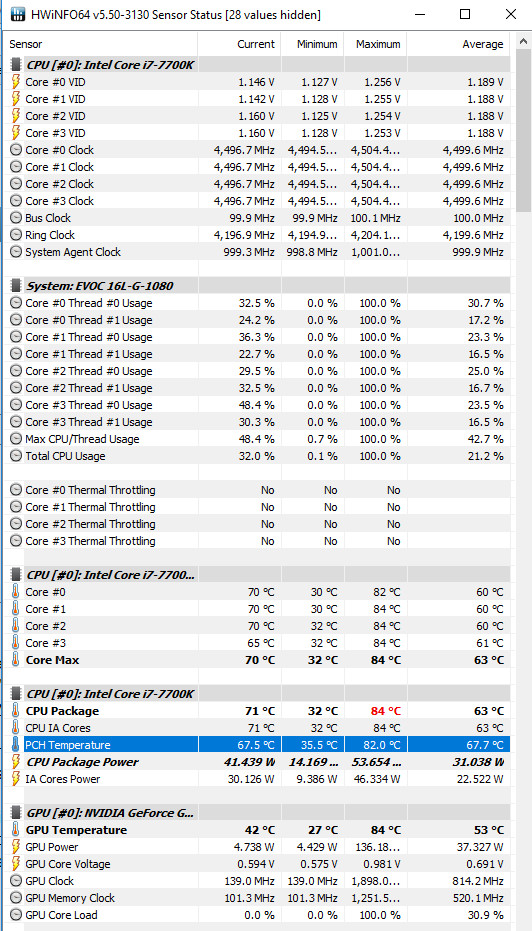
Should I be worried that the PCH temps hit 82 max? This was after a 20 minutes round of BF1 in FHD 120HZ ultra settings, strange is it didn't go above 60FPS like if it was limited by the server. My desktop goes all the way to 144FPS on QHD 144hz screen.
GPU undervolted to around 0.95v, CPU still on 4.5Ghz 1090Mv, both got to 84c maximum with full fans, no air pad cooler.Attached Files:
hmscott likes this. -
-
82c is definitely on the higher end but not crazy. When I was testing fans, I observed PCH temps at 102c before forcing shutdown. With max fans I didn't see PCH temps over 75, and they stay under 70 when using a notebook cooler.
Temps dropped 10 degrees from these levels after adding an 8mm heatsink to the PCH and removing the thick thermal pad transferring heat from the SSDs to the motherboard (PCH is on the opposite side of the SSDs.) There still isn't a lot of air moving across this area of the motherboard. I suspect there is even less airflow moving across the PCH if you have the bottom case holes mod. Either way, I definitely recommend the little heatsink. -
Did this have any significant impact on gpu or cpu temps?
Sent from my SM-G935T using Tapatalk -
You should be able to hit 120fps in BF1 with your 7700K + GTX 1080 at 1080p right? I don't play that game, so can't speak from experience. Assuming your hardware is capable of hitting 120fps, then maybe you have a setting messed up somewhere in the NVidia Control Panel: in Screen Resolution have you checked it's at 120Hz, no silly Half Refresh Rate V-sync set, etc? In the actual game menu of BF1 has it detected your 120Hz screen, not set on 60Hz in the game or something? These are just rhetorical questions, these are the things I'd check.
-
Yeah, it was on 120hz, but found the culprit, in Advanced settings it was buried there and somehow I missed it before, it was the FPS limiter so I removed it and I'm flying to 120FPS now, thanks though, it helps to remind a fellow of small things that can be overlooked.
You are right, I played BF1 again and max it got was 76c for PCH, CPU this time hit 91c 4.5Ghz-1090Mv and GPU 86c at 0.981v.
My new SSD the Curcial MX300 has a thick thermal pad below it and on the motherboard where the PCH as you said, this explains why it gained more heat from the usual 55c to 65c to this new 65c-82c.Robbo99999 and hmscott like this. -
I got the CMOS battery extension for my 16L. How do you pull it to reset the BIOS?
-
It is under 2nd M.2 drive. Battery is stuck in place, what you do is disconnect the small white 2 pin JST connection where the wires are connected. It was possible to do this on mine without removing the M.2 SSD I had in slot 2 by simply fishing out the wire.saturnotaku, Papusan and hmscott like this.
-
So jelly of your GPU temps(. Mine has been better since I've locked down the FPS.
Donald@Paladin44 likes this.
-
You can undervolt your GPU, I did it to mine, max 86 and sometimes less, you should use MSI afterburner Frequency to Voltage curve to adjust the applied voltage, it should help it run cooler and still maintain a good performance level. Try to run it on 0.9v.Donald@Paladin44 likes this.
-
Things have continued unstable here. I did the deep reinstall of the Killer driver as suggested, but unfortunately I've had two crashes since then, and one of them was with the Ethernet disconnected. I've got a ticket open with
@Zoltan@HIDevolution to try to work the problem. I won't bore the rest of you with any of the diagnostic dumps I've sent to HID.
Donald@Paladin44 and hmscott like this.
-
That's too bad, I was hoping for a software fix for you, but it's sounding more and more like a hardware problem
Please come back and let us know the final resolution, HIDevolution @Donald@HIDevolution should fix you right up
Robbo99999 and Donald@Paladin44 like this. -
Tech support is not Donald's job, my friend. @syscrusher is following the correct protocol.Papusan, Donald@Paladin44 and hmscott like this.
-
It doesn't hurt to have a prod / nod from upper management to the service department checking up on progress.
It's also an odd enough issue that it might be good for him to know about, if he hasn't noticed already. Donald is here to see / find problems before they get out of hand, I'm sure he doesn't want to miss one as interesting and as extensively debugged as this one.
Last edited: Aug 30, 2017Papusan and Donald@Paladin44 like this. -
What are the BSOD codes that you are usually getting after the crashes?
Normally if its not the drivers, good chance is that it is either an unstable overclock or a bad stick of RAM. But in most cases its a bit tricky to nail down.Papusan, Donald@Paladin44 and hmscott like this. -
I mostly have been getting BAD_POOL_CALLER but had one instance of DPC_WATCHDOG_VIOLATION.hmscott and Donald@Paladin44 like this.
-
What were the associated parameters with that error? You can look up the type of violation here:
(Developer Content) Bug Check 0xC2: BAD_POOL_CALLER
https://docs.microsoft.com/en-us/windows-hardware/drivers/debugger/bug-check-0xc2--bad-pool-callerLast edited: Aug 30, 2017Papusan and Donald@Paladin44 like this. -
Well, I wouldn't say "debugged" yet. More like, "observed in its glorious bugginess."
@Zoltan@HIDevolution has responded to my ticket, and by mutual agreement my next step is going to be a partial teardown and reseat of connections tonight after work.
Question: My RAM sticks are under the keyboard rather than accessible from the bottom panel. I requested that during the build so it would be easy to upgrade RAM later (I have 32G now, but will someday go to 64G when it's cheap to do so). I've heard that you can get to the "hidden" RAM sticks on this machine by lifting the keyboard. Anyone know how to do that? Zoltan says reseat the RAM if it's accessible from the bottom panel, but I'd love to be able to reseat mine regardless. I've seen enough flaky hardware over the years that was fixed by reseating RAM, so this seems a very good next step. DRAM is notoriously hideous at its timing level, picky as hell about every voltage and clock transition, so even a slightly poor connection can be extremely disruptive.Papusan, Donald@Paladin44 and hmscott like this. -
Unfortunately, that error dump got lost in a later crash, so I don't have the deeper parameters any more other than what I posted to the forum. I'll save that link for {sigh} next time, though.Donald@Paladin44 and hmscott like this.
-
I don't know about removing keyboard only, I think you should do a full tear down of your laptop like I just did back then to reset my CMOS battery before the mode that was introduced by @Mr. Fox .
Papusan, Donald@Paladin44 and hmscott like this. -
Gotcha. Just to check, have you tried doing a full BIOS / NVRAM reset?
Also if possible run latencymon and check if you are getting DPC latency spikes. This is mainly to check something im suspicious might be causing the issues, but could also be totally un related.Papusan, syscrusher, Donald@Paladin44 and 2 others like this. -
I generally only see those two stop errors on my MSI and Clevo laptops with unstable RAM settings. Try setting the default memory profile and see if the problems go away.
The keyboard is not removable. You have to take the motherboard out to get to the top RAM slots. The motherboard is attached to the underside of the metal palm rest... bolted directly to it, along with the display assembly/hinges.
That can also induce them if the DPC latency is out of control. Intel and Killer have both had some random driver versions that totally screw up things with DPC latency. NVIDIA and AMD graphics drivers can also cause it, but buggy networking drivers are usually the prime suspects.
@syscrusher - this is my favorite DPC latency checker. It will identify specifically which driver(s) are causing a problem. http://www.resplendence.com/latencymonLast edited: Aug 30, 2017Huniken, Robbo99999, Papusan and 4 others like this. -
All noted, and working on implementing suggestions. Thanks! LatencyMon so far indicates no problems, but I'll let it run for a while.
Along the way, I also noted that my CPU voltage got reset to dynamic mode, perhaps during a crash recovery? Dunno whodunit, but it's back to static mode now since that's always been the most stable for me.Papusan, hmscott and Donald@Paladin44 like this. -
As an aside, I'm already at the default memory profile; never had the guts to tinker with that setting.
-
Great news. Troubleshooting DPC latency issues is never any fun. Yes, very likely that a glitch reset something. If you disable the watchdog timer on the second overclocking menu that will be less likely to happen. I'm sure somebody at MSI thought that would be a good idea. It really pisses me off to have any of my BIOS values be reset without me issuing the order. Used to happen often on my P570WM as well.Last edited: Aug 30, 2017
-
Anyone else get a loud popping sound from the built-in speakers whenever you mute/unmute them and/or plug/unplug headphones?
-
Do you have Realtek Audio power management enabled? If so, try disabling that in the Realtek control panel.
-
Already did that. No joy.
-
LatencyMon ran for almost 5 hours. There were only two drivers reported as problematic. One was something called "wdf", which I gather is part of Windows core functionality. The other was...big surprise...the Nvidia driver. The mysterious "wdf" driver was only slightly slow, but the Nvidia driver had instances of 80 ms response time for delayed procedure calls! The data tables were astonishing -- everything else down in the two- or three-digit ranges of microseconds, then here is the Nvidia driver with 80000 plus, two orders of magnitude slower.
The DPC latency appears to have been a one-off spike, and I actually think it may have been the screen reinitializing when it came out of screen blanking mode. So I'm not going to over-react right now, but I'll certainly keep an eye on that Nvidia driver. I'm running version 385.41 right now.
I did as HID Evolution suggested, and reseated internal connections tonight. I also found a heatsink part with missing screws, and secured that.
What do most others here have for their "turbo boost mode power limit"? It defaults to 91W; mine is currently set to 95W, but the scale goes way below and way above that.Huniken and Donald@Paladin44 like this. -
Considering this, the NVIDIA driver dont seem to causing any major spikes.
I would definitely try a CMOS/NVRAM reset though.Huniken, Mr. Fox, Papusan and 1 other person like this. -
As a very loose idea/theory, if you don't need all the bloat in the NVidia driver maybe you could get lucky & it would help DPC latency just installing the features you need - e.g. just Graphics Driver + PhysX for instance.Papusan and Donald@Paladin44 like this.
-
Hmmmmmm....... I ran FireStrike after my connector reseating, more as a confidence test than as a benchmark. The first attempt failed to run, then it succeeded when I ran it again. Windows Event Viewer reported that the Nvidia driver "stopped responding but successfully recovered". I saw that error before, earlier today. I'm beginning to suspect this latest Nvidia driver may not be such a great version. What are others running that is behaving stably? I may want to revert this one.Mr. Fox and Donald@Paladin44 like this.
-
GeFarts drivers are frequently buggy. I generally avoid updating drivers unless I have a bug that needs to be fixed or a new game that requires an updated driver to perform well. I like the "if it ain't broke don't fix it" approach and generally stick with whatever drivers give me the highest benchmark scores.
-
I rolled the audio drivers back to the standard Microsoft ones and made a change to the output in the sound control panel, and everything seems to be kosher with the speakers. The only time they pop now is when powering off the computer, which is more than livable.
With the Realtek drivers, adjusting power management, either via the control panel or through the registry, does nothing. Upon further investigation, I came across some posts on MS TechNet talking about some more deeply embedded registry keys that are tied to audio power management. See the post by Trevor Seward here - it's for Windows 7, but I'm assuming it's the same for 10. The specific location for the entires can be found here. I'll try these out if I'm feeling up to reinstalling the Realtek drivers, but the MS ones seem to work just fine. Plus, it has the added benefit of being less bloatware.Last edited: Aug 31, 2017 -
Great tip...eager to hear more once you reinstall the Realtek drivers.hmscott likes this.
-
-
Tell Vivian I said thank you for testing and confirming it helped on other machines. Always nice to have validation from multiple computers/technicians.
What would be interesting is to see that heat pipe redirected to the CPU MOSFETs and VRM chips that are not cooled. It could have a heat sink block soldered to the end of it and a thermal pad to cool those pieces. Although, my setup is working fine as a discrete cooler for those pieces. -
@Donald@HIDevolution @thattechgirl_viv - here is a before and after snapshot of what I am referring to. I think that heat pipe would be a better use for that than my foam pad. But, I doubt it could be re-shaped for that pupose without breaking or kinking the heat pipe in the process. Perhaps you guys and @Eurocom Support could convince MSI to make this change on the next product revision.
![[IMG]](images/storyImages/YYGzUQD.jpg)
-
Although if they moved the heatpipe over to cool those CPU Inductors & VRM chips, then it would only cool those if they were running hotter than the GPU - because the heatpipe is coming from the GPU and heat only flows from hot to cold. If they do run hotter than the GPU, then all good, but still not quite as good as a heat pipe coming direct from the heatsink fin assembly.Donald@Paladin44, hmscott, Papusan and 2 others like this.
-
Well, whaddya know about that?
I never would have guessed that. Thanks for the update; I'll remove the screws I installed, next time I open the box.Donald@Paladin44, hmscott, Papusan and 2 others like this. -
Yes, that's correct. What I am using now is probably as effective as it needs to be for the CPU components. I'm thinking along the lines of using it to hold the heat sink on those components since there is no way to screw it down (hence the foam pad). Simply moving that pipe off the CPU and putting a finned copper heat sink on several inches of the end of the heat pipe would likely help improve the 1080 cooling, and it needs all the help it can get. If it could knock at least another 3°C to 5°C off the GPU temps that would be meaningful. The pipe is soldered directly to the copper plate that contacts the GPU die, so I'm thinking it might make more than that much difference for the GPU, but connecting the CPU (hotter of the two) to the GPU is simply adding fuel to the fire for the GPU. Connecting the two is the Achilles Heel for the Clevo P7 product line as well. I don't understand why this silly practice is so popular with laptop engineers. It does help CPU cooling a little bit with the P870DM3/KM1 vapor chamber, but there is probably about 2 to 3 times the cooling capacity with that compared to your typical laptop heat sink. Just the vapor chamber alone weighs nearly as much as some thin and light turdbooks, LOL.temp00876, Donald@Paladin44, hmscott and 4 others like this.
-
Those little finned copper heat sinks that you're talking about sticking to the end of the heatpipe over the VRM/Mossfets, they're only gonna be able to transfer as much heat away from the components as related to the volume rate of flow air that passes directly over those little finned areas - I don't think that would be a substantial volume flow of air, and the heat transfer surface is also not large, so I can't really see that helping GPU temperatures much, because the GPU throws out a lot of heat in comparison to the VRM/Mossfets, but I can see it helping the VRM/Mossfets, but again only if the GPU is running cooler than the VRM/Mossfets (because the two are connected).
EDIT: I can see some value in a slightly different setup with that 'spare' heat pipe. Leave it connected to the CPU, but disconnect it from the GPU - then bend it round and place it on the VRM/Mossfets - all cooling is now coming from the CPU heatsink assembly. (I mean I doubt it will bend that far, but if it could be designed that way, then that would work better).Last edited: Aug 31, 2017Donald@Paladin44, hmscott, Papusan and 1 other person like this. -
Passive cooling works fine for the CPU power components. Even most desktops use passive cooling. I have those on the PCH chip and they work great. The PCH is cooler than necessary now. These parts do not get hot enough to need a fan, but they do get hot enough that having nothing is a big problem.
However, I would be thinking more along the lines of a single piece, long/thick strip of copper with 0.25 to 0.50 inch fins on it soldered to the heat pipe, not the stick-on aftermarket things. That would be more than adequate and much better than nothing, whether it would be connected to the CPU or to enhance the 1080 cooling.
I like your idea... it's a good one, and I could probably do that mod myself. I would just need to buy a new heat pipe and transfer the existing bracket over to it.Last edited: Aug 31, 2017Donald@Paladin44 and hmscott like this. -
Wow never realized the barebone did not have vrm and chokes heatsinks. The bga version does have a block of heatsink that extends from the cpu heatsink. Don't those vrm overheat without a heatsink?
Donald@Paladin44, hmscott and Mr. Fox like this. -
I have never checked their temps. I never had any issues whatsoever before, so they were not getting super crazy hot and causing instability. But, leaving them bare like that cannot be ideal. They are cooled on my Clevo's. So, I did something about it just for good measure. It certainly can't hurt.
I am noticing random examples in photos that are posted online where this is being ignored on other brands as well. Alienware comes to mind, but I have seen others, too. It seems like we live in a day where cutting corners on expensive laptops to save a dollar here, a few pennies there, is becoming too much the norm and it really sucks.Donald@Paladin44, hmscott, Papusan and 1 other person like this. -
I did hear the chokes don't really need it but The VRM does because it gets super hot.Donald@Paladin44, hmscott and Papusan like this.
-
Wont the foam piece block / seal in a lot of heat? Since the surface doesn't get enough breathing room for the heat to actually transfer over to another medium from the heatsinks?Donald@Paladin44, Mr. Fox and hmscott like this.
-
I know VRMs need cooling because:
Donald@Paladin44, hmscott, Papusan and 1 other person like this.
*** MSI 16L13 (Eurocom Tornado F5)/EVOC 16L-G-1080 15.6" Owner's Lounge ***
Discussion in 'MSI Reviews & Owners' Lounges' started by Diversion, Oct 14, 2016.