Problems? See this thread at archive.org.
Yup, this was tested extensively. I think other guys were able to hit 1885 or 1895. Depends on the hardware I guess.
-
-
Thanks! I did a little fooling around with this, and hit a FireStrike score of 18349, my personal best, with about a 3 degree Celsius *lower* GPU temp than my previous. It only dropped from 91C to 88C, so still warmer than I would want to run for an extended period, but I have not finished tuning.
Incidentally, I offer a big shout-out to all the mentors on this list. I logged into 3DMark web site, and found that my first FireStrike with this machine was 16450, so with a lot of help from you folks, I'm getting a lot more out of this system.
EDIT: A little more tuning, and FireStrike 18388 at max GPU temp of 87C.Last edited: Aug 25, 2017 -
Update: The new driver fixed my suspend/resume problem, but introduced a new problem. Now when I connect to wifi, I lose Bluetooth entirely. Stopping and restarting Bluetooth from Control Panel fixes Bluetooth, and wifi continues uninterrupted. My friend told me the Intel wifi driver is persistently buggy, and I'm starting to really believe that.
I checked for updates on the two Bluetooth drivers (one from Intel, the other from Microsoft, and apparently handling different parts of the stack), but I am already at the latest version on both. -
It's sad two main wifi manufacturers (Killer-Intel) is bugged with problems. What's work for you is a lottery. And wifi cards is now even soldered on the MB on some notebooks
 What a future.
UsmanKhan, syscrusher and hmscott like this.
What a future.
UsmanKhan, syscrusher and hmscott like this. -
It was Intel drivers that were buggy throughout the 72xx series and Killer was a winner, then the other way around, now both? Yipe...
"We're gonna need another Wifi brand!! (Timmy!!)"
-
We had Broadcom wireless wifi cards(in my AW17-I hadn't much problems). But those had also their own problems
 hmscott likes this.
 -
Looking forward to finally receiving shipment on a Eurocom Tornado F5 on Monday...1 year later but I finally got it. Glad I held out for the better specced machine with most bugs worked out.
Kinda impressed, I ordered and paid on Tuesday its coming monday, that's pretty quick for custom build. -
I tested this undervolt in Fire Strike with stock clock speeds, comparing to the none undervolted run, differences were lower by 300 points on the undervolt run, it's a few pages back. But the lower temps is what I like so this is isn't a major performance impact, I still fail the stress test in Fire Strike with worse % on the undervolt, this GPU needs higher voltage to run stable none fluctuating frames but this also requires proper cooling as in liquid cooling or AC cooling to keep temps down. Best solution right now seems to undervolt the GTX 1080 and run stock clocks for long gaming sessions. I play sometimes battlefield for extended periods of time, keeping it cool is my number one priority, now both CPU and GPU are cool, I'm satisfied with what I have.
-HunikenLast edited: Aug 26, 2017Papusan likes this. -
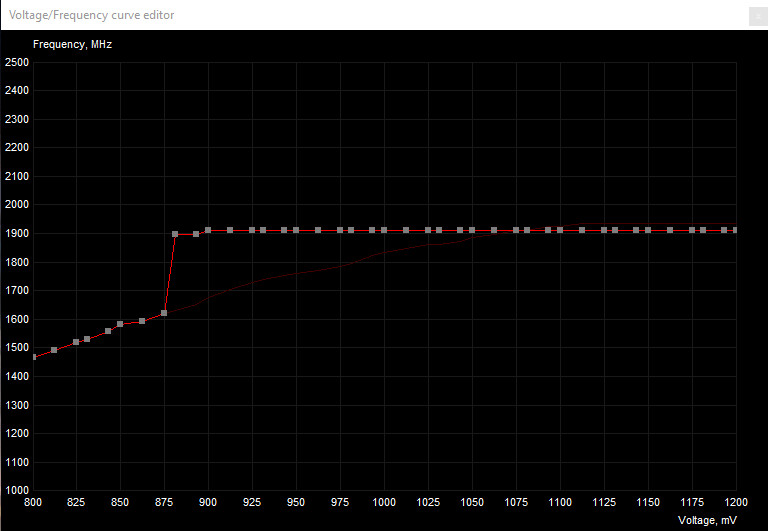
Is the picture of the curve you posted a few pages back the one your using? I read somewhere the sharp increase could cause performance issues (don't know enough about it to know if its true or not). If that's not yours could you post a pic of your current curve? I would trade off a little performance for some of this temperature any day!
-
Here is my result in stock clocks no undervolt:
http://forum.notebookreview.com/thr...6-owners-lounge.797128/page-767#post-10588089
Now this is with undervolt:
http://forum.notebookreview.com/thr...6-owners-lounge.797128/page-775#post-10589747
My current curve attached.Attached Files:
-
-
That curve shows a massive overclock of almost +300Mhz at your lower voltage point, I'm fairly convinced you're not getting the full performance of 1900Mhz clockspeed, and that it's sitting in that weird zone where it doesn't crash but under-performs for the clock speed that is shown. Sure, it's performing same as stock, but what's the difference in the clock speeds that the GPU stabilizes at in GPUz during your benchmark runs on both stock vs your undervolt? My guess is that the undervolt option results in a significantly higher stable frequency than the stock version? If that's the case, and the performance of the two are "the same" (which they are as you've shown), then you're in that strange zone where Pascal underperforms it's shown clockspeed due to not being supplied enough voltage. I'm not sure I'd want to run a GPU in that zone, because it feels to me like some kind of a 'fail safe'/'bugged zone' that the GPU falls back on when supplied with significantly reduced voltage - just wouldn't feel right to me.
-
*grumbles*
I knew it would happen, and it did: I went back to my parents and grabbed my old 24" monitor, dragged it back to my house, set it all up with appropriate adapters from DVI cable to HDMI port, and it doesn't work.
No signal is being detected, and even if Nvidia and Device Manager are detecting the monitor, Windows 10 isn't.
Has anyone encountered this experience?
(Let this be a lesson to me, no matter how much you spend, you can't get more than one screen!)
Edit: after some fairly rigorous experimentation, I've definitively narrowed it down to the F5's interaction with the monitor, or the F5 itself.
Screen, adapter, cable, all work together with another laptop's HDMI slot(windows 10 Pro activated) ; screen, vga cable, work with another laptop(windows 7 activated) .
Unless Microsoft included some hidden nasties in the non-active 10 Pro, it must be the F5...Last edited: Aug 26, 2017 -
Maybe... its like $15 on ebay to get pro key, just activate it.
https://www.ebay.com/p/Microsoft-Windows-10-Pro-Professional-32-64bit/809536399 -
Are those sites legitimate? I know similar sites selling steam keys turned out not to be.
Anyhow, I sneezed and it worked suddenly.
There is no justice.hmscott and Falkentyne like this. -
Got a problem: My system is spontaneously rebooting, about once every 24 hours, and examining the event log yields this:
A corrected hardware error has occurred.
Component: PCI Express Root Port
Error Source: Advanced Error Reporting (PCI Express)
Bus Device:Function: 0x0:0x1B:0x0
Vendor ID Device ID: 0x8086:0xA167
Class Code: 0x30400
The details view of this entry contains further information.
There is a link to go to Microsoft's KB for further information, but it gives a 404 page not found error. The details view is essentially the same data. According to a web database of PCI vendor IDs, 0x8086 is Intel (well, no surprise there).
This error happens when the machine is idle but not suspended. I haven't been playing with my CPU settings or RAM timing at all, for several months now. Yes, I've messed with GPU in the past couple of days (see my previous posts), but this error happened before I started that testing.
Any ideas what could be wrong?
EDIT: I found some online discussions suggesting this may be related to ... drum roll, please ... the Intel wifi driver. {sigh} -
The Level1 Linux channel has good info on passthrough...watching it Live now...
Level1 Linux: Livestream (Setting up PCIe Passthrough on Fedora on X299 and Threadripper systems)
Did you get passthrough working ok?
Edit: Amazing timing, I must have felt the disturbance in the force, screaming Blue Screen of death(star)
syscrusher likes this. -
Try disabling your Wifi module...
https://h30434.www3.hp.com/t5/Noteb...ry/WHEA-Logger-flood-Event-ID-17/td-p/5424405
"Under Windows 10 (64bit) i have about 500 messages pers second.
This causes about 300Kb/s constant traffic on the disk.
The problem comes from the PCI that holds the WIFI module (device ID: 0x8086:0xA115).
If i disable this PCI from device manager the error stop appearing."syscrusher likes this. -
Watched part of this live, will catch the recording later. Thanks!hmscott likes this.
-
Done. Let's see if this helps. Really annoyed that this driver is so problematic.
-
Yes, I got mine off ebay. Those keys cost close to nothing in bulk orders, or if they play M$ right
-
Yes they are. I got my MS W10 Enterprise key from ebay, and it was legit and still works.
ThatOldGuy likes this. -
It is what it is, the average Mhz is around 1680-1730 in the undervolt but spikes to 1890s then back, in GPUz it clearly shows the voltage being not reliable because of the undervolt (in the sensors tab there is a colored graph showing it being supplied with less than Ideal stock voltage) but the performance impact is minimal as shown in Fire Strike so it is good in my opinion to be able to manage the temps being way lower, 73 max playing Final Fantasy 14 online at Maximum settings.hmscott and leftsenseless like this.
-
Fair enough, but I was asking what the difference was between the clock speeds during benchmark when comparing stock to your undervolt - if there is a large difference between the two and you're getting the same performance, then you're in that bugged area where Pascal doesn't crash when given significantly less voltage than required but instead underperforms for the clock speed shown. If you're happy with how you have your GPU set up that's cool, I just don't want people to be under the mistaken impression that they're getting the full performance that their clockspeed shows when they undervolt 'too' far.
-
Hey, the post & testing at the following link could be interesting for some of you folks that might have trouble keeping your GTX 1080's cool to a temperature that you would like:
http://forum.notebookreview.com/thr...ecture-2017-2018.794920/page-38#post-10590610
To summarise, I found that you can effectively undervolt & overclock your card at the same time by reducing your Power Limit (TDP) and simultaneously applying your max stable overclock - Turbo Boost 3.0 technology of Pascal will then do the rest & effectively give you lower voltage points & higher frequencies. The caveat to this is that you have to be able to be in a position to change the TDP of your card, and my understanding is that on laptops you don't have access to the Power Slider in MSI Afterburner - you could look into modding your vBIOS though to a lower TDP - you lower it to a max value that corresponds (through experimentation) to the max temperatures that you want to see. This process effectively maximises & optimises frequency at each voltage point on the curve, while the TDP limit you've set will prevent the highest voltage points from being used (which are the ones that create the most heat). This approach would help avoid the pitfalls of the "Pascal Undervolting Problem" that was the topic of conversation in my previous post directly above this one (as well as in earlier posts in this thread recently).Last edited: Aug 27, 2017 -
Now that I understood you, yes you are correct, I totally forgot that the curve actually does increase the clocks as I was focused on voltage only. I'M stupid. Yes the none undervolted run was not oc like this undervolted over clocked run, stock no undervolt was around 1835mhz tops and gave a higher Fire Strike score than the Overclocked and undervolted run (1895mhz).hmscott likes this.
-
Hey, that's ok, you're not stupid! I'm just trying to stop people falling into the pitfall that they're getting the full performance that their clockspeed suggests when they undervolt too far using the Ctrl-F curve in Afterburner - it's an easy way to dupe yourself - I was duped briefly when I used that feature & thought I was running my GTX 1070 at 2150Mhz and 1.0V! Haha! If you want to try a more flexible & reliable means of undervolting then my previous post above (Post #7775) is the one to look at - but it does mean having access to change the TDP of your GPU which could be complicated when it comes to notebook GPUs.
-
Saw that but since it's a pain in the eyes to try it on a notebook I have no choice but to run the GPU like this to run it cool, summer isn't kind in the middle east.....brother @Phoenix knows too well how hot it gets in the summer, 50c easy!hmscott and Robbo99999 like this.
-
A good idea, but unfortunately not a solution. Overnight, I left the system idle with the wifi device disabled, and it still rebooted itself. Is there a Windows utility like "lspci" from Linux that I can use to find out which specific device is at fault on my system? I notice that Windows Device Manager has an option to update all the device drivers -- is that a good or a horrible idea to try? (Recall, I'm fairly new to Windows.)hmscott likes this.
-
i have check infomation of memory support of CPU. i7 Skylake support maximum with 2133Mhz RAM, and KabyLake is 2400MHz RAM @@.
So is that the same performane when run 2400Mhz vs 3000MHz on Non-Unlock BIOS @@ -
Windows 10 is a real disaster, with constant bugs and fixes to find, I'm not using it myself - remaining on Windows Vista, 7, 8.1 for the foreseeable future, @Phoenix to help with Windows 10 problems is a good suggestion.
Or, someone with the 16L13 that has seen this problem and fixed it under Windows 10.
I would indeed recommend looking for current driver updates on the brand, vendor, OEM sites.
@Phoenix has several Windows 10 related threads:
Windows 10 Creators Update Bloatware Free Edition
http://forum.notebookreview.com/threads/windows-10-creators-update-bloatware-free-edition.804247/
Windows 10 Tweaks and Fixes (Index post #1)
http://forum.notebookreview.com/threads/windows-10-tweaks-and-fixes-index-post-1.779394
NBR Windows 10 Clean Installation Guide
http://forum.notebookreview.com/threads/nbr-windows-10-clean-installation-guide.781178/
Phoenix Software Updates
http://forum.notebookreview.com/threads/phoenix-software-updates.794490
These have been updated recently, see if they work on Windows 10:
The latest release of pciutils is version 3.5.5 (2017-07-05)
https://eternallybored.org/misc/pciutils/
http://mj.ucw.cz/sw/pciutils/
If you have the original boot backed up, you could reload that to do a sanity check. I've found at some point it can be useful to go back to the out of the box Windows install, and if you are stable running it, you can rule out a hardware problem. Jumping back in time to before the driver / OS instability can quickly rule out an RMA.
Good luck
Last edited: Aug 27, 2017Huniken and Spartan@HIDevolution like this. -
Has anyone written a guide to ventilation mods for the Tornado F5? Searched the forum with no success.
-
I need to stay on Win 10 because I heavily use its built-in UML subsystem. I absolutely live in the bash shell all day long at work. Yes, I can run Linux virtually, but the UML subsystem is so much more convenient.
My original reason for the question. I assumed that I was not the only one to have seen this issue on this machine. Perhaps I was mistaken. I should have realized that my personal entropy field is capable of spawning new problems seen by no other mortal.
[...]
Oh, @hmscott, you are my hero today! I never imagined someone had ported my old friend "lspci" to Windows. I keep forgetting how many Linux users have alleviated their workplace-mandated Windows angst by porting useful POSIX utilities over. Downloaded, installed, and working. This will give me exactly the deep PCI data I need to isolate my problem child. So far, it appears it might actually be the PCI bridge chipset driver, so I'm going to take your suggestion and seek out a new version of that.
I also downloaded WhoCrashed, which was recommended on the @Phoenix tips page you linked, and found that this won't help me until I re-enable the pagefile that I turned off early in my Windows experience. I've got 32 GB of RAM on this machine, so I got rid of the pagefile to save wear and tear on my SSD and conserve space. I'll bring it back temporarily for testing, so I can get crash dumps.
Even better than that, my "original boot" is a clean install of Win 10 Pro from a thumb drive. Even in Linux, I never stick with a factory-installed o.s. on any of my machines. Two reasons: First, I have strong preferences of how I want things configured, beginning with my disk partitioning. Second, unless you have done the system installation from your on-premises installation media, you do not know for sure that you can do so in a disaster recovery situation. I'm a crusty old sysadmin, with all the paranoia about backups and DR that go with that curmudgeonly grumpiness.....errr, I mean, wisdom and experience.
That being said, I'm going to shy away from a total reinstall unless I have no choice. My environment is rife with dev tools and other things that take a long time to install and configure, and I can't let myself fall into the trap of "just reinstall" every time something is amiss. I need to learn to troubleshoot Windows the way I do Linux.
Thanks much for your detailed reply. A lot of good links in there, and my bookmarks now contain them for future reference.
Under the category of "Duhhh...", I forgot that I actually have a Linux boot on here now, on the spare SSD. I just installed that a couple of weeks ago, right before traveling, and I forgot about it. I could have booted that and run the "lspci" to get a bus dump. Oh well, at least now (thanks to you) I have a way to do that inside Windows. -
I caught a break. The system actually crashed while I was using it, instead of in the middle of the night, and it briefly displayed a stop code of BAD_POOL_CALLER. Online research strongly suggests this is a driver problem, so I'm going to keep pursuing that avenue and make sure I've got updated drivers all around.
hmscott likes this. -
Completely disabling your pagefile is not a good idea for exactly this reason. What you can do is create a small dynamic one with a minimum size of 1 GB, maximum size of 2 GB. The file Windows creates will only be 1 GB in size, and it will only be used if your system ever runs out of physical RAM.syscrusher and hmscott like this.
-
Personal use varies, but I've found rare occasion for an application where I "need" a pagefile, if I have enough memory. For debugging I use one, but after the bug is fixed, normal operation doesn't require a pagefile.
Also, I use a fixed sized pagefile, usually 1GB is enough, although for a long time 800MB was enough. Dynamic sized between 1GB and 2GB, you might as well set it at 2GB and leave it static. Also I will optimize for contiguous space before creating a fixed size pagefile.
@syscrusher your reason to not having a pagefile is as good as any, reducing the storage vampires of pagefilesys and hiberfil.sys along with write cycles on a small boot SSD is a good idea put to practice
Last edited: Aug 27, 2017 -
check out HIDevolution, they have a custom bottom coverleftsenseless likes this.
-
So, in the world of Windows, and this type of machine, which company counts as the brand, vendor, and OEM? Intel? MSI?
By coincidence, you and I came up with the same setting: I went with 2G min and max static. And yes, my hiberfil.sys was banished long ago. With 32G of RAM, hibernate is a horrible idea for me.
hmscott likes this. -
That's a question for the 16L13 owners / @Phoenix... or search the thread?
Sometimes the 1st post, OP, has links for support, but I don't see any there, @Diversion ? Maybe add some driver update links for various vendors of the 16L13 to the 1st post?
I would assume the vendor / seller should have a support area with links to updates for the hardware as well. Try @Donald@HIDevolution or @Eurocom Support - or wherever you purchased. Maybe those guys I @'d will come through with links...
Otherwise google is your friend, get a list of hardware from inventory software with hwinfo64 and then start building a list for yourself, and to share here too.
Microsoft tends to try to install "anything" if there is something missing and it doesn't have a vendor specific solution to install, so check to see what's installed, uninstall it and then install the OEM driver for that specific hardware.syscrusher likes this. -
Yeah, I actually went there before posting the question. The problem is that the 16L13 isn't directly mentioned on MSI's site as far as I can tell, and searching for drivers for its motherboard just yields discussions about same, not actual downloads. I was nervous about going the next level of generality -- the chip numbers -- because if ASICs are involved then those chip numbers may be emulation targets and not the actual devices. That seemed to be the "road to madness".
I did find that my Intel Bluetooth driver had an update available, so I applied that. I'll see if that helps. If nothing else, I now have all the prerequisites for WhoCrashed to do its magic on the dump file.hmscott likes this. -
I can't fault them too much for that. I've written code to do hardware detection, back in the day, and if you can't directly get the hardware from an ID number or BIOS string, it can be extremely challenging to deduce the chips involved, and even more so the boards, just from reading register values. PCI and similar smart buses took us a long way forward in that regard, but hardware manufacturers still sometimes lie about their ID numbers when they're trying to be compatible with something else.hmscott likes this.
-
There are "driver updaters" that can help in your situation. Some are dangerous with potential malware, some just have ad's for their other products.
I use IObit Driver Booster started from IObit Advanced Care, and I've had it a long time on old systems without issues.
You can download just the Driver Booster updater, run it and see what it finds
http://www.iobit.com/en/driver-booster.phpsyscrusher likes this. -
What!! >>>>>>"The chip will be compatible with the LGA 1151 socket and rumors are that board makers will extend support of Coffee Lake onto 200-series and even 100-series platforms"
http://wccftech.com/intel-core-i7-8700k-cpu-benchmarks-leak-faster-than-8-core-ryzen/
Do I smell a 8700K in my EVOC?!!Robbo99999, UsmanKhan and hmscott like this. -
That article's messed up, they must have accidentally copy / pasted old copy into it, as just before the section you quoted it says:
"The Intel Core i7-8700K will be an interesting processor for consumers as it is the first mainstream chip from the blue giant to feature 6 cores. The new chips will be marketed under the Intel 8th gen branding and will be featured on a new platform known as the 300-series. The 300-series platform will mean that the chips will not be compatible with older 200-series platforms although the 300-series is known to feature the same socket aka LGA 1151 (v2). " -
I'm hoping for it to be backward compatible but time will tell.hmscott likes this.
-
The Greed is stronger than AMDs presence with 8 cores
-
Updating the Bluetooth driver last night didn't help. I had another crash this morning. This is the device (from "lspci") whose ID is filling my event logs right before each crash:
Code:00:1b.0 PCI bridge: Intel Corporation Sunrise Point-H PCI Root Port #17 (rev f1) (prog-if 00 [Normal decode]) Flags: bus master, fast devsel, latency 0 Bus: primary=00, secondary=02, subordinate=02, sec-latency=0 I/O behind bridge: None Memory behind bridge: dc400000-dc4fffff [size=1M] Prefetchable memory behind bridge: None Capabilities: [40] Express Root Port (Slot+), MSI 00 Capabilities: [80] MSI: Enable+ Count=1/1 Maskable- 64bit- Capabilities: [90] Subsystem: Micro-Star International Co., Ltd. [MSI] Device 1163 Capabilities: [a0] Power Management version 3
This appears to be the Intel PCI bridge chipset, so I'm going to go looking for a device driver update for that.
Thanks for the recommendation on the IObit driver updater. I saw a number of similar programs advertised in my Google results, but for exactly the reasons you mentioned (potential malware) I wasn't going to trust any of them until I had a recommendation from someone I trust here. In the Linux landscape, I know who to trust and distrust, but in Windows, aside from the major vendors, I don't know what sources are trustworthy. (Some would argue, with justification, that not all the major vendors can really be trusted, but that's another thread.)
EDIT: No surprise, the IObit updater found that my Intel PCI chipset driver was "extremely outdated". I'm doing a general update of all 8 problems it found. (I normally would do one at a time, but as often as my system is crashing right now, I figure I don't have much to lose.)
My only complaint about the IObit software is that their marketing is a bit off-putting to me. I don't like installers that default to "yes, please install a browser thingie I didn't want". The software seems to work well, though, and if it solves my problem I'll pay them for the Pro version as a thanks.Last edited: Aug 28, 2017 -
Try installing the Chipset driver update if one is available or the most recent available.Papusan, hmscott and syscrusher like this.
-
this is also a welcome thought if they make a mobo for the 16L13.
*** MSI 16L13 (Eurocom Tornado F5)/EVOC 16L-G-1080 15.6" Owner's Lounge ***
Discussion in 'MSI Reviews & Owners' Lounges' started by Diversion, Oct 14, 2016.