Problems? See this thread at archive.org.
Which setting controls vcore? The 1175 number?
Sent from my iPhone using Tapatalk
-
-
The 1175mv Vcore is "Manual/Override".
But that's simply the voltage mv target. If AC/DC is set to 1, then this is very close to the VID.
Raising IA AC/DC loadline will raise the VID target at load, but there is no vcore sensor in this laptop, so the VID shown can wind up being very inaccurate from what voltage the CPU is actually receiving. Also there is vdroop, which will increase in amount the higher the target voltage is set. At 1.4v, vdroop can be as much as 100mv, yet you would need a digital multimeter to know exactly what the true current vcore is. VID will NEVER show vdroop, ever. VID is simply the target voltage BEFORE vdroop, and the VID starts acting funny or becoming inaccurate with adaptive voltage and AC/DC=auto.
You can compensate for vdroop by raising IA AC/DC, but I would not go above 50 under manual vcore, without having measuring tools. I believe the "Auto" setting uses an Intel reference of 2.10 mOhms, if this reference is the same as the Z370 / Coffee lake boards/8700k (this would be a manual value of 210).
UNDER NO CIRCUMSTANCES DO YOU EVER GO ANYWHERE NEAR THE UPPER LIMITS, PERIOD.
On desktop boards, this setting should be set to the lowest value that is not auto (0.01 or 1), but on laptops, this setting is used by MSI to "compensate" for vdroop, and was designed to work "Auto" with adaptive voltage. Using the auto setting with manual vcore causes heat and power draw to go through the roof (you should probably do your own testing on this, as my results are only from the BGAbook; this may or may not apply to the barebones). I suggest you test it out. Due to the 91W TDP limit you can't bypass, you should probably downclock your CPU to 3.5 ghz and then test it, that way you won't be limited by TDP throttling if you decide to mess with it. You can get a baseline idea of what the voltage "might" be, by looking at the temps and the power draw levels, but I've even found the power draw to be reported inaccurately on adaptive setting with the "Auto" setting. You should experiment, but be prepared to waste a day...or two...on it.Huniken and saturnotaku like this. -
I use 1.08V core/cache +25mv offset at 25 AD/DC. Can you try if that works for you?
-
How do I set a 1.08 core/cache and at what clock frequency are you locked?
Pictures of your BIOS screens would be very helpful.
Sent from my iPhone using TapatalkHuniken likes this. -
Oops sorry about that. That is at the stock frequency of the 7700k. The 1.08 is core voltage set to manual with an offset of +25mv too. I do not have pictures as I do not have my machine (p870dm3) with me right now.Papusan likes this.
-
I assume this means 1080mv override on the MSI, offset +25mv (not sure why this is needed when using manual voltages however! Why not just use 1105mv directly?), IA AC/DC=25 (0.25 mOhms), at 4.2 ghz.
Offset is usually used for adaptive voltage, because adaptive target voltage is based on the VID, but the VID can vary wildly if IA AC/DC is set to auto. With a value of 1, the VID will always be the target voltage but you may need a positive offset if the VID is too low for stability (because again--vdroop).
It's better to find what target voltage you need for stability, and then if vdroop is killing you, raise the target voltage to compensate and put just a little into IA AC/DC loadline, rather than keeping IA AC/DC at 2.10 mOhms (=210), IMO. -
@saturnotaku
I'm regrouping my bios screenshots and I will edit this post with my current configuration:
![[IMG]](images/storyImages/1zAJIWO.jpg)
![[IMG]](images/storyImages/hr4Pber.jpg)
![[IMG]](images/storyImages/sg531Zv.jpg)
![[IMG]](images/storyImages/4G9tvEi.jpg)
![[IMG]](images/storyImages/j9r9EtF.jpg)
![[IMG]](images/storyImages/TEAOreS.jpg)
![[IMG]](images/storyImages/Ggtq8lV.jpg)
![[IMG]](images/storyImages/fn7LVdw.jpg)
![[IMG]](images/storyImages/DHxjJfz.jpg)
![[IMG]](images/storyImages/s1Rzjxy.jpg)
![[IMG]](images/storyImages/PAW78S5.jpg)
![[IMG]](images/storyImages/licFVfh.jpg)
![[IMG]](images/storyImages/Lz75FSh.jpg)
Done!Last edited: Nov 21, 2017Huniken, saturnotaku and Falkentyne like this. -
I based it on the Intel Power Delivery guidelines published by AnandTech, that is why I (again) started using offsets https://www.anandtech.com/show/2404/5 . Offsets are used to prevent voltage spikes when the processor current requirement is low.

-
I keep my book locked at 4.8 Ghz. I rarely see temps above 80 C. I haven't really OC'd the gpu because it throttles at 50 C anyway and I don't run air conditioning through it.
-
From what I understand, your P870 has the capability to draw more than 91W from the CPU. The 16L13 cannot, as @Falkentyne has stated. Plus, your machine has superior cooling and the larger form factor so I don’t think your settings are going to really apply here.
@leftsenseless - You must have hit the silicon Power Ball (super lottery with huge jackpots but the odds of winning are more than 300,000,000 to 1) with your CPU because 4.4 GHz seems to be about the best I can do without hitting the power draw limit or thermal throttling. Temps seem to hold in the mid 80s so that’s probably where I’ll keep it.
Sent from my iPhone using Tapatalk -
i ordered these, if any one want; https://www.aliexpress.com/item/NEW...S-ROG-G20-G20A-G20AJ-COOLING/32317298085.html
hfm linked the post that guy used them succesfully with some modding, so guess ill be doing same.hfm likes this. -
I should have mentioned that I use a cooling pad with a massive single fan beneath my book and weather stripping to help direct more airflow through the machine rather than around it.saturnotaku likes this.
-
Will it fit on this laptop model
-
I've been messing with this thing for hours (barely slept at all), and it seems the best I can manage is 4.4 GHz across all cores with a 1175 voltage override and +5 on AC/DC. Anything more results in either failing Prime95 within a minute or thermal throttling. Even if I were to somehow get 4.5 or higher stable, it may be right on the edge. At 4.4, CPU power draw does not appear to exceed 90W, which is probably right where you want to be on this machine because of its cooling and BIOS/EC limitations, so that's where it's going to stay.
This experience was the answer to the question of why I got out of the PC tuning game so long ago. Now I'm just going to shut up and enjoy my machine. Even at 4.4 GHz, you're not going to find a more powerful desktop replacement notebook that is still reasonably portable.
Thanks to everyone who tried to help.Papusan, hmscott, Robbo99999 and 1 other person like this. -
What is your fire strike benchmark score out of curiosity, @saturnotaku?
Huniken likes this. -
Hmm are they better than the stock ones by aavid?
Currently running without a working fan for CPU, no bottom cover and using an air pad.
Papusan likes this. -
Don’t know and don’t care. My PC is for productivity and playing games and not to serve as an arbitrary number generator.
Sent from my iPhone using Tapatalkhmscott, hfm and Falkentyne like this. -
I've run them. I like that I have a history of perf for my various notebooks. It's cool to see the upgrade progression. Oh, and I managed to get the 666 achievement. So that was badass \m/.
Otherwise I don't care either as long as my games play well.hmscott and saturnotaku like this. -
In other news...
https://arstechnica.com/information...d-vulnerability-in-pc-server-device-firmware/
![[IMG]](images/storyImages/O3kzDZ1.png)
@Donald@HIDevolution @Ted@HIDevolution
What's the chance of a new Prema BIOS once a patched firmware is released, or at this point maybe just take a patched stock BIOS.Last edited: Nov 21, 2017hmscott, Robbo99999 and saturnotaku like this. -
check this post out; http://forum.notebookreview.com/index.php?threads/810712/
-
Don't you have to have Remote Management activated in the first place in order for this exploit to occur? Windows 10 Home doesn't have Remote Desktop feature, so that one should be secure I'm thinking. Will be interesting to see if I get a new BIOS patch for my MSI motherboard (desktop).
-
Placed an Order with HIDevolution for a 3 day shipping via FedEX, Star Citizen 3.0 is coming out like an Avalanche and I just can't stay standing by watching.....My desktop rig also got hit bad, the monitor PSU died on me and ordered one from Amazon hoping that it will work without any issues. I hate my bad luck damn it!!
-
What did you order from hidevolution?
-
I was asking not out of bragging rights, but as a reference to see where your machine is performing compared to what it's capable of. If you were in the hunt, great. If not, I was going to offer to compare BIOS settings.Last edited: Nov 23, 2017
-
Replacement CPU Fans.
-
No, it can be exploited by malware it seems based on what I've been reading.Robbo99999 likes this.
-
Considering selling my Tornado F5 since I'm not gaming much anymore. Does anyone know if there's a specific thread for posting laptops for sell?
Sent from my HTC6545LVW using Tapatalk -
http://forum.notebookreview.com/forums/nbr-marketplace.18/
Be sure to read the rules and FAQ first. There is a specific form that needs to be filled out when creating a for sale thread, plus you need to provide timestamped pictures. -
Thank you!
Sent from my HTC6545LVW using Tapatalk -
I do indeed have the worst luck in the world, I don't want it to rub onto anyone else.
HIDevolution needs time to restock the CPU fans, them being out of stock, no surprise there.....
Locked out of Alpha testing of Star Citizen 3.0, CIG servers took a dump from all that hammering LOL!! Stress testing they said, more of can't handle the flood of new comers! -
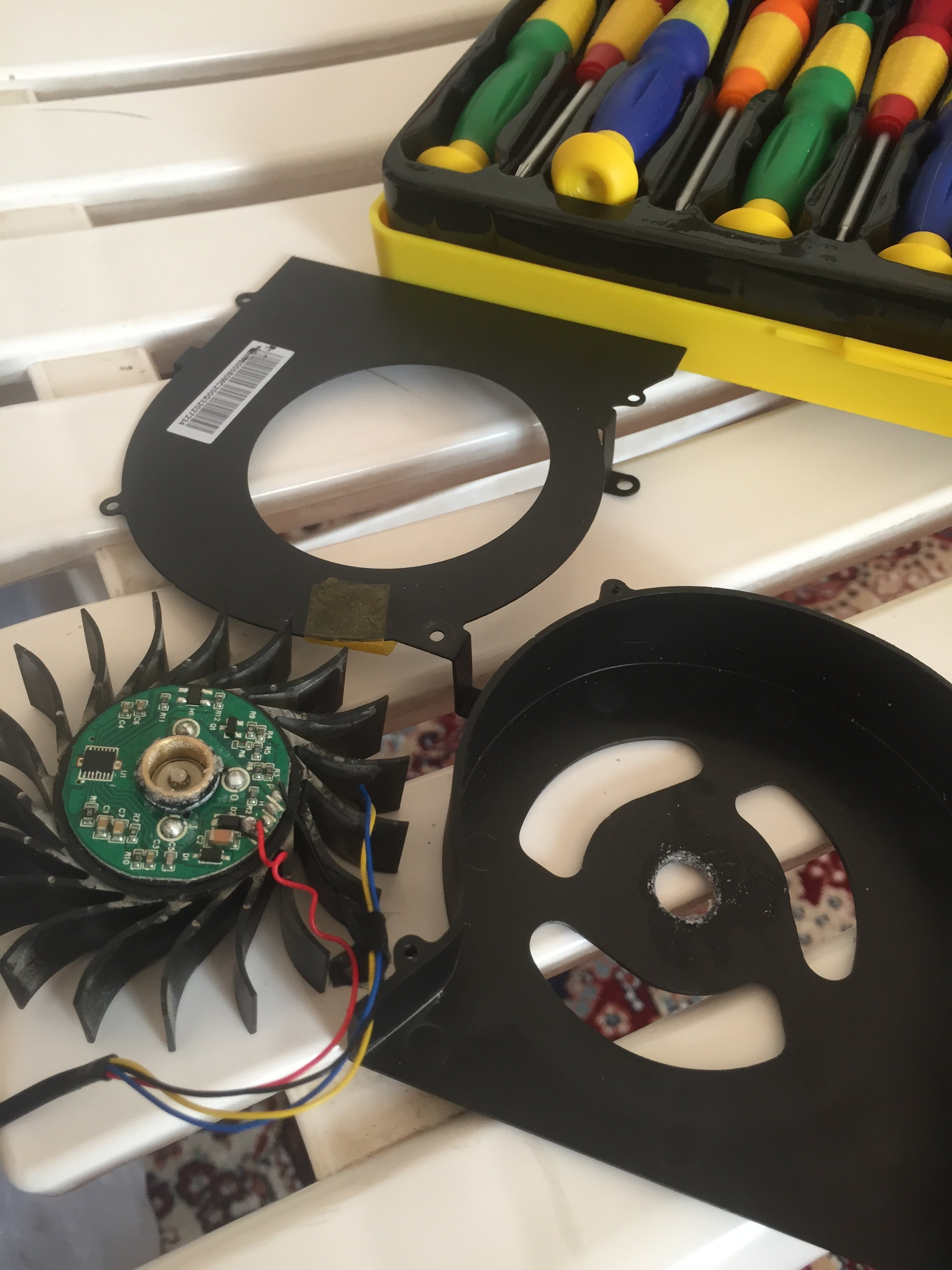
Man, these fans are EXTREMELY poor quality. MSI needs to let some other company make these next time.saturnotaku and Huniken like this.
-
No ****! The housing broke when I tried to take the blades out, flimsy crap, even soldering wires is useless!
Attached Files:
hfm and saturnotaku like this. -
-
Hey guys, where are the hotkey drivers for Windows 10? Also I bought this skin https://www.ebay.com/itm/Laptop-Car...r-2016-MSI-GT62-GT62VR-15-6-inch/272460027950 and it applied flawlessly. has some cutouts for the MSI GT62VR lid but I left them in place and it's pretty flawless.
-
Guys which 1080 laptop with support of two sata hard disk slot available in market. In 15 inches screen size
Sent from my iPhone using Tapatalk Pro -
None. There's no space for two. Only laptops which have an optical drive option would support two SATA HDD's.
Some of the old laptops support two SATA drives only if you remove the optical drive enclosure (or if the ODD space is left blank).
Unless I'm living in a cave, NO high end laptops have room for two HDD's.
The GT73VR can use a HDD in the "Slave" slot for a SLI video card, with a SATA male to female extension cable, but only one SATA HDD can be installed because there is only one connector. There is a place for a 2nd Hdd power connector but there is no second SATA connector. Maybe there's one on the backside of the mainboard, I don't know. -
Yes my idea was to use one SSD in primary slot and Hard disk in DVD ROM slot. So I thought if msi having any 1080 model were i can fit my two hard disk.
Sent from my iPhone using Tapatalk Pro -
None of the 15,6 inches, but the bigger Clevo P870 series. You need come out from your dark cave, bruh.
-
Hi, May i know what country are you from? and what happened to your unit? I'm currently in the situation you've been through and I would appreciate some thoughts and insight.
-
I just shipped it back to them and they fixed it and shipped it to me. Not really anything else to add.
From US.saturnotaku and Thana7 like this. -
My apologies for jumping to conclusions. Certain discussions with other forum members about benchmarking that came up in the past really left a bad taste in my mouth, and I was fast to judge. That being said, there's a possibility I'll want to dig further into this, but my machine seems to be in a pretty good place at the moment. It's fast, temperatures and power draw are good, and I seem to have fixed the last nagging area of instability (see below).
I have a feeling the software was pulled because of some major bug in it and the Windows 10 fall creator's abortion. My machine would inexplicably reboot itself if left it idling - even after just 10-15 minutes or so. The event log only showed that it was because of a power problem. There was no BSOD, file error, or anything else that could be used for further diagnosis. On a whim, I uninstalled the hotkey/keyboard light manager software, and I haven't experienced a single reboot since, even after leaving the machine idle for an hour. -
Hopefully it makes a return. I really would like to utilize the screen off button.
-
So my CPU fan is also dying... cool.. Gonna have to replace it, also am most likely going to sell the Tornado soon, got a desktop at a great price this past weekend... It will be sad to see her go but I have not moved my laptop since the day I purchased it and the desktop will be more practical for what I will be doing..
I say this now but in 1 month I will probably be selling the desktop looking for a new laptop
-
Quite a few people leaving to get desktops, although I'm not that surprised as the Tornado is very similar in ethos to a desktop - in terms of modular design, tinkering, upgrading options, high performance, so it attracts the same kind of enthusiasts.
-
Tornado F5 is a desktop replacement in all rights.
wait and watch, with what I know coming out next year this time, everyone will be back with thier insane crazy laptops... -
Not everyone if the F7 will have the same firmware limitations!
saturnotaku, Falkentyne and steberg like this. -
I'm building a new desktop but I h ave no plans to replace my laptop any time soon, however it is a little upsetting to see so many fan issues happening as of late. Hoping that since I do not use mine as a primary computer/DTR and do not have fans running at max all the time that mine will last a little longer.
Robbo99999 likes this. -
I like gaming in my armchair with a lap desk too much to go desktop.
-
lol, not referring to F7 - we went through multiple potential options for another lineup already, some including AMD infact, just small tidbit of info. Not sure what the status is, but I assume most idea's were shelved or unviable.
-
He's referring to the F5 being unable to bypass CPU TDP without PL2 throttling with stock firmware (Bios power limit settings are ignored).Huniken, raz8020 and saturnotaku like this.
-
Is this not overcome by the unlocked bios ?
*** MSI 16L13 (Eurocom Tornado F5)/EVOC 16L-G-1080 15.6" Owner's Lounge ***
Discussion in 'MSI Reviews & Owners' Lounges' started by Diversion, Oct 14, 2016.