Problems? See this thread at archive.org.
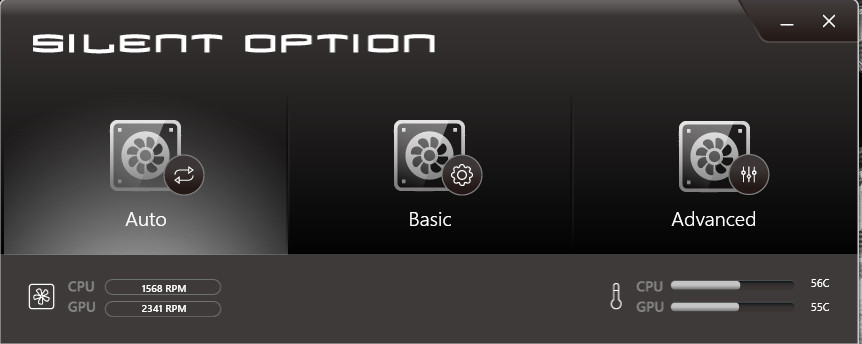
Fan is now working as intended.
Thank you @Ted@HIDevolution & @Zoltan@HIDevolution for the quick response!
I'm now back in track, going to take it easy this time, no more tinkering for a while, I just want to enjoy my machine.
Peace o7
-
Attached Files:
-
-
I've got a question and need some help terribly. I'm very confused and have literally no idea what is wrong. It's worked, for the most part, flawlessly.
Anyway, I listed my old Samsung 950 Pro m.2 SSD for sale on the local craigslist, and someone wanted some Crystal Disk screenies sent before we met up. I opened up the laptop, put it in, and booted up Windows 10 from my main SSD (a Samung 960 Pro m.2). Everything was fine, I got the screenshots, and while in Windows wiped the drive (950 Pro) via Windows built in Disk Management application.
I turned off the PC, took it out, and the system no longer boots at all. It goes to the built in Windows troubleshooting screen, and every single option gives me an error (System Restore, System fix, {System Reset isn't present}, Windows Rollback, etc....). The disc is seen in the laptop's BIOS, but it won't boot. So, I decided to just reinstall Windows 10, but when I get to the "Pick your drive" there are none available to select.
Turned off the PC and took the 960 Pro out, put the 950 Pro back in, with exactly the same issues. I expected this, as it was wiped, but when trying to install Windows it's not shown in the disk selection screen either. It shows up in BIOS, but nowhere else.
Took that drive out and put in my big storage SSD, a Crucial mx300. This one is a SATA III interface, not m.2 like the other ones. This one showed in BIOS, and allowed me to install Windows on it. Did so, loaded into Windows, turned off and put the 960 back in. System boots into Windows, but Windows cannot see the 960 Pro (or the 950 Pro for that matter). They both show up in BIOS, but I can do nothing with them. Both drives don't work in both m.2 slots.
What happened?
My brother walked me through some troubleshooting via the CMD prompt line, and neither drive is accessible there, even though they can be seen. I was unable to boot into safe mode with both m.2 drives. He thinks that somehow both drives got corrupted. I do not have another machine to test these in. -
So this used to be a common issue with the windows 10 recovery environment. I had this issue on of original samsung NVME drives in my alienware and if I remember correctly the fix was to change the Sata operation in Bios and make sure there no other SATA drives enabled.
Go into BIOS
Navigate to boot, make sure it is UEFI
Go to SATA operation and set it to AHCI
Then I think in Advanced or Advanced boot or something like that enable legacy ROM options
Then disable secure boot
Let us know if this worksVasudev likes this. -
Is it giving you a BootMGR error or a "No disk detected, insert system disk and try again" message?
-
From my understanding the disk is just not showing anywhere but in BIOS, basically when he goes to install the Win 10 media with USB the drive does not show up when you get to the "Where do you want to install Windows" screen.
Please correct me if I am wrong.
By CMD commands do you mean Diskpart
LIke ListDisk and all of those? -
I think @cavell219 's instructions will work.
Most likely, when the drive was removed, the Bios probably bugged out because there was no longer a nvme drive, and switched one of the options back somehow.
Please PM me if cavell's fix does not work.
P.S. are you using the STOCK BIOS or the UNLOCKED BIOS or Prema Bios? (do you have access to advanced bios settings that are normally not available?) -
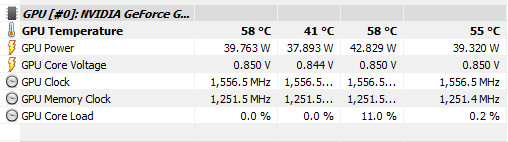
I don't like the GPU temps at Idle, is this normal? 58.....Room is around 25c..........
Attached Files:
-
-
Can you try adaptive instead of max performance in the Nvidia control panel?
-
I just did that, thanks.
Seems I think I need to do a repaste on the GPU side only, CPU is fine. When I use full fans, the temps do drop, but when I turn off full max fans, the temp goes back to 56c.... -
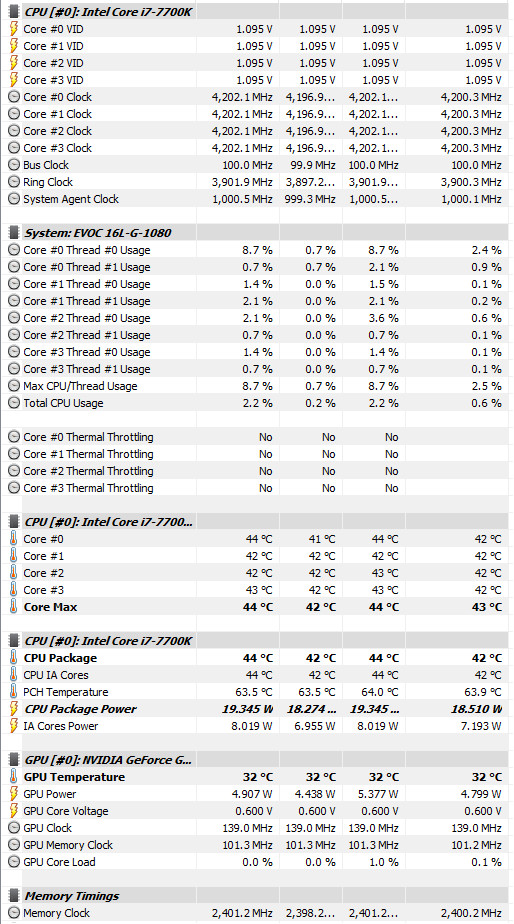
That's a lot of wattage sucking from your CPU there considering it's in idle. Mine is chewing down only 18W Package power (6700K @4.7Ghz, 1.4V) as I type this - C-states is one answer. So, if you're at 40W consumption at idle this means your CPU fan is always gonna run, and I guess a 58 degC is normal for the load, especially considering your warm 25 degC room temperature.
EDIT: sorry, I didn't look properly, you're talking about your GPU! Yes, my GPU is consuming 14W average as I type this, and yours is at 40W. You need to change your Global Power settings in NVidia Control panel to the NVidia Recommended options: I think it's called "Optimal Power".Last edited: Dec 5, 2017Huniken likes this. -
Here it is with just Adaptive instead of max power, both fans around 1.1K RPM.

I like the thermals, quite too!
Attached Files:
temp00876, aaronne, ThatOldGuy and 1 other person like this. -
-
-
Yeah, you want to set the NVIDIA control panel to Adaptive. Optimal Power, which is unfortunately the default setting, has been bugged for the longest time.
-
Great. In your previous post, you were idling at ~40W and 1500 MHz. Temps were good for that amount of power too.Huniken likes this.
-
Oh right, when people were talking 'Adaptive' I thought they meant 'Optimal Power' - now I know these are 2 seperate options. I'm running Optimal Power, but haven't noticed any strange increases in idle GPU power consumed, I'm on a destkop though - is it a laptop related bug?
-
Possibly, though I haven't used a desktop PC in more than half a decade. The main issue I experienced was the GPU not downclocking properly when exiting out of a game. Maybe this has been fixed, but since Adaptive has always worked, I just never thought about using Optimal.Robbo99999 likes this.
-
Ah, I see. I have to thank you indirectly, because this talk of GPU Power Management prompted me to try "Prefer Maximum Performance" on Firestrike benchmark - I ended up with 5% increase in GPU score over "Optimal Power"! http://www.3dmark.com/fs/14342504
Strangely, a number of months ago I lost 5% GPU score in Firestrike since the introduction of newer drivers - I hadn't thought about trying "Prefer Maximum Performance" (PMP) to regain that GPU score, and it worked just now! It would be interesting to know if I get any performance boost in games by using "Prefer Maximum Performance". I'll test some game benchmarks and then edit this post with my findings. I might just set "PMP" for all my games just to be sure, it won't effect thermals in a big way.
"Optimal Power" is at least bugged in the Firestrike benchmark anyway on my desktop at least.
EDIT: tested with "Prefer Maximum Performance" in 3 different games, and no difference in framerate in the built in game benchmarks: F1 2015, F1 2016, Dirt Rally. (Yep, I don't just play Codemasters racing games, just these have benchmarks, and my SSD's aren't massive!). Will still enable "Prefer Maximum Performance" for all of my games, just to ensure there are no silly bugs like on the Firestrike benchmark.Last edited: Dec 5, 2017 -
The difference is that the higher performance keeps the GPU running at full clock all the time, so your idle temps will be higher too. It's better to lose that 5% most of the time and let the GPU idle and save wear and tear - it'll reduce fan noise at idle too.
The same goes for CPU performance. High Performance Power setting is CPU Min/Max set to 100%/100%, never letting the CPU downclock, instead use Balanced Power plan with CPU performance set to 0%/100% to reduce idle heat and fan noise. -
If you only set "Prefer Maximum Performance" on a per game basis, rather than on the Global settings, then there is no difference in power consumption, because games pretty much always boost clocks to their max levels on the GPU, but I agree that you want your GPU to downclock when you're just browsing the web or using office programs or something - and that can be achieved by just setting "Prefer Maximum Performance" on a per game basis, not globally.
EDIT: my GPU was not downclocking at all in the Firestrike benchmark using "Optimal Power", so that wasn't the cause of the 5% lost performance, GPU running at the same clocks with "Prefer Maximum Performance", but regained that 5% performance using the latter - strange!
For CPU performance, I'm also a fan of the CPU not consuming lots of power when idle, but at the same time I also prefer maximum responsiveness of the CPU in the desktop environment. Luckily it's possible to have the best of both worlds & have your cake & eat it too! You can do this by using Windows High Performance Profile combined with ensuring you have C-states enabled. I've mentioned it before in this thread & elsewhere on these forums, but I did some testing to determine the best power saving features while retaining maximum CPU performance. My testing is shown in post #1 of this thread I created: http://forum.notebookreview.com/thr...eatures-vs-performance-responsiveness.803030/Last edited: Dec 5, 2017saturnotaku likes this. -
I ran the Intel tool in Premas "Important Security Update" thread and it says my MSI is vulnerable. Is this something at the bios level that needs to be done? Or will his Clevo patch also work on these machines, or will there be some future update coming out? Just curious.
Huniken likes this. -
@aaronne and I updated our 16L13s using Prema's utility with no issues. If you decide to go this route, and it works for you, be sure to send him a few bucks as a thank you. There are PayPal and BTC links in the readme file.
-
Where is the tool? Thanks.
-
-
So I installed a 7700 (non-K) into my F5 after flashing the latest Eurocom provided bios.. For some odd reason my idle temps went from the low to mid 30s with a 6700k to low 40s with this new processor (de-lidded).
Under load, the 7700 can run at the same 4ghz all 4-core turbo load as a 6700k stock, and nets a 15-20watt gain (lower over the 6700k).. Temps aren't any better.
I'm not sure if this is a characteristic of Kaby Lake cpus or if it's the new BIOS but i'm not really excited about the change, I was hoping for incredible load temps at 4ghz and it's roughly the same :/ I even re-pasted twice with liquid metal to ensure I had good coverage and nothing changed there.
Perhaps my F5, being well over a year old now is wearing out on me.. Heck I even bluescreen with a -150mv undervolt with this CPU now running at a base clock of 3.6ghz (Disabled Turbo). It's very disheartening but it is what it is I suppose. -
-
Even if you set it per game, as long as the game is loaded it will keep the GPU high, Global settings only take effect when the app is unloaded. If you put the game in the background even stopped the GPU will stay clocked high.
Although this does vary, which makes it fun to debug while it's happening.
-
If I remember well, the Kaby Lake cpu's die is smaller than Sky LAke, so the heat is transferred less efficiently
yeah! and also lapping help a bit! -
Its because the benchmark tests are rather short; and "Optimal Power" hangs up briefly during loading stages. An algorithm then has to decide what "Optimal Power" is at the end of each loading screen, so there is very brief lag in ramping up the FPS. "Prefer Maximum Performance" doesn't need a second or two to decide, it just goes at it full power.
-
-
From what I remember, both i7-7700K & i7-6700K have exactly same die size (122 mm²). But the Heat Spreader on Skylake is a bit thicker. See also the Bitspower Skylake variants who is designed for both Intel Skylake & Kabylake CPU.Last edited: Dec 6, 2017UsmanKhan likes this.
-
I didn't know this.. Unfortunately I don't have my 6700K lid or cpu (Sold it off already!).. Is buying the Bitspower IHS directly from Bitspower website the way to go or is there an USA distributor with them?
-
Here we go. Don't forget lapping
-
Ah, if only I'd checked this thread when I was also struggling with the same issue...
Ah well.
Does anyone know the way to fix the "Fall Creator's update and new Nvidia Drivers switch off laptop screen backlight" problem? I can't currently travel with this laptop, which is a big problem. -
Glad to hear it worked.
-
This has been an issue with Nvidia updates on my 4k screen since August. Which screen are you using?
The only fixes I know of are to revert drivers. I have not tried the creators update yet myself. -
OK this might be a bit of a rant, not sure if this is against the rules but hey, I need to let this one out.
I'm facing a very strange bug, on boot up with a cold start in the morning after like 6-7 hours of needed sleep, the screen is black but only I can see the mouse pointer moving around the screen, usually I do a hard reset of the laptop to restart it again then it just works fine.
This is very annoying to me especially since this machine is brand new less than a year old, very expensive and it has some really STRANGE bugs.....first 120hz screens had those brightness issues, then CPU fans dying, now this strange bug at cold start first thing in the morning.....sometimes and only SOMETIMES I come back from grocery shopping and the screen is black, not even mouse pointer is present, laptop still working fine, clicking mouse or keyboard key bashing doesn't yield any response, have to hard reset it. It irks me, but I also can't deny how great the performance of this laptop is, it's like having a beautiful wife/girlfriend but she just likes to bother you and tease you to unspecified limits....
End of rant. -
I expect you use Windoze 10 Have you tried disable Fast Startup if you have this ****y enabled? It's well known this
feature trash can screw up. As well Tested with other display drivers to see if the same happen? See also
https://www.drivethelife.com/windows-10/black-screen-on-windows-10-issue-how-to-fix.html
Huniken and Robbo99999 like this.
-
Hmm, I saw somewhat similar black screen issues on cold boot up with my Alienware M17xR3 laptop. In the end my GPU died, at least that was my conclusion, it's running fine off the iGPU now. (Windows 10)
EDIT: could be one for the tech support from the company you bought the laptop from, especially if in warranty.Last edited: Dec 7, 2017Huniken likes this. -
Yeah I think Fast Startup is on. I'll go disable it.
-
I'll ask Zoltan if he have any Idea about this issue.Robbo99999 likes this.
-
Don't take this the wrong way, but I've had my laptop since April and use it every day and do not have any of the issues you are having. The only "annoying" thing was the 120hz brightness bug which was fixed many months ago.
Are you sure that your overclocking isn't screwing up your unit? I do everything from play games to light coding/video editing and it seems to do fine with an "every day" 4.6ghz OC.Last edited: Dec 7, 2017saturnotaku, raz8020 and hmscott like this. -
Wait the brightness thing got fixed? For months I’ve been using it on max. How do i fix it?
-
Hi,
I have just got my MSI 16L1 machine, which is a cyberbook fangbook. It has BIOS EL16L1ID6.30A date 02/02/2017. Could someone help me, how I could put a custom bios, and from where I can have it? It has 7700k what I would like to overclock a little bit By default the laptop seems to give crazy voltage, and I think on that voltage the CPU could do a lot better or default clock with much lower voltage. Thank you very much for the support, I am pretty new member here, however I am amazed how the member super helperful here
Cheers -
To fix the voltage problem, set IA AC DC Loadline to 1, in "intel IA Domain" for the CPU core.
MSI does "VID boosting" with the Auto setting, which also causes VID to be reported INACCURATELY when using adaptive voltage, and for excessively high power draw when using manual voltage.
Setting this value to "1" will make the VID and actual voltage target be reported accurately, however you will still have vdroop, because there is no vcore sensor at all. VID will never show vdroop because VID is not vcore. -
You can try and get hold of SVET on the MSI forums. He can usually provide an unlocked bios for a small donation.
https://forum-en.msi.com/index.php?board=51.0
Prema no longer provides his BIOS to private individuals; only Prema partner distributors. He has been burned too many times by individuals. -
Thank you very much! Donation isd absolutely fine for the work they do! Prema has helped me before, a couple of day later his website was closed down, I could not enter any more
Thanks I will get in touch with the "guy",
cheers -
Also, in the machine I have 1070GTX. I have just ordered a 330W power supply, how I can a vbios it to have desktop performance, higher TDP? Thank you!
*** MSI 16L13 (Eurocom Tornado F5)/EVOC 16L-G-1080 15.6" Owner's Lounge ***
Discussion in 'MSI Reviews & Owners' Lounges' started by Diversion, Oct 14, 2016.