 Problems? See this thread at archive.org.
Thats exactly how to handle frequencies switching.
First you unlock with bar edit -> frequency drops,
You set frequency and vcore -> vcore changes but frequency don't.
Then you lock -> frequency changes to the new value.
-
Max working temp of 5750m 100 deg. If you want take it all be ready for 100 deg. 70 deg is only for 3,5-3,7 ghz. Temp correlates with voltage. The higher freq. the more voltage you need, it means higher temp. As i showed it on ebay, there are different freq. for different types of apps. Some works fine at 4.7-4.6 Ghz, some requires 4.1- 4.2 Ghz, otherwise the cpu is getting too hot.
-
What kind of performance can I expect in the Ryse Son of Rome and the Lords of the Fallen with A-10 on board ?
-
if you are on uefi mode then disable secure boot option and make sure you select usb in boot menu , if that doesnt work then switch to legacy mode and then try...
-
I created a script ".bat" that simplifies the whole process of using overclock with "amdmsrtweeker+setpci",(you dont need pscheck,overdrive or baredit), which allows you to:
1. overclock (put your multiplier and voltage and it will do it by yourself)
2. Remove the overclock (restore factory settings to restart or shut down without problems or bsods)
3. To lock to 3.2ghz (for standard processors or "ES")
4. Remove lock 3.2ghz
5. Change TSC to HPET to correct overclock errors with transparencys in windows 7 if you have it.
6. Disable or restoration of ULPs in windows registry.
All this is well explained and with a simple "menu", is a lot easy to use, try it, it is very convenient. It have all you need to overclock with the best method and in only 2 clicks.
Spanish version:
https://drive.google.com/file/d/0B1_Uo-NdslviekxicUlhVzB4Qm8/view?usp=sharing
English version (thanks to PornFlakes for his translation and to leeloyd for his knowlege):
https://mega.co.nz/#!QZAQRYhI!EqQjJdWxi8RY0hj4dPIEWs6Fwp2qlJOJA-g_E5VEDZ8
Just unzip, copy the "overclock" folder in the root of c: and copy the shortcut on the desktop. Enjoy it, if you are happy using it, do a comment here. -
I have a question to people who ordered their ES's on Aliexpress from this guy
Original Processor QS/ES A10 5750M (ZM258563C44HJ,4MB L2 Cache,2.5GHz to 3.5GHz, A10 5750M ) Socket FS1(FS1r2) PGA722 Laptop CPU-in Processors from Electronics on Aliexpress.com | Alibaba Group
How long did it take to arrive ?
It's been 6 weeks for me now and still no sign of it. I ordered it on 23 of september, last tracking info i got is that it was sent to airline on the 2 of october.
I already contacted the seller and he extended my purchase protection for another 38 days. -
hi, i am from Portugal and i ordered from that seller on 30 september and received it yesterday so for me it tooked 35 days to arrive. But usually it can take a litlle bit longer for another countries even when it reaches 50 or 60 days is normal . If the seller has extended the protection purchase and you have tracking code do not worry about it
 . Just wait! I do not mounted mine yet but i want
-
Mine also took a fair amount of time to arrive - but it did arrive! Probably around 35 days as well - to NZ.
Hope it turns up soon!
Edit: Also I haven't installed mine yet either! Have to put some time aside to concentrate and get it done! -
Ok, thanks
I guess i just need to be patient
-
Anyone can play to call of duty advanced warfare with this laptop?
-
Nope - but it's not the fault of the GX.
CoD: AW is terribly optimized as of today - game loads 5 minutes into the map, stutters, crashes, movies stutters too.
CoD: AW won't be playable for a few weeks still until they patch the damn game. -
Yes
HP ProBook 455 - A10 [email protected], AMD HD8750M@1000/1200(PowerPlay off), game runs @ 40FPS -
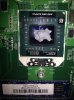
So, i already upgraded my laptop to 5750M ES and i also took advantage of the moment to repast cpu and gpu.
I was using a chinese cheap themal paste on the other cpu that has only 1,5W/mk of thermal conductivity and the cpu was easily reaching 80ºC during benchmark.
The seller that sell me the ES also send me a good thermal paste that he claims to have 5,5W/mk. But because i do not want to open the gx so soon and i want a really good colling to let me a good space to overclock i invested my money on a thermal past with 8,5W/mk to see if i get improvements on temperatures. The complete clean up also helped lot and i am very happy so far . The temperatures dropped 8ºc~10ºc from 33º to 24º on idle and benchmarking it do not reach 60º (all stock, no locked at 3.2ghz)
One curious thing is that after i replaced the cpu and turned on the pc the ccc started normally and really nothing changed unless the name of cpu. I am running on gx stock unlocked bios and windows 8.1 uefi mode. I think that i have a good space to overclock but the UEFI will be a problem right??
I probably has exagerated on thermal paste but is working fine xD

Attached Files:
-
-
That's A LOT of thermal paste you put there! I put like 1/3 of the ammount you gave and spread it evenly into an thin layer.
But I guess I will re-paste my ES, by adding just a little more paste. -
Yeah, you´re probably right but if you see on your laptop that should come just like mine, the gpu when i disassembled the cooler has this amount of themal paste from the msi factory
My problem now is that if i overclock the cpu on AOD i get a black screen but should be because i still have the pc running on UEFI. I will need to change
If i run cinebench benchmark several times with the cpu locked at 3.2ghz it already hits 73ª C without cooler boost. -
73 C i rather fine for 3.2 Ghz on longer session.
I get 85-92 C on 3.7 Ghz 1.26v on longer gaming sessions depending on the game, so I don't OC any further, otherwise my GX is loud as a hairdryer
-
Try overclocking with my script, may work on uefi without problems and is the easier method, yo only need to disable powernow on bios.
-
At least is a stylish hair dryer
Hi, thanks for the script, is a great work. I dissabeled powernow, pss support and CPB mode on bios just like Lisupoland tells on the tutorial . When i run the script i am trying to change multiplier to 33 and voltage
to 1,188V and i always get a black screen and keep to see my mouse moving. What shloud be?? I am thinking of dissabling uefi to test but i will need to chose legaccy mode and format the computer right ???
I also can use other hdd to instal other windows setup just to test and to be easy get back just in case. -
The only options you need to disable on bios is powernow. Cpb is the turbo mode and in my script when you overclock, it disables automatically by software and isn't necesary to disable on bios. I didn't tried my script on uefi, probably that is the reason of your problem. You need to set legacy mode and format windows again. You can change to mbr the partition of windows without formatting and do some modifications with third party softwares to boot on legacy without format windows but i think that the easier way is to format again. Here are a tutorial to do this:
http://www.terabyteunlimited.com/kb/article.php?id=580
I tried and works fine. You need to download his software (the trial version works fine) and burn his bootable app to do the modifications. -
So, i read what you writted and i turned on the CPB and Pss support again. I runned the script but this time i choosed 36 multiplier and 1,23V and worked fine in uefi mode.
I opened amd overdrive and it also tells that cpu is running on 3600 mhz and even the temperatures raised more.
But when i run cinebench 11.5 the cpu only scores 2.0 Pts
Usually with the cpu locked at 3.2ghz scores at least 2.6 Pts
What could be happened?? -
I really dont know... Try 3dmark11 physics test and compare the points default/overclocked.
-
I think your CPU throttles down when it reaches certain temperature - I had that problem, the "target frequency" was for instance 3600 mhz, but actual clock was like 2000 mhz.
3.2 Ghz scores 2.6 pts as you mention, so 3600 mhz should be giving you 2.85 pts at least. -
I do not think that the temperature should be the problem because it do not reached even the 80º.
I think that the problem is from the igpu because the image stop working.
Can i completely dissabe the igpu and run windows on h7970m alone??
How and where i can chose this option on bios ?? -
Do the 5 step of my script to avoid graphics and overclock problems and try again.
-
Has anyone here have luck flashing the bios of their non-hitman edition of their gx60 1ac to d0l?
LisuPoland, I'm afraid to flash using the 90l bios you provided because I have win8 and not win7. How did you mod the 90l to work with your laptop? You said about rom
ID checking, and the only thing I saw that was changed is the added /x parameter.
Did you flash using dos or efi? I'm assuming dos because you modded the bat file and not the flash.nhs which I think is used for efi flashing. -
Really thanks Consolero4ever!!
I was thinking that 5 option was only for who is on windows 7 because its what say on the script but the truth is that solved my problem.
What it changed ?? xD
I only tested 3.6 Ghz at 1.23V but i am already happy.
I can keep with my windows 8 on Uefi (8 secs boot time) and still be able to Overclok.
And more words for what?? Here is my best run results with all unecessary tasks closed down:
![[IMG]](images/storyImages/AEGyjd.png)
![[IMG]](images/storyImages/Plnqjf.png)
![[IMG]](images/storyImages/mOZsLC.png)
-
Your welcome! 5 option change TPC to HPET internal clock in OS (in the practise, nothings change). TPC has problems with overclock. Try 38 multiplier and 1.269 v . That frecuency works for me. Enjoy your overclock!
-
-----------------------------------------------------------------------------------------------------------------------------------------------------------------------------------------------------
These are the exact results you should be getting!
Give us feedback about how the games you use to play run after overclocking your ES
And here are my results running on 3.7 Ghz with v1.26 for comparsion:
![[IMG]](images/storyImages/3Dmark11ES2_zps4762f1d9.jpg)
![[IMG]](images/storyImages/3Dmark11ES_zps637a4871.jpg)
![[IMG]](images/storyImages/3Dmark11ES3_zps9a92ce93.jpg)
-
Hello All.
I am now an MSI GX70 3BE owner and would like to share my experience so far.
I have not used it much, but I did run Diablo 3 and some 3DMark benchmarks.
You can see the benchmarks in the below link.
One is without the turbo lock and one is with the turbo lock on.
Avoid AMD at all costs! Get intel&Nvidia! - Page 3
http://dragonarmy.msi.com/forum/showthread.php?t=22452&page=4#.VGUFqp4VOUk -
Hey guys. I got my ES the other day and everything was working fine. I used LisuPoland tutorial and consolero4ever script, BIG THANKS to both of you.
But today i got this error while trying to overclock
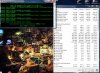
as you can see the voltage stays at 1.23 but the clocks go down to 900 Mhz,
when i try to undo the changes with option 2 in the script i get this
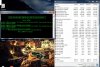
the voltage goes back to 1.18 and clocks go to 3.2 Ghz
All i have changed in BIOS was turn Power Now off and disabled turbo (with turbo in auto it always booted with 3.2 Ghz instead 2.5 Ghz for some reason)
As i mentioned before everything was working fine until today ????? No changes has been made to the system besides installing few windows updates.
Any clues what went wrong ? -
That problem is really strange. Your problem is that for some reason setpci is not working (setpci is like baredit on cmd, and is used to avoid frecuencys dropping when you overclock with amdmsrtweeker, the overclock is well done with amdmsrtweeker but setpci dont work for you). If you want, and the problem continues, you can overclock with script and to prevent frecuency drops to 900mhz try to use baredit and do the same method like you usually do to lock to 3.2ghz but with 01 values in the two steps instance 00. Only powernow must be disabled on bios. Dont disable cpb (turbo) on bios, the script will disable it for you when you overclock. Restore default bios settings and only disable power now and try again. Try to delete the overclock folder on c: and gxmods shortcut and download it again. If the script worked for you fine and later it doesn't work is really strange. The last thing to try is format windows. You need to use 64bits windows 7 or 8/8.1 . The script works on legacy and uefi. If you have problems with graphics or overclocking you can try 5 step on script to solve.
-
Hey guys, just wondering if you saw my post, it's the last one on the previous page, and I'm having some trouble with flashing the bios. Thank you!
-
BIOS tip doesnt work deleting the folder and downloading it again doesnt work either
tried step 5. I'm on W7 64bit , 90L unlocked BIOS
I dont have much more time to fiddle with it today, will try tmrw.
Thank you for your advice. -
Hm.. I'll try to ask other forum members for a solution.
But until then you can use ES on the stock BIOS so no worries
-
Hi All,
For those interested.
MSI GX70 3DMark11 (basic) scores. Standard CPU, MSI updates.
The first run is standard run:

The next run was with the turbo lock.

-
Fair scores with the machine, the only way to improve the stock CPU further is to get some very low latency ram.
-
Did you run the script as administrator ? setpci and AmsMsrTweaker need admin privileges.
And in Bios setup, you can leave "turbo" in auto, consolero's script will disable it before changing fequencies and enable it again while reseting the OC.
This script was meant to be used without Bios modding.
Edit : @consolero, it's TSC (Time Stamp Counter) that is replaced by HPET by the 5th command in your script ... not TPC (TurionPowerControl).
By the way, TPC can be used instead of AmdMsrTweaker to achieve the same result for both Windows and Linux. -
Just reinstalled W7 today, it's been over a year since the last one and I figured it's not a bad idea after switching the CPU. Everything is back to normal Thanks for your support guys.
-
"fair" is very generous of you, I scored higher with my old 4600M locked to 2.7 Ghz

-
Someone is playing Dragon Age: Inquisition maybe ?. Playable on gx ?
-
Most probably it's very playable since DA:I uses Mantle.
-
Thank you Polish Gamer. And how do you think , will I be able to play without mantle on A10?
-
It's a little pointless to me to be making lucky guesses just a few moments before game's release.
But, if you ask me, the game will run very good on Mantle (provided it's well optimized since the beginning) and decently on D3D, but if you can... then why not just use Mantle? -
Because I play mainly in the older games, I'm happy with the 13.4 CCC , and I do not want to do update windoiws on 8.1 version (not now yet) .
Thanks for the reply .
Btw - The game has already been released
http://www.metacritic.com/game/pc/dragon-age-inquisition
-
So, i already tryed lots of configurations on my ES like:
1.26V @ 3.8 Ghz
1.29V @ 4.0 Ghz
but principally those setups that also are on overclocking guide of Lisupoland.
I tryed to benchmark them just to see the resuls and to see what this cpu can do:
3.8 ghz 1.26V
![[IMG]](images/storyImages/MsBqn7.png)
4.0 ghz 1.29V
![[IMG]](images/storyImages/a2Dw6N.png)
But of course that for long time gaming i get 85º / 90º C and more on this setups,
so for now and because looks like my cpu it is not so angry like many others
i managed it to run at 3.6 Ghz and 1.2 V
It runs stable on this setup and helps a lot on the temperatures because it do not reached 80º C playing even without coller boost.
Assuming that my previous setup was the 5750M locked at 3.2ghz i will show my gains based on that:
![[IMG]](images/storyImages/mgrbur.png)
![[IMG]](images/storyImages/mg4FQk.png)
For now i only bring grid 2 results but i will bring more results from other games.
And grid 2 it is not much cpu dependent so on other games the results should be more noticiable and for those people that jump from the a10-4600m even more. -
Well then, let me upload my results in Far Cry 4 (ver. 1.3.0 ) running on ES overclocked to 3.7 Ghz v.1.260
Settings I play on (the game is already very beautiful)
![[IMG]](images/storyImages/FarCry4_2014_11_19_07_18_49_005_zps4df43320.jpg)
![[IMG]](images/storyImages/FarCry4_2014_11_17_23_39_07_374_zps92562793.jpg)
![[IMG]](images/storyImages/FarCry4_2014_11_17_23_53_57_078_zpsa739b1e3.jpg)
![[IMG]](images/storyImages/FarCry4_2014_11_17_23_36_48_344_zps0be438a2.jpg)
![[IMG]](images/storyImages/FarCry4_2014_11_16_12_25_10_330_zps1970b939.jpg)
![[IMG]](images/storyImages/FarCry4_2014_11_16_12_33_10_777_zpseaec5206.jpg)
![[IMG]](images/storyImages/FarCry4_2014_11_17_23_18_40_933_zps30514c61.jpg)
![[IMG]](images/storyImages/FarCry4_2014_11_17_23_32_14_149_zpsd5d35c5a.jpg)
![[IMG]](images/storyImages/FarCry4_2014_11_16_12_31_29_457_zpsbe9104a5.jpg)
![[IMG]](images/storyImages/FarCry4_2014_11_18_15_26_37_422_zps9cea7986.jpg)
![[IMG]](images/storyImages/FarCry4_2014_11_16_12_33_14_929_zps1da7cbf8.jpg)
![[IMG]](images/storyImages/FarCry4_2014_11_19_06_28_45_952_zps185d7a1a.jpg)
![[IMG]](images/storyImages/FarCry4_2014_11_19_06_17_26_292_zps494b7cd3.jpg)
![[IMG]](images/storyImages/FarCry4_2014_11_19_07_14_50_507_zpsb9be63d1.jpg)
![[IMG]](images/storyImages/FarCry4_2014_11_19_06_28_39_504_zpsa5f963ec.jpg)
![[IMG]](images/storyImages/FarCry4_2014_11_19_07_25_01_901_zps04a8db18.jpg)
![[IMG]](images/storyImages/FarCry4_2014_11_19_06_29_58_313_zps1056193b.jpg) Kevin@GenTechPC likes this.
Kevin@GenTechPC likes this. -
Lisupoland what program is that, that are you using to see temp, fps, etc, on upper right corner of screen?
-
Hello,
does anyone have experience with 4k monitors/TV??
im not sure if that laptop can handle it.
Ihave the MSI GX60 3AE-214XCZ Hitman Edition.
Thanks for response.
*The Offical MSI GX60 Owners Lounge*
Discussion in 'MSI Reviews & Owners' Lounges' started by layjohn, Oct 12, 2012.



![[IMG]](http://s1149.photobucket.com/user/LisuPL/media/3Dmark11ES2_zps4762f1d9.jpg.html)
![[IMG]](http://s1149.photobucket.com/user/LisuPL/media/3Dmark11ES_zps637a4871.jpg.html)
![[IMG]](http://s1149.photobucket.com/user/LisuPL/media/3Dmark11ES3_zps9a92ce93.jpg.html)


![[IMG]](http://s1149.photobucket.com/user/LisuPL/media/FarCry4_2014_11_19_07_18_49_005_zps4df43320.jpg.html)
![[IMG]](http://s1149.photobucket.com/user/LisuPL/media/FarCry4_2014_11_17_23_39_07_374_zps92562793.jpg.html)
![[IMG]](http://s1149.photobucket.com/user/LisuPL/media/FarCry4_2014_11_17_23_53_57_078_zpsa739b1e3.jpg.html)
![[IMG]](http://s1149.photobucket.com/user/LisuPL/media/FarCry4_2014_11_17_23_36_48_344_zps0be438a2.jpg.html)
![[IMG]](http://s1149.photobucket.com/user/LisuPL/media/FarCry4_2014_11_16_12_25_10_330_zps1970b939.jpg.html)
![[IMG]](http://s1149.photobucket.com/user/LisuPL/media/FarCry4_2014_11_16_12_33_10_777_zpseaec5206.jpg.html)
![[IMG]](http://s1149.photobucket.com/user/LisuPL/media/FarCry4_2014_11_17_23_18_40_933_zps30514c61.jpg.html)
![[IMG]](http://s1149.photobucket.com/user/LisuPL/media/FarCry4_2014_11_17_23_32_14_149_zpsd5d35c5a.jpg.html)
![[IMG]](http://s1149.photobucket.com/user/LisuPL/media/FarCry4_2014_11_16_12_31_29_457_zpsbe9104a5.jpg.html)
![[IMG]](http://s1149.photobucket.com/user/LisuPL/media/FarCry4_2014_11_18_15_26_37_422_zps9cea7986.jpg.html)
![[IMG]](http://s1149.photobucket.com/user/LisuPL/media/FarCry4_2014_11_16_12_33_14_929_zps1da7cbf8.jpg.html)
![[IMG]](http://s1149.photobucket.com/user/LisuPL/media/FarCry4_2014_11_19_06_28_45_952_zps185d7a1a.jpg.html)
![[IMG]](http://s1149.photobucket.com/user/LisuPL/media/FarCry4_2014_11_19_06_17_26_292_zps494b7cd3.jpg.html)
![[IMG]](http://s1149.photobucket.com/user/LisuPL/media/FarCry4_2014_11_19_07_14_50_507_zpsb9be63d1.jpg.html)
![[IMG]](http://s1149.photobucket.com/user/LisuPL/media/FarCry4_2014_11_19_06_28_39_504_zpsa5f963ec.jpg.html)
![[IMG]](http://s1149.photobucket.com/user/LisuPL/media/FarCry4_2014_11_19_07_25_01_901_zps04a8db18.jpg.html)
![[IMG]](http://s1149.photobucket.com/user/LisuPL/media/FarCry4_2014_11_19_06_29_58_313_zps1056193b.jpg.html)

