Problems? See this thread at archive.org.
no way to use that shaite hmscott must be paid by msi or something,it always caused troubles and interaction with other programs im set in bios and i dont use any program even throttlestop i set vr limit to 1000 ive never seen throttling since then even when temp cores are sometimes around 11 degree difference
-
6RE's faulty 1070 issue can solved with custom debug vbios? 1400 or 1600mhz is enough. But when idle state, graphic clocks still uses full speed? If isn't true, i thinking flashhing vbios and selling my laptop.
-
I don't have a faulty 1070 but I still use 86.04.5B.00.8A for streaming/sound/low temp purposes.
It will idle to low speeds when not in use and boost to 1645MHz when using full speeds.
The vBIOS just disables GPU Boost 3.0, 1443MHz -> 1645MHz is regular Boost. 1645MHz -> 1800-1900MHz+ = GPU Boost 3.0. -
I have faulty one. When idle gpu speed 150-450mhz, gaming 1443 mhz, boost 1645 mhz, and 3.0 boost 1911 mhz. Boost 3 occurred only low gpu usage and system crashed. Vbios is only disables 3.0. All other settings same. I understanding this, but i can't write english good, sorry for this.
-
I also have a faulty 1070. I have the vbios fix but I also overclock it with msi afterburner. I'm running +100 core (1745MHz) and +450MHz memory overclock with no issues and I'm currently playing witcher 3 maxed out which is very Gpu heavy and I've had no crashes.
I have a year left to decide if I want to send it to MSI and have it replaced but I probably won't. If I have a game that I have to overclock my gpu to hit 60fps but it keeps crashing because of the voltage problem then the game is too much for my system. An extra 150+MHz from GPU Boost 3.0 would not make a difference if I had a non faulty 1070. A 1080 would though lol. I was annoyed at first too as I like things working as they should especially for how much money I paid but for this problem it changes little.
At a certain point overclocking a gpu becomes less efficient and you get little to no fps increase past certain clock speeds. I think if you look around anything above 1850MHz does little to nothing.
Up to you though if you want to sell it.hmscott likes this. -
Do you have another upgrade or are you going to upgrade?
-
Hmm? What do you mean? Sorry
-
Did you upgrade through MSI from the 9xx series?
There was a program for selected countries that enabled upgrading 2 generations after the 9xx series. Not available everywhere but they had you send in your old unit and pay a difference for selected upgrade models.
The thread is found here:
http://forum.notebookreview.com/threads/the-official-msi-gt60-70-970m-980m-upgrade-thread.765058/ -
Ah right. No I didn't do that, I came from an old Asus G75VW lol. Sorry maybe I worded my reply wrong.
I haven't decided if I'm going to send my GT73 back though as I believe it was mentioned in this thread that I can send my GT73 back to MSI and they will fix my faulty 1070.
I guess they replace the GPU? I think the point I was trying to get at is even if you have a faulty 1070 from 2016, once you get the Vbios fix that removes gpuboost 3.0, you can manually overclock still through msi aftuerburner. The difference in the end between a non faulty and faulty 1070 at that point is negligible. Some people, as you have specialist7, have also used that vbio fix (.8a) on non faulty 1070s as it is a bit more stable with the clocks.
That's why I don't really care about it being a "faulty" 1070. Not worth losing my computer for weeks and I do believe they do a factory refresh which I don't want to have to bother with when it gets back to me.
Just my .02 lol -
For what it's worth - the new revisions of 1070s MSI put out are slower than the older ones. I've got direct proof showing that my GT73VR 6RE with original, faulty 1070s in SLI are 5% faster at 1696MHz than my GT73VR 7RE 1070s is SLI at 2000+ MHz.
It could be any number of things causing it, like power limits in the BIOS and VBIOS not on the older model. The nice thing is that the laptop won't reboot anymore by itself while I'm playing a game or benchmarking.
If you care about every bit of performance then I'd stick with the modded, older 1070. The only reason why I got a replacement laptop was for a separate, apparently unfixable over 7 months of trying, white screen then no video out issue that my old 6RE had.
https://www.3dmark.com/compare/fs/14440386/fs/13256680#hmscott likes this. -
does anybody knowns what sound card is inside gt73vr’s? 7re
-
-
Do you guys have problem with crunching of back cover or I open it too much ?
-
no, you need to make sure you fully unscrew the screws and gently remove it from one side then the other before pulling hard. If you here clicking noises, congratulations, you broke a few hinges.
Ivan994 and Vistar Shook like this.
-
The hinges won't break if the screws are fully undone. Believe me, I've tried.
Last edited: Feb 5, 2018Papusan and Spartan@HIDevolution like this. -
-
I can hear clinking noise when i grab laptop from right GPU side. I just open it and check hinges. They are all there. It is like very plastic...Spartan@HIDevolution likes this.
-
You're supposed to pull the back cover off from the far back side where the raised visor is (by the I/O ports). Then you slowly work it to the left and right with a rocking motion. It won't break. Just don't try to force it quickly. Some people use a credit card to work around the sides but that isn't necessary.
I've found that with about 20-30 opens and re-inserts (pressing down evenly and hard around all the edges), the back cover starts coming off easier.Ivan994 and Spartan@HIDevolution like this. -
do you know by any chance if that work well with midi controllers thru fl studio? i mean what latency does have it, as i would like to avoid delays from midi keyboards if its not possible ill get a usb sound card
-
I don't know. I'm not a sound guy. Sorry.
-
If anyone is a sound specialist, pleeeeaaasseee help us to solve annoying "klik" sound after close any video/youTube and sometimes randomly!!!
Donald@Paladin44 likes this. -
Not a sound specialist but I have none of the issues you mention.
Running these drivers:
Realtek ALC899 Driver v6.0.1.8273
Nahimic v2.5.19Donald@Paladin44, Falkentyne and hmscott like this. -
![[IMG]](images/storyImages/b286151e80fb435d619badce321ac1ff.png)
I havent updated mine in a while but the latest one is Nahimic 2.5.24 paired with Realtek 8318 if you wanna check that out.
https://nahimic.helprace.com/hmscott likes this. -
Thank you,
I will check mine tonight,
As I checked our problem is with the Realtek driver. The problem will not sole even by removing the Nahimic, We have to remove Nahimic + Realtek then restart and replace the drive with windows default driver!!!
Then the laptop's sound will be horrible, but that annoying random "klik" sound will be removed!!
Strange ... -
Hello guys anyone play arma 3 on this laptop if so how does it run?
-
I only install official drivers posted by MSI so no thanks. I have no time to try things, especially when the official ones are the tested ones from MSI to work 100%
-
I mean to each is there own, I update when I feel like it, when I see changes that cater to me, or if I'm having problems.
If I went by what MSI releases (which is not always up to date) then my gpu drivers would be old af 376.39, 2017-01-10. They don't always update the website if they don't need to, that would be more work on their part and they're not going to be paying someone to keep all the drivers up to date
similar to motherboard drivers, once released they barely keep it up to date outside from BIOS or critical updates.
-
oh yes I do update graphics card drivers and Wireless Drivers. Other than that, I found that Audio drivers are very sensitive as the Realtek Audio Drivers have a list of supported hardware which may or not work 100% on your laptop.Papusan likes this.
-
hello guys I live in switzerland and im looking at the msi gt73vr 7rf 473 is this the version with the 120hz gsync screen?
specs are 7820hk 32gb ram 512ssd and 1tb hd. -
-
thx Phoenix its mostly because of your post im looking into this laptop i can get it for a really good price I wanted a clevo 1080sli but with volta around the corner I would rather wait for that before buying something really expensive.Do any of you play arma 3 with this is performance ok?
Donald@Paladin44 likes this. -
Looks like the MSI GT73VR Titan Pro with the CM238 chipset is back after it's been gone for a while! Check the specs tab
Custom Built MSI GT73VR 7RF TITAN PRO-HID1 17.3" w/ G-Sync nVIDIA GeForce GTX 1080Last edited: Feb 7, 2018Donald@Paladin44, Vistar Shook and Falkentyne like this. -
Did you ever find out why MSI doesn't mention g-sync in the specs?
Enviado de meu Pixel 2 usando TapatalkDonald@Paladin44 and Falkentyne like this. -
lol i remember when i was close to buy this instead of 7820hk gtx1070 but thankfully i didnt
-
This is a HM175 chipset version if Donald was accurate earlier. 7700HQ I've never seen come on CM238...
can donald verify this?Vistar Shook likes this. -
click on the specs tab at the bottom:
![[IMG]](images/storyImages/2018-02-08_011632.png)
It's nice to see this model show up again as it's out of stock everywhere (the one with the CM238 chipset that is)Donald@Paladin44, Vistar Shook and Falkentyne like this. -
I can't tell you as this is internal MSI stuff (I have a friend who works at MSI that told me the reason) but to simplify things, it's for legality reasons.
Even if you call their customer service and ask them they'll tell you it's NOT G-SYNC capable or certified and you might be looking at the GSYNC tab right in front of you and it'd be enabled.Donald@Paladin44 and Vistar Shook like this. -
i swear.
I clicked control F, pressed CM238 and it said no results found.....~__________~
and........................
it's because i didn't click the SPECS button.
Yeah. I'm done. see you guys in a few days or something.Last edited: Feb 7, 2018Spartan@HIDevolution and Donald@Paladin44 like this. -
![[IMG]](images/storyImages/fedwkc5.jpg) Papusan, Vistar Shook, Donald@Paladin44 and 1 other person like this.
Papusan, Vistar Shook, Donald@Paladin44 and 1 other person like this. -
I am just curios, If CPU VRAMs getting too hot and CPU is not , is CPU throttle or no?
-
CPU VRM's won't get hot. There is also no VRM temperature sensor (or DDR RAM temperature sensor, for that matter).
raz8020, Spartan@HIDevolution and Ivan994 like this. -
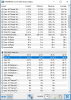
I just do not know what is happening with my laptop. I repasted 5 days ago, that day I tested and I 7 core differents witch is result that I am happy with and today I run again and I have 15 C differents
How is that possible?
Attached Files:
-
-
What brand Thermal paste? And you are sure you did a proper job?Donald@Paladin44 and Falkentyne like this.
-
You need to INCREASE heatsink pressure on cores 1 and 3. That is something even I dont know how to do easily. I tried to mitigate the problem by using 0.5mm thermal pads (Arctic) on the VRM's and the chokes rather than 1mm, as HS pressure on these reduces the pressure it can apply to the CPU area (closest to the VRM's).
raz8020, Donald@Paladin44 and Ivan994 like this. -
It is NOCTUA, it is best paste that I could find in my country. I think I did everything well. I am very confused how first day can be just 7 C and after 5 days 15 C. I mean nothing changed.Donald@Paladin44 likes this.
-
If the fit wasn't good in the beginning... This can happen. Open up and se how good the paste was spread.raz8020, Donald@Paladin44, Falkentyne and 1 other person like this.
-
I wanted to try with 0.5 pads but I can not find any good thermal pads brand in Serbia :S . I need to order from Ebay and wait about 3 weeks for shipping. I do not know to try to repaste again. I ihave a fear that I could break this pads if take off cooler again :SDonald@Paladin44 and Falkentyne like this.
-
Yes i know, try removing the thermal pads on the VRM and the chokes (black squares and grey larger squares) and replace with 0.5mm Arctic thermal pads (or any 0.5mm sized pads). This will reduce heatsink liftoff on the VRM side and may help you.
This is a design issue with the GT73 and GT75. Everyone has higher core temps on cores 1 and 3, compared to cores 2 and 4 because there is less heatsink pressure. This causes pastes to dry out. I managed to get them within 2-5C depending on load, with 0.5mm thermal pads and liquid metal cooling.raz8020, Donald@Paladin44 and Ivan994 like this. -
Buy cheap pads as an emergency til you get the proper pads.Falkentyne, Donald@Paladin44 and Ivan994 like this.
-
Just do the work necessary to get new pads 0.5mm. This is the 21st century. Don't tell me you don't have a way to order them from somewhere. It's not like you are living in North Korea.
Can't you buy these from SOMEWHERE??
https://www.amazon.com/ARCTIC-Therm...8&qid=1518059635&sr=8-1&keywords=arctic+0.5mm
https://www.amazon.co.uk/ACTPD00004...8&qid=1518059664&sr=8-1&keywords=Arctic+0.5mm
https://www.ebay.co.uk/itm/Arctic-T...338181&hash=item488e1c4480:g:5UEAAOSwwbdWPekA
https://www.ebay.com/itm/ARCTIC-The...301688&hash=item2a9b9c318c:g:vWYAAOSwmphaTbre
please do NOT Give me an excuse that you can't order from ebay UK or amazon Uk !!!!!!Donald@Paladin44 likes this.
The Official MSI GT73VR Owners and Discussions Lounge
Discussion in 'MSI Reviews & Owners' Lounges' started by -=$tR|k3r=-, Aug 16, 2016.