 Problems? See this thread at archive.org.
My Gs60 goes into day for a new screen (scratch like blemishes between layers on the LCD panel). I'll let you know how the UK rma process works!
-
Hey Mardon,
are you still planning on making a video guide for basic tweeking the notebook once you have it back?
I believe you mentioned a few weeks ago you might do so. Would be great help
-
I certainly will. I'd started it then when on holiday and now my Rma has come through. I've completed a list of useful links etc I just need to film the guide.
-
Sweet. Looking forward to it!
Good luck with the rma -
Just got my gs60 052 and it's great but I have an issue with a lot of programs being blurry. I'm able to fix it by disabling dpi scaling in each program's properties but it's tedious when so many have the issue.
Sent from my iPhone using Tapatalk -
Does the custom fan stuff work for the MSI GS60 Ghost Pro or is it just intended for the Ghost? Also, is there a way to write this out to the BIOS?
Thanks for your work! -
Hi guys, I was reading this forum to get to the decision of getting a GS60 .... which is now here
Since I'm currently in China I ordered a CN-Model ... 279CX I think... actually the PERFECT model for me: 4710 processor and 860-card. no SSD, 8GB Ram ... obvioulsy I immediately upgraded to a 512GB 2280 in addition to the Samsng 840PRO and another 8GB Ram for 16 total. Everything runs spot on but ONE thing:
This is my "office" notebook, I havent touched a game in 5 years so its not a big deal but it kinda bugs me on a 2500USD setup...
EVERYTHING runs perfect with the Intel HD4600 card (IGFX picked in bios), but as soon as I choose "SG" which should be the GTX860M card, windows crashes in an endless loop.
I choose SG card, boot into Win8.1 - the power button turns orange, so the card is active... everything looks ok, but after 30second the GPU fan goes into FULL SPEED for 15sec and then BSOD: "Driver power state failure" - obvioulsy I need to install drivers for the GTX card but its impossible!
When IGFX is selected the device manager doesnt find the NVidia card, when I pick "SG" windows crashes - not enough time to find it I guess...
Any ideas how to get those drivers installed?
BTW: Chinese models ship WITHOUT OS, so I had to set it up myself.. I actually just put my SSD from my old notebook in and win booted right up... installed drivers - all set and good! Running WIN 8.1 64bit
thanks in advance! -
There's your problem. You've not done a fresh install of Windows 8.1 try from scratch
-
ya if that would be possible... I have 25 different users on this PC... no way I can do a fresh install... Im looking at 3-4 NONSTOP days of getting it back together...
-
Hello,
I have a question..
I recently bought a Msi ghost gs60 laptop. just to play games.
the issue is GS60 Ghost is lagging and sound is echoing? when I play video games. My video cards are up to date and I downloaded the latest drivers. still no effect, I also tried to play with low resolutions.. can someone please help me..
Thank you for any help you can provide in this situation. -
What game are you playing? Graphical quality settings?
Are you playing off AC connectivity? Or battery power? -
Boot into safe mode with the info set in bios (Google how on Windows 8.1) and uninstall any nvidia drivers. Then enable SG and reboot. See if you get any further. -
This isn't an issue. Higher resolution displays will inevitably result in higher DPI especially on smaller screens. If anything, the issue is Windows software itself not being optimized to take advantage of displays with high DPI.
-
I'm playing steam games like portal 2 and counterstrike global offensive. I tried both mostly with connection
-
EDIT:
Made it into safe-mode whith SHIFT+RESTART ... same issue tho. As soon as Im in the safe-mode I go to Control-Panel.... scan for hardware... its scans but freezes the scan... seems like it wants to find the card but as soon as it finds it... FANS FULL SPEED and BSOD again.
-
Pretty simple tweaking like changing font size to be able to see things better with 100% scaling or just change the scaling so everything looks bigger.
-
I get what your problem is, things like skype, steam and most programs get blurry with scaling right? Happened to me too.
Like I said before to another user u can either set scaling to 100%, which is what I did to avoid scaling, and make the font size bigger ( in my case I added +4 to default font size) so everything will look crisp or use scaling.
At first I used scaling between 125-150 % but the blurriness bothered me on some programs like skype so I tried disabling dpi scaling but things would be too tiny so I ended up setting the scaling to 100% and make font size larger. -
Hi Guys .. First time post here .. Got my Gs 60 pro about a month ago now .. I love it .. one thing that is frustrating to me though is the Matrix Dispay.
I love the fact that I can output and have a total of 3 monitors .. Laptop is powerful enough for me to render out on cinema 4d on one monitor .. while gaming on another and have the browser open on a third.
My frustration is I can do all that .. but I can't have a game expand over 3 monitors? no access to nvidia surround in nvidia control panel? what gives? -
The GhostPro does not have the ability for Nvidia Surround, I tried it too lol. I still have 3 monitors running though, with DisplayFusion.
-
It must do, it's advertised clearly on the official product page MSI Global GS60 2PE Ghost Pro
-
Nope .. No option for Nvidia surround at all
-
Question for the VBIOS modders involved with the GS60. Would it be possible to mod the VBIOS to increase the thermal limit? I know it sounds crazy, but what if we got another 2-3 degrees, I wonder if that would help.
To anyone, what is the easiest/best way to test for throttling? I don't want to use Furmark as that is not a realistic test.
Finally, in updating the EC, the pinhole - does this need to be pressed when the AC adapter is unplugged or when? Little fuzzy on this.
Thanks,
N -
Hi, would one of the VBIOS modders do me a favor? I found that for my system Sen7inel 's minus75 VBIOS results in the lowest temps for me. Would one of you mind updating the latest VBIOS to use his settings? I have 80.04.EF.00.21 but sen7inel's BIOS's are version 80.04.EF.00.A2. I would prefer to use the .21 version but with Sen7inel's settings from minus75.
Any help would be greatly appreciated!
N -
Have used this laptop for about 5 days now, so far I've played SC2, D3, SWTOR, CSGO for 3-4 hours straight each. Max temp for CPU is 78C and GPU (870M) is 87C. Absolutely fantastic and have not found any flaws. The only annoyance I have is accidentally clicking on the touchpad buttons while typing or gaming. They seem to extend 50% of the touchpad from the bottom.
-
Isn't the touchpad automatically disabled when you have a mouse plugged in?
Sent from my iPhone using Tapatalk -
Yup, it's fully disabled. However, the actual mechanical buttons are still pressable. Usually I accidentally click it with my left palm when adjusting my hand slightly to the right.
-
So, I decided to learn tonight and have bought Svet's BIOS editor and have simply moved Se7inel's changes to the .21 VBIOS. I have really good results with this on my system. Machine stays much cooler, and seems to take longer to ramp up to full fans. All credit goes to Se7inel and Mardon, I just did this one small tweak
View attachment minus75-21.zip
Update: 3dmark firestrike runs and furmark gets to 5 minutes before throttling but 3dmark 11 crashes. Oh well
N -
I'm not too sure if this has already been answered, but on some games it still uses the intel integrated graphics rather than the gtx870m. Is there anyway to force it to use the 870m as the integrated grpahics means some games don't run as well as they could, I have to lower some settings on these games!!
-
Try right-clicking on the game executable and choosing to run using the dedicated GPU or setting up a profile for the game executable in the NVIDIA control panel.
-
Hey mardon, I would really like to try your improved 860M Bios But is it save with the upped voltage or am I frying my card than after extended use? ;-) Not sure if OC'ing is covered with the warranty tho?
BTW.: My trackpad is slightly uneven - the right side is a little bit deeper than the left side: The right side is 0,5 mm leveled, whereas the left side the same level as the chassis. It isnt an issue because I barely use the trackpad, but it would be interesting if someone else has this "problem"?
Additionally my space bar is squeaking a little bit. has anyone an idea to fix that?Last edited by a moderator: May 12, 2015 -
Hi Guys, just wanted to say how happy I'm to own a GS60 Pro 052, after a long wait because I had a bad motherboard and had to send it back to warranty.
Well, for me the temperatures are unbelievable for such power in a thin chassis ( mine is with a GTX 870M ), I did some modifications to it and I will go through, but I didn't wait to test in the original setup as I had to disassemble the motherboard to install a different m.2 SSD and RAM, so I didn't want to disassemble two times.
Here I will go through the different things that I made comparing to the factory setup:
Change the memory to Corsair Vengeance 16Gb 1866Mhz CAS10, and yes it works at these speeds and latency. If you want to buy these RAM, you need to be careful at the serial number, as there is one KIT with a voltage of 1.5v, and other with a voltage of 1.35v. CMSX16GX3M2B1866C10 is with 1.35v and CMSX16GX3M2A1866C10 is with 1.5v
![[IMG]](images/storyImages/cn9ioG.jpg)
Took off the Hard Drive and 128Gb m.2 SSD and replace them with a Crucial M550 512Gb M.2 SSD
![[IMG]](images/storyImages/k6EXcs.jpg)
Replace the thermal paste ( Prolimatech PK-3 ) and thermal pads in the GPU ( Phobya 5W/mk 1mm )
Also a lot of people put more thermal paste than it is necessary when they are repasting, I always remember one sentence that I read once: "It is very easy to put too much thermal paste, but almost impossible to put too little"
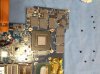
I put some simple black electrical insolate tape in the top of all the fins at the coolers, unfortunately I didn't take good pictures of it =/

After one 3DMARK11 run I started to modified the BIOS and ends up with this BIOS that is just a little better in performance, but a lot more cooler =)
I could achieve that by underclocking and undervoltaging the GPU but overclocking the Memory

Here is a 3DMARK 11 run with the ORIGINAL bios:

And here is a 3DMARK 11 with the modded BIOS

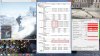
And here are temperatures playing Battlefield 4 with settings on ULTRA,
Yesterday at night I was playing at temperatures of 81 degree in the GPU, but I was not totally ready with the BIOS and didn't took a picture.
The building that I'm living has a digital thermometer in front of it, and today when I was playing it was 32 CELCIUS degree outside, probably in my room was 30C degree because earlier was not so hot.
SO, even with this temperatures I was playing with a average temperature of 82-84 degree in the GPU, and MAX temperature of 85 degree. For this thin chassis, and this hot ambient temperature, it's very very respectable for me.
OH, I did not mod the fan profile, this is with original fan profile.
Here is the picture:
Well, I cannot stop saying how happy I'm with this notebook, hehehe.
If you guys have any doubt, feel free to ask, hehehe =)mardon, Reks, Kevin@GenTechPC and 1 other person like this. -
Great write-up. What does the tape on the fins do?
-
Theoretically it helps to irradiate less heat, and therefore more heat will be exhausted or kept at the fins.
This is just a theoretical of my point of view as I don't know how well it works, but the gamer line of ASUS usually come with tape at the cooler fins. -
Interesting! Thanks.
-
I was thinking about getting new thermal pads good shout for getting it done.
-
Are there alternative trackpad drivers i can download? The stock elan drivers are horrible at recognizing three finger swipes.
-
How come your model has a 4700HQ and not a 4710HQ?
-
Thanks, and if you are going to change the thermal pads, don't buy the 7W/mk from Phobya. They are hard, and for thermal pads in a notebook cooler I would recommend only soft pads. I used the Phobya 5W/mk 1mm thick.
I bought my laptop in the beginning of May from USA, but unfortunately I had a bad motherboard and had to ship it back to USA ( I'm living in Germany right now ), and it took a long time to receive it back =(
The really first batches of the GS60 Pro had the 4700HQ and not the 4710HQ. -
Hey, perhaps you could help me with my problem....
Hello,
I have a question..
I recently bought a MSI laptop: Gaming GS60 2PE(Ghost Pro)-212NL . just to play games.
the issue is GS60 Ghost is lagging and sound is echoing? when I play video games. My video cards are up to date and I downloaded the latest drivers. still no effect, I also tried to play with low resolutions.. can someone please help me..
Thank you for any help you can provide in this situation. -
When you play games, what color is your power button? It should be orange if it's using the Nvidia GPU and blue if it's using Intel GPU.lewdvig likes this.
-
Hey guys! I'm currently considering purchasing the Ghost Pro FHD with the 870m but I have a concern that I hope some of you can clear up for me.
I'm a college student and I will be using this laptop for note taking during lectures, some of which are 3 hours long followed right away by other ones. I was wondering if its possible for this laptop to last about 4 hours on a single charge with the custom fan profile and processor set at 2Ghz ? I would be just doing web browsing and some word processing.
It would be great if someone could give this a test and post the results since I feel battery life hasn't been discussed too much in this thread so far.
Thanks for the help in advance! -
Hi! Guys,
I ordered msi ghost pro 3k from gentechpc and received it a couple of days ago, I was about to change to win7 but was too late cos it already shipped. Currently I am trying to clean install win 7 pro into it, but I am having no luck, as it keep getting error of can't verify the signature. I have the win7 iso that do from and I have the code. Can gentechpc help on this clean install guide? Thz -
Hi I bought my GS60 the 870M ver. around a month ago, I've been happy with the hardware itself, but I just couldn't live with this Win8 Pro pre-installed on the laptop, my questions are, if I want to do clean install of win& ultimate on the laptop will it erase the Raid0 configuration of the SSD (sorry if this is considered noob questions)? other than drivers for win7, are there anything else that I would have to download before doing a clean install? and the last but not least, have anyone succeeded in doing so without a problem?
Thanks Guys -
What is it you hate about Windows 8? I was really not a fan at first. After some tweaking (startisback) and setting it to boot to desktop it's just as good if not better than 7..
-
It is one of my designing program is having an issue with it that everything I wanna use it ihave to trouble shoot the system to use it. That is the reason I want to downgrade it back to win7. Is there a guide to clean install win7 on our ghost.
Thz -
Not that I know of. You might struggle with 3k on Windows 7 from what I here it's worse that Windows 8.
-
Does it work with Win 7? Seeing inside the zip is manual for Win 8?
Nevermind... Tested, not working (min speed still 2800 RPM, although on higher temps it worked, just the min didn´t - which was kind of the point though). Screwed up the notebook too, now CPU is going on 11-12% all the time (restarting didn´t help, actually Windows refuse to turn computer off, had to do it the hard way). Aaaand it messed up WiFi.... Restoring back. WiFi still messed, CPU fixed.
*EDIT WiFi fixed by removing and re-adding the device - reinstalling drivers.
Will never flash bios again! -
It turns orange
-
Probably everything about it, I've tried everything I could do to get used to the OS, I've installed the start button back into the OS. I've set it to boot to desktop, but still hate the overall experience that I had, I knew that sooner or later I would have to make the switch, because Windows will probably let go of Win7 like they did with XP, but still, while I still can use win7, I will try to use it. Thanks for the suggestions though! but do you know whether my raid0 config will be nullified or not when I do clean install of win7? Thanks
-
I have a question.. I don't know if I am having an issue with my laptop or is this is a limitation of laptops in general.
When I am playing a game for example batman origins.. With the power plugged in.. I can play with all the setting at max and have a great smooth frame rate.. As soon as I unplug the power .. The performance run like crap.. Plug power in.. Runs perfect again.
I have set all power option to maximum performance and still the same issue..
Am I doing something wrong?
MSI GS60 Ghost/ Ghost Pro Thread
Discussion in 'MSI' started by GreaseMonkey90, Jan 14, 2014.


