Problems? See this thread at archive.org.
I just got my GS60 3K with 860M ( I believe no one on this thread mentioned they had one with this specs) so heres my short review :
Loud fan ? Check - This doesn't really bother me because well it keeps the laptop at decent temps and from what I read I think I can change the fan settings with custom bios etc..
Power brick - Way too heavy for a thin laptop.. gladly we can get the razer one from what ive read.
Poor straight up worse I've seen in a laptop wireless? Check- I noticed it right away when I was downloading the latest nvidia drivers because the speed went up and down so randomly , and a couple of hours ago my ping on LoL was unbearable while I could play just fine on my desktop.
Its completely ridiculous that a laptop that costs so much fails at such a crucial part, other people would mock me if I showed them the wireless on this laptop and told them how much I payed for it
Msi needs to address this issue ASAP but they don't seem to care since this problem isn't new.
Besides that I'm very happy with the build quality and the screen, feel free to ask any questions.
Oh and I'm going to get a wireless adapter tomorrow and even tho its not too much of a hassle to carry it around its worse to have one less USB port because of that.. Any tips from people that resolved the wireless problem would be great.
-
Have you tried:
I'm interested to know if this actually works. -
Hey guys, I just purchased this laptop and I have the dumbest question ever: How do I disable the touchpad? There's no option in the SCM as there was on my GT60.
Concerning the wireless card, my laptop came with the AC 7260 and I've downloaded and updated all the Windows updates and NVidia drivers in about 30 minutes including applications like Firefox, Steam, Origin, etc etc. Wireless router is downstairs and 2 rooms across so I guess I have a pretty solid card right now or a compatible router. This did worry me before I bought the notebook but it seems to work perfectly. Internet speed is around 10-15 Mbps so it's not like I have lightning fast download speeds either.
I also read that the screen bezel is not very well made and people were complaining how they could see gaps and stuff. Not sure what that's about but I've meticulously gone over every centimeter of the screen and top half of the laptop. I can't see any gaps or any reasons to be concerned about whatsoever... -
Have you tried FN+F3 to disable touchpad?
If you are happy with the screen bezel you shouldn't worry then
-
Yup...that doesn't work either.
Sad that everything works for me quality-wise but this problem is singlehandedly ruining my life lol.
EDIT: Fixed. Turns out the GS60 uses the ELAN touch pad driver and not the Synaptics one like my GT60. -
I'm getting very close to making a decision on what laptop to purchase next, and this is one of them. I was wondering if anyone that had the Ghost Pro, 870 model could answer a few questions before I pull the trigger on one or the other.
I know there's been discussion after discussion on the heat issues with this laptop, but I've yet to find a real definitive answer as to whether or not the new VBIOS profiles make a difference in both heat output and fan noise. Could anyone with a flashed bios and the GTX 870 comment on how their laptop performs? In addition, could you also shed light on how difficult it was to flash. I'm by no means new to computers or poking around with settings that I probably shouldn't be, but I still like to get some information on what I'm getting in to before I dive in.
Any information is greatly appreciated. I'm looking for a laptop with a GTX 870, dual fan cooing, and low weight, and this fits the bill perfectly. Second choice would be a Sager 8268s, which is a bit heavier, but has most if not all of the features I'm looking for in a laptop. If there are other options that you all could recommend, I'd appreciate that as well. -
Just had my laptop from charged to about 5% battery under class use of light browsing and notetaking at 10-20% brightness depending on what I was doing. The battery life is only 3 hours and 20 minutes roughly on balanced plan.
-
I have the 1080p version of the Ghost Pro (870m). I would describe myself as comfortable around computers, but I had never flashed a BIOS before I got this laptop and just following the instructions in this thread did it for me. All it took was following the instructions carefully and not cutting corners.
As far as fan noise is concerned, the modded fan profiles make a world of difference during idle or low intensity usage, since you can actually get the laptop to run with fans off most of the time. As soon as you do something even slightly demanding, the fans will kick in and noise will be quite noticeable, but not enough to annoy the wife, for example. Under load the fans get pretty loud, but by then I'm usually with headphones on and don't notice it at all. I don't expect any kind of modding, undervolting, or flashing custom BIOS will change this.
Undervolting the CPU allowed me to get the fans to turn on less often while browsing the internet, so just for that I count it worthwhile. I also undervolted the GPU and I still get thermal throttling during FurMark, but not while playing games (recently I've been playing Wolfenstein: The New Order and Divinity: Original Sin). I'd like to point out that I did not repaste anything in the laptop. -
think I found a fix (at least for me) with the wifi problems of the 7260. My model was the GS60-003 Ghost model.
I was just dealing with the problems for a while then got tired of it so looked and found MSI GS60 WiFi drop out Fix and it ended up working for me.
History of my wifi problem was I would have full wifi bars when not gaming, could go for hours browing the web, watching vids, etc. without a problem. Then once I started a game and the GPU started up the wifi would cut in half or disconnect randomly and not reconnect unless I played with my wifi settings(Airplane Mode, turning wifi on and off, etc.) and would nearly guarantee come back up once I quit the game.
All I did was I uninstalled the old 7260 driver from Device Manager (heard to do this first), then installed the one that the MSI CS rep gave. Restarted the laptop and now no wifi problems at all ran some games for hours to test it which I could never do before, with no random interruptions to my wifi. I thought I would have to deal with it for the rest of my time owning this laptop...but at least for now looks to be working nearly perfect.*fingers crossed*
It seems to cause some major loss of MB/s for some users that have the internet speeds to use it. But for me I just wanted wifi that wouldn't disconnect out of nowhere when gaming and my wifi speed of 10 MB/s is fine enough for me, which hasn't changed with the new driver (wifi where I live isn't that fast overall to begin with)...so can deal with that for now.
Hopefully it works for the rest of you all. Sorry if it doesn't or if it was stated earlier somewhere...
mosc2k likes this. -
Yup, this is a known issue and was posted on MSI's FAQ site.
MSI USA - Online Technical Support FAQ -
Hey Kevin, do the 860M and 870M draw the same amount of power on the GS60? Like, would they produce the same amount of heat if both were running the same game using the same settings? Was wondering if choosing the 870M was the best idea.
-
Yes, 870M does draw more power than 860M thus giving out more waste heat as well.
870M = 100W TDP
860M = 60W TDP
Of course, since 870M performs better than 860M so it's a better choice for you if you are performance-seeking type of user. -
The Kepler 860M is 60W TDP? I thought for sure it'd be closer to 75W.
-
I'd agree as 770M is suggested 75W with less shaders than 860M Kepler.
-
Thanks again everyone for the flashing instructions, and utility. The 870m bios' worked great. I still need to stress test the -75mv one, but it seems good.
I am encountering the wifi issues like everyone else. Getting max 27Mbits. What this makes me think is that the card is using the B network, but with 1 antenna, not MIMO. Which is odd. The AC tech uses two antennas or more for more throughput. But at 27Mbits its half of a B network so i'm thinking its using 1 antenna as opposed to MIMO.
While i am slightly educated in the matter, my hypothesis is that it is in fact the drivers. Which makes this more of a cluster because i would think intel could put out good drivers. I'm going to try the newest drivers, and if that doesn't work i'm nuking the drivers and sticking with the windows ones.
To add to the paragraph above, i couldn't connect to my router at work, but could connect at home. Albeit very slow at home (27Mbits).
If anyone has any more insight into the wifi issue i'd appreciate the input.
Thanks!
Ninja Edit:
On Intel XTU do i put Negative Dynamic CPU Voltage offset, or do i just set the cpu voltage?
Thanks again!
Second Edit:
To add more to this wifi wrinkle, i can get 27Mbits over my home network, but only 1MBit out to the internet..... DUN DUN DUN.
3rd Edit:
I'm going to keep adding what i test for the wifi.
My router is a B/G router. I made it only accept G requests, still the same results. -
Try what I did Kevin, Just uninstall the wireless on device manager and straight after scan for hardware changes. Windows should install its own wireless default driver. This should fix the wifi! Anyway where did you find the flashing instructions?
Also does anyone know if its safe to use the razer 150w power adapter? It seems to be a lot smaller than the msi one which really appealed to me because I will be moving around a lot with my laptop, so to save a bit of weight and space in my laptop bag would be great! -
That was the first thing i tried on my lunch break at work to no avail!
Updating the driver yields me 27 Mbits over the internet now opposed to just the local private network.
The flashing instructions are in this thread, at the bottom of one of the earlier pages between 100-200. Very last post on the page.
OMG
I plugged my laptop into a gigabit switch. Still got 27 MBits.
Closed killer network manager
Still 27Mbits
Closed Geforce Experience
Got 1Gbit.
CASE CLOSED.
Edit:
Ok maybe not, multiple problems with the wifi it seems.
Now on speed test . net i get 1Mbit down 20 Mbit up.
It keeps getting weirder.
AHAHA
So here are the steps to fix the 1Mbit internet connection!
1. Go to computer management.
2. Go to device manager.
3. Right click and go to the properties of the 7260 AC.
4. Go to update the Driver.
5. Browse my computer
6. Let me pick the yaydadadadada
7.SELECT THE MICROSOFT ONE. -
Well I can´t say for sure if it worked until I test it some more but sure as well improved a lot.
Ping went from constant spikes/ unplayable to rarely have any spikes.
Will give more info once I get more time with it.
Now to fix the fan noise ... I have the 860 with 3k screen so any custom bios that seems to work well would be nice, it bothers me that the fan is so loud by just watching a stream. I'm not in college now but when I go back it would be really bothersome in class.
Thank god I went for the 860, it already heats up quite a bit so I can only imagine the 870 -
Glad it's working for some. Best way is to uninstall wireless on control panel then at device manager I think. I remembered someone was making a guide to fix the fan if I'm not wrong. Not sure what happened to that?
-
Yeah, someone a few pages back said he was working on some guides, although I think they were for the 870
-
Hey everyone,
I am going to pick up my GS60 GhostPro-052 in a few days. Ordered it from xoticpc and had the IC Diamond Thermal Compound - CPU + GPU installed.
Now when I get it I will probably want to use the custom setup so the fan is silent during normal use.
I have been on osx a few years so I am new to windows 8 and dont want to do anything to damage the device. So was hoping someone could help me with a walkthrough.
I saw it a few weeks ago on the threat here, but have been unable to find it again. So any help is appreciated!
TLDR: need help/guide to lower temp/fan noise
Thanks -
The guide is in this thread, it just happens that this tread is 338 Pages long. I read all of it to find my guide
-
Someone a few pages back posted saying they bought razer power brick and have used it succesfully. I see no reason for it to pose any kind of problem to the GS60.
-
Anyone have side by side comparisons with the MSI power adapter compared to Razer? Will have my GS60 tomorrow, and if I am happy with it I may want this smaller power adapter.
-
I am using a Razer brick without any problems. I do, however, believe the 150w adapter to be at or over its ability for the gs60 pro with 870m. A 45w CPU + 100w GPU on a 150w adapter is a recipie for disaster in my mind when both components are pushed to their maximum. I've purchased a 180w adapter for the gt60 (180w) to see if it gives a little more power when I'm stressing both components.
My kill-a-watt meter said over 170 on the stock adapter, so I'll compare it to the new as well. -
Custom EC firmware for silent operation (when under 54C): http://forum.notebookreview.com/msi/742589-msi-gs60-ghost-ghost-pro-thread-288.html#post9695928
Follow MSI's directions for updating firmware to apply this one.
Youtube video guide for custom VBIOS: MSI GS60 Custom VBIOS Flash - YouTube
If you want to undervolt the CPU, use Intel XTU: http://www.intel.com/content/www/us...p-boards-software-extreme-tuning-utility.html
Just move the Core Offset Voltage to about -70mV (which is my limit for a stable system, yours might be better or worse, depending on chance) and do a stress test on your CPU. If you don't crash, try to go even lower (to -80mV, for example). If you crash, reduce the offset. Rinse and repeat (don't really rinse the laptop) until you get the lowest stable voltage.
Intel XTU has a built-in stress test that some people like, others don't. Alternatives are CPU burn-in ( www.cpuburnin.com/), Prime95 and others (Google is your friend). Some people say that you have to run the stress test for 30 minutes, some say 72 hours. I ran a stress test overnight, while doing some random browsing, tried a few games, unplugged and replugged the power brick a few times (trying to destabilize the laptop a bit) and went to sleep. In the morning my GS60 was still alive, so I counted that as a stable system.
Hope this helps!Reks, Cenvan, magnwit and 1 other person like this. -
I'm interested in if the 180w power brick provides more wifi stability too.
-
There was a thread a while back where someone with both the blade and the ghost compared all the components including the power brick and I remember it was quite a big difference.
I think that with the 860 there should be no problems using the razer adapter , I plan to buy one in the near future .. I don't know about the 870 though. -
I'm wondering paying 100 bucks for a power adapter is worth or not
-
If it gets the job done and is smaller (and potentially lighter) it'll definitely be worth it to some people who take their laptops on the go a lot. Is that not part of the appeal of the GS60? It is slim and light. Why not have a power adapter with the same appeal?
-
Thank you very very much!
I was dreading having to go through all 338 pages to find it. Once I picked it up I will give it a shot. -
Can someone post a product link to the slimmest 180w that is known to work well with the GS60?
-
Personal experience with the wifi:
- No problems at all when browsing the web, for the past 3 months
- Major wifi drop (i.e. complete internet death) issues when I started playing online games yesterday, as if the dGPU activity or temperature causes the 7260 AC to fail.
- FIXED these issues by editing the 7260 AC properties to prefer "20MHz" band instead of "Auto". -
While playing world of warcraft with the -50mv bios (wasn't stable at -75mv) my card still hits 93c and throttles.
Time for a repaste i guess? -
Yup, try that. But if the same problem persists, then it must be hitting the thermal limit.
-
World of war craft is not a very taxing game? Have you used vsync? If not put it on the game might be rendering 100s of frames you don't need. Limit the frame rate to 60 and you should reduce your heat output.
-
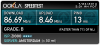
So i fixed my wifi problems somehow on windows 7. Getting solid 90mbit/s over wifi now finally
I updated driver manually in device manager with microsofts wifi driver or something, then nothing worked. Then again updated driver in device manager with the intel 7260 in the list and boom! Normal wifi finally!
![[IMG]](images/storyImages/3644752578.png)
Attached Files:
-
-
Now try a taxing game for 10 mins exit out and test again. Fingers crossed!
-
It was hitting 93c while being at a constant 85-90% usage. I'm sending it back, newegg isn't charging me a restocking fee.
I think the GTX 860M model with the 1080p screen is probably the way to go. -
MSI limited the GS60 w/870M at 93C, so it is a common phenomenon with this model.
You can switch to 860M which does not hit 93C easily. -
Hi.
I'm planning to buy the 3k version.
Are there any issues that I should know?
Here are the specs that I chose from xoticpc (or should I get it from a different site/shop?)
- Free XOTIC PC T-Shirt (Orders over $1499.00) (Specify Shirt Size in Checkout)
- Special Upgrade Package the Boost Package GPU Overclocking + Operating System Redline Boost ($130.00 Value!) -
- No Back-2-School Special -
- No Back-2-School Special -
- No Back-2-School Exterior Finish Special
- 2014 PC Security Essentials Software (Not Installed) Trend Micro Antivirus Security (2 Year Subscription) [Was: $35.00]
- No Back-2-School Notebook Cooler Special
- FREE!!! U.S. UPS GROUND SHIPPING (Use Coupon Code "FREESHIP" in Checkout) [U.S. Lower 48 ONLY / Restrictions Apply]
- 15.6" WQHD+ 3K (16:9) Glare-Type Glossy Screen (2880x1620)
- Standard No Dead Pixel Policy
- XOTIC PC Professional Monitor Color Calibration (Operating System is required) (XPC Service)
- 4th Generation Intel® Haswell Core i7-4710HQ (2.5GHz - 3.5GHz, 6MB Intel® Smart Cache)
- IC Diamond Thermal Compound - CPU + GPU (Cools better than all Compounds) (XPC Service)
- NVIDIA® GeForce GTX 870M (3.0GB) GDDR5 PCI-Express DX11 w/ Optimus Technology
- No Video Adapter
- No External Mobile Display
- 16GB DDR3 1600MHz [SKU-824P] (Dual Channel Memory (2x8GB SODIMMS)) - Default
- Standard Laptop Finish
- No Laptop Laser-Sketch
- No Custom Laptop Painting
- No Custom Laptop Painting
- MSI Logo [White] - Stock
- mSATA Option: Operating System Installed [Default] w/ mSATA(s) selected below
- 128GB Solid State Drive [M.2] mSATA - Stock
- 128GB Solid State Drive [M.2] mSATA
- 1TB 7200RPM (SATA III - 6GB/s) - Default (SKU - HDD025)
- No Back Up Hard Drive
- NO External USB Optical Drive
- Bluetooth Included *With select wireless cards only* (See Wireless Network Section Below)
- Intel® Dual Band AC 7260 802.11 A/AC/B/G/N 2.4/5.0GHz + Bluetooth 4.0 | Up to 300/867Mbps (2x2) (SKU - WIFI24)
- No Network Accessory
- Internal 2-in-1 Card Reader (XC/HC)
- Integrated Digital Video Camera
- No TV Tuner
- Sound Blaster Compatible 3D Audio - Included
- MSI Branded Protective Sleeve - Included
- Smart Li-ion Battery (6-Cell)
- No Car Adapter
- No Spare AC Adapter
- Standard US Power Cord
- No Dock/Hub/Adapter
- No Fingerprint Reader
- No Headset
- No External Keyboard
- Stock MSI SteelSeries Chiclet Backlit Keyboard
- No External Mouse
- No Notebook Cooler
- No Thanks, Please do not Overclock my system
- No Operating System Redline Boost
- WINDOWS 8.1 - 64-Bit (Pre-Installed)
- Clean Windows Installation (Install drivers only - no bloatwares) (For factory installed OS only, not required if OS upgrade is selected) (XPC Service)
- No thanks, do not create backup recovery DVD's
- None
- No Antivirus Essentials Software Bundle
- No Back Up Software
- No Unlimited GB Cloud Backup
- No Office Software
- No Software Bundle
- No Global Anti-Theft Protection (Options below require an operating system)
- 2 Year MSI US/Canada Parts & Labor 1 Year Global Warranty w/ Lifetime Tech Support
+ 1 Year Accidental Damage Warranty (Requires Registration within 30 Days from Ship Date) (SKU - WTY007)
- No Certificate & Binder
- * 24/7 LIFETIME U.S. based technical support
* Extreme QA testing by dedicated technicians
* 24-72 Hour stress testing and benchmarking to ensure top performance and stability
- Standard Production Time
- No Outside of US Shipping Coverage
- No thanks, standard double boxed packaging is okay with my order
- No XOTIC PC Gear -
I see you're opting for the IC Diamond, which is good.
What will you be using the laptop for?
-
Mostly gaming. A bit of programming for school. Will the IC Diamond solve the issue of heating quickly?
-
It won't completely do away with it if you have high temps but does help to keep it running cooler.
-
So, the heat wouldn't be much of a problem now? And what else should I be concerned of?
-
I have the 3k version but with 860 and without all those extras x) I can tell you that the 3k is beautiful but at the beginning everything might seem very small ( well actually everything IS small) so you will have to tweak a bit to your liking but after that you're set.
Since I have the 860 I cant really comment on heat but its probably going to heat up quite a bit from what i've seen others say in this thread, but in the end its your choice if the extra power is worth it.
Also there are quite a few solution already for the wifi problems that worked so that will probably be ok too. -
If you are going to game at a desk, I highly recommend getting a good notebook cooler - Cooler Master has some good ones, I have one of theirs with 2x 140mm fans,leds, and a 4 port USB hub. It helps keep the notebook cool during long gaming session. I would also recommend that if you use it on your lap - use a notebook cooler or pad that can breathe easy.
-
Wouldn't throttling still be better than having a significantly weaker card? The difference between the 870M and the 860M is quite a big gap.
-
nope, the throttling makes it perform worse than the 860 in many cases. the throttling has quite a big effect on it
-
What kind of tweaking do I have to do?
MSI GS60 Ghost/ Ghost Pro Thread
Discussion in 'MSI' started by GreaseMonkey90, Jan 14, 2014.