 Problems? See this thread at archive.org.
I have exactly the same issue if I go slowly that is why i always have a mouse I use this one at work because it is so comfortable, they are just trying to get you to buy their gaming mice. Its funny actually to me that it can be that bad for a a computer produced in 2014... I would have to agree on everything else I love this laptop as well! Plays very well and does everything I need to replace my 2xquad core z800 desktop at work! I have it connected to 2 external monitors (high resolution 2560 x 1440) HDMI and mDP. Love the performance when playing BF4 and D3. Thanks MSI for making a great laptop. The noise really doesn't bother me. The fan that I have below my laptop is louder than my laptop fans (except when gaming).
-
Could you guys record the 'zigzag' of the mouse and post in something like youtube? I personally haven't noticed any such difference in behavior between touchpad and mouse
-
I know this May sound stupid, but I don't know how to turn off my keyboard backlight.
Ways to turn it off? -
That'd be something you can do in the steel series engine software, should be running in your taskbar. Just right click to configure and should be an option to turn off.
-
Or you can hold down the FN key and press the + key on the numberpad to turn it down/off and the - to turn it up/on. You should see icons on those keys.
-
Did you update to the new touchpad firmware posted on the support page?
It makes a world of difference, couldn't use the touchpad before the update but now i only use my mouse for gaming.maximbc and Kevin@GenTechPC like this. -
Any guidance out there on removing the screen bezel? Going to try and fix my backlight bleed issue.
-
Yup, the new firmware made a huge difference, and everyone likes it.

-
Hi all,
just to show the wifi link quality after some time having GS60 connected to my home AP (Mikrotik RB2011UAS-2HnD-IN running ROS 6.19 with Wireless-FP package):

It is rock solid, no disconnections, quite good speeds.
So, if anyone has any problems, install the latest drivers first, then try to search for the reason of the problems, if they do not vanish... -
I never would have guessed it would take so long to update the firmware for a trackpad lol. I think it took nearly 45 minutesmardon likes this.
-
EC v 507 does not work with the fan Controlling. Any ideas?
-
The fan address might have been changed so the tool no longer works.
It must be revised to add the correct offset address to support fan control. -
Please let us know if you find something out.
-
It doesn't work with svets tool either. He had a look and said he couldn't see any problems.
-
Has anyone identified where the "subwoofer" on this thing is? I took it apart last night but didn't see anything. I have the option to control it in sound settings, so I'm assuming a speaker somewhere is being fed all the bass. I also found it mildly funny how many components are pretty much floating around under the hood. No screws for the battery or the HDD. That explains why it's so light I guess. I was still pretty impressed with the build quality on this thing.
-
I believe its on the keyboard side of the machine which requires total removal to get to.
Xentar712 likes this. -
Anyone else ever have trouble doing a factory reset? Mine tries but then reboots with an error saying it encountered a problem. I've also tried booting with F3 but it asks for me to install recovery media. My factory image is on the HDD so I don't know if that is there by mistake or by design. Might just do a fresh install if this keeps up.
-
WOW GUYS! This is a must do when you get your msi out of the box. After Updating to this firmware I went from being OK with that laptop to Absolutely loving it! The difference is huge. Get it done if you use touchpad
-
Also, I read many posts about fingerprints issue with GS60 body. I have a special edition Gold colour GS60 and I can not find a single spot after having used it for over 1 week. I guess it could be colour specific.
-
Newegg has the 970M versions available for purchase.
Kevin@GenTechPC and MSIGeno like this. -
Only some of them. Not the -064, which is the 6gb 970m with 1920x1080, unfortunately.
-
And if I were to upgrade, that would be the one I would upgrade to.
Looks like XoticPC already has it listed (along with the other models): XOTIC PC | MSI GS60 Ghost Pro-064 - 15.6" 3K Ultra Thin Gaming Notebook - GTX 97
However I don't yet see that particular model at GenTech (I'm sure it will be there soon).
Anyone here kept up with Broadwell news? Weren't the mobile broadwell chips scheduled for late 2014? It would be nice if they quickly made it into these machines (I believe they should be using the same socket so it should be a relatively easy and quick swap for the laptop producers).
Update: Seems like the Broadwell-H isn't scheduled to make an appearance until Q1/Q2 of 2015, so that's a bit of a bummer. -
I find it interesting that notebookcheck benched a 3gb 970m playing Shadow of Mordor @ ultra resulting in 51fps - hardly a result that indicates stuttering.
-
Without having to search through this whole thread, what is the consensus on battery life for the GS60 ghost pro? Can it realistically achieve 3-4 hours on battery with light use?
-
Yes, but no more than 4. I find it adequate but the Razer Blade had better battery life. I still prefer this machine overall and look forward to seeing how well the 970M handles 3k.
On another note, I also noticed xotic has 4k models. My two cents is 3k is good enough and is on the cutting edge of tolerable with the scaling issues. I think if I upgrade, it will be the 3k model since I know the viewing angles and screen quality are already top notch. Stupid that the FHD model has 6GB of ram and the 3k model has 3GB. I think 3GB is probably enough for me though... -
ALL GS60 MODELS
![[IMG]](images/storyImages/a8d711f436a54fb2876abe8371ea6577.jpg)
-
I'm thinking of getting the new 970m 6GB version when it comes out. Is it easy to add or replace the msata ssd drives?
-
MSI emphasizes that the GS60 and GS70 are not upgradeable, and doing so will void your warranty. This includes having a Build to Order authorized dealer do any upgrades on them as well.
RMXO and Kevin@GenTechPC like this. -
I experienced the same issue until I tried CrystalDiskInfo. Set the APM of the HDD to max performance and problem solved.
-
I'm not sure of their stance on user upgrades for the GS models, I know that we can do customizations on them and have no problem with MSI honoring the warranty with their trusted resellers.Kevin@GenTechPC likes this.
-
I welcomed Maxwell into my home today.
Here are some benchmarks on the 970M version:
3dMark: FS-6541, SD-17907, CG-19752, IS-101710 CPU-86C max, GPU-85C max
PCMark 8: 3501 CPU 80C max
I also played Skyrim @ 3k on Ultra and capped at 60fps(No AA or AF). The GPU clock was over 1000Mhz and didn't throttle at all. Will post more benchmarks later but this is definitely a cooler and faster card. That tiny fan is also able to cool it so far!charliex3 likes this. -
As Gino stated, you can do upgrades as long as you don't damage the product.
However, GS60/GS70 are very hard to work on and can be damaged easily so you must be very very careful.RMXO likes this. -
Please post your benchmarks here
http://forum.notebookreview.com/msi/762769-msi-gs60-ghost-pro-970m-owner-s-lounge-6.html -
Potentially good news for the 800M series owners. Take a look at these photo's:
GS60 970M
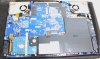
GS60 870m
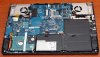
Can you spot any large differences?? Nether Can I!! So there's a good chance we can swap out our motherboard for the new 970m which will be considerably cheaper than buying a whole new laptop!
Thanks to Gentech for their video which I grabbed the shot from. -
Where do you buy laptop motherboards?
-
They do look very similar and compatible. However, I recall that MSI doesn't sell NB motherboard alone so this option may not be feasible.
-
Maybe I'll have to contact the UK support centre and have them order one?
-
isnt it more worthwhile to try and sell your gs 60 with 870m for a certain sum of money then using that money plus top up to get the gs60 970m?
-
Hard to say really. Perhaps. I imagine it'll be quite a tricky laptop to sell. I'm thinking in maybe 6 months time anyway.
-
Anyone know where I can get some replacement rubber feet/nubs? The big one on the back right side (looking at the back) is gone. I think it gets really hot and weakens the adhesive. And then it just falls off I guess. Not sure how long its been gone. Is there somewhere I can order more?
-
Have you tried their support page? If it's under warranty, they should send you some
-
Hi everyone.
This is my first post on the forums: I'm looking to buy a new laptop and i'm currently between a MacBook Retina 15" 2.3Ghz Intel Quad-Core i7/16GB RAM/512 SSD NVIDIA GeForceGT 750M for $2180 or the upcoming msi GS60 Ghost Pro 4K with 2x256GB SSD, 1TB, 16GB RAM, GTX 970M for about $2500. I'm not a gamer, i never game but i do wan't to have a powerhouse and make the right choice so i have the system that i need.
Originally i want something better than what Apple offers. I'm use OSX and plan to use this new machine with OSX primarily. I don't know if i pony for this: XOTIC PC | MSI GS60 Ghost Pro 4K-079 - NVIDIA Maxwell GTX 970M w/ 4K Screen
That i can run OSX in the msi GS60 4K. or that i can run it as seamless as i would be running OSX in the MBP Retina 15"
I like the msi more frankly but my main purpose is not gaming but be able to use it as an Apple computer with the msi hardware. I want a high end computer, and have saved up a bit so would like to make a correct purchase and not purchase a GS60 that would not run me OSX. Please any GS60 owners, enlighten me as i can't make a mistake with a $2500 purchase that then i wouldn't be able to use.
The use i would be doing to the computer would be : normal web surfing, photoshop editing, video editing, and maybe depending what system i buy have a virtual machine. -
Honestly if you want to run OSX without any issues then stick to a MBP.
Sent from my LG-D851 using Tapatalk -
Hey. Can anybody here tell my why a custom EC fan profile could be not working properly?
Whichever EC I install result is the same: The fan spins up and down periodicly. After installing the EC from MSI site its continous again...
Greets -
I can only get custom ec's from version 504 to work.
-
Thanks for making my MSI gs60 3k look pathetic Just kidding I love this laptop stellar performance and does my work really well and boosts my 2 2560x1440 monitors and its monitor for a great setup. The noise at work is minimal and compiling my Visual Studio projects is so snappy! I will have to let my co-worker know about the new 4k laptop coming out. So many of my coworkers drool over my laptop. The only thing I hope for is that they will have a 32GB option this time but not expecting it because there is no desktop application that needs that much memory besides VMS.
-
My two cents - Skip the 4k version. The 3k screen is plenty nice enough for the distance your are viewing it from and the scaling is reasonable if you set Windows to scale at 200%. I have tried and tried to like 4k screens but the scaling issues plus the inability to game at those resolutions was just too hard to get over. On top of that, each 4k screen has had SOMETHING they cheaped out on, whether it be viewing angles, refresh rate or yellow color accuracy. The unicorn GX500 is the only 4k screen that seems worthy but it's MIA. We'll see soon enough what MSI chose to use. Besides all that, the 970M will be much more effective at driving 4.7 million pixels(3k) then it will with 8.3 million pixels(4k)
-
BTW, I put a review up of the 970M version here, in case anyone was interested: MSI GS60 Ghost Pro 3K review - Nvidia GTX 970M & 870M versions
-
If you are not planning on gaming then I do not know why you would be considering the GS60 over the mac?
Pros for the GS60:
gaming ability
plenty of usb/video ports
Cons:
Poor fan noise control (really noisy at idle which drives me insane when working not gaming).
Not so great keyboard (space bar does not always register, no windows key, strange enter key layout)
Average build quality (better than a bargain basement acer/dell but not a patch on a mac) -
I agree that if you're not going to be gaming or doing very heavy gpu things (I'm thinking CAD/Photoshop), then I would just go with the mac. It's probably not worth dealing with getting OSX properly running on this machine and dealing with potential driver issues or the performance hit of running within a VM (although I will say, I've never ran OSX on a 'PC' so I'm just guessing here what the potential issues could be; if you know better, ignore me).
As for the above cons list, I'm not sure how much I agree;
1) Although I wish there was better fan control (mainly just cause I'm use to having more fan control on a laptop), I never hear the fans on this laptop unless doing something intensive (you can also flash an EC that quiets them down/turns them off when appropriate).
2) I love this keyboard; it's superb. I've never ever had it miss a spacebar keystroke; there is a windows key, but it's been move to the right side which takes a bit to get use to if you use it alot (it's meant to be out of the way for gamers so they don't accidentally hit it, but the better fix would have been to allow for disabling of that key when gaming, like external keyboards do); not sure what's strange about the enter key layout....again it's like it's been on any of the previous 5 laptops I've used, or at least I, nor my fingers, have noticed any difference.
3) Build quality is great; the only thing that's better is a mac and razer blades.
As for the pros list, it could be extended, but again, I don't think this laptop is for you; I think you'll be happier with a mac for your needs.
MSI GS60 Ghost/ Ghost Pro Thread
Discussion in 'MSI' started by GreaseMonkey90, Jan 14, 2014.


