 Problems? See this thread at archive.org.
Model i dont know for sure LOL
Test (Fire Strike
Thermal Compound Stock
CPU/GPU tuning Yes CPU cores unparked
Shift Mode Sport
Room/Ambient Temperature 74
Comments
Results with pic and or link,
-
Attached Files:
-
-
Those temps look great! I hope your repaste goes well but I don't know how you could ask for anything better honestly.
-
LOL i just poped the back cover off and started. To my suprise one of the thermal pads was not sitting where it was supposed to be.. You guys may want to check. i should have been watching VRM temps... i normally do. But i dang sure will from now own. lol
-
I need to update my scores, but my latests were for 3dmark:
http://www.3dmark.com/fs/4296200
http://www.3dmark.com/fs/4311070
and 3dmark11 http://www.3dmark.com/3dm11/9556508
All those were OC'd GPU, if I remember correctly, to +135 core and +350 (175) mhz memory. CPU was at 3.6Ghz with the normal +200 intel XTU bump. All of these were at 70F ambient temp.
For the moment I don't have temp info for my CPU/GPUs, but I am sure they were on the 80s and near 90s celsious for the CPU, and 70s for the GPUs. When I get time I will bench and take a screen cap with HWmonitor running. -
Model 001
Test Fire Strike
Thermal Compound ICD
CPU/GPU tuning Yes CPU -46 voltage offset, CPU Core +200, GPU No
Shift Mode Sport
Room/Ambient Temperature 85~90F
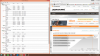
Comments I uploaded two pictures here, both 3dmark stock clocks for GPU, but CPU +200mhz, one with turbo fan ON and another one with turbo fan OFF. I purposely ran intel XTU to identify thermal throttling because my current ambient temps do feel hot and I had little to no ventilation. When I ran without turbofan, it measured thermal throttling up to 41% for an instant, however the minimum CPU recorded speed was 3.58ghz via intel XTU, so I am not sure how exactly the thermal throttling hits.
 Turbo fan OFF
 Turbo fan ON
-
The room temps of 85-90 is staggering, glad to see the GT80 can still survive and do well with cooler boost running.Last edited: Apr 2, 2015
-
I got 14265 Points
CPU : +200mhz
GPU: +135 Memory +250
CPU hottest 92c
GPU around 70c
With this OC i got 9931 Points in Physic and 5221 Points compined
With Cooler Boost on i also had 10c less -
Did you undervolt the CPU?
Where's the results link? -
I did not undervolt The CPU! I will do it now again and Post here The screenshot
-
Given Ryzeki's ambient temps and CPU clock, his results are not surprising at all...... exactly as I'd expect, considering the results of stock clocks, at much lower room temps. No doubt about it, the GT80 CPU gets a bit warm for my liking. Hopefully the next iteration will bring this down a bit.
@GTVEVO: He shows ICD in his post.

-
Yes I see that now and those room temp are up there so that does explain it.
-
Yeah to be honest, ambient temps are quite high, and will only get higher in the coming months LOL. When ambient temps hit 100F, I will game with turbofan all the time, which I had to do with my previous GT60 heh.
-
You should see my lenovo with 4800mq, it can't even hold 2.9ghz and runs near 90 all the time when stressed, lol!
But yeah, any time you see over 47W power, you will see higher temps. When turbo boost window expires, the self regulation brings it to under 90, most of the time, even after long periods of time. -
Model: I7 4720HQ and GTX 980m sli
Test Fire Strike
Termal compund: Arctic Silver 5 on CPU and both GPU
CPU/GPu Tuning CPU only +200 GPU + 135 Memory +250(Stock vbios)
Shift Mode Sport
Room/Ambient Temperature 77
Comments without Cooler Booster
![[IMG]](images/storyImages/ohnecoolerbooster16b9b.png)
The next Screenshot with cooler Booster!
![[IMG]](images/storyImages/mitcoolerbooster6guwn.png)
What do you think about this score and the temps at both Screenshots?
I personaly think the score is amazing!Last edited: Apr 2, 2015 -
Best results for the 4720HQ so far!
Here's the comparison with some of the previous results:
Think there's still room for improvements!
You didn't undervolt the CPU, right? -
So this kind of bothers me, where are they getting this score from?
![[IMG]](images/storyImages/3dmark-fire-strike5.png)
-
If I had to guess its probably 3dmark 2011 since its a very common benchmark used, basically the same but older version but I believe that test runs in 720p res hence the higher score.
-
That just goes to prove there are many bad reviews out there.
Those results[1] comes from Zardon[2].
He didn't say[3] what versions were used:
" Software:
3DMark 11
3DMark"
He didn't even mention the models of the SSDs he tested.
[1] http://www.kitguru.net/laptops/zardon/msi-gt80-titan-review-2x-gtx980m-023uk/11/
[2] http://www.kitguru.net/author/zardon/
[3] http://www.kitguru.net/laptops/zardon/msi-gt80-titan-review-2x-gtx980m-023uk/6/ -
Model 001
Test Fire Strike
Thermal Compound Stock
CPU/GPU tuning Stock
Shift Mode Sport
Room/Ambient Temperature 69
Comments - Just got my GT80 001 a few days ago, what an amazing machine! I've been lurking the owner's page for a few months so I thought I'd contribute my results. All I've done since opening the box is uninstall Norton and install 3 games. My temps seem a bit low compared to others. With that said, I'm completely new to benchmarking so it's possible that I screwed something up... I'm going to try OC the cpu/gpu so we'll see what difference that makes. Thanks in advance for any feedback!
![[IMG]](images/storyImages/Test1_Stock.jpg) GTVEVO likes this.
GTVEVO likes this. -
Model 001
Test Fire Strike
Thermal Compound Stock
CPU/GPU tuning Stock CPU / GPU + 135 Memory +250
Shift Mode Sport
Room/Ambient Temperature 69
Comments - Here's the results with the GPU / Memory OC. Also, I just noticed that my stock pic cut off the combined score - sorry about that. I can re-run and post the figure.
![[IMG]](images/storyImages/Test2_GPUOC.jpg) GTVEVO likes this.
GTVEVO likes this. -
What's the combined score for this one?
-
Guys, please also send the 3DMark report links, such as: http://www.3dmark.com/fs/3986089
-
Yeah, that was my bad, realized after I posted that I had cut off the combined score. My two year old just woke up crying so looks like my free time is up! I'll rerun the test tomorrow and post the link next time too. Thanks!
-
Exactly, it helps people easily compare their scores
-
Hopefully you will have the chance to provide us with more info on the score.
-
You are Right, no undervolting CPU! But i think this is a good result! -
Morrow i think you did The Benchmark with Coolerbooster! Im Right? -
No, I did not turn on coolerbooster during either test, which is why I was a bit confused by the temps. My thermostat was set to 69 and I checked the actual temp to confirm beforehand, which was also 69. I powered up the laptop, placed it on my lap and immediately ran the first stock test. I ran the gpu oc test about 10 minutes later. I had hwmonitor running in the background and I took the pic as soon as the tests completed, couldn't have been more than 5 seconds or so.
I was quite surprised by the temps and, again, I'm new to this so perhaps I didn't do something right? I'm at work now but will rerun everything tonight and this time post the links as well. Curious. -
Guys, what Cormogram is doing, tracking benchmark results, has some value, but it's a waste of time worrying about temps. For this, control standards would be needed for accuracy, and this simply will not exist amongst users posting individual results in a forum thread. There will always be questions, and results can always be skewed. Morrow's results are a good example of this, and immediately I have questions when I see his reporting...... such as, why are his 'Minimum' CPU temps so high? His are about 20 degrees higher than everyone else, and these minimums should be in the low to mid 40's. How is it his current 'Value' temps, are almost identical to his 'Minimum' temps? Also, the margin from "Minimum' to 'Maximum' CPU temps is questionable. This would suggest to me (and I am NOT making accusations here) that HWMon was not running throughout the entire duration of the benchmark testing.
Point is, unless comparison are made in the same environment, with the same testing and standards, we may never know the answers to these questions..... nor, could we ever know the value of one thermal compound over another.
Again, I think Cormogram's benchmark spreadsheet, has the most value to the thread.
Edit: @GTVEVO, when Cormogram has compiled enough data, it would be helpful to add his spreadsheet to the thread's lead post. I can do the same in the Owner's Lounge thread.
Last edited: Apr 3, 2015Cormogram likes this. -
I think we understand user environments are not equal, you couldn't argue that with any test held on a public forum. The cool thing is trends are starting to form and the posted data is valued from all members including Cormogram.
-
Again, I get a sense you have taken my post personally. I have made some edits, so please re-read, and perhaps then you can understand the intent. The intent was NOT to diminish the contributions of other members..... just challenging the value of importance placed on CPU temps.
-
Sounds like a plan
Thank you, understandable. -
Please disregard my temps from my earlier posts. Having read strikers message I've realized why my numbers didn't add up: I didn't start hwmonitor until right after the test. I understand now why that totally skewed my numbers, and how that must make me look like an idiot, haha! Just keep in mind I'm a total newbie on this stuff. To put it on perspective, my last "gaming" laptop was an. Alienware m11x r1! Anyways, sorry for the confusion, I'm going to rerun the test and I'm sure my temps will likely line up with everyone else's.
-
No problem Morrow...... I look forward to seeing your NEW benchmark results, with HWMon running in the background, the entire test.
-
I think all in all, SLI versions will always run HOT! for the CPU. But unless your ambient temperatures are very high, they shouldn't really affect you performancewise.
I am still quite confused on what does thermal throttling does. I basically forced it, but I still ran at 3.58ghz, so I guess... it doesn't need that much of a drop in speed just to regulate lower temps? -
Model 001
Test Fire Strike
Thermal Compound Stock
CPU/GPU tuning Stock
Shift Mode Sport
Room/Ambient Temperature 71
Comments - Now with proper temps!
http://www.3dmark.com/3dm/6502133Attached Files:
GTVEVO likes this. -
-
That's more like it, and right in the ballpark for your CPU.... NICE!
-
Yes that looks really good
-
Model 009
Test Fire Strike
Thermal Compound Stock
CPU/GPU tuning Stock
Shift Mode Sport
Room/Ambient Temperature 72
Comments - First run with no mods. I'm feeling my temps are high. Perhaps I should offset the core voltage?
Kevin@GenTechPC and GTVEVO like this. -
Yes I would recommend starting there and post any difference with your results. For a 4980 the score is a bit low (not terrible by no means) but usually its scores around 13600-13700 so you could be getting into thermal throttling or have something running at the time of this test in the background causing it to report lower.
Another question I have as we see your testing is are you using a full version of 3dMark or the Demo, I only ask as the demo test is much longer and would cause a higher temp to be reported so this too could be a factor.Last edited: Apr 5, 2015 -
Did you get a repaste when you ordered it?
-
It looks real nice. The temp is a bit high so you may hit throttling intermittently.
Try reducing the vcore a little bit. -
Your CPU temps are precisely in the range of my initial testing, HERE, which is not uncommon for models with the 4980HQ CPU. A re-paste of the CPU brought the temps down a few degrees, but not much. I would not worry about this, unless temps elevate to these levels when gaming, or you see evidence of thermal throttling in normal use. You can offset the core voltage, but truth is, you shouldn't need to.
Last edited: Apr 5, 2015 -
Model 009
Test Fire Strike
Thermal Compound Stock
CPU/GPU tuning Yes CPU -50 voltage offset
Shift Mode Sport
Room/Ambient Temperature 72
Comments My 2nd test. After reading the replies from @GTVEVO and Kevin@GenTechPC, this test has a -50 dynamic cpu voltage offset. I made sure there were no extra apps running in the background. I also unchecked the "Include Demo" box before running Fire Strike.
@ -=$tR|k3r=- After this test, the max temp reached was lower than my first test which pleases me. I think ill be safe for now and ill hold off on reapplying new thermal paste until i see those max values getting higher in this laptops lifetime.
Thanks all!
http://www.3dmark.com/3dm/6521401
![[IMG]](images/storyImages/fittyyentest2.jpg)
Last edited: Apr 5, 2015GTVEVO likes this. -
Great base score and better temps, thanks for the update.
-
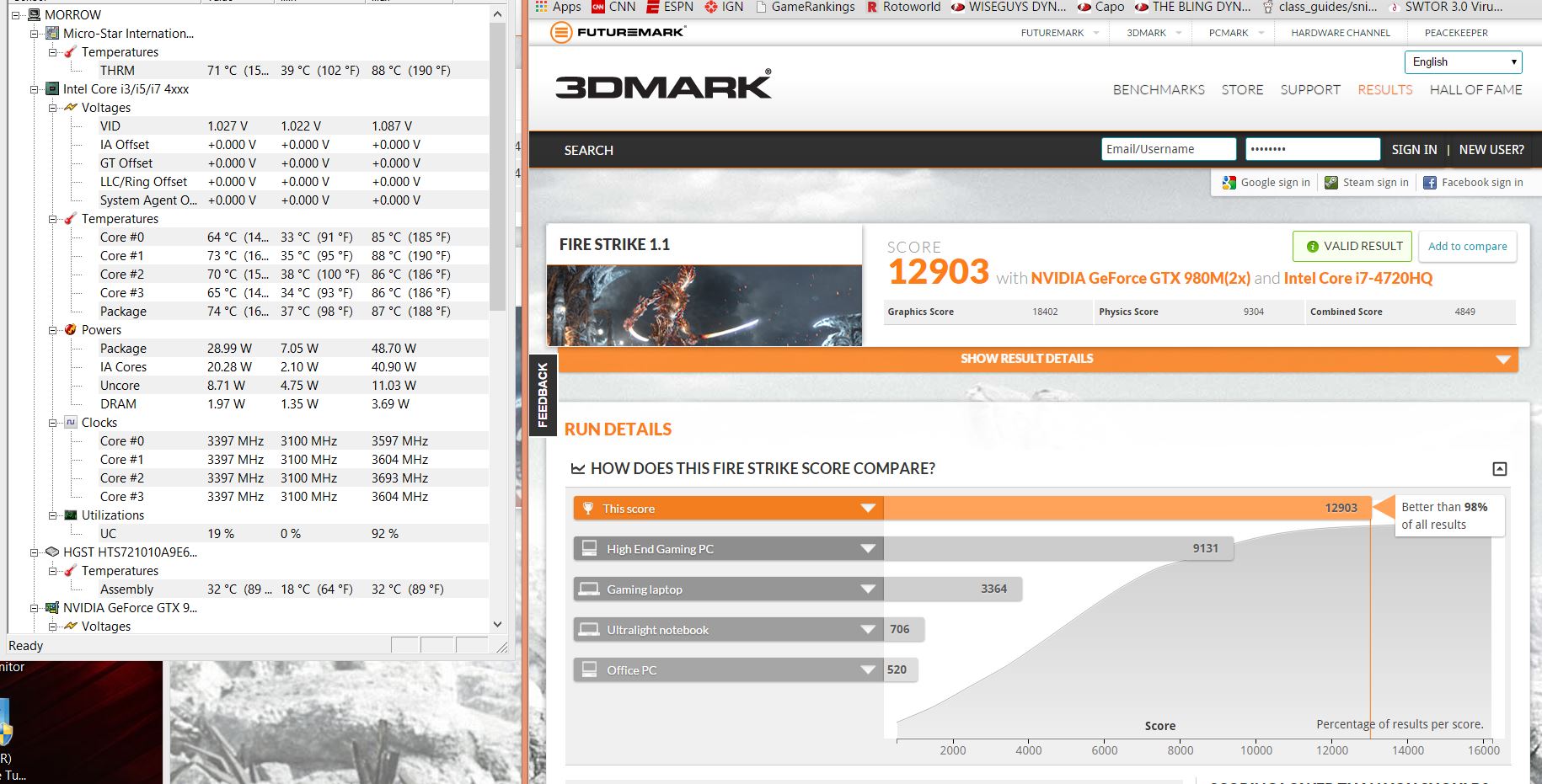
Model 021
Test Fire Strike 1.1
Thermal Compound Mod (MX-4)
CPU/GPU tuning No
Shift Mode Sport
Driver : MSI 347.77
Room/Ambient Temperature 23°C
Comments The CPU temp is a bit high
http://www.3dmark.com/3dm/6661079
![[IMG]](images/storyImages/mini_338847FireStrike11CPUGPUstockrepast34777.jpg) GTVEVO likes this.
GTVEVO likes this. -
Model 021
Test Fire Strike 1.1
Thermal Compound Mod (MX-4)
CPU/GPU tuning Yes : CPU -50mV / GPU : Core +100 MHz ; Memory +100 MHz
Shift Mode Sport
Driver : MSI 347.77
Room/Ambient Temperature 23°C
Comments The CPU temp is a bit high
http://www.3dmark.com/3dm/6661198
![[IMG]](images/storyImages/mini_323531FireStrike11CPU50mVGPU100clock100memrepast34777.jpg) GTVEVO likes this.
GTVEVO likes this. -
Thanks for the submissions, I ran another test with my new arrived Rosewill watt meter (Daily deal on newegg) and at my GT80 at stock clocks (CPU & GPU) with -70 dynamic core offset my machine pulled a max of 317 watts and around 305 watts average (excluding physics only test) during the firestrike test in case anyone was wondering.
-
For a comparison an overclocked titan-X and GS30 combined draw about 380W from the wall.
-
Is this with the same power brick design on the GT80? Delta 330
MSI GT80 3dMark Scores, test and tune
Discussion in 'MSI' started by GTVEVO, Mar 19, 2015.




![[IMG]](http://www.hostingpics.net/viewer.php?id=338847FireStrike11CPUGPUstockrepast34777.jpg)
![[IMG]](http://www.hostingpics.net/viewer.php?id=323531FireStrike11CPU50mVGPU100clock100memrepast34777.jpg)