 Problems? See this thread at archive.org.
The GT70 is a great laptop. The GT60 is the same but a 15.6inch size instead of 17.3. Either way, both have a better fan than the GE series laptop and both have Cooler Booster 2 which allows you to maximize the fan speed (you'll feel like you're playing through a hurricane though).
The GT series is a lot more expensive than the GE series.
-
I am looking to buy MSI GE60. I will be using this laptop for both for college and gaming. Having read some reviews of MSI GE60, I have a couple of concerns:
1. I have read in a couple of places that the laptop is relatively noisy when it is NOT under load. Plus, would it be comfortable to use the laptop on your lap when doing web browsing etc temperature wise.
2. I do not need a very long battery life. About 3 hours of web browsing and microsoft office should be enough. How is the battery life like since I have read in a couple of posts that it lasts no more then 2 hours max.
What temp would the GPU and CPU reach when playing games like Rome 2 Total War, Europa Universalis 4, Starcraft 2 etc for a few hours since I play strategy games most of the time.
Plus, how much do the ambient temperatures affect the GPU and CPU temperatures of a laptop since the temperatures are somewhat higher in my country in the summers.
Thank You! -
Ambient temperatures affect component temperatures directly. Running with 35C ambient will give temperatures 15C higher on components than running with 20C ambient.
-
Has anyone been able to connect to 300mbps via wifi? Max I can achieve is 150mbps. I must say im like 3-4 metres away from the router,without any wall in between (the sygnal strenght is excelent)
-
I believe 150mbps is the max that you can get from two antennas, see below.
IEEE 802.11ac - Wikipedia, the free encyclopedia
Additional article on how 802.11n works.
http://blog.merunetworks.com/blog/2009/08/what-is-a-stream-anyway-how-802-11n-works/ -
Im having a problem with the led being always in orange.When I play a game, the led turns orange, but when I quit, it keeps on orange,it doesnt change to blue.
I tried uninstalling and reinstalling the nvidia drivers with no luck, tried the last version and the last beta too.
Im using Win 8.1 ,with the latest bios (517) and the latest firmware. -
It should not be concerned at all.
On a lean-running system (fewer running processes), the LED eventually turns white but some programs or websites may still be using the GPU for acceleration. -
Hey guys,
Not wanting to speak too soon, but installing the new nVidia beta driver (334.67) seems to have solved my problem.
Overall I'm very happy with this laptop now that these issues have been fixed. Keyboard is excellent and the sound is the best I've heard in my (limited) experience of laptops. It runs games well and the fan noise is really quite acceptable in my opinion.
I've found that It's portability makes up for any noise or heat generated, as quieter, cooler laptops tend to be much thicker or 17.3" variants. -
Weird thing it only happens after I played a game.If I start up windows normally without playing, it sticks to blue.
-
Did you wait for it? Did you launch the game through Steam?
-
Found the problem, it was the program HWInfo
-
Many/most monitoring programs do it - I've noticed GPU-Z which is understandable as it monitors the GPU.
-
Yup, there are many software that can benefit from the dGPU for acceleration. They don't need to be just games.
-
Just got the MSI GE60-223XES with a core I5. I think I already know the answer, but GPU is not mxm nor upgradeable or replaceable in case of failure, not?
Thank you
-
That's right, so if GPU fails then the whole board needs to be replaced.
-
What a shame, althought i suspected it when i added more ram. I got misleaded by another forum where they stated and sweared that you could replace it, but when I open it for the ram thing I couldn't find the MXM board anywhare, and got a totally a 'omg' face... Anyway, even with that, I'm really happy with the laptop. Great performance, great looks, and really good price.
Anyway, i have a doubt about the temps, are this safe temps?
CPU: Idle ~39ºC, full load ~70ºc (+/- 5)
GPU: Idle ~37ºC, full load ~72 (+/- 4)
Anyway, thanks a lot Kevin for your quick answer!
-
That's pretty normal (slightly warm) for this laptop, but you can make it cooler using IC diamond.
Sometimes, updating the BIOS and EC firmware will also help. You can also place the laptop on top of a laptop cooling pad to cool the unit even further. -
Depends on cost effectiveness, for instance Complete BGA rework cycle including reballing (Rework Station) - YouTube
Not saying you should buy one of these but there maybe some place that offers the service.Kevin@GenTechPC likes this. -
Hi!
I've noticed some framedrops while gaming with OC.
Those framedrops are caused by some kind of gpu load drops. They aren't caused neither because of CPU bottleneck nor because of something relationed with temperature, I find 70 GPU degree quite normal while gaming though. Core and memory clocks show normal values.
It is a Nvidia GTX 765m and it looks like I'm not the only one with this issue.
http://rog.asus.com/forum/showthread.php?36058-GTX-765M-GPU-driver-quot-throttling-quot
But i'm not experiencing it till it reaches 70 degrees more or less.
Thanks!
Enviado desde mi Nexus 4 mediante Tapatalk -
I'm using Artic Cooling MX-4. Do you think that with IC diamond i would see better temperatures? Anyway, you say slightly wark, so you think i should worry? (anyway, the full load temps got them using static benchmark, so i don't think i would get them during normal usage).
Thanks again!! -
I already had this issue with that faulty 8600m series , i don't think i could live with that issue again! -
Hello
I am setting up RAID0 from both mSata SSDs. However, 1st SSD has Windows installed (2nd one is empty). I previously set BIOS mode to be AHCI when i installed Windows. Now I am prompted that I will lose all my data on 1st mSata when creating new volume for RAID. Is there a way to setup RAID without having to clean install windows? Thanks! -
Unfortunately, the OS needs to be reloaded under RAID mode since by creating an array the drives will be purged clean by the RAID utility.
Also, please note that the controller is named differently in Device Manager.
For example, you may have Intel SATA AHCI Controller right now, but when you are running RAID mode then it is called Intel RAID Controller.
The OS is lead-in differently with each controller mode therefore it's difficult to even clone and restore it if without involving complex procedures. -
This was explained before, you should have set your BIOS to RAID before installing Windows on your single mSata.
RAID needs space at the end of the disk for metadata. Now you have installed with AHCI driver to boot trying to convert is going to be awkward. Probably going to be easier to just re-install.
Here is an example for other people considering doing the same.
System with just one drive, BIOS set to RAID and OS installed then another drive added.
![[IMG]](images/storyImages/uce5.png)
For this example selecting RAID0 creation.
![[IMG]](images/storyImages/51e2.png)
Select to keep the OS data and migrate it across the RAID0 array. Make sure you select the disk with the OS.
![[IMG]](images/storyImages/ls4w.png)
Once the array is created the original partion size can be increased if wanted after reboot.
![[IMG]](images/storyImages/v42e.png)
Continue using OS while migration is in progress.
![[IMG]](images/storyImages/n6r3.png)
Migration completed.
![[IMG]](images/storyImages/qd9v.png)
OS now running in RAID0 and after reboot volume size increased from 56GB to 112GB.
![[IMG]](images/storyImages/fccn.png) hoyhey and Kevin@GenTechPC like this.
hoyhey and Kevin@GenTechPC like this. -
Thanks so much for detailed explanation. My mistake for not setting the BIOS mode to RAID in the first place ):
Gonna have to do clean installation once again...dos101 likes this. -
Dufus,
Thanks for the informative post.
Is there similar method for AMD RAID array to convert like Intel does?
Thank you. -
Is it possible to get 4-5hrs+ on the newest MSI 2OE w/ 128gb ssd+1tb hdd (with lowered brightness, resolution, no backlit, graphics etc.)? During this time of lowered settings I would only be using it to browse the web, use office and maybe watching a movie or youtube.
-
One more question, what should be optimal strip size for RAID0? I intend to run OS, programs and games.
-
MSI's default choice is 128KB, however there are some who prefer 64KB.
The difference is the capacity wasted and performance, see below to read more about it.
Stripe Size Discussion - RAID Scaling Charts, Part 3: 4-128 kB Stripes Compared -
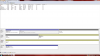
Hi, i just finished setting up RAID between my 2 Msata. However, i still see a capacity of only 1 in my computer. When i run Disk Management, the 2nd msata is labelled as 'unallocated'. What should i do in this case. I have attached screenshot for ref.
-
I guess not.
Another question, how is your HD 4600 integrated video card performance? I thought it was stronger. About 900-950 gpu points with 3dmark11. -
I should have made it clear that I haven't bought the laptop yet but planning to buy it, hence looking for some feedback!
-
Hello everyone.
I just bought MSI GE60 MS-16GC? By the day im here in Qatar. It came with Windows 8. But I decided to downgrade to Windows 7. I had difficulties of finding the exact drivers for windows 7 since the Model number isnt on the list. esp. on global site. The only thing that doesnt work right now is the Creative Cinema/Eq. My friend also bought the same laptop and when we compared the audio. mine was only playing 2 speakers and on the playback device I see 2 speakers listed. I played each and they play different speakers. And when I played my friend's GE60. Theres only 1 Speaker on the Device and all 4 speakers played... actually his volume is a lot louder than mine.
System Specs.
i7 4800MQ 2.7Ghz
8+4GB DDR3L
GTX 765 2GB GDDR5
Sandisk 128GB SSD
750GB HDD -
Did you look for drivers for the older ge machines to see if they would work?
-
I don't know Kevin, sorry.
Did you reinstall with one disk then migrate instead of creating the array then re-installing? What you are seeing is the OS partition volume size which can be extended under disk management (right click partition and extend volume) if you want it to be bigger. -
I'm planning to buy this in the coming days wondering if if anyone could shed some light on a few doubts I have;
1) What is the model of the 128gb SSD and 1TB HDD provided as one option?
2) Is it possible to get 4-5hrs+ on the MSI 2OE with the somewhat lowest settings+tweaks+using Intel Graphics+no backlight+etc. (except undervolting)?
3) Is heating a issue with light use, watching HD vids, MS office, normal everyday stuff?
4) Is the touchpad good or bad? I've always used a touchpad with 2 bottom clickpads so I'm not sure if I would find it good. Is it?
5) Should I buy this laptop?
Thank you! -
1. There's none, MSI did not actively promote the bundle of mSATA on the GE series.
2. It's possible, but difficult.
3. No, however the unit itself should feel warm though.
4. It's Elantech, which is the direct competitor of Synaptics and used by ASUS as Smart Gesture. -
Thank you. Would you say the touchpad is of a good standard/feel or of a mediocre to lower standard?
-
The one on MSI is a good one, since it has many features available.
Budget version doesn't have some of those features. -
I just got my MSI GE60 (from GentechPC - great experience with these guys so far). The question I have is where do you guys go to get BIOS/driver updates? When I go to the MSI download center, there is no category for laptops and they specifically state that their LiveUpdate application isn't meant for notebooks, tablets or all-in-ones. I tried searching by model and it just says nothing found.
-
hey viper, how does the touchpad and keyboard feel? are they nice to use?
also, how long is the estimated battery life of the ge60? -
It's here but MSI website are having issues at the moment.
http://www.msi.com/service/search/?kw=GE60 2O&type=product
Can you email me as my username says plus dot com and I can send you the files? -
I've only had it a day or two and haven't really had a ton of time to play, but the keyboard feels fine to me. The only complaint I would have is the same as I have seen mentioned that the Windows key is on the right side of the keyboard and the right shift key seems really short. I have caught myself hitting the key next to it a few times instead. I like the feel of the touchpad, although I need to get used to the left/right click areas since I'm used to dedicated click buttons. There definitely is a "sweet spot" for the left and right click keys. I've found myself going to click back button on the browser and it feels like I have clicked the left mouse button but nothing happens and it was because I was real close to the corner. If I click in closer to the center, it registers every time. I personally find most touchpad gestures annoying so I've disabled the zooming, etc.
The only thing of concern I've seen is the optical drive is very flimsy feeling when open, but I haven't read yet of anyone having it break. I just take note to be careful when putting a disk in.
Right now my battery life seems to be like 3-4 hours, but like I said I haven't used it a ton which also means I haven't tweaked with any of the energy/power settings. I'll get to dive into it a little more this weekend.
It is really fast though. I ordered mine through Gentech and had them add a 250 GB Samsung EVO mSATA and it is a huge difference. From hitting power button to sign on screen is literally like 10 seconds. I'm sure people who are used to SSD drives are not surprised at this fact, but for a first time SSD user the speed is shocking. The Gentech experience was great. I ordered it on a Friday, they shipped it the following Tuesday and I had it in my hands the next Tuesday since it had to ship from Cali to NY.renzor likes this. -
Hey viper thanks for the reply. I'm quite like you, a little new to touchpads without dedicated buttons and first time (hopeful) user of SSDs. Everything on this laptop seems great except maybe the heat, but for me it is really not a major issue I would think as I wouldn't play too highly demanding games like Crysis.
Battery life was a little concern for me as I'm starting college soon but you said est. 3-4hrs without tweaking? That would be great then. Since I'm going to be taking it I'm hoping to get around 4-5hrs on tweaked settings and also hopeful that it's possible to carry (its advertised as 2.4kgs but ppl are saying 2.6 - would you say it is advertised falsely?)
A little question about the touchpad - as someone coming from never using one w/o dedicated buttons, would you say it is still easy to differentiate left/right buttons on click or does it take a little more force or getting used to? (sorry a little paranoid about the touchpad haha)
Thanks so much!
P.S. Would you recommend me getting this (from the limited time you have used it)?
-
I haven't gamed with it so heat hasn't been an issue, although I did have Gentech repaste the CPU and GPU so I'm hoping that helps when it comes time.
There is a battery calibration utility from MSI I want to try. I know one user on the board here said his showed like 5 1/2 hours of battery time with his tweaks, although I don't know if he actually got that in real usage. I'm happy if I can keep it around 4 since I'm not usually far from the outlet.
Just by feel of the surface there isn't a real way to tell left/right click. I keep looking down, but eventually I think I will get a feel for my placement on the touch pad and won't have to keep looking. If you aren't clicking near an edge there isn't a difference in how a left click vs right click feels although both seem solid.
I haven't actually weighed it to see - and mine would be very slightly heavier since I added the msata card that isn't in the standard weight figure, but my previous laptop was a Dell Inspiron 15 with the 9 cell extended battery that weighed out right at 6 lbs and this definitely feels lighter than that and is much easier to handle since it is pretty thin. I don't think that there would be that much of an issue carrying this around.
renzor likes this. -
Renzor - I can give you a little better idea of battery life after this weekend when I'm installing all my programs and digging into it a little more.
renzor likes this. -
Thanks a lot, appreciate it! Guess I'll hold out buying it for a few more days ~
also may I know which model you have? -
I have the GE60 2OE-003US.
MSI Notebook Official Website | G Series - GE60 2OE-003US Gaming Notebook / Laptop -
Just for a rough idea on 100% set to Power Saver, I went online and downloaded a couple of programs, streamed some song clips off itunes store, and watched some youtube videos for an hour. After that it said I had 2 hrs and 39 mins left. I did notice at one point for some reason the nvidia card kicked on and the battery life dropped from like 3 1/2 hrs at that point down to 2 hrs, then it went back up to the 3 1/2 so there is def a difference if you happen to run something that triggers that dedicated card. The only change I had made from out of the box configuration was that I turned Bluetooth off.
-
Interesting. I would assume youtube (since for some reason it is now heavier) is the one causing the switch. I wonder the laptop will let you to temp. disable the geforce gfx card to only use intel integrated for heavier programs/websites.
From the estimates, I'd be guessing around 4.5hrs without backlit keyboard, lower res, lower brightness, undervolting and various other tweaks (and turning off wi-fi would increase this further) - do you think this would be right?
Official MSI GE60 2013 Owners Lounge
Discussion in 'MSI' started by Grim Tuesday, Jun 18, 2013.


