 Problems? See this thread at archive.org.
That is not the case though. GTX 880m is not new a gpu and I had no problem updating the one on GT70 dominator pro and asus g750jz which both comes with Gtx 880m. This laptop for particular reason is not being recognize by Nividia driver which i think is due to it not utilizing Nividia optimus. I was just wondering if other gt72 users are having the same issue updating their graphic driver.
-
-
Since the GT72 is a new release, I feel certain ryzeki is correct. This is common with new releases, and it generally has to do with the HW ID. Once this becomes listed in NVidia's Verde driver program, updates will proceed normally. I am betting the HW ID for the GT72 880M is different for the previous GT70 880M.
 GenTechPC likes this.
 -
Okay thank you for your input.
-
This issue is not new. GT70 owners was having the same problem and I don't remember it was GTX680M or GTX780M. the vBIOS on GTX880M most likely different and you may have to wait for next 2 or 3 new drivers from nVidia to compile the compatible driver with your GT72.
-
It was the 780m Ken
We 780m owners had to wait 1-2 months before optimized drivers came out
@Arkantos1965
You either wait or mod the inf files yourself adding your GTX880m's HWID.
GenTechPC likes this. -
-
The 680m, 675m etc had the issue too if you go back, Nvidia always has a lag on adding mobile products to the main driver inf.
-
That's what I said, DARN IT!
(LOL! We go through this with just about every new notebook or GPU..... )
-
Laptopvideo2go.com offers immediate support, the GPUs get added into their inf instantly when surfaced.
-
Not necessarily, those drivers are hit or miss. I've have had issues in the past with drivers from there before.
-
Perhaps one fail in hundred drivers for me. But depends heavily on the brand of the computer. Some brands have their own tweaks. But those brands included in Nvidia OEM inf should work well. I have tried over 350 drivers on Acer (a long, long time ago), Amilo, HP/Compaq, Asus and MSI, they all have been mostly unproblematic. And Lv2go drivers without the modified inf are just plain Nvidia, different (tighter) compression used.
-
It seems we are all in agreement! haha. It has to do with most of us having gone that road with each new GPU
But people don't sweat it, support will BE there. This is not 2004 again with obscure driver releases only for 2 products and unheard of updates!
-
edit: nvm a bit off misinformation on my part.
-
striker and what about the msi gs 60 and gs 70? the laptop is super thin, these two fans run or are too small to heat both the 870m? have a nice design, they are thin but the price is somewhat cost in relation to the gt72 GT70
-
This could be very important for most potential owners, to avoid any dissatisfaction on something they will be staring at for 99% of the time hehe.
-
I love them too..... but they are completely non upgradable
+ the thin chassis even with the dual fan can reach temps upto 93C
People have found out a way to undervolt and avoid throttling though, but again it doesnt fully utilize the 870m in it due to heat issues...may be wait for a maxwell iteration and you might have a sufficiently cool sleek lappy -
Hi Guys,
I am new to this discussion, so pardon me if I duplicate a topic. I am working on a GPU-based scientific computing application using CUDA. For this project, I’ve used a GT70 Dominator Pro -889 (i7 4800MQ (2.70GHz), 16GB Mem, GeForce GTX 880M 8GB) as a benchmark machine. I’ve also got several GT70 Dominator-895s, a GE70 Apache Pro-061, and a GS70 Stealth-037.
I need to order one more machine in the next few weeks, and am highly interested in the GT72 DomintorPro-010. I am quite fond of the redesign for a “form, fit and finish” perspective. Simply, it looks like a more cohesive and well-considered product.
On the other hand, as the first of a new generation of leading-edge products, I am deeply bothered by the choice to downgrade the processor to the i7 4710HQ. I am not so concerned that it is soldered, because I’d say that very few people ever consider a CPU upgrade on a laptop. But it is troubling that the overall performance, compared to the 4800MQ is down about 8 – 10 %. I assume this difference is mostly due to the slower clock. Since waiting for new SKU’s with different configurations is not an option, I must decide whether or not to get the GT72, or get another GT70 Pro-889, which would actually be about $300 cheaper.
From a benchmarking perspective, it would be interesting – although in my case, I am not sure if the net performance of my application is CPU bound – most of the heavy lifting is done by the GPU.
So, a couple of questions:
1) Are there any other subtle differences in the processor architecture or related subsystems that would offset the difference in CPU clock speed?
2) In regards to the ability to switch back to the internal video processor – does anyone know if the GPU is physically still accessible to the system in this mode? Does the GPU still have power? For my application, this could actually be a big positive, since I would be able to use more of the GPUs resources than in the case when the compute code is sharing space on the GPU with Windows.
Thanks very much! -
Big difference between 895 and 889 or 890? You got both can you please tell me if the 400$-500$ of difference in price worth IT? Thanks
-
As stated earlier the gt72 uses the new display port (2 channel 30 pin connector). Previous panels will not work. As future ips 1080p panels are released you should be able to swap them in though.
-
Yes the GS series are sexy, aren't they? But honestly, gaming would not be my focus in these models, and due to their design/cooling solution, I'd opt for the GTX-860M.
Compare Intel Products
For the application you describe, I really do not see any perceivable benefit of the 4800MQ, over the 4710HQ. Both i7 Haswell's are powerful, apt for the job, and I do not believe the .2 GHz clock difference is real cause for concern. Many have suggested this as a downgrade, but not really..... it's negligible. GT70 models were initially introduced with 47xx series processors too, and now 48xx are offered, incentivizing these outgoing models. The 48xx processors are a perk in this case, an exception (more often an upgrade), but not generally the rule. My biggest grievance here would be Intel's push to HQ processors. Even if I do not choose to change processors, I still prefer having the choice to upgrade, should I see fit.
Anyhow, you seem most inclined toward the GT72, but are caught in the loop of feature benefiting (nit-picking) the old vs. the new. You really like the shiny new GT72, don't you? Are you willing to pay a little more? I say, do whatever floats your boat, and places you in calmer waters (your happy place). Personally I believe both can do this, but the GT72 has my vote due to it's improvements. Also, with the GT72, the automatic (and sometimes problematic) switching of Optimus is gone..... it's either IGP or dedicated GPU, not both..... and system resources are solely dedicated to the graphics solution of choice. As such, only the chosen solution appears within the Device Manager.
Oh, and since you mention, "most of the heavy lifting is done by the GPU", I'd really try to hold off until the more efficient Maxwell GT72's arrive..... or you will be sorry..... SOON!
-
oops, didn't know that
Here's to hoping high quality 17" laptop panels are ever made. -
And Big difference between 895 and 889 or 890? You got both can you please tell me if the 400$-500$ of difference in price worth IT?
-
Thank you for the well considered reply.
I think you answered my processor question well.
I would love to wait until late Q4 / early Q1 2015 for the new Maxwells - however, this particular project is tied to a schedule in which monies expire in a few weeks, so that's not an option, unfortunately.
I will most likely order the GT72 in the next few days. When it arrives, I will run some of the standard CUDA benchmarks and share the results versus the other laptops in our stable - if anyone is interested ...
As an aside - my company has always purchased Dells for general business-class workstations. In fact, I have a soon to be 5 year old Vostro 1720 that might as well be bulletproof - still running along beautifully. I purchased MSIs for this specific project solely because of the GPU capabilities, and they seemed to be a significantly better value spec-for-spec than the equivalent Alienware machines. The build quality on every MSI I've bought is good, to very good - and I think on par with anything I've seen from Dell.
Unfortunately, the MSIs will not get the day-to-day roadrash like our other laptops - so I would be interested in any information about how these hold up over the long term.
Thanks, -
I used an older GX660R for nearly 3 years of field engineer duty. It was an older model full of flexible plastic over a rather sturdy but still flexing case. It lasted all three years with some scratches here and there and just recently the battery died. Newer MSIs are far sturdier than that model. My current GT60 looks exactly as new with no visible damage on any part despite a year+ of use. I am confident the new design is even better
-
Hello, everyone. I have been researching a good desktop replacement for about 6 months now, and have been drawn to the MSI line (first the gs series, then the gt series). The cooling advancements and other subtle changes have made me decide a GT72 dom. 047 will most likely be my choice, and based on my reading (gs, gt70 owners thread, gt series with 870 & 880, this thread in full, and several others) specials that gentechpc interest me greatly (ram and ssd upgrades, and on the phone someone mentioned thermal compound replacement). In the course of my research, however, several questions have had conflicting answers from different sources, and i would like to ask the community here for their opinions!
This machine will primarily be used for music studio purposes, music video editing, and database storage (heh, not like that should be an issue). Oh, and some casual gaming, but i would like to futureproof this box for as long as possible. My single biggest interest is being able to upgrade harddrives or ssd's in the future. What attracts me to the GT72 line is 4 m.2 slots.
1) How versitile is this configuration? For example (a), can i run 2 128gig drives in raid 0, and 2 other drives indepently? For example (b), can i run 3 drives in a striped raid, and a fourth m.2 drive independantly?
2) As it sits, the domintor comes with one (1) terabyte mechanical drive, and a second bay which contains a bluray burner. Does it have room for a third 2.5" device to be installed? Conflicting answers on the phone when i asked various retailers that question.
3) Patient as i am, i am not sure i would be patient enough to wait for the maxwell generation of chips, however, when these release, (A) would the prices be somewhat equivilant to the current generation? More? Less? (B) would the current generation become obsolate, or cheaper? This would be an educated guess based off past trends, i understand. No need for disclaimers. =)
4) the second choice i had listed was the GT70 dominator 892, which appears to have better hardware (minus the chassis changes and m.2 changes the GT72 provides, of course), including a second stock ssd and a 4800mq chip (upgradable and a tad faster, from what i read). If possible, could someone answer the first two questions as it would apply to this model, and possibly reassure me that i am leaning in the proper dirction?
I realize this is a lot to ask as a new member, but it seems you all are very helpful and knowedgable, and it would be *greatly* appreciated! I look forward to owning an MSI. -
1) The drives are fully independent and can be organised any way.
2) No, 1x 2.5" bay, 1x optical bay (can be converted to 2.5"), 4x m.2.
3) Probably yes about the same, maybe a little more at the very start. MXM prices tend to stick fairly well but they will drop on the high end as the new stuff launches.
4) It has either 3x mSATA + 2.5" + optical OR 2x 2.5" + optical. All drives are again independent.
EDIT: As a side note:
GT70: mSATA + 2.5" = Gen 3 SATA (optical = Gen 2)
GT72: M.2 = Gen 3 SATA (optical + 2.5" = Gen2)
Gen 2 is half the speed of Gen 3 and is perfectly usable but will slow down SSDs a little. I'll likely run a 512GB SSD in the 2.5" bay and have 4x 256GB M550 drives in the M.2. -
i just want to know if the difference between 895 and 889 or 890 video card worth the 500$ of difference in price
thanks
-
Hey guys, I have a small question: Is Gt72 suitable for a Graphic design student ? Could I easily and effectively work on PTS, Lightroom, maya or some video editting programs by a Geforce card ?
-
Thank you for the detailed reply! So, the GT72 is actually lacking with it's 2.5" drive? Assuming Gen2 means Sata 3Gp/s and Gen3 means Sata 6Gp/s speeds, or am i mistaken? In other words, were i to replace the (1) TB mechanical drive with a samsung evo 1TB, it would run faster and more efficient on the GT70 dominator 892?
And regardless of model, if i replaced the optical drive (which i am sure to do quite soon, if not at purchase), a SSD in its place would be hampered by the limitations of its connection...? Bummer. Is this something that could possibly change with the new maxwell models? Thank you again, by the way.
- Dave -
You can get 512GB m550 drives in the m.2 slots for 2TB of storage. You could then put the 2 SSDs in the optical and 2.5" bay in raid 0 this would increase the sequential access speeds of the drives back to single port SATA gen 3 speeds.
You are right about what i mean about gen 2 and 3.
The thing is the chipset has 4 gen 3 ports so having more beyond that forces some to be gen 2. -
Those higher capacity m.2 drives are too long for most systems and won't fit. AFAIK 256GB is the largest in the short form factor (42mm) and those are just now hitting the market. Has this changed? Or do the GT72s support the 60mm & 80mm drives?
Cheers, -
GT72 use the longest sized 2280 drives.
-
That's nice. Next year when the new Intel chips are out and prices have come down on m.2 drives, I might have to take a look at the GT72.
Cheers, -
I think it should suffice for student/intermediate grade work and within a reasonable level of expectations - professional grade work as well. But if you want to make something really intensive, with a lot of moving 'parts', then I think you'd be better off with a proper workstation.
As far as laptops go, other than going custom with dual cards in SLI or a quadro card or more RAM, I don't think you could go any higher than the GT72 with the 880M. -
The GT72 is about as good as you will get before going quadro.
-
The thermal design on GT72 is not maxed out yet, MSI's design team has put into consideration to house something better later on.
Of course, if it hits the ceiling with thermal capacity there are still things that can be done to increase it. -
I am on the road again, so sorry I did not get back with you sooner.
I would say this depends on your intended use, and your budget. The biggest difference in price is in the GPU (870M vs. 880M), and the remainder is in other configured hardware. Personally, I do not own any of the models you outline, and prior to the GT72, my last GT70 purchase was the GT70-2OD (780M). When the GT70 880M models were released, I knew the improved GT72 was in the works, so I opted to skip this GT70. To me, I feel the 880M pushes the limits of the GT70's single-fan design, at least to a point that I am not comfortable with. If you are not a hard-core gamer, and budget is a priority, I think I would consider the GT70 870M options...... because the 870M will game nicely too. Otherwise, hands down, I'd suggest considering the GT72 options, over GT70 880M releases...... and perhaps wait a little longer, to see other GT72 options becoming available.
The GT72 does use the longer 2280 M.2 SSD's, and generally, if this is the case, the appropriate set-screw holes will be available for the shorter M.2 SSD's, as well. I have not checked the M.2 adapter for this, but I am betting the GT72 will accept the other M.2 lengths. Perhaps Ken or Kevin will be so kind to verify this for us?
-
It's good that MSI opted for m.2. At first I was wondering if it was a good move, but seeing future iterations of the GT72, plus new market SSDs, it seems like a great addition.
4 x 500+GB drives, plus additional 2TB drive... hmmmm! -
All hail Ryzeki,the Lord of Excess!
-
Better yet 4x 512GB plus two 2tb hdds in raid 0 (one in caddy).
2tb ssd with 4tb extra mech storage. -
Yeah, and M.2 is still in it's infancy, currently limited and awaiting next-gen support. At present, SATA III bandwidth is 6Gb/s, and PCIe 2.0 x2 caps at 10Gb/s, but with future chipsets and PCIe 3.0 x4 we can expect storage bandwidths up to 32Gb/s. Imagine that..... good times ahead!
-
The price for M.2 isn't that bad, but it will eventually drop on the pricing which will be more appealing to buy.
-
This is what the adapter looks like:
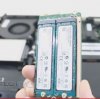
The screw hole is at the end of the card, therefore, it only supports 80mm.Cloudfire, -=$tR|k3r=- and felix3650 like this. -
You may be able to get an adapter off eBay in the future if you want to use a smaller drive.
-
-
But Ken, your photo shows the M.2 cards installed on the adapter. If the SSD's are removed, beneath, are there screw holes for the shorter M.2 cards? As shown here:
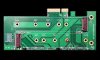
-
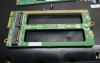
No it won't fit, the card is too wide to fit in the slot. Other adapaters won't work either because it will make it too thick to be install.
 -=$tR|k3r=- likes this.
 -
Interesting! So they actually cut out the center of the adapter's board? Yep, no doubt about it, that adapter will only accept 2280 M.2 SSD's, LOL! Yeah, I wasn't suggesting using other adapters..... I was just wondering if the screw holes for shorter M.2 SSD's were present..... obviously not! Also due to the adapter's bus, I imagine the MSI M.2 adapter is also proprietary too, you reckon?
Thanks Ken!
-
No like the half height to full height converters for mini pci-e.
anyway if all else fails electrical tape would do. -
Yup the adapter won't hold the shorter M.2 SSDs.
Yes the MSI M.2 adapter is proprietary since it's double-sided and holds 4 M.2 SSDs. When MSI first introduce their first Super-RAID with 2 mSATA SSDs they said it will take competitors at least a year to duplicate it, they were right, a competitor brand was not able to make it at the time and end-up put a warranty void sticker on one of the mSATA SSD slots if you try to install.
-=$tR|k3r=- likes this.
***The MSI GT72 Dominator Pro (GTX-880M) Owner's Lounge***
Discussion in 'MSI' started by -=$tR|k3r=-, Jul 17, 2014.


