 Problems? See this thread at archive.org.
Hello all i appear to be having a speed-step bug with my GE40. If the laptop is allowed to sleep/hibernate for a length of time on resume the CPU clock speed gets locked at 0.77ghz making the machine very sluggish. This pretty much makes sleep mode useless for me. Changing power modes has no effect the only way i have been able to restore performance is restarting the machine. I have installed the latest bios and firmware updates and still have the issue.
Has anyone else encountered this issue with their GE40, on Google i found reports of this with other laptops but no others with the GE40.
-
A cooling pad will help a bit, yes. There are minor modifications you can make to the cooling system, but a cooling/chill pad is a far easier way to lower temps by a few degrees.
I haven't seen reports of this on the GE series either. Is this happening while running on the adapter (if yes, does clock frequency change if you remove it)? -
Yes this also happens when on AC for the whole cycle as well. Disconnecting/reconnecting the AC adapter doesn't change it.
-
So the issue appears to be corrected for now. I made two changes, disabling and then re-enabling speedstep in the bios and reinstalling the Intel Management Engine drivers.
-
Hi All,
I have the MSI GE40 since last year October
But i have been having issues with my Brightness control for the past two weeks
My current Display Drivers are
Intel 4600 - 10.18.10.3383
Nvidia - 9.18.13.4052
Windows 8.1
I have tried rolling back to older drivers but i still am having an issue i cant seem to control it using SCM or using the Brightness control on Windows
I am not sure where the problem could be.
Please do let me know if anyone has a solution to this problem.
Thank you -
Where can I find the latest BIOS and VBIOS updates for the barebones model? (MS-1492)
I bought it from pcspecialist.co.uk... -
What's the model#? It should begin with 9S7-xxxx-xxx or 937-xxxx-xxx.
-
Sorry to jump in like this however I've the same laptop from the same retailer and there is no model# following that number scheme.
On a separate note, would you also be able to provide me with the latest EC/BIOS for my GE40-2OC barebones (MS-1492). I'm currently on EC: 1492EG61.507 and E1492IG610N which you actually provided me last time too.
Would just like to thank you once again for your support on this forum Kevin. -
Hey guys,
how do you connect msi ge40 to a tv using hdmi cable?
I could only get the video output but could not get the audio to the tv. Is there any software or driver i need to download? -
Check under Sound, audio, and game controller in Device Manager, verify if you have 2x High Definition audio controller or Intel Display Audio + Realtek High Definition audio controller.
If you have the first part, then you will need to load Intel HD Graphics drivers as well as Nvidia drivers.
But if you have the second part, then you will need to make sure the display is shown on the TV, and then go to Playback devices to make sure the audio is set to Intel Display Audio is set as Default device. -
i dont have that part. how do i download it?
-
-
Hey thanks alot for the help!!
-
You are welcome, feel free to ask any questions again if you have any.
-
Hi, I just bought the MSI GE40-i760M285W7 (the one with gtx 760m and Windows 7) for 750€, and now I have some questions, would appreciate it if someone could answer.
How is the battery life with this notebook under windows 7 (brightness reduced, browsing or video playback) and has anyone tried out both W8.1 and W7 and can give a comparison?
The thing that bothers me the most are the orange dragon eyes that light up when the notebook is turned on. I know that you cannot turn them off, but I found this guide for screen replacement
https://www.youtube.com/watch?v=Rs-qCjkVjHU&t=2m45s
and it looks like you can just remove the foil with the orange eyes underneath the display. Or maybe just put another black foil on top of the orange eyes, or paint them black. Has anyone tried it yet?
What do you guys think are the chances that you can replace the nvidia gtx 760m with the gtx 960m or gtx 950m when it comes out? I mean there is already a version with the gtx 850m, but the difference in performance from 760m->850m was not enough for me to warrant a purchase of the new ge40 model with the 850m, which would have cost 250 € more. -
GE40 has a soldered CPU and GPU ... there's no chance you can replace it with new 900series ...
Only GT models have MXM cards of GPUs which are replacable...
I am not owner of GE40 but in every review I've read is reported battery life 5+ hours during internet browsing
-
That's too bad about the GPU soldered on the mobo. Yes I've read countless reviews as well, but they were all done with Windows 8.
To those who have problem with overheating/temperatures:
Why not use your own custom fan profile? It's pretty simple, you only need RWE ( Read Write Everything) and this tool that a MSI owner on a german forum made. The pre-configured fan profiles are already pretty good, I'm using the quiet one right now and the notebook is virtually silent while temp readings are constant at 63°C.
Tool: Fan Control Tools by Pherein v1.0.3
Sources: http://forum.notebookreview.com/msi/645070-force-fans-go-faster.html
Fan Control für MSI Barebones - Notebookjournal - Forum
This way, you can set the fans to spin at a faster rate at a lower temperature, and thus reduce the temperature.
On the other hand, if you think your notebook is too loud in idle or when doing simple tasks (when temperature are still relatively low), you can reduce fan speed to make it quieter.
USE THIS AT YOUR OWN RISK. IT IS NOT MSI OFFICIAL. Fans reset themselves every time you boot, so it's best to create a shortcut for the Fan Profile Applier.exe and Fan Profile Toggle.exe on the desktop. I think it only works with Windows 7, but I'm not sure. -
Thank you! I was looking for something like this
-
You're welcome
-
Hi! I want to take back my GE40 to the factory mode (clean windows with the stock drivers) any way to do it?
-
Factory recovery should be using the original recovery discs created from the MSI-made OS when you first got it.
The "factory mode" that you mentioned is not factory mode, but a clean install instead.
You will need to have the original installation disc, plus drivers provided by MSI on their website to achieve this objective. -
Thank you! I found it, I've got to click on F3 in the MSI screen logo, then click on clean!Kevin@GenTechPC likes this.
-
You've done well! :thumbsup:
-
Hey Everyone,
Anyone have any info to share about upgrading the network card? I read on one of the early pages in this thread that it is possible, but I can't seem to find information about how to actually go about doing it. Also, if you have any recommendations on specific cards, i'd love to hear that too
-
Hey, In the middle of gaming session just now my laptop began emitting a high pitched screeching sound and some clicking noises. anyone know what the could be?
-
Might be a hard drive problem, have you tried disconnecting the HDD and if the issue persists?
-
I upgraded mine to an Intel 7260, and everything worked perfectly from the get-go. Just make sure you have drivers on hand (I forgot and felt rather embarrassed). Installation is incredibly easy; one small Phillips screw holding the half-size card in place. Also don't worry about voiding your warranty by breaking the sticker, they won't turn down an RMA unless the issues are caused by the card.
Edit: Whoops wrong post reply...Rez00 likes this. -
I bought an MSI GE40-2PC (the one with GTX850M and FullHD screen), should I stay in this topic or post somewhere else? I tried to look for other topics dedicated to the updated G40, but it seems nobody's there anymore...
-
You could create one dedicated to the -2PC if you like but I don't think people will mind too much.
-
Okay. I'll stay here then, since 2PC is just a spec update and shares the same chassis, and my question would apply to both models anyway.
I love it so far. I bought the i5-4210M version, maybe that's why I don't experience any heating or noise issues - the machine is less noisy than my old Dell Vostro 3450, and the temperatures don't seem to go above 80C on CPU and GPU even during intensive gaming. I didn't test it very thoroughly, but it seems okay. Nothing catastrophic at all.
The screen is amazing. It's AUO113D, apparently it's the same panel as in Gigabyte P34G v2. Viewing angles, brightness, colors, etc. - everything is great. I have to use 125% scaling though, because everything is so small on a 14-inch FullHD screen.
What I don't like is the awkward location of USB ports and that stupid warranty sticker that prevents me from adding RAM and SSD until my warranty period is over. At the moment I'm stuck with 4GB RAM and 1TB HDD, but the machine is still surprisingly fast. The GTX 850M is a beast - I specifically went for the GDDR5 version because I knew it would be almost the same as the 860M. Not disappointed at all.The nVidia Optimus software is very easy to use too, especially compared to that horrible AMD Enduro system I had to endure (pun intended) on my previous laptop.
I have a question to people who have disassembled the GE40 - is it possible to remove and replace the keyboard without touching the warranty sticker on the back panel? Is it secured by any screws? Thanks a lot in advance. -
You can damage warranty sticker any time you want
It is made just for unskilled people to scare them out to not touch things inside...
You will not lose your warranty that's what I love about MSI You are free to upgrade or repaste anytime you want.
-
That's what I heard too, but I bought this laptop in Japan, and on their Japanese site it says explicitly that if you damage this exact warranty sticker, you'll be charged for repairs even during the warranty period.
-
Hi all,
I was wondering what size screws MSI uses for the two beside the battery on the underside and the one directly below the left shift key?
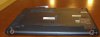
Those two
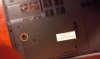
and that one? -
These pictures from the service manual may help:
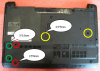
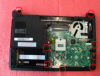
There aren't any sizes in the second picture, but in the service manual it says the screws are M2.5*5mm. Also, "The screw driver torque is: 2.0-2.5Kgf-cm".
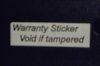
By the way, I managed to peel off the "Warranty void if tampered" sticker without damaging it. I took a blowdryer and some spare sticker paper I had. So I applied some heat to the sticker for a while, then put the edge of the paper underneath the sticker and slowly moved it while still applying the heat. After the paper went about halfway, I took the sticker with my fingers and peeled it off very carefully. Now I can upgrade my computer with extra RAM and an SSD, but if anything happens to it, I'll just slip the sticker back on. -
Very sneaky...:thumbsup:
Anyway, thanks for the reply! I'll look into into it. -
Trying to remove the top cover/keyboard surround from my GE40. I removed the screws from underneath the hinges, but still can't get it off. Anyone know how to do this?
-
Have you looked at the disassembly guide posted above?
-
Hi,
i bought my MSI GE40 20C last year DEC 2014. I changed my hdd to samsung evo 840 250GB SSD. Changed the dvd rom to my original HDD. I find that my battery life is shorten to about 30%. Instead of 4.5hrs it become 2.5-3hrs. Initially it was ok. Suddenly become like that. The current discharge value is around 15w. Anyone got any idea why is it like that? -
There is a new BIOS version Q on the MSI site - MSI Global - Computer, Laptop, Notebook, Desktop, Motherboard, Graphics and more
Release Date 2014-11-24
Version 20Q
Description Add APIC version information in CpuInfoHob for S4 test stability
Note Channel Legacy AHCI -
Only got 10Q and 30Q. Which one should i choose?
-
It depends of your current BIOS, if you have 10x - then flash 10Q, if you have 30x - flash30Q.
-
Could someone provide a mirror for the disassemble guide? For some reason the link leads me to an SSL error.
-
Hello guys,
I have serious problem my notebook. As you can see in picture below, temperatures while playing games on dedicated GPU (World of Tanks, high settings, 1600x900) are getting crazy. Also fps drop is enormous (first 10 minutes Im on 43 fps, after 10 mins fps are getting down to 15 fps). Im considering to send him to so some service - (cleaning inside and putting new paste on CPU)- but not place where I bought it (cos I would have to wait for like 1 month ...). Will I be able to claim notebook if sth happens to him if sticker in photo below get void ?
-preview.png)
-
You can claim warranty for it, but it's better if you can do some steps first since the computer is on your side before contacting MSI.
1. Make sure the system is powered off.
2. Use compressed air to clean up the vent, heatsink, and fan.
3. Repasting of thermal compound.
4. Update BIOS, and EC firmware.
5. Verify.
If problem persists, then contact MSI directly for warranty service. -
Man, thanks soooo much for your advices !! I'll try to do all the stuff you numbered up here. I really appreciate it.
-
You are welcome, feel free to let us know if you have any questions. :thumbsup:
-
someone used thermal paste ?? how cool is after applying it ?? :O
and if someone did a cooling mod, like putting a hole above the fan ?
i ask this cause when i play it reach 95° CPU and im afraid that it will burn... im using it with a cooling pad.
Thx -
With IC diamond, you can drop a few degree of Celsius.
-
I just purchased the ge40 20c-128us second hand.
After a bit of work I figured out that you have to turn all power settings both pc and intel graphics, to high performance before games will work on this.
However, it seems that diablo 3 will still not use the GTX 760m. I have gone into nvidia control pannel and set the nvidia card as default for global, as well as the launcher and the .exe. But still I get 25 to 40 frames a second. This is very disconcerting as I have seen diablo 3 run on my friends 760m (he has an asus) and his runs like butter.
It looks like no matter what I do, I can't get diablo 3 to run against the nvidia card. Right click run with graphic adapter is not working even when I make a shortcut directly do diablo.exe with -launch.
I have updated the drivers both intel hd 4600 and the nvidia driver to latest driver.
Does anyone have any idea what is going on? Borderlands 2, Final Fantasy 14 run just fine 60 fps just fine with nvidia optimized settings. -
Hi. I have the barebones version from PCSpecialist with the old GTX 760m.
PcSpecialist hasn't updated the BIOS since release, so can someone link me the latest compatible BIOS for my laptop?
BIOS Version/Date American Megatrends Inc. E1492IMT.10H, 26-Aug-13
EC 1492EG61 Ver 5.06
EC Build 07/25/2013
Also, I've dual booted Ubuntu on this machine but the fn key for Airplane mode and Bluetooth/Wifi Switches don't work under Ubuntu. This leaves wireless on at all times and causes a considerable battery drain. Are there any drivers for enabling the toggles for linux?
Thirdly, is there an Unlocked BIOS that will enable me to limit battery charging at a certain amount like Lenovo laptops? I usually disconnect my battery when I know i wouldn't be taking the laptop out for days or during very long gaming sessions, but a solution like that will be preferred...
Thanks
The Official MSI GE40-2OC Owner's Lounge
Discussion in 'MSI' started by Wonderdog, Jun 19, 2013.


