Problems? See this thread at archive.org.
yes it is made from the upgrade download.
I installed a copy of windows 8 x64 that i had laying around, when it first booted up, it showed build 9200 at the bottom right of the desktop. Is that the latest build? I dont remember my win 8 pro installation on my gaming desktop show that.
Anywho, i didnt activate or enter my product key from the stock msi installation on the stock hdd, but its activated somehow..
-
GPU clock does drop to 135Mhz when you are not using GPU intensive programs. if you open 3DMark program the core clock will go back up to 771MHz.
-
I started up Battlefield 3 and it was unplayable. I alt / F4 back to the desktop to check GPU-Z and it was at 135..
Id really like to use just the SSD.. I just want everything to work the way it does with the stock drive. I would really like to clone it somehow, but when in the windows 8 install screen where it wants you to pick a disk. the stock disk has 6 partitions.. I think that is really unnecessary. No more than 3 IMO. -
The GT60 to get maximum gaming performance would just need the latest intel chipset and Nvidia graphics drivers.
Beyond that it should behave normally regardless of using a fresh install or MSI's included image.
Can you post up the sensors graph run over a period of gameplay in GPU-Z? -
Make sure its not running on the integrated GPU.
-
There is a latest nvidia 680m driver released on the nvidia website, V 310.9, relased on Jan 5. Is it recommended that i download that driver for my gt60 or should i just download the drivers msi relase on their website ?
-
Typing on my new MSI. It just came in an hour ago and it is awesome. I do not see any of the keyboard problems people have been reporting and everything works great. Good job Gentech on build and delivery. You will always have my future business after all of your help.
-
The latest set resolves a security issue, graphics drivers are one to get from the card manufacturer.
-
Windows 8 has got to go. Please help. I got this laptop today and I need to install windows 7 ASAP. I am sure the drivers disk I received from Gentech PC probably was configured for windows 8 so ............... what do I do? Is it as simple as inserting the windows 7 professional disk and then loading the drivers disk?
-
Far better off getting the latest from the MSI website or manufacturer websites, disc drivers should always be used as a last resort.
-
Is there a way to disable the intel gou?
I will post screenshots when I get back home.. -
Yes but since all the displays are wired to it and not the gpu you would get no display at all

Your best option to rule this out is select nvidia gpu only in the graphics drivers. -
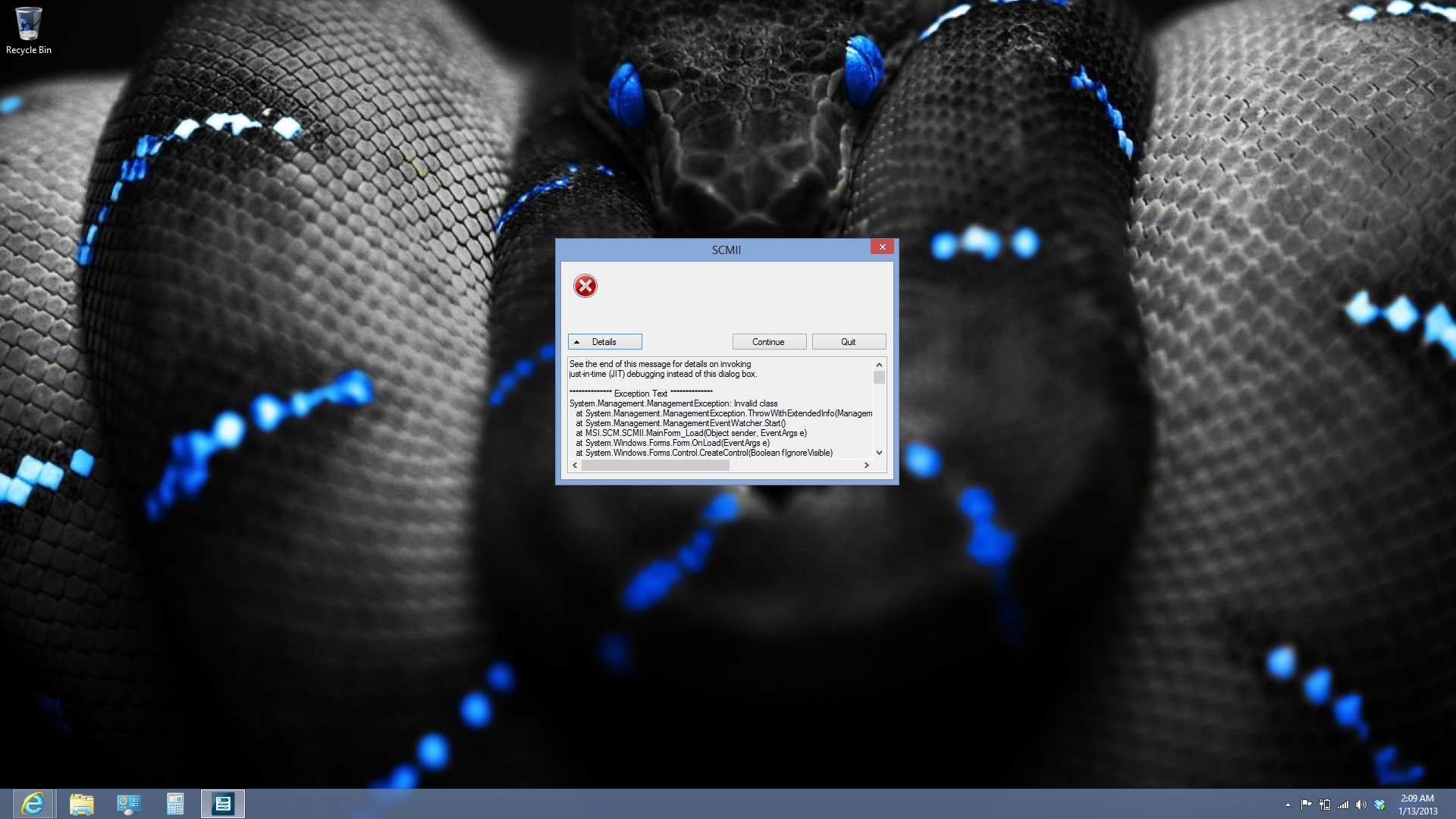
Has anyone seen this error before?
Also, everytime I restart or turn on my laptop, I have to go into the bios and then F10 and it will boot, otherwise it will keeping loading the MSI logo over and over and never boot. And when it boots into windows on the SSD,the killer NIC software always loads up and wants to do the internet speedtest and when I close the program, its always display the "never show this message again" even though i put a check mark in it.
Also, the CPU isnt going past 1.2ghz even with the turbo on and the power cord plugged in. But everything works fine on the stock hdd.??
The below issues were resolved by plugging the power brick in.. Why is that?
Also, with the installation on my SSD, the Function and F5 or F6 doesn't work? Suggestions? Actually, this works if the power plug is plugged in. weird..
Another issue is the wifi, the speed of browsing and the results at speedtest.net are a lot slower than the stock 750gb hdd installation.. i dont know whats going on..
this is the stock hdd win 8 install speed test/ http://www.speedtest.net/result/2434467992.png
and this is the new ssd win 8 install speed test. http://www.speedtest.net/result/2434476398.pngAttached Files:
-
-
Try go to BIOS > Security and disable secure boot if your unit came with Windows 8.
For Killer wireless try install the drivers from the MSI drivers DVD. -
I loaded Windows 7 pro and spent the night finding and updating drivers. That leaves me with a few questions. Under device manager and other devices I have two faulty drivers, universal serial bus (USB) controller and an unknown device. Also I can't get my disk drive eject button to work anyone have any idea how to find or fix that.
-
The Killer software is already installed from the dvd, maybe i should uninstall and reinstall the software.. What will disabling secure boot do?
Also, why doe plugging in the power have anything to do with the speed of the internet btw?
My memory seems to be running at 1333 as well..
Thanks -
Have you tried downloading the latest set from the website?
-
Im going to try that now..
Should i update my EC and the BIOS ver.?
Whats this btw? it seems to move a percent every minute or so..
-
A windows update by the looks of things.
-
If you're facing a problem about the Killer NIC message not disabling, disable "Launch PXE OpROM" as shown in the following screenshot:
![[IMG]](images/storyImages/bpAb5.jpg)
-
hi guys, i use to mute my speakers by pressing the Function key "Fn" and 0 on the num pad, but that doesnt seem to work anymore. all other functions commands work. Does anyone know what the problem is ?
-
Make sure you are running SCM (windows 8) or S-bar (windows 7).
-
Thanks. I installed the Killer software from the MSI site and rebooted and it didnt bring up the message again.. so thats good..
-
I thought this would be an interesting little video, how long does it take a UEFI, option rom disabled SSD powered notebook to boot:
MSI 16F3 modified bios boot times - YouTube
The answer is not very
-
Holy hell.. I think the only way i would be able to do that is to remove my 750gb drive and leave the ssd in. I would if everything worked right on my win8 installation on said ssd.
-
If i use the MSI recovery software to make recovery disc's, can i use them to restore a SSD so that it will be identical to the 750gb hdd?
-
Yes you can use MSI recovery disk to restore to SSD or rotation hard drives.
-
what if its a formatted hdd?
Thanks for the reply -
I've disabled safe boot in the bios but i still have to go into the bios and then exit to make the laptop boot. The bottom right shows A2 and then it restarts over and over. HELP!!!
-
Nice! If I select UEFI, it boots right into the BIOS. Any ideas?
For now its legacy. -
You must install the OS in UEFI mode, that or follow a guide on how to convert the OS, but it's not something I have done.
-
Hello All,
I was reading this review and I was curious if anyone else is having these problems as well? Do you guys use the drivers directly from Nvidia or do you use the ones from MSI with regard to the 680m.
Thanks in advance for responses. -
Unless you get a notebook with a customised switching setup, ALWAYS get video drivers from the manufacturer of the card.
-
Wow, I had no idea that disabling "Launch PXE OpROM" killed that annoying Killer boot.
-
BTW. i formatted the ssd and did a restart and it restarted normally. I guess having two boot manager partitions was confusing the laptop. so now it starts just fine..
I think i will try and use the recovery usb i made last night on the SSD.. Crossing fingers
Do i need to remove the stock hdd? Will the program ask me to choose a hdd? -
I just bought a GT60 ONE with GTX680M 2 weeks ago. (This is to replace my Alienware M17x for my int'l travels as this one's lighter).
My unit came with a Windows 8 O/S but i wanted to downgrade it to Windows 7 Ultimate (as i have an original DVD).
I had a problem reinstalling Windows 7 as it freezes during installation. The solution i found for that is to install under Legacy option in BIOS, rather than UEFI.
Every chance i got i still try to re-install Windows 7 under UEFI. I even tried the USB Flashdrive booting and still freezes when the 4 colors in Windows 7 appears, just after loading the installation files. One thing i noticed though is that whenever i switch to UEFI, it seems that the drives disappear from the list. Even when i press F11 for booting, the drives are not on the list, only the CD/DVD drive and the Network Connections options.
Appreciate any help and reasonable suggestions. Thanks much. -
Im pretty sure if you install windows 7 in legacy mode, you have to stay in legacy mode and the same is for uefi mode
-
My concern is, i like to clean install Win7 in UEFI mode. I've thought and done setting UEFI mode, then booting on the Windows 7 DVD hoping to delete the current system disk (which is 2 SSDs in RAID0) and then freshly reinstall the O/S.. The problem is that the installation doesn't even get to the disk management as it freezes just after loading the setup files..
-
Im not sure, but i would disable safe boot under the security tab in the bios. worth a shot.
-
I'll suggest move your stock HDD to the empty slot and put your SSD into the primary slot.
The MSI recovery program will not ask you to choose a HDD, it will restore factory OS into your SSD and put the recovery hidden partition to the 750GB HDD.
Unfortunately the MSI BIOS doesn't supports Windows 7 with UEFI mode, you will need to use legacy mode to install Windows 7. If the BIOS is set to boot with UEFI then it will freeze at Windows 7 splash screen. -
I removed the stock hdd and left the ssd in the empty slot and used the recovery usb to restore the ssd.. It boots super fast. I then reinstalled the stock hdd and booted it up and it didnt even ask to boot to the stock hdd. thats a good thing .. I did not want it to go to the windows boot manager, so now, everything seems to be working nice and fast.
Also, when i restored the ssd with the usb recovery, it split my ssd into two partitions, just to let other know, all you need to do is go into disk management and delete the data partition and then right click on the C drive and select extend and then you can choose the unallocated space.
Thanks for the help and replies. Now all i need to do is to muster up and install a unlocked bios and vbios, i doubt i will do that since i like warranties.. -
You don't have to, the stock performance is very good, so don't worry.
-
Huh that's funny I had windows 7 installed fine on my 16F3 with a GT60 in UEFI mode to do my upgrade install......
EDIT: Sorry mods, I meant to edit not post again, if you could merge the posts. -
What would happen if I were to disable the intel HD4000 in device manager? I would really like to disable it but I don't know if my display will go black and then I won't be able to enable it because the monitor is black.
-
It changes your Windows 7 color scheme to basic and weird things begin to happen when you game. The screen might turn black, might not. I don't know
-
I would advise you not to touch it as there is nothing to be gained from it.
-
OK thanks
The only thing I was try to do was bring up the windows performance index. My coworker has a HP laptop with a i5 that has the intel hd3000 graphics and his desktop graphics performance score is higher. -
It's a meaningless number so I would not worry, optimus skews the results.
-
Can you guys post your windows performance individual scores for comparrison?
Mine are
7.8
7.8
5.4
6.9
7.7 -
What are your specifications?
***The Official MSI GT 60 w/GTX-680M Owner?s Lounge***
Discussion in 'MSI' started by xMAR99, Jul 20, 2012.