 Problems? See this thread at archive.org.
Sometimes upgrading to 8.1 can cause the low memory error message to appear, it's a bit of a known issue but not one I have personally dealt with.
-
-
Which driver should be used for the 680m, the older MSI's Version 311.15 from
MSI Global - Computer, Laptop, Notebook, Desktop, Motherboard, Graphics and more
OR
The newer 335.23 from Nvidia's website
Drivers | GeForce -
Use Nvidia's new driver for more improvement, etc.
-
Hey fellow GT60 0NE(GTX 680) owners it seems I am the final member of your club,bought the last unit of gt60 0ne (probably left on the planet
 ) for 1341$ I hope I did not overpay
-
Depends what's in it. I paid around $2400 last year which included 256 GB 840 PRO, 750 GB 7200 RPM HDD, Copper cooling (never again oh god) and other bits and pieces.
-
Welcome to the club
-
I don't know about final member but welcome.
-
Hey fellow owners of the GT60 (GTX 680M), it seems the secondary HDD bay is empty, is it a Sata 3? and do I need any extra wires/connectors to put a 2.5 inch SSD there? Would opening the back of the laptop void the warranty, Can I have both Win 8, Win 7 installed on the laptop, one on the HDD and the other on the SSD? and in that case do I have to change from UEFI to LEGACY each time I log into a different windows? and is that change from UEFI to LEGACY complicated in bios or is it just one button? thanks for taking the time to read
-
SATA II, you need the bracket to properly support the drive but the connector is standard, no, yes, yes, yes unless you do UEFI installs of both.
-
How do I know when my GPU is working and when integrated intel HD is the one being used, is there any harm or slowness from installing both as UEFI? and I am assuming my Windows 8 is default UEFI? Is it recommended to install Nvidia's GPU experience? and my headphones keep popping out of the headphone port, is there a specific pin size I need to get?
-
The light on the power button is white when the integrated graphics is being used and it turns amber when it's the 680M. The reason you have the integrated running is to save battery, isn't required since you have little GPU usage, GPU has better life since it's not being used for such small tasks. BTW, it's called Optimus technology. It's not recommended but it is less tedious to get drivers manually. Although some might argue that each update should be a clean install ie drivers must be completely removed and new ones be installed to prevent any weird driver issues. They're standard 3.5MM I think.
EDIT: it's makes more sense (could be just me) to go through the whole forum and learn what people have to offer. I read through all of it while waiting for my MSI to be shipped. Just a thought. -
Got it up and running, now i have a few questions about the modified vbios if anyone can answer:
1. Can I use stock voltage with the vbios like undervolt it from the svl7 1.025v back to stock? If so how would I do that as msi afterburner doesnt allow the votages to be changed although I verified with gpu-z it is running at 1.025v
2. The reason I'm looking to undervolt is because I'm reaching 93c gaming now where before the flash I was around 87c max. I fully expected the extra heat, but it would be nice to return to stock voltage on the fly if I'm not playing a game that really taxes the card and I know itll run it at stock clocks and voltage fine. Is 93c high to be at for extended periods of time? (1-2 hours max) -
Yeah, that's kind of at the point where you would want to dial down a few settings or repaste (always repaste). I think the voltage is locked therefore the reason of having multiple vBIOSs stock, 1.025v, etc. So only way to get back would be to flash the stock voltage one.
-
As Saiyan96 said, you can't change voltage through afterburner. Only way is to reflash it.
Temperatures are debatable. Some people say it's alright to have it at 90 - 95. Personally, I'd be more comfortable with 90 max.
First I would repaste and see what happens.
If you're still uncomfortable, use the stock voltage unlocked vbios, I got great results with that
-
It seems my Power button is always orange indicating 680M is working, but I can not switch back to integrated, turned all performance down from PC's power management plan then went to NVidia's control panel settings put integrated as physics processor and went to 3D global settings then to power management switched to NVidia controlled but still power button is not white and integrated is not on? any suggestions?
-
Set it to use integrated for all 3D applications and see, also enable the visual indicator in the tabs on the top of the nvidia control panel.
-
I am using a "USB" 2.0 device from my telecom company to connect to the internet, in the "Network and Sharing center" it is called "GCT WIMAX USB NETWORK DEVICE", it is not a "WIFI" or "Ethernet" device, it is under local arena network and labelled network 5, anyway once I shut down the PC, the next time I open it, the device is not recognized, internet does not work and I have to re-install it again.Does anyone know what causes such a problem? does it have to do with Killer wireless"? btw I have norton installed but tried to disable all network related tasks but still no use
-
Could be an issue with the device drivers. Try updating them.
-
I'm starting to believe my power adapter might be going kaput since I hear some ringing noise from it when I run intensive apps. Could it be the 1.025v vBIOS I flashed? Also, when I run GPU and CPU stress test programs at the same time, the clock of CPU start fluctuating (below 70C) and GPU usage starts going haywire (below 80C). Any program to how much power I'm drawing from the adapter and should I be looking at a more beefier adapter then? Thanks.
-
How many watts is your AC adapter? 180W is the max the system will draw therefore using anything higher than 180W is going to be wasted.
-
It's possible your power adapter is going bad. The ringing you refer to might be capacitor whine and can sometimes be a telltale of it failing. I'd get something like a Kill-A-Watt to plug in between the wall and adapter to see what it's drawing.
-
"Q: I'm getting a crackling sound from my speakers/headphones
A: Realtek HD Codec R2.71 4/8/13 have been proved to not have this issue."
That driver is not available in MSI Global - Computer, Laptop, Notebook, Desktop, Motherboard, Graphics and more 64 ...Where is it?
and which driver do I install for internet lan or wireless?Beta Killer BigFoot LAN or Killer (Bigfoot) LAN or wireless_bt_killer_n1202 or Intel N2230 Wireless LAN??? -
The wireless and lan are combined iirc so the most up to date package.
Make sure all non used inputs like microphones are off. -
but for wireless do I install big foot or intel? and combined means that if I download one Bigfoot Lan or Wireless the other is installed anyway?
-
It's the 180W standard AC adapter. I believe I've used it inefficiently by keep my laptop plugged in at all times even when it's turned off. I've placed an order for a kill-a-watt plug to see what's up.
The situation is currently that with medium overclock and running Kombuster, the clocks are stable but say 20 seconds later the whine starts and the readings go haywire.
So, Kevin, getting a beefier PSU won't help? -
Get the drivers from the MSI website. It's the Killer (Bigfoot) LAN. This contains all the drivers. Run the MSI cleaner if you have previous ones installed. The Intel part is for the bluetooth drivers. The less tedious way of doing it is to install a driver updater software.
-
Running Kombustor on an oced mobile chip for a long time is asking for trouble.
-
Max I've done is two minutes, just to check for stability
-
nevermind, search function and plenty of reading answered my questions...
-
Repasted with IC Diamond and all I can say is WOW. Went from 93c gaming to 75c max so far in over an hour and a half of benching and gaming combined. Thank you so much for your help
-
Good to hear! Glad you got it figured out.
-
I am trying to determine whether I am playing games fluently or not by measuring my FPS using fraps but it seems in less demanding games like tell tale's walking dead/dota 2, my fps is always locked at 60 fps with decreases or slight increases every fraction of a second. This occurs even in the lowest resolutions. I am just trying to determine why I am not getting higher fps like 90+ and why these fluctuations occur? Is fraps locked to 60 fps reads? or is the game itself locked at 60 fps?
-
-
xMAR99 in post #525 was able to OC 320/520 with great results, but I can't seem to be able to OC my GT60 680m any further than 200/400... When I do, it crashes during 3dmark 11 and I get an error message saying that the display driver stopped responding.
Is this a driver issue? GPU temps only get to ~75 deg C and my current driver is 337.5 -
Each card is unique. Some have amazing OC ability, some don't. Call it the luck of the draw. For more information and to see how others did, head over here: 680M overclocks
-
Wow, some of those scores are unreal. This is the best I could muster so far, got a pass in at 200/500 without it crashing NVIDIA GeForce GTX 680M video card benchmark result - Intel Core i7-3630QM Processor,Micro-Star International Co., Ltd. MS-16F3
Am I reading that right that overvolting can raise the OC ceiling? I assume I'm getting into more dangerous waters by doing so, so when I did try the 1.025V bios, I didn't see how much I could get as the heat was a problem, even after repaste with AS5, will try Tuniq TX-4 soon though...
EDIT: I was able to get 250/500 to work after changing to 1.050 version, but nothing higher http://www.3dmark.com/3dm11/8234021 -
Some nice results! The 3dmark score is ancient in my sig. Lemme have a go with your clocks and see what I can muster
EDIT: adapter still being a pain, time to replace it. Can someone recommend one and does it have to be exactly the same or can it be 19v,9.5A instead of the original 19.5v,9.2A? -
Voltage must be identical, current can be the same or higher.
Make sure it is a properly branded brick and not some cheap knock off.
The highest scores involved near 1200mhz core clocks and over volting the memory manually to around 1400mhz. -
Is it the brick itself going bad, or just the plug? If it's just the plug, new ones can be purchased and spliced in. If it's the brick, then that sucks because the OEM ones are $130 and no longer carried by most (including MSI https://shop.msicomputer.com/App/StoreFront/ProductDetail.aspx?ID=1461 ), and it sounds like knock-offs are rather poor quality, however this appears to be OEM parts for $55 ADP-180NB BC 180W Laptop AC Power Adapter for MSI GT60 GT683DX GT683DXR GT685 GT685R GT70 GT780 GT780D GT780DX GT780DXR GT783 GT783R GX60 GX70 Notebooks
Also, in this thread 220 watts AC adapter for MSI GT60/70 someone was using a Dell 220w 19.5V 12.3A brick with the correct plug soldered in. Someone also mentioned in the thread that +/-5% on the voltage is ok, I agree with that and would try 19.5V for myself (I thought 19V was stock?), but that's just my opinion FWIW; often power supplies of all sorts will deviate as much as a volt from their rated output anyway.
EDIT: I just checked mine, it's an ADP-180NB BC rated for 19.5V 9.2A, actual output with no load 19.60V. Wall outlet reads 121.3V AC, not sure if that matters.Saiyan96 likes this. -
I just repasted (spread technique) with Tuniq TX-4 (coming form Arctic Silver 5), and wow :thumbsup: what a difference. 3DMark 11 benchmark on stock clocks was 69 vs 75 max temp on GPU, 63 vs 68 on CPU, and FurMark 720p benchmark only got to 87 instead of 90 and throttling. A quick few rounds of Titanfall and I was thoroughly impressed, temp from 75-78 with 200/400 clocks where as before with 150/250 it was hanging out around 85-88. This review posted an average of 3 degrees cooler with TX-4 over AS5 Geek Tested: 17 Thermal Pastes Face Off | Maximum PC and they weren't lying. Going to see how much more I can push out of her now!
-
I'm surprised people are still using AS5, it came out in 2003 lol.
-
Thanks for the replies and thank you very much tailslide5_0 for the info. I've found this charger MSI GT60 charger so hopefully this should do the job. It's the adapter itself since it produces whining noise when playing intensive games and makes my GPU clocks fluctuate. The power meter shows a maximum of 190W drawn so I'm not sure if that's good.
-
Guys I am using Realtek HD Codec R2.73 which is newer than Realtek HD Codec R2.71 4/8/13 and I still get the crackling sound, it is especially easy to hear when the volume is turned to the max and the external speaker is muted..I also turned my microphone off .Do I downgrade to version 2.71? the crackle is very annoying I do not know what to do anymore
-
Any recommendations for RAM upgrade? Planning to take out stock RAM and replace so 12 gigs.
-
I'm no RAM expert, but my Corsair Vengeance 4 x 8gb sticks are working great for me. Little pricey @ $340 USD for the 32 gb though.
-
Yup, those work quite well.
-
Guys I have heard something I downloaded may have contained a virus that could mess with or alter fan speeds, is that possible, and how do I know the stock levels of fan speed? and the firmware in the first page of this topic says it is for 'Keyboard lighting" not fan speed I am confused, thanks anyway
-
Hi @ all,
I hope you can help me out. I got a GTX 680m on ebay and it was told that it would be a MSI-branded one. But I can't figure it out. The information on the chip is unknown to me. Maybe someone is familiar with it?
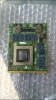
Thank you for your help! -
It's possible but it's less likely to happen since it's rather pointless and a hassle to cause such nuisance to someone.
That's indeed a MSI card, since it has MS-1W091 which is the MSI P/N.xMAR99 likes this. -
Also it's at least a 675MX, but likely a 680M (due to the ram). You would need to power it up since the part marking on the core has rubbed off.
***The Official MSI GT 60 w/GTX-680M Owner?s Lounge***
Discussion in 'MSI' started by xMAR99, Jul 20, 2012.


