Problems? See this thread at archive.org.
@Aivxtla I'm pretty sure that is the case, so the problem must be something else.
Wasn't there something about masking PIN 20 with tape that used to help with those situations?
-
-
Hi
@ Aivxtla is right but he used wrong term .. Acer filtering in this model any changes except SSD upgrade ..
I have installed the card in mine msi laptop and works .. installed drivers and now am running..
But there is another issue.. The card absolutely doesn't reach 1.7Gbps speed .. Still is the same as Killer 1535 or older card max 866.7Mbps
Router supports up to 1.3Gbps ...
Is there particular channel I have to run on ? to gain faster throughput ? -
It won't be any faster - the router supports 1.3 Gbps which means three spatial streams 433mbps each with 80 MHz channel width.
Killer 1550 is a two spatial stream card and achieves 1.7 Gbps by using two spatial streams - 866mbps each thanks to 160MHz channel width.
Your router does not support 160MHz channels so you are limited to 80MHz ones and your card does not support three spatial streams so you are limited to two. As a result you can get above 866mbps.Donald@Paladin44, Vasudev and Aivxtla like this. -
So I will need router upgrade with 9260
This one
http://store.virginmedia.com/discover/broadband/explore/fast-wireless.htmlLast edited: Jun 22, 2018Vasudev likes this. -
Yes you need a new router. Its best to buy aftermarket routers from Netgear, Ubiquity etc..
Personally you can try Nighthawk X10, @Phoenix has it. Or you can buy either Nighthawk X4s AC2600 or AC2350. Anything below that won't give you 1.7Gbps on 5G band. -
@Phoenix Do you still use killer 1550 or switched to another Intel with AD wireless awareness?
If you're on 1550 let me ask you this, do you have same issues on new 8th gen intel chip as well? Or did new chipset fix your issues you earlier had? -
Intel has already stated its giving up on wireless ad for WiFi chipsets and only is promoting it for VR now. The Intel 18265 was the last ac/ad combo card. I never saw it as useful on a router as usually a router is kept hidden from plain site and 60Ghz has very little penetration with the slightest obstruction being devastating to it like a piece of paper, a bit of an exaggeration but you get the point. It makes more sense for wireless docks and VR units. During the R9000 beta I did mention to Netgear to the fact it’s kinda useless in a router (in a nice way lol) but I guess it looked cool for marketing at the time to stick a huge MBPs number on the box.
@Predator-X to utilize the 9260ac at standard HT80 - 866 Mbps Link rate (link rate is theoretical and actual max throughput will not usually cross 65-75% of link rate due to overhead, interference etc) you don’t need a router upgrade. However if you want to utilize its HT160 feature for 1733 Mbps link rate and MU-MIMO, the Netgear R7800 or Synology RT2600AC both of which use the same internal hardware are your best bet.Last edited: Jun 22, 2018ygohome, Predator-X, Vasudev and 1 other person like this. -
I having serious issue with Killer 1550.
Everything went well without issue during usual activity but when i tried to upload a zip file to my server, it corrupt my zip file.
I tried many ways to resolve the issue like turning off the bluetooth or have my firewall disabled which all don't resolve the issue.
The only way can resolve this issue is to reinstall the driver again and again (everytime when i have the zip file corrupted issue.).
Really suffer!
-
I doubt it. Check if your 3rd party firewall is interfering with file transfer. It might be the ISP also. Try uploading the same file using password protected archive and optionally note down the hashes as well.
-
I don't believe too. I bring my laptop to other places and also uninstall my firewall. None of them resolve my issue beside reinstalling the driver. Really weird.
-
Which DNS you use?
-
Google Public DNS 8.8.8.8
-
Switch to Quad9 and see if it fixes your issue.
Do check for latest router firmware and install it.Last edited: Jun 26, 2018 -
New driver is out on 11/07.Wake from Sleep No Wifi is still there
-
-
Wow, I was getting reeled in by marketing of the fancy “Killer 1550 advertising pictures “ until I read this review lol.
I guess I will stick with my killer 1535 as well!
I also have Spectrum internet. After updating my Killer 1535 drivers, and tinkering with device manager settings it has been GLORIOUS! It never lets me down in BF1 servers.
It’s unfortunate killer has partnered with intel. But then again, who isn’t these days?Spartan@HIDevolution likes this. -
Don’t get riled by one person’s review. I mean as I mentioned before differences in laptops and APs can make a huge difference plus you can see quite a few threads on the 1535 itself with complaints usually more so than Intel, I myself replaced a few with Intel cards with free replacements from Dell. They (Qualcomm) did fix most of the issues eventually. Grass is not always greener on the other side. Also it’s not like Killer makes any cards or drivers, the 1535 is a Qualcomm QCA1674A rebrand. The only product Killer really makes is that suite... I also told OP in SNB Forums that the 1550 and 9260ac were the same card which he didn’t believe at the time.
My father for one works in a large medical device corporation where all if not most of the Precisions/Latitudes have cards ranging from the 7265 to the 8265 in over a thousand laptops and quite a few of these run mission critical stuff. So if Intel was terrible they wouldn’t be used so widely.
Honestly try it to see if it’s good in your environment (ie router/laptop) but if what you have now works just stick with it unless you need HT160, which is probably the best course, if it ain’t broke don’t fix it.
Qualcomm usually makes the best WiFi/Cellular chips but it’s not always the case driver side.Last edited: Jul 14, 2018 -
I had issues with the Killer 1535 my self. Though, this is user/setup error usually. My issues were resolved by adjusting 1 setting.
You can have issues with any product, I bought a pair of extremely expensive Bluetooth headphones a few days ago, yet the audio sounded terrible in games. Turns out, a simple google fixed the problem. Disabling “ Bluetooth telephony” in services totally fixed the horrible audio.
So, an average user may knock those headphones for bad sound, or poor reception. But, I’m pretty sure the original poster @Phoenix knows what he’s doing.
I have nothing against the 1550, or 8260.. Intel
Wants all the money, I totally understand. They are greedy, and even more so desperate lately! Lol..Last edited: Jul 14, 2018Aroc and Spartan@HIDevolution like this. -
@Vasudev @downloads
I fixed the issue where the wireless wouldn't automatically connect upon startup, it wasn't enabling the WWAN Autoconfig service and WLAN Autoconfig as Vasudev suggested, nor was it the driver, it was O&O ShutUp10 that was causing this. This time, I formatted, disabled all the nasty stuff but via the Group Policy Editor rather than O&O Shutup10 and what d'ya know, WiFi auto connects every time now.Last edited: Jul 15, 2018Aroc, hmscott, Vasudev and 1 other person like this. -
-
Because you haven't a crappy Killer 1550
![[IMG]](images/storyImages/quGf9zk.gif)
-
Soon, OOSP will be deprecated in near future which is so sad. But Mr. Phoenix disabling Connected Users and Telemetry kills out most telemetry for everyone.
These days I use Win Toolkit and NTLite to make sure removed components/services don't mess up.
GPedit.msc is best one there is.Aroc, jaybee83 and Spartan@HIDevolution like this. -
I doubt Phoenix has a Clevo. Ask Bloodhawk, Mr. Fox, Johnkss
-
The only computer I have is the one in my signature bro.Vasudev likes this.
-
I bought 9260 NGW from Aliexpress. Wanted to use it in my desktop ( MB has a 2230 m2 slot ). It worked fine with my home wifi. I have Sager 8677s ( P670rg ) with 1535 in it. Never had issues or dropouts. Only issue was blizzard games disconnecting from the server if you alt tab and open browser, no idea why. Range has always been good on 1535. Comparing the 2 ( DT with 9260 and NB with 1535 ) revealed that the same wifi , with the same amount of bars results in different speeds. 9260 being slower.
9260 is on 20.60.0, 1535 on Atheros 12.0.0.428.
Phoenix, would you be so kind and tell us what 1535 drivers are you using? Also any tweaks in the settings to get the most out of it? Thank you. -
One may be slightly better than the other but comparing two cards in two different devices is not an Apples to Apples comparison regardless of bars (each bar itself is a rough range of dBM), due to antenna characteristics and device layout. Best way would be to compare in the same device and do a LAN file transfer to a NAS or external drive. Only tweak I can think of with the 1535 is lowering roaming to minimum. Some also disable “Packet Coalescing”, for slightly lower latency. (Packet coalescing aggregates multiple packets and sends them at once trading latency for higher throughput and reduced CPU usage).
Router side, if you have a HT160 capable router (ie Netgear R7800, Synology RT2600AC, Linksys WRT AC3200) you need to set it to lower 5Ghz channels to take advantage of the HT160 feature on the 9260ac for a big speed boost to around ie 900-920 Mbps realworld speeds, that depending on range and obstacles of course. Additionaly disable MU-MIMO if you have a Broadcom chipset based router (ie most Asus routers and most Netgear routers) if you have 2 or more MU capable clients as it will actually lose performance due to Broadcom's terrible implementation. Only Qualcomm routers do MU-MIMO well (ie Netgear R7800 & Synology RT2600AC), the 1535 is a rebadged Qualcomm QCA6174A so it will do MU well and so will the 9260ac.
On 2.4Ghz disable 40Mhz and force 20Mhz, because if you live in an area with multiple APs/routers that will cause more issues and possibly higher latencies/worse range. Also fix a channel on 2.4 Ghz on the router in channels 1/6/11 as those are non overlapping channels.Last edited: Jul 17, 2018 -
I see, valid points, i agree. DT has external antennas and laptop has wires running inside, both are different. I havent tested them too much. Mostly just general use. I swapped 1535 in the laptop with 9260 and put Killer in my desktops MB. Both cards work, 9260 being newer with more advanced tech.
-
How's Intel Wireless ProSet 20.70.0.5 WHQL working for you?
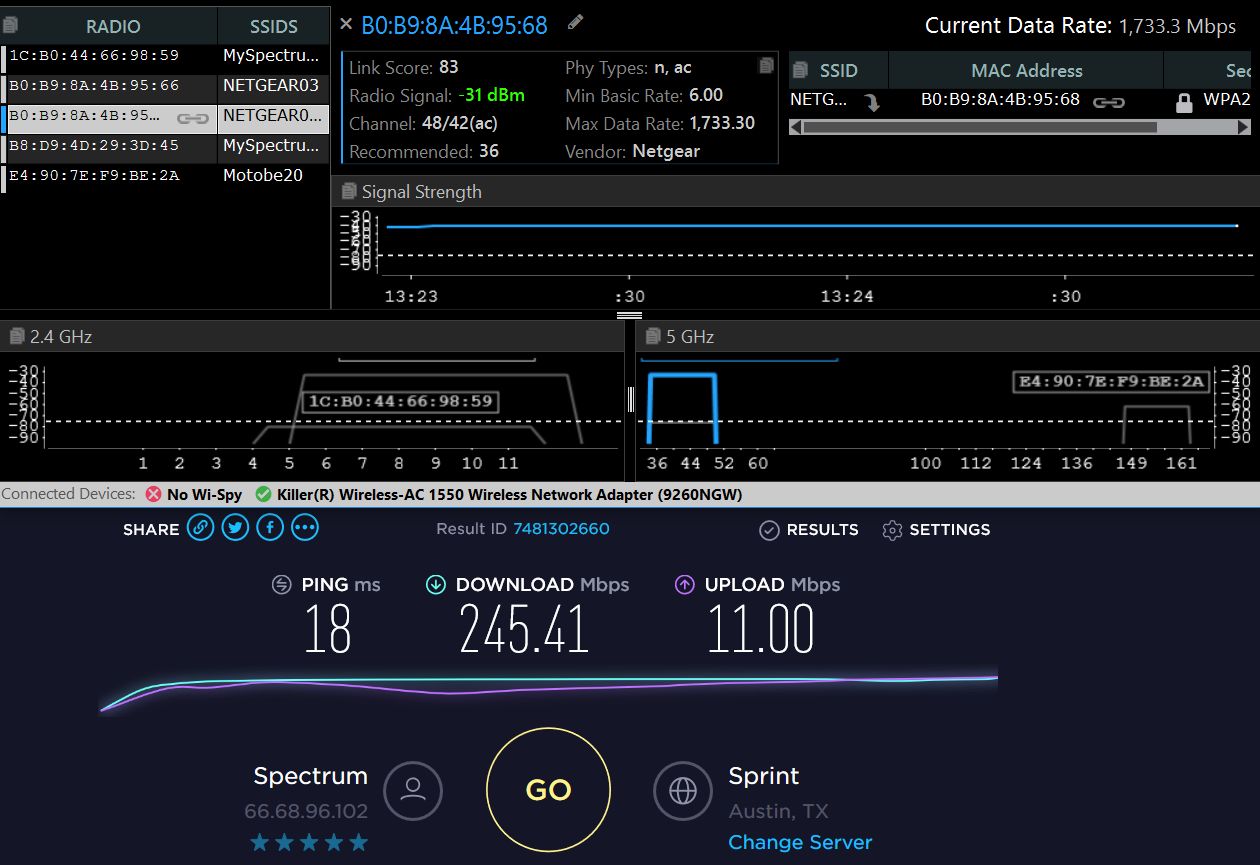
I installed it a few days ago but see no difference in file transfers.I do see a boost of about 5-20 Mbps in my Internet download speed using Speedtest but this may have more to do with my ISP than Intel driver.
My Internet service is for 200 Mbps but tests show 245 Mbps to 270 Mbps.Attached Files:
Vasudev likes this. -
-
Just an FYI try using DSL Reports Speed Test with test set to Cable/DSL etc based on ISP.
Additionally DSL reports gives bufferbloat scores as latency under load is just as important if not more than speed alone.
Speedtest.net can be inaccurate because some ISPs boost speeds on detecting it while others have 100MB or so initial boost on transfers which inflates numbers. Also it doesn’t measure latency under load, which can be impacted by ISP/router/network card. That is also where QoS can have a big impact with gaming, streaming etc. QoS also helps with LAN side load balancing.
As for the increase in speed it’s probably just normal fluctuations in speed from the ISP and not the card. Pretty sure the update is just minor bug fixing and so you won’t notice any drastic speed changes as it already seems pretty well optimized.Last edited: Jul 19, 2018 -
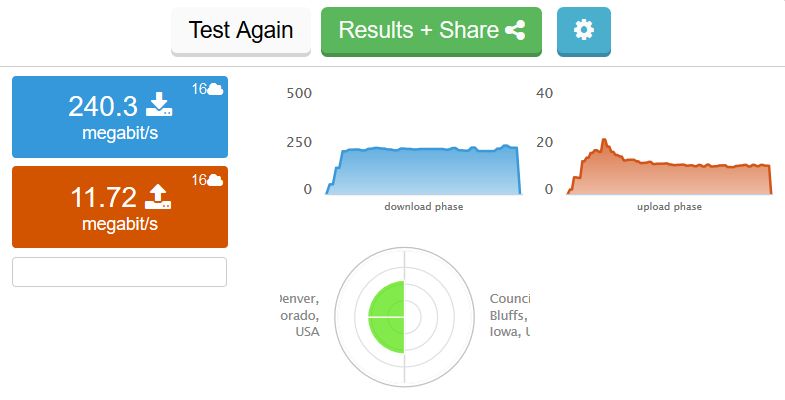
DSL Reports Speed Test for Cable.
Attached Files:
Aivxtla likes this. -
-
Weird it didn’t show latency.
It sould be some thing like this once you click the result button, I did my test on an iPhone on cellular so results are worse than my home network. As you can see it shows the latency distribution for idle, down and up. Speedtest by Ookla only shows idle as you can see and that can be deceptive in real use, Ookla isn’t bad it’s just not as detailed. You can even go to custom settings and set speed test to test up to 60 seconds both up and down thereby bypassing the 100MB or so boost on affected ISPs. Also has high res buffer bloat option in advanced settings in that same page.Attached Files:
Last edited: Jul 19, 2018 -
-
With Ookla I can connect to several servers that are within about 10 miles with best results between 6AM and 8AM.
On DSLReport the servers near here are not connecting or off line so I'm not getting as good a result using it.
I have no complaints about my Internet service from Spectrum.
I'll give DSL Report another shot early tomorrow morning after my second cup.
When I got my Killer 1550s I moved from 5ghz channel 161 to channel 48 where I was alone.All others showing up on 5ghz in inSSIDer were using the upper range of channels.Now there's 3 SSIDs on 44-48 so I get best results now on 36 when they're broadcasting.
My MSI GS60 is 4 years old this month and still without any issues.The only complaint I would have to say about it is the battery.The battery expanded in size like a balloon and had to be removed because of case buckling.
I've changed wireless cards a few time and replace the hard drive with SSD.Yeah,one needs to take out the mainboard to get at the memory and M.2 slots.Aivxtla likes this. -
On the 9260, the main and aux "white and black"markings are reversed compared to the 1535 and the intel 8260, but the actual 'main' and aux writings are in the same spot. So where do the main and aux antennas actually go to?
-
Look where the black cable says Aux, then put that black cable in the Aux location on the other card, I know the color is inverted but Aux goes in Aux
I just swapped this POS Killer 1550 to my old Killer 1535 and all my troubles like internet suddenly having no activity, lag, apps reporting that I am connected but no internet like the Micro$h4ft store or even Windows activation, slowness, are gone, it's like I just upgraded my internet by 10X
I gave this card a good chance to prove itself but its utter garbage, tried every driver out there, you can't fix a turd.Aroc, Vasudev, Donald@Paladin44 and 2 others like this. -
I’m sure there are enough people who say the same exact same about the 1535....
Aroc, Vasudev and Spartan@HIDevolution like this. -
good for them, it's perfect for meAroc, Vasudev, Papusan and 1 other person like this.
-
My point was the same, thing is you keep bashing something not realizing what works doesn’t / work for you doesn’t necessarily mean other will have the same experience, granted I’ve the done the same before.
Aroc and Spartan@HIDevolution like this.
-
I've said it a 100 times, gave it a lot of chance, so many others share the same experience as I do. It' a POS garbage WLAN card. Period.
If i it works for you, then go have a party congratulations. you have just discovered the internet. But let me share me experience and opinion about it as I see fit.Aroc, Vasudev, Papusan and 1 other person like this. -
Point isn’t about having a party.. It’s that you think only what works for you is good and if it works for someone else it’s still terrible choice for others. Yeah there as many people who say the same with the 1535 you can scour countless reddit etc, threads but for the smallest questions like the poster above you keep bring up that it sucks and calling it a POS as if your sole experience should be extrapolated for everyone. I’m sure all those multinationals that have Intel cards are all fools by that logic including my fathers company that replaced what few 6174A (1535) to Broadcoms and Intel units.
Also I’m just trying to have a conversation not trying induce anger or frustration in case you mistake my intent. I’m sure I’ve held my view points above others only to be corrected by somone, you’ll get to say the same stuff to me soon on some thread.Last edited: Jul 20, 2018 -
To be fair to Phoenix, the 1535 is **NOT** a Killer card! it's a QUALCOMM card, the company most known for making the most stable chipsets. It's the Killer driver suite that causes all the problems. I'm too lazy to install my 1535 but I'll do it later and check the bluetooth just to see if its more stable with game controllers than the Intel 9260. Can't be bothered atm.Aroc, Vasudev, Spartan@HIDevolution and 2 others like this.
-
It had other driver connectivity issues that were apparently fixed by the atheros drivers, hardware itself was never the problem. Overall I can’t disagree QCA does generally make the best WiFi chipsets and cellular modems in general.
The QCA9984 in the Netgear R7800/9000, Synology RT2600AC is probably the best consumer WiFi chipset overall, with actually working MU-MIMO and HT160 unlike their competition. I made sure to get the QCA iPhone as well as we all know how despite Apple nerfing the QCA modem to be equal to the Intel one the QCA version still does better in low signal areas.Last edited: Jul 20, 2018Vasudev, Spartan@HIDevolution and Papusan like this. -
Thread crap, but what bluetooth and BASIC drivers are best for the 1535 then? Not the Killer suite, but just basic vanilla drivers and bluetooth?
-
Just use the Atheros Wireless inf and Bluetooth drivers from the Killer site or from Windows catalog.Spartan@HIDevolution and Papusan like this.
-
Yes the latest BT vanilla driver and INF for the WLANFalkentyne likes this.
-
Use BT driver version 783 W7. I use Killer Control Center from MS store with UWD driver. Switching out all Win32 drivers from non UWP to UWP. FYI, don't remove BTTray.exe from startup. The connection and drivers seem more stable than Windows 10 native drivers with generic driver files.
-
Last edited: Aug 1, 2018Vasudev likes this.
-
-
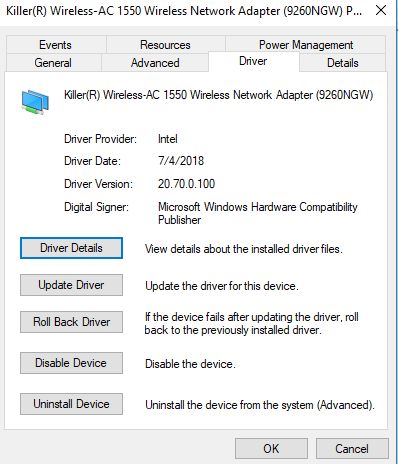
Intel Wireless ProSet 20.70.0.100 WHQL is out there.
Attached Files:
-
-
Guys need some help, I switched from the Killer 1535 and removed those drivers to the Killer 1550 driver is 20.70.0.5 and using the control centre from the Microsoft store. I am not getting the XTend feature in the control centre for some reason? Any ideas on a solution? I've tried reinstalling the killer suite and did a clean iso reinstall of windows 10 64 bit too but it still hasn't worked
Killer Wireless-AC 1550 Review
Discussion in 'Networking and Wireless' started by Spartan@HIDevolution, Mar 3, 2018.