Problems? See this thread at archive.org.
Try installing the W10 package dated 08/16/2018 from the killernetworking site.
https://www.killernetworking.com/driver-downloads
-
Attached Files:
Vasudev likes this. -
-
I have an Aero 15xV8 on which I had HID install a 1550. Ran the auto updater from the Devices screen and I think it pulled some drivers from May or June. Running 20.60 for BT I believe as well. Should I do that, or do you recommend I use the drivers posted here, or even get the full suite from the killer site? Not sure what's the beta approach for drivers nowadays. Thanks!
-
I tried the 2.70 drivers, they are crap and keep disconnecting or having very low connection speed, these are the best:
Killer 1550/Intel WLAN Driver v20.60.1.1/ Bluetooth v20.60.0.4
Always stick to the INF drivers not the Killer Suite, extract the zip file, then manually update the WLAN Driver from Device ManagerDonald@Paladin44, Vasudev and Papusan like this. -
Got it. I'll update after work today. Any tweaks to the setting I should make to ensure fastest/best connection. Just got and setup a new Asus 86u, so should be able to handle it.
-
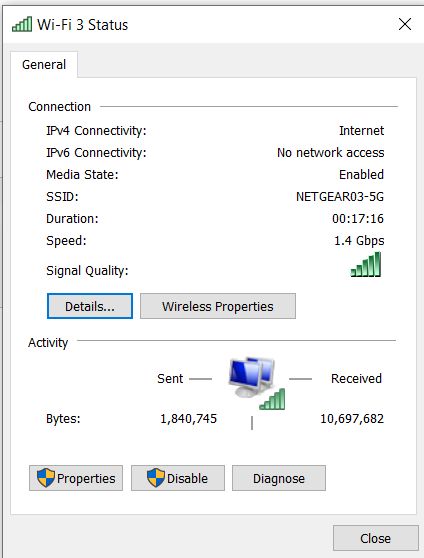
Alright, after updating, I'm seeing a connection speed of 866.7Mbps, and speedtest shows 557Mbps down (I have gigabit). Is this the maximum i can expect from my setup on WiFi (Asus 86U and Killer 1550), or are there tweaks I can do to make it faster. Thanks!
-
For these coming here from a google search: Be aware that Rivet Networks LLC are incapable of writing a proper Killer Control Center.
The UWD driver package is even worse than the older software, and at this point, its' recommended to SKIP installing it.
Use the drivers only option here https://www.killernetworking.com/driver-downloads/item/killer-drivers-64bit -
Its become pretty strict to embrace UWD kit based driver framework since on paper, you won't require constant driver updates for major/minor Windows builds and driver removal is easier since there is no leftovers in driver store and other install directories.
I am using KCC UWP app 1.6.x and UWD driver as well. After installing WU is disabled and so does other WU related processes as well. If you are having problems, consider using Killer Uninstaller app from their KB article(s) for Clean install like experience. -
I can't confirm that - 20.70.0.100 work perfectly for me. FTP transfer peaks at 100MB/s and there are no disconnects at all ( I would notice since that disconnects VeraCrypt containers that are hasted on a NAS and these require manual re-connection on my part).
I wonder why is it that you have such a bead experience with this card in general. If I remember correctly you've tested two cards, so a card is probably not a lemon.
Maybe something in a notebook, like antennas routed near sources of interference? Have you tried Killer1550/Intel 9260 in a different notebook?Aivxtla likes this. -
nevermind it was my router and the fact that I put it on Smart Connect. Please delete my previous message in order to not mislead anyone
-
It's not misleading - all in all it's helpful. Someone might have the same the same symptoms and google search will bring them here, where they'll find a solution.Vasudev, Papusan, Aivxtla and 1 other person like this.
-
Along with a new Skip Ahead Insider Preview build today came a new Intel Wireless ProSet version 20.80.0.5 in Windows Update
Attached Files:
Aivxtla likes this. -
-
can you please copy the driver files, zip them, and upload them somewhere
just search for Netwtw06.INF
Open the containing folder, and you'll find all the files needed there
thanks in advance -
I had the files ready to upload but no need to upload 20.80.0.5 since 20.80.1.1 is available using Device Manager>Update Driver
The driver update may take longer than normal but after many passes of the green bar that will stop.Then X out the box at the end and 20.80.1.1 will be installed.Attached Files:
Last edited: Sep 7, 2018 -
-
The new driver was located here:
C:\Windows\System32\DriverStore\FileRepository\netwtw08.inf_amd64_ae09b771e02b6ef2
Here it is for anyone who wants to store it on their computer for future installs:
Intel Wireless-AC 9260 Driver v20.8.1.1
This driver gave me the highest download speed so far, 1 whooping MBPS more over previous driver, up from 94MBPS to:
![[IMG]](images/storyImages/7617877311.png)
-
I haven't seen much change in speed from the last few driver updates.
I normally get between 235 Mbps and 245 Mbps wireless scores depending on time and day on my $44/mo Spectrum 200 Mbps Internet service testing several local servers.
One rare occurrence resulted in a 268 Mbps download score but not today.Attached Files:
-
-
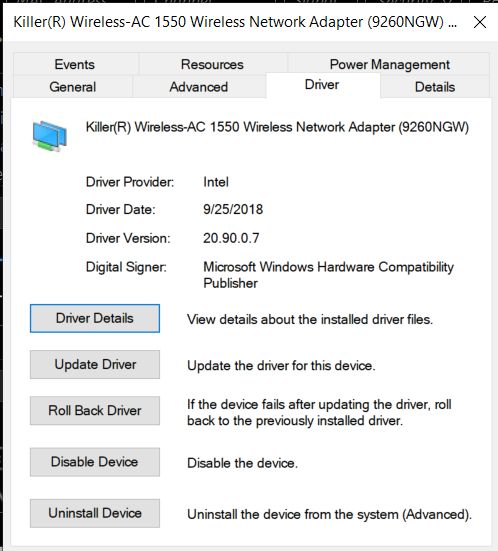
Intel Wireless ProSet 20.90.0.7 WHQL is available.
Attached Files:
-
-
and where? on the german intel side is no download same on the english version for intel.
-
https://www.station-drivers.com/ind...tory&Itemid=352&func=fileinfo&id=3703&lang=en
Or the extracted version uploaded by me:
Killer 1550/Intel WLAN Driver 20.90.0Last edited: Oct 15, 2018WhatsThePoint, Vasudev, JeanLegi and 1 other person like this. -
@Ultra Male so did you stick with the 1535 after all of that headache? I see you have the 9260 listed...
-
no I'm using the Intel 9260 which is the same card as the Killer 1550 minus the Killer bloatware. It has gotten way better now with the latest drivers.
The reason I don't use the Killer 1550 though is because Windows 10 automatically downloads the Killer Software from the Windows App Store which I know I could uninstall but I don't want it or any trace of it on my system so I put in my Intel 920 which doesn't come with that crap.
I don't need to limit bandwidth for any app I want everything to have the max speed that's why I despise that Killer softwareMr. Fox, Starlight5, Donald@Paladin44 and 2 others like this. -
I'm preparing a test rig to start going the linux route. I simply could not adapt to windows 10, and MS has locked me out of windows 7
 Last edited by a moderator: Oct 23, 2018
 -
Yep good choice. I'll be phasing out W10 in next 2 years. I'm using Q4Wine GUI to run any Windows apps and its not perfect but its so much better when I tried 3 years ago. I'll try out DXV aka DirectX to vulkan using winetricks.
-
I have this problem with my Killer 1535, no wifi on wake up from sleep or hibernate. How did you fix it in gpedit? btw I don't have O&O ShutUp10.
-
Have you tried Killer Uninstaller and get the latest UWD driver and see if it fixes your issue.
-
It's a common issue i have been experiencing too ever since i bought this laptop. Look at this https://www.killernetworking.com/ki.../faq/31-bluetooth-missing-from-device-manager
They blame BIOS but i blame them for doing nothing about it except blaming Windows or guiding you to the manufacturers like MSI that doesn't even care or does any BIOS update for issues like this after it was reported multiple times by people on their forum and through the private support forms they have. They just tell you to update your drivers or do a clean install, that's it.
Killer's solution would be to completely discharge your battery whenever this issue occurs. Of course i'm not gonna discharge all the damn days my battery because they don't want to fix it. Network reset works for a bit but it's more like a placebo. -
Which router do you use?
-
Honestly Killer can’t do anything because they don’t make the drivers or the cards. They rebrand Qualcomm (1535 is a QCA6174A) and Intel (1550 is a 9260ac) cards and drivers are stock Intel/Qualcomm drivers. Only truly Killer made product is that QoS. So the only issues Killer can actually deal with are with the QoS suite. About all they can do if they see issues with the actual hardware/driver is pass that info to Intel/Qualcomm so they can fix in a upcoming driver update if it’s an issue on their side.
It might actually be a Bios issue though if some have the issue and others don’t. -
I would've accepted the BIOS thingy but even people with different configurations have the same issue. People with Alienware, Dell, Asus ROG laptops mentioned this issue and nobody managed to fix it yet. I do understand that all they do is rebrand and make some buggy software suite but this is just not tolerable on configurations that cost up to 2k and more.
-
One more thing, is Killer Suite running at startup? I had random disconnects and Wifi getting disabled when Killer Suite was running at startup. Also, some channel numbers don't play nice w/ Killer. Always had to use higher (141 or 151 in 5G band to get stable connection when signal strength drops below 30%)
-
Intel Wireless ProSet 20.90.0.100 WHQL on station-drivers
There's no setup.exe so update through device manager>update driver and point it to the folder where you unpacked the downloaded file.
Still using channel 36 with an R7800 router and Voxel firmware.Attached Files:
downloads likes this. -
-
Fixed it by updating to da latest driversWhatsThePoint, Vasudev and jaybee83 like this.
-
That's because it *IS* a Bios issue. If it happens without the killer drivers installed (basic windows drivers with the 1535 without Killer drivers)
I don't have this issue on my GT73VR because MSI fixed it.Vasudev likes this. -
Yeah it happened also with windows drivers if i recall correctly.
What should i do to get MSI to update the bios then?Vasudev likes this. -
What laptop is this?
All you can do is call them on the phone and pray
MSI even had a bug in the GT73VR where the PEG port would not be reactivated if you switched from dgpu to igpu and back to dgpu.Vasudev likes this. -
GT62VR 6RD, afaik even people with GS63 and GT72VR had this issue...Vasudev likes this.
-
They probably stopped Bios updates for their older models. You need to ask them if they can fix the problem.
The GT73VR originally had the same issue but one of the last few bios updates addressed this was written in the update notes).Vasudev likes this. -
Yeah i checked the bios changelogs for the GT73VR and they fixed it. I sent them a support request, hopefully they will do something about it.
EDIT:
This is their answer:
This is disgusting. I'm gonna link them all the topics on their forum of people having this issue.Last edited: Oct 29, 2018Vasudev, hmscott and Falkentyne like this. -
-
Intel Wireless ProSet 20.100.0.4
This version was installed with new Windows 10 Skip Ahead Insider Preview so I thought I'd share it.
Link to uploaded file removedAttached Files:
Last edited: Nov 19, 2018downloads, jaybee83, hmscott and 1 other person like this. -
-
That's an infected link!
Here's a safe link: https://www.files.laptopvideo2go.com/wlan/proset_24.100..0.4.exe
![[IMG]](images/storyImages/2018-11-18-063008.jpg)
-
I seriously doubt that it's infected since I uploaded it myself and downloaded it after that onto my other drives and PCs.
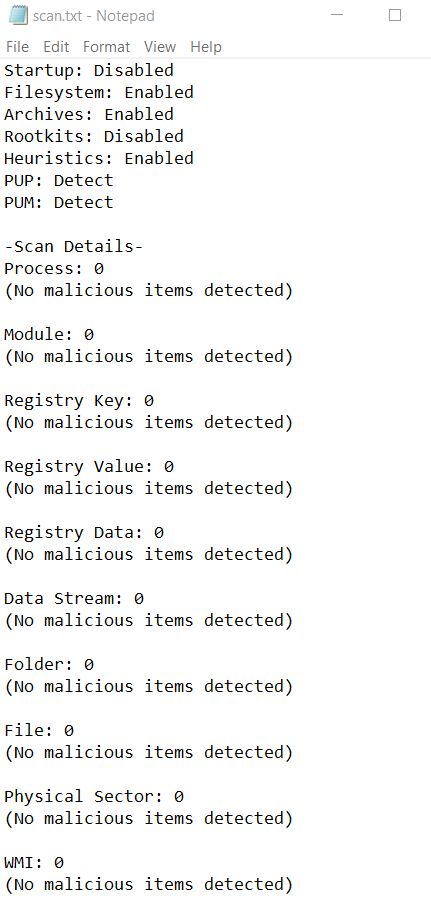
I just downloaded it again and scanned it with Windows Defender and Malwarebytes and no infection detected.
Please don't use it if you feel it will cause you harm.
All my systems are clean after installing this after I thought of doing my fellow members a favor.
I guess you can never please everyone.
Yikeshmscott likes this. -
STOP SPREADING FAKE INFORMATION\
Attached Files:
hmscott likes this. -
-
Stop shouting drama queen. I didn't say your file is infected or that you meant any harm. All I said was the link was infected as caught by the HTTP scanner of one of the best Antivirus solutions in the world (ESET) with the least false positives for many years consecutively!
AV-Comparatives False Positives Test
Zippy share...righhhhhht...
-
I can't confirm any malicious software on that zippyshare site.
I checked on two of my computers with different AVs and used VirusTotal to scan that particular URL - both actions with no hits.
I did one of my own tests with uBlock Origin disabled assuming that might be something served by external ad company but these are profiled based on several factors so it's not possible to be 100% sure that there will not be a case where something malicious is served.
This is possible on any website that uses external ad brokers though and that does not merit deletion of the link.Vasudev likes this. -
Yeah its a FP from ESET. Usually zippyshare users hosts/save most malware pack and I used to test them for research and educational purposes. Sadly my ISP is blocking Mega,Zippyshare etc.. and I had to use my phone to access them.Last edited: Nov 18, 2018hmscott likes this.
-
This is why I recommend never using 3rd party (suspect) file services to share files, even with the best of intentions it can get compromised after upload, so it's always a good idea to link to official downloads.
It's sometimes fun to be a buddy and upload cool stuff to share with friends, but this can be problematic what with all the cyberwar shenanigans going on from so many these days, your file could get compromised as a mass infection for some reason completely unrelated to you and your group. It's better to find and share the real original source download link(s).
That's why long ago I decided to only post official OEM download links, and even then it's a good idea to file check all the downloads you recommend first - and note any false-positives that may come up from a multi-vendor anti-virus test - there are often FP's even among the best products.
We are all friends here trying to help each other out, it's all good.
-
re with friends, but this can be problematic what with all the cyberwar shenanigans going on from so many these days, your file could get compromised as a mass infection for some reason completely unrelated to you and your group. It's better to find and share the real original source download link(s).
Even if you like to host using similar services its best the hash each file or entire archive and then upload it. That way, if hashes are not matching the user can delete the file and report it to the mods.hmscott likes this. -
I got around to installing it... finally.
My experience has been positive so far and have noticed the improvement in download speed on LAN. -
It's one of the best fileshares out there... spreading pirated content.
Papusan, Vasudev and Spartan@HIDevolution like this.
Killer Wireless-AC 1550 Review
Discussion in 'Networking and Wireless' started by Spartan@HIDevolution, Mar 3, 2018.