Problems? See this thread at archive.org.
no they said that i it would be in my mailbox by monday... so dont you go get annoyed with me, i am down 6 weeks of productivity that i was relying on from dell, so they should have kept to their word. i was told when i ordered it, that it would be at my place between 7-10 working days (i.e 2 weeks), i was never told there was going to be a delay in 7800's by dell, i probably would never have found out if it wasnt for me calling them...
-
I know things come up, but I'd have to agree with bigtwist " i am down 6 weeks of productivity that i was relying on from dell, so they should have kept to their word",
I waited over a month for this laptop and Dell didn't inform me that it was cancelled, I had to ask about it. And yes this does hit our pockets a little. I'm no expert on ROI, but researching, waiting, dealing with reordering, and the frustration in itself should be enough for Dell to refund the amount and even tack on a few $$$$.
Seems like the going rate for IT services ranges anywhere from $45 to $100+ USD in my area.
-
I'm in Australia and I ordered a 9400 on the 31st March with the GeForce Go 7800 card and it arrived on the 12th April. Just lucky I guess...
...or maybe not.
I reformatted and reinstalled windows to get rid of the bloatware. Since then my screen resolution is screwed. Before the reformat it was set to 1920x1200 and everything was an easy size to see and read (I never got as far as browsing the web, so can't comment there.)
Since the reformat I have the resolution set exactly the same, but (like some other people have commented) need a magnifying glass to see anything.
I adjusted the DPI but it seems to leave icons jagged and doesn't enlarge everything.
Is there some setting that I am missing? Something in the Dell standard set up that I can use to put it back how it was?
Please help, I'm starting to get a terminal case of reinstallers remorse...
PS. Couldn't get media direct to reinstall using their reinstallation cd, quits at 10%, but that's another story and another thread.... -
Hi, I recently purchased an inspiron 9400. Great machine, apart from the gfx-card, which I am afraid will be outmoded very shortly. I have read over and over again on different boards that I can soon replace the x1400 that I have with a 7900 card, when they become available.
So my question is, how much truth is there in this. If I would have to mod, something (cutting, grinding or soldering) I would rather return it and by a different notebook. But if the installation is relatively harmless (keep in mind I've been assembling my own pc's for the last ten years, so no noob ) I might keep it and replace the gfx later. From the Dell service manuall I get the notion that so long a 9400 is available with the card I want, I should be able to buy the card online and replace my old one, without too much problems?
Anyone heard anything from dell? Will they do aftermarket upgrades such as this? Any idea of price or availability of replacement gfx-cards?
So, basically, any information you guys have, would be apreciated..
-
Not sure what the problem you see with the video card. just loaded battlefield 2 and ran it at full 1920x1200 with 4x AA and it does not even miss a beat. Thats with the supplied dell driver. What more could you need?
rygo, I think you may need to relaod theviseo driver? go to:
http://support.dell.com/support/dow...&s=gen&SystemID=INS_PNT_P4_9400&os=WW1&osl=EN
download the video driver.
then go to
http://download.microsoft.com/download/b/7/0/b7019730-0fa3-47a9-a159-98b80c185aad/setup.exe
and do the clear type thing
Hope this helps -
oh hold on, just re-read. Do you have x1400 ? I have 7800go fitted to mine.
-
Thanks for the tip garygeneral. I'm on the road for a couple of days, but will try it when I get back and let you know how it goes.
Cheers -
Yeah, that's sort of the problem.. I have the x1400. And that's just not cutting edge..
So does anyone know anything about this? -
Well I am definitely of the opinion that Dell found their problem with the video card. It was as someone else mentioned. They were killing the sales of their top of the line Gaming Laptop. Check out their NEW top of the line Gaming Laptop "XPS M1710"! And it carries a price tag that is about $1000 to $1500 more than the Laptop that I had previously put together on the I9400 with the exception of the Geforce 7900 Go. Does the Geforce 7900 Go constitute this price increase, I THINK NOT! Hmmm, what timing on the release!
This is the second time I have been put in a bind because of Dell. I am now going to try my luck with another vendor to see how they treat their customers. -
I'm looking at purchasing this laptop. However, I want to be able to run games like the recently released oblivion. I'm ok with turning settings down, just so long as it runs smoothly, and with graphics at least comprable to elder scolls 3 morrowind.The one in my price range has the 256MB ATI MOBILITY RADEON X1400 HyperMemory....is this powerful enough? What can I expect? Also, is it possible to upgrade the graphics cards on this laptop (are they removable?)
-
You will need a MONSTER laptop to run that game smoothly
If you are willing to turn down the graphics to eldar scrolls 3 standards then you will be able to run this game at an acceptable speed.
I'm not sure with the X1400 though, I have a 7800GO. -
Eventually got my 9400 working ok, although I don't think I will be buying another Dell.
- Interested in buying a small business?
Last edited by a moderator: Feb 2, 2015 -
Dashhh!!!! Dell, never again!!! I just run PC marks 04, the resuls on file compression\decompression and all that staff are some 2 times lower than described in reviews - all that after 2 reinstalls to remove bloatware, PC Marks 05 gave me only 2950 score......... much lower that for the same E1705 but with Solo 1.66 GHz in futuremarks page. Meanwile grafics video gave quite OK, I started to think that it is some processor issue...
May anyone know what the problem might be????
And the last thing that killed me - the screen becomes completely red sometimes, even before Win boot.
I should definitely call Dell on monday -
I understand this is a cheap lap, for the specs it has, but it SHOULD work!!!! This machine is a BAD quality, one can guess it even from the way the stickers are fixed- they definitely care nothing about the quality
-
BIOS version A01 can now be downloaded from the Dell support site.
Amongst other things it gives support for the gForce Go 7900 GS.
http://support.euro.dell.com/suppor...&typecnt=1&libid=1&releaseid=R120246&vercnt=2 -
Just to add a note about performance and people having trouble.
I accidentally ran WoW on full quality settings with 8x AA and 16 AF after forgetting to reset it after running Monkey 4. I know its not a massivly intensive game but it still looks nice and did not even stutter on my 7800. -
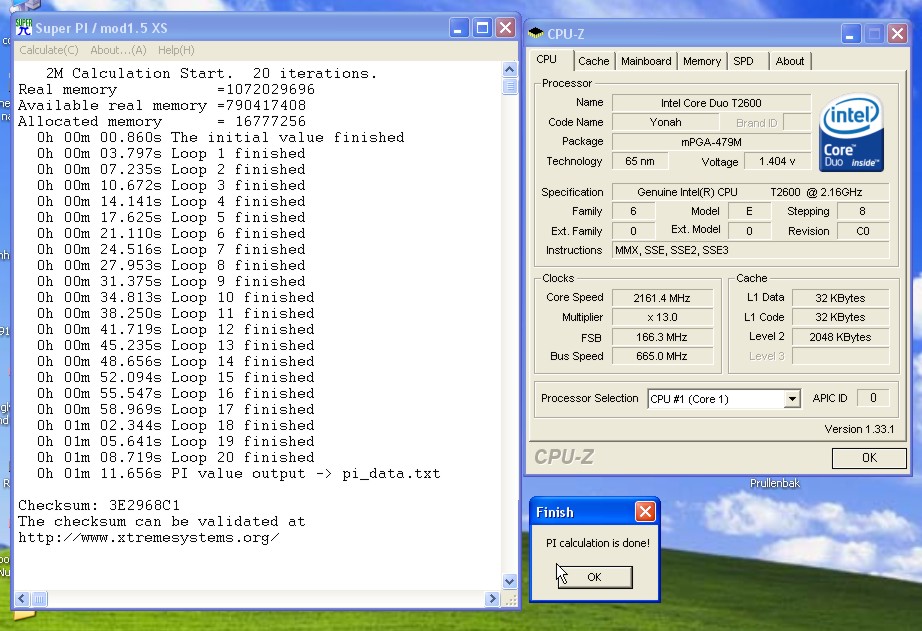
Benchmarking results with my Dell Inspiron 9400
Configuration: Dell Inspiron 9400 with Intel Yonah Dual Core 2,16Ghz, 1024Mb 667Mhz DDR2 RAM and Geforce 7800 GO (+ 7200rpm 80 Gb HDD)
The laptop was reformatted, and a fresh WinXP Pro SP2 copy was installed.
McAfee virus/firewall suite was still running when performing tests (and I forgot to reboot before benchmarking).
I ran 3DMark05, PCMark04 and SuperPI (the modded version, 1.5 I believe?), and the results are superb, on par or above with what I see here:
Results: 3DMark05: 5637
PCMark04: 6453
SuperPI: 11.656 sec
Of course the latest Nvidia-drivers were loaded, and the Geforce 7800 Go was running with 'optimal detected settings'.
When running tests the day the laptop arrived (so with the Dell-install on the HDD), performance was weak, verrrrryyy weak...
Now, it is flying ;-)
Greetz!
PeterAttached Files:
-
-
Euh Which Nvidia drivers do you mean ? Did you download these from the Nvidia site ? (Which version ?, the 7800 GO GTX version ? )
Do they work properly ?
I thought they didn't support the 7800 GO version.
Everybody is using the XTreme-G MobileForce drivers or the Drivers from Dell.
Greetz
-
I am seriously reinstalling a fresh version of XP, anyone got a link where I can purchase it.
Anyone got any remarks on the bios update.
Pete
http://www.bizseller4u -
OK. I have noticed a peculiar situation.
Opening intensive apps (like photoshop, 3d studiomax) is much slower than on the old system. 16 seconds to load vs 6 seconds.
the old system is an amd 2000+/ati 9800 pro vid card/1.5 gig/ 7200rpm HDD
vs the new core duo 2.18GHZ/7800 go (optimum setting)/1 gig ram. 5400rpm HDD.
does the extra 500 meg memory actually make the difference... or, more likely,
is it all based on the 5400 rpm HDdrive vs 7200 rpm drive??
If so, i had no idea there was that much of a performance hit. -
Lemme start off by saying that I have read almost every post in this thread!! Proud to say that I did lot of research before buying the most popular Dell 17" value gaming rig....Here are the specs:-
------------------------------
Intel Core Duo 2400 1.86 Ghz
2 GB RAM 667 Mhz
100 GB 7200 rpm hard disk
nVidia Geforce 7800 Go 256 MB
17" UXGA with True Life
Bluetooth
Carbon Fiber Color Kit (Coz I am crazy abt FORMULA 1! Go ALONSO!!!)
And all the usual stuff!
PRICE: RM8200 = US$2190 inclusive of shipping and no taxes (yay!)
----------------------------
The lappy has been shipped by Dell Malaysia in Penang (I live in Kuala Lumpur) and is sitting in some warehouse in KL. The delivery guys called me today to confirm a delivery time slot and I made the most difficult decision of my life....I DEFERRED IT!!!!
I have a very important exam on 9th May and Dell was ready to deliver it on 8th May. I told the guy to deliver it to me on the afternoon of 9th..which is after the bloody exam. TWO MORE DAYS OF WAITING TILL I GET MY HANDS ON THIS BEAST!!
Getting to business on hand, I have got a couple of VERY IMPORTANT questions to all the proud owners of the Dell Inspiron 9400 a.k.a E1705.
1. Which nVidia driver should I download and what softaware (s) are required to overclock the GPU to optimal performance?
2. Is it recommended to re-install the OS because of the bloatware. I dont live in North America/Europe so I am expecting Dell wont pre-install all the bloatware you guys get.
3. Will there be any problem with Media Direct if I re-install the OS? I remember reading somewhere that formatting the hard disk and re-installing the OS causes Media Direct to malfunction.
I hope you guys answer these questions for me.....
GOSH!!! I AM SO EXCITED...Cant wait to play NFS:MW, BF2 and CoD2 on the beasty machine!
Cheerz -
You'll want to visit http://www.tweaksrus.com/ and find Xtreme G Mobileforce drivers 83.90, there may be a newer version out but I have not checked the forum in a while so don't know about it's stability. When you install the drivers you want to go down to the system tray, and click on the NVidia icon. Then select NVidia Display and Laptop Display within this menu. When the g-force menu is displayed you'll want to select clock frequency settings. Here you can set the clock to whatever you desire. 352/859 seems a pretty common speed, however I simply leave mine at automatic. With regards to reformatting I know there is a way to reinstall media direct, however can't remember it myself. If anyone knows how please post as I am interested in reformatting my system too. Thanks, Liam
-
It was only a matter of time. I posted about the HDCP "scandal" awhile ago.
Well, ATI is now being sued for its alleged fraudulent claims about being HDCP ready/compliant. So you x1600 types might be getting some money in the US.
I would imagine Nvidia's turn is just around the corner.
http://www.theinquirer.net/?article=31533 -
I got my laptop today and I tested NFSMW...IT WORKS AWESOME! I put everything on high and the graphics were fluid...but the top right hand corner of the laptop is heating up...the graphics card core temp. is around 70-85 when I am playing the game....IS THIS NORMAL??? Please reply...
-
Yeah mine gets very very hot too, its normal when playing games, the heatpipe from the GPU extends to both corners where there are fans.
The way I look at it, if it overheats then thats what the 3 year warrenty is for. -
I have noticed a peculiar behavior of the 7800 GPU. The idle temp is around 65-70C. Once it crosses 70C (when not playing games as well) it rises to 80C. As soon as it reaches 80C, the fan starts to cool the GPU till 70C and then this process repeats itself.
My core temp never goes above 80C when I am not playing games. However, when I am playing games, the core temp is around 85 - 88C. This is VERY HIGH! FYI, I am using the Xtreme-G Mobileforce 84.56 drivers...Does changing the driver affect the GPU core temp?? Please RESPOND! -
Thinking about buying the 9400. It looks good from what others have posted here
I have a few questions before buying however. First, is the Go 7800 a GTX? The tech guy at Dell said yes, but I think he just wants the sale more than anything. I mean it's 128 shared 128 dedicated, so it seems like it should be a 7800 GS or something.
Second, is it possible to bargain with them when buying over the phone?
Third, can the video card actually be swapped out later? I thought these were pretty well integrated. -
strange! my gpu's temperature never gets higher than 80C....even after 2-3 hours of playing FarCry at max. settings! Have you checked your room tempreture also? Nevertheless i think there is 93C threshold level and the warning window pops-up whenever you cross it! So no worries mate!
By the way anybody tried playing F.E.A.R.? I am experiencing minor lags, i.e.just a msec lag at turning the cam too vigoursly but this happens permanently! Did anybody encounter the same problem on this machine? -
You might want to lower your graphics card clock settings for the temperature issue.
-
If I lower my GPU clock settings, there is a minor lag at some junctions in games like NFS:MW and F.E.A.R.
-
I noticed that my i9400 has a problem with graphics. The start button and icons in the task bar appear to be distorted. This was also the case in IE when the images were distorted. I corrected the IE problem by going to the registry and changing the value of UseHR from 1 to 0.
However, the task bar icons and the start button are still distorted? Is there any other way to solve this problem. I already tried lowering the dpi from 120 to 96 but then the text becomes way too small for me to read. You guys got any ideas??
Regarding the GPU overheating, does changing drivers affect the heat output? I am thinking of installing laptopvideo2go drivers and see how it affects the heat as opposed to the Mobileforce drivers. -
My room temp is around 30 C because I live in Malaysia. It is a tropical country. When I turn my Air-con on and the room temp decreases to around 20-24C, the GPU doesnt go above 80C even after extended gaming sessions. I guess room temp also plays an important part in GPU cooling.
I am learning abt heat sinks and liquid cooling in one of my modules in University. I am toying with the idea of building a customized cooling pad for my i9400 which incorporates fans, a heat sink and a liquid cooled base. Anyone fancy this idea! -
Can anyone tell me where I can purchase a copy of my operating system.
Thanks -
Followup from february:
MS has fixed the battery drainage problem (where USB devices could not enter s3 or s4 state and thus save on battery juice) --well, almost
http://www.reghardware.co.uk/2006/05/18/ms_patches_win_xp_core_duo/
or, you can directly link to the Microsoft site for the fix here:
http://support.microsoft.com/kb/918005? -
what software can i use to make my lappy run cooler or at leaset keep the fans on all the time?
-
ok. it has been months. But anandtech.com finally has our e1705/i9400 vs the dell XPS gaming version. Very detailed info to be had. check it all out at:
http://www.anandtech.com/mobile/showdoc.aspx?i=2766
you will be glad that you did.
----
Under your nvidia driver settings...there is an option to check...fan always on.
edit: i would also imagine you can just underclock (to cool things down) it when you are not gaming or using something that requires all the power
i am assuming you have checked out the power saving modes already. -
Does anyone know if the 17 inch +WXGA (1440x900) has "True Life"? i ask because i dont like when when my eyes fatigue fast. I ve heard that the technology "true life" gives an anti-reflective coating... or is it only used in the high end models with 1900 resolution ?
-
Hello there:
First of all I need to tell you that my write english isn´t so good enought, but I'll try to be clear.
I have same notebook and I noticed same problem with the small icons in system tray and each window. (so IE, but it fixed with your post).
The solution is in the "Dell QuickSet", on "Screen configuration option" (or something like that, in my case is in spanish
Then you have Icons and types sizes configuration and Scale Adjustment for IE.
Uncheck that last and IE it will seen normaly.
If you go to advanced boton for Icons and type config, you will go to Display Properties, in general tab put "96 ppp" (normal size) on resol config and voila !!
It seem that Dell's people thought that larger icons and types it was better idea than lower resolution of his icons.
I hope that this information is going to be useful for you.
Greetings
jobcito -
Yea so my far bottom right side of the LCD screen popped out of the socket connecting it to the other side of the casing to the screen.
Hopefull the warenty covers it. -
Does anyone know where I can find photos of the snap in covers for the 9300/9400? I've looked and about all I could find so far was a really low res one on ebay.
I had been looking at getting a Asus z96j or a HP dv8000, but looking at the 7900GS with the WUXGA along with the price on the 9400/E1705 is very much making me point that direction. I don't care much for the silver look though. Changing that out might make it an easier choice for me. I'm trying not to make myself wait for the DV9000 -
8kfanGUI version 3.0 beta 5 http://www.diefer.de/i8kfan/index.html
-
good morning..
i`m getting a dell and until 3 month ago was dell inspiron 9300, of course when i saw that the 9400 has been release..well..now i want that one, the problem is taht on the site that i use to get reviews and specs are lacking some and some review said that it has some problems with the dvd reader/burner...
can you help me...i read most of this forum but i still don`t knw which one should i get...
the site are (just in case) www.cnet.com or www.cnet.com.au and www.pcmag.com
here is the page comparing http://www.cnet.com.au/laptops/laptops/0,39035651,40055378-39035650t-30000040c-16000855q-3,00.htm
thank you... -
Just ordered a 9400 2gb Ram, 2.16 duo, 7900 go card, 7200 rpm drive.
Question: does 553 to 667 Ram make a difference?
Regards
C -
Hi,
I have a Dell Inspiron 9400 for just 3 months, now my harddisk stopt.
A new harddisk from Dell but without any software.
Has anyone a gost of the harddisk (software) for my so I can put al
the software back and also the restore function?
Plaese help.
Thanks, Peter from Holland. -
I know this is an old post, and the 9400 may not be as hot an item it once was, but never the less I am excited as I am awaiting the arrival of mine. I am expecting it tomoorw or Wednesday. Opps sorry I almost forgot, I am new to this forum, but I have been following many threads secretely for a few months.
-
I know this is an old post, and the 9400 may not be as hot an item it once was, but never the less I am excited as I am awaiting the arrival of mine. I am expecting it tomoorw or Wednesday. Opps sorry I almost forgot, I am new to this forum, but I have been following many threads secretely for a few months
-
Well I've ordered one of these with the 7900GS, 2GB RAM, 2GHz, 1920x1200. Should arrive in a week. So when did it go from 7800 to 7900GS? Will the same apps be available for OCing the GPU?
From reading the non-mobile forums on the 7900GS it looks like a very good candidate for OCing. Will this be the same in the mobile form? -
You are right this is an old post but very informational. Thank you for all your good posts
I picked up my E1705(us) / 9400 In march of 2006 It has been a very high performance, very reliable(good) computer.
It has been an excellent computer. Their are some things I needed to do to imporve the performance.
#1 Most important I ordered a 7200 RPM hard drive with the computer anything else is just too slow to get any performance out of this computer.
#2 I went to dell live support chat and oordered drive and operating system CD's so I could reload windows. The system is dreadfully slow with all of the software installed from Dell, too many useless programs. After a fresh install it seemed to almost double its performance.
#3 I Installed Forceware drivers from laptop video to go. this greatly increased 3D performance
#4 Installed 2GB of ram this made a HUGE difference. It really made the dual cores shine.
Order the Operating system and driver CD's from dell for $10
Specs
T240 Dual core @ 1.83 Ghz
17" True Life
Ge force 7800Go
512 MB ram
60 7200 RPM hard drive
DVD CD Burner (dual layer) -
I recently bought an Inspiron 9400 with the new Core Duo 2 (Merom) processor with 2.0 GHz speed, but after a harddisk formatting and a totally fresh install now, the CPU-Z is repporting the CPU running at 997MHz. Why this semnificant dropdown processor power? Im missing something? Im under WindowsXP.
Dell Inspiron 9400 With Intel Duo Core Available (specs)
Discussion in 'Notebook News and Reviews' started by Andrew Baxter, Jan 3, 2006.