 Problems? See this thread at archive.org.
@eddi3x3x3 regarding your clean driver install for the high package power draw (somewhere in like page 147 or smtg), have you tried it with the latest nvidia drivers yet? The clean install trick is still working perfectly fine on 441.66 but i have thought of updating it
-
Hey all - Just wondering if anyone has been having BSOD issues within the past few days when their laptop was running fine (with the exception of wake issues) before that? I am having multiple BSOD a day - I couldn't even "reset" windows and had to do a clean install from a USB drive. I have just had another BSOD since reinstalling so I was wondering if it was a driver issue. Is anyone experiencing the same or know what I can test?
-
Test if your ram and ssd aren't dying.
-
Hi guys, sorry again I didn't have time to read this thread recently. Just want to inform you about some on-going developements:
BIOS Update 0062 is released
Just released today. Includes permanent solution for the very annoying "Periodical Standby (S3) wake-up issue", where some units were not able to automatically enter Hibernate after 180 Minute.s
Read the full changelog in this post.
Thunderbolt Firmware Update incoming
Not sure if BIOS 0062 already includes all fixes for some of the reported issues with Thunderbolt 3 docks and USB-C port replicators, revolving about Power Delivery.
But the BIOS 0062 includes a changelog item that does relate to misconfigured Thunderbolt devices in Device Manager (so called "yellow bang").
We will clarify this ASAP. Updated will be provided in this post.
Upcoming DLC
You probably read this already, because this post is already a month old. Project Aurora support is almost ready, the other items are still "tba" but so far so good. All details here.
Thank you and please help to spread the word!
Cheers,
Tomelgreco14 and Randomisity like this. -
Does anyone know the exact thickness of the SSD thermal pad in QC7?!
-
Part Number: PAD,TIF130FG-12U-NS1 30*40*0.75mm,Ziitek
So that's 0.75mm thickness. // TomRandomisity and elgreco14 like this. -
I do not believe that this is a common issue as XMG has told me I'm the only one so far that had reported problems with the spacebar. You are the first one besides me that seems to have a problem with the spacebar, although my problem is not exactly the same as yours. The dead zone for me is on the left hand side by the C key. I've messaged a bit with XMG and for me the problem seems to be related to the switch underneath.
Have you tried removing the spacebar and reinstalling? For me this fixes the problem until I press too hard on the switch (which is fairly avoidable for me, just something to keep in mind). If you check my profile you can read the post I made about it in more detail.Last edited: Mar 17, 2020 -
My theory was correct. You need to place an extra thermal pad to prevent it from accidental shorting, because if you don't place an extra thermal pad and you push the aluminum housing under the right fan, just below it, then the heat spreader will touch your SSD and it will short.. Quite amazed that this was overlooked in building this laptop, since on the heatspreader there is an outline for just one thermal pad...
If you want to test yourself, push very hard on this spot: https://i.imgur.com/zIJYcwB.jpg (do at your own risk though, if your SSD dies from shorting, its not my fault..)Last edited: Mar 18, 2020 -
Have updated to the 62 BIOS -
(1) will have to wait longer before I can definitively say whether or not the "waking itself from sleep" bug is solved, but so far so good
(2) it has NOT solved my "sleep occasionally turns into a shutdown" problem, unfortunately - in fact thisj ust happened to me this morning.
(that's when, occasionally, after I tell my machine to go to sleep, it trundles a long time as if it's actually hibernating... then it powers off, and when I turn it on again, it's a fresh boot, where I have to restore browser windows etc. When I tell it to manually hibernate it works fine.)
(3) it HAS "solved" the wierd situation where my machine would NOT wake from sleep upon opening the lid - previously on my old BIOS, when I close the lid the machine goes to sleep fine, but when I open the lid nothing happens and I have to manually tap the power button/keyboard keys in order to wake the machine up. Now this no longer happens - when I flip the lid up, it wakes.
Installation notes -
(a) machine did NOT automatically reboot after updating BIOS - instead it seemed to have powered itself down instead. I was waiting for it to come back up on its own but it never happened - I gave up and tapped the power and it came up fine...
(b) ... or I should say EVENTUALLY fine, because there was one scary moment in that I could hear the "windows startup sound" but had NO display for a rather long time (I'd say longer than 15 seconds) - I was getting really worried until the display finally came on, showed the Windows hello login screen, and then authenticated and put me in my desktop.
(c) I'd been sitting there with my bitlocker key ready, but... I was not prompted for it. Everything came up "as before". Not sure why that other guy was prompted to enter his bitlocker key.
-
Is this a decent deal guys? https://www.newegg.com/black-eluktr...-00167?Item=9SIA8S1APD9462&Tpk=9SIA8S1APD9462
-
Anyone here experienced strange noise from the fan? Not coil whine. A noise as if the fans is nudging something? I've experienced it for about a week when the fans was on low/medium. When gaming the noise went away. Today something really weird happened. I had the laptop in my laptop in my lap and suddenly a sneeze (allergies) came to me which made med shake the laptop a little bit. This caused the fan to go haywire, it really sounded like something was in the fans way. I turned it off and tried to twist and turn and squeeze the chassi alittlebit. And now its gone again..
-
Can't seem to find it but people have posted online that using one of the lower wattages PSU in this list https://docs.google.com/spreadsheet...eK0DUFoqzwzm5y0mqjK1yc6ME/edit#gid=1097266979 works. I was going to get the FSP FSP180-AJBN3 but don't haven't toy budget this pay. Based on a cheap GPO power meter running on the balanced profile, with a ThrottleStop undervolt and gaming the max that I got was 186watts drawn at the GPO(running on a 2070maxQ). If you're looking at something like the FSP FSP180-AJBN3 make sure that all the specs are correct cause some sites sell same, same but different models (ie weight)
-
You can use lower wattage brick it will just drain the battery if use goes beyond the capability of it.St00pid likes this.
-
So this is needed/prudent when installing a second M.2 yourself? If so, where to get these thermal pads, any common specifics/sizes?
On another note, I didn't have the not-rebooting issue after upgrading to BIOS 62 as mentioned above.Randomisity likes this. -
Haven't seen this issue reported before. But I never use Sleep on my unit, I always go straight to Hibernate.
Do you have any Event Viewer logs on this?
Haven't heard that one either. But a few other people had either problems entering the F7 Update Tool or this redditor who can enter the tool but the Update does not proceed, instead it just reboot. Looks like I'll have to open a few tickets with Intel on these single case issues. Capsule Update is a pretty convenient method (EC, ME and BIOS in one neat package) but maybe it's not entirely waterproof yet.
/edit: Intel already replied that they've been able to reproduce the same issue on one of their machines. Wheels will be going into motions now to avoid this glitch in future updates. Thankfully it's not critical because your update still went through successfully.
/edit2: Intel replied again and suggests that this happens when you do a BIOS Update on-battery, without having your charger connected. Does this apply to you?
Is your chassis bent and pressing on the fan? Or maybe the fan misaligned inside the chassis? You can open the bottom plate and check it out yourself. You could also check this video for reference, but proceed at your own risk. At any rate, getting replacement fans for this laptop is not too expensive. Part Numer THER7GK5C6-1411.
Cheers,
TomLast edited: Apr 8, 2020 -
Thanks! now I know it's there, I can't unnotice it and it annoys me. It's like when someone else pointed out the noise that the trackpad makes when you tap on it, at least they followed it up with a fix.
-
So... My computer kept reporting 2-3 hours battery life at full charge, and it really does go down somewhat fast despite having the large battery.
I reset to factory Windows 10 and it started reporting 8+ hours of battery again. But after installing updated nvidia drivers, it started reporting 2-3 hours again. I uninstalled them and it still shows 2-3 hours
I don't know what's going on.. Any hints? -
Optimus ain't working correctly. https://www.reddit.com/r/XMG_gg/com..._101/?utm_medium=android_app&utm_source=share
-
Likely a bad battery. You can test this by fully charging it and then shutting it completely down and after a few days turn it on and check the battery %. If it has dropped more than a few percent it has high internal resistance and is self discharging. Resetting windows just resets its learned capacity back to the rated capacity, as you use it Windows relearns is actual capacity.
-
That would really suck. I had a friend bring it from the US to South Korea for me
Edit: Seems like @elgreco14 is most likely correct. I reset Windows 10 again and didn’t install anything. Used it for office work in a browser the entire day and had great battery life (estimates were 6-8 hours at a full charge). I’ll try adding updated Nvidia drivers today.Last edited: Apr 1, 2020 -
I really like that model. When I bought the MECH-15 G2Rx I was looking very carefully at that chassis. There is a lot to like about it. Unfortunately, the lack of a numeric keypad and the poor selection of external monitor ports made the MECH-15 a no-brainer for me. The deciding factors for me were having dual mini-DP and numeric keypad. I rely on both of those things. When I am working at home I always have my dual monitors connect using the mini-DP and external keyboard. When I am traveling for work and do not have an external keyboard, I always rely on the numeric keypad to get things done. But, I like the aesthetics and chassis build better on that newer model.
-
For a while now I've been having an issue that is just annoying the hell out of me. When watching YouTube or Twitch I get stuttering and I can not figure out why this is happening. It seems to happen in 10 or 11 second intervals. This even seems to happen when just scrolling a web page, I'll get a stutter. I use the
Intel Driver & Support Assistant and every driver I have is up to date. My system is stock and nothing is overclocked. Please, if anyone can help I would be grateful. This problem is extremely annoying. -
Are you running in power saver mode?
-
I'm in Gaming mode, the middle one, but seems to happen on all three. I modified my post above as this also happens when just scrolling a webpage. This also happens while plugged in. Sorry for the lack of detail but I'm thinking of things as I go along here. This has kind of been happening since I got the laptop but I haven't done much about it till now when I'm trying to watch a stream and the stutter is just driving me insane.
-
I really don't want to but I'm tempted to wipe the whole PC and start over.
-
Have you tried a different web browser to see if the problem is consistent among IE, Edge, Chrome (or another preferred web browser)? I'd check that first if you haven't already done so.
Also check in the browser settings and try toggling hardware acceleration on or off.
And, try setting the Global profile in the NVIDIA Control Panel to favor the NVIDIA Graphics instead of having it choose automatically whether to use Intel or NVIDIA.Papusan likes this. -
I mainly use FF but I have tried with Chrome with the same results.Mr. Fox likes this.
-
On this screen select the middle radio button. Click Apply, then click on "Take me there"
On this screen select the option shown... Click Apply, then reboot and check if the stuttering is any different.
buffalofloyd likes this. -
Thank you for the examples! I am not the most technical person on here but I know my way around a PC fairly well and I just can't figure this out. I tried using all the GPU settings in the control panel, integrated, nVidia, etc... no difference. I also turned acceleration off in the browsers and no difference. Not really sure where else to go.
I have MSI Afterburner & Riva TS installed and closed those out just in case it was conflicting. No difference.
This happens in Windows as well, so this seems to be a system wide issue.
At one point early on I used ThrottleStop and XTU to check out and test some thing and decided not to bother and just let the system do it's thing. Is it possible something got corrupted? Since then I've updated the BIOS and drivers several times.Last edited by a moderator: Apr 10, 2020Mr. Fox likes this. -
If you have anything connected to USB ports, try unplugging those devices and only use the touchpad. If no USB devices are plugged in does the problem go away?
I experienced a similar issue with USB ports in use. If that helps or eliminates the problem I will provide some additional suggestions so you can use the USB devices. -
I don't have the problem with anything being plugged into the USB ports, they are empty.
However, I forgot to restart the PC after switching the nVidia card as the preferred GPU. I restarted and it seems to go away. Wtf is going on here?
I tried this using just the integrated GPU and restarted and it seems to go away as well.
I know it will come back though, because it always bothers me, I'm just not sure when. I also use this PC connected to a TV a lot so I though maybe connecting the HDMI and then disconnecting might trigger the problem, but in this instance it did not.Last edited: Apr 9, 2020Mr. Fox likes this. -
If I had to guess, this is one of the "lovely" features of having an Optimus (switchable graphics) system. Unless you really need to maximize battery run time, Optimus sucks and it's better to not even have that. This is only the second laptop I have owned that has Optimus (automatic switchable graphics) and I much prefer a laptop that does not have that feature. I've had a ton of systems that run discrete graphics exclusively and they are much better products. But, they all have lousy battery run time because discrete graphics chew through power a lot more than integrated graphics.
In other words, Windows is constantly trying to minimize power consumption and switching between the Intel HD Graphics and the NVIDIA discrete GPU and as it does that you see the stuttering. When 3D demand is higher, it stops using the Intel graphics (like for a game) and only uses the NVIDIA GPU. Web browsing and watching YouTube videos can be confusing to the OS. Neither one are demanding, but may illicit 3D rendering from the NVIDIA GPU intermittently.
Try disabling 3D graphics acceleration in your web browser advanced options and change NVIDIA Control Panel to primarily use the Intel graphics if battery run time is important. If battery run time is irrelevant, leave it set as you have it now to prefer the NVIDIA GPU. I think what you demonstrated by making the change I suggested is you are minimizing the occurrence of the OS arbitrarily switching between the two and causing hiccups in the video rendering.
One other thing you can do that may be useful if battery run time is irrelevant, is select the Windows High-Performance power profile and override all of the advanced options in that profile to disable power saving features. If you are using Balanced or Power Saver profile, that could exacerbate the situation because of the dynamic nature of those power profiles.Last edited: Apr 9, 2020Papusan and buffalofloyd like this. -
I want to thank you for taking the time to try and help me. I may experiment with a few things and make a system image as a backup and might even try to do a complete Windows re-installation.
-
You're welcome. There certainly is a possibility a clean OS installation might fix it.
Have a nice Easter weekend. -
Hi guys, I've been following this thread since the beginning, so I will try my best to help some of the newer laptop users here. Also I rarely check this thread anymore, I suggest contact the XMG_gg reddit thread for better and faster help/info
1. First for those of you who have graphics problems, please use NVCleanInstall to install your NVIDIA drivers and apps, you can search this thread for "NVCleanInstall" as it is already been explained in length by one of our friends here.
2. For battery draining issues, first I would update to BIOS 62, but if you are not comfortable with that, I have also posted a short tutorial in this thread. I forgot in which page, maybe around 130-140s.
Nvidia optimus is a bit finnicky here so you have to also be sure you are in save battery mode with the NVIDIA GPU disabled, (Open device manager manually and disable it, or you can write a simple script to do it automatically).
3. For fast responses, the Reddit/XMG_gg is a strong community of Fusion/Vapor/Mag users which is usually replied and answered quickly.
4. Bios 62 helps fix some of the problems with Tongfang Q7, such as Slow Bootup, Thunderbolt 3, Battery, Waking up by itself, and etc. I myself have the Vapor Pro 15 from Aftershock, and I don't have most of these problems. You can read all the updates on the Reddit/XMG_gg thread.Mr. Fox likes this. -
Thanks for the info @javidben. It is good to know there is a Reddit thread, but it is also good to have the same information posted in more than one place on the internet. Some people enjoy one community more than another and may even prefer to avoid certain communities.
I strongly dislike Twitter, Facebook and Reddit and have their domains blocked in my hosts file.buffalofloyd likes this. -
Sorry for replying a month later lol...life happens.
You might’ve figured this out on your own by now, but just in case:
Code:powercfg -devicedisablewake “device name”
Randomisity and build6 like this. -
Hello all,
I have the same problem where I think I am telling the laptop to sleep (for example by closing the lid) but the machine itself will continue on for a long time (fans will be quite loud) until eventually the machine will shut off (not sleep). I did not tell machine to hibernate. When I hit power button next, it boots (browsers will say they were not shut down properly and ask me if I want to restore etc.).
How do I check the Event Viewer logs? When I launch Event Viewer there are quite a lot of options - I'm sorry I don't know which is relevant.
I have 64GB of RAM (using Samsung modules). I wonder if it has something to do with a failed transition from sleep to hibernate. I don't know if it is related but Cortana now will not put the machine to sleep, when previously, I could say "Hey Cortana, go to sleep", Cortana will ask me to confirm, I will say "yes", and then the laptop goes to sleep. Now when I say "Hey Cortana go to sleep", it issues the sound and then nothing happens (the Cortana window stays open but with no activity). -
I had the same issue, I found that something in the initial load is causing the SSD to spike to 100% Usage frequently. Reloading the OS solved the issue.buffalofloyd and Mr. Fox like this.
-
another question - is there any way to change the "direction" in which the "performance" button cycles? Right now each time you press it, it goes from "high performance" to "balanced" to "power saving" (and then "high performance" again). I'd like it to go the other way - i.e. when it's at "balanced", when I tap the button I want it to go to "high performance" and not "power saving". Is this possible?
-
what's the cheapest website to buy this in europe?
-
Just to be clear, would the "reset this PC" function in the recovery option of Windows 10 be sufficient or should I wipe the drive completely and re-install Windows from scratch from a USB or whatever. Are these two options basically the same thing?
-
Odd request, but would anyone be willing to backup and share the Mag-15 2070 Max-Q GPU VBIOS with GPU-Z?
I was experimenting with the Razer 2070 Max-Q VBIOS and have lost my original. Any help would be greatly appreciated.
Thank you!Last edited: Apr 14, 2020 -
can you use 3 external displays with this notebook?
-
I'm looking to upgrade the storage in my Element. Stuck between a 970 Pro and one of the new and pricey PCI 4.0 NVMe drives. Does this this machine support PCI 4.0 for NVMe storage? Though I would assume not as it's a new technology.
-
(1) I have an Aftershock if that works for you
(2) you'll have to tell me how to backup the BIOS and get it to you, I'm new to this -
Sorry was having trouble posting with instructions. See reply below.
Last edited: Apr 16, 2020 -
Awesome, as long as it is the 2070 Max-Q it will work. Thank you!
Download GPU-Z from TechPowerUp :
https://www.techpowerup.com/download/techpowerup-gpu-z/
When you load GPU-Z the first time it will ask if you want to install or run as a standalone (I normally just use it in standalone mode)
After it loads, click the drop down box in the lower left corner and select the NVIDIA GeForce option:
https://drive.google.com/open?id=1EHSz5whMT0e3IXsSRYz7WHCz9bjMLjW9
Afterwards, click the little box with an arrow as seen below:
https://drive.google.com/open?id=1tf6-Wb1pEvuW9NSV2i9D-9AIodOAd_04
Select “Save to file…”
It will take a moment and then you will get the following message:
https://drive.google.com/open?id=1Q20sCeLPxEWMMwZ6Mq59KyOcRpCt9tJH
Select “Yes” and wait for a moment.
You will then be able to save your VBIOS wherever you wish. The default location is in your “Documents” folder:
https://drive.google.com/open?id=1njGIFXdty87V5j0VMF3OfLm1DIfAJeWV
Click “Save”
Next, upload the VBIOS to Google Drive, OneDrive, or any other Cloud hosting site you prefer and make the link shareable.
In Google Drive to get a shareable link, simply right click and select “Get shareable link”. It will copy the link to your clipboard for you to paste.
Finally, post the shareable link back in this forum.
Again thank you for your help, I really appreciate it!build6 likes this. -
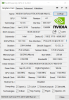
no problem, it was fast - I saved it with the default name it suggested (TU106.ROM) and I used mediafire:
http://www.mediafire.com/file/nyc7z1ylgdqbog3/TU106.rom/file
 Last edited: Apr 18, 2020
Intel-TongFang QC7 (Element/Fusion 15/MAG-15/Vapor 15 Pro)
Discussion in 'Other Manufacturers' started by B0B, Sep 2, 2019.


