Problems? See this thread at archive.org.
Is there any fix for the 800MHz throttling when battery is less than 40%?
-
My LED strip only worked when the laptop arrived. I think it stopped working after flashing BIOS or I don't know.
I have image projection ON on CC 1.2.2.8, BIOS N.1.05 and EC 1.35.
What am I missing? -
Or he can just search like I do so we don't keep repeating the same thing every 3 or 4 pages.
Sent from my Samsung Note 9 "SM-N960U" using Tapatalk -
So, for some reason my lack of knowledge doesn't let me comprehend, after I lowered the multiplier once from 63T, it adjusted to 41T and won't go up again. I'll test to see if this change has any impact on the undervolting parameters I was handling before.
Thanks for your help. -
I don't have the 17 so I can't really comment on what the power limits should be set there or why there might be a discrepancy between HWINFO and ThrottleStop. There are 3 places that the power limits can be set and ThrottleStop only looks at one of them. Intel XTU uses another. And then the 3rd one no software has access to as far as I am aware of. Different systems use the value from different places to actually enforce the limits so it is likely HWINFO and ThrottleStop are not looking at the same values.
Try running some stress tests (even just TS Bench with 12 threads) and see if the CPU is running at 3.9GHz under full load on all cores. If you see that and it doesn't throttle down after some time then you should be alright because that is the maximum the CPU can do. If you aren't seeing that then something might be wrong with the power limits.
Bob, doing it the same way on every laptop is exactly what I was afraid you might've been doing because it won't work on the OP laptop that way. Every other machine from the past year or so that I've tested has had Speed Shift enabled by default (some have an option in the BIOS to control it as well) so if you just set the EPP value on the main window in ThrottleStop it immediately takes effect just like you show in your ThrottleStop tutorial video for the 8750H. But on the OP laptop Speed Shift is not enabled by default and there isn't an option in the BIOS to enable it so you have to actually open the TPL window in ThrottleStop and first enable Speed Shift there with min and max set to at least the min/max multiplier range for the CPU (i.e. this sets the multiplier range that Speed Shift will use based on the system load, the i7-8750H has a CPU multiplier range of 1 to 41 but I left the range values in ThrottleStop as 1 to 255 since once you go over 41 it doesn't really matter since that is the max multiplier for the CPU, just to be clear this does not set the EPP value range that is always 0 to 255). THEN once you have fully enabled Speed Shift for the system the EPP value on the main ThrottleStop window will actually do something if you set it.
You can see if the Speed Shift EPP value is actually being used by opening the FIVR window in ThrottleStop, under the current voltage offsets at the top right you should see the Speed Shift EPP value that your system is currently using. If it is blank then Speed Shift is not enabled.
You can easily see in my screenshots in the link I posted previously that as soon as I set EPP to 0 I get 45+W in Battlefied. If you fully enable Speed Shift and set EPP to 0 and you don't immediatley see the CPU frequency jump to 3.9GHz then Speed Shift is not working correctly and you might have faulty hardware. Setting EPP to 0 is literally the exact same thing as setting the performance mode to Max Performance, it just keeps the CPU at max boost frequency all the time under any load to remove any possible delay from boosting the frequency when there is work to do.gotchapt, Nitroturtle and Snamuh2 like this. -
Don't use the Set Multiplier value in ThrottleStop, that is there for older CPUs. On newer systems just use Speed Shift and set the EPP value and/or the min/max multiplier range in the TPL window to control the CPU multiplier. No matter what you do though the multiplier will never go higher than 41 on the i7-8750H because it is a locked CPU and cannot be overclocked and that is the maximum possible when only 1 core is being used. The max when all cores are being used is 39 and that is typically the max you will see in the real world since it is almost impossible to get only 1 core being used when you have any sort of background processes running.
If you open the FIVR window in ThrottleStop in the lower left you can the different multiplier values based on the number of cores used.gotchapt and ZaiArgylle like this. -
A video on this specific laptop using your steps would be really helpful for many of us.
Sent from my Samsung Note 9 "SM-N960U" using Tapatalk -
Nope bbswitch just loads the driveres dynamically back and forth. It does somehow reduce the power input of the dgpu, but rather via something like an undervolt than a complete switchoff. The problem is/was that the new nvidia drivers dont't support dynamical un/loading. This may lead to a massive screen tearing. I'm not really an expert on this, but when I took a look at it, this popOS bash script solution seemed to be the best option. Manjaro/Arch have guides in which they try to remodel that via a nextGPU.sh script, still this needs some manual Xrandr - ing and I'm utmost **** in these things.
When you switch driver=nonfree on a manjaro install it should install and configure bbswitch automatically, this never worked with my machine, but haven't tried lately. Maybe they fixed it.
Well yes had the idea from my Arch install on this Laptop. Was happy it worked for debian. -
Thanks for clarifying that. I believe it may have contributed to the bubbles. Like other guy said here: the 3M DI-NOC branded product is a higher quality vinyl, and probably worth the extra cost. It may also be available in textures other than carbon fibre. For example a stone texture like granite or marble. Or a wood grain. Well, at least 3M advertises other textures on its website. But they may be considerably harder to find in practice.
To remove the OP logo properly, it really calls for some car body filler. Before laying the vinyl down over the top. Kind Regards.
Yes - this! I am really glad that somebody else has finally twigged. Well the thing is that its just a single large piece of plastic. So that would best be duplicated, as a custom piece of SLA. Which would require manufacture in China. But the size is normally too large for most 3d printers. Also a 3d printed part is not going to be as strong as resin. Hence the need for SLA. Normal 3d print would be more prone to damage or breaking.
Here is an idea though:
We could try to make up a full 3d model the underside. And print that out first as divided into multiple sections. To iterate the prototype out on a normal regular cheap 3d printer. Tweaking the model (as you do), until its correct.
Then ask a print shop to print out a version on a larger printer. As a prototype. Then with that model, we could share with people to come up with a larger cavity version. To incorporate enough room for the following item(s):
* 100 Wh Battery (or near enough).
For example one from a different manufacturer's laptop. Like a battery for a Dell or gigabyte. which ever is affordable and has a good quality, good availability and a long product lifetime.
* Enough room to re-locate the 2.5 inch sata, or make it work with an adaptor.
There are multiple different ways to tackle the problem... But I would imagine you would end up with a thicker laptop at the front. With taller feet at the back. And a larger air cavity in-between. So the side profile would look something like this |_.------.____| -
Thanks. We have had that mystery going on for several months now. It was first reported by another user way before Bob showed up. And that earlier guy ended up returning his laptop.
This is really important information. Your posts need to be linked back to the first page of this thread. Who is...
Please come back, and like to his posts! Thank you,
Thanks!
Actually, to get further information on this area would be quite useful. As in: the Intel data sheets are not very helpful. Because of the presence of other additional power management mechanisms, and how they are interconnected and affect each other. It's not so simple to understand!
And also differences in way that XTU works. It's really 'does not feel the same' as TS. Also the intel DPTF driver. Because XTU refuses to launch after intel dptf is forcibly disabled.
Thanks!
Thanks!
Thanks!
Thanks!
Thanks!
You have helped to clarify this no end... I am very grateful ! -
External display works for me. You may have to press that detect automatically button in the display menu.
the key is the
w /sys/bus/pci/devices/0000\:01\:00.0/remove - - - - 1
command. This removes the dGPU from the pci list. Fun fact: Now my skylake controller holds the device id of the dGPU. I better not repeat this command.
In the end, this is a software solution and you can't really brake anything. If you get a black scrren of death because you missed something just hit e in the boot menu and add modprobe.blacklist=acpi_call and you are back to normal. The scripts will leave error messages because the module did not load, but that's it. Oh, and of course the dgpu is back.
You also may want to call all confs and services something with acpi_call. Simply because when you sudo apt purge acpi_call it removes all the conf files with it. the same reason you never want to put something directly in your soucres list but rather use /etc/apt/sources.list.d and add a whatever.list file there. -
@99-0 I've tried that button, but not had any joy. Which model of this laptop do you have? Mine's GK5CN6Z, 15 inch with 1060. Also, is there any Intel driver that you have installed?
-
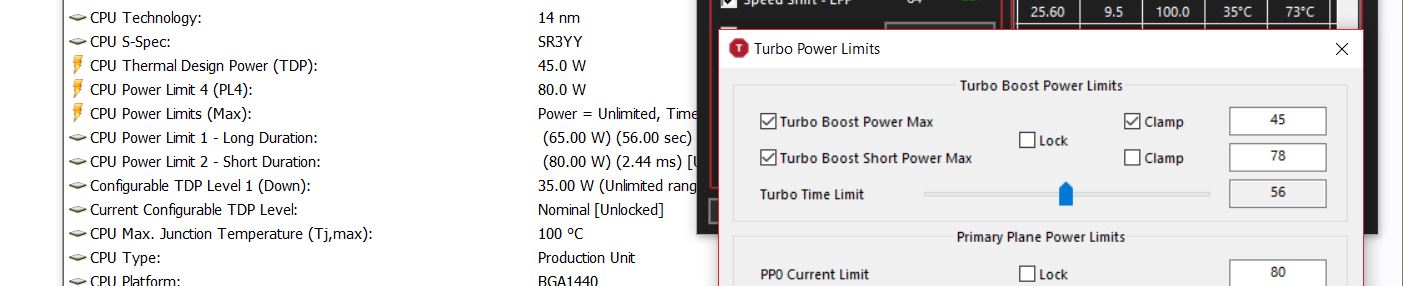
Taking into account that the default TPL values for Turbo Boost Power Max and Turbo Boost Short Power Max are 45w / 78w respectively, would you advise raising the first to 55w?
Even better, If you don't mind, would you share a couple of screens of your complete TS config?
I have, of course, confirmed my unit is configured to correctly use the 180w power adapter
Thanks for your input -
I am on a XMG Neo there is only one version. driver is intel-Xorg i915 with mesa. Oh install the mesa driver I think that might be it. If you have them, I am out of an idea. I never really tried to get bbswitch/prime working since I switched from opensuse. Manjaro did the job automatically, so did debian (adding the mesa dri). On arch I installed them manually. They will brake bbswitch/ prime.
https://imgur.com/a/1icjsOt -
Does anyone know if Walmart intends on getting more laptops in stock?
I know there's alot of talk on the "best bios, windows and gaming center combination for the 15+. What bios would be best for the 17+, or do we not have as many options as the 15's when it comes to bios?
Side note. If anyone is still having issues with there powers button not working while plugged in. Try pressing on the left side of the button. It would typically take 3 pushes to get my laptop to come on before I realized that. -
Hard to say on the stock. Walmart was not making any money on these at their sale prices. There was never any issue with powering the laptop on while not plugged in. You simply had to hold the power button for a couple seconds - this was designed to prevent the laptop from being accidentally turned on while not plugged in. -
I noticed this issue on my system too. As soon as I plugged the power the processor snapped back to 3.9 GHz. I haven't had a chance yet to dig too deep into this issue. -
I am almost certain they have killed all their OP laptops now. Because when you click the nav bar to back out to all laptops. They no longer list 'Over Powered' as being one of the manufacturers that they sell. Its just MSI, ACER, etc. Only the other ones now. Wheras 2 days ago, 'Over Powered' was still being included in the manufacturer filter list.
Seems to be:
they went out of stock --> got some last final shipments --> went back in stock. Sold out again (2nd time) --> went OOS forever now. -
OTOH I *could* be wrong about that. If their filter criteria just happens to automatically hide a manufacturer from being listed if all of their models happen to be simultaneously OOS all at the same time.
Then we would see it re-appear again once at least 1 of the 3 different model types comes back in stock again. But would not hold your hopes up too high. -
![[IMG]](images/storyImages/2bKFNQl.jpg)
This was supposedly in a Walmart in Colorado. FYI, Esports Arena is the logo you see on the O in the OP logo..
richierich, bidzer, Johnazz and 1 other person like this. -
-
I don't do graphic design so I don't know whether the integrated graphics is good or not. But given the prevalence of UHD630 and the two software, you might be able to find that answer on google.
As for the bios, there's good news! People are already working on modifying the bios ( see here) and there's a hidden option allowing disabling the internal graphic card, which opens the door to drive the gtx1060. But we don't whether that option actually works before one can unhide it. Just hope for the best before it's done.Last edited: Jan 6, 2019 -
Which Walmart is this one? Colorado Springs? Might be checking it out.
-
This doesn't happen on my hackintosh. So this would not be BIOS or EC related. Look at windows and softwares (e.g. control center).
-
https://variety.com/2018/gaming/news/esports-arena-opens-walmart-venues-1203024499/
" Esports Arena, North America’s first dedicated esports facility, recently announced it’s bringing competitive gaming to Walmart shoppers.
It plans to open and operate five arenas within Walmart stores. The first three are in Roseville, Calif., Spokane Valley, Wash., and Colorado Springs, Col. Two additional locations will arrive at a later date. All of them will hold league nights during the weekdays and tournaments on the weekends. They will also have open play hours daily, so customers can train together, try out new products, or practice for upcoming matches. Streaming events and merchandise are expected in the coming months.
All of the Walmart arenas are equipped with the retailer’s new line of gaming PCs called Overpowered by Esports Arena. The line launched exclusively on Walmart’s website last week and includes three laptops and three desktop PCs."Johnazz likes this. -
I could make a video if it is really needed but I'm not a content producer like that at all so it probably wouldn't be very good lol. It's just a few check boxes so it's quite simple.
Try running TS Bench with 12 threads (or any other CPU stress test) to see if your CPU can hold 3.9GHz for extended periods of time, if so then you really don't need to worry about the power limits since it is still working at the maximum capability of the chip. Here are some screenshots of how I have it configured. Let me know if you need any more info about things.
OverPowered Control Center
- Set Fan Mode to Gaming
- Set Performance Mode to Equilibrium and Windows 10 Power Mode to Better Performance (although ultimately neither of these matter once you enable Speed Shift)
- TPL Window
- Check Speed Shift
- Note: once this is enabled you cannot disable it without fully shutting down (the check box will become grayed out/disabled)
- Set Min and Max to 1 and 41
- Check Enable Speed Shift when ThrottleStop starts if you want it to automatically enable it each time ThrottleStop starts.
- Hit Apply
![[IMG]](images/storyImages/t4xlJ1C.jpg)
- Check Speed Shift
- Main Window
- Check Speed Shift EPP and set value to 84
- Uncheck BDPROCHOT
- Hit Save
![[IMG]](images/storyImages/8D6jHrm.jpg)
- FIVR Window
- My machine had instability at -0.125V undervolt that Bob recommended so I have mine set a little lower. Everyone's machine will be different here so don't take my values as absolute either.
- Set Core Voltage Offset to -0.120
![[IMG]](images/storyImages/Cg0T3vZ.jpg)
- Set Cache Voltage Offset to -0.115
![[IMG]](images/storyImages/lGpt2qe.jpg)
Last edited: Jan 6, 2019richierich, nimaim, gotchapt and 10 others like this. - Set Fan Mode to Gaming
-
But out of the box, it is impossible to move the stock 256GB M.2 SATA to the second (empty) slot, and then install an NVMe PCI SSD in the first slot, install Windows on, then and make it bootable from the BIOS, correct?
-
Thanks. I hit my max score of 1241 in CB
Edit: Just to clarify that I am running 100% stock components in my rig which means single stick of RAM.
Not much but just hit 1237 twice and then hit 1242. Nice consistent scores.
Last edited: Jan 6, 2019richierich, scottydo42, Johnazz and 2 others like this. -
It seems undervolt the iGPU (e.g. by -90mv) brings up CB score by 10 to 20.Installed64 likes this.
-
Still wish I could get gaming mode to work. For whatever reason, the 1050ti version of this laptop gaming mode does not turn the fan on and it stays at default (even if temps hit 90c or more), wonder what cyberpowerpc couldve done. I can run the fan on manually in office mode but this caps cpu at 35w.
-
Thanks, Blebleuh!
-
I'm sure we can just leave the M.2 SATA SSD exactly where it is is, in slot 1 (out of the box), then install an NVMe PCIe SSD in the second (empty slot - i have a 500 GB Samsung EVO NVMe SSD), install Windows (and OP apps/ suites) on IT, and then make it the boot device in the BIOS or boot device menu. Then wipe all the partitions off the M.2 SATA SSD and use it for games / apps / storage...? I like to have my OS booting on the fastest possible device.
-
I noticed that my Turbo Boost Power and Short Power Max are different. Is this something I should change to match yours?
![[IMG]](images/storyImages/FRNTGyN.jpg) em0ney14 likes this.
em0ney14 likes this. -
So, is this safe to say I can return my second 16gb ram stick? My laptop comes in tomorrow so I cannot do any testing, but this seems very promising. Is there any real noticeable advantages having dual channel? I think 32gb is overkill for my needs.
-
Hmmm. Interesting. My TS was at 65w power max and 80w short power max initially. TS author said to run it at 52/70 for the 8750. I have the link saved if your interested
-
That's interesting... I did not set those on my machine those are the default values it came with so I'm not sure why it's different. Do you have the 15+ with the 1060 or is that the 17in or 1050 model?
In any case, I'd try running a stress test like the TS Bench 1024M with 12 threads and if your machine maintains the full 3.9GHz boost frequency for the entire test theres no need to change those values since it is already running at the maximum anyway. You can try a longer test too if you want but basically just check if your machine can maintain enough power draw to run at the max frequency under a full load for a while. You could also try running both a CPU and GPU stress test at the same time like aida64 and heaven at the same time and make sure it's not throttling due to the 45W limit it is set to.
If it isn't maintaining that boost and the temperatures are still within reason then you can try raising the 45W to 55W. If it doesn't change anything after setting it via ThrottleStop then try setting it via XTU as well because they are actually setting the value in different places and different machines are set to use the value from different places and I'm not sure where the OP laptop is reading it from since I haven't needed to mess with it. -
Some games will still benefit with having dual sticks in place. I plan to go to dual stick totaling 32gb in one laptop and 16gb on the other. -
Thanks a lot for your feedback
-
He's what my 17+ looks like stock. It's maintaining 39x without issues.
Attached Files:
-
-
killerkhatiby009, thanks for all your help.
![[IMG]](images/storyImages/aAuxqcL.jpg)
I copied killerkhatiby009's settings, running stock Overpowered 15+ with one stick of RAM.
In game, however, I cannot seem to get past the 35W power limit with Speed Shift enabled. It hits 60W+ in Cinebench and TS Bench.
FWIW, Overwatch settings are all Low, 75% rendered, HPET disabled, Nvidia Control Panel settings set to prefer High-performance Nvidia processor.
Anyone know what my issue could be?Installed64 likes this. -
Could you help me understand why you set speed shift to 84 on TS main page and then set SS range to be 1 to 41 on the TPL page?
-
I would recommend disabling SpeedShift in TPL settings, that for me reduced the issue of CPU being throttled when gaming.
-
Those are standard PL for 150W adapter, just install the 180W mod as explained in first post of page 1 and you will have 55/65 as default.
-
What BIOS/GC versions are you running? I’m on an old BIOS version and with Gaming Center 1.1.16.4 from Eluktronics so could be usefull to know if newer versions have the same issue.
-
Looks like I'm already running these, so the issue must be somewhere else... Which Linux distro do you currently run (I'm on Mint 19.1, running kernel 4.20)?
EDIT: I am starting to think that my and your laptop's external ports might be wired differently - I get the same issue in both windows and linux, when Nvidia card is disabled iGPU fails to detect any monitors on either HDMI or DP ports.Last edited: Jan 7, 2019 -
100% stock Walmart image with November build
Gaming Center: V1.2.2.1
BIOS Version: N.1.05
EC Version: 1.35.09
Build 11/2018
Product: OP-LP2stesteste likes this. -
I figured that and have tried running Oemsev twice and those numbers don't change. But HWiNFO64 shows the correct PL1 and PL2 numbers.
![[IMG]](images/storyImages/DTmLdpP.jpg) Last edited: Jan 7, 2019
Last edited: Jan 7, 2019 -
Quick Question, How loud are the brown switches on this laptop?
-
The top case for the Recoil II can be repalced, yes, whilst the Vyper is more complex. We would always suggest returning your laptop for this work to be carried out.steberg likes this.
-
Thanks. What about the back panel? Do you guys carry spares for that? I would like to modify it to house a 3rd drive with the bigger battery mod but I'd like to have a backup.
On that topic, can anyone post the internals of the 17" version? I'm curious how that looks inside and how much empty space is in there.
EDIT: Found it here: http://forum.notebookreview.com/threads/tongfang-gk7cn6s.825461/page-8#post-10836954Last edited: Jan 7, 2019
TONGFANG GK5CN5Z / GK5CN6Z / GK5CQ7Z / GK5CP0Z
Discussion in 'Other Manufacturers' started by sicily428, Apr 22, 2018.


![[IMG]](images/storyImages/u3RlBNw.jpg)
![[IMG]](images/storyImages/IeNLdXm.jpg)