Problems? See this thread at archive.org.
It's on a sticker when you take the bottom cover off. I don't think there is any difference that has been noted between the Oct/Nov release dates.
-
I've seen a bunch of talk about Gaming Center not having the ability to change the front bar to white.
What happens when you uncheck "Colorful"? This turns my front bar white. -
I just repasted with liquid metal (Conductonaut), and I'm extremely pleased. I can never go back to traditional paste now. Compared to the Arctic MX-4 I had before, average CPU temps are down 7-8C after an hour of AIDA64 full CPU+GPU burn, fans at max for a fair comparison. Never hit 80C. Without the GPU in the test, I'm getting mid 50's. The spread in the cores' temps are much tighter as well. If you want lower temps, I would highly recommend liquid metal. This is the first time I've used it and it went without a hitch after watching a few guides. I just electrical taped around each die and spread a thin layer on the dies as well as the heatsink.
Here are the results before with MX-4 and after with Conductonaut:
![[IMG]](images/storyImages/VwuDdxp.png)
![[IMG]](images/storyImages/TK36WMD.png) richierich, Clamyboy74, faiz23 and 2 others like this.
richierich, Clamyboy74, faiz23 and 2 others like this. -
Anyone know why I can't install gaming center from any brand?
I originally have overpowered control center then I uninstalled it to try other brands', but no matter which control/gaming center I try, the installer just quits immediately after I double click it. -
Very nice... keep in mind though it's also very, very easy to do this: http://forum.notebookreview.com/threads/misjahs-guide-on-how-not-to-liquid-metal-repaste.805338/. Even if you are careful and limit the amount you put on, it is very easy for LM to get dislodged when you transport it. @Falkentyne posted a good way to set up a barrier to help protect against this: http://forum.notebookreview.com/thr...r-liquid-metal-safety-insurance-guide.817207/.
LM is definitely amazing stuff but please take the necessary precautions. And yes I'm repeating myself because people will post amazing results/benchmarks and others will go applying it on impulse and screwing something up. This is not like thermal paste whatsoever and it should not be treated as such; it touches one cap or resistor and you're done, and neither Walmart nor OP is going to fix that for you.
Personally, I'm happy enough with Kryonaut, same as @B0B applied in his OP videos, along with many others in this thread.Last edited: Jan 5, 2019BluJ, richierich, Installed64 and 1 other person like this. -
Ditto here with the Kryonaut. I depend on my rig to much for business and travel to risk one little itsy bitsy teeny weeny drop running out and frying everything.
Sent from my SM-N960U using Tapatalk -
Finally got that carbon fiber look. Took way longer than I expected. Honestly, it looks better in the pictures than in real life. I tried to show the laptop in its best light so you can't really see the numerous small air/dust bubbles, especially on the lid. I couldn't avoid them to save my life. Still, I'm pretty satisfied with the results. I opted to keep the microphone and lock ports covered up because I've never used them in my life.
![[IMG]](images/storyImages/QICrBia.jpg)
![[IMG]](images/storyImages/nZZOUXl.jpg)
![[IMG]](images/storyImages/3XMuNgi.jpg)
![[IMG]](images/storyImages/EBfx0Ic.jpg)
![[IMG]](images/storyImages/cgESOYC.jpg)
![[IMG]](images/storyImages/vTkPVDK.jpg) Austin St Peter, boidsonly, richierich and 7 others like this.
Austin St Peter, boidsonly, richierich and 7 others like this. -
AliExpress has battery in stock for $75.66, I'd buy it if I could sell the old battery. Doubt there's a market for that.
US $75.66 | New Genuine laptop batteries for GK5CN-00-13-4S1P-0,GK5CN6Z,GK5CN-00-13-3S1P-0,15.2V,4 cell
https://s.click.aliexpress.com/e/cVITQTIY
Sent from my Pixel 2 XL using Tapatalkarcticjoe likes this. -
Anyone know whether this laptop supports the new 32gb SODIMMs? Would love to push it up to 64GB RAM, it would make a really nice portable VM lab.
-
Awesome, thanks - ordered.
-
This whole thread reminds me of the following adage:
Life is about the journey, not the destination.
("Getting there is more fun than arriving", etc.)
My final philosophical take: If the universe were perfect, none of us would be here discussing 35W power limits, throttling, and single- vs dual-channel memory bandwidth. -
Here's what I did with mine: I kept the M.2 SATA SSD in the slot 1 (it won't work in the 2nd slot), and I installed a Samsung 970 EVO nVME M.2 500GB SSD in slot 2 (the other open slot), installed Windows 10 on it, and set it as the boot device in the BIOS. I wiped the M.2 SATA SATA SSD in the first slot and am keeping it for my apps / Office suite and games. I also have 2 x 8GB Kingston HyperX DDR4-2666 at CL15, with none of the power / throttling issues on the i7-8750H. Full-on beast mode.
-
Just put the NVMe M.2 SSD in the 2nd slot, do a fresh install of Windows 10 1809 on it, and assign it as the boot device in the BIOS or in Boot select menu. Leave the crappy SATA M.2 SSD in the 1st slot, and use it for games / apps / storage (after wiping all the partitions & Windows 10).
-
-
Have to say, many thanks for this, I've got mint running on my 2nd SSD and its really nice and light. My only complaint is that battery life seems to be far lower than with Windows 10, thats even with an undervolt and using only Intel GPU. Any ideas why that might be (chipset drivers maybe)? Would love to be able to bring CPU package power usage down to <1w.
EDIT: keyboard lights work for me ok, I cant select any custom lighting settings, but can toggle brightness using FN+ keys) -
To find out what subsystem(s) are draining the power, requires that you install certain programs, which can better profile and report back to you in more detail what is going on specifically with your individual laptop. Sorry I forget, but they seem to be 'powertop' and 'tlp'. There are several good online tutorials which will help to walk you through this process.
-
Did you use a specific product? Is it the 3M vinyl one, or some generic unbranded one?
-
If you want a true carbon fiber look and feel go with the 3M DI-NOC in the matte finish (Product CA-1170)...
https://www.3m.com/3M/en_US/company...70-4-ft-x-164-ft/?N=5002385+3294794003&rt=rud
Here's a nice video of someone installing it on a laptop...
Sent from my SM-N960U using TapatalkLast edited: Jan 6, 2019 -
Hello
I have been a long time reader of this thread as well as an active poster in the slickdeals thread. I started getting the dreaded WHEA_Uncorrectable_Error on my laptop. I had installed an additional 8 Gb Crucial Ram (2400 MT/s) which I had as spare to run the laptop as dual channel. I had also undervolted both Core and Cahce to -140.6. While playing COD MW2 and MW3 I started getting crashes. I ran MEMSCHED / MEMTEST86 and all of them found no problems. I looked at Bob's video today and have changed my Throttlestop values to -125 today. I have also taken out the extra 8GB stick and running with the default 16 GB ram which came with it. I will again game some pr today and see if that changes anything. Any other suggestions on what I can do to troubleshoot the issue ? -
This thread keeps getting better and better! I have a 17 but that thread is quiet compared to this. So will leave my question here.
Having my kid QA test the unit before the return window is up. Got 7 more days. The only complaint so far is the left shift key, as moat of you know is (Sprinting in most games) is hit or miss with touches. Is fhere any tweaking software wise that can be done to increase sensitivity?
Appreciate the active community and information sharing here!
Thanks -
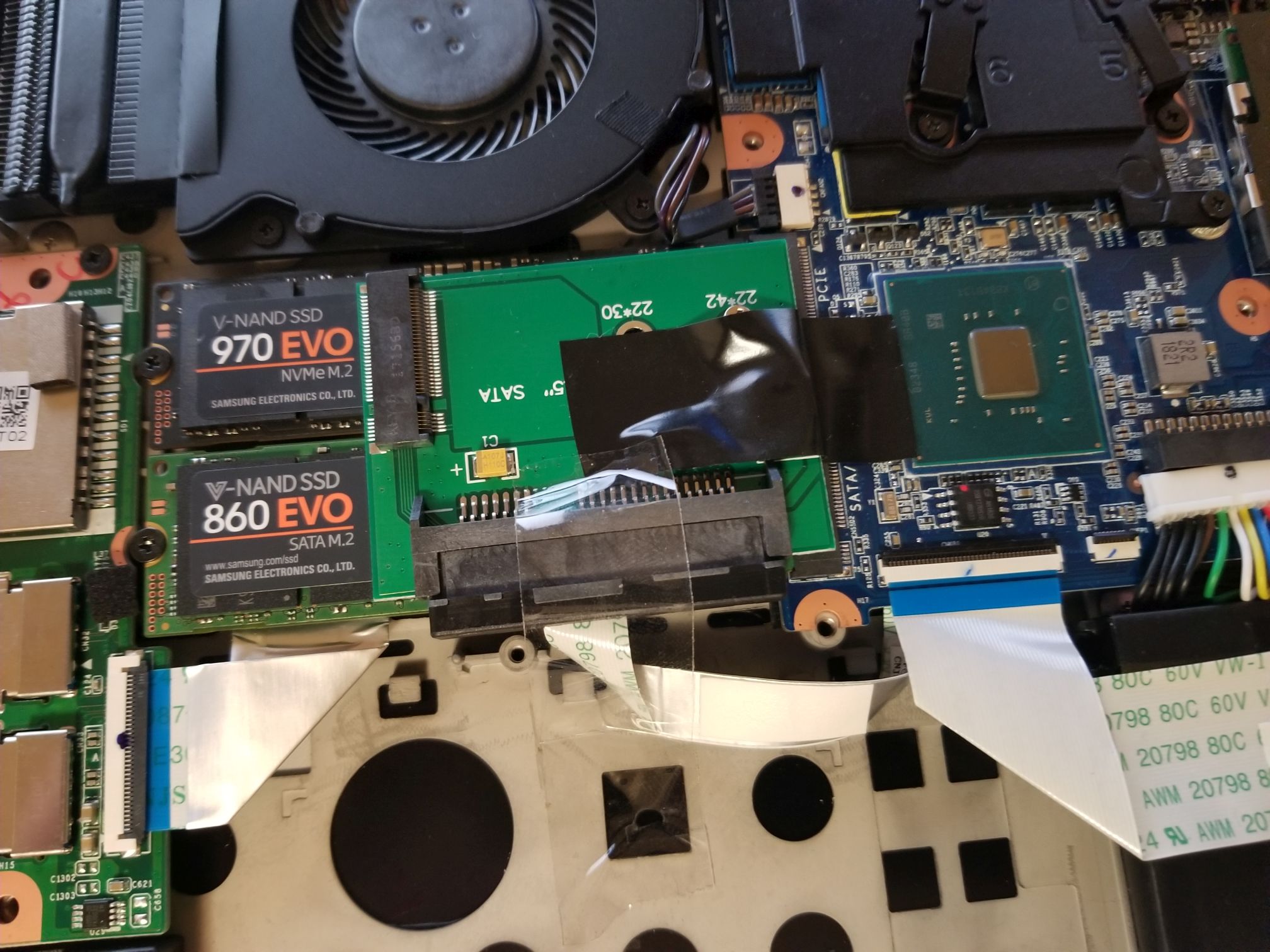
So I paid a bit more to get it quicker from Amazon, and I don't see any way even this board would fit in here with the bigger battery. Maybe the 17" chassis would accommodate it more easily but I don't see any empty space it could fit in in here. If you put it on top of anything, the back panel won't close ...
EDIT: Ok so one possible place it can go. If you were to put it on TOP of the two SSDs (between some thermal padding of course), and somehow remove that little plate on the back panel (the one with a blue thermal pad on it for the SSDs, not sure how this comes off, anyone want to try to remove it?), it would probably work because then the height is only like 1-2mm more than the fan on that side. See attachment of concept (ignore the tape, just trying to keep it in place).Attached Files:
Installed64 and ZaiArgylle like this. -
-
google says its a windows registry error maybe system restore or something will fix it
-
I wouldn't. Especially on a laptop, with such cramped quarters and close tolerances. I don't overclock memory, even on desktops. It generally accomplishes little, except maybe bragging rights on some benchmarks. It can also stress components in clock / timing circuits, leading to premature failure down the road.Last edited: Jan 6, 2019
-
-
Not sure if its any specific apps that are doing it as even when CPU is idle @ <1% utilisation it consumes a constant 4w - so I suspect maybe Ubuntu is missing something that allows CPU to enter power saving states as it does on windows...
-
 As far as I remember Mint comes with a prime switch. The Prime switch does not switch off your dGPU hardwarewise, it is just a software switch with the 1060 still powered on. Even with the bigger battery, taking my debian buster install as a reference, it will be around 2,5 h battery life as max. You must switch the dgpu completely off via acpi_call. Done so with the bigger battery I got roughly 4-5h battery life on duty and 16h on idle. I haven't throtteled the cpu as in the windows battery preset. So it is not really a performance drop when on battery.
First off all blacklist noveau, it will **** up everything if you don't.
Install acpi_call via your package manager.
in /usr/share/acpi_call/examples/ you should find a turn_off_gpu.sh
output should be like this:
...
Trying \_SB.PCI0.PEG0.GFX0.DOFF: failed
Trying \_SB.PCI0.PEG1.GFX0.DOFF: failed
Trying \_SB.PCI0.PEG0.PEGP._OFF: works!
Trying \_SB.PCI0.XVR0.Z01I.DGOF: failed
Trying \_SB.PCI0.PEGR.GFX0._OFF: failed
...
remember the output line which says "works"
at this moment your dgpu is turned off. if you run tlp stat you should find an extreme drop in the discharge value. Mine dropped from 1400-1800mV to 450-650 mV. might be mA instead of mV, can't remember.
in my case
echo '\_SB.PCI0.PEG0.PEGP._OFF' > /proc/acpi/call
is the command to turn the dgpu off.
a suspend might freeze the system or switch the 1060 back on.
to turn thr dgpu off at boot:
create /etc/modules-load.d/acpi_call.conf
with content:
# Load 'acpi_call.ko' at boot.
acpi_call
create /etc/tmpfiles.d/acpi_call.conf
with content:
/proc/acpi/call - - - - \\_SB.PCI0.PEG0.PEGP._OFF
create /etc/tmpfiles.d/remove_gpu_from_lspci.conf
with content
w /sys/bus/pci/devices/0000\:01\:00.0/remove - - - - 1
to prevent the dgpu to be switched on after waking up:
create
/etc/systemd/system/dgpustaysoff.service
wtih content:
[ Unit]
Description=Local system resume actions
After=suspend.target
[Service]
Type=simple
ExecStart=/usr/bin/sh -c "echo '\_SB.PCI0.PEG0.PEGP._OFF' > /proc/acpi/call"
[Install]
WantedBy=suspend.target
atfter that do
sudo systemctl enable dgpustaysoff
sudo systemctl start dpustaysoff
done. You completely removed the 1060 from lspci
the conf file names are random and this example worked for me, the SB.PCI0.PEG0.PEGP._OFF output may differ.
You can still add a 2nd screen via the big hdmi port. the UHD630 was made for big 4k displays so that is not a real problem. Your linux gaming days are over, but you have a linux laptop with 5h mobility. Everthing has a price.
if the turn_off_gpu.sh is not in /usr/share as it happened on my system take it from here
https://github.com/mkottman/acpi_callLast edited: Jan 6, 2019 -
Oh. If mine is set for 150 watt, how do I change it to 180?
Thanks in advance -
- Trev -
Reduce your cache undervolt, I had the same thing occur intermittently when I went past -130mv.
-
Check "OEMServ" in this post. Info also available in page 1.
-
Search works great
Sent from my Samsung Note 9 "SM-N960U" using Tapatalknimaim likes this. -
Just some cheap one.
-
Wow this is great info ... thanks! bbswitch won't do this automagically?
EDIT: Looks like it may, ArchWiki has a similar tutorial to this: https://wiki.archlinux.org/index.php/hybrid_graphicsLast edited: Jan 6, 2019 -
Anyone know if the back panel on these is sold separately? Would be nice to play around with some things to make components fit, but not at the cost of breaking something and not having another panel to swap it for ... looking up the number on that bottom case assembly (PMARG5ZY10-0213 FORETECH) yielded nothing on Google.
-
or you can just give him the link that is the right page for the info
http://forum.notebookreview.com/threads/tongfang-gk5cn5z-and-tongfang-gk5cn6z.815943/page-101Snamuh2 likes this. -
-
I've started experiencing a few issues with my screen. It was flickering brightness once nonstop, but that was fixed with a restart. Now i am frequently seeing lines show up in my scroll bar in Chrome as shown in the attached picture.
Attached Files:
-
-
For kyronaut how many repsste on the 15+ can I expect from the smallest 1gram tube?
And is Amazon the best place to get? -
couple, its where i got mine at but i cant do anything cause walmart screwed something up and ups has to ground it to meLast edited: Jan 6, 2019
-
Just wanted to clear something up here: there is no 2nd stick of RAM "fix". The OP 15+ laptop works just as well as any other laptop with comparable specs (i7-8750h, GTX 1060, 16GB single-channel RAM), there is no 35W power limit issue due to the stock single channel RAM (though there is an issue where some devices are coming set to only charge with 150W instead of the full 180W and that is causing some power limit throttling but there is an easy fix for that in this thread and it has nothing to do with the RAM, see the note at the bottom here to check if your power limits are not set correctly).
I don't believe Bob of all trades had Speed Shift fully enabled when testing the OP laptop and so when he set the EPP value to 0 by just doing what he talks about in his ThrottleStop tutorial video it does not actually enable it fully on the OP laptop and thus had no impact, I wish he would post a correction for this to clear up the confusion. Most machines nowadays come with Speed Shift enabled on the system by default but since the OP laptop does not come with Speed Shift enabled by default you have to open the TPL window in ThrottleStop and enable Speed Shift there first for the EPP value to actually have any impact . The other laptops he had tested before probably had Speed Shift enabled by default and so when he set the EPP of 0 it would actually work and that is why he was seeing different power draw on the OP laptop. When you have Speed Shift properly enabled on the OP laptop it will easily pull 45+W when playing Battlefield V with single channel RAM as you can see here:
https://imgur.com/a/dlQ294n
Now honestly though you don't even need to set EPP to 0, a value of around 80 (I use 84) is what the creator of ThrottleStop recommends to have a balanced laptop. Setting it to 0 is exactly the same thing as setting your Windows Power mode or OP Control Center mode to Maximum Performance which just wastes energy and generates more heat without really getting you any more performance. You might be saving about 10ms of performance since the CPU doesn't need to boost when put it under load and you run it at max boost all the time.
Note on the 180W charging issue: If you open HWiNFO or the TPL window in ThrottleStop and you see your Turbo Boost Power Max set to 55 and Turbo Boost Short Power Max set to 65 then you know the system is configured to use the full 180W charger. If your Power Limit 1 and 2 (PL1/PL2) are lower you'll need to apply the fix that you can find early in this thead by searching.
Hope this helps.Last edited: Jan 10, 2019LanceAvion, unclewebb, KnightFader and 7 others like this. -
In other words, you cannot have a working system with an NVMe M.2 SSD in slot 1 as your boot device, and the stock SATA M.2 in slot 2 (moved over from slot 1). This is a minor tragedy. So we're stuck with an unusable 256 MB SATA M.2 SSD after replacing it in slot 1 with NVMe - and only 2 lanes at that (not 4). 8 [ -
Just wanted to say massive thanks, this has doubled my battery life. Creating a service seems to have gone wrong somewhere as the service does not kill the GPU, so for now I am manually running the turn_off_gpu.sh bit manually after each boot. Will troubleshoot this later and post a list of commands someone needs to copy paste to get it to work.
Big caveat is that external displays do not work via intel GPU (i think the same is true in windows as as soon as external display is plugged in Nvidia GPU powers up). The same was true when I used PRIME switch to disable nvidia GPU, so I expect its just the way this laptop has wired it's output. Oh well, it will make a nice option to have especially when travelling. -
umm i wonder if you got a defective system still under warrenty tho
-
well... it would work, just slower than optimal. I have 2 PM961 drives in both slots and both are bootable - speed wise, without benchmarking I cant even tell which one is in PCI x2 lane.
-
The line in the scroll bar looks like what's displayed when you use the ctrl-f to find text on the page.Installed64 and jppflg like this.
-
None of them is only two lanes - it's simply an error in the OP manual.
-
Anyone have the issue where holding down volume up on the keyboard changes the volume in Windows slowly? It's kind of hard to convey over text, but holding the volume up key changes volume way slower than any other computer I've used in the past, and moves more like you're simply tapping the volume up key repeatedly. It's the same when changing stuff like brightness as well.
Installed64 likes this. -
So a couple questions here. First off, I have the 17+ so I'm not sure if that's the cause of the differences. But when I look in HWINFO without enabling Speed Shift, I'm showing PL1/PL2 of 65/80. In ThrottleStop, in the TPL window I see the Turbo Boost Power Max set to 45 and Turbo Boost Short Power Max is 78. So first off, why am I seeing different values? Should I be using Speed Shift and EPP of ~80, or is it basically the same as using balanced power mode?
-
I can set TS with my eyes closed and do it the same way every time. All laptops with single channel memory and this cpu pulled 45 watts in BF1 but this one so far tested in the channel.richierich, Installed64 and custom90gt like this.
-
So with the overpowered 15.6" laptop. I am wanting to switch out the 256 GB M.2 SATA SSD with a 1 TB ADATA 8200 NvME SSD am I going to have issues installing it where the old Sata SSD was? How do I transfer the OS from one SSD to the other will all the software?
TONGFANG GK5CN5Z / GK5CN6Z / GK5CQ7Z / GK5CP0Z
Discussion in 'Other Manufacturers' started by sicily428, Apr 22, 2018.