Problems? See this thread at archive.org.
Do the later BIOS versions have better benefits?
I don't know if you guy's noticed but Walmart already took these things off their website. Kind of concerning but with the specs and how this thing runs I can't complain.
-
Maingear now sells these (GTX) laptops, https://www.maingear.com/custom/notebooks/pulse15/index.php
They also have a new upgrade plan program for them every 2 years, https://www.maingear.com/solutions/edge.php
The base price they are asking is a steep at 1.5k. -
Looks like I found the new RTX line model names: GK5CP6Z/GK5CP7Z
Referenced from https://www.fortunetechnology.com/notebooks/12786/
https://laptopparts4less.frl/15.6in...1060-6Gb-Coffee-Lake-game-laptop-samenstellen
Earliest batch seems to be Jan 29. RTX 2060 is non-maxq, RTX 2070 is max-qLast edited: Jan 14, 2019Installed64 likes this. -
Guess I've been pretty fortunate then, because I haven't had a sleep issue like this on any of my previous Windows laptops.
I don't know what would prevent sleep. It was pretty random today too. I put the laptop to sleep last night, tossed it in my bag this morning on the way out to class, and when I got to class, it was on inside my bag. .-. -
I've been swapping thermal paste often in my new OP 15+ to see what works best but after about 5 cycles the screws have started to wear out and I'm worried that sooner or later I won't be able to get them out.
I know the general consensus is just to buy this kit but does anyone know the exact screw that the heatsink and fan assembly uses?
I wanted to buy some high quality screws to replace the one's that are almost stripped in mine and was thinking about going with either this or this.
Also does anyone know if the taller heads on these screws will cause an issue? As well as the difference between the grade 10.9 screws and the stainless steel screws?abraham3991 and yayo685 like this. -
Hot dog! I should've gone with these istead of the microcenter ones.
Sent from my SM-G965U using Tapatalk -
A couple articles linked below. Nothing new here, except that CyberpowerPC will not be shipping these right away. No sign of RTX laptops on their website, in fact many of their laptops are now listed as 1050 TI’s that are actually 1060 models. Strange.
https://www.google.com/amp/s/amp.ho...esktops-and-laptops-intel-core-i9-geforce-rtx
https://www.google.com/amp/amp.laptopmag.com/articles/cyberpowerpc-tracer-iii-xtreme-17roneintheblack likes this. -
Which thermal paste has performed best? Guessing small differences between them.
-
Not exactly a fix, but have you tried configuring it to hibernate instead of sleep? It won't come on quite as fast, but should still be pretty fast, and the battery will last longer.
-
Woot the damn batteries made it through customs! We should be seeing them by next week!
yayo685 likes this. -
Looking forward to reports on battery life increase. That's the only thing that will keep me from keeping this laptop sadly.
-
The 17.3 version says that they use the 2070 non max q
Sent from my CLT-L29 using Tapatalk -
Yeah I know... this is not clear at all. But we shall find out soon enough, after somebody gets one of these. Shouldn't be that long to wait.
-
All tests with Aida64 stressing CPU and FPU with max fans. Equilibrium mode in OP gaming center with balanced mode in windows.
Stock paste: 80-82°C Max; 3.0ghz average boost speed (AFTER short term turbo boost ended)
Kryonaut: 87-88° Max; 3.0ghz average boost speed (AFTER short term turbo boost ended)
IC Diamond: 79-80°C Max; 3.6ghz average boost speed (AFTER short term turbo boost ended)
Arctic Silver 5: 86° Max; 3.0 ghz average boost speed (AFTER short term turbo boost ended)
MasterGel Maker: 74° Max; 3.6ghz average boost speed (AFTER short term turbo boost ended)
IC Diamond is from a friend and is about 1 year old.
AS5 has been sitting in my desk for about 3 years now and has separated.
Cooler Master MasterGel Maker is brand new.
Kryonaut is brand new but I'm 99% sure I got fake stuff.
I applied all of them the same way and the Kryonaut consistently performed worse. Also I used the Kryonaut in my desktop pc with an delidded 8700k and it performed about 3° C worse than the AS5 that was on there for about a year.
I've noticed temperatures appear to be slowly rising with MasterGel so I'm not sure if that's ambient temperature changing, but if it keeps going up I'm gonna repaste again. Maybe with phobya nanogrease extreme?
Side note: Does anyone know if you can flatten a warped heatsink?
Mine came warped from the factory (at least I assume so, I was very careful when taking the heatsink off each time)Installed64 likes this. -
Does anyone know if NVIDIA's newly released drivers enabled adaptive sync on this laptop's monitor? It might just be my ****ty eyesight and wishful thinking, but I haven't noticed any screen tearing in my games today.
Snamuh2 likes this. -
So does anyone know if the warranty in the manual is enforceable as it's a different term period than what is sold with the laptops on walmarts site?
-
Its two years, I emailed them about a month ago about that and they just replied today.
-
I'm more saying legally if their terms apply if we are never provided the terms with the laptop nor have ever agreed to any terms of the warranty.
-
No option doesn't show up in nvidia control panel.
-
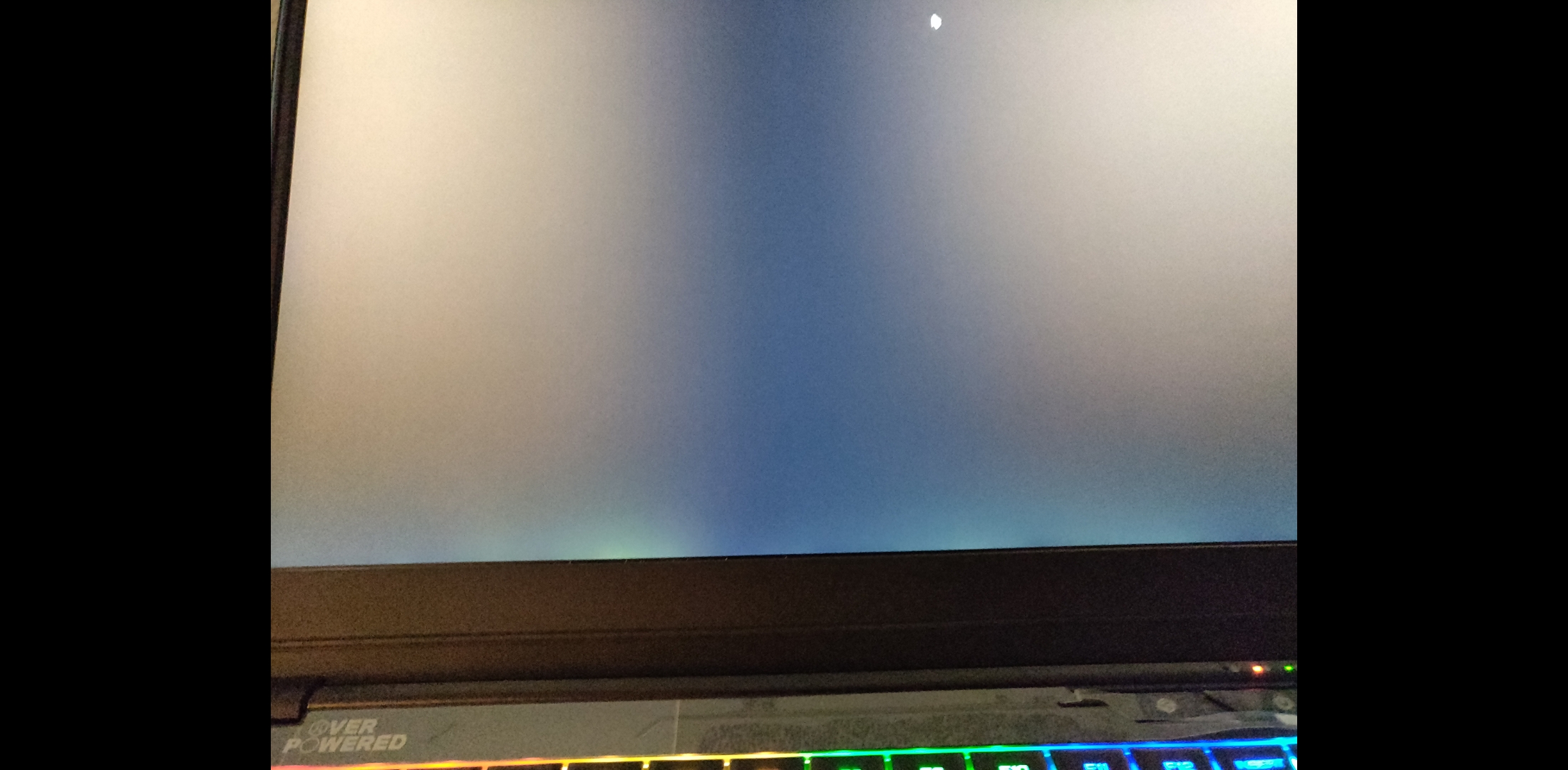
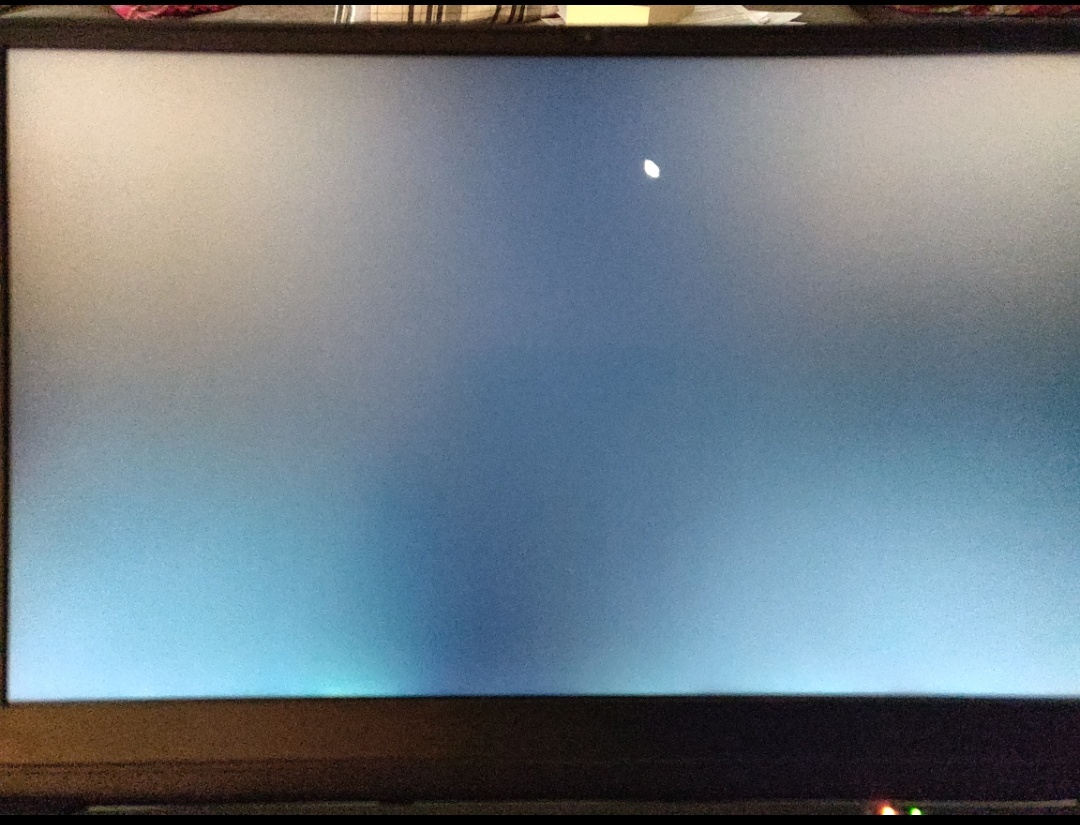
How is everyone's blacklight bleed? Mine is kinda bad... https://imgur.com/a/EBdnyEf
Should I return? -
Could you let me know how much life it adds to it? Also are you having bad blacklight bleed? Or is this normal? https://imgur.com/a/EBdnyEf
-
I had some nasty backlight bleed too. Instead of returning it I took off the bezel and gently played around with pressure points. I ended up putting a little paper inside the bezel down below to relieve pressure (or redistribute) when the bezel was reinstalled. It is acceptable to me now. You can exchange if you recently got it I guess, but you might be in the same boat anyway.
steberg likes this. -
this laptop isnt even instock and it may never be at these prices anyways
-
that is the same issue I have with noctua nh1 paste it starts out great but seems to slowly creep up. the coolers may not be super flat and direct die cooling is already prone to pump out of thermal pastes. I have some IC Diamond coming tommorow to repaste it with that as its super thick of a paste and resist pump out quite well. you might be able to sand flat the heatsinks to make it a more even surface or as alot of people call lapping it.
-
the intel gpu controls the onboard screen. if you plug something in threw one of the display outs it would probably show up as an option if the screen in question has freesync on it. I have a hard time noticing tearing at 144 hz
-
oh i wasnt aware that intel's uhd 630 and intel graphics drivers supported adaptive sync. You are claiming it does, somehow? Because what intel officially said was that is coming up in future products. That does not seems to include back-porting the feature to the current / older existing products. Sunny cove isn't out for another year yet.
-
if you use the display port out it will use just the nvidia gpu theres pretty much no way for the intel gpu to do it on the onboard screen
-
I'm not sure what that means. I already have the laptop and did a review on the benchmarks.toughasnails likes this.
-
That's pretty bad. Might be a faulty panel. These panels are usually very dark and even.
-
I don't know, when I was looking into it, I noticed a lot of poeope had bleed. Here was mine before. I'll have to get an after pic when I get a chance. I might work on mine a little more yet.
Attached Files:
-
-
I was in the exact same boat. I ended up soldering a glob and a paperclip onto it to get the screw to spin out after I thoroughly destroyed the screw head through my own stubbornness. Once extracted I saw a fairly large glob of blue loctite. As a PSA, I'd advise anyone to stop forcing it and get the correct fastener bit. A couple seconds of applied heat through a <20 watt soldering iron should also loosen the loctite, but be careful!
I will be replacing all the heatsink screws with alternatives and i picked up some left handed drill bits for easier future screw extractions. I ended up getting this set:
https://www.amazon.com/gp/product/B000HS0UJQ/ref=ppx_yo_dt_b_asin_title_o00__o00_s00?ie=UTF8&psc=1yayo685 likes this. -
Anyone else here order a stick of the crucial ram as their 2nd stick? I have not thoroughly benchmarked, but I noticed cinebench scores about 50-100 points lower than when I was in single channel. The ram is running at CL19, with slightly slower timings than the gold key I believe. I ordered this one, which was linked earlier in the thread:
Crucial Memory CT16G4SFD8266
https://www.amazon.com/Crucial-Single-PC4-21300-SODIMM-260-Pin/dp/B071KP8CGJ -
Is anyone else here able to get decent battery life on the stock battery? With fans in office mode, power option set to balanced in Windows and slider all the way to the left, and a restricted "Battery" profile in TS I'm able to get about 5 hours of light use(Spotify in the background and browsing this thread). This is honestly not that bad. I dig it.
custom90gt likes this. -
That's not too bad. If I knew I could get ~8 hours with the bigger battery, I would purchase it in a heartbeat. Still up in the air as to if I'm going to keep the OP15 or not.toughasnails likes this.
-
I'm pretty sure the timing is exactly the same. Cinebench will vary just from restarting the program. Reboot, make sure extra stuff isn't running, and try again. YoullY see different scores.Frdmjstc likes this.
-
Does anyone know where the setting is to keep the keyboard lit when on battery?
-
Could try going to into Settings>System>Display>Graphic Settings and then one by one adding all your browsers and apps that really don't need the 1060 to force using the iGPU. When I had my laptop, I was able to get almost 4 hours with power saving mode in the OP CC software and power saving mode on the windows power options forcing the CPU max processor state to only do 45% while doing programming and school work.Snamuh2 likes this.
-
Have any of you had some issues with the audio jack where it will sometimes not recognize that an audio device, like headphones, is plugged in and will continue to play sound from the speakers? It seems to go away on it's own after some time or after a restart but I don't know why. I've tried 2 different 15+ laptops that had the same issue.
-
If it doesn't bother you much I'd suggest keeping solely because your chances of getting another OP15+ is getting slim considering they removed the laptops from search results (can still be found if you click links directly to the page.) No one truly knows if they'll come back or not.
Personally, my OP15+ doesn'y have noticeable bleed, but my 17+ has just as much as yours. Generally, It can't really be fixed unless replaced, but can be improved as a previous poster showed with the paper trick among other techniques. You could try contacting OP support and who knows maybe they will exchange the panel? -
Nobody has random freezes in this laptop? Sometimes my laptop completely freezes for like 1 minute, and then it gets back. Some time later it will freeze for good, and I have to hard reboot. I thought it only happened when gaming, but today I got it with normal usage, was just on discord and browser...
-
8 hours is REALLY stretching it, even with the 4 cell. You'd have to really tweak the crap out of it to even come close to that (e.g. max battery profile, minimum brightness, all LEDs off, etc.). I think 5-6 hours is more practical based on "normal usage". Aero 15 is still the king in this department.yayo685 likes this.
-
If you're not comfortable with the solder or drill like I was you could get one of these.
https://www.microcenter.com/product/467372/screw-extracting-pliers---small---esd-safe
Sent from my SM-G965U using Tapatalk -
Do you know what size those screws are?
I'm looking to buy replacements since I stripped mine as well but don't want to end up buying screws that don't fit.
I assume thread pitch is standardized?
But I hate assumptions. -
Do you have a picture of your's so I can provide reference? Thanks I am glad I am not the only one that thinks this is bad...
-
Simply when on battery set the backlight level you want through the control center and save, same when connected. Mine lights up when on battery and shuts down when connected because I use an external keyboard.clone1008 likes this.
-
GREAT NEWS ALL ...
Thanks to the time and efforts of everyone over @ win-raid, major credit to Lost_N_BIOS (if you have some time, please register there and donate to their site), much testing and bricking by me, and 2-3 weeks later, we are close to unlocking this BIOS. We are working on moving some options / menus around, but we've figured out the strings to in AMITSE to edit to unlock the good stuff so the hard part is done. I will post the link when it's ready. Please do not flash any test BIOSes there unless you have a full backup and know how to recover w/ a programmer.
Important to note: just because all the options are unlocked does NOT mean they will work as intended (hardware still needs to support it). For example, you will see SG (switchable graphics) options in second Advanced menu, but since TONGFANG went with a muxless setup, you cannot really fully disable either card even though it appears you have the ability to do so. Doing so also runs you the risk of having no display (I've tested this), so again, you would need a programmer to recover. Rather, the OS controls this. That's just one example ... this is basically just a generic BIOS that is used on tons of boards so some options may work, some may not.
EDIT: Please do not post any link to the thread until it's safe to do so otherwise people will rush to flash it and end up bricking their units.Last edited: Jan 17, 2019rtrip, Installed64, em0ney14 and 2 others like this. -
Sure, understood. Then the only remaining question about that aspect, is if the official released version of the PCB still has traces and pads left onto it unpopulated, for the missing mux chip. Probably not, I would expect not. Just thought I might as well ask anyhow. In case anybody else happens to know. And can confirm / deny.
-
Which Model (Vendor)? Which BIOS Version? Which EC Version?
I had random freezes with the XMG version. Bios 1.03, EC 1.35.09 (so was it delivered)
Updated Bios to Overpowered 1.05 (See: http://forum.notebookreview.com/threads/tongfang-gk5cn5z-and-tongfang-gk5cn6z.815943/page-109) and kept EC.
Installed the ControlCenter 1.2.2.8 from overpowered (modded with classic tray icon, see also the link above) to be on the Overpowered safe side.
No a single freeze issue since then (2 weeks already)
If you can read German (try google translate if not), you can see that the 1.03 XMG Bios was giving problems to a user some months ago with random freezes: https://www.computerbase.de/forum/threads/sammelthread-xmg-neo-15.1804213/post-21613139 -
The OP Control Center simply will not launch for me anymore. Anybody got any ideas why it would stop working?
I was using 1.2.2.8. I've uninstalled and reinstalled a couple of times and nothing is working. Not even the modded install with no animations. -
Has anyone had issues with their hinges? I've had very bad experiences with some brands in the past, and wanted to know what to expect from this TONGFANG chassis, even more so now that I hear a small noise on the left hinge, every time I move the laptops lid...
TONGFANG GK5CN5Z / GK5CN6Z / GK5CQ7Z / GK5CP0Z
Discussion in 'Other Manufacturers' started by sicily428, Apr 22, 2018.