Problems? See this thread at archive.org.
Quote 100%
I fixed a lot of laptops but I never ruined any screw.
With this laptop I damaged two screws. They are made with a really bad material
-
-
https://www.amazon.com/gp/aw/d/B01GE9V55E?psc=1&ref=ppx_pop_mob_b_asin_image
Sent from my Samsung Note 9 "SM-N960U" using Tapatalksteberg likes this. -
Hey Everyone! Just wanted to say that I will be joining you! I picked one of these with the i7 and GTX 1060. Pretty impressed with the performance and overall build quality. There are some strange gripes but for $800 you really can't go wrong with the specs you get. I have already taken this thing apart and re-pasted it to get some lower temps while gaming [I only go up to 80 degrees C]. I haven't needed to mess with the drives yet but after they get a little cheaper I plan on putting an NVMe drive in there along with my desktop for super fast boot times. I will say that while I was re-pasting this thing I had a scare that I stripped one of the screws for the heat-sink. What I did was I went to Microcenter and I picked up one of these that removed it.
https://www.microcenter.com/product/467372/screw-extracting-pliers---small---esd-safe
Then I bought one of these to replace it.
https://www.microcenter.com/product/429404/80-piece-assorted-notebook-replacement-screw-kit
Currently suffering from post concussion syndrome but I will read my way through this thread to see what everyone else has done as far as mods and upgrades. -
I stripped one of the screws on there as well, probably the same one. @clone1008 and @lKinder_Bueno are both correct. The screws used are poor quality and easy to strip even with the proper bit.
Good find on the screw extracting pliers, just FYI these are NOT made by iFixit but imported from Japan (it's an Engineers PZ-57, even says so on the handle). Handy tool to add to the toolkits mentioned in this thread.yayo685 and lKinder_Bueno like this. -
what paste did you use? I repasted with noctua nh1 and it pumps out and ends up having worse thermals after a bit probably going to order some ICdiamond or something else thicker to help stop the pump effect. it could just be my cooler is slighty more off then others
-
The general consensus, mine as well is TG Kryonaut.
Sent from my Samsung Note 9 "SM-N960U" using Tapatalkyayo685 likes this. -
I almost stripped 2 as well, I had to pressed down really hard when unscrewing them. The metal the screw is made of is really soft, and the threadlocker really locked them in.
lKinder_Bueno and yayo685 like this. -
I used arctic cooling mx4 which seems to do well. I am getting 70-80 with an overclock ed cpu and messing with power limits. Once it is stable I will find out where I land while gaming.
Sent from my SM-G965U using Tapatalk -
How does licensing work with the install? I don't have a windows key sticker on the bottom of my laptop.
Sent from my SM-G965U using Tapatalk -
From 2-3 years windows license is not anymore a "serial", but it is linked to your hardware. So you can reinstall windows 10 without inserting any key and your windows will remain actived with no problemyayo685 likes this.
-
Are you guys testing your undervolt when you plug/unplug the power cable. I had a great undervolt going, worked perfectly stable when plugged in. But if I run prime95 and have a youtube video playing, then unplug the power when all this is running it would crash. I think it has something to do with the laptop changing from power to battery profile.
-
I just did a reinstall because I screwed up my system image of the original.
Things seem to be set up great! BUT...
If you want to use the official nvidia drivers that have Nvidia control panel you will need to download them before you install and save them to a usb or something. You have to install the nvidia driver before your laptop ever connects to the internet. So leave the laptop unplugged and don't set up wifi until the nvidia driver is installed. (during my first install the driver would not installed because I had connected to the internet.)
Windows 10 Fresh Install - So what I did was;
- Got OP drivers and extract each driver on to a usb. (I ignored the dated folder (05...)
- Got official nvidia driver and put it on a usb.
- Installed windows without a connection to the internet.
- Installed the chipset driver.
- Installed nvidia driver.
- Installed all the other drivers from the OP package with some exceptions;
- I did not install audio (from the audio folder and the soundblaster folder), but windows automatically installed the soundblaster stuff without me doing anything.
- I did not install the Intel CSME (converged security managment engine) because it seemed sketchy to me. apparently its used for remote access and i really dont see why i need it installed. if anyone has info on this please let me know. my searches dont bring much up for general consumers. I dont even see why this laptop has this feature because it seems like its used for businesses and corporations.
- The gaming center from the OP driver package does not work. You need to download the one that is separate from the drivers, its located on the right side of the driver page. (labeled as 5gb even though its like 35mb).
- Install x86 and 64 versions of .net redistributable so that you can use throttlestop.
- I used this guide to set up throttlestop. and this guide to make throttlestop start at boot.
After all this my cinebench scores are 1200+ (its been 1250ish - and that's right now on battery)
The only changes i've made to the laptop are that i installed to a samsung evo ssd. everyting else is stock (no repasting, no ram changes - stock 16gb) I'm pretty sure mine came with the latest BIOS and EC.
--------------
I had also had the original drive running as a hackintosh. Which worked pretty good! but the keyboard fn functions, keboard backlight, sleep didn't always work (as noted in post after this), and nvidia gpu and video out would not work. Am looking to get back into that soon though!Last edited: Jan 13, 2019unclewebb likes this. - Got OP drivers and extract each driver on to a usb. (I ignored the dated folder (05...)
-
when you go on battery your clocks will drop and the percentage of undervolt is a lot higher when voltage is low about .600mv is the ideal stable minimum voltage in the 5xxmv range can possibly be stable to make it stable when on battery you can boost up the minimum clocks in the power settings if you need to or possibly set throttle stop to change profiles when on battery and ac and have to different profiles as a huge core offset is to much for lower clock speeds
-
You are lucky it crashed. Shocking a battery with this kind of load is a good way to permanently damage your battery. If you need to run this sort of load while on battery power, you might want to look into lugging around a small car or motorcycle battery. Seriously. The batteries that come in most gaming laptops are not adequate for 6 cores of Prime95 torture testing.lKinder_Bueno and clone1008 like this.
-
Restart has issue after wake from sleep. Monitor shows 30.5 inches. I tried to patch edid but not successSnamuh2 likes this.
-
I forgot about sleep. Mine was funky as well.
For the Nvidia GPU is there still hope in waiting for official mojave drivers? Or possibly OP BIOS updates?
For my hackintosh stuff I basically just copied another persons EFI. So im not very good with it yet. -
The optimus can not use nvidia.
-
I am surprised we haven't heard of such a situation happening yet. I see a lot of new people come into these threads and do things that they really have no idea of what/why they are doing them. It's the quest of my Benchmark is better than yours but now what.
Prime95 on a plugged in laptop is bad enough but unplugging a laptop right in the middle of that kind of test??? .... are you kidding me!?
Sent from my Samsung Note 9 "SM-N960U" using TapatalkLast edited: Jan 13, 2019unclewebb likes this. -
Sorry if this is stupid, but...
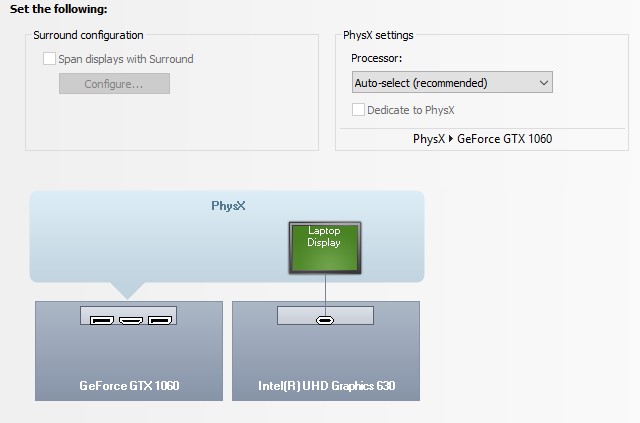
It looks like the USB C on the back of the laptop is for the integrated intel GPU. So if i got a usb-c to hdmi/displayport adapter than I should be able to use the hackintoash with an external monitor without issues?
Here is a screenshot from the nvidia control panel on windows that i believe is showing that the usb-c is for intel gpu?
I've never even used usb-c before so I know nothing about it. The walmart specs say its usb-c 3.1. I am not sure this laptop has a full featured usb c port...
@Nova _nYc @Johnazz
Tagging because you may have the answers as well! ThanksAttached Files:
Last edited: Jan 13, 2019 -
-
The USB-C on this is purely a data port, it is essentially another USB 3.0 port (in type C form factor). It is not DP capable. You can only use the 2x mini-DP or 1x HDMI for display out.Installed64, yayo685 and Snamuh2 like this.
-
Thanks for the info. I setup a battery profile in throttlestop, but it does not switch fast enough, so i ended up adjusting my undervolt to the point where i can plug/unplug without crashes.
So you guys think it's stupid to run a any app that puts a load on your laptop and unplug it while it's running?
Why would this "shock" a battery? You don't think there is a protection circut and capacitors in front of and behind the batery circuit?
Laptops are designed to be plugged/unplugged without closing applications, even when under load.
I was doing a simulation to see why it crashed randomly when i unplugged it, and running prime95 while unplugging it was the easiest way to re-create it.
I was just giving everyone a heads up in case your laptops randomly crash when being unplugged (if you undervolted) -
Ok...carry on. I guess you would know better than the creator of Throttlestop, my bad.
-
-
?
Ohh man, so does that mean that I can't get a USB C docking station for this to game with on a separate monitor?
Also to whoever asked, looks like while I play Overwatch on high settings, it does not go over 71 degrees C after the repaste. This is without any sort of overclock because Overwatch keeps crashing with an OC.
Also one more question is where would I go to get a 2nd power brick?
Forgot who asked this but this is the ram that I have in here right now.
https://www.microcenter.com/product...c4-21300-cl19-dual-channel-so-dimm-memory-kitLast edited: Jan 13, 2019 -
Just an FYI, I read every post in this thread so please keep it civil.
@jmandawg, what Unclewebb is talking about is laptop batteries aren't designed to run at that high of a power draw and it is not only damaging to them but can also be dangerous. This is why laptops do not run at full speed when on battery power (well that and battery life). Your lockups are likely due to too much of an undervolt. When I test my undervolt I like to start and stop Prime95 many times because the downclocking of the CPU often causes issues.Dannemand, clone1008, steberg and 1 other person like this. -
I think you just don't understand, since I did not test my under volt at every p-state, it ended up being unstable at lower p-states. upon unplugging, It may hit that p-state before throtttlestop has the chance to load the battery profile. I do not think throttlestop guarantees it can switch profiles before the lower battery p-state kicks in.
-
Yes there is a way to set what the “fan” button does. Originally the 17+ had it set like you preferred, togging between “office” fan mode and “game” fan mode. I played around with the oemservice utility and
I didn’t know TS switches saved profiles on its own... -
Under options you set the default profile for AC power and battery (top right):
![[IMG]](images/storyImages/GGSQtIG.png) Snamuh2 likes this.
Snamuh2 likes this. -
Yeah. The ding dongs used red locktite on these... It's not an engine for crying out loud.
-
It has already been reported in this forum that the battery used in these laptops is not happy during full load stress testing.
http://forum.notebookreview.com/thr...ongfang-gk5cn6z.815943/page-278#post-10844453
I know for years that many Dell laptops would instantly throttle when switching from AC to battery power. This was done deliberately to protect their batteries. After 5 or 10 seconds, they would try to go back to full speed. Maybe I am just old school and laptop batteries do not need to be babied like this any more. If it was my laptop and my battery, I would avoid running Prime95 while on battery power. Just an opinion. -
Does anyone know if Eluktronics is going to be releasing an RTX version? I'm hoping the price comes down on this model. It doesn't appear WM is going to be getting anymore in stock.
-
when you say overclock what do you mean?? are you some how able to overclock the 8750h or something?
-
Not the cpu but the gpu using msi afterburner.
Sent from my SM-G965U using Tapatalk -
Yes, there has at least been links to models with RTX already previously in this thread... I do believe they were Eluktronics versions, but even if not, I imagine they will get them.oneintheblack likes this.
-
@Tweak155 I haven't seen any Eluktronics offerings with RTX yet but surely they will get them eventually. Unfortunately, their pricing is not aggressive.
You have me curious now... how did you change it to toggle max fan on/off instead of office/game mode? I heard a BIOS update fixes this for the 17" but I haven't bothered with that yet.oneintheblack likes this. -
my OP 17+ came configured the way you described, the "fan" button toggles between Gaming and Office fan profiles.
and as I was poking around with the OemServiceWinApp.exe, I found that:
SetApCtrl /FB
would change the behavior of the Fan button.
Setting it to 0 makes the fan button behave like you described, toggling between Gaming and Office fan profiles (default on 17+)
ie run from Admin CMD window:
OemServiceWinApp.exe SetApCtrl /FB 0
AMIDEWINx64.exe /OS 16 1D051053Z1100500
setting it to 1 makes the fan button toggle Turbo fan profile on/off (default on 15+)
ie run from Admin CMD window:
OemServiceWinApp.exe SetApCtrl /FB 1
AMIDEWINx64.exe /OS 16 1D051053Z1100500
I made it toggle Turbo when i was still benching the 17+, and then I switched it back to toggling between Gaming and Office fan profiles after I am happy with the settings. As I find the instant "silent mode" is more useful than the instant "jet taking off mode" on a daily basis LOL
link to the zip file
http://forum.notebookreview.com/thr...ongfang-gk5cn6z.815943/page-101#post-10802356
extract the zip file, and use the OemServiceWinApp.exe and the AMIDEWINx64.exe from that zip fileLast edited: Jan 14, 2019oneintheblack, rtrip, Blebleuh and 1 other person like this. -
sorry i was typing on my phone last night and didnt remember what the commands were, and i didnt realized I actually posted the half completed message!Installed64 and oneintheblack like this.
-
Nice catch!
I tried to do this but I think I did something wrong. From the Admin CMD window I navigated to the \program files\oem\control center directory. I entered "OemServiceWinApp.exe SetApCtrl /FB 0" and it said Operation Complete. I then entered "AMIDEWINx64.exe /OS 16 1D051053Z1100500" and it did not recognize the command.
The button still toggles the turbo even after I SetSpCtrl /FB 0.
Am I doing something wrong or does it not work on the 15? -
ah my bad, sorry for not being clear!
you need to grab the zip file from this post
http://forum.notebookreview.com/thr...ongfang-gk5cn6z.815943/page-101#post-10802356
and extract it, and use the OemServiceWinApp.exe and the AMIDEWINx64.exe from that zip file -
Still having this issue and can't figure out what's causing it. When I check Event Viewer, it says:
Considering the placement of the power button is inside the laptop, I have no idea how this is happening. Anyone else have any ideas?Code:The system has returned from a low power state. Sleep Time: 2019-01-14T11:38:15.812555400Z Wake Time: 2019-01-14T20:10:40.249276700Z Wake Source: Power Button
-
Does this only work on the 17? I tried it on my 15+ and it has no effect. Having the button switch fan profiles would definitely be more useful.
-
I returned my 15+, so there is no way for me to verify this anymore.
-
What made you want to return it or were you just trying it out?
-
so maybe we need to clear the the values first (aka line 3 of F.bat?)
another way I can think of is to modify the F.bat and change that value after the /FB on line 4?
I am pretty sure it should work for the 15+, because the /FB flag is in the F.bat -
I bought both 15+ and 17+ and to me, the 17+ checked off more items on my preference than the 15+. so I kept the 17+ and returned the 15+. imma still part of the OP family though!
-
BIOS 1.02 for LP1
https://www.dropbox.com/s/savsl6p92..._ESI_BIOS_N.1.02_EC_1.33.09_20180926.zip?dl=0sfinney76 likes this. -
https://www.pcworld.com/article/3332201/computers/pricing-for-rtx-laptops.html
This video and article confirms CyberpowerPC has the Tongfang GK5CN#Z models as the Tracer III 15R with RTX 2060 (Max-Q?) and RTX 2070 (Max-Q?) with pricing at about $1500 USD and $1800 USD respectively. There is also a 17 inch version. I'm hoping OP will sell these as their next model of laptops since my 15+ was returned due to trackpad being defective and a wifi wire being lose out of the metal connector. I'm guessing OP won't be leaving the computer market yet if they are putting up gaming centers at a variety of walmarts. -
I've had this happen on multiple laptops over the years, I always just figured it was a windows issue since I've seen it over a number of laptops.
My best guess is you have a task or program running that prevents sleep. I put mine to sleep almost 100% of the time when I'm not using it and have not run into this yet. -
I can confirm it doesn't work on the 15+. I'm guessing it is probably a bios difference but I'm not expert.
-
Hopefully they were just blowing out their inventory of 1060s.
TONGFANG GK5CN5Z / GK5CN6Z / GK5CQ7Z / GK5CP0Z
Discussion in 'Other Manufacturers' started by sicily428, Apr 22, 2018.