Problems? See this thread at archive.org.
So I've been playing around with this OP15 trying to increase battery life.
I've been able to get 4 to 4.5 hours of battery life just doing office tasks with the screen at 20% and keyboard backlight on.
Things that helped:
Fresh install of windows.
Undervolt and setting EPP to 160 when on battery.
Installing Intel Rapid Storage drivers - helped cpu go from 5w idle to 1w.
Removed 2.5" drive.
Set gaming center to "office" for fan control and "equilibrium" for system monitoring.
Set Nvidia control panel to ensure firefox and such were running on igpu.
I'd love to see what I could realistically get out of the bigger battery but they are out of stock everywhere.
-
-
Ill try your settings as soon as I get my battery. Thanks for posting them.
On the other hand, steer clear of the nvme I said I was going to try out a couple days ago guys. It didn't even last 24 hours and started giving crazy read errors and overall not showing up unless I popped it in and out of the board a couple times...
https://www.amazon.com/gp/product/B07J2Q4SWZ/ref=ppx_yo_dt_b_asin_title_o02__o00_s00?ie=UTF8&psc=1 for reference -
Have you had any issues with TG Kryonaut pumping out?
I'm annoyed that MasterGel started out great; 74°C Max with only a CPU load, but now I'm up to 88°C Max with no changes to the laptop and minimal ambient temp changes.
I'm really considering giving liquid metal a go, but with how uneven my heatsink is I'm worried that it will dry out in a few weeks.
I'm assuming that liquid metal would make my already large core to core temperature differences even larger. -
is anyone still running a bios combo other than OP's BIOS 1.05 - EC 1.35.09? Consensus seems these are the best from reading the thread posts, but post 1 still says 1.16 Mechrevo for performance and 1.03 XMG for battery.
-
Got tired of finger magnet, got some carbon fiber sticker from AliExpress $2.55 and fixed it. Bonus since I have sweaty hands it actually tracks better. Clicking mouse no longer works but I only tap to press anyways.
![[IMG]](images/storyImages/1dd7df698faa491f96922a5ddad7a642.jpg)
![[IMG]](images/storyImages/75e5b66b487887f47a4977637c620781.jpg)
Sent from my Pixel 2 XL using TapatalkTrungGap, Installed64 and GTRagnarok like this. -
I just ordered this battery today. $78 shipped.
http://www.batteriess.de/getac-gk5cn00134s1p0-152v-6232wh-laptop-akku-batterien-p-28645.html
EDIT:
Running through checkout again, the price is now lower than when I bought it. Showing it would be $71 shipped to me now. (5-12 days shipping)
EDIT:
They cancelled my order saying it was out of stock! ugh.
Oh, my "s" key led is going bad. Always shows a little red tint now. Any fix, anyone?Last edited by a moderator: Jan 19, 2019 -
There seems to be a new XMG Combo which was added yesterday (less than 24 hours ago)
Link: https://www.mysn.de/driver/1_XMG/XMG_NEO_15_XNE15M18/BIOS/
Contents:
- 18.01.2019 59 readme.txt
- 18.01.2019 9421803 XMG-NEO-15-M18_BIOS_N.1.09.zip
- 18.01.2019 83568 XMG-NEO-15-M18_EC_1.37.09.zip
- 18.01.2019 382700 XMG-NEO-15-M18_ECWRITE.zip
I wonder why the mega jump from 1.03 to 1.09 if that's all ...
A new ControlCenter is also available, version 1.2.3.4
- https://www.mysn.de/driver/1_XMG/XMG_NEO_15_XNE15M18/Driver/
Direct Link: https://www.mysn.de/driver/1_XMG/XMG_NEO_15_XNE15M18/Driver/04_ControlCenter_1.2.3.4_XMG.zip
And even more ... everything is put together in a directory named "XMG_NEO_15_XNE15M18/NEO-RELOADED" which contains an additional and very clarifying readme.txt
Link: https://www.mysn.de/driver/1_XMG/XMG_NEO_15_XNE15M18/NEO-RELOADED/
How to install "NEO-RELOADED" Software/Firmware package:
1. deinstall old ControlCenter (GamingCenter)
2. flash EC 1.37.09
3. flash BIOS N.1.09
4. execute "XMG_6Z.exe" from "XMG-NEO-15-M18_ECWRITE.zip"
5. install new ControlCenter version 1.2.3.4
6. Enter BIOS Setup and select "Load Setup Defaults"
Please note: the one-time tool "XMG_6Z.exe" only has to be executed once in the lifetime of the laptop.
It writes permanent values into the mainboard regarding the usage of 180W power supply.
The tool does not need to be run again for future BIOS updates.Last edited: Jan 19, 2019custom90gt, nimaim, Snamuh2 and 2 others like this. -
Hi @ezradharma that is exactly what we have been looking for. Thank you so much!
But also:
If you happen to see any keyboards or keycaps for these on taobao. Please let us know. Because that is the other major thing we need to source independently as a 3rd party component. Thank you. -
seems to be holding quite well. I did do a spread with my finger in a plastic bag the old school way. warmed the paste up before hand in some water in its tube before I opened it. it spreads kinda like gum. you might be able to get away with just the rice grain method or something but im not sure how well this cooler would spread it. but temps have stayed the same since application vs Nh1 would seem to just pump out quite fast. my laptop does more around more then some. so there may be people who pretty much use the laptop as a desktop and can get away with thinner pastes. but if you ever do repaste ic diamond be careful removing it and use a soft cloth like a microfiber cloth as the diamond particles will give an edge to thingsLast edited: Jan 19, 2019
-
I'd stick Gelid GC Extreme into that list, much better than MX4, on par with IC Diamond but much easier to apply. MX4 unfortunately for me always lost its performance after a while, I suspect bubbles or cracks would form in the compound.dreamcat4 likes this.
-
If it stays put like ICdiamond does then it would be great as applying that stuff on a rectangle if not spreading it manually is hoping for some magic from the light pressure mounting systems of alot of laptops. and spreading icdimaond well is easier said then done as it is like spreading gum and trying not to get a bubble. Its working well for me on my laptops. but depending on the cooler lottery some may have better or worse for how flat there cooler is so they might be able to use a slightly thinner or need just as thick of a paste. my laptop also gets put into a bag quite often for travel so it sees more movement then say someone who just uses it as a desktop which I think plays a huge role into pump out of thinner pastes
-
Upgraded battery update: had it on battery most of yesterday, managed to get nearly 7 hours out of it yesterdayat work, before it started beeping at me with brightness @ 20%. If working with brightness at 0% (if its dark) I've seen the battery guessometer show few ridiculous predictions of 12+ hours... Still though @ 7 hours its well worth the £60 spent on it as I can take the laptop out for a few hours without needing to pack the power brick
.Installed64, ZaiArgylle, scottydo42 and 1 other person like this. -
Well no improvement on the raw power since the OP bios, actually a bit less CB15 scoores. But now we have the dedicated FAN - MODE switch in BIOS.
-
Try contacting any company that sells the tongfang laptop for replacement switches, some might only offer blues, some could offer browns.
If anyone can make a 3D CAD file of the keycap (stem most important), might help out anyone that wants custom keycaps.Last edited by a moderator: Jan 19, 2019 -
Good morning, I`m trying for couple of days already to update the bios on my Overpowered 15 gtx 1060 laptop and i cannot do it..Nobody answers from that support .
I followed that post from page 109 and still i cannot do it,I triple check all the setting and the same problems.
Where i`m trying to boot straight from my flash drive nothing happens , i press f7 (because f10 dosen`t do anything) and when i press enter to do it from the flash drive nothing happens..
I tried do to it in windows to but the same nothing ...
This is a video from my windows ..
Please i hope somebody can help me
Thanks/
And the second,sorry for the bad quality.
Last edited by a moderator: Jan 19, 2019 -
Well I haven't flashed the bios on mine but I can tell you that the files you are trying to boot off of won't work. If I were you, I'd download Rufus portable and use it to create a free-dos bootable drive and then copy the files over to it. From there you should be able to run the batch files.
-
Ok, I will try that tonight.
If somebody else has another bios or more advices I’m thankful..
I was trying to upgrade my bios so I can do some undervolting on my cpu, when I’m doing them with this Bios is worse..
Thanks -
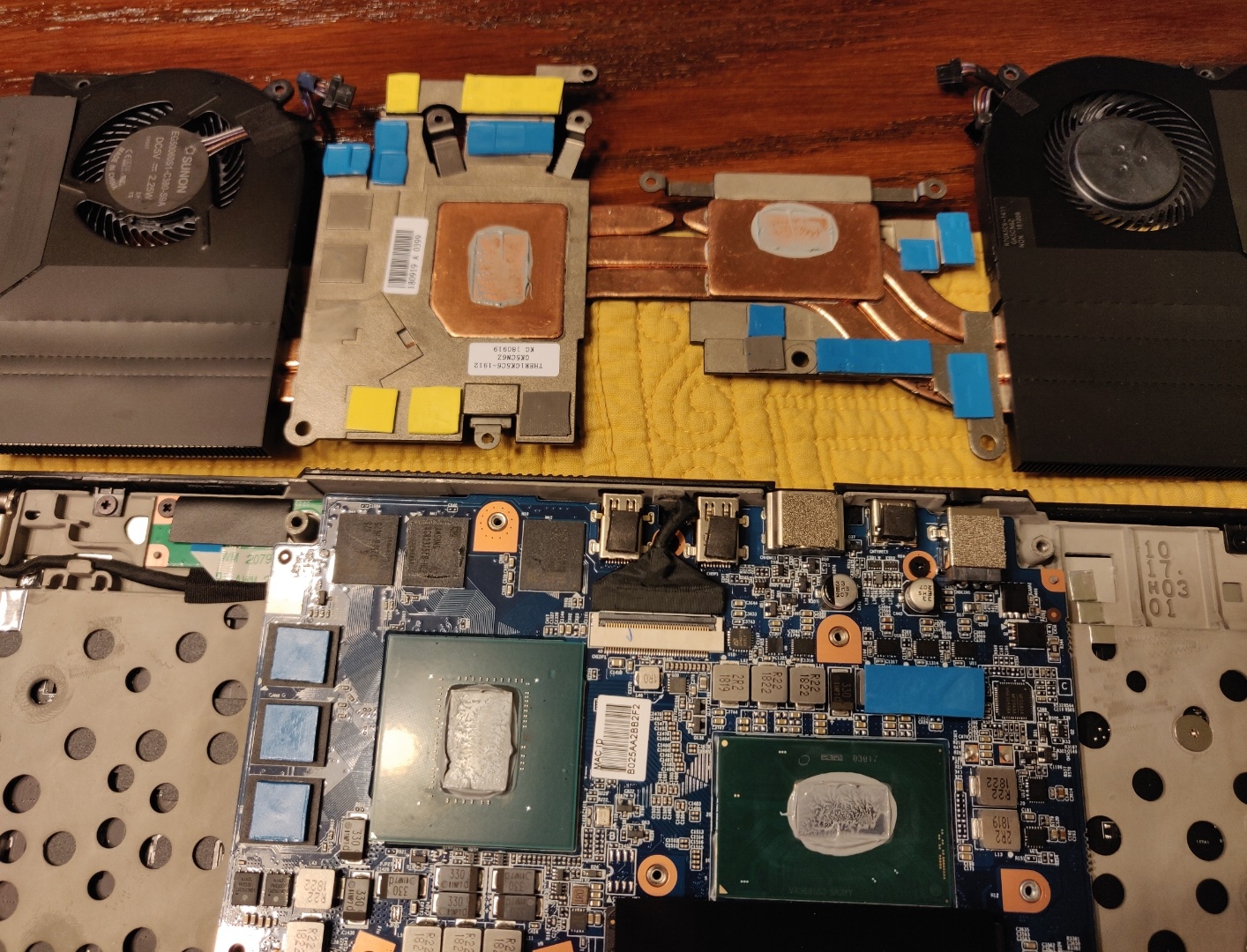
So after I've added another 16GB of RAM, I've noticed my temps are through the roof. Are these the Aida64 stress settings people are using? This was with fans on turbo. It was pulling 75w plus or minus under load.
I'm going to repaste again. Just using mx4. Kryonaut is in the mail (I hope it isn't the fake stuff)Attached Files:
-
-
those temps look what like mine did when I used nh1 and it pumped its self out id check your temps right after repasting with mx4 and see if they slowly get worse
-
Just opened it up. Still looks ok to me. Maybe a little too much.
Attached Files:
-
-
after you put a fresh paste run a stress or cinnbench and note the temps then over time check if they go up. thats what would happen with my noctua paste
-
More ideas for my post ??
-
Ok, it took it 3min this time to reach 90c. Still not wonderful, but better. If you look at the settings in Aida64, is that what people are using?
I'm not sure a DOS bootable will work with the OP stuff. Here is the contents of the bat file from it:
So notice it is going to use AFUWINx64.EXE to flash the BIOS. I'm not sure that is going to run in a bootable DOS. Maybe someone can chime in. This is why it is made to run in Windows. Let's take a look at the script for the EFI version:Code:@echo off @cls @echo WARNING: This utility will reprogram the whole SPI Flash chip which @echo WARNING: includes system BIOS, TXE or ME firmware!!! @echo WARNING: DO NOT continue unless you are 100%% sure you want to do this. @echo WARNING: To stop, turn off your computer and remove the update media, @echo WARNING: or do not run THIS SCRIPT. @pause @cls @AFUWINx64.EXE GK5CN6XN105.ROM /p /b /n /r /x /l /reboot
Since we already booted into an x64 efi shell, it will have no problem running the AfuEfix64.efi file.Code:@echo off @cls @echo WARNING: This utility will reprogram the whole SPI Flash chip which @echo WARNING: includes system BIOS, TXE or ME firmware!!! @echo WARNING: DO NOT continue unless you are 100^% sure you want to do this. @echo WARNING: To stop, turn off your computer and remove the update media, @echo WARNING: or do not run THIS SCRIPT. @pause @cls @AfuEfix64.efi GK5CN6XN116.ROM /p /b /r /x /l /capsule
Can you boot off the usb using the EFI and use a modified script that uses the correct BIOS (and EC) for the OP? I don't know if that's what people are doing, I didn't read through the whole thing. I updated mine by running the bat inside of Windows. I just bought it so I was ready to return it to Walmart if it failed, but it worked out perfectly for me.
EDIT:
Watching your second video, a further explanation of why you cant boot from your usb. There are no bootable files on the usb. The files you copied onto the usb drive are made to run within windows. You need something on the usb the computer can read and say, "Hey, this is what I need to load in order to boot off of the usb" When you use the EFI method, you would put a folder on the usb root called "EFI" and inside of that there is another folder called "BOOT". Inside of THAT folder are the following files:
That's what it is looking for, and if it doesn't see that (or whatever else it can use), it just moves on and tries the next thing that is configured in the BIOS.Code:Bootx64.efi Shell.efi Shellx64.efi
Attached Files:
Last edited by a moderator: Jan 19, 2019 -
-
I use just CPU/FPU and then run furmark as well if I'm trying to do a worst case scenario.
-
Yeah if it's using winflash then it should just be flashed in windows itself.
-
I tried running Afuefix64.efi and the .Bat file does the same thing .. doesn’t do anything like first video... I don’t know what’s the problem.
Ok if I cannot but that from the Uefi bios , i cannot do it from windows what the problem?? How can I do it? -
I edited my last post, please go read the end. What do you mean you ran Afuefix64.efi? You need to slow down before you brick your laptop.
-
When I run the stress test in AIDA64, it looks like I'm being throttled to 34x multiplier. Temps are good and I believe my TPL is setup correctly. In TS with the limit reasons open, it has 3 boxes that are red that say "EDP OTHER". I assume this means I'm being throttled, but by what?
-
I recently tried to load new bios.
***I don't know what I'm doing***
**Do not follow me**
I tried the f.bat and loading one of the .exe and opening the .rom file in there and selected flash and it came up with an error.
I was attempting to load the ones from the official driver package. Following the instructions on The first page and page 109.
Can I make a bootable us with Rufus and make a USB with the files from the official driver package? I'm just trying to avoid using the 3rd part downloads (drive and mega.nz) -
After taking off the plastic wrap, I noticed my unit came with a dent on the top aluminum panel. I started investigating other parts to see if anything else was damaged on and it seems my right screen hinge (looking at the laptop) is mildly warped. HERE are the photo's of the dent and hinge with it open/back view. Does anyone else's machine look like this? Normal? Not sure if I'm nit-picking or if this thing came partially damaged.
-
doesnt seem to far off mine hits 89c after a bit in that test with standard gaming profile in op center. but remember your trying to cool 70+ watts on a cpu which in normal use will never hit that. the only thing odd with your results is the gap between the hottest core and coldest core being 90 -75c. but id watch over time if you re do this test and suddenly are getting procshot throttled you may be suffering from thermal paste pump out. which can either be solved my making the heatsink flatter or using a thicker paste its part of the reason laptops come with thicker paste stock. as laptops are prone to less then ideal heatsinks with low mounting pressure lots of movement and uneven surfaces on the heat sinks
its possibly current limit but I would caution against bumping it up. as pulling 70 watts is already quite above and beyond what most i7 8750h will go threw as alot of them are hard bio locked to 45 wattsLast edited by a moderator: Jan 19, 2019 -
If you want to run a higher multi in aida, you're going to need to raise turbo boost power limits to something like 80&90. This will let it run 38-39 multi, but temps are crazy (for me) and PKG will be 85+-. PP0 set to either 110 or 120.
This let's it run unleashed, but I'm tightening it up cause the heat is just too much (and unnecessary)
Yeah, I'm not going to get much further with this mx4. Waiting on the Kryonaut.
If you want flash the BIOS from Windows, do this:
1. Click start and type "cmd"
2. On the results, right click "Command Prompt' and choose "Run as Administrator"
3. Navigate to your download file, for example, if the folder is in your downloads, the cmd might be "cd %USERPROFILE%\Downloads\OP-LP2\BIOS\intel_CFL_GK5CN6Z_ESI_BIOS_N.1.05_EC_1.35.09_20181101\BIOS\FlashUtil\AfuWin64"
4. type "f.bat" and press enter. It will prompt you to press a key to continue. If you changed your mind, just click the "X" to close, otherwise, press a key.
5. It just reboot now. When the screen goes dark, start tapping "F2" on the keyboard to get into BIOS.
6. Restore default values (on the exit tab) save and reboot.
Done
You don't need to run the exe files in the download. The bat file will call them and run them with the proper command to do the job correctly.
Note:
The bat file from the official OP website does not update the EC. To do that, you need to edit f.bat and go through the process a second time. The last line of f.bat needs to change to this:
"@AFUWINx64.EXE GK5CN6XN105.ROM /p /b /r /x /l /capsule"
in order to update the EC after you have already gone through and updated the BIOS.
You really shouldn't change f.bat if you don't know what you are doing though. You can download the 02_EC.bat from page 109 and put that file in with f.bat, then just go through the steps and when you get to the part where you run f.bat, instead run 02_EC.bat (after you have already updated the BIOS)
I hope this was clear and not too confusing.Last edited by a moderator: Jan 19, 2019 -
So even though my laptop doesn't need it, I'm reprogramming the bios on mine just fine.ALLurGroceries likes this.
-
Method used?
-
I was trying to upgrade my bios thinking that I will not have the same problems, with low fps after undervolting like in this video..
I will just leave it like that for now... I don’t wanna break something..
I updated the ram to dual channel and everything is good.
I quest that what I was doing in the first video was wrong to no?? -
Sorry, I see you are using the official one with from OP's website that comes with f.bat. Here is the contents of f.bat:
So you can see that it will call AFUWINx64.EXE and load GK5CN6XN105.ROM and run AFUWINx64.EXE with the following options: "/p /b /n /r /x /l /reboot" So this will not update the EC, you can check if you are up to date by going into the bios after it reboots your computer. Make sure you do go into the BIOS right after it reboots and choose to load setup defaults, save and reboot.Code:@echo off @cls @echo WARNING: This utility will reprogram the whole SPI Flash chip which @echo WARNING: includes system BIOS, TXE or ME firmware!!! @echo WARNING: DO NOT continue unless you are 100%% sure you want to do this. @echo WARNING: To stop, turn off your computer and remove the update media, @echo WARNING: or do not run THIS SCRIPT. @pause @cls @AFUWINx64.EXE GK5CN6XN105.ROM /p /b /n /r /x /l /reboot
EDIT: Actually, I think this might also do the EC. The only difference the specific 02_EC.bat is addition of the /capsule switch and removal of the /n switch. I'm not sure, someone would have to check:
@AFUWINx64.EXE GK5CN6XN105.ROM /p /b /r /x /l /capsule
EDIT:
Ok, I just check again, and I am on EC 1.33.09 currently. Which I think was what was current at the time, or it was never updated when I did the f.bat before. SO now I am wondering if I should update my EC or stick with 1.33.09.
What are the advantages of 1.35.09, anyone know?Last edited: Jan 19, 2019 -
Yes, it was wrong. What BIOS and EC are you running right now? What model laptop do you have?
-
Anyone know anything about additional BIOS for the i5 gtx 1050 model?
-
I unzipped the files to c:\temp then I opened an elevated command prompt and ran the batch files from there. I just realized that right clicking on the 01_bios.bat and running as administrator did NOT work for me.Last edited: Jan 19, 2019
-
Ah, I think I remember that now too. I'll update my previous posts.
-
Oddly I ran the EC update by right clicking and running as admin without issue, but just to be on the safe side an elevated command prompt may be best.
-
Guys, I'm developing a better Gaming Center (open source) with a better interface (something will be similar to the Control Center from Clevo).
I know it is a not a necessary thing, but I don't like the Gaming Center, it's too slow and buggy.
- I already fixed the "Office Mode" and it is much more responsive (Sometimes Gaming Center get stuck and has fans on also if you set fans speed at 0%).
- Added a "Super Quiet Mode" Which will let your PC super quiet without having throttling (of course performance will be lower, but it is perfect if you are only using the laptop for studying or surfing internet.
- Added a "High Performance Mode" using fix found on this thread (PL1 and PL2 set at higher Value)
- Bios Update Checker
- Import and export keyboard lightning layout
- I'll try to port the FanSpeed feature on Linux (I have few ideas)
![[IMG]](images/storyImages/XjLdFyv.png) Last edited: Jan 19, 2019
Last edited: Jan 19, 2019 -
You're a savior, no really A TRUE SAVIOR.
i hate the current control center AS HELL,
My requests for your GamingCenter is to
- Keep it simple as with not so much motion effects.
- Try to add some backlight effects for the keyboard ( if possible of course ).
- The Light bar to be colorful while charging ONLY ( not both as the current GC does ) and/or to color change while low and/or on battery ( maybe red ? ).
I'm totally excited to try it actually, Good luck and thank you <3 -
I just wanted to make sure something wasn't setup incorrectly. I have a 17+ so temps are very low. I haven't seen it go higher than 80. So just wasn't sure why it was throttling. I have TPL1/TPL2 set to 65/80. Don't have PP0 limit set in TS, how to I find what this is set to currently? When AIDA64 stress test is running TS is showing just under 60W for pkg power. Shouldn't that go to 65W with my settings?
Ability to import/export keyboard layouts would be fantastic. I had a bunch of different profiles setup and lost them due to reinstalling GC, kinda annoying. -
Followed the instructions from XMG and installed the combo BIOS 1.09 EC 1.37.09 and executed the (apparently life-changing) "exe" which writes some values to BIOS/EC and will change some bits with regards to the power supply type (possibly related to the 150W / 180W issue) And then installed ControlCenter 1.2.3.4_XMG (which by default enables the hateful animations)
Without much testing I have gone back to OverPowered 1.05 - 1.35.09. The reason: after closing the lid, opening it would not bring the display back to life. One had to suspend Windows (for example with Fn + F1) and then bring it back to life.
The road back to EC 1.35 is not straightforward because the 02_EC.bat will try to update it, but later the BIOS screen shows that 1.37 is the latest firmware and no downgrade happens. So:
- Downgraded via UEFI to Mechrevo 1.33.09
- Upgraded with autobat to OverPowered 1.35.09
Blebleuh likes this. -
Laptop Op-L2
Bios :N1.04 9.28.18
Ec =Embedded control ??? 1.33 -
Does anyone know if the BIOS revisions for GK5CN6Z OP-LP2 will work on the GK7CN6 OP-LP3.
I am stuck at 55.6 watts package power and was hoping use one of the other BIOS's.
Was unable to change PL1 & PL2 with XTU or TS.
Currently on OP-LP3
BIOS N.1.04
EC 1.07.09
OP control center 1.2.2.8
I have lurked here since December and read entire thread and apologize for asking if the answer is obvious just stuck ATM.
Regards,
Zeddi -
Anyone get their laptop back from overpowered support? How did it go? I am about to send mine in to get the blacklight bleed on the panel repaired/replaced.
-
Thanks this really help , was perfect for a dummy like me
I got that file from page 109.
Now i have Bios N.1.05
Ec:1.35.09
I saw more advices there i will try to make more setting to make this laptop better ..
This video from Bob is ok no?? this will help?
Btw at page 109 i saw another Bios 1.06 -ec 1.24.09 Illegear what this???
If you have more advices they are welcomed .
Thanks again for everything guy!!! -
I am thinking of adding a NVMe SSD as the boot and application drive, either the 480gb Adata SX8200, or the 512gb HP EX920, what type of expection should I have besides fast boot times?
TONGFANG GK5CN5Z / GK5CN6Z / GK5CQ7Z / GK5CP0Z
Discussion in 'Other Manufacturers' started by sicily428, Apr 22, 2018.