Problems? See this thread at archive.org.
Thank you. I will open it and check them now.
-
-
![[IMG]](images/storyImages/MOpRPm3.png)
REV.CENTER 2.0 1.65
(for GTX version)
Updated 27th February 2019
Source code released
I'm glad to announce a little tool I'm developing for our TongFang Laptop.
Why choose Rev.Center 2.0 to Gaming Center.
Rev.Center is a smarter alternative to Gaming Center.
Why Smarter? Because most tweaks for this laptop are already included in this tool, it automatically change Voltage for every Performance Mode.
Of course the tool is still development and some feature are missing that will added in next days, but the most important are already included.
FEATURES:
- Performance Mode: each mode changes the relative Windows Power Plan (example: Performance Mode -> High performance Plan)
- Silent Mode: Best mode if you need to do low-weight works as studying, browsing. It offers you the best battery life on DC mode. On battery mode it will switch automatically to PowerSaving Power Plan, on AC to Balanced Power Plan
- Entertainment Mode: Best mode if you need more power for heavier work in quiet place.
- Performance Mode: Unleash all the power of our i5/i7 8th generation ! All tuning settings are "setted" for the max performance (1252 pts on cinebench)
- ( * )Custom Mode: Tune manually your laptop.
- Throttlestop Compatibility Mode (activable from the gear icon on the Main Settings page)
- LedBar: Change your LEDBar Colour and Brightness
- KeyBoard Lights:
- All keyboard layout supported (UK & USA style)
- Multiple Profiles Support
- Lightning effects: Static, Breathing, Wave, Ripple, Reactive, Rainbow, Marquee, Raindrop, Stacker, Impact, Aurora, Spark, Neon, Music.
- Speed & Direction effect
- Single Color
- Power Saving Mode
- Brightness Slider
- (*)Import & Export Keyboard Profiles
- FanMode
- Auto: Stock Laptop fan managing. Fans are controlled by the BIOS and not by the Rev.Center2.
- Max: Turbo Fan Boost Mode.
- Silent: Automatically change Fan Speed to guarante the most quiet fans without worring about temperature).
- Static: Choose a fan speed regardless of temperatures.
- Custom: Create your custom Speed Graphs
- System Info:
- Monitor CPU Temperature, Utilization, frequency speed
- Monitor GPU Temperature, Utilization, frequency, VRAM
- Memory Usage
- CPU Voltage
- Battery Status
- Additional features:
- Nvidia GPU Switch
- Hibernation USB Charging Switch
- LeftWindowKey Lock Switch
- Sleep & Ibernation Mode
- Volume Regulator
Screenshot:
![[IMG]](images/storyImages/GZFxdGS.jpg)
![[IMG]](images/storyImages/JTodmYx.jpg)
![[IMG]](images/storyImages/38onUFI.png)
![[IMG]](images/storyImages/XpBFYlT.png)
![[IMG]](images/storyImages/AtEjHun.jpg)
![[IMG]](images/storyImages/IVGNqt7.png)
![[IMG]](images/storyImages/GY0c4Fd.png)
![[IMG]](images/storyImages/hZjlce2.png)
Download:
https://drive.google.com/open?id=13q3bXRrJYDpj0zBGVndT14XL6TD-h3Dy
Source Code: (for any info about the code write me a PM. You can do whatever you want with the code)
https://github.com/lKinderBueno?tab=repositories
Installation:
-
Unistall Gaming Center (highly suggested)
-
Install Rev.Center 2
Changelog
[1.65]
Added missing library
Fixed Keyboard crash
Added in the installer options: Automatic Tuning - No Automatic Tuning
(for who are facing problem with my OC settings)
[1.6]
Fixed Crash loop
Fixed Several bugs
Replaced CPU Vcore
Removed any Intel Extreme Tuner libs
Removed XTU3SERVICE
Added OpenHardwareMonitor support
Release Source Code
Added English in the installer
[1.50]
[MAIN TOOL]
Improved Graphic
Added Manual FAN Mode (with graph)
Added CPU temerature monitor
Added CPU voltage monitor
Added CPU Clock monitor
Added CPU Usage monitor
Added Nvidia GPU clock monitor
Added Nvidia GPU VRAM monitor
Added Nvidia GPU Usage monitor
Added RAM monitor
Fixed Fan Wrong Colour
Fixed Fake close issue
Fixed Loading Anination stuck at startup
Removed Loading Animation when switching performance profile
Improved and reduced to 1 second time for Switching performance profile
[FAN MANAGER]
(Totally rewritten)
Added Manual Fan Mode
Fixed Gray Bar bug over the Windows Bar
Fixed definitevely FanManager Max speed random activation
Improved FanManger Performance (from 0.5% Cpu use to 0%)
Improved Automatic Fan System Performance
Improved Quiet Fan Mode (Adequated to normal laptop temperature)
Optimized dimension (only 38Kb)
[KEYBOARD]
Added Keyboard layout choose at first startup
Added 102 Keyboard's key Layout and 101 Keyboard's layot (ex. Usa and UK layout)
Fixed Keyboard Settings not Loading ad windows startup
[TRAY ICON]
Fixed Tray Icon Exit Button (now close also Rev.Center)
Fixed Tray Icon Open Rev.Center2
Fixed Gray Bar bug over the Windows Bar
[PERFORMANCE MODE]
(Totally rewritten)
Fixed Gray Bar bug over the Windows Bar
Optimized App weight (only 22Kb)
Added switching PowerPlan Mode
Improved Performance by 10%
[BATTERY]
Improved Battery Life in Silent Mode by 10%
[1.10]
Added Keyboard Lightning (there are new light effects)
Added better menu
Improved (a bit) loading time
Improved changing performance mode speed
Improved performance on Quiet Mode
FIxed random Turbo Fan Mode activation
FIxed Multiple Icon Bug in the task bar
Added "ThrottleStop Compatibility Mode" in the settings
[1.0]
Initial ReleaseLast edited: Mar 2, 2019domell98, Nap0l3on, Fastidious Reader and 23 others like this. - Performance Mode: each mode changes the relative Windows Power Plan (example: Performance Mode -> High performance Plan)
-
You are correct. There was a screw attached on the motherboard. I installed them and setup went well. Thank you for your quick response.
-
how hot does the 970 evo get while in the laptop? I know mine is pretty warm even in a desktop if you put it under a disk bench mark so that could be part of it there could also be something else limiting it if you run crystal disk mark and watch the temp in crystal disk info you might get an idea. but the built in little heatsink might help alot that the laptop case has on it
-
IC diamond has been great for me. just be careful applying it and if you ever remove it as the compound will give an edge to anything allowing stuff to scratch the cpu. it is very hard to spread I spread mine out but I warmed up the cpu and had the tube of icdiamond in some warm water before I applied it and its still spreads like gum. the easiest way to apply it would probably to be apply a little more then you think and let the cooler smash it out since it is quite a thick paste spreads pretty much like gum. but in the end its what my laptop needed to not have a pump out issueoneintheblack likes this.
-
I have a 870 EVO 500GB and mine runs cool, never saw it over 50ºC. The base of the laptop has a thermal pad for the two m.2 ssd.
I did an ATTO bench and the maximum temperature was 45ºC (as you can see my problem is the seq read speed of only 1300MB/s): https://i.imgur.com/ioE4Nw8.png -
Great and fast job !
Here is what I noticed or would suggest:
- Loading time of performance modes are quite long (about 5s), and during this time you cannot access other features. Maybe a loading bar and/or greyed controls during loading might help, avoiding people say "heh what's going on ? Crashed or what ? ah no"
- Quiet mode is not quiet, with or without silent mode. Fans are running all the time
- It completely messed up ThrottleStop 8.70.6 who dont launch at system startup anymore and do not stay open in the task bar (even if the option is turned on in TS settings), and some settings changed (SST value, BD PROCHOT, SPeedstep an C1E turned on while they were turned off with my settings).
- Volume displayed on the softwares interface does not change if you change the volume with your keyboard
- Performances are good in performance mode ! I hit over1250 on Cinebench.
- I dont understand the purpose of the grey rectangle between "70" and "%" representing fan speed offset. Incoming feature (manually enter value ?)
- Each time I tweak some parameters (especially fan speed offset while in static mode), a new icon of the utility pops in the tasks bar, and a small window border appears, as shown is the screenshot below. Newly poped icons disapear when you hover them with the cursor.
- "Main settings" and "LED Bar" tabs buttons change color each time theyre clicked, not only when you switch to another tab
- When sources will be public I'll try to learn and try to make a smaller and more sober interface in addition to your fancy one, hoping I will satisfy lazy people like me
- When you open the app window by double clicking on the icon in the task bar, it takes about 5s to pop. Sometimes, it will make fans turn at max speed and I have to turn the silent mode once the window appear to make them slow down. If you double-click twice before the window pops up, the fan will turn at max speed for a short instant and the window will appear.
- Sometimes when in silent mode you cannot change performance mode (but volume control was ok). It happened to me once and I couldnt reproduce.
Hope it can help !Techdude594 likes this. -
Thank you for the bug report !
- The quiet mode doesn't tune only the laptop, but it enable a "SilentMode" from the EC and for activate it there is a second of "hardware lag". The issue is that if you, for example go from Performance Mode-> Quiet Mode -> Performance Mode before EC has succefully enable/disabled Silent Mode you risk to have a Performance Mode with SilentMode enable and that mode cut a lot of performance. For this reason I have disabled the "Performance Switch Buttons" till the mode is successufully changed. In the next version I have removed the "freeze" and reduced the lag of 0.5 seconds.
- That's strange.. Mhm, can you enable QuietMode+Silent Mode and open this little file ( https://drive.google.com/open?id=1r9fO6Tq6m5OZwXKZTjaMCh1Vct3b9Wrr ) when you hear fan spinning? Report me what it comes out in the MessageBox
- Yes it's normal. I have to add an option for who uses Throttlestop
-I'll fix the Volume problem later, I don' t think it's a Core feature..
-The grey rectangle near the fan bar is something I forgot to delete. I was testing something that I decided to not implement.
-The lot of icons problem is fixed in the next version
-Same for "Main setting" and "ledBar" checkbox. It was a bad design choice.
-I have to check that bug. It never happened to meTechdude594 likes this. -
Hi, i have a PCS Recoil 2 (gk5cn6z) and i'm having problems with standby:
the pc won't go on standby but only turn off the laptop's LCD, this happen if i close the lcd lid or manually set it in standby mode (i did try all power configurations and checked thoroughly any windows setting that may preventing it from going to standby).
I tried to update Gaming centre ( 1.2.2.8) and BIOS 1.16 - EC 1.33.09 - Mechrevo but it did not solve the issue at all.
After some some digging i found a command to debug the problem:
by running
in administrative cmd the report showed that the device "PCI\VEN_8086&DEV_A36D" aka "Intel(R) USB 3.0 eXtensible Host Controller" was preventing the pc from entering standby.Code:$powercfg/energy duration 120
I tried uninstalling Gaming centre and re-installing the USB driver (they're only available throught Microsoft) and it did somehow fix the problem but i found out the keyboard stays lit even on standby (this is unaccaptable, it will drain the battery on standby!).
Anyone having my same problem?
PS: The standby feature is a must for me, i do use it all the time when i traven from and to the work without closing all my programs. -
Quick question, is there anyway to check if the OP laptop’s usb-c port is giving full power output or its power output is limited? In terms of charging and powering other devices
-
Any recommendations for a good laptop cooling pad for the 15" OP laptop ?
-
It would have to pull the air down and out of the PC and not up into it like most coolers.
Sent from my SM-G965U using Tapatalk -
Why is that? The fans on the bottom of the laptop take in air and expel it out the back. Fresh air coming up and feeding the fans sounds like a good thing to me.
-
Not quite sure why you say this. A cooling pad putting cool air up through the bottom vents has got to be a benefit. How is this laptop different?
-
I recently bought a couple of these for my boys. It is good for the couch or anywhere you want to use it on your lap with the built in mouse pad. I would like to find one with the built in mouse pad + a mesh design, but I haven't found it yet.
-
Hey all,
I bought the OP 15+ laptop and am tweaking a few things on it. The internal solid-state storage (generic 256GB SATA) isn't really enough for what I want to use it for (mostly digital DJing / light music production, as well as gaming), so I want to upgrade. Two questions:
1. Is NVMe worth the price hike over traditional SATA SSD for my intended use? I'd be looking at either 500GB or ideally 1TB.
2. I know the second slot of the laptop doesn't support SATA, only NVMe, so to maximize space, if I do go with an NVMe drive, I'd like to install that in the second slot and install the OS on that, then keep the 256GB SATA SSD in the first slot so I can use that as a second drive. I've heard that installing NVMe in the 2nd slot isn't optimal as it won't be as fast as installing the in the first slot. Is that true?
Thanks for the help all.
Q -
What SATA drives were you looking at? It probably comes down to the price difference. If you aren't happy with what came stock (which should be running at near top SATA III speed), then another SATA drive probably isn't going to help.
Here is the 1tb HP ex920, which is a great NVMe drive for the money. $160 on sale at newegg:
https://www.newegg.com/Product/Prod...als LLC-_-na-_-na-_-na&Item=20-326-778&cm_sp=
No, it isn't true. I'm running a Samsung NVMe drive in the second slot and I get full speed out of it. -
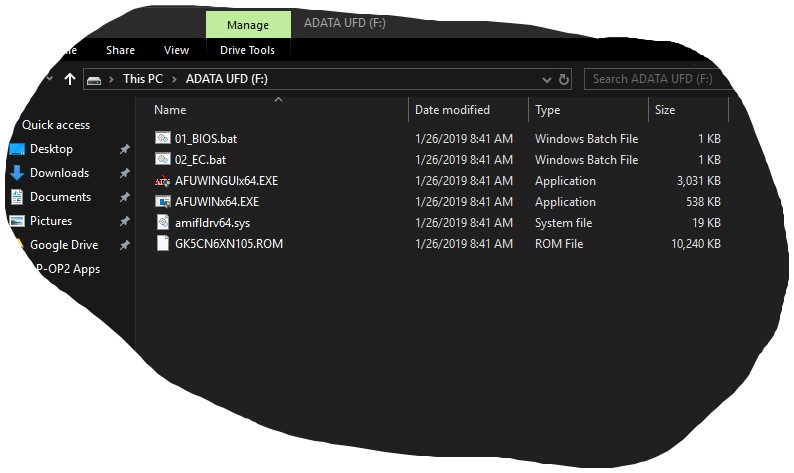
The only thing I have left to do is update the EC firmware on the LP-OP2. Can someone tell me which of the files I need to update the EC firmware and which to delete?
Also, do I need to disable CSM(sp?) in the BIOS before I attempt the update?
I plan to use the instructions found on p. 109.Attached Files:
-
-
Thanks for the info. Now that I know the speed won't be affected by installation in the second slot, I'm going to go for NVMe since that means I can keep using my SATA drive. That's a good price but here's a killer deal (and 20% on top of it from Google) so I think I'll go for this. I'll save the cash and go for the 500GB since I'll have the 256 SATA also.
https://express.google.com/u/0/product/16829447429340206860_8128223210169465260_1057813
Appreciate the help!Last edited: Jan 29, 2019 -
The P1 sucks. I would look for a higher quality drive. Usually the P1 goes for less than that. It is QLC. Write endurance sucks. Speed is not good on the 512GB.
https://www.anandtech.com/show/13512/the-crucial-p1-1tb-ssd-review
EDIT: Sorry, I thought you linked the 500gb for $144, didn't realize it was the 1tb. Still, I wouldn't buy, but that's just me.dreamcat4 and ZaiArgylle like this. -
I second this. Purchased it for use with this machine, didn't even last a day before giving multiple read failures (as stated in a previous post).dreamcat4 likes this.
-
This laptop pushes air out though the bottom of the laptop via the large fans. I tried with my coolermaster notepal and it didn't make any difference in temps beacuse it was blowing air up into the laptop.
Sent from my SM-G965U using Tapatalk -
I think you're mistaken. It draws air up from the bottom and exhausts out the back/side.
-
You might notice you feel hot air blowing out the back of the laptop, this is because it sucks in fresh air from the bottom. You can also take a piece of paper and put it on the bottom over a fan. Turn on the turbo mode. Report back what happens.chili.red likes this.
-
Ah, good to know. Looks like I won't be accepting that delivery...
-
I just sent mine in today (Tuesday) and wondering the same thing.
-
In that case, you'd just flip the cooler over.clone1008 and ditchmagnet like this.
-
Just put both vCORE and cache at -1.25 mv and call it a day.
-
Haha, nice, probably good for another 5c-10c too!
-
I don't think this is very sound advice. My 17+ has random freezes and restarts when I undervolt past -.75mv. Anyone having issues with their laptop should first undo any changes made with TS and verify if they are having issues with factory settings. Once that's been done, you can play around with the numbers until you find stable values for your specific machine.
-
You guys are awesome with your -1.25mv and -.75mv! And here I thought I was doing good with my -0.150/-0.140 core/cache. But seriously, you can set core&cache to -0.125 and apply, but DON'T SAVE. Then work for a while and see if you have any trouble. After you are pretty sure you have solid settings, THEN save (assuming you have TS set to run at startup). There are a bunch of other settings, but search this thread for a bunch of tips.
I like to save before I'm really ready to, but I have TS set to automatically switch to the battery profile when I pull the plug. I know that is stable, so if I crash and reboot, I can just pull the plug to be sure Windows doesn't have any trouble logging in. -
Does this work for the GTX 1050/ti, RTX 2060, RTX 2070, 17 inch? Does anyone have video demo of this?
-
Do you guys think the 180w brick is enough for this machine with a rtx2060? I’m assuming so as the 2060 only pulls 90w.
-
It should work also on the 17inch. Maybe there is some issue with the Quiet Mode, but I need someone that test it using this file
https://drive.google.com/open?id=1r9fO6Tq6m5OZwXKZTjaMCh1Vct3b9Wrr -
Is there any way to reverse the function key / media key action?
It's a pain holding FN to change keyboard or backlight, etc. -
I’ve been playing on the OP 15 for about a month now, and I still love the experience however recently I’ve noticed that if I have it on “game mode”, it starts to utilize the CPU a lot more ~70-80%. This causes hitches in the game.
If I put it on Equilibrium mode, it goes down to ~45-55.
Is there any particular reason for this? Why does the game mode utilize the CPU a lot more? What should I do?
Sent from my iPhone using Tapatalkem0ney14 likes this. -
My OP-LP2 does better in Equilibrium mode, too, so that's where I usually keep it.
-
If no one yet knew that Eluktronics is selling 4 cell batteries for the 15 and 17 inch models, here it is:
https://www.eluktronics.com/4-cell-batt-mech-15-g2-mech-17/ -
Just a simple question.
(vcore -145, cache -120)
I run cinebench, TS shows 3.9 all cores 100% load, package 53-55W 65C max
I run AIDA64 extreme stress test GPU/CPU 3.4 all cores 100% load, package 52-54W. 85C max
Edit: AIDA64 CPU only test,3.4-3.9 but still show 100% load, no throttle, package now 64-64W 62C max
Why the difference between 3.4 and 3.9 yet same package voltage ? and they are both 100% load.
thanksLast edited: Jan 30, 2019 -
If you are only running 3.4 GHz when all cores are active then your CPU is throttling. Open up the ThrottleStop - Limit Reasons window and find out why. If it is EDP related try increasing the PP0 Current Limit. Also try increasing the Long and Short turbo power limits.
Different programs will load the CPU differently. A program that loads the CPU 100% while processing mostly AVX instructions will create a lot more heat and power consumption compared to a program that loads the CPU 100% but is not processing any AVX instructions.
3.4 GHz is definitely throttling. -
go into windows game bar and disable the game mode in that, that worked for me, i was having the same issue but now its gone. -
Nice find - pretty much the same price as the one shipped from China!
-
Has anyone come up with a fix for the characteristic low volume of this machine??
Been using VLC a lot since it has the option to increase the volume of a video beyond the normal 100% threshold. When doing so to around 150%, videos sound quite crisp and loud, even on our good ol' TongFang. Is there any way to tweak the laptop to perform the same volume adjustment VLC does, but for everything??? -
I haven't used my laptop for much media, but have you tried using the Windows Sound functionality to normalize things? I find that it helps on laptops
-
I have. It does help a bit, but nothing even remotely close to the adjustments and the much higher volume you get when using VLC
-
Hello Guys,
Quick question, i want to connect 2 24 inches screen with the intel graphic card using the mini DisplayPort AND use at the same time the HDMI output of my GTX1050Ti to connect it on a screen.
Is it possible to use both graphic cards at the same time ? -
Did you ever get this issue figured out?
-
I figure there must be other ways to go about this issue, but for now found a program that solves to the low volume issue (up to 500% volume boost above stock limit). Letasoft Sound Booster for anyone interested: https://www.letasoft.com/
-
Go into the Sound Blaster Connect app, turn on SBX Pro Studio, click on Smart Vol and make sure it's on and on Loud. That's for the latest version of the app. It's similar but a little different if you have the older version which came preinstalled.oneintheblack likes this.
-
This fixed the issue for me as well. The speakers are quite loud now, though I do usually use a Bluetooth speaker.
TONGFANG GK5CN5Z / GK5CN6Z / GK5CQ7Z / GK5CP0Z
Discussion in 'Other Manufacturers' started by sicily428, Apr 22, 2018.