 Problems? See this thread at archive.org.
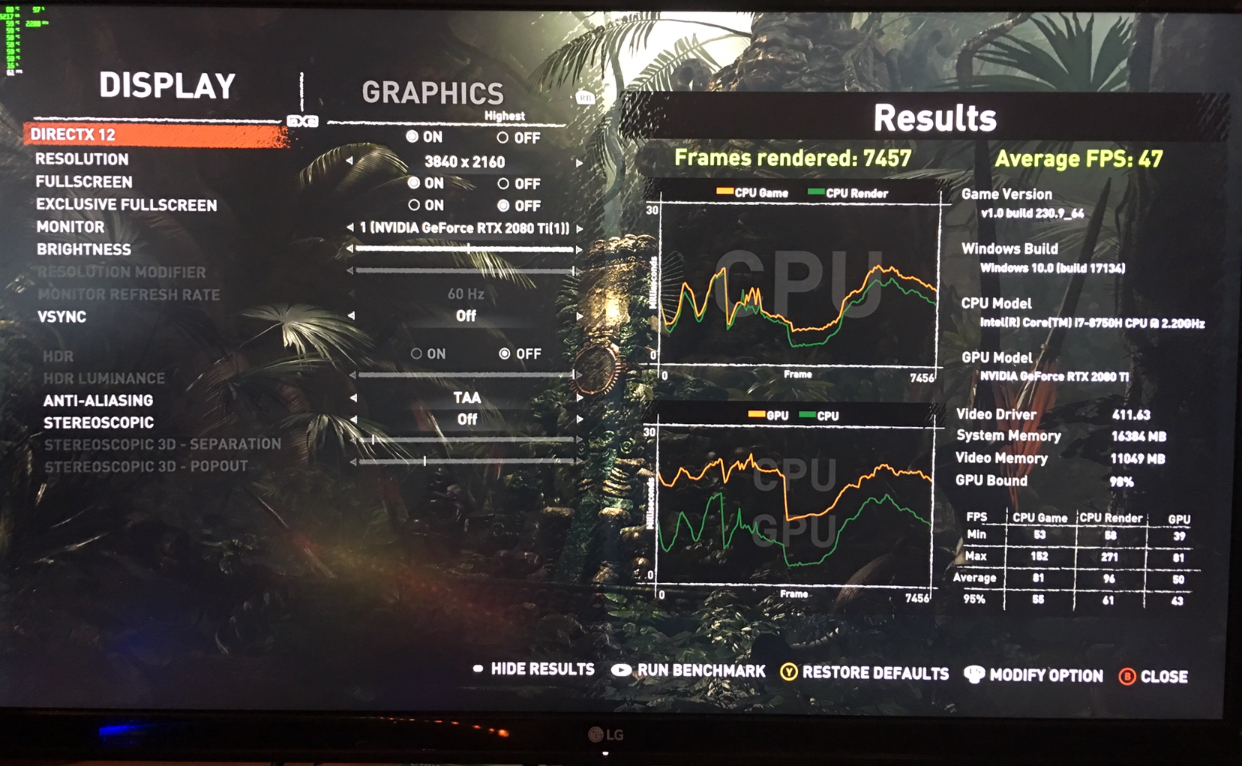
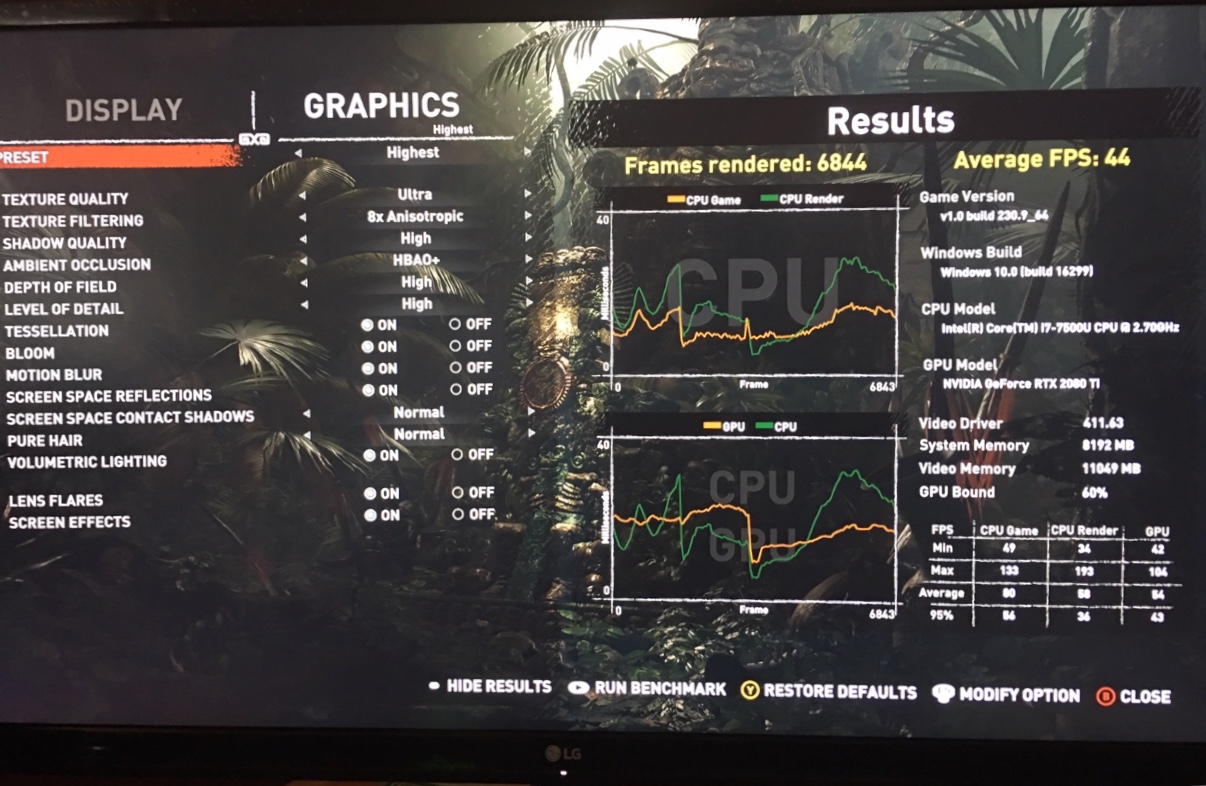
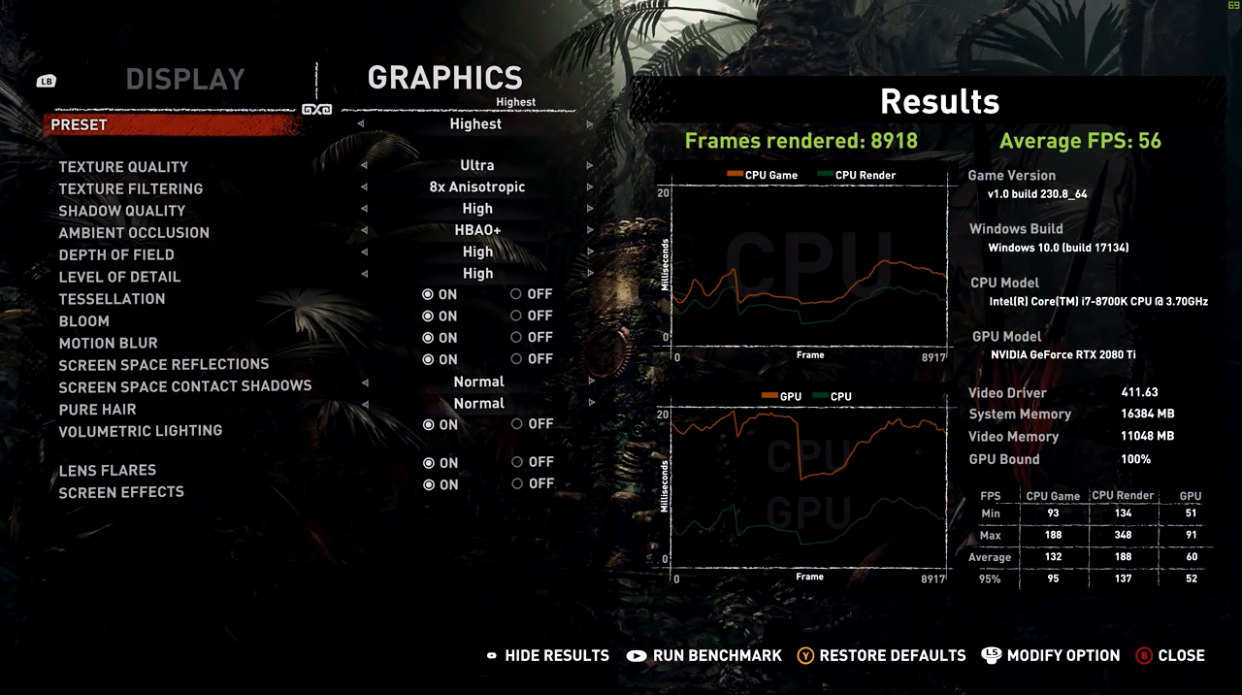
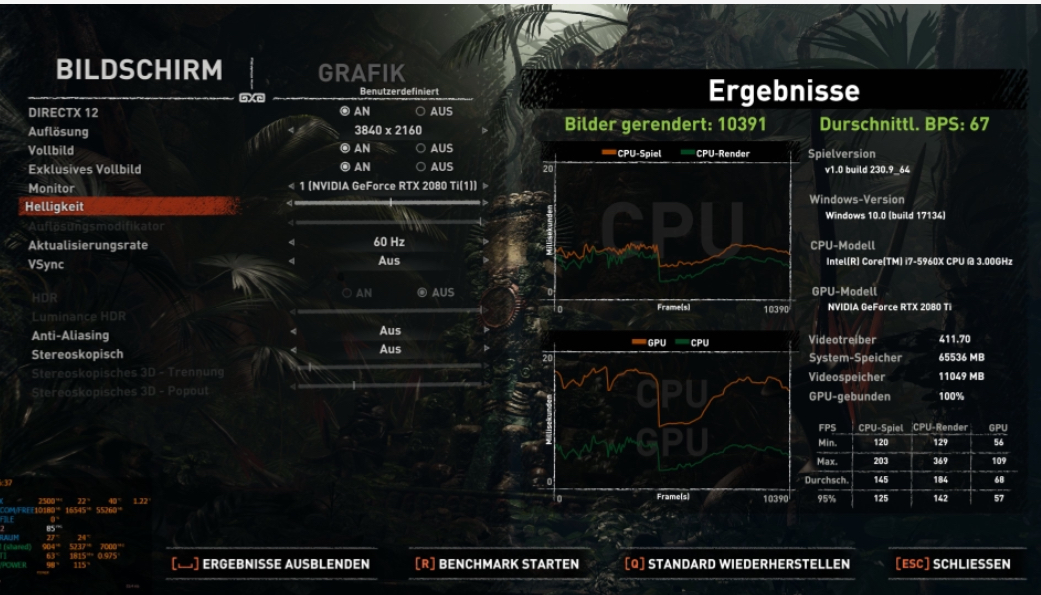
This is benchmarks for egpu setting vs desktop on same gpu as my core gpu, and it seems by turning off antialiasing and Stereoskospich, it bumps the FPS, not tried it yet but I’ll try tonight if it worth quality downgrade.
With gtx 1080 maybe you’ll get only around 30fps 4K highest but not with 1080ti/2080 or 2080ti.
-
Hey guys, I've been considering getting the 1070 144hz model of the blade.Would like some impressions from those who had some quality time with one. Anything specific to note or any reason to maybe get a 1060 over a 1070? My uses will be moderate to heavy gaming and lots of programming and traveling.
-
I've had the 1070 144hz model since launch, it's been an incredible laptop. I give it a 10/10 in most categories from daily use to performance, it's by far the most well rounded laptop I've used, and I've had many. The one point I can make for you to consider is that though this laptop excels in most every category, it is not the *best* at thermals with stock clock speeds. If gaming was more of a concern to me than having an amazing trackpad, screen etc, then I'd consider the Zephyrus S for its ability to stay cooler (haven't seen results yet but they advertise low 80s in game).
Bottom line for me is I'm not always gaming, maybe on weekends, and the blade accommodates me well through the week as my favorite powerful daily. Very good gaming FPS, but I do sacrifice my clock speeds to stay under 80c in game. -
Thanks for the prompt response. Actually a good track pad and screen go a long way for me. It's one of those things that once you have you can't go back. Thermals I can work with I have lots of experience with repasting and over/undervolting notebooks these day. I don't suppose you or anyone here has some VR experience on the blade? I have a rift I use on occasion and travel with for demos. So it would be good to know how well VR runs. I mean I know it will obviously run, but how's the experience?
-
No prob, cant comment on VR unfortunately as I haven't used it on a blade. There are definitely enough ports for it at least. I have used the blade to power an external monitor and peripherals, which it does great other than needing a restart first due to Optimus screwing up.
-
This may become your reference for VR,1060 maybe better on battery life and portability a bit or if you considering an eGPU setting, on laptops gaming I think 1070 is way to go. I’ve 1070 since EU launch, it’s great gaming machine and I did only ssd upgrade and xtu basic undervolting. No thermal throttling, rock solid also on 4K gaming with rtx card and Razer Core.
-
Thanks a lot. Seems very promising and you all seem quite happy with your blades. This will be my first razer product so I've been doing my due diligence. Been trying to read through this thread but there's a lot of pages haha. So far seems good. Typically thermal concerns with a thin and light but I mean come on, this much power in this form factor, that is completely understandable and acceptable in my opinion
-
Make sure that you can have at least 2 years guarantee, gaming laptops need hardware protection at least within that period imo, buying from physical store would be better than online for better cs and Unit replacement if there’s anything goes wrong.
-
Yeah I always get extended warranty with my products. I'll be going though the Microsoft store and still get a 10% student discount. So that covers the 2 year extented warranty costs and still about $150 off the purchase price. Pretty good deal
-
Black Friday comes right? It’ll be nice if there’s any great deals on laptops. Here recently there’s great 19% free tax deals in 2 biggest electronics stores like Best Buy there, all products that’s in stock including Apple and Razer laptops was also this time is included, unfortunately i have Blade already, and my model that costs 2450 could be gotten under €2k. Though I grab 970 evo 1tb, rtx card and some games for a steal price

-
Haha don't think I can wait that long for those sales here in Canada. Maybe come that time I'll try and pick up a Core on a good deal.
-
Hey everyone,
I've had my razer blade 15 1060MQ for now almost a week and I'd like to keep it as long as possible.
Could anyone recommend me a laptop stand or a laptop cooler that will reduce temps as much as possible ?
I'm planning to get this stand (matte black) for when I'm not at home : https://satechi.net/products/satech...ops-notebooks-and-tablets?variant=45297679689
And I would like to get a laptop cooler (fans or radiator like Assault's one : http://forum.notebookreview.com/thr...070-2018-edition-owners-lounge.817185/page-62)
Do you guys know which system I should acquire to reduce temps as much as possible while gaming ?
By the way i already undervolted my computer using ThrottleStop.
Thanks
Assault likes this. -
I know the Notepal U3 coolers have been quite popular in the thermal management communities . You can mod the crap out of them. Just look up some notepal u3 mods and you'll see what I mean.
Although doing so may cause your desk to sound like a drone is trying to carry it away. Also depends of the form factor you're looking for in a cooler.
I"ve seen the most dedicated actually use mobile AC units to cool notebooks haha. -
Wow I'm not sure I have the tools needed to mod one of these Notepal U3 Cooler lol. The best would be an out of the box solution that helps getting out hot air and getting in fresh air faster. But I'm not sure these sort of solutions exist...
I would like to know what Assult "Cool toy" is (this one : http://forum.notebookreview.com/thr...on-owners-lounge.817185/page-62#post-10744561) but I can't PM him yet.
I think I'll try this one : https://www.amazon.co.uk/gp/product/B07FNJPHPZ/ref=vp_c_A3BP3CX1TFKIL4Last edited: Oct 3, 2018 -
Interesting, haven't seen a cooler like that before. I would do some research into their efficiency first. Seems as though it blows air towards where there would normally be a notebooks exhaust. Thus blowing the warm air back at the notebook. Someone correct me if I'm wrong though
-
I'm supposed to receive it tomorrow, I'll just try and see how it goes. I'll make a post here to tell about it's efficiency.
-
Yeah for sure! I'm curious to know actually.
-
I've used something similar and by itself, its ok but works a lot better with the NotePal U3.
-
How do you guys feel about the dbrand skins for the blade? I love the matte black unibody look and feel, but I'd hate to scracth it. I know dbrand has matte black finishes though. Any opinions?
-
Have the matte with no logo cutout. Really dig it.
Sent from my SM-N960U using Tapatalk -
That's exactly what I'd get. Bottom to or just lid? Also how was the application of it?
-
Just wanted to share my results with a Kryonaut repaste, 210/755 OC on the GPU and -140 UV o CPU.
15320 with Temps average in the mid 60s for the full run.
Any further tweaks to recommend?
![[IMG]](images/storyImages/a667d7657a06de33059c60733b7cec38.jpg)
Gesendet von iPhone mit Tapatalk -
Not too shabby. I'm liking those stats all things considered. Nice job.
Question..
Have people been repasting because it give a decent temp decrease, or because some of you have bad OEM paste jobs or uneven heatsink - die contact? -
Just the lid, didn't feel a need for bottom since I just wanted to cover the logo. Application was simple. Instruction video was very helpful.
Sent from my SM-N960U using Tapatalk -
Ah gotcha, thanks for the opinion.
-
Great score and temperature, how was the difference between default thermal paste?
Did you upgrade the ssd and run that benchmarks using it, or is it the original one?hmscott likes this. -
Thank you! Tbh I do not know the temps before the repaste, as I received it like this from Razer. Before sending it to me, they did the repaste for me and also installed additional thermal pads ( Silverstone SST-TP01-M2) on the (stock) SSD.
-
Oh that’s new, so they did repasting and adding ssd thermal pad for you?
-
Dont mistake this as a Standard Service they offer now. This was the result of a over 1,5 year lasting hassle I had with their laptops (starting with their RBP). Finally I got contact to a very understanding and eager CSM, which helped me out. This is the solution we found in the end. All in all I have to say, their customer support improved a lot and I never experienced such a personal contact like this with any other company (not even apple).Joikansai likes this.
-
Interesting. They should offer a service like this or an option when purchasing. Hell, one might argue that they should be using top quality TIM and thermal pads to begin with, considering the premium we pay and all.
-
Yes I saw also issues with their cs, for this price tag laptop they should do service like that if user is uncomfortable with their Temperature.
I think they do use not bad thermal paste. This is my first time benchmarking firestrike out of the box. Recently when I checked again I could get over 15,2K with similar temperatures and OC setting on the original SSD, and I didn’t open the vapor chamber yet, only SSD upgrade. It’s same cpu temperature with my old Blade 14 with over 30% performance increase. -
Tbh, this is not realistic, especially if you consider the extra steps and logistics in relation to the amount of laptops they sell. Especially if they use third party companies to do the service as over hear in Germany/ Europe. I think, this was a rare exception and only justified by the “hell” I went through advance. So you should not expect this as a normal service.
And FYI: I bought the Paste and Pads by myself and sent it over to them in advance.
Gesendet von iPhone mit Tapatalk -
I've actually always been curious as to what TIM's most manufactures use. I mean with the R&D Razer does with their cooling solutions, I doubt they would use any old generic TIM. It's just that 90% of the time, I've always has better results on a re-paste with most machines.
Good point, I guess i'm a little more used to custom machines. Oh you sent in your own stuff? That's actually crazy good customer service for them to do that, guardedness of your unique situation with them. Cool stuff -
I see, you’re in Germany. I sent them (letmerepair gmbh right?) my old Blade 14 too before sold it to diagnosis, that’s also rare case since usually it’s if something goes wrong with the Blade which was not. They changed parts that should be replaced, dusting it and sent to me back within a week. Nice support, I could sell it also not bad for 1,5K, after 14 months gaming usage around €600 price reduction from purchase price, the buyer even gave me his student discount code to buy this Blade. Next time maybe I’ll try to send them grizzly conductonaut to repasting my Blade lol
-
Absolutely agree, and I am more than happy now. Even it took some time, they managed to make a satisfied customer in the end, which I was doubting in the beginning.
Yes, it was LMR and the CSM checked the machine himself before sending it over to me! Great guy! Concerning the LM repaste you mention.. I am pretty sure they don't do that, and I would leave this job to someone who is really experienced with it like @iunlock if you really consider it. I do not see the reason now, as my machine works perfectly fine and quiet.
iunlock likes this. -
Just kidding I’ll do that my self if I need repasting it with kryonaut or LM, I don’t see the need to do that atm too. And mostly at home I play with the core setting anyway that keep cpu won’t go any higher than 70ish. Don’t see also the needs adjusting the heat sink and took hours testing this and that, better spending time in jungle on SoTR or in old Greece on AC Odyssey
cn555ic likes this.
-
Damn you paid for the early release of AS odessey. That was expensive. In the US it was $120 USD to play 3 days early and get a bunch of other crap. I opted to wait 3 more days and save $60 towards my amp and GTX 1080
-
No I didn’t buy it yet, I’ll finish Spider-Man PS4 first and get €40 GameStop Voucher by returning it to buy steam card for Odyssey, only dr Otto left to beat
-
Oh okay. Thank goodness. I felt that was such a bad offering to suck money out of customers who are die hard AC gamer. I mean offer it for 20 dollars more is reasonable for the junkies who can’t wait but for double the price. Wow
-
So I was able to open up my Razer today! So far I'm really impressed with the system, and HIDevolution did a really nice job. This is honestly one of my first experience with any screen above 60Hz and it's blowing me away how smooth the motion is. I formatted the hard drive, installed a copy of Windows 10 LTSB (goodbye forever Cortana
), and reinstalled all the drivers. I'm currently in the process of installing applications and games before I start really putting this machine through its paces.
One problem I have encountered though is mouse stuttering. Sometimes the mouse - either the trackpad or an external mouse, it doesn't matter - will freeze in place for about half a second or so. It is especially prevalent when I go to install a new program/have to give permission to a program in the User Access Control popup window. Does anyone know what might be causing this problem or how I can go about fixing it? -
Check to make sure drivers are up to date
-
Thanks, I reinstalled my external mouse drivers and checked the trackpad driver to make sure it was up to date. I also install windows updates and restarted my laptop to be safe. The issue appears to have subsided, although I'll keep playing around with it to make sure.
Edit: The issue is persisting after downloading a few more programs and using the laptop for a few hours. It mostly happens when the user account control popup window appears (i.e every time I open ThrottleStop among other programs or try to install a new program.)Last edited: Oct 5, 2018Joikansai likes this. -
Hey, I am new here! I purchased the new Razer Blade 15 a few weeks ago. I've read a lot about it, especially regarding its thermal issues. As my fingers are not all thumbs I tackled repasting my Blade (with Arctic Cooling MX-4, had some left). Further I fiddled around with some undervolting. I would have loved to get some further insights on specific settings and how they compare. That is why, I like to share my experience with it.
Generally, I've got around 3-5°C lower after repasting with same undervolting settings (as well as no undervolting). It wasn't important for me to have the craziest undervolting settings, I've just wanted to tickle the hidden power out of my Blade and reduce its thermals to an acceptable level. So I only went for -0.125 mV for Cache and Core Offset and -0.030 mV on iGPU. I used ThrottleStop to adapt the voltages. In particular, I saw some great potential in configuring Speed Shift correctly. My second variable was the difference between "Balanced" and "Gaming" mode. I wanted a setting that combines the best of two worlds: Cold and quiet as well as powerful. Last but not least, I tried some different max. Turbo Boosts, because I saw high temp peaks, especially when ramping up at max. clock speed.
Here are my results that hopefully help you as well:
![[IMG]](images/storyImages/Unbenannt.png)
I especially looked at max. temps as average temps were pretty much in line with them. Each setting was tested three times and the values listed in the table are their averages.
I achievied best results with undervolting -0.125 mV, sticking max. turbo at 4.1 and keeping 128 Speed Shift. Interestingly, the temperatures were reasonable in gaming mode and only slightly higher than in balanced mode. However, fans were ramping up much higher, but that's totally acceptable, as GPU is overclocked a bit.
Another setting that should be considered, is undervolting -0.125 mV, reducing max. turbo to 3.6 and reducing Speed Shift to 64. I had very similar results, but lower temperatures. It seems to be a kind of sweet spot. Nevertheless, I currently use -0.125 mV, 4.1 turbo and 128 Speed Shift, because temperatures are already ok and I want the full potential. I use two profiles in ThrottleStop, where the second one is my battery profile. Still -0.125 mV undervolt, but only 3.2 turbo and 150 Speed Shift. The power stays reasonable, but I get some extra minutes/hour when using the Blade's battery.
Again, this test was not about getting the highest scores and/or the lowest temperatures, it was about getting some nice temps and performance with low effort, because -0.125 mV should be possible for everybody (Intel i7 8750H in the Blade!), without some extended testing. Of course, you can reduce voltages even more, but I personally didn't want the hassle.
Hopefully, this is helpful for some of you. Cheers!Joikansai likes this. -
What I did for every day use and gaming is a UV of -140, max Turbo of 3.6, 128 Speed shift, Balanced Mode with Auto Fans and OC of GPU of 100/300 like in gaming mode.
This gives me a quiet notebook with (almost) the same gaming performance as Razer Gaming Mode and average temps after a few hours of OV or Fortnite in the low to mid 70s. This is my sweet spot so far.Joikansai likes this. -
I've heard that below -0.125 mV some already had issues, that is why I didn't go below. But sounds great, if that works for you!
What software did you use to overclock your GPU? MSI Afterburner? Do you have it in autostart or do you have to do it manually? -
That’s well known intel micro stuttering issue, happens on desktop by opening programs and especially when administrators access permission tab is opened. I think it’s not only on Blade, on xps and other windows laptops I saw also similar issues, on previous Blade intel is addressed this, on Blade 15 i still notice it too but not deal breaker to me, since it doesn’t interrupt my gaming usage.
There’s difference tdp on balance and gaming mode that Razer limited atm, so on balanced mode you won’t get full 8750H performance, you can check on 3Dmark physical score. Last time I checked gaming mode throttle to 45 Watt and balanced to 35 or lower. For cpu workload apps that needs faster procces I use gaming mode, for long session gaming that use less cpu I use balance mode to to get better thermal that may translate to longer lifespan.
Undervolting value may different on each unit, it’s like gpu silicons lottery, but yes 8750H stabil value is around that, I’m using -130 btw. You can set any OC Software like afterburner, firestorm, precision x etc to run from windows start from its setting I believe.The Pikachu Mafia and TCO like this. -
It's an awesome blower, I recommend it over using any stupid underneath fan on these hinge exhaust laptops. The notepal x3 actually raised my Temps 6C.
As for the blower, I mainly use it now from the front, and have a custom made stand to direct air up into the fans. This solution is incredible for docking the laptop but not comfortable for use otherwise. If I'm traveling now, I just bring a bendy USB fan and point it at the keyboard deck, works fine. -
There is absolutely no need to use a "cooling pad" for your razer blades. repasting with a liquid metal TIM + elevating the rear with a stack of sticky notes or a hockey puck is more than enough. If you're not comfortable with liquid metal, try kryonaut or phobya nanogrease extreme. Liquid metal will give you the most profound results.
-
I had lm in my blade, and it dried. I have no understanding of how or why, I'd done a lot of research beforehand and had prepared a accordingly, also had great temps for 6 weeks. After it dried I went to kryo again and still have good results, still plenty acceptable though. I'd tell anyone at all just use kryonaut, lm is only for the seasoned enthusiasts.. Stay worry free.
-
Interesting, I wish you'd taken pictures. Did you use liquid ultra or conductonaut or just plain ol galinstan from ebay?
Razer Blade 15.6" (GTX 1060/1070, 2018 edition) Owner's Lounge
Discussion in 'Razer' started by X33nbat, May 20, 2018.


