Problems? See this thread at archive.org.
I feel only difference on games I mentioned, FFXIV seemly has less things to render than FFXV from games details. It’s maybe not huge difference if other hardware specs like cpu similar, my system that has evo 860 is with 4gen cpu it is also one of the slow loading reason. But as you can see on this user benchmarks, depends on usage it may huge, on windows boot or light games maybe not noticeable. Now 1tb you can grab for €200 Max €250, 500gb for around 100, I would personally still get it even evo 860 half the price.
https://ssd.userbenchmark.com/Compa...-250GB-vs-Samsung-860-Evo-250GB/m494033vs3949
-
So it turns out the 1070 (even in normal mode) can play Battlefield V on 4k with /medium to high settings, 30-50 fps. Decided to hook it up to my 4k Vizio today (60hz). Changed the res on my blade (obviously) to 4k, and adjusted the settings to a mix of medium and high. I was able to sustain 30+ fps, generally 40-50 for the most part. I'm curious to see how it would do in gaming mode, but I didn't want to the temps getting out of hand.
![[IMG]](images/storyImages/BfjrOxl.jpg)
-
Man I'm gutted we don't get the mercury white one in the UK! Looks good! Nice to see it pushing out 4k tho! Even tho I guess very few people opt for the 4k actual model.
In other news Amazon say my machine is out for delivery... So let's see what happens today.. -
I think I may return my Razer Blade.
I am more of a productivity person and gamer secondary. I think the machine is great in terms of build quality etc but I found that portability is decent but the issue I had is thermals.
The bottom gets noticeably hot so it is hard to use on your lap - this is doing just basic tasks really off the AC. The keyboard is also a bit meh, I don't type well with it (surprisingly I type better even on the Apple butterfly keyboards!) and the lack of function key back-lighting is sometimes a pain. The arrow placement and lack of end/home buttons also slow me down when I am coding.
When I did game, I got to say, this thing goes loud and hot (although not unexpected). Due to undervolting, it maxes to around 85 degrees which isn't bad, but the area above the keyboard is so hot it does make me wonder if a laptop like this can really last for years. Wonder what would have happened if I selected "Gaming mode".
I have ordered an XPS 9370, they are offering discounts and I added an advantage code so managed to get an i7/16GB RAM/512GB SSD machine with 4 years premium onsite warranty + accidental for only £1,378 today directly from Dell. Not only is this super cheap, I like the fact that I don't have to ship my Dell should an issue arise and I will instead have a technician fix it onsite or collect it. I had a bad experience with Lenovo in this regards...
I will probably just buy an eGPU with the money saved as truthfully this XPS will likely easily handle the games I play fairly easily (MOBA's, Blizzard games FPS - I don't play games like the Witcher etc) plus when I do play I'll use the external display so the 13" shouldn't be problematic.
I think I just bought the wrong machine for my need - I bought it as an XPS 9570/MBP 15 alternative, but I think this experience has lead me to realise that the new 45W CPU's (i7-8XXX 6 core) are just not comfortable to use on the go. I will miss the 144hz screen though but I guess overall 60hz is good enough for me, as is the 13" form factor.Last edited: Nov 28, 2018 -
Yes if you’re not using it for gaming there’s xps is better choice. 144Hz screen is also for that. Keyboard is personal matter, but I saw also though poeple mentioned it’s hot on laps and upper keyboard area which I don’t think so. It may so maybe because it’s first time, windows doing a lot of things back ground that made cpu hot, i didn’t take care about that at first time owning it, i only noticed worse battery life which i thought for the same reason as new device. Last time playing long session games with some cores sometimes hitting 90 but overall average was high 70ish, the upper Keyboard and Palm Rest area wasn’t hot, it’s warm but fine to lay on my hands for long time. Bottom area may hot since it’s quite thin aluminum and there’s gum (idk what’s called) for transfer heat from hardware inside to cassis, though on paperwork like an hour or so it isn’t hot.
-
It getting hot really wasn't down to background processes (I monitored it all) but the way these CPU's seem to work is they go to high clocks to do even simple tasks very quickly - but Intel kind of messed up with these new CPU's. So it isn't Razer's fault really that it gets so hot easily, I think this also would occur on the other laptops with the same CPU even £5,000 MacBook Pro's. I was tempted to disable turbo boost on battery via TS, but then I started to get annoyed that I am doing so many tweaks to this machine just to make the thermals, noise and battery life good, including reducing performance.
If you don't need to use it on your lap, it is a non-issue. -
I've finally received my blade! It's heavier than I expected! I haven't had chance to play with it as it's sat on the windows 10 "just a moment" screen for the last hour.. razer support says to just leave it. I'll give it 2 hours..
I wouldn't mind but I'm swapping the SSD anyway once this has logged in! Just want to check it's all working before I do the swap! -
Finally! Grats
 .
.
When opening it up, be very careful with the screws on the back of the machine. They go into plastic housing and there is a lot of cases of either snapping of them, or stripping of the screws. -
Yup. ****ing SSD screw won't come out. Think I'll need to go to a computer shop to see if they can get the screw out.
Really annoyed that the SSD screw is that soft and so tightly screwed in! -
I feel now how to having a notch on iPhone X
Though I’m kind late doing wide screen it’s great!! Recommend it!
Datus likes this. -
Why defend Razer's (engineers) move going thinner and lighter - or not provide/design/create good enough cooling for the products they sell? When you design/build a product, you test it properly with the hardware intended for it before completing how the actual end result should/shall be. If you fail that task... The buyers/consumers will take the bill. Read the title...
Thinner and Lighter Laptops Have Screwed Us All motherboard.vice.com
And the pursuit of thinner, lighter laptops, isn't a trend only driven by Apple nowadays.Last edited: Nov 28, 2018Vistar Shook, Falkentyne and jclausius like this. -
You’re true, I don’t defend Razer but they came already from first Blade gen with this category. Back in 2012 there was only few options for this category unlike now. I like my Qosmio x305 from 2009, it’s damn good still working till now, windows la vista. But I need portability and gaming on the go which impossible to me on such laptops, that’s why I went with MacBook Pro. But it cannot gaming well and they charge even more and more every year for less performance than Blade or other windows laptops, so I went with Blade 2015, didn’t even think about thermal and didn’t even know what undervolting is
, open the box and gaming, i knew first about undervolting after over a year usage
Maybe i was just lucky motherboard was still fine after 2 years gaming usage before put it on eBay. The good thing, now we have egpu setting that could help this thin categories in term thermal sharing with egpu enclosure even with its bottlenecks world, but with temperatures improvement that I saw without doing this and that tweaking I believe there’s still big hope for thin light categories, I saw several thin light gaming laptops users already using this and not only Blade users. It may be expensive like 1K upgrade, but it’s better than having MoBo fried and pay 1K or more for repair imo.
-
which nvidia driver are you using with your blade? On the Razer support page ist almost an old driver from the middle of this year.
-
Atm i use 416.94, directly downloaded from nvidia website. Drivers from Razer website usually old one that comes on default factory setting out of box, for optimization and compatibility with new environment or software it’ll be better download drivers from vendors especially intel and nvidia. From Razer I used once after clean install the windows, after upgrading SSD, after that for best optimization i update again directly from nvidia and intel. For intel drivers I use intel driver update utility, it’s nice scanning the latest hardware drivers.el3c and Vistar Shook like this.
-
any existing RB15 owners had any luck upgrading or buying the new RazerCare extended warranty program? Even through HIDevolution I was not able to get them to help me to change my current warranty to RazerCare 3 years. I just bought the laptop 2 weeks ago too
-
Isn’t there 14 days return policy by online shopping? You can return yours and get new one, can’t you?
-
Well that SSD screw is shafted. Took to to a computer shop and they wouldnt touch it. says it needs to use a dremmel to cut a slot in the screw so you could use a flat head. Thing is they say its too risky so wont touch it. So i'm basically stuck with a 256gb model now.
I guess i could get a Samsung 1Gb T5 drive and use that for games and videos. Just a shame as i wanted 1Gb inside the laptop! And as the screw is damaged i dont think they'll let me return it! -
do research and try a good extractor tool. maybe https://www.amazon.com/58-0670S-6-P...sr=8-4&keywords=Precision+Screw+Extractor+Set
Also invest in an ifixit tool kit or comparable.evilras likes this. -
How accurate is the “month old” description? If you are still a few days out, you can buy an Upsie warranty for a pretty reasonable price.
-
So guys after a few days of playing around with my Razer 15 Base I'm pretty happy with it, thermal performance is fine haven't undervolted or overclocked anything just yet. I did put in my own 256gb NVME with a clean install and I still can't find the drivers for this model and razers website.... But when just playing casual games(rocket leauge, CS:GO, Jurassic world EVO) I see the clocks just below 1700, Minimal backlight bleed and temps well within reason. Now couple of questions
1) What do you guys use to undervolt? Bios mod, throttle stop, or XTU?
2) Are razer ever going to have the drivers up for the device? I feel like the speakers sometimes hang when playing sounds initallly -
Cheers guys I'll take a look at those tools. It's annoying that it's just 1 screw!
For the SSD what thermal pad should I replace It with? Not sure if I can reuse the one that's already on there.
As a laptop it's nice. Heavier than I thought! Loud yes, but on par with my old gs60 to be fair. And that's only during gaming. Battery is about 3 ½ hours so far but it is brand new. Great small footprint. Got to be careful how you hold it though! As it's so thin if you grab it wrong the blades on the fan touch the chassis!
The feet are huge! Add 4mm I reckon! The speakers are decent for a laptop. Some bass but not tons. Nice that they're firing up! Good stereo!
The chroma is fun. Had the laptop, mouse, mouse mat and front room hue lights all flashing together! I hope there's a way I can set them to flash red when I get hit in a game! That would be fun!Joikansai likes this. -
Use Throttle stop. There are many reasons to use this over XTU. Not sure of how workable the BIOS mod is.Michael A. Saldana likes this.
-
The fans touching the chassis does not sound normal :S.
-
Unfortunately you can't undervolt or overclock or anything of that sorts via the BIOS. The overclocking menu is completely disabled and changing the values in there doesn't do anything. ThrottleStop is good, lightweight and reliable enough to take over that job.
Just let Windows Update get some drivers if you're really bothered by it, it should get somewhat recent Realtek drivers. Otherwise just install them yourself. The audio IC in the Blade is nothing special, standard drivers will work for it. For me if I have Realtek drivers installed, the microphone becomes so quiet that it's unusable, so I make do with popping speakers and headphones, but good microphone volume.
If you didn't stretch it too much, you should be able to just reuse it. It doesn't change thermal characteristics by applying it a second time to something. Just be careful when taking it off the default SSD, because it stretches very easily. Take a guitar pick or something else thin and plasticky to get it off.evilras likes this. -
Yeah I picked it up in the wrong place! Otherwise the fans sound fine. Tho I can appreciate how it would be too loud for a lot of people used to MacBooks!
-
Okay so I'm looking for a comprehensive guide to throttle stop as I was also hoping to limit the turbo to 3.7-3.8 and I heard you can do that as well.
-
http://drivers.razersupport.com//in...583.1250104625.1543519404-44795083.1543519404
Surely most of those advanced drivers would work? -
Thanks mate. Ordered this: https://amzn.to/2QoiZGO - Moody Screw Extractor & Screw- driver, Mini, Aluminum, 6 Pc
Its going to take a week to arrive, but hopefuly this works!!
One thing i've found that frustrates me about the razer is the up arrow!!! I keep hitting it instead of the shift button when using caps, !, ?, etc! Going to take a bit to get used to this!! -
if anyone is interested in a ram upgrade, i can confirm these are working fine out of the box: HX426S15IB2K2/32
Hyper-X / 2666Mhz / CL15evilras likes this. -
returning would cost me additional restocking fees and shipping fees.
-
Ok, Razer update! They don't look like they'll sort out that SSD screw. As its a 3rd party upgrade? Although i maintain that the screw is theirs and its preventing me from putting the 3rd party bit in there!
So thinking i might just return to amazon. And reorder it in a week. That way i can get the 2 year warranty added again as they messed up and its no longer valid. And get another chance at that SSD screw with the ifixit kit i've ordered!
Also, Currys still refuse to update their website to show 16gb RAM! Still says 8gb! -
As you might know, undervolting Max-Q GPUs with MSI Afterburner is not possible via the voltage/frequency curve, because the curve only goes down to 800mV, but Max-Q GPUs keep below that most of the time. As in my answer to @Datus last saturday about how one can potentially undervolt a Max-Q GPU with Nvidia Inspector's corresponding command line parameter, I gave it a try today in a multi-hour session. Just let Unigine Heaven run in the background and went for it.
I'm surprised by how I didn't expect the outcome to be so underwhelming. Should've seen it coming really. Turns out, undervolting the 1070 Max-Q in my Blade is not really worth it. I get almost the same thermal and performance characteristics as with just applying a simple core clock offset.
First of all, for those who'd like to try it on their own, it's actually pretty simple to do. Just get Nvidia Inspector into a folder you can easily access via command line. Then open cmd, navigate to that folder and call Nvidia Inspector with the "-dumpVoltagePoints:0" (including the quotes, the 0 indicates GPU index. We only have one GPU, so it's 0) parameter. This will drop a batch file into the same folder as the executable with all the voltage points in µV for your GPU and the corresponding clock offsets in kHZ. There's a lot of them and they of course will all be in the same line, so it's a little tedious to edit, but I got used to it quickly. By running either GPU-Z or Nvidia Inspector (or some other monitoring app), look at the voltage your GPU is supplied with when under load and change the offset values of the corresponding voltage points. To undervolt, raise the clock offsets for voltage points below what your GPU is usually running at. It's really like the V/F curve in Afterburner, but in text form. When you're done, save the batch file and run it. Nvidia Inspector will immediately apply the values without opening a window or anything.
So what I managed to do was get just a few MHz more out of the GPU on voltages below 0.75V. The GPU will still run into power limits and thus the voltage will bounce around and so will the clock speed. When I undervolted the 1080Ti in my desktop, I was able to significantly lower the voltage while keeping a rock-stable relatively high core clock (0,931V at 1949MHz). Because of the 90W power limit of the 1070 Max-Q, I'd have to go to much lower voltages than what the GPU is usually running at to get a significant enough portion of the power budget back to raise clocks further. But the GPU won't give me anything over 1520MHz anywhere below 0.69V, which is much lower than the almost 1670MHz I get on unmodified voltage points with a simple offset. So Nvidia I think was mostly right in their Max-Q presentation saying that they mostly struck the balance between performance and efficiency. At least my specific GPU could be seen as pretty much on the very edge with the 240MHz core clock offset I was running it with before the undervolting experiment. So yeah, unfortunately neither more stable clocks, nor power savings.
But hey, MSI Afterburner's monitoring put a pretty hefty amount of load on the GPU driver in the System process, so now I apply my clock offsets via Nvidia Inspector. Don't really need the fancy RivaTuner overlay that much anyway.
By the way, you might notice, when you run Nvidia Inspector from the command line with an unsupported parameter, it will tell you all the available parameters. You'll find a lockVoltagePoint parameter in there. Useful for when you want to tweak the clock offset for that specific voltage point, but the GPU will be locked into it even after the load is gone, so it will never turn off and will remain at the same voltage until you unlock it again.Last edited: Nov 30, 2018 -
Really impressed with the battery on the 1070 advanced blade! battery saver mode, 60hz screen, static keyboard on 40%, screen on about 25% brightness. Basically just web browsing all day and got 6 hours out of the battery! Even then, i was still at 12% when i plugged it back in!
Night and day compared with my old GS60's 80 mins battery!!
Getting used to the shift key now and doing less mistakes. Tho the keyboard itself with its low travel keys is taking time to get used to as well!
Getting that screw extraction pliers tomorrow so HOPEFULLY I can get that damn screw out and get the 1Gb SSD in this puppy!! -
Reducing half keyboard brightness to 20%, did you also turn off the logo and undervolting of course right? May boost more battery life. I’m also not expecting honesty so long on a gaming laptop, sometimes it shows 9 hours, but never use it till all dry, max on go 6 hours web browsing paperwork is already good to me. Keep in mind some apps may kill the battery life, I think you’re on -10,xxx charge rate or below on HWinfo64.
-
Nope, left the logo on as i like seeing it as i walk past! And no undervolting or anything. I'm waiting to see if i can upgrade that SSD tomorrow to 1Tb! Once thats done i can really start getting going with the machine!!!
In other news, they came back to me on the warranty question for UK laptops:
So we'll see what happens once i swap this SSD and register the machine on the website for the warranty.. -
Yap, similar mail I had only with EU instead UK. Warranty I didn’t register it yet on my Blade 15, but previous blade 14 even with 2 years „“hardware“ Warranty shows only a Year in Razer ID, eventhough when I sent it for repair in 14th month it stated all fee is covered because within Guarantee period.
Yes I like also looking breath logo light when passing by but not in Starbucks
Quite weird though about ssd screw, didn’t you screw wrong way
-
So throttle stop is actually a super nice and surprisingly great program, got a good undervolt going -130mv but only lowered my temps a hair. I still idle around like 45 degrees Celsius, has anyone gotten any better temps with a thermal paste swap or is this as low as I should expect? (Not really complaining I personally think 45 degrees is great for a laptop CPU like this, rather just wondering out of curiosity)
-
As expected. If you compare the clock speeds though, they should be higher.
You shouldn't expect bigger improvements at idle, but you can expect a drop in temperatures under load if you use good thermal compound. Depending on your ambient and core temperatures under full load right now somewhere in the realm of 4-20°C.Michael A. Saldana likes this. -
I blame a cheap screw and cheap screwdriver.... Never had this happen in working in IT for the last 10 years! But hopefully I can fix this tomorrow or I'll have to send the whole thing back to Amazon and reorder.
Got an ifixit kit today. Hopefully that won't break the other screws! -
Hi Guys, first time poster and have been working my way through reading most of this thread. I recently picked up a RB15/1070/256GB for an awesome price on Black Friday. I have been optimising the machine and haven’t had a chance to check out its gaming performance.
I currently have -125mV applied on both CPU Cache and Core. Should I be concerned with the differential temperatures across cores? I am looking at a 9 deg C maximum difference across cores after running Firestrike (max=88, min=79). Thanks. -
The fans will stop spinning when temps are under 50C that is the default setting. If you force the fan to spin manually then you should in theory reduce the temps further. Idling at 45 - 50C is perfectly fine, my old alienware m17x r3 idles at 50-60C and runs fine till this day.
-
I mean it's not like the highest recorded temperature is hitting TjMax (at least not in the recorded data). The CPU wasn't thermal throttling (which it does only when one or multiple cores hit 100°C), so you're more than fine. Should you replace the thermal paste one day, just use a known good thermal compound and increase the mounting pressure a little bit. Maybe the thermal compound application from the factory isn't perfectly even (maybe they dropped the glob off-center or something), that's where that can come from. But even then don't expect a large reduction in the range of core to core temperatures. Even Intel has manufacturing tolerances and consumer CPUs don't get the special treatment enterprise products do. You can potentially get a CPU with very close core to core temperatures, but you'd need to be very lucky for that. Also, the higher the core count, the lower the chance of course.
-
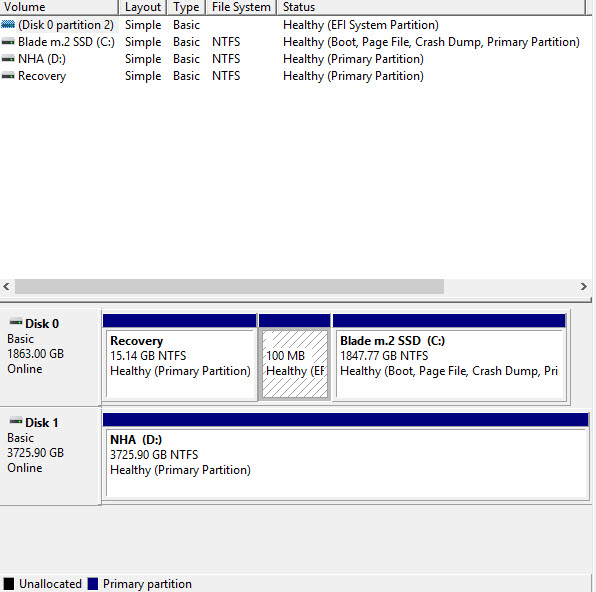
Ok those screw extraction pliers are the greatest thing ever made!! Got the SSD screw out straight away! Installed the 1Tb drive, peeled the thermal pad off gently and put that on this drive. Installing windows now! Yay!
Next stop install everything then get the red dragon skin on there!Last edited: Dec 2, 2018Arondel, Darkhan and RobotDoctor like this. -
This was the primary reason I purchased the Blade base model! Love the storage capacity!!!!
Attached Files:
-
-
Have you tested the thermals? Curious to know if the extra headroom allows for better cooling.
Sent from my SM-N960U using Tapatalk -
So here she is! Drogon!
Now with 1Tb SSD installed thanks to those awesome screw extraction pliers! - https://amzn.to/2DTBBI9
Also, Mrs Ras helped to fit the Red Dragon Dbrand skin. Its on the lid and bottom. I like it and i dont think many people go for this option! And ticks the box that the Alienware m15 would have done with that lovely red lid! -
Judging by the little strip of black at the top of the lid I suppose your skin is also not an absolutely perfect fit (unlike what Dbrand is saying), just like mine. I was worried that only i got one that is slightly too small. I got a matte black with logo cutout for the lid and bottom. The trackpad skin was too large and made the trackpad click all sticky. Not a fan.
But aside from the small imperfections on the dimensions I guess there's nothing better at protecting the laptop from scuffs. -
Nah it's a good fit on the lid. Less than 1mm smaller to make sure you don't knock it off! The bottom was a bit big and easier to see due to the screws.
I looked at the black matte skin. And they do look very fitting as it's a lovely matte black laptop! But I love having this red dragon skin on! Makes it easier to pick up and looks great in my eye. I used to have a nebula red m14x back in the day. And I could never find a skin for my gs60. So it's lovely after all these years to get a red laptop again!
Razer Blade 15.6" (GTX 1060/1070, 2018 edition) Owner's Lounge
Discussion in 'Razer' started by X33nbat, May 20, 2018.