Problems? See this thread at archive.org.
I have not tested the thermals as of yet. The standard "feel" test does not indicate excessive thermals on the computer shell.
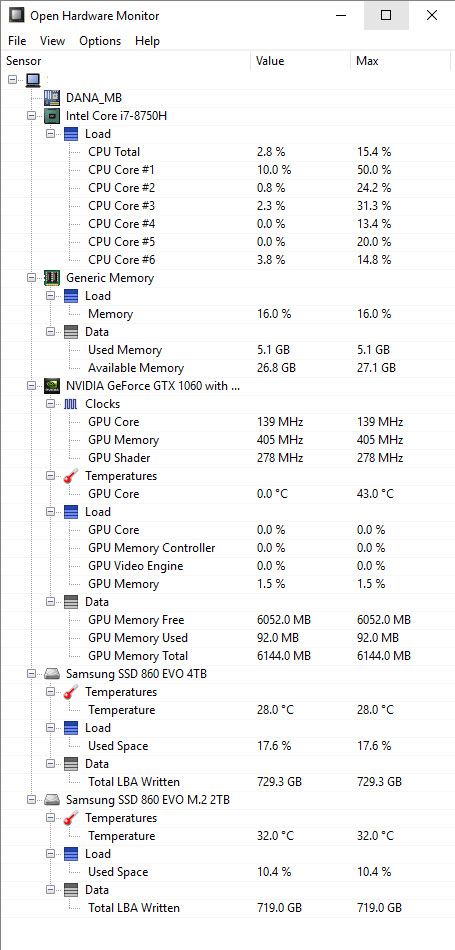
I just checked the thermals using openhardwaremonitor and the results are shown in the attached picture. Since I am not a gamer I might not have really pushed this system as hard as many will.
-
Attached Files:
-
-
Awesome, thanks for the feedback. Temps are great at the moment, however I have only be playing Europa Universalis. I'll have to try something more taxing to really put it through its paces.
-
Anyone else having issues running the fans in manual mode after today's synapse update?
-
Unfortunately, I only use automatic mode.
I have another weird issue: My Blade sometimes doesn't switch to my headphones, when I plug them in the headphone jack. I wasn't able to find any pattern when and why. Haven't updated any audio drivers yet, will be my next step...still bit strange.
Has anyone experienced something similar? -
Anyone used micron ram in these machines? Apparently crucial are part of them and they're huge. A mate is selling 2 x 16gb 2XR8 pc4-2666 sticks for a decent price.
-
Nope. The BIOS isn't reading XMP from the sticks, so you'll be running at DDR4-2400 and garbage timings.
-
Ah, so its better to buy crucial then?
Also, hit an issue with steam. Since i changed the SSD, Wolfenstein now dies randomly. really odd as this didn't happen with the 256Gb stick. -
Yes there’s issue with today update, couldn’t set fans manually always on automatic, it’ll fry my Blade playing AC Odyssey on surround 3840x1440p high. Uninstall it and reinstall without doing update put it back to normal...wtf...Milutin likes this.
-
xmp is working on my hyperx from kingston:
![[IMG]](images/storyImages/hnimvX.jpg)
just take a closer look to the jedec and xmp profiles:
![[IMG]](images/storyImages/bipqFc.png)
also ps says its a 2666 Mhz:
![[IMG]](images/storyImages/rCaKde.png)
-
So if you want 32gb of 2666 what brand must you buy?
-
I should have specified. The BIOS isn't applying the XMP from Crucial sticks. Of course it must read some XMP, otherwise the default sticks wouldn't run at DDR4-2666.

The HyperX 32GB DDR4-2666 CL15 kit is as good as you'll get. Nothing else with lower timings. -
Just buy a kit of These one: HX426S15IB2K2
-
Not catastrophic but that kit runs at 1.35V vs the standard 1.2V. Should reduce battery life by some small albeit unknown amount.
At least that is what the picture would have me believe, the page says otherwise -
Wtf... It runs at 1.2v.. Take a closer look at my Screenshots -
I didn't see your screenshot until now. Good deal. Its amazing how often junk is wrong on Amazon.
-
Guys it isn't working for me either. Tapping on graphics power doesn't increase power limits and setting fan speeds doesn't change them either. Wth is wrong with synapse update?
-
I saw someone in Razer forum today said they addressed it already, try do some update. I’m not on Blade so can’t confirm it.
-
Can you please share the link to this thread? I don't want to get stuck with a broken update!
-
Fixed this now. turns out bitdefender spotted the game trying to encrpyt a save file (I assume to stop you tampering with it to cheat), and blocked it hence it crashed every 5 mins when it was autosaving. Whitelisted it and it works now.
-
Hey guys, recently bought the Base model for 1300$ down due to a sweet gift card/egg points I had at newegg. I plan on slapping in a WD 500gb black NVME drive in there as well as a 2tb ssd. I got the 500gb for 80$ on BF and the 2tb ssd for 130$. I'm pretty excited.
Originally I was going to go with an Alienware m15, but after some major issues with Dell and then playing around with my buddy's, I decided it's a major no go.
Question I have, is there anything crazy I need to know now before I take the bottom lid off, replace, and start fresh installing windows? I've been building computers for damn near 20 years, and fix MacBooks and iPhones as a hobby, but you guys all have the experience with this machine so wanted to know any crazy or weird things that may slow me down? Thanks -
Just save all the drivers on a usb stick ready for the SSD swap. Saved me a ton of time downloading them at work. And be careful with the screws! I shredded the threads of the SSD screw. Always start with a bigger screwdriver than you think you'll need and work back. And unless you spent £1k on that 2tb SSD remember it'll be a slower sata not nvme. So boot times will be longer.
-
Good call. Yea for the OS I got the 500gb WD Black nvme SSD @ 3400 read and 2500 write. And the normal slow 500 MB/s 2tb SSD. Been buying exclusively Samsung nvme drives since 2016 but these WD look super nice and a decent competitor.
-
Just be careful with the two screws in the corners on the display hinge side of the device. The metal posts that the screws go in are seated in soft plastic that easily breaks.
Aside from that there should be nothing weird going on with the hardware. Having an advanced model myself, as far as I understand the advanced and the base model have almost no differences in motherboard layout, so I'd say there's nothing surprising awaiting you there.
Software-wise Synapse is the bane of the Blade's existence. It's so quirky and unreliable that I uninstalled it which forces me to live with the default hue shift keyboard backlighting effect, but I'm somehow dealing with it. But hey, at least it can't limit the CPU power ceiling to something lower than Intel specifies when it's not installed.
Razer don't provide downloadable drivers specifically for the base model yet. You should know how to deal with missing drivers though, just get some from the advanced model and download newer versions for graphics, iGPU, Bluetooth/WiFi and LAN from respective sources. Let Windows get sound drivers from Windows Update (which I'd under no other circumstance even remotely consider to be the way to go, but here we are).
I imagine you having some experience with overclocking and maybe undervolting. To squeeze out a bit more performance it is advisable to undervolt the CPU. Don't even think of having BIOS options for that, you'll need to use ThrottleStop or Intel XTU (better set up a task to launch ThrottleStop at startup, it's more reliable).
And basically that's it.JediTreasley likes this. -
Congrats of the deal! Hope to see your review/impressions on the Base Model since there hasn't been a lot of coverage about it!JediTreasley likes this.
-
this, I'm glad I'm not the only person experiencing this problem with the screws, the threaded insert (upper left hand corner) on my brand new RB15 literally popped out the first time i opened it, I was unable to secure the inserts back to the plastic slot anymore so I had to resort to using some epoxy glue and stick the insert back into the slot, luckily it fits nicely and I don't have any problems with the backplate so far.
This is definitely a design flaw, the plastic is just too weak to withstand the forces of screwing into the inserts, it's silly because the other screw holes are on the frame itself, just these 2 corners are on plastic slots.JediTreasley likes this. -
I have been putting my RB15 1070 through its paces and wanted to see what you guys thought of my temps. Playing GTA V it seemed mid 80's was the average, with recorded maximums of 90 (deg C). This is with -125mv on cache/core and turbo limit on 3.6GHz. Is this acceptable? I don,t have much experience with this sort of thing so any advice is appreciated.
I obviously could look to repaste/ further optimise with software. However I wanted to know where I currently stand on thermal performance. Also, idle is about 50 deg C. -
Pretty similar with mine, 1070 FHD bought in June. So far there’s nothing wrong, though I didn’t limit the turbo on 3.6, only simple undervolting-130mV through xtu with still default thermal paste. All my long session games never showed Average above 90ish always on 80ish, it depends the title the worst one is AC Odyssey with average high 80ish with synapse balanced and 5000 max fans rpm, but it’s expected since I play it on high setting ultrawide 1440p res in surround mode 2 monitors. Idle is also similar 50 mostly sometimes 40ish and with downloading and watching movies while browsing may hit 60ish.
-
1060 or 1070?
I am thinking about buying one of these but I am not sure which GPU. Usually, I would go just for the stronger one but the review on notebookcheck mentions that thermals, noise and battery life is noticeably better with the 1060 version which more important to me. Has anyone experience with both versions?
https://www.notebookcheck.net/Razer-Blade-15-i7-8750H-GTX-1070-Max-Q-FHD-Laptop-Review.305426.0.html
https://www.notebookcheck.net/Razer-Blade-15-i7-8750H-GTX-1060-Max-Q-FHD-Laptop-Review.314146.0.html -
Personally I went with the base model because of the Notebookcheck review, and a few other youtubers who compared the 1060 vs the 1070 max q's. Most people leaned towards the 1060 because it had a more consistent higher clock, less throttling, and better noise. AND I wanted the option to put a 2tb ssd in the 2nd storage spot. Also didn't need 144hz screen. and getting it for less than $1400 was too good to pass up.
https://www.notebookcheck.net/Razer...0H-GTX-1060-Max-Q-Laptop-Review.343591.0.htmlArondel likes this. -
The review was early batch Blade 15 vs several later Blade 15 advanced, there’s huge difference in terms optimization like synapse or windows. My June batch was also inconsistent at first months, but now run like a champ, I won’t getting bored posting this pictures, it runs great on ultra wide 1440p surround and be able to catch smooth 60fps and could keep long gaming session core temperature on high under 90ish average. No repasting no core clock limitation, Turbo Boost on. The big vapor chamber works great imo.
All 8750H on thin light categories runs hot and need great cooling and appropriate tweaking like undervolting or playing Synapse mode which mostly reviewers doesn’t do. Enabling Turbo Boost keep my cpu often on 3.9 max, I notice that because there’s always big on screen display and HWinfo64 run background to see average core clock on long run. -
If you go for the advanced model (which has the vapor chamber heatsink instead of a heatpipe design), the 1060 variant will yield better battery life in some situations (when connecting a screen via HDMI for example), but under non-3D workloads and the built-in screen they will be the same, as the battery performance will depend on the CPU and its integrated graphics. Noise is now less of a concern since Razer changed the default thermal compound to something better while review units and early units had a garbage thermal compound. They will both get pretty loud under full load, mostly thanks to CPU thermals. If the CPU is loaded, first the left fan will come on and will be joined by the right fan if the temperature continues to increase.
-
I went for the 1070, as when i'm still using this in 3 years, the 1070 is 30% faster and I'll need that in a few years!
If you're getting the eGPU then doesnt matter!
Personally i'm happy with the performance and noise from my blade. And i've been playing game with the speakers on! (in balanced mode). But not paying attention to undervolts or anything else as i really dont have any issues with the device!Joikansai likes this. -
So, I'm going to be sending this back for a replacement. Hopefully the next one doesn't come 'used.' I hear all the time, looking a forums and such, how Razer has sent their laptops with missing screws, loose parts, scratched, but how many of you guys have delt with this?
Last edited: Dec 8, 2018 -
hey guys quick question for the base owners, I'm tyring to turn off the logo lighting in synapse and it just doesn't seem to show up in options... I did do a clean install of windows when I first purchased the machine so idk if it has anything to do with that.
-
Since 2015 I bought from their Store 2 Blade (14 and 15) and one refurbished Blade stealth, even the refurbished one looks new with only no specs sticker. Maybe I’m lucky?
No base model doesn’t have that feature. Backlight logo use same lighting with screen display, you can check by up/down the brightness it should be similar behavior, it likes previous FHD non touch model. -
question to all owners, do the palm rest / battery section of your RB15 (advance) gets hot/warm while charging? does not even need to be on any heavy workload, Is this normal?
-
Mine gets warm just watching videos with Turbo Boost disabled, lol.
-
you mean the palm rest area? and you are plugged in? I try to avoid plugging in too often or too long (unless im using it to game), usually charge between 40 - 80% battery, takes like.. 30mins and can last for quite a while on battery saving and undervolt settings.
-
Just install the New bios, you find it here : https://www.reddit.com/r/razer/comments/9jq0w0/temporary_fix_for_razer_blade_15_high_cpu_idle/
IT fixes the cstate Problem. I am getting a usage auf 0.9W - 1.4W while watching videos or browsing. The Fans stay off and temps are low.
Also use throttlestop and Set the Max clock speeds to 2.2ghz. -
Just be aware that the recent Blade 15 advanced model may come with a BOE panel instead of LG.
The BOE panel does use PWM backlight control that causes flickering if brightness below 99%.
hmscott likes this. -
The BOE panel also doesn't allow the switching from 144hz to 60hz via synapse either.
-
I'm sorry that's just sloppy on razer's part, they can't even make sure their hardware and software talk to each other properly.Darkhan likes this.
-
speaking of problems, anyone that is on Windows 10 Build 1803 and are having problems with their internal microphone?
In the device manager, under events I get a event saying
"Device SWD\MMDEVAPI\{0.0.1.00000000}.{701953c3-8e97-4a96-9498-8453c2f2223f} was not migrated due to partial or ambiguous match."
and my mic is no longer working, even after i've set the correct privacy settings.
Unfortunately i'm unable to rollback to the previous windows build, somehow the OS has deleted the windows.old folder, not even a month after i upgraded to 1803, that was odd.
also, there are no realtek drivers on razer's support page. -
Just checked and my mic is still working.
Also my monitor drivers show DISPLAY\LGD05C0. So i'm assuming thats the LG model not the BOE one then. As i can switch between 60/144. though honestly my eyes cant tell the difference. -
Well, my work for a quiet and cool RB15 with nVidia 1070:
BIOS 1.06 and EC 1.03
Throttlestop CPU -0.140, Cache -0.125, all the rest (iGPU etc) -0.065
C-State: C10
Max Speed 1 Core: 3,5 GHz, 6 Cores 3,0 GHz (the rest in between)
Set Windows Balance Mode min CPU Speed to 0%, max CPU Speed to 50%, quiet cooling.
No repaste!
If I use Windows Balance mode, I can use Office 2o19, Firefox, DAZN, Netflix without any Fans are working! Temperatures are between 42 to 46 degree ... and CPU uses 0.7 to 1.3 Watt! In Balance Mode, the CPU takes under full load 7,3 Watt.
After one hour Hitman 2 or GTA 5 on Maximum Power mode, the fans (on auto) are very quiet and CPU stays at 65 degree ... it is really impressive!Last edited: Dec 10, 2018Arondel likes this. -
I'm sure you've Found this page, but here it is for reference:
http://drivers.razersupport.com//in...hktKdGnN5v5kWTecjNzWi31lSm61-0UkaAnhkEALw_wcB -
Wow! I did 3 hours of wolfenstein 2 at the weekend and the CPU hit a max of 100C and the GPU 91C! Thats all at stock!
I only game maybe 1 day a week, so not massively worried, but might have to look into undervolting! -
that is for the realtek app only, it does not contain the drivers.
I think it's a hardware fault at this point, I've rollback to a previous window build (factory SSD) and the mic is still not working. Damn that's really disappointing in an otherwise very good laptop. I hate to want to RMA it but i guess there's no other way. -
The only issue I have with the microphone is that it's extremely quiet when the Realtek driver is installed. With the generic Microsoft driver it works just fine.
Yup, but there's also no need for Razer to host a driver, because they didn't make any modifications to it like Asus and some others do. You can simply get the driver via Windows Update, or get any generic one from the web. The audio IC in the Blade is nothing special, so recent drivers you get from the web should be fine.
Really, if you are absolutely in on microoptimizing it, it would be worth more to enable SpeedShift in ThrottleStop and use the SpeedShift value to underclock the CPU than to do it via software in Windows. It's just more efficient and quicker to adjust and automate that way (via ThrottleStop profiles).
Razer Blade 15.6" (GTX 1060/1070, 2018 edition) Owner's Lounge
Discussion in 'Razer' started by X33nbat, May 20, 2018.