 Problems? See this thread at archive.org.
I believe with that cpu max processors state, it’ll be quite and cool. Good if that feed your needs.
Through windows monitor setting as well, or just Synapse? Synapse is quite often buggy, when you use Synapse all installer from Razer website, it won’t even show any option in right area like refresh rate etc on performance tab, if you stay on original without updating.
Dont hesitate RMA it if you found even small issues, that’s to me one key to get a great Blade. Late 2016 can’t pass my QC, I rejected 2 times till get perfect one...early 2017 one(in middle of RMA process 2017 that address the issue was announced)
-
Okay here i am back again with my final review part 3. Recently i sold my Razer blade to get the Zephyrus M Because I felt the spec sheet fit more what i was looking for and the reviews seemed to support how I felt so I posted my Razer blade and sold it within a week for a great deal.
TL;DR it was a mistake..... Opening with the TL;DR because this will be a long one, anyone who is in the market for a gaming laptop you will want to read this as I have guinea pigged alot of machines...
So in the past 4 months i have tried 6 different gaming laptops trying to find which would be the best fit for me for me. Price was not a issue I really just wanted the best laptop that coould play games, Handle my work tasks, both in performance and battery and just be awesome while its doing it.
So I started with the blade 15 1070m model then got the
Zephyrus GX501 1080m 2018 model
MSI GS52 Stealth Thin 1070m model
Alienware 17 r5 gtx 1070 120hz Gsync
Zephyrus M 1070 144hz Gsync
Razer blade pro 2017 model 7820hk gtx 1080
And after trying all those machines I found myself coming back to the Razer blade twice. It just works better than all of those machines.... It has the best keyboard, Screen, overall performance, Temps and battery life of all the machines I have tested.
The gx501 was powerful and thin but has a small 55w battery so only getting around 2.3 - 3 hours battery life and just gets too hot. Also has pretty bad speakers, Audio was muffled and no matter how i tweaked it was just not good for gaming. Music and movies were punchy and okay but gaming sucked. Everything sounded "off" and was not the most comfortable to use with the forward keyboard design. Also the 8750 power throttles in that machine just like the Razer blade.
The MSI is the most similar footprint to the blade same specs, but does not use a NVME drive it uses a m.2 drive so its pretty slow and getting in requires completely removing the mother board. Also the Graphics card would also power throttle and it comes with a 180w brick which is smaller then all other laptops of its class so that may be the issue. I was also getting higher temps and a consistent 5-8 fps lower in all games compared to the razer blade. That performance drop was reason enough to return it. the MSI also comes with alot of Applications and factory blat ware that is always running in the back ground wasting resources. It got about 30 minutes more battery life on occasion but I had to constantly restart the machine because the Audio app that controls the sound would spike 80% cpu usage and tank the system randomly and often.
The Alienware was easily the best performer. When it comes to temps and performance there was nothing that can compete with that machine. With no under-volt or CPU adjustments it would run at full 45w 3.8 ghz in games that would make the other laptops tank and never go above 80c the surface was always cool and i could over clock the 1070 to +215/ +500 and it wouldn't break a sweat. everything would run in the full 120hz on the 1440p panel but thats where the goodness ends. The software is awful it uses Synaptics drivers that would always crash and make gestures stop like 2 finger scroll, and the panel is TN so horrible colors and horrible viewing angles. The screen was pure trash, Like the MSI the Alienware requires alot of background apps to work and also comes with alot of factory bloat ware. Surprisingly it also uses a ton of power. On better battery option with 50% brightness and balanced Nvidia settings i was getting 3.5 hours on a 99w battery. Thats terrible it should be in the 4.5 ish area with that battery. I got better battery life out of the Razer blade Pro and that has a power hungry 7820hk and full gtx 1080 So something is wrong in the EC of the Alienware that makes it use too much power for basic tasks like Word and YouTube,another side note the Alienware is also difficult to re-paste because the mother board is upside down so you have to remove the entire board to re-paste, And is much more difficult than other machines because the DC in plug is very close to the heat sink fan so re attaching it without bending pins is difficult, (Speaking from Experience lol )
Which brought me to the Zephyrus M. On paper this is a dream machine. Gsync = Check, Full 1070 = Check, Good Screen and high refresh rate = Check. However that's where it ends with that guy too. The ability to switch between Gsync and Optimus is genius and every laptop should have this feature. However because of the useless 2.5 drive it has the smallest battery in a 15" laptop all Zephyrus models come with the 55w batter from the new S all the way to the GX 501 and its the Achilles heel. Even on optimus mode I was only getting 3-3.5 hours of battery doing nothing but word... It pretty sad Also the fan curve with all updates applied is "off". The fans would run constantly even when i wasn't doing anything and loud enough to be noticeable and the temps were bad too sitting idle in the mid 50's even with a under volted and CPU clocks locked to 35 ghz it they would run constantly. Also the power brick would not deliver enough power to the system. It would constantly drain power even when plugged in and all i would be doing is downloading games or working on a power point presentation. That's odd to me so I exchanged it for another machine and had the same problem. So there is something wrong with the power delivery of that machine as well. Mix in the bad speakers and jet engine fans ( the loudest fans of any gaming laptop i ever used even on balanced mode) and it was just not a good experience. The power draining issue alone should be enough reason for most people to pass. Which is a shame because on paper and in reviews it looks like it should be the gaming laptop to get. But its just not there yet.
And last but not least the Mighty Razer blade pro. The laptop of all laptops so I thought. I was able to get one brand new for $2400 because of a best buy system error so I jumped on it faster than any dirty analogy you can come up with for something being jumped on. I7 7820hk model with 32gb ram 2x 1tb ssd in raid 0 full gtx 1080 4k screen with Gsync and a large 99w battery I was a kid at christmas when it came in. Personally I love mechanical keyboards and Had no issues with the pro keyboard I really liked it and the track pad is huge and feels great to use. Speakers are great and there are some work around to get Atmos drivers working on it so they sounded great. Battery life was amazing for what it was. I was getting 4- 4.5 hours on 65 % brightness and better battery option so I was able to lug it around to coffee shops and such and be able to work and play music and the battery would chug along. but as a gaming laptop its terrible. One of Razers worst. It gets unbearably hot. Hotter than any machine Razer had made. The battery being right under the keyboard with no mouse pad makes the entire wrist zone really hot when charging and when you're gaming the surface temperature of the entire bottom case is uncomfortable to the touch. I re-pasted with liquid metal and the temps where great but awful to the touch. The screen is also awful for games. I had to go buy a Spider 3 calibrator because the screen was more saturated than any Samsung phone I have ever seen it was bad. The response times are some of the worst too. With gsync and the 1080 you can play alot of games at 4k 60fps and it will be rock solid performance but the screen is so slow and the G2G is so low the ghosting is headache inducing and you will not be able to game on it long. Maybe im too used to fast refresh rates I don't know but it was really jarring for me and a huge deal breaker. The Pro also uses Killer WiFi which is my personal Achilles heel I Have never in my life as a gamer had success with Killer in my systems. Its is consistently slower than the Intel chip and always has compatibility issues. it would not detect my home gigabit WiFi or my moms last gen Verizon 2.4 WiFi either so I had to change the Wifi chip just to set the machine up. The Pro is not a laptop for gaming.
So that's my experience that I went through with my machines I wanted to share it with you guys here in case anyone comes here looking for what they should buy and are considering the Razer blade 15. I would without a doubt say the 15 is the best gaming laptop on the market right now. It Feels great to be back on one, and I missed not having it when I was trying other laptops. The 6-7 hours of battery is tops in it class, I can go a full workday without needing a charge. The speakers are good Gaming performance and WiFi performance are top notch in its class and of every 15" gaming laptop on the market the Razer blade runs the best temps and has the coolest surface area of all the other systems I have tested. What Razer has done with this machine deserves an award.
Thanks for reading and hoped this helps some people out and if you have any questions about the machines i was testing feel free to reply! -
just download throttle stop and set the 6 core clock to 35 or 36 and it wil stick around high 75-82c no need t under voltevilras likes this.
-
Great price for blade pro, but you made right decision, I think it is bad engineered. 250 Watt ac Adapter won’t run well full gtx1080. The machine runs also loud and hot due seemly bad thermal design. Graphic performance may be better than blade 15 1070maxq, but thanks to new cpu I think I get better overall performance when I checked last time blade pro owner lounge. About power limit throttle you claimed before, seemly Alienware m15 thin light one, doing similar thing from review I saw recently, so maybe 8750 need a bigger cassis and cooling room to cool it down on full performance. I can get 45 watt full performance but I don’t want to see my cpu staying long on 90ish, and I don’t like personally limiting cores clock
 , on balanced mode it reach 3,9 quite often. I can get btw 60fps quite stable on 1440p SoTR by lowering some setting to high and turn off AA, I didn’t notice huge differences between high and highest.
-
Through everything. There is no Synapse or windows setting that will allow us BOE panel users to switch to 60hz. We either have to disable the driver in Device Manager then it defaults to 60hz, use Custom Resolution Utility to make a custom 60hz profile, or run Linux in which case you can set it to whatever refresh rate you want.
Here's a post I started on Reddit to track the issue, defiantly not isolated. Some users, including myself, actually had the 60hz option in the beginning. Razer has yet to comment on the post, even though users keep reporting to it and the BOE panel issue becomes more obvious.
https://www.reddit.com/r/razer/comments/9xlw59/calling_all_blade_15_144hz_boe_panel_users/ -
If you could do that at first time, it may some software compatibility issue, it may take sometime to address it imo from my past experience with addressesing issues that didn’t effect all models, remember even bios update for fans issues on late 2016 took so long. Anyway I think BOE Panel doesn’t have Backlight Bleed like LG, does it?
I’ll check on my local store as I want also go there for buying something, and I think it’s new BOE model since it recently displayed. -
Damn that's a ****ty issue and a surprising one. How to tell if it's a BOE Panel because purchased the advanced model and I have the option to switch in both the igpu panel and synapse
-
I'm a long time alienware customer and was thinking about making the switch to the Razer because i loved the design. Decided against it because of this:
https://www.reddit.com/r/razer/comments/9xj4d6/razer_blade_15_advanced_model_has_flawed_design/
Razer is cutting corners with quality by using plastic anchors near the heat sink that end up melting. Not good for the long term. Thought you guys should knowrb6freak likes this. -
For those interested in learning about MSI Afterburner and using it with the Razer Blade 15 I have just started a series of uploads for it.
Part #1: Introduction has just been launched. Enjoy.
-
Yes it’s plastic anchors, idk why but should seemly metal. It’s been half year owning it btw, it’s not melted yet. Some users who after repasting it screwed that too hard, seemly broke it. I didn’t reach cpu yet only simple SSD upgrade but can’t say it’s not durable, to me it looks fine. Playing Ubisoft games mostly I use max fans rpm and it isn’t in cool area at all sometimes high 80ish mostly 2 hours gaming session or more and that anchors area felt also not cool at all. Like display cable across vapor chamber I think it use heat durable material and won’t easily melting. Heard that made me scary unscrewing it though
-
You can find your panel type via HWiNFO or through Device manager -> Monitors, open the Generic PnP Monitor, click the “Details” tab, then in the Property dropdown select “Hardware Ids”, if you have the BOE it will show something like “MONITOR/BOE7AF” and the LG something like “MONITOR\LGD05C0”.djcgeez2189 likes this.
-
Not sure about this there is no Plastic oon my heatsink it's identical to my 2018 blade Boone cuts more corners than Dell ....
-
Can you take a pic? Also did you get an early batch? Maybe they fixed it, but i doubt it
-
A pic of my heatsink ?
-
The plastic isn't on the heatsink, it's on the corners near the display. Screws are seated in this plastic that's dangerously close to the heatsink
Take a look at the reddit post I linked. The user has pictures attached if you're not following -
Yea not sure im following and based on that article just seems far fetched and nit pciky. I know razer doesnt have the worlds greatest track record when it comes to QS but I have had the razer blade 15 for Quite awhile now and games very hard on it and have never had a issue with heat, temos ir Quality. The only thing about this machine that is awkward or worry some to me is the Monitor ribbon runs across the heat sink and That is worrysome to me. Other wise its very well built. Better so than the Zephyrus, Msi g65 and the Alienware 17 r5
-
I wouldn’t thinking too much, just make sure you’re protected by good guarantee like rom 3rd party and enjoy the game. That cable isn’t melting yet rocking high 80ish cpu temperature in Ubisoft games in this 6 months, I saw someone has display issues, but I thought she wasn’t slot that display connection slot rightly after upgrading RAM, but it was not both, it was the Ram issue somehow seemly bring display flickering. If I should saying other potential issue that is going on, it’s that buzzing ac adapter that I still saw on some users (maybe old stock from early batch) and BOE panel that couldn’t be changed to 60Hz (for someone who need better battery life it may kill a lot when not changing it).
-
Do you all recommend the Advanced model versus the Base? I can get the Base model for about ~$1,300 or I can cough up $2,200 for the Advanced model with the 1070. It seems like quite a difference in price but wanted to know whether the build quality, higher refresh rate, and better GPU is worth the price. Thanks!
-
Do you guys think now is a good time to buy a Mercury RB15 (1070) or wait to see if they release a refresh soon? My biggest fear is buying this $2600 laptop and them release a new version within the next few months lol
-
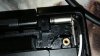
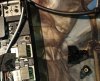
Dang, thanks for sharing. I checked mine, sure enough one corner was cracked. I never torqued these screws down, not sure how it happened.
 Xenrail likes this.
 -
it's a known issue, the plastic holes are too weak to hold the threaded inserts, it will break off eventually due to heat expansion or simply putting too much force when screwing.
my experience with images below
https://imgur.com/a/sQGBlN1Last edited: Dec 11, 2018 -
Interesting is that the 1060 model ? Your heatsing is copper mine is black I will have to check that out I didn't notice that plastic peice either
-
I don’t believe if it’ll break due heat, saw also other early adopters who owning it and didn’t repasting yet like me doesn’t have it broken.
if it’s so it’s under warranty unless users breaking it by screwing it too tight when trying to access cpu and gpu for repasting, it’s maybe out of guarantee as their website stated, changing or modify parts inside that make it break will void guarantee. -
only you can answer that question!
The 1070 is about 30% faster than the 1060, but it generates more heat and uses more power. With the base model you get a different 60hz panel, a different keyboard with 1 colour chroma, heat pipes, slower storage (with the 128gb sata drive but I assume you'll swap that), and the build isn't as sturdy. Tho still good.
Whereas with the advanced you can still get that 1060 model, or the faster 1070. You get a vapour chamber cooling. A per key chroma keyboard, bigger battery (tho less storage). Better screen (144hz option). Its upto you whether those things are important.
Take a look at Linus thoughts on the Blade Base. I'm happy i got the advanced.
-
Humm, i'll have to check mine as well. I've removed my heatskink twice so far. Also that part looks very easy to machine. I may ask a buddy of mine if he can machine a couple of these from aluminum for testing.
-
Some users who made lm Guide on YouTube didn’t also mention about that, and his LM failed and he repasting again with kryonaut, I think he screwed that part dozens time. I wanted also to make sure that but I didn’t see a reason opening it yet and prefer continuing my games rather than tweaking it, there’s too many quests I’ve to finish first
-
i didn't break it, it was already like that when I first opened it, if anything it is Razer's manufacturers that use motorized screw drivers and over tighten the screws and thus breaking it.
-
Yes I remember someone mentioned it on Reddit or here, about weird rattling sounds when fans at max, I would send it back ASAP if I experienced it.
-
Does anyone know where to get the original sound drivers? Had some issues, uninstalled them and after reinstalling via Windows update I miss some important "enhancement" options.
-
You ve uninstalled? Wtf... Do you mean drivers or the dolby App? If u mean Dolby and realtek App you would find them on c:\recovery ... There is a install batch file, just Start the batch within a cmd
-
Thanks for your effort, but that's very unspecific "there is a batch file, just Start the batch within a cmd". In my case, there are many folders with batch files in them and none of them really sound like anything "Realtek", "Sound" or "Audio".
However, I found the solution. Originally, there wasn't installed the Realtek driver, but the standard Windows 10 High Definition Audio driver instead. You can select that driver when updating the device in your device manager, then click "browse my computer for driver software" and then "Let me pick from a list of device drivers on my computer". Here you can choose, whether you like the Realtek driver or the "normal" high definition audio driver. In my opinion, the high definition audio driver sounds much better than the original Realtek driver. -
Here on support page, there’s Realtek app, try to install it.
-
Thanks! Tried it, but wasn't able to install it. Cmd spitted out the error code 1163, something about "cannot find files", so I guess this file is somehow corrupted.
Nevertheless, I found out that it isn't necessary to have the "original" driver, because Windows 10 has the newest Realtek audio codecs and additionally it is better to use Windows' internal "high definition audio driver" instead of the Realtek drivers. Much better sound quality regarding bass and fidelity, especially when using headphones. -
let me google this for you ^^
1.) copy this folder: D:\Recovery\OEM\SIG\UWP to your desktop or so
2.) got to the folder to your desktop and open (with an editor!): installuwp.bat
3.) correct these paths :
- SET DOLBYDIR=C:\Recovery\OEM\SIG\UWP\DolbyAPPX\
- SET REALTEKDIR=C:\Recovery\OEM\SIG\UWP\RealtekAPPX\
- powershell.exe -executionpolicy unrestricted -command c:\recovery\oem\sig\uwp\installuwp.ps1
Optinonal .) If u need the .net Frameworks, just google these versions, download and install: SET
Microsoft.NET.Native.Framework.1.6_1.6.24903.0_x64__8wekyb3d8bbwe.appx
Microsoft.NET.Native.Runtime.1.6_1.6.24903.0_x64__8wekyb3d8bbwe.appx
Microsoft.VCLibs.140.00_14.0.25426.0_x64_Erase likes this. - SET DOLBYDIR=C:\Recovery\OEM\SIG\UWP\DolbyAPPX\
-
Maybe noob question here but can someone tell me in Windows how to leave sounds on, meaning even if I have a window that minimized or is "Not Selected" how do I retain the sounds from that window to be on?
Thanks. -
The sound is on when minimised by default (unless it is a full-screen application), in which case the application would have to have an option to play sound while minimised.
-
How many people have upgraded from 16gb of ram to 32gb? Would this possibly have a negative impact on battery life or thermals? (probably not much im assuming?)
-
I will say, the vast majority of people do not need 16GB RAM, it is very hard to utilise this RAM properly. Do not go buy how much RAM you are using, if you are seeing 14GB of 16GB used, it does not mean you need more RAM. Programs use as much RAM as is available, even if it doesn't benefit the user - you can make Chrome use 30GB RAM.
I have used VM's on 8GB RAM, most developers have managed to have several on such a configuration, 16GB RAM is luxury. -
This is not the case I play Hearthstone on Windowed mode and if I have a windows browser selected there is no sound from the game playing until I reselect the window.
-
I upgraded to 32gb Corsair vengwnce I'm getting the same battery life and ram has no impact on thermals that's Apple talk lol
-
Razer is great about this. The Dolby drivers are digitally licensed to the device id that's why you can't find them in install the app and if you got a new HD you won't have access to the recovery partition to get them .
So go to thier website and live chat them and they will take care of it .They sent me a link to install the Dolby drivers on my fresh install 1tb Samsung 960 pro now I'm back up and running with Dolby app working properly -
Can you share that link?
-
Weird thing I just noticed ... I tweaked some stuff in throttlestop, yesterday. Now everything which I saved is gone ... Did I miss something?
-
This is an application setting. Not the Windows environment. MTGA for example, has an option in settings to mute the sound when the window is not in front, or to keep it playing sound.
-
You should just reinstall the latest windows. Windows updates will take care of all the drivers you need including sound driver. Then, you need to go to the microsoft store app to update "realtek control console and dolby atmos". The license comes with you motherboard, not your ssd. The only thing is that a compatible sound driver need to be installed, otherwise the control console and dolby atmos will say "device not suppoted".
I am currently running 6.0.1.8413, which is install by windows update after doing a clean reinstall. -
it wont help you because the driver and software are linked to system ID the best way to fix this is to go to razers website and chat with them. They are always available and it doesn't take long to connect with a rep in chat.
Hmmm how did you do that because when i did a fresh install on a new HD all the drivers installed just fine but Dolby and Realtek controllers would not install. I had to go through Razer and they helped me install the driver from their servers.
I had this issue as well I deleted the throttle stop and reinstalled it and now its all good.Voxis9292 likes this. -
Both Dolby atmos and Realtek control console are UWP program that come straight from Microsoft Store. I did not manually install them. I just checked updates from the store. I did multiple times of windows reinstall, no exception.
-
did you actually clicked the "save" button in throttlestop?
-
Has anyone changed the font size of their Blade 15? The scale to select font size is not present in the Display settings as it should be. Any assistance in this would be greatly appreciated. Thanks in advance.
-
change the font size under Scale and Layout within Display settings
Razer Blade 15.6" (GTX 1060/1070, 2018 edition) Owner's Lounge
Discussion in 'Razer' started by X33nbat, May 20, 2018.


