 Problems? See this thread at archive.org.
84C in heaven is great
-
-
Shaz2bot, yes, a picture of both heatsinks would be great. Glad it is fixable.
-
Are the P157SM and P177SM also subjects to this HS problem?
-
They all use the same heatsink. But if it were broken you would know from the temps.
-
CPU max 69°C
GPU max 67°C
Benchmark 40 minutes -
JESUS! 69°C lol, which model is yours?
-
P170SM. I did a repaste. Before i had temps about 93°C with CPU and GPU.
-
Great temps Odolino100. The low record I think. Is the computer stock, or modified?
-
I only repaste.
-
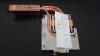
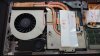
Here are two pictures of the heatsinks, old (left) and new (right):
See the red box, the new one has an extra metal connection piece from aluminium to the entry point of heatpipes into the copper heat fins. Its solidly soldered on both parts of the heatsink, connecting them structurally. Couldnt find any other difference.
The old one got me 92-93 C and throttling
The new one gets me 84-85 C in the same benchmark (heaven 4.0) (no throttling of course)
Same thermal paste and same ambient temp
Has anyone else got the "new" heatsink? -
I think the problem is not the heat sink look at these photo
![[IMG]](images/storyImages/173396-1379883987.jpg) . I think the heatsink do not lies flat on the gpu chip.
. I think the heatsink do not lies flat on the gpu chip.
-
In my case actually it was the heatsink. The old heatsink sat perfectly flat but did not conduct any heat. The new one actually doesn't sit perfectly flat but conducts enough to get decent temperatures, so I am happy
If some batch of heatsinks were broken, no repasting or reseating will help, it depends on where the problem lies -
There were people that repasted several times, it did not help. Clearly there is a difference in those two heat sinks. It looks like maybe the hot out pipe is touching the cold return pipe. So some heat sinks may be touching, and others may not, which would explain why Clevo didn't catch it.
So, making sure there is a gap between the pipes might help. And, yes, doing a better paste job has definatly helped some as well.
Edit, as Meaker pointed out these are probably hot and cold in one pipe. Although they do make loop heat pipes, that seperate hot and cold. Bend at your risk as one user below broke it trying to bend... Bend is not a good word... -
Heatpipes are self contained, both are "hot pipes" where the condensed liquid runs down to the hot area.
-
That little plate wont make much a difference. It's likely just to ensure that heatpipe wont bend.
-
I have the new one but i still hit 91 - 92 with repaste i tried again today and used the old memory thermal pads and my temps went nuts again (94 + and quickly eg 10 mins) then i tried again with using thermal paste on the memory and now im stable at 90-91 i want to get ne thermal pads and test again but i dont know what thickness to get (.5, 1, 1.5 )
EDIT: well i think i broke it i tried to seperate the two pipes now i just cant get it not to throttle i should have just left it as is any one know where i might be able to get a new heatsink im in australia -
Meaker is probably right, each heat pipe is most likely hot and cold. The heat causes the liquid to turn to gas, like steam, then the cooling fins cause the gas to condense. The gas and liquid travel down the same pipe. The pipe has a special outer area of the inside, it is a wick. The center of the pipe is hollow.
Although there is a loop heat pipe, that keeps hot and cold seperate. But you should see a loop...
So, VK, it sounds like they were touching? Sorry you broke it. I do feel bad for the suggestion. I should have said just move a tiny ammount, no more than a milimeter. Otherwise the tube will crimp. Is that what happened? A new heat sink should be about $35, and I think any dealer can get one. -
Lol no idea it's a little damaged not crimped and I called my reseller and got the 411 on my warranty being voided seeing as I pulled the pc apart. me right lol if they did there job in the first place I wouldn't have had to touch the dam thing
-
I doubt the warranty says it is "voided" if you simply open the computer. This is a popular myth that doesn't hold up in court. Go by what the actual warranty says. On the other hand, bending or forcing the heatpipe probably voids the warranty on the heatpipe itself.
-
They said it because I attempted my on repairs if I can outsource a heatsink then ill be fine there is no serial numbers on em right lol
-
I just got a Sager 9380 with a single 780m and it idles at 50C but underload i have seen it as high as 92C.
Is this something I should worry about? or will it get better over time as the paste settles in?
Thank you. -
92 was what I was getting after repaste before I stuffed my heatsink it's fine it won't throttle but there is no room for overclocking
-
Well, 92-93 is where it starts throttling. Well, maybe throttling is not the right word, but it is the max temp for the built in turbo mode. So it is the performance peak.
-
Yes the throttle wont be so harsh on the 780M compared to the 680M.
-
For Experienced users, apart from undervolting and changing thermal paste could someone point out other strategies to reduce GPU temps on this chassis? (This is regarding playing FPS {BF3 / ArmA3} for long hours <4-6 hrs straight>) Also whether you see considerable decrease in temps when resolution in-game is decreased under high settings?
All different type of strategies/ experimented experiences would be appreciated (graphics setting + resolution + hardware settings)! -
Well, two users replaced the heatsink with a new one, and got temps that were 5-10C better.
-
Yes, I saw that. I'm looking for answers on the configuration side, considering there is no problems with the heat sink and using the laptop for 4-6 hr long gaming sessions. Thanks.
-
Thank you for the replies everyone, well what I was trying to say is if it's a "normal" temp for this combination? Like I said I just got this laptop and I don't want to have a dead laptop within 6 months due to thermal issues.
On the Cpu side seems to be fine its a 4700mq and the highest I've seen it's 79C but but the 92C on the GPU side is what has me worried.
I only did about 30 minutes of planetside 2 when I noticed that temp. -
The 92-93 is set as the max temp, because they think that is safe. The Nvidia site says the 780 (desktop version) can go as high as 95C safely. The spec is not listed for the 780M. Using the GPU boost, I think the max temp you can set is 94C. I don't have one to verify.
-
Well i just emailed my reseller and he had my try FN key + 1 to set the fan at high speed before gaming and with this the highest recorded temp while playing planetside 2 was 78C
-
Yea but do that under a 3dmark firestrike benchmark on loop and it will still creep up over time its not a fix just a do this so we don't have to spend any money thing
-
The highest I've seen with that "fix" was 83C in BF2 and Planetside 2 after about 4 hours.
I don't really care about benchmarks to be honest. -
Washer mod, by placing a 0.5mm washer between the arms of the heatsink that are made of two pieces you increase the pressure.
-
Have you done that before on the Sagers? Any concerns with it? What size should the inner hole be?
-
So what is the consensus here?
Is it the GPU and CPU clocks are running exorbitantly hot compared to last generation(2012 model) or is the cooling solution supplied by clevo not cooling enough?
Curious. -
Forums, reviews and stress tests, all seem to simply point at Haswell. It runs hotter than Ivy-bridge (quad cores have this problem, their inferior models are actually better than ivy). Also the nvidia 7XX series are kinda overclocked 6XX delivering more performance. So if Clevo has not changed much in terms of chassis design I don't see how its fully responsible. Probably HS is just a minor factor affecting it.
-
I would measure the heatsink to get exact dimensions, I used this trick on my P150EM, you just have to be careful about warping the heatsink.
-
Isnt there a danger to break the chip if you put too much loading pressure on it? 0.5mm washers may not sound like much, who knows how much extra pressure it is after you screw the heatsink down tightly? Plus this card runs quite hot, heat and high pressure = not good
-
Nah, the heatsink is likely to give way first, and you never used an old athlon XP style mounting system did you?
-
My opinion, is that the new Nvidias come with GPU boost 2.0, which changed the way the over clocking on the GPU was done. Now it is better at hitting that target temp, which is 92-93C. As for why people see different temps, seems to be paste differences, heat sink issues, and variations in how people report things. As mentioned above, the total power usage on the Haswell has gone up from previous generations.
-
I found a company in USA (im in aus) that can ship me a new heatsink sagernotebooks.com just waiting on a cost
-
Yeah, sager are good for picking up parts as they do ship internationally and since they are the main clevo distributor in the US you know they have the right parts.
-
Thank you all for your informative Threads!
Today i got my clevo P157sm (One.de)
After 1-2 Hours of Crysis 3 max settings i get 82C
The big question is how high could my temps get if I add 100hz to the core?
I have the notebook siting on a cooler master notepal U3 with 5 fans
Thnks for your help! -
Try running a benchmark like Furmark and see what you get. But 82C sounds good.
If you over clock too much you might need to upgrade the power supply. Without OC it is very close to the 180 watts max of the power supply. HTwingnuts review thread talks about over clocking, the wattage, and tells how to swap a power supply and power plug. -
I did a little (55Mhz) overclock to the core and got temps arround 85C with 24C Room Temp playing Crysis 3 on Max settings @ 1920x1080 on a external Monitor.
I am right thinking that without the Notebook display turned on i should be able to OC better ? without the need for a stronger PSU
Strange thing is i cant run BF4... i get a windows Programm error after Origin trys to connect to a server.
Edit I did another test with +75Mhz OC and it went up to 86C.
I will let it run on stock clocks and in 2 Years when i need more FPS i will Flash the modded bios / buy another PSU.
Adding another PSU is as easy as cuting the adapter out of the standard PSU and connecting it to a stronger Dell PSU? -
You get a little saving but the 780M is thirsty beast and you gain very little for your trouble in terms of Mhz.
I've had it almost to the point of taking a 180W PSU by itself. -
Received my P150SM last week and after playing BF3 for a few hours, only reached 76C max with the 780M. High settings, not ultra mind you. I was very very surprised. I had it come with IC Diamond so not sure if that's what's making it so cool, or that I live in Alaska and my room is already pretty cold. I'm really not sure, but I'm very happy so far none the less.
I installed the drivers for the 780M that came with the comp. If everything is working for me just fine, is it worth it to upgrade the Nvidia drivers? I've kind of gone with the theory in the past that with video card drivers, if it ain't broke don't fix it. Thoughts? -
With nvidia drivers I usually update them pretty fast as they can have vast improvements especially in newer games.
Sent from my Nexus 4 using Tapatalk -
NV driver updates can make a big difference for new games. But sometimes they break old stuff as well.
-
I try to stay a update behind. So a recent driver, but not the latest. That way hopefully the issues get ironed out. Also I don't tend to play the latest games, so I e
don't need the latest update. But as said, drivers can noticably improve game performance, but there is a small risk of breaking something.
780M temps in P150SM, P157SM, P170SM, P177SM?
Discussion in 'Sager and Clevo' started by ajnindlo, Sep 2, 2013.


![[IMG]](http://www.bilder-upload.eu/show.php?file=173396-1379883987.jpg)


