 Problems? See this thread at archive.org.
I believe people would like this option so that the CC need not be installed at all, and we can adjust fans and backlighting still.
-
-
I didn't know you could set/select the colour for the lid.
Btw. any preview of the fan speed control? I have a Eurocom Q5. -
Touchpad drivers are not installing correctly.
I think the problem could be in the "SetupInf.inf" wich contains one variable with two paths (is this correct??? I mean, the second one may will overwrite the first one?
[info]
path=drivers\TouchpadTouchpad\SynSmbDrv.inf
path=drivers\TouchpadTouchpad\SynPD.inf
Maybe the relative path is not well formed:
@John@OBSIDIAN-PC -
Everytime there is an update this is what i get and I have to manually click the update icon in the obsidian folder. Any ideas?
![[IMG]](images/storyImages/1c76e68ff18f19c3c4cfe60239eb1838.jpg)
Sent from my iPhone using Tapatalk -
I have the same "issue", it happens after logging in on W10 and when I use the dedicated GPU, logging in and using iGPU only does not cause this problem for me though. I believe John is going to make an Obsidian Tools 2.0 in the near future, so maybe just wait for a few months?
-
Im not complaining in the least, John has helped me out plenty and I appreciate it. I just wanted to get this bug/issue out there and also to see if anyone else was experiencing it. Which now I know Im not alone

Sent from my iPhone using TapatalkL00K3R4 likes this. -
The paths are correct if you install using the OBSIDIAN TOOLS.
If you try to install it manually it won´t work with those paths.
I use that touchpad driver on pretty much ALL units, works like a charm in the production line and even on my personal unit (P775DM3-G).
Are you running latest Windows build?
That path error you are showing only shows if you try installing the driver from the folder, if you let the app install it there´s no error. -
If you have problems updating the app just delete the full app dir (backup only your Throttlestop profile if you have one and the license file), re-download the full app from here:
https://www.obsidian-pc.com/files/OBSIDIAN TOOL/OBSIDIAN_TOOLS.zip
Please notice we build dozens of units per day so we are "always testing" the app in the production line. To this date we found problems only in some clients units and usually:
- Agressive antivirus software - which not only cause problems with the app but even with some drivers, we´ve seen antivirus software screw with the CC install/uninstall and deleting software like Throttlestop
- Using guest accounts -
I'm not using the last windows Build, I'm using 1607 compilation.
Using OBSIDIAN TOOLS it say 'installation OK' but it never upgrades the driver version installed... -
As always john, you are awesome! Will try this when I get home.
Sent from my iPhone using Tapatalk -
And is your Intel Chipset updated too?
I´m starting to think this synaptics version is intended only for latest Win build.
I´ll try to test it myself too. -
John,
I did as you said and am still having the same issue
Sent from my iPhone using Tapatalk -
Status Update
Future release plans
After much consideration we have decided to develop and release the following software:
- Control Center- Our own take on a simple and light control center, this will be the main app where you can launch the others apps, manage power profiles, set brightness levels, hopefully select GPU mode, etc - basically something for those who want to use the laptop without CC
- Updater - Our redesigned take on our software to update drivers and bios
- Keyboard Backlit - Seems to be a popular request, a simple Keyboard Led control software for those who want to use the laptop without CC
- Fan Control - As posted above our take on a fan control software
Development status
- Updater is done, just needs re-design and some minor bug fixes and code improvements
- Fan Control just hit a major progress update, thanks to the senior developer who joined, we have figured out how to convert and control up to 4 fans remaining development should be fast now
- Keyboard Backlit, i should have first beta ready this week, just a simple solution for those who asked
- Control Center, yet to start...
Will keep you guys updated
And welcome @skandal to the project please
Last edited: Jun 26, 2018 -
Would you be ok with allowing me to connect to your unit to do some testing?
If so please PM me, im out today, but tomorrow i can do it. -
Wrong user name?
-
And all these utilities will work on Clevo based laptops? And will they basically replace the buggy Clevo control center? I have a Sager NP7851/Clevo N850EP6 coming in the mail.
-
Yep. Could be, but don't worry, is not urgent/important.
The only thing is that in every boot the app suggest me to update synaptics drivers and it's kinda annoying XD. -
Lol yes sorry! My bad
That´s the point. -
I just bought this the other day, really helpful.
Anyway I have prema bios installed, and my re-seller says it's the latest version but obsidian keeps notifying me there is a bios update anyway to make it stop other than turning off update notifications for everything? -
@john@Obsidian
Thx for the effort on developing these apps. I for one would love to eliminate the CC because of the built-in window scaling. On my 4K 28" screen the app fills the whole screen. Very annoying. -
Just downloaded the Obsidian tool. Great program. Probably going to upgrade to the paid version. My question is, what do we do if our specific computer is not in the list? I have a Clevo N850EP6. Closest Obsidian build laptop is the N850HP6. Is that one close enough? Are there plans to add the N850EP6? Thanks again for the great program!
-
yes please. i never use clevo control center, its a bloated mess and i oc my gpu with msi afterburner only.
would be great to have some way to control colors. -
Hello
N850EP6 should be added this week, please wait until it is fully supported.
ThanksFTW_260 likes this. -
Will do. Thanks for the amazing support!
-
Welcome.
Are these going to be for-a-fee? Asking not to complain (I want to support, beyond having paid for the update utility already), but just to have an idea of what to expect
-
Curious as well!
-
Really looking forward to these! Thanks for all the hard work.
-
For end user we will sell two products:
- Updater - Updates drivers and not much more
- Fan Control - Allows you to control fans
For end users we will give away for free two products:
- Keyboard Led Control
- Control Center app (which will be a GUI to call the other apps with extra stuff like support and widgets
For Brands, either small shops or big ones we will sell a single package:
(At a really discounted price)
The package will include all the 4 programs listed above
Some cool stuff for brands is the fact you can edit each app theme, texts and links.
Like this:
![[IMG]](images/storyImages/Fan_Control_Theming.jpg)
-Edit App Title
-Edit Highlight Color
-Edit UI image files (buttons, icons, etc)
-And much much more...Karyudo, kong and aziraphaleUK like this. -
This is great! Hopefully someone from XoticPC is [email protected]....Dennismungai likes this.
-
I can confirm I'm having the same issue running W10, build 1607. For me it's the Touchpad driver as well as Bluetooth that are not installing correctly. I've attached screenshots of the Obsidian app between reboots.
After update:
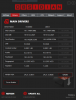
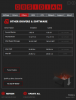
After restart:
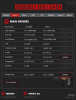
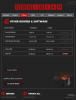 iRoxas likes this.
 -
I can also confirm that the Touchpad and BT drivers don't install correctly, since after you restart Obsidian-Tools, it goes back to saying what it said before. You also don't get the options to edit the Touchpad settings inside Windows.
a.Techie likes this. -
Ok guys lets start with BT.
Please update and report back what version you get now.
Im gonna try a different install method for the Touchpad and report ASAP -
This time it worked, sweet. I checked in my installed programs and it seems like 20.60.1 was installed.a.Techie likes this.
-
Bluetooth v20.60.1 installs correctly for me as well; my gamepad and keyboard connect and work normally.iRoxas likes this.
-
Take my money any day, I'm in!John@OBSIDIAN-PC and FTW_260 like this.
-
You mean at any given day I can just take your money if I feel like it?

PS. Full weekend working on fancontrol.
Our code allows us to control up to 4 fans voltage... Seems to be running solid
First trial / beta version is around the corner!
Sent from my MI Note 2 using TapatalkAnthony Accioly, Porter, FTW_260 and 3 others like this. -
With a working product, yes. You have a customer
That's excellent news
-
Sounds good. I'm eagerly awaiting the keyboard backlight tool. Is there a PayPal link somewhere to donate for the free tools as well?FTW_260 likes this.
-
Looking forward to it
-
I'm still getting bios update notifications all the time. I'm guessing it doesn't work right with Prema Mod?
-
-
What do you mean?
-
That you could risk overwrite Prema Mod bios.
-
Oh right, well I meant it doesn't work with Prema in the sense that it's not taking into account I've got Prema when it checks the version number, even though it does identify it as Prema Mod in the system info. Don't think you can install bios updates through the program anyway, or at least I thought I read that. Anyway, point is it's really annoying it keeps telling me there's a bios update lol.Papusan likes this.
-
Obsidian-Pc ain’t a @Prema partner. Your reseller will/should tell if there’s a new Prema Mod bios update.
-
Getting a bios update isn't the problem, being constantly told there is a bios update in my notifications is. It should either detect you're using a modded bios and skip checking for bios updates or there should simply be an option to turn off bios updates/notification.
-
Yeah, that would be better... Options. But remember Obsidian tool is in first place created aka intended to serve their own customers computers/notebooks.
-
Any update on this one?
Thanks -
Sorry... It's taking a bit longer because we are changing from OBSIDIAN Tools to:
Control Station + Updater
Basically 2.0 is around the corner.
Sent from my MI Note 2 using Tapatalk -
@ John@OBSIDIAN-PC, I hope fun control is also around the corner)
CLEVO Drivers Update Utility by OBSIDIAN-PC
Discussion in 'Sager and Clevo' started by Spartan@HIDevolution, Feb 13, 2017.


