Problems? See this thread at archive.org.
Hi John,
I believe I selected P670RP due to it having the most similar nomenclature, so that would be fine, I've updated all of my drivers through the utility and not noticed an issue, probably because as you say all 6th gen laptops share most hardware, I'd also add that since installing the recommended sound drivers and sbx through the utility my audio volume and clarity has significantly improved through the onboard speakers, so cheers for that!
-
i tested with the updater audio drivers (realtek) and the headphones bug is solved but now i have another problem, related with this drivers as i didnt have it with my previous ones. Which is, whenever i go from silence to sound, the sound fades in. it is really annoying especially for notification sounds where i only get to hear the last part of the sound. Ive looked everywhere and cant disable this annoying fade-in. Can anyone help me?
-
@John@OBSIDIAN-PC
Is there a way you could post a link to the purchase pages for the updater and fan control? I'm trying to convince a friend to switch to it and it's a bit daunting to say go and read 291 pages of posts in this forum. Those pages had great descriptions and the links you post simply have the zip file.
Thanks -
Here you go:
--For both (Purchase pages) --
https://code.obsidian-pc.com/windows/
--For Fan Control
https://code.obsidian-pc.com/windows/fan-control/
--For Updater
https://code.obsidian-pc.com/windows/obsidian-tools/
Additional Info for OB Tools (John's Sig Links):
--For FC
http://forum.notebookreview.com/thr...-by-obsidian-pc.801464/page-211#post-10778696
--For Updater
http://forum.notebookreview.com/thr...-by-obsidian-pc.801464/page-200#post-10777197
Make sure you take advantage of the promotion while it still lasts (Fan Control promo ended, but the Updater coupons are still valid for a sizeable discount):
--Official Threads--
http://forum.notebookreview.com/threads/obsidian-tools-promotion.823269/#post-10800200
http://forum.notebookreview.com/threads/obsidian-tools-promotion.823266/#post-10800058Last edited: Oct 10, 2018John@OBSIDIAN-PC likes this. -
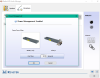
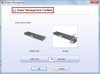
Disable the power management feature in the Realtek Control panel
Sent from my MI Note 2 using Tapatalkjoluke and TheChosen0ne like this. -
Keen follower of the nearly the entire thread...well mostly...
just "bit the soure apple" and bought the Updater and Fan Controller...
...
Well worth the money!!!!
Updater found 8 updates on pretty much everything.
best feature though is the silent fan curves which work...Wifey sitting next to me has approved of purchase for her ears sake!
thanks @John@OBSIDIAN-PC and keep up the execellent work on all your Laptop Tools...
(if i were you you should promote this much harder on all CLEVO / SAGER retail sites & reddit etc)Last edited: Oct 11, 2018John@OBSIDIAN-PC and TheChosen0ne like this. -
To add on to that:
This is what it should look like, since the option is fairly inconspicuous.
-
Hi, is it correct that the 'start app with windows' setting isn't working for any of the programs?
they don't appear in the task manager startup tab either.
also a unrelated question, before my brightness worked but since i reinstalled windows and before and after the updater that is gone.
i guess i used to have a specific driver version?
I'm just asking in case anyone knows a fix, if not you can ignore this question.
Laptop: Clevo PA71EP6
EDIT: okay this is weird, the software didn't auto start yesterday or this morning but when i turned on my laptop just now it suddenly worked fine.Last edited: Oct 11, 2018 -
Unfortunately it doesnt solve it to me.
My audio still fades in having the "Power Management Enabled" ticked or unticked.
If anyone has other suggestions im all hears. Until then ill keep searching
aziraphaleUK likes this. -
You could try disabling audio enhancements, may work
https://www.thewindowsclub.com/disable-audio-enhancements-windows-10 -
thanks for the help, i have already done that (and other usual stuff) and no luck
-
Also, John, whenever i restart my computer the LED brightness level is maximum although i set the bar to a bit under half.
Im guessing this is a bug from the software -
A few points/observations from me:
my laptop is used by the family as well who each have their own (non-admin) user account. I found that the "start app with windows" creates a Task in the scheduler which is trying to launch the app (CC, Fan Control and KeyboardLED) once a user is logged on.
However, all these apps are restricted to be run with ADMIN rights which means that these actually do not start at all.
My work around is two-fold:
1) change the task scheduler settings such to execute the app as a specific user account which has admin rights with the option to do that "wether the user is logged on or not"
2) changed the trigger to launch the apps "at system start", ie these get launched when waiting for user to enter the credentials
now i still have the issue that the app do not actually show up in the task bar for non-admin users.
i know its a trade-off, but i would prefer if the need for ADMIN rights is removed from these apps.
across control centre, KeyboardLED and FanControl there are use-cases which really should not limit them to require admin rights:
- change a keyboard color (by the way having user account based color profiles would be nice to see in a future feature update)
- change fan profiles
- chnage power profiles
some features would benefit from ADMIN rights so there is less danger of damaging anything if an untrained user tinkers with the settings....
regards -
This is a good reason to actually make the working features into a system service that always runs in the background with admin privileges in early boot, then have a user interface that any user can run that communicates with the service.
It's also nice as the features can work such as fan control and lighting without having any programs running in the tray, and saves a little bit of memory as the UI doesn't need to be in RAM. You could switch user accounts without affecting fan control or lighting at all, as the service would continue running and each user could theoretically run the UI at the same time and all be communicating with the same service.
A very simple way of communicating could be to store the ini in a directory such as C:\Users\Public\OBSIDIAN\ and use the Win32 API FindFirstChangeNotification to monitor the ini for changes using a thread in the service.
This would be the best method, as you can modify access permissions per-user for the OBSIDIAN folder through the Security tab.
Alternatively, you could store current settings in HKEY_LOCAL_MACHINE along with a list of users allowed to change settings, and the service can monitor HKEY_USERS of each allowed user for new settings. This method would allow you to tailor allowable settings to change for each user.
Another method is to only use an admin access settings file but change options over a TCP socket which also adds the advantage of being able to create access credentials, allowing you to control the settings from another PC over LAN or via internet. You'd probably want to implement TLS for that, though.Last edited: Oct 11, 2018joluke likes this. -
^ the changes and abilities it has goes beyond what non-admins can use, so it needs admin privileges. It's not possible to make it be non-admin, and if it's a windows service that's a whole other can of worms you're opening there.
And even then, non-admin users still cannot make changes that require administrator approval. The unit would be mostly a shell, if i am understanding it correctly. -
I hear what you are saying...but how do i explain to my 8year old that she cannot change the RGB lights of the keyboard...
also, MSI Afterburner is not admin protected and one can screw ones GPU if incorrectly used... -
You can't destroy a GPU with afterburner. Can crash the GPU driver probably but that's about it. It also runs with UAC privileges for me?
Sent from my OnePlus 1 using a coconut -
Anyone else getting periodic hangs when using throttlestop's built-in bench? I thought I had it narrowed to the fan control, but wondering if anyone else has this issue? It happens regardless if I'm using coretemp or the internal system monitoring. It's a bit concerning, because the benchmark is still running during the freeze and the CPU temp is rising without any corresponding rise in fan RPM.
-
´
We already use shared memory and TCP sockets for app communication (apps already talk with one another, ex: Control Station, Fan Control and even Keyboard LED).
The next step in the Fan Control is actually having a service which will interface with the EC and the UI will only communicate with the service.
Not sure when that will happen.
I need more time for this, unfortunatly i´m the only active developer at the moment.
Benchmarks with such thread priority should not exist, when a benchmark get´s top priority, even over driver actions and high priority threads that talk to ACPI then you have a problem, and that is not a problem with just Fan Control.
Please until the next big fan control update to do those benchs... we will greatly improve it.RogSmitty likes this. -
Hello
Are you sure it´s not the Control Station power modes replacing whatever value you set in Keyboard LED? Or are you not using the Control Station Power modes? -
im not using them. i activated, to test them, then de-activated, and the system didnt roll back to the deactivated state, i had to do it by myself, but the leds reset to max brightness everytime i wake up the computer, or turn it on (with power modes UNticked). I explained the best i could, hope i made myself clear
-
Just released two updates, Keyboard LED and Control Station.
Tell me if that solves your problem.joluke likes this. -
Nope, not solved, after reboot led lights still go back to max brightness
-
I'm assuming you don't have the Clevo Control Center installed right?
Also which keyboard led mode did you use?
-Single Zone
-3 Zones mode
-Reactive to Load / Temp
And is the auto-dim option On or Off?
Thanks
Sent from my MI Note 2 using Tapatalk -
@John@OBSIDIAN-PC when you have time would you be able to add a CPU profile for 7820HK please? Thanks in advance
-
No clevo control center installed, single zone, auto dim off, clevo p650 rp6-g
about the audio drivers: couldnt solve the issue, reverted to windows hd audio driver. -
About the UPDATER -
Does this apply to P957HR? Which model in the list will be the best one to select? -
I have the same problem but they go to off (i dont have installed cc) with the clevo p650hs
Enviado desde mi SM-G950F mediante Tapatalk -
Question,
I have a clevo PA71ES and since day 1 I have wifi drops.
I use different ping tests for about 8 hours and once in about 20 seconds I have a drop.
When I use the same test on other laptops there are no spikes.
To be sure I did the same test on other Wifi networks and the results are the same.
I used all the drivers that are comming with the update tool, now 20.80.0.5
When I play my other laptop no issues on same Accespoint (I use a nighthawk 5G accespoint behind my modem but on the 5g of the modem (Experiabox v10) the same issue.
Of course I checked for free channels etc.
Is there some issue with the Wifi AC 1550 killer cards?
For now I can't even play games like Fifa and COD BO4 because of the disconnects. Even when browsing sometimes and won't load pages for a few seconds (sometimes error/timeout message)
please any advice... -
Actually yes. More than an year ago, when i got my laptop, I bought it with that card and had strange problems with it too (my router was a tp link archer c7). after a lot of research and tinkering, nothing seemed to solve the issues. that was when i found this forum. If I remember correctly there is a big topic about the issue, more than 10 pages, cant find it though. There was no fix. I ended up buying another wireless card (intel AC 8260). No issues since
-
Getting a Metabox P750TM-G just want to know if the Obsidian Updater support my model?
-
just wanted to report that LED doesn't save settings, I always have to set it back, by default its just off.
-
That´s basically a P950HP6, the only drivers that might be different are the Audio/SBX, and even those i doubt they are different.
Yes it does, P751TM is the same.
And you are running from C:\Program Files\LaptopTools\Keyboardled.exe correct?
Obviously i should not have to say that all our models are tested before shipping and if any of our apps shows a bug like that (not saving settings) we immediately detect it. So what i usually need to do based on your reports is find out why it works on our units but not on yours.
Settings for keyboard led are actually stored in C:\Program Files\LaptopTools\keyboardled.ini
You can open the file to check if it is actually storing them or not.
You can even close keyboard led, delete that settings file, relaunch Keyboard led, change your settings and check that file again to see if it is storing or not. -
This is the kind of support I love! Keep it up John

Ps: still waiting for the price of the LCD since i wanna buy it from a reliable seller
Enviado do meu SM-N950F através do Tapatalk -
in my tools it is stored in C:\Program Files\LaptopTools\settings\keyboardled.ini.
if i want to reset all tools what files should i delete? all the .ini? -
Close all apps
delete controlstation.ini
delete fancontrol.ini
delete keyboardled.ini
delete updater.ini
delete user_power_mode.ini -
reset, rebooted, all seems fine now! thanks for the amazing job!
-
Yes.
Worked, guess the old settings from first versions might have confused it
I have a question about something that bothers me. When you go to clevo control panel then there is a sound tab, in that sound tab you can put the sound to "game", which bossts the Audio of the headphone jack, that feature is not present in the Obsidian control panel, that is the last feature I would need to finally remove the clevo control panel, are you planning on implementing that?
Last edited by a moderator: Oct 16, 2018 -
I'm not seeing a P950HP6 in the list. I see P950EP6, P950ER, P950HP, but no P950HP6.
Also, what is the recommended procedure to install drivers after a clean install? Is it okay to clean install Windows, install UPDATER and click 'update all', or is it better to install drivers one by one, rebooting as needed?
About the sound drivers - should I install the stock CLEVO drivers and then run the UPDATER so it knows which drivers to update? -
P950HP it is
My recommendation: Install Windows, do all Windows updates (some drivers require latest windows build), install Updater and install the drivers one by one (this way if any causes problems you will know which is doing it).
Audio and SBX you can install from CLEVO website.anytimer likes this. -
And the Keyboard LED still doesn't save when shutting notebook down, only when restarting.
It saves every single setting, except for the selected mode. I cannot find anything in the settings.ini that has something so I guess it doesn't save it into the .ini. What would the setting name be for Effects?
Effects = int?? -
I planning a dual OS Window 7 and 10 on my P750TM-G so do I purchase one or two for the updater?
-
Windows 7 on a P750TM... I don't even know how to install 7 on these units... Not easy I'm sure.
The Updater is Windows 10 only BTW...
Sent from my MI Note 2 using Tapatalk -
Keyboard LED updated to 1.0.9
- New Brightness apply method (code improvement)
- Save and Load now correctly applies to Effects
- When effects are selected other options are disabled to make the UI better understandable
- Auto-dim improved fadeout
- Added Touchpad Stripe / LCD Lid color selection - Tested only with touchpad stripe on P750 -> please report for P870 LCD lid
- Lot´s of other small improvements -
John,
Just updated and clicked on the Stripe / Lid tab and now I can't click on any of the other tabs.
My model is P870TM1 -
Make sure Effects are set to "none" otherwise everything is disabled (as it should since effects replace any color mode).
If anything just close it and delete C:\Program Files\LaptopTools\settings\keyboardled.ini -
Not working at all for the LID. Tried all the basic colors, but the color never changes. Also tried setting it to NONE, but the LEDs remain lit on the LID. Tried deleting the .ini file, but could only reconfigure the keyboard and nothing to do with the lid.
-
Hummm then the current method probably only works with the Touchpad LED Stripe.
I guess i need a P870TM to finish this... BAHHHHHHHHHHHHTheChosen0ne likes this. -
Getting this error when trying to install the latest Intel Wifi driver (9260, PA71HS-G). Anyone else have this issue?
Attached Files:
-
CLEVO Drivers Update Utility by OBSIDIAN-PC
Discussion in 'Sager and Clevo' started by Spartan@HIDevolution, Feb 13, 2017.