Problems? See this thread at archive.org.
Guys, anyone how it works the VGA fan, after the upgrade to "blacky.bestmail.ws/CLEVO%20BIOS/P150EM/P150EM_0505.zip" ? ...The conversation, of course, about P150EM.
I still had, and the driver from the site Clevo : ftp://usftp.clevo.com.tw/P1xxEM/VGA/7970M.zip, and on this driver : http://download.benchmark3d.com/AMD...AMD_Catalyst_12.7_Beta_win7_32-64-7900-MOD.7z the fan continues to loud spin any 6-8 (!!!) minutes after lowering the temperature of the VGA to 40-42 (!!!) degrees Celsius, which is very-very annoying ((( Question - what is meant by this change : "1.Modify VGA fan control" ??? ))) (((
Would love to hear your feedback on the work of the 7970m VGA fan on the new EC/KBC V 1.00.05 & BIOS V 1.00.05
-
Thanks, cool, wanted some confirmation before doing so.
-
problem with mine p170em...
i make an error , i've updated the bios ( 1.0.0.6 version ) before the EC firmware ( same 1.0.0.6 ) ...and now the ec firmware don't recognized the bios... how i can resolve it ? re-installa an older bios , then flash the ec firmaware 1.0.0.6 and then re-update the bios with the last one ? -
yep, sounds good
 just make sure that theres no version check enabled when flashing the older bios over the newer one
-
So which one is Sager and support for Fn+1. In messing with these I lost my Fn+1 support and like and idiot didn't back up my original bios.
I managed to get the BIOS 1.00.05LS3 but am missing EC 1.00.05SA.
Nevermind. I love you Tyranids and iaTa! I'm all set. Whew.
+rep to you both, you saved my day. -
thanks, but , i don't find any complete old bios for the p170em...
-
Blacky offered to provide older BIOS & EC via PM...
-
So who here with a Malibal p170em, has upgraded to 1.06? Any problems? Apparently Malibals use the vanilla clevo. Would a Sager BIOS have any benefits over a Clevo bios? Those modified fan tables look pretty interesting, but not necessarily enough to make me want to upgrade.
-
I'm on 1.06 and no problems for me.
-
i need to modify the scripts of the 04 bios and ec batch file to don't stop the downgrade , how i can make it ?
the batch file of "flashme.bat" show me
@echo off
@set BIOS.ROM=P170EM.04
:: Flash ME
fpt -f %BIOS.ROM% -me
if errorlevel 1 goto End
fpt -f %BIOS.ROM% -desc
if errorlevel 1 goto End
@if exist MSDM.BIN del MSDM.BIN
::=======================
:: #define NG 0
:: #define PASS 1
:: #define ERR_FILE 2
:: #define ERR_NOMSDM 3
:: #define ERR_ACPI 4
:: #define ERR_CLEVO 5
::=======================
GMSDM.exe
if errorlevel 5 goto NoMessage
if errorlevel 4 goto WithoutMessage
if errorlevel 3 goto NoMessage
if errorlevel 2 goto SaveMessageFail
if errorlevel 1 goto WithMessage
if errorlevel 0 goto Fail
goto Help
:NoMessage
goto WithoutMessage
:SaveMessageFail
goto End
:Fail
goto End
:Help
goto End
:WithMessage
AFUDOS.exe %BIOS.ROM% /p /b /n %1
OAIDDOS MSDM.bin /OA
@if exist MSDM.BIN del MSDM.BIN
AFUDOS.exe /shutdown
goto End
:WithoutMessage
AFUDOS.exe %BIOS.ROM% /p /b /n %1
AFUDOS.exe /shutdown
goto End
:End
the batch file of "ecflash.bat show me this
AFUDOS ECP170EM.04 /e /shutdown
i want to make this because i've installed the 06 bios before the 06 ec and now i want to install 04 ec than 04 bios and after that put the 06 ec and next the 06 bios. -
Just install EC06.
-
it not works , you need install it beforse 06 bios..
i've tried to install a modify 04 bios ( with the n chakc old bios procedure ) and EC but now mine p170em has a problem , when i start it , remain active power button led , bluetooth led and the system , after about 30 second restart and the situation restart from beginnging...
argh!
i've tried to remove the battery bios and not the system , after the switch on , don't restart but switch off. -
We could have forced EC06 to install...
Did you install EC04 (while being on BIOS 06) and then after the shutdown it hang and you couldn't install 04 BIOS? -
that's the story
i've take the p170em with the 1.0.0.3 bios and EC
i flash the bios 1.0.0.6 before ec and the ec firmware don't recnognized the bios
i try to re-install the 0.3 or 0.4 bios but nothing works , next a try to flash the bios with a version who pass over the auto-check ( if there's a newer bios , the older is im possible to install )... and this is the 1.0.0.4
i flash correctly the ec but not the bios , now the sistem don't start anithyng , only black screen with bt led , power led and keyboard active , no bios log etc... -
Maybe a reseller can chime in, but it very much looks like BIOS 06 won't work with EC03/04. Which basically means it is bricked...sorry man.
You may try to keep FN & B pressed just after you hit the on button as the shutdowns and reboots that you first got where because of non working data in NVRAM, but it looks like it was cleared by removing the cmos battery anyway... -
hello people my bios if I update to version 114/EC13 every restart I get a black screen.only 112/EC13 works for me without problems.
my NB is Clevo P150HM-Ati 6970-8gb,DDR3,OCZ-A3. -
Qestion:
How to flash Clevo P150EM BIOS to Sager NP9150 BIOS, to for get a PERFECTLY - in my case it 7970М - VGA fan control, a.k.a. fan table?
Answer:
IMPORTANT! It is assumed, that you have ALREADY flashed your P150EM last CLEVO EC and BIOS for P150EM ( http://forum.notebookreview.com/sager-clevo/416916-clevo-bios-thread.html#post5300982), if not - do this, by following the instructions from the archive : http://blacky.bestmail.ws/CLEVO BIOS/P150EM/P150EM_0505.zip Thank you, blacky!
1. Create a bootable flash drive with the FlashBoot 1.4.0.157_portable; copy at her 3 Sager's files from this archive Clevo P150EM to Sager NP9150 BIOS(ECP150EM.SA and P150EM.LS1)=PERFECTLY fan control.rar ,or mirror Download Clevo P150EM to Sager NP9150 BIOS(ECP150EM.SA and P150EM.LS1)=PERFECTLY fan control.rar from Sendspace.com - send big files the easy way : AFUDOS.EXE, ECP150EM.SA, P150EM.LS1 (( Thanks to Tyranids and iaTa)); reset the BIOS settings to default values, and then boot mashine from flash drive.
2. FIRSTLY flashed Embedded controller/KeyBoard controller (EC-KBC) with the command :
AFUDOS.EXE ECP150EM.SA /E
3. DO NOT Power OFF or Reboot/Reset computer
4. Secondly flashed the BIOS. Command line :
AFUDOS.EXE P150EM.LS1 /P /B /N
5. PowerOFF computer (hold the power button 3-4 seconds)
a. Plug OFF the AC adapter for 5 seconds, then plug in the AC adapter.
b. Power ON the system, the system will shut down automatically, then AUTOMATICALLY - after 2-3 seconds - Power ON
c. Enter the CMOS setup to check the BIOS version.
Now I am very pleased with the machine! ...Almost. Thank you very much for the BIOS, Sаger!!!
I know, that is not "discovered America", but still I hope for beginners this message will be useful. -
discovered america *lol* nice one
Sent from my Galaxy Nexus using Tapatalk 2 -
My situation is identical, but EC version 06, I flashed BIOS version 04 on the version 06.
How to create BIOS Recovery USB Stick with BIOS Version 1.00.06 and run it (if i press FN+B - orange led blinks and laptop will not boot)? -
Hey everyone. Gonna buy my new Clevo P170EM in a week. Wanna know something: a friend of mine told me that there is a BIOS that does magic with the nVidia GTX680?!?
Does anyone know what he was talking about? Thz
Sent from my GT-N7000 using Tapatalk 2 -
Magic? No it only makes the GTX680M become readable to the BIOS and the 06EC comes with modified fan table. 06 for the EM, check front page.
-
Sorry DeadMan, but if FN+B & CMOS battery removal fail, then it's a dead man, too.
-
now you have black screen with no bios log ?
-
thought it was something else.. a modded bios but since i didn't saw PRema talking about P series bios i started to have my brain twisted lol
-
ure probably talking about the modded vBIOS which is used to overvolt and overclock the 680m, not the system bios
Sent from my Galaxy Nexus using Tapatalk 2 -
Yes, lights is AC-Line(Green), Battery (Orange always on, if i press Fn+B - blinks, or green if i press power on button) Power On, Wlan & HDD LEDs.
Where CMOS battery? how to get to the CMOS battery?
And yet, how to make BIOS Recovery USB Stick (or CD) with BIOS 1.00.06 for my Clevo P170EM (DNS 0151828 - under such brand sold by us - I'm from Russia)? -
Just FYI, if any of you are in the US or Canada, these guys do full service BIOS repair for the Clevo: AQSTECH they restored a P205 Toshiba for me a while ago, with no problems.
-
The bios battery is below the keyboard.
Remove the plastic bar that covers the power wlan etc lights (It's just snapped in, can be lifted from the sides).
Remove the 4 screws below,
lift keyboard carefully (it has a flat cable below, so careful)
disconnect the Cmos battery for like 30 seconds.
(all with PSU/Main Battery removed).
If that fails its RMA, there is no leaked BIOS recovery for the Aptio Clevos except via serial programmer.
-
remove the plastic over keyboard , from left ro right ,
remove keyboard by 5 screw
plug off battery for some minutes
re-connect and tell me if this change something
-
made, but nothing has changed
Once I broke the BIOS battery power supply -
and what you do now ? i found an agency in Italy who can reinstalla bios on mobo/laptop... but this , with shipping , cost a lot , 100
-
Tomorrow I will go to service centers. Know what they say.
-
Bios 07 up at MYSN for the P170EM. No change log though, I wonder what is does.
-
tel me what they say when you have news
-
Today at the city found a specialist from our service center, said that tomorrow will do, but the warranty will be gone. While waiting for the result
-
Change log for 1.00.07:
Source: [Sammelthread] 17,3" Clevo P170EM(3) Gamer Notebook 2012 (SandyBridge/IvyBridge)
So can anyone tell me one doubt:
First flash the EC then BIOS right?
-
EC first! Right
-
Thanks a lot mate
Will order two Clevo like the one on my signature in 4 days
Can't wait ehehe -
Alright, so I bought a laptop from cyberpowerpc and it is running a Clevo W150ER on AMI 4.6.5. The Bios options are.......minimal at best. Since this is a gaming notebook I need Bios options for Cpu speed, speed step options, turboboost, etc. Or something compatible with Intel Extreme Tuning. Can anyone point me in the right direction. I havent modified BIOS before.
-
check premas sig and his biosmod website
Sent from my Galaxy Nexus using Tapatalk 2 -
I try to run it, but it says it is having compatibility issues because I am using a 64 bit set up.
-
I have Sager NP9170. From the instruction here it says change the .bat file and tell the system not to restart after flashing ec. however in the part flashing bios, after updated intel ME the system needs to restart before update the bios, would this brick the machine?
edit: ok i update to ec 05 and bios 05 first then up to 06 should be ok -
@stratosfear: best way to flash ur system BIOS is in a DOS environment. its not recommended to flash it in windows
-
i have updated both ec and bios to the latest verison 06 and i can confirm for my np9170, the fan cooling the gpu still keeps spinning even the gpu temp is down to the level the fan can stop. same way i have to open any 3d appplication to remind the fan to stop.
-
BIOS 1.00.07 for P170EM now up on the first page.
-
I can't seem to find the option to boot to USB. I'm in 1.00.06. Does anyone else have this problem?
-
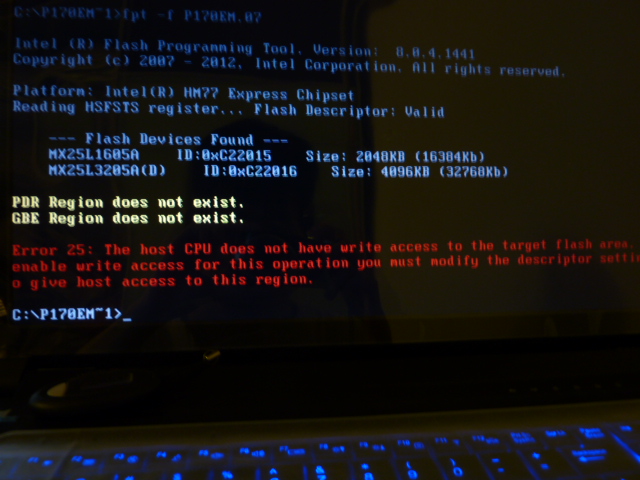
update from 1.00.06 and got this screen and fail to write, what happen?
![[IMG]](images/storyImages/P1020085.jpg)
Attached Files:
-
-
Did you run MeSet.exe first?
-
I can't even boot to my USB ever since flashing 1.00.06. This is how my boot menu looks like right now:
![[IMG]](images/storyImages/IMG_20120802_092937%20%28Custom%29.jpg)
![[IMG]](images/storyImages/IMG_20120802_092944%20%28Custom%29.jpg)
Did the .06 bork the boot menu?
I tried flashing from CD, but I can't make a bootable CD that can show the .07 files in it for the life of me. I create a bootable CD with the files using Win98SE image. When I'm in DOS, I start at the A: prompt. I do a DIR and the .07 files aren't there. I go to C: and same, not there. There are no other drive letters I can switch to. I booted to Win98SE with CD-ROM support, mind you, but it can't read the .07 files in the CD. -
i am running 1.00.06 and already updated me when flashing last time, need to do once more time?
Clevo BIOS Thread
Discussion in 'Sager and Clevo' started by Blacky, Sep 11, 2009.