Problems? See this thread at archive.org.
Is there a 1.00.05EU or 1.00.05SA KBC/EC firmware I can flash over mine? I want to find out if Fn+1 will turn on the fans to max.
-
I have contacted Sager about getting their latest BIOS, but I am wondering about the KBC/EC. First of all, I do not know what KBC is, but EC is electric control I believe? Knowledge Board Control? I don't know. Either way though, do I need a special EC firmware from them or does their BIOS work with the Clevo KBC/EC posted on the first page?
-
No, you need both your EC and BIOS to be the same. The KBC as far as I know stands for Keyboard controls.
-
EC/KBC Stands for Embedded Controller / Keyboard Controller. They used to be back in the day two separate chips on the motherboard. Now-days they are all the same hence why there is now a / as the EC/KBC is what the Keyboard, trackpad (PS2), fans, led indicators, led logos, etc hook to. Also does all the AC adapter and battery management, also controls the power states of various things like WiFI, Btooth, 3G, also does temperature monitoring, and controls all the physical switches on the computer.
So yea kinda important -
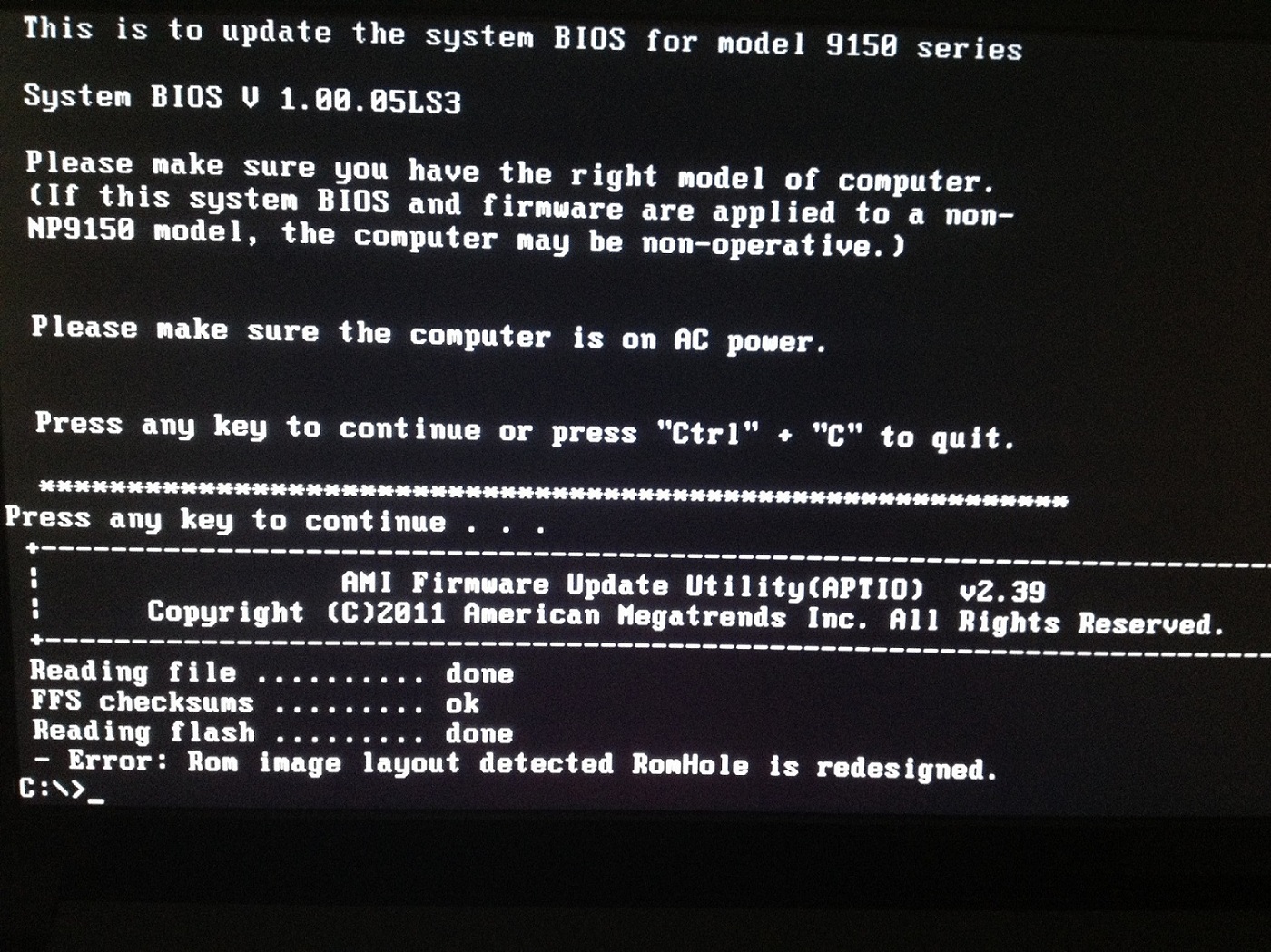
When I tried to flash the BIOS to the most recent Sager one, I am greeted with the following error message: ROM image layout detected RomHole is redesigned.
I took this picture with my phone, so forgive the quality, but that's what it looks like. The computer booted back up fine and I typed this message from it... But I'm not sure what exactly is going on here.Attached Files:
-
-
Edit the *.bat file and see if there is a /K command.
It should read: afudos ... /P /B /N /K ...
If it is there remove it.
If it is not there add it.

-
I don't know how to do what you are suggesting. I was given this .iso that I attached. It appears empty, even when burned to a disk and with view hidden folders enabled in folder options of control panel. I know it is not empty though, because 1) it's a 7MB file and 2) I was able to boot from the disk I made by burning it and see the file contents with the dir command. The .bat file is autoexec.bat, but I don't know how to view it or access it aside from DOS booting with the burned disk...
EDIT: I can't attach the file because even as a .zip it's still largerthan 585 kb. I uploaded it here: http://upit.cc/f/c356431a.iso -
I received 05EU for the EC update from Malibal, but when I tried to flash using AFUDOS, it says Error BIOS is write-protected, what do I need to do to by pass this and update the EC firmware?
-
Tyranids you need to use something like UltraISO to extract the boot file from the ISO. Then open the bif file in UltraISO and you will see the required files.
Or just use the files I posted previously where I have already done this. -
latest for sager NP9170 is BIOS: 1.00.05LS1 EC: 1.00.06SA
anyone got these? -
I've emailed Sager trying to acquire them. I'll update more tomorrow.
-
Hello,
The .bat inside the EC file Malibal sent me has 2 strings:
AFUDOS ECP150.5EU /e /shutdown
rem AFUDOS ECP151.02 /e /shutdown
And when I tried to update with the AFUDOS downloaded from AMI site it gives me this error:
ERROR: BIOS is write-protected
How do I get around this? Anyone know? -
EDIT: That is a strange bat file the rem command line should be first...exchange them and try to reflash the EC.
-
It still says ERROR: BIOS is write-protected
The AFUDOS I'm using seems to be version 4.40, are there any recommended ones for Clevo laptops? -
Oh, then of course that's the problem...ha ha ha. Did they not send you the whole package?
The latest Afudos has some changes and refuses to flash.
Use this one:
File-Upload.net - AFUDOS.exe -
They only sent me the ECP150.5EU it seems and thanks for the afudos.
Edit: Thanks it works This EC also brought back the Fn+1 function, Fn+Esc works too.
-
Updated BIOS and EC on the front page for
P150EM
P151EM
P170EM
Enjoy! -
oh damn thats nice!@fn+1 functionality
but what does fn+esc do?
Sent from my GT-I9001 using Tapatalk 2 -
I flashed the latest EC for my P170EM but fn+1 doesn't seem to do anything to the fan speeds.
-
Here you guys go this is the newest Sager EC/KBC as well as the accompanying BIOS. It's 5.45 MB so I can't upload it as an attachment, but here's the link: http://upit.cc/f/60b65f97.zip
I don't know how to get the actual files out of the .iso I have of the EC/KBC from Sager, so if anyone could do that, it would let people do both off the same flash drive. At the moment I have the EC/KBC on a disk and BIOS on a USB stick, but that's really an inefficient use of resources. -
There was a program that could open the ISO and extract the image... forgot its name.
Also the BIOS file seems to be for the 150EM.
You sure you got the right files? -
The resulted file is the same as the one for the BIOS.
-
Yeah I posted a new link.
-
I'm pretty sure. This is the Sager BIOS iaTa posted on page 236 and the EC/KBC was emailed to me from Sager yesterday. It's for an NP9150, which is based on the P150EM yeah. I am running both right now and experiencing no problems. Everything is recognized, booting is fine, and both Fn+1 as well as Fn+Esc work.
-
Fn+Esc brings up the Control Center menus.
-
Has there been a P170EM owner who flashed the latest EC and got Fn+1 working? There's a test I want to do with my 6 NotePal U3 fans at max with both fans also at max.
-
Now that you speak of it, I've only seen P150EM so far.
-
How are you guys getting the BIOS to flash from USB. I just get "unknown command or file name" when I type update.bat
I followed the guide.
I have already installed the EC using the ISO on a cd.
edit
Nevermind, had to type autoexec.bat instead
edit
The fn+1/esc is nice, the problem is that my cpu fan keeps reving up for no reason. It stays silent for about 10 seconds and then it spins up even though temps havnt increased at all. Does anyone know how to get the cpu fan to stay silent? -
Hey guys, I think the last BIOS I installed a few months ago does not perfectly handly the fans of my Clevo x7200... before I had no heat issues, and now if I encode a video for 5-6 minutes at 100% load, it reaches 95-100° and clocks itself down to 1599 Mhz.
Now, should I flash one of those Mods: http://forum.notebookreview.com/7177417-post1684.html
Or use any stock BIOS/EC and which, as the Clevo Links are down?
Is there anything else I can do for cooling my CPU without loosing the warranty? Did already clean the dust and I'm using a cooling pad.
Thanks in advance
PS: FN+F1 activates the fans for me too, but I guess only the GPU ones as the CPU does not get much cooler -
Are the BIOS updates posted on the main page Clevo BIOS or Sager BIOS? The reason I ask is because I got my computer from Prostar and they are a Clevo reseller not a Sager reseller and I don't want to brick my machine.
-
I just went ahead and updated the BIOS and it works with my Clevo model laptop just in case anyone else was wandering the same thing.
-
Any reports of changes in the fan management with the newest P150/P151EM BIOS? I've read so many complaints about the first fan stage being too loud already.
-
Yeah, it got worse for me. It idles at a higher rpm than it did before I flashed. -
Added CLevo BIOS 1.06 for P170EM.
-
it would be nice if in bios would be an option to set (with maxs and mins, of course) the values for when the CPU & GPU fans to start.
I have read that other notebooks have this option. -
i am using sager NP9170. any specific procedure to prevent bricking my machine?
-
If you have a Sager, I recommend you stick to Sager BIOS.
Email them and ask them for the latest. -
has anyone tried this out yet? did it improve anything?
-
I'm on it now but nothing to write home about.
-
it says it modified the fan table... do you notice any changes there?
-
I just flashed the EC and it went well. However, I'm trying to flash the BIOS right now and I'm getting PDR/GBE region does not exist followed by "Error 25". According to the OP, if my BIOS is 1.00.04 or lower, to run an EXE first, but since mine is 1.00.05, I just run the batch file.
Should I run the EXE first despite having a 1.00.05?
UPDATE: OP, please update the... ummm... OP (original post). (Lol.) Even under 1.00.05, the user must follow the read me and run the MESET.EXE first. Proceeding with FLASHME.BAT will NOT work. Anyway, I'm on 1.00.06 for both KBC/EC and BIOS now. Thank you, OP!
EDIT: Regarding the fan table being modified, is this a temp:RPM change? If so, does anyone know what the exact numbers are?
UPDATE #2: Aside from the fan table modification, the EC firmware update also makes it so that when you start up your computer, prior to entering Windows, the keyboard no longer defaults to LED-blue before proceeding to changing into the colors your customized them to. When you boot up, the keyboard remains unlit until after you log on. This might be minor to some, but I think this is the way it should be and I'm very happy they did this. I don't want the blue LED to face or burn out earlier than the other colors because they're logging more hours than the rest due to this. Very nice! Scratch that, after a few restarts, it started going back to blue again. Weird. The LED was completely off the other two times I restarted before. (Sad panda) -
I just post the instruction from Clevo.
-
Same deal, had to use MESET.EXE from 1.00.05 to get write access.
-
Clevo even had a broken .bat file in the latest official release... So we shouldn't take their word to serious...ha ha ha.
-
Hi guys !!!
Somebody know where can i find a bios and EC update for clevo W253ENQ? -
So if I want to flash the newest BIOS for P150EM I have to use the Meset.exe from the previous BIOS package? My current BIOS is 1.00.04 and GTX680M is shown empty on the BIOS menu like your GTX675M in HM.
-
hi all,
any1 help with 100/240V Autoswitch AC Power Adapter compatibility P150HMx , Preference (220w model ) or 180w. Link ebay plz . I think change my video card gtx 460m(120w) to gtx 675m. -
@hackness
Nope, everything is fine in Blackys 05 files. -
hi,
the system doesn't recognize the bios update for c480, a warning sez "the bios(C4800) does not support this M/B.."
is there something wrong?..thanks
Clevo BIOS Thread
Discussion in 'Sager and Clevo' started by Blacky, Sep 11, 2009.