 Problems? See this thread at archive.org.
BIOS and EC are 4 MB, The ME Firmware is an other ~2MB on P-series EM models.
The EC in BIOS files isn't identical to the EC in EC file. The BIOS in EC files isn't identical to the BIOS in BIOS file. Why...CLEVO...LOL
-
-
Thanks, now have understood a lot.

Do you know what firmware parts are reflashed during Boot Block Recovery procedure? I see Boot Block areas are different in EC v6 and BIOS v7 (compared just compressed ones, didn't extract all modules). What of these two Boot Blocks is started if the recovery procedure is invoked? BIOS Boot Block is located at CPU on-reset start address; does it perform recovery procedure itself or calls EC Boot Block instead?
And yet another question. EC firmware is flashed by AFUDOS without /b option so EC Boot Block is not reflashed. But BIOS is flashed by FPT tool, and I see Boot Blocks are always processed. If FPT reflashes them each time, it definitely is a bad behavior. Is there a way to avoid FPT from reflashing Boot Blocks? -
That's most likely the problem. Technology development through a massive game of "Chinese Telephone" (no offense intended) is a dire situation.
-
The whole recovery precedure never worked on HM series.
It required more than just renaming the rom and putting it on a usb or cd-rom and press FN+B...it works on many other notebooks, but we could never trigger it on the Aptio Clevos.
Some systems expect a certain folder structure or additional files to be present...we all ended up with either SPI programer or RMA...sorry
-
Has anyone tried setting BIOS_REC to "Enabled"? Maybe it allows bios recovery to be triggered via Fn+B, etc...
-
Sounds bad. Do you mean that Boot Block code does not read the .rom file and flash it at all? Or that it does and all looks fine but the laptop still doesn't start?
Can ROM ICs in P1xxEM/HM be reprogrammed using SPI in-circuit, without resoldering, just by connecting programmer wires directly to their leads? -
It simply doesn't care if only a rom file with correct name is present...it doesn't trigger the flashing process. All the Recovery settings in BIOS setup screen are basic Ami stuff...at least on HM it had no effect...
I guess you can do an in-circuit programming for a one-time recovery, but you still apply 3.3v to the board doing that, so it may not be the best solution when doing it more often. -
Maybe somebody having a bricked P1xxEM will try. I don't want to test it on my new laptop only to check if it works.
Doesn't the motherboard apply 3.3v itself if AC adapter is plugged? Or if AC adapter is plugged, EC can communicate with ROMs even if power button is not pressed? -
Tell me please, what is the difference in practice, after flashing the BIOS to version 1.00.07 with bios version 1.00.03b?
Are you interested in the practical side of it, and experience.
My configuration is -Clevo P170EM with GeForce GTX 670M and Core-i7 3610QM.
What is new, I see? -
I have exactly the same model (DNS 151828) as yours. Initially, it has EC 1.00.03 and BIOS 1.00.03RDN. The fan policy was "aggessive". Both fans reach their full speed quickly and cool CPU/GPU down very efficiently (CPU frequency didn't drop less than 3100 in Aida64 System Stability Test). Of course, it was loud but only under a load. Without significant load, both fans were almost silent.
1.00.03 has a bug (VT-x blocked) so I have upgraded to stock 1.00.07 (with EC 1.00.06, of course). Clevo stock EC firmwares have a "conservative" fan policies so fans never reach their full speed now. Of course, the laptop works quieter under full load but CPU frequency drops down to 2500.
I found no other changes. -
And where to get the BIOS 1.00.03RDN? Either find a modified firmware with an aggressive profile fans.
Also noticed the drop in frequency in the AIDA - at the beginning of the test 3100, but then quickly drops to 2600-2700 (it is now on 1.00.03b).
On 1.00.06, too, noticed less noisiness (as it turned out at the expense of frequency). You can find somewhere in orig. firmware from the DNS?
I bought a video editing at work and on business trips, the rate per cent is of sufficient importance -
i'm here with a bricked p170em...
how i can try to re-flash bios without windows , dos , bios ?
it's possible with the usb pen and the ami bios guide ? -
This is an international forum so writing in national languages is impolite here. If you prefer Russian, please write a private message.
-
OK. Wrote in a personal message
-
I have provided a detailed description for you in my second private message. Here is an edited copy:
On any other computer, make the preparations:
- Download 1.00.06 EC firmware and unpack it to an empty folder.
- Locate ECP170EM.06 file and rename it to P17EM_08.rom (this name is specific to P170EM).
- Format a USB flash stick or an SD/TF card in USB card reader dongle using FAT (FAT16) file system. A small-size (2 GB, 512 KB or even 64 KB) medium is preferred.
- Copy renamed file to the stick/dongle.
- Insert the stick/dongle in USB slot of your P170EM. Don't connect any devices (USB keyboard, mice, external display etc.).
- Plug AC power in.
- Turn the power on then immediately press and hold Fn+B. The laptop should access USB stick (if there is a LED indicator, it should flash). After several seconds, release Fn+B. If a dialog appears on the screen, follow the instructions. Otherwise, simply wait until the laptop shuts down. Maybe the recovery process will be hidden, without any screen messages. If the laptop looks like hung, don't turn it off immediately, wait 2-3 minutes before.
- Regardless of the laptop reads the file or not, it will shut down and restart automatically. Let it restart untouched to see if something was changed.
- If nothing was changed, try insert USB stick into other USB slot, turn the power off and repeat with Fn+B.
- If still nothing, try to repeat with Ctrl-PgDn and Ctrl-PgUp.
- If you see recovery messages and then the laptop powers down automatically, unplug AC adapter from it, wait 5-10 seconds, plug AC adapter back and turn the laptop on.
- If the screen remains black and USB stick/dongle indicator doesn't flash for some time, please carefully watch for other "live signs" (sounds, laptop LED flashing, including power/battery ones, fan speeds etc.) and report them here.
Today Prema said that P170HM's Boot Block recovery mode doesn't work properly. So this procedure may not work in P170EM too. -
i'me here , tryed with an usb pen
i've take the pen , formatted in fat32 mode , put inside the "P170EM.04" ( 6.144KB size ) file with the name "AMIBOOT.ROM" the put on the clevo and presso CTRL + ( 7 ) HOME
the pen has been read from the machin , then , after 30 second the laptop reboot but nothing changed....
but the good news is that the pen has been read two times , the ctrl + home ( 7 ) works and it read the file , i think , only if it is named "AMIBOOT.ROM" if i use the same file but named "P170EM.04" it was not read by the machine.
sorry but i've delete for an error the message
now i've try this with a 16gb corsair usb pen...
i've do all , pen read by machine , restart automatically and then....appared the bios logo ...now i can entry in bios!
no message show before the restart and the bios logo ( the screen appared when "boot logo" is enabled...now i try to run the machine and update the bios machine.
i can see now , bios revision 1.00.05 and ec firmware 1.00.04..
now i select systema firmware updating...it run now on the bios page dedicated...
1.0.0.6 ec firmaware.... 32%...
finished , it works but bios show me the same info...
ec firmware 1.00.04
bios 1.00.05
now i try to update the ec to 1.00.06 version -
Congratulations! It sounds very good for me because I was afraid that P170EM cannot perform Boot Block recovery like P170HM. So if I decide to flash some modded BIOS and get a brick, I will have a way to reanimate it.
-
updated all ! now i've 1.00.06 is EC and Bios ! , laptop worksssss!
-
Everyone here deserves a rep! You guys managed to find a way to recover for a bad bios flash! Congrats!
-
many thanks for you guy! you make this day better for me ! i've saved 100 ( bios remage from an specialized italian agency ) !
-
It sounds as if you have rewritten the NVRAM and saved from corruption not that it actually flashed the BIOS...your NVRAM was corrupt, not your BIOS bricked...
...we had the same on P170HM with that procedure (FN+B = USB/CD-ROM flashes then restores NVRAM to default & reboots, with or without ROM present)
...otherwise it would have had the revision of the BIOS that you renamed, wouldn't it?
(Your BIOS with corrupted NVRAM was 05, the recovery that you renamed was BIOS 04 = it didn't flash any BIOS)
We had EM series boards, where people actually changed BIOS values, which prevented the system from booting and this never worked with a real brick...
...someone better confirms with a working system and a different version update that this really works, before people build their faith on it...
ITS GOOD TO SEE YOUR MACHINE WORKING THOUGH!!!
-
Hmmm, you're right. Thanks for pointing to that, I didn't notice it. But in any case, the procedure is useful a lot.
-
I'm not sure if this is just what throttlestop does, but have a look at this document:
PPM in Windows 7 and Windows Server 2008 R2
If use regedit.exe and browse the "Processor Power Settings":
HKEY_LOCAL_MACHINE\SYSTEM\CurrentControlSet\Control\Power\PowerSettings\54533251-82be-4824-96c1-47b60b740d00
There are a number of subkeys that govern things like throttling, core parking, processor frequency, etc...
Set the "Attributes" to "0" in each subkey, and the options will be shown and accessible for modification under:
Start > Control Panel > Hardware and Sound > Power Options
Click "Change plan settings" for the "High Performance" profile.
Click "Change advanced power settings"
Expand "Processor power management"
Notice all the options that govern how windows modifies performance states of the processor.
Consider setting:
"Processor performance increase threshold" = 1%
"Processor performance core parking min cores" = 100% <-- 100% if you want to disable core parking
"Processor performance decrease threshold" = 0%
"Allow Throttle State" = Off
"Processor performance boost policy" = 100%
"Minimum processor state" = 100%
"System cooling policy" = Active
"Maximum processor state" = 100%
"Processor performance decrease time" = 100 Time check interval
"Processor performance core parking max cores" = 100%
You may have to reboot.
Does this change the processor frequency behavior? -
tried it, can only decrease in frequency
And one more - the spread at 12 degrees Celsius between the cores at full load (AIDA64) - is a normal frame?
The core 1 - 78С
The core 2 - 88С
The core 3 - 90С
The core 4 - 88С
Here I think may, in serv. center have not changed thermal paste after flashing the BIOS, coolers because they were shooting to remove the motherboard and BIOS flash.
Who has what temperature? -
Do you use ThrottleStop as well? Clevo has added a feature that the P150EM/P170EM turns off Turbo boost when both the GPU and CPU are in use to avoid larger bump in power consumption, so far the only solution I have come across is by running ThrottleStop and let the i7 CPU run like it really should have been.
-
They really disabled Turbo on P-series EMs? :confused2:
Since which revisions? -
yeah ive read several posts pertaining to that. its weird, one should think the machine to be able to handle gpu and cpu on full throttle, since the HM series was able to do that as well! and now with an em machine ull get a disabled cpu turbo boost when stressing the gpu and cpu, sucks big time
Sent from my Galaxy Nexus using Tapatalk 2 -
Tested at the Aida64 and indeed, if the test without a video card, the frequency of 3100, if the video card, then - 2600-2700. Bios 1.00.03B, EC 1.00.03
Scratching their heads, whether or not to flash the Bios 1.00.07 and EC 1.00.06? -
I didn't check the motherboard revision, but for BIOS, 1.00.04 and 1.00.05 for P150EM showed the same sign, I'm assuming since the start. Without ThrottleStop it hardly reaches 3.1GHz on all 4 cores in game, it stays at 2.3GHz like the whole time, but if you turn on ThrottleStop you'll notice the next second all 4 bump to 3.1GHz in game and at least 3 cores will stay at 3.1GHz, the 4th core jumps between 1995 and 3.1GHz, also you'll notice FPS boost the second you turn on ThrottleStop. [3610QM]
-
AIDA64 for a simultaneous load on the CPU and GPU at the same time with Throttlestop 5.00 (latest build) Turn On, the frequency is reduced to 2.600 MHz on all cores of cpu.
I would like to know other people P170EM observations. Maybe things will change when you change the BIOS to the new version (above 1.00.03b) -
Not that I know of, only some W-series, namely the W110ER (the "mighty mini") will not turbo with dedicated GPU active.
-
It is because of cooling policy. As I tested mine with DNS 1.00.03 firmware with the same test, both coolers were noisy but very efficient (CPU frequency didn't drop below 3100). So all the problem is the damned fan table.
-
Did you test it on your P170EM by the way? Because I'm seeing this issue on the P150EM since I got my laptop. ThrottleStop 5.00 beta was a savior back then, and it expired on July 31st, got the final release version on Agust 1st, that one day gaming was totally with 2.3GHz on 4 cores...
-
I did try it before because of the issues with the W110ER. But I will check again when I get a chance. In any case I haven't had any performance issues because of it.
-
I'm not sure if this was in reply to my post above, but another thing to try to see if the CPU frequency is limited by thermal budget is to actually turn on core parking and make sure all cores can be parked. If you monitor with HWiNFO64, you might see a core hitting max turbo (and sustaining) more often. At least you'll know you're probably thermally limited and can increase frequency with external cooling:
"Processor performance core parking min cores" = 0%
"Processor performance core parking core overide" = Disabled -
Hi, i was wondering wat was the difference btwn the sager & clevo bios? i just ordered a np9150 and i figure it's should be the most updated, but if it's not i'm not quite sure what to do.
i've heard some ppl mention an unlocked sager bios? can anyone explain?
sry, i'm new to sager/clevo and not too knowledgeable on computers unfortunately. -
Hi,
Hope someone can help. I've got a Zoostorm laptop which I want to enable hardware virtualisation on but there's very little in the way of options in the BIOS. I therefore think I have to update to the latest version to do this.
I can't find the BIOS update though.
This is the machine - Zoostorm Laptop - Laptops | Ebuyer.com
And the spec of the motherboard is:
Motherboard
Manufacturer CLEVO CO.
Model W240HU/W250HUQ
Version Not Applicable
Chipset Vendor Intel
Chipset Model ID0104
Chipset Revision 09
Southbridge Vendor Intel
Southbridge Model ID1C49
Southbridge Revision 05
System Temperature 45 °C
BIOS
Brand American Megatrends Inc.
Version 4.6.4
Date 03/03/2011
Can anyone point me in the right direction???? -
Does anybody know if i can flash the P150HM bios with the P170HM{XTU} as the meaker did with P150EM?
thanks mates. -
nope i wouldnt do that since hm series machines have different chipset versions (hm65 vs. hm67) whereas the em series share the same (hm77).
cheers
Sent from my Galaxy Nexus using Tapatalk 2 -
No, HM65 chipset doesn't support XTU Gate feature.
Burn yours and go to local service to replace it with HM67
-
Hi,
i have a Clevo M74xk and i've installed BIOS 1.00.10, cuz i have a problem with my Video Card. You see my clocks are diference from default. here a pic:
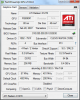
how can i fix That?, BIOS updated didn't work...
Thanks! -
Now that's a super old card. Could you follow this
link, make a usb bootable drive and dump the vbios of your card using atiflash? Curious to see if the clock value for each mode is messed up.
Use atiflash -s 0 filename.rom to dump the vbios into the usb drive.
Or
You can try clicking on the icon for dumping the vbios next to the BIOS version in GPU-Z but I doubt it'll work since it didn't work on my Mobility HD2400 and Mobility HD2600 (a little newer than yours). -
Ok, i'll try that, Thanks for answer, after dump the vbios, i should re-flash it?
i can't do that, i get this: "Adapter not found".
What can i do now? -
Both the atiflash method and GPU-Z vbios dump method didn't work? Maybe try an older version of the atiflash. But it might be possible that the vbios is stored inside the main bios like the Asus laptops...
I tried to find the M74xK bios but all I found was bunch of dead links, do you happen to have a bios package laying around (1.00.10)? Maybe we can take a look if the vbios is stored inside the bios as an option rom using MMTool.
For dumping the BIOS, I don't have any experience on the old Clevo laptops, maybe Prema knows.
If you happen to obtain the vbios or the bios, post it up here. -
Here the link of the BIOS 1.00.10 i downloaded it from Page 58 on this thread.
ftp://ftp.clevo.com.tw/ALLBIOS/MW7xK/BIOS_10.zip
i don't know how to use MMtool. :S -
Tried MMTool 3.19 and 4.50, AMIBCP 4.50 , can't open it tho. Guess it might be a Phoenix bios.
According to this thread: ATI X1270 gpu core?
The clock setting when not gaming seems to be correct, 57MHz, like yours showed.
Your version of the X1270 seems to be a bit different to the regular X1270 as the regular X1270 has 0 vertex pipelines while yours has 2. And one more thing, not sure if the default memory clock is correctly shown in GPU-Z.
By the way what version of the atiflash did you try? -
I used ATIFLASH 3.95, and yes, it's a Phoenix BIOS. The clocks doesn't move while playing, always 57mhz, and 401mhz :S
Should i try with a old version of ATIFLASH? -
Try 3.30, 3.30's release date is pretty close to RS690M's release date. Also was the first release that supports HD2600 (generation after X1000 series).
Edit: 3 more things. Was GPU-Z able to capture the clock sensor (since the GPU is so old)? If it does, start logging before playing (tick log to file) and then take a look at the log to see if it ever goes above 57MHz. Also was the power adator connected? -
I Still get "Adapter not found" :S. i tried to underclock with ATITOOL but it return to 57mhz and 401mhz :S
-
I see, were you seeing 57/401 before you updated to 1.00.10? Just checking if the BIOS contains a vbios. Also is the power adapter plugged in?
Clevo BIOS Thread
Discussion in 'Sager and Clevo' started by Blacky, Sep 11, 2009.


