 Problems? See this thread at archive.org.
Yeah, i updated trying to fix this problem, but nothing happened and yes, it's pugged in.
-
I see, so the X1270 has been running that way since you first bought the laptop and none of the BIOS updates helped?
-
that's right, my friend bought this laptop 3 years ago i think, and he sold it to me 2 weeks ago. He had no idea about clocks, video cards, etc. When i saw GPU-Z i asked everywhere, buy nobody knew about this issue :S, and i think the Overclock from 200mhz to 401mhz make chipset hotter :S.
-
Oh, it's been overclocked? Have you tried not running any OC tools and game like that to see if it bumps into 3D clock zone?
Can you make a GPU-Z log and check if the clock for both the core and the memory ever change when gaming? -
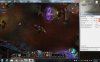
Here a pic, i'm running Torchlight and clocks doesn't move :S, if u see GPU load is 61%.
-
By the way I have come across a similar issue on my old Mobility HD2600, where the GPU-Z couldn't read the change of clocks and shows 500/400 all the time, however, MSI Afterburner does display the change of clock. Might want to download MSI afterburner and see if it shows a different clock than the GPU-Z.
-
It show me 0mhz both Core and memory :S and 2 GPU (GPU1 and GPU2).
-
What? There are 2 GPUs? And on the GPU-Z it only shows 1 GPU or 2 as well?
-
No, GPU-Z Shows 1 GPU,
-
I see, actually I doubt if the sensor is reading the clock correctly. What's the FPS like when running Torchlight?
-
i think it's about 30FPS, or less, i'm not with the notebook right now :S, but CS 1.6 it's a bit laggy i ran CSS (Counter Strike Source) and it's run 20-30fps, so i think CS 1.6 should run fine :S
-
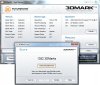
I see, when you have time, could you download 3DMark 03 and run it with the setting 1024x768. See if it scores between 1200~1970, if it scores within that range then that means GPU-Z couldn't read the clock correctly.
-
is this ok?
-
Yes your X1270 is working as it should be, that score has completely proven that the GPU-Z is no use for monitoring the X1270.
I did some researches based on the X1270, I have come across a thread that has the exact same issue as yours: ATI X1250 overclocking (57 MHz bug) - techPowerUp! Forums
Also check this Article for OCing the X1270 correctly using ATITool: How To: Overclocking AMD Boards With 690G Integrated Graphics - AMD 690G IGP Overclocking - Legit Reviews
This article has also stated that the ATITool was reading from the wrong sensor, you'll need to set it right before overclocking its real clock. -
greetings everyone.
i recently got a laptop from a friend who doesnt need it any more. it seems to be a Clevo M660SU/M670SU VT6363A, with a mobile dual core @ 1.73 ghz, 2 gb ram.
BIOS version showing in BIOS is 1.0.0.P08, probably a very early one. and i am having troubles with performance, heat and noise.
could anyone send me the latest bios or post a link to it? would be greatly appreciated. i searched the other bios thread, the one with the older ones, but didnt find any. -
Yepla, maybe this could help you :
Index of /clevo-mirror
Especially the « M66xS », « M67xSRU » or « M66xSRU » directories, but I'm not able to know which one is needed as it seems that there is no « M66xSU » or « M67xSU » models referenced by Clevo. -
thanks for the reply.
unfortunately it has to match my laptop exactly. and the M660SU is a listed model here: CLEVO - Download but as you've said it's not listed on that mirror.
using a BIOS that has been designed for another model is not an option and probably wouldnt work anyway. -
Thank you so much !, you're the best!, But the way, i don't speak english, so sorry for my bad english.
Again Thank you!.
Greetings! -
No problem mate.
-
Yepla ==> I know, but I was unable to find an entry matching your model name, so was pretty sure it had to be one of them.
I have investigated, and it seems that the right entry for your model is « M6xSU », you can find it by downloading a driver for your model on the Clevo download website : when downloading, it redirects you to an ftp:// URL, with the M6xSU name in it.
So here you will find all the files available for your model :
M6xSU -
oh that's great. thanks a lot.
just one more question: are those bios files listed by release date? in other words, are those on top including the fixes of the other ones? the version numbers are a little confusing.
if not, i will probably have to try all of them to find the best one. and i only want to do that if it's really necessary ;-) -
No, they are not sorted at all :/
Oh, and it seems that 3 BIOS are for specific graphic cards only, so there is just 2 BIOS left (the « M67SU_H802.zip » one seems to be quite relevant for your problem).
But I don't think that a BIOS update would solve overheating or performance problems, and keep in mind it's a risky operation… -
hey guys i just bought a new clevo p170em with Bios: American Megatrend Inc. 4.6.5. all this stuff is new to me so if you could lead me ina direction with updating my driver that would be great thanks.
-
@palkeo, I noticed that your ftp has a newer version of the W110ER system bios, 1.00.04, the one in OP is 1.00.03. Maybe Blacky can add it?
-
Oh no...more work...LOL
+rep palkeo -
vlps5122 ==> In the first post of this topic you have detailed informations about how to do the upgrade, and you will find updates for your BIOS.
I also added the files concerning your model in my mirror
steberg ==> A lot of messages here are from people who are unable to find the right BIOS, so if I can help by sharing my work, it would be great !
So yes, I think Blacky can add links to my mirror if he wants
-
anyone here has the 1.00.07LS1 with the KB/EC 1.00.06SA ???????
-
Tried flashing the newest BIOS for my P9170 (P170EM) and it said something along the lines of "not found" or "not supported" or something.. And I'm not about to read through 263 pages to see if this was answered somewhere, fail on me.
-
anyone happen to have the NP9261 latest bios?
i havent used this pc much since I got it like 5 years ago new. Original bios still on it.....
some of the keys on the keyboard dont work. like F11... so i cant enable the wireless.... the number 2 key with the @ symbol... etc...
Not sure if its the bios but gonna try it anyway.
Been searching online and all the links i found in this thread are dead but there is also 260 pages to go through....
anywho... anyone help me out? -
I think that's the reason there is a search function
-
altho ud better use google for that, nbr search function suxx
Sent from my Galaxy Nexus using Tapatalk 2 -
@Prema: sorry to bother u, but have u ever thought about making a bios for Clevo170 ust like u did with W110ER/NP6110? Thanks in advance.
-
He's been asked this countless times. Each time he's said it's locked down, he can't do anything for it.
-
Anyone have this they can upload somewhere or email to me?
kinda BS that its not available anywhere...... -
Isn't it just the same as the Sager 9260/9262 (clevo D901C).
Meaning the bios you need is here (older thread):
http://forum.notebookreview.com/sager-clevo/556299-clevo-bios-older-models.html -
is it?
its not extremely clear... and i dont want to brick anything... the sticker on mine says Np9261
That thread shows the d901c as compatible with D901C (Sager 9260/9262)
and if it is compatible.. seems there's an N version and a non N version... only one of which is avail since the other was hosted on megaupload
EDIT:
ACTUALLY i think the file on MU is actually the bios and the one that IS avail is the h8 update?
From what I've read I cant do one without the other so essentially im up the same creek still :/
But maybe I dont understand... here are the files in the archive....
H8D900C.13
H8Update.exe
update.bat
USBEMUOF.EXE
looks like the BAT file just runs the h8update exe using the .13 file... i dont know what the USBEMUOF exe is.. but doesn look like theres a bios here..... -
New BIOS for P170EM and P150EM (B10). Found from MYSN.
-
Change log? I can't find it.
-
You couldn't provide a link?
-
Just gave heads up to whomever updates the thread. I sure would like to know changelogs before updating, but here you go:
https://www.mysn.de/secure/userarea...37D827CDA8CF44E6A9D3DE037C115548&show=Support
(oh. xmg P502 and P702) -
I don't know what changes there are. Installed it, this is what I have.
AFUDOS.exe ECP150.07 /p /b /n /x
- And it updated the BIOS too.
![[IMG]](images/storyImages/28515478.png)
FYI I have the 9.00 August 9th driver installed, from Station Drivers, the original. I did not install the mangled asder00 whatever crud. The CCC works fine by default and now I have Enduro 5.5 options running, with A/C set to maximized power.
I don't want to get people excited but a quick run in GW2, I'm getting 85-98% GPU utilization and 47-52 FPS on Ultra with everything on, maxed.
But MP3 sucked. 42% utilization FTW.
BF3 runs at 40 FPS @ 60%
I guess no Enduro fix from this BIOS update. But the options of Enduro 5.5 are available, and in the Windows power options, the new options for switchable graphics. So maybe it's just a prep BIOS for the new drivers?
![[IMG]](images/storyImages/53539527.png)
-
That would be awesome if true. AMD working with the manufacturers.
-
Why doesn't Sager make these BIOS updates available? Where do you download them? Are they even official?
-
This is Clevo BIOS not Sager. Sager has Clevo do some custom settings for them. If you email Sager, they can provide you with the latest BIOS they have usually. I suppose it's to make sure only Sager owners can download them.
-
Flash the new EC first:
ftp://ftp.clevo.com.tw/ALLBIOS/P1xxEM/P170EM_ec08.zip
Then only BIOS:
ftp://ftp.clevo.com.tw/ALLBIOS/P1xxEM/P170EM_B10.zip -
ftp://ftp.clevo.com.tw/ALLBIOS/P1xxEM/P150EM_ec07.zip
ftp://ftp.clevo.com.tw/ALLBIOS/P1xxEM/P170EM_B10.zip
Would it be interesting if I have XTU installed and the memory/HD4000 can be adjusted? -
Performance Tuning module is missing from the ECP150.07/p150em.10, there's no XTU support in this one.
-
Didn't the P150EM never had XTU...people just crossflashed if i remember correctly.
Let's not mix P150 & P170 EC & BIOS.
Here once again the way they should be flashed:
P170EM (HAS XTU):
ftp://ftp.clevo.com.tw/ALLBIOS/P1xxEM/P170EM_ec08.zip
ftp://ftp.clevo.com.tw/ALLBIOS/P1xxEM/P170EM_B10.zip
P150EM:
ftp://ftp.clevo.com.tw/ALLBIOS/P1xxEM/P150EM_ec07.zip
ftp://ftp.clevo.com.tw/ALLBIOS/P1xxEM/P150EM_B10.zip -
After flashing P150EM , EC still 1.05 is it ok?
-
Thank you, Prema! And Montage for bringing the update to light.
Clevo BIOS Thread
Discussion in 'Sager and Clevo' started by Blacky, Sep 11, 2009.


