Problems? See this thread at archive.org.
Hey guys,
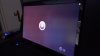
I noticed this a while ago on my NP9150's screen. It's a 95% gamut matte screen. This only happens when I look at it from the right side, as you can tell from the photo. It's like it's kind of washed out in the middle-right and bottom left of the screen. This only happens on black or really dark backgrounds. Is this normal?
Thanks!
-
It could be a result of fingerprints/rubbing from cleaning. If you have a microfiber try using that on the strange areas and see it any thing changes.
-
Thats weird!
-
I think it's underneath the screen... Maybe has something to do with the backlighting? I haven't touched the screen yet, so there's no fingerprints, and I very gently use a microfiber cloth to clean it.
-
My theory is that no screen will be perfectly flat, so there could be minor deviations in the angle/elevation of the surface causing the weird reflections/images.
-
Oh ok, so it's kinda normal then? Lol. I just don't know if I have a defective screen or if this is something that just happens, like you said.
-
I agree with trying to clean it first, but if that changes nothing I would call it defective.
-
I tried cleaning the screen, and it's still there
 if it's defective, what can be done? I'd really rather not send it in because I just started classes and have been using it quite often...
-
Does it bother you when you use it in front of you? No? Then i don't see what the problem is...
-
It doesn't really bother me when I'm centered in front of the screen, but if I deviate even just slightly to the right, it's pretty noticeable.
However, the problem is that if I'm going to spend $2,500 on a laptop, it better be near perfect, especially a premium gaming laptop.
-
Have you already verified that you got the correct display? Model should be B156HW01 V4, some hardware recognition software get it right but windows shows LEN40B2.
In my experience, I've had 2 monitors that looked like that, so I consider it normal and not necessarily defective. Cleaning the screen sometimes leaves traces of the chemical used only viewable from certain angles and light conditions, so as suggested before, try to clean the screen, Isopropyl Alcohol dilluted in destilled water at 40%-50% works best for me, it seems to leave little to none traces, use microfiber.
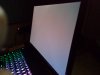
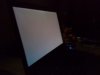
For your reference, mine looks like this:
-
I tried using Speccy, but it wouldn't show me the model number of the screen. I'm pretty sure I got the correct display; the colors look really vibrant (if that's what a 95% gamut screen is supposed to look like lol), but other than that, there really isn't a way to tell without taking it apart... What app do you recommend that will show me the model number of the display?
The thing is, I never used any sort of cleaning solution on the screen (maybe the manufacturer did, if that's possible?) prior to this problem. Will using that cleaning solution then potentially get rid of it?
Thanks for taking pics by the way! -
HWiNFO shows it right, I recomend the portable version.
-
Alright I'll try that, thanks!
I'm not sure I have all that stuff for the cleaning solution... is there anything else you'd recommend? -
You're welcome!
You can get distilled water from Bottled water to drink, just make sure it has no minerals, the purpose is to get the purest water. Isopropyl alcohol is also known as Rubbing alcohol, it should be available at your local pharmacy. Lens cleaning cloths are usually microfibers.
For now is the only thing I can help. -
Thanks for your help RogerCD! I'll see if I have that those items around my house first, then if not, I'll buy them and give it a try. Also, my screen is the correct model number; it matched the one you posted above in HWiNFO.
-
Looks to me to be a slight error in the light diffusing layers in the back of the screen.
-
.... Does that mean it's defective??
-
I had the same thing happen to me, except the blotch that appeared on my screen may have been even more pronounced. The issue is not caused by dirt or grime, so cleaning the screen is not going to help. I started freaking out when it happened to me and got to the point where I was looking for a replacement part on eBay.
You mention that you just started classes, so I assume that you are a student. I also assume that you carry the notebook around in a backpack, potentially with a couple of textbooks thrown in for good measure. You shouldn't do this. In my experience, the lid encasing the screen is not strong enough to protect the screen from the pressure it experiences when carried in a backpack full of other heavy stuff. With just a little bit of pressure, the screen will be pressed into contact with the keyboard (resulting in oils from the keys being transfered to the screen), and you will notice the appearance of blotches like the one seen in your photo.
The good news is that your screen is probably not damaged nor defective, and the fix is pretty simple. I know next to nothing about LCD panels, but I suspect that there is a layer of film of some kind, possibly aluminum foil or something similar, that is attached to the back of the screen for either protection or light diffusion or something else entirely. What I believe to be happening is that this film gets pressed into the back of the screen due to the pressure I mention above and gets stuck, possibly due to static cling. This results in improper diffusion of the lamp light.
The "fix" that I stumbled upon as a last resort (if I'm going to have to replace it, I might as well, right?) was to torque the screen by grabbing the top two corners and gently pushing on one while pulling on the other and then vice versa. This must have loosened the clinging film, because it cleared up the blotchiness I was having and my display has been fine ever since. While this technique worked for me, I won't be responsible if you break your own panel, so attempt this at your own risk. -
there's a foil heat shield that surrounds the back and edges of the panel itself. interesting idea, but i'm not sure how the foil would become stuck to the panel as adhesive only exists around/on the edges of the panel. meaker's observation of an issue in the diffusion of the backlight wouldn't be affected by this foil shield either because the LEDs exist entirely within the panel if i'm not mistaken. there are many other layers of "film" that make up the display on the other hand which could be the culprit here. definitely looks like an issue within the panel though.
-
Thanks for the informative reply! As a matter of fact, I have it in my backpack right now, in a sleeve, with only my 5 subject notebook lol. But this is the first time I've taken it with me, and I haven't put any pressure on the lid at all. Also, there is little to no oil on the keys, so I'm not sure if that's the issue. I'll try your solution and see what happens though!
That doesn't sound good... Haha. So it is defective then? I emailed XoticPC service and I'm waiting for a reply from the tech department to determine the issue.
Sent from my HTC One X using Tapatalk 2 -
For your edumacation:
LCD Monitor Teardown - YouTube -
Haha thanks Meaker! Very informative video. I still don't know what the problem with my screen is though... lol.
-
I just read a couple articles about screen blotch issues; one said that magnetism could possibly cause the blotches, and the other said that updating the drivers for the display may also fix the screen. Does anybody know if this is true?
-
I had this exact problem with my 95% matte screen. Like the OP, it was only noticeable on a dark background. Tired a few different things to diagnose the issue--ultimately had my reseller swap it for a replacement. It's surely a hardware defect.
-
Thanks for the reply! I was afraid it might be a hardware issue... I contacted Eric in the service department at XoticPC and I'm waiting to hear back from the techs. After reading your reply, it seems like it may end up having to be replaced. Did you opt to have a new one shipped and replace it yourself, or did you send in your laptop to have the reseller do it?
-
I had to send it in, per my resellers policy. Personally I would've preferred to do the swap myself--it's rather simple and there are video guides through several resellers in case you need the help.
Good luck with the replacement. Hopefully you don't encounter other issues. -
I was able to have a replacement keyboard cross-shipped, so I'm thinking/hoping that my reseller will do that with the screen, because I can't really send it in for repair; I just started classes and need my laptop daily. I've seen some videos showing how to swap out the screen like you said, but I still don't know if I'm entirely comfortable with it. I'll probably end up having a local computer repair shop do it for me lol.
I hope I don't have any more problems... Not trying to complain on here or anything, but this is already the second issue I've had with this laptop in the past month I've had it. First the keyboard had to be replaced, and now the screen? For $2,500 everything should be near perfect out of the box.
Sorry for that rant haha, thanks for your help! -
I was referred to your post by another member. I have a similar problem as yours but I think mine is worse.
It drives me nuts. I attached some pictures. -
you guys should both be looking for screen replacements under warranty. both panels are seemingly "defective" depending on when/where the "damage" was done.
Hotjujube, it looks like too much pressure was placed on your panel--and obviously not by you if it arrived that way. i have similar "blotches" on my dell screen, although much smaller (like pencil eraser sized), in a couple places where i've accidentally nicked the outside lid. scroll up and check out the video meaker posted to get a better sense of what could (or couldn't) be causing what you're seeing.
_____
EDIT:
see this post. -
*sigh* I was afraid of that. I wonder if my reseller can talk sager into letting me bring in my laptop personally for them to fix on spot since I'm less than 2 hours away.
-
I just saw that you posted here in my thread first! I just replied to your thread a couple hours ago lol. Glad you got it fixed! Hope mine comes back soon.
Sent from my One X using Tapatalk 2 -
UPDATE: Just got it back today! I listed a couple more issues for Sager to fix, and they did free of charge! Great customer service (went through XoticPC). I inspected the new LCD a little bit on the boot-up screen, and I noticed a little bit of the same light bleed in the middle of the screen :/ However, it's definitely not as noticeable as the first one, which you guys have seen on the first page. I also have to go to the FAR left in order to see it on a black screen, and it's a little more faint than the first one. I'm thinking this might be normal then? Or do I have to get yet another RMA?? If you want, I can take another picture of my new screen.
On another note, the new keyboard I got through the RMA seems to require an EXACTLY centered press on some of the keys, like the "H," "M," "J," and "," keys. Is this sort of normal because it's a new keyboard? I've seen quite a few threads on missed keystrokes, but I'm not sure if it's because I'm not pressing hard enough, or if it's a defect. -
Hi jkel777,
If I were you I will use my warranty until all problems are fixed never mind how big or small they are. Dont hesitate to talk with Sager and discuss your issues. Im sure that they will help you. At the end this is your laptop and I think you should be comfortable while you are using it.
PS: BTW my intention is to buy 9150 too. -
Definitely go for the 9150. It's a good laptop, but hopefully you don't have as many problems as I do! I guess I'm just unlucky lol. I'm not gonna bother sending it back for a third screen replacement; I'll just deal with it the way it is. XoticPC's customer service told me it's sort of normal anyway. As for the keyboard, I'm getting another one cross shipped to me by Sager.
Sent from my One X using Tapatalk 2 -
Hi jkel777,
Thanks for the recommendation. At the moment I began to have serious doubts about 9150. IMO the screen and keyboard issues are pretty annoying for me. I cant accept a high-end laptop in your condition as a normal one. Its difficult to believe that entire line of these quality matte 95% screens are bleeding.
If you have time I would like to see a picture of your new bleeding screen. Also could you check the screen please with the Nokia Monitor Test. Its a small and free application. Try to set properly (read the manual how to do it) the brightness & contrast and then check again the bleeding. This is the simplest analog UAT. Try to repeat the test in another part of your room. Also make the screen check on battery too. -
I totally understand where you're coming from. I have another thread on my new screen bleed (I'd link you but I'm on my phone lol). Just look for threads that are started by me and it should be pretty recent. I also received an email from XoticPC's customer service stating that any kind of light bleed from an extreme angle is not unusual. I've never heard of that app, what exactly does it do?
Sent from my One X using Tapatalk 2 -
Thank you, jkel777.
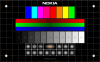
I've read the thread http://forum.notebookreview.com/sager-clevo/693626-just-had-my-lcd-replaced-light-bleed-now-my-new-lcd-defective-too.html" and my answer is Yes. The screen is defective. I have two stock matte screens without the bleed effect. The NMT (Nokia Monitor Test) cant solve a problem like this. Im using NMT on any uncertified system for graphics design as a first step to evaluate the screen properties and performance (gray scale, colors, ..), basic adjustments as brightness & contrast, etc.. Basically its the start of screen calibration procedure which involves different tools, equipment for spectrographic analysis and low quality humans eye. Shortly with NMT you can easy to compare the performance of two screens and to catch some defects. A picture of the main NMT screen:
![[IMG]](images/storyImages/nmt.png)
After the reading of http://forum.notebookreview.com/sager-clevo/691382-sager-p9150-heavy-back-light-bleed-95-gamut-matte-display-3.html Ive decided to not go with Sager. Im not happy but I will stay with Asus.Attached Files:
-
-
Thanks for your reply! After reading this and considering I want my expensive laptop to be perfect, I've decided to RMA it again. I'm asking to get the screen replaced again as well as my keyboard. I'm also asking for the quality of the screen and keyboard to be checked. Thanks for the help!
Sent from my One X using Tapatalk 2 -
The Sager NP9150 is designed to be perfect and Clevo engineers deserve a respect. I’m sure that your lappy will be in the condition it was designed to be. I like this machine very much because it suits me perfectly. It’s small, powerful, stylish, good cooling system and attractive with its 32GB, NVIDIA Quadro K3000M, i7-3840QM, RAID 0,1. The only useful video for me was that of Jayz 2 cents. I like his style and honesty.
I really will envy you when you have your NP9150 in perfect condition.
Unfortunately I passed my time window for buying this beast.Last edited by a moderator: May 12, 2015 -
Yeah, I've seen that guy's video! Very informative and honest, just like you said. Hopefully it soon will be perfect. I really like the laptop minus the pesky hardware issues. If by the second RMA all issues aren't resolved, I may be jumping ship to MSI...
Sent from my One X using Tapatalk 2Last edited by a moderator: May 12, 2015 -
Well, it looks like I'm staying with my current LCD! After further contact with XoticPC and Sager, Sager apparently went through 40 different LCD replacements and deemed that the one I currently have was the best. Knowing that makes me feel better with having the screen. They also told me that light bleed at that extreme of an angle was normal, and more evident on higher gamut screens. Granted, Sager wouldn't replace the screen because they went through so many the first time, but offered me a downgrade, which I couldn't accept! So I'm happy with my current LCD
Sent from my One X using Tapatalk 2 -
I was waiting for your answer before to take my final decision about the choice of a laptop. I would like to thank you because the customer opinion for me is staying at first place and yours was a real help!
Enjoy on what you have and all the best!
Thanks again. -
You're welcome! Glad to help. So are you going with Sager?
Sent from my One X using Tapatalk 2 -
jkel777 i think your screen is perfect man, I would be pleased to have one like that
good to see your sticking with it, now make use of it!
yeah duhai, what choice did you go with? -
Thanks kingyr! The "bleed," if that's what it is, doesn't bug me anymore after hearing they went through a bunch of different LCD's and chose my current one as the best
You really should go for the Sager duhai!
Sent from my One X using Tapatalk 2 -
yeah he went through a few panels with mine too but maybe didn't look hard enough to notice the ghosting
-
Your new one better come back perfect!
Sent from my One X using Tapatalk 2 -
hahaha it better! thoroughly tested, so they say and was supposed to ship out on monday but only shipped out last night, but no biggie. so better be damn close to perfect!
-
When a company is explaining a defect as something normal and practically doing nothing to solve the issue its a pity. I cant to be a customer of such a company. I was considering Sager as Ferrari in the notebook world. How wrong I was! When Im buying a product at first place for me is the quality and nothing except the quality.
@jkel777
You are kidding me. Definitely Im not going with Sager
 .
.
@jkel777, @kingyr
As I said before I like 9150 very much and its the only choice for me in the laptop segment. If one day Sager accept the best screen and its bleeding effect as a defect then Ill think again. Until then Ill enjoy at a custom desktop solution with the next base specification:
Motherboard:
CPU:
Memory:
Video:
Does anybody know what this is on a Sager NP9150 screen?
Discussion in 'Sager and Clevo' started by jkel777, Sep 30, 2012.


![[IMG]](http://imageshack.us/a/img836/6881/nmtmainscreen.png)