 Problems? See this thread at archive.org.
You might want to ask in the hp forum to pick up quirks on their platform.
-
-
tesla m6 on my laptop Clevo P157SM, game Borderlands 3, test video in youtube .
-
So a warm GPU but just about under control.
-
it is advisable to replace the fan with a new one, and it may be better to install a radiator. but FPS is close to gtx 1080, sometimes. but there are two fans and a tm version.
-
Impressive results for the size of the machine.
-
the critical temperature is not the same as on the GTX 1070, 1080 chips. more. in any case, for GTX 780 it is 95 degrees. and the temperature in games is about 90 degrees, this is permissible. specifically on a Tesla m 6 video card, I don’t know the critical temperature.
-
Is it possible to get HDMI out working with Tesla M6? With optimus, so that the intel HD is working. Only for YouTube on external LCD.
-
I'll check if the output is hdmi or dvi, I'll write. I usually get enough of a standard laptop screen.razor0601 likes this.
-
tesla m 6, in the same test gives about 30 -35 fps more than gtx 970. tesla 75, 80 to 101. gtx 970, 45 - 75 fps. only, in this test the fps monitor reader was not installed for me. it also eats a few fps.
-
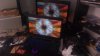
I checked that the Tesla video card m 6, in a laptop clevo P157sm, through hdmi the output to the monitor works. and in 3d applications too, intel video and 3d nvidia work.
-
How could that be? I thought the Tesla m6 can‘t Output to an external Display.
-
I just connected the monitor in the standard way, via the hdmi cable to the laptop, and immediately, after a couple of seconds, he turned on the image. both on a laptop and a monitor. I installed the driver , standard gtx, and selected gtx 980 m. not quadro driver.
-
@cafeogu Did your 8740w boot with the M6?
I bought one but have been unable to boot at all with it. The wifi touch-key light just blinks blue/orange when I turn it on. I have the laptop running as a headless server and I'd like to use the Tesla's compute for hobby projects. I don't know if the card I got is bad or the Elitebook 8740w just can't take it. The VBios is 84.04.8F.00.0C according to a sticker on the card. -
Is it possible to overclock Tesla m6?
-
I tried to install the Tesla in M18X R2. No luck. Is detected in device manager as standard display adapter. But after installing driver via iobt black screen after Windows Logo. Same with modified 980m driver.
-
The M18X R2 had switchable graphics right?
-
Yes, known as SG-Mode.
-
I think my card is dead. Also black screen with card installed in GT60
-
That sucks, any visible damage?
-
No, nothing. Card seems to be working normal. Core is getting warm. But I don‘t know why there comes a black screen after installation. Normally the igpu must work. And the Tesla must get code 43 in Windows or something.
-
I have never overclocked video cards. read that riva is a tuner, or something similar. on this cooling, which a small laptop has, it is unreliable to overclock this video card. temperatures will probably be high. until I can not check the overclocking of the video card, since I gave a laptop with this video card to a family member ..Clevo P157sm
-
Can you explain exactly how you got your Tesla working in your Clevo? I have problems with black screen.
-
m 6 video card, according to some descriptions, depending on the video bios also, or all variants, do not work with EDP screens. I have not tested it. although the opportunity was there. On my laptop, where I installed this video card, there is also a connector on the motherboard for the EDP of the screen. two connectors on the motherboard, for LVDS, and for EDS at once.. and there is a spare screen for me, EDP. and cable. I just didn't have time to do this. works on lvds screen, and good. my video card has a BIOS 84.04.8F.00.0C . What screen do you have on your laptop? LVDS, or EDP? I got a black screen for another video card, according to the description, as you did, when I wanted to install the gtx 780m video card in a newer laptop, with an EDP screen. the video card itself is good.
-
I have the same VBios and also lvds
-
Perhaps a processor with an integrated video card from Intel, should be 4 generations and video Intel HD Graphics 4600 , and support from nvidia Cuda.
-
Optimus and non Optimus will make a big difference if the card is giving out outputs or not.
-
Dude! same GT60. The difference is I could boot with iGPU, however Tesla M6 was not detected in device manager
-
-
Oh Yes I checked it and it is completely cold. I guess this card might be dead?
-
It means it's getting no power at all, it's not even initiating which is a bad sign.
-
reinstalled better thermal pads, and the temperatures become lower. at this temperature, the video card can even be overclocked, if you wish. tesla m6 clevo
-
I found fitment to be more important than the pads themselves, nice work.
-
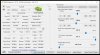
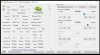
installed the utility for overclocking nvidia video cards. here are the pictures that the nvidia inspector shows on the tesla m6 mxm video card. but I have not overclocked yet,. because the temperatures are still high without overclocking.
-
Does MSI afterburner load? Does it bring up a voltage curve?
-
I have never used MSi. I do not know how with her and what. but I'll try to install it later, unsubscribe.
-
I wrote earlier that I have no idea how to work with this program. so I installed this program. and here is a photo of the screen. what did you want to see? this picture?

-
I checked the boxes later, but I could not change the core voltage. power limit can be adjusted.
-
Press ctrl + f with the program loaded, does it bring up a graph?
-
no, nothing is displayed on the screen after pressing these buttons, when msi is active.
I put this video card with a laptop for sale in ebay. https://www.ebay.ie/itm/284394148912
https://www.ebay.co.uk/itm/284394148912 -
Ok so no frequency/voltage adjustment then. An undervolt could have helped.
Eddy99 likes this.
Has anyone tried the Tesla M6 MXM
Discussion in 'Sager and Clevo' started by Damin, Aug 28, 2020.


