 Problems? See this thread at archive.org.
Yeah, I used tape at first, but for the last few I did for guild buddies, I just used a dot of silicon modified conformal coating with a small plastic tool. Literally dab, dab, done.
-
-
Makes me wonder if nail polish would work just as well, some use it to coat the SMTs when applying liquid metal to their CPUs

-
Nail polish is more likely to chip than the tape for this application.
electrosoft and jaybee83 like this. -
Hi guys. Just a couple of days ago I decided to finally follow this thread and replace the 6700k in my P750DM2-G with 9900k. I did the GOP part, updating the vBIOS for my GTX 1060 from 0x30002 to 0x3000A. And then successfully flashed the BIOS with an USB stick. At the end of that I unplugged power chord, hard shutting off the laptop. I chose the P7xxDMx_RTX.rom instead of the P7xxDMx.rom for flashing because dsanke stated both in this thread somewhere and in the ReadMe excel file(Chinese version) that the RTX version supports both 10 and 20 series graphics card. Besides, when paired with 9th gen CPU or 20 series GPU, it supports G-sync that P7xxDMx.rom otherwise does not. I also plan on upgrading to a 2070 in the future. Those are reasons I chose this BIOS rom.
However, as I put my laptop together, it wouldn't start, just a black screen and endless boot loops. I took the battery out, disconnected the power and cmos battery, then let it sit for a while and connect everything again, power up while pressing Fn+ D but the same happens. I suddenly realised that the 6700k is not supported with RTX.rom according to the excel file, so I swapped the CPU to 9900k with the 2-pin mod, but the black screen and boot loops are still there. (technically, dsanke said the in the Chinese excel file that you can still run your laptop with 6/7th gen CPU and RTX.rom, only the frequency will be significantly lower than normal.) I disconnected power, battery, cmos battery multiple times and tried many times with no luck.
Now I'm out of clues. Is it just a bad flash? I now need to buy a spi programmer to flash the motherboad or is there anything I'm missing here? -
You need to use the spi programmer now. Had the same trouble with the 8700k and a spi programmer solved it
-
Or try to let it sit a couple of days without battery and cmos battery. And then let it run the bootloop for a while. It worked for me
-
Just ordered a cheap CH314A programmer kit. It'll take almost a week to arrive. In the meantime, I'll leave the laptop without battery or cmos battery and try it again in a couple days. Thanks!
KKthebeast likes this. -
The bios work in my p775dm3 with gtx 1080 ans i9 9900k use a spi programmer like to tl866II for me is the best programmer
https://www.amazon.com/WINGONEER®-T...6&qid=1562080024&s=gateway&sr=8-1-spons&psc=1 -
i have checked and the BTN....1.0 panel gsync works fine in my machine
-
Would you be able to share your bios settings? I know that is a big request considering how many there are.

Sent from my SM-N950U1 using Tapatalk -
Did you load the 1080 or 2080 ver. I went with the 1080 and gsync settings in Nvidia control panel is gone, thank for the info
Sent from my SM-N950U1 using Tapatalk -
I just used Clevo control center to offset the voltage and upped the cpu vr limit. Nevertheless I will share a bios screenshot.
-
You need to flash rtx bios. That literally saved me lol because a 1080 at 4K is choppy. G sync makes it feel like 60fps making games look playable.KKthebeast likes this.
-
I have 1080gtx flashed the new version, flashed with gsync bios and 1.0 works like charm
-
Sorry to be a newb. Can you elaborate on the flashing the 1.0
Sent from my SM-N950U1 using Tapatalk -
All I did that downloaded the package from 1 post, flash the gsync sli 1080 rom to my 1080gtx, and the gsync appeared I have km1-g. I have also tried with the IPS 144hz AUO 3.1 screen and the BTN...1.0 screen, both had gsync.
KKthebeast and joluke like this.
-
Thanks for the details brother. Perhaps I should try reflashing the cards I have the built in 3K 120hz G-Sync Panel.
Sent from my SM-N950U1 using Tapatalk -
Mine was doing that after the flash of the 1080 compatible BIOS. I just pulled the battery and cmos bat. Held down the power button for 60 seconds. Then plugged in the brick, powered it back on didn't seem to do anything at first. Then waited about 5 minutes and finally the tiny blue message about the cmos battery came up. (I might have hit fn+D+power randomly a few times)
Sent from my SM-N950U1 using Tapatalk -
That should have g-sync
-
The GPU has to support G-sync originally and the BIOS needs to have been around when the system shipped with the exact panel fitted.
joluke likes this. -
For me it is still a mistery... when i wanted to flash gsync bios in my 1080 nvflash started complaining “not good version”. So i flashed the non-gsync vbios. When i visited an expert i have asked what if we flash the gsync version with programmer... he said let us see if we softbrick we can do it back. And voila worked and gsync came back. From electronical point of view is there any difference beside the bios? For me it looks there is nothing...
-
The g-sync certificates and enabling it.
-
Yes sir, the Original setup was the 1080 SLI G-sync with the 3k g-sync panel.
Looking for advice:
Which is the safer bet.
Concerns:
-Seems about half and half with the flashing working with zero issues..
-Working out of time in the middle of no where, usually hours away from any real tech
-Never used/seen/owned a chip programmer
Setup:
hardware came with Gsync working before the current install of the 1080 gysnc BIOS and vBios (still no g-sync).
-P870KM1-G
-GTX 1080 SLI
-Prema's BIOS
Current Recommendations:
-RTX 2080 BIOS
-Reflash the 1080s vBIOS's.
Just get the programmer then play around further? or make a move. (having a brick even temporary would be bad as I work out of town mostly in random places for long periods in BFE)
-
Hello,
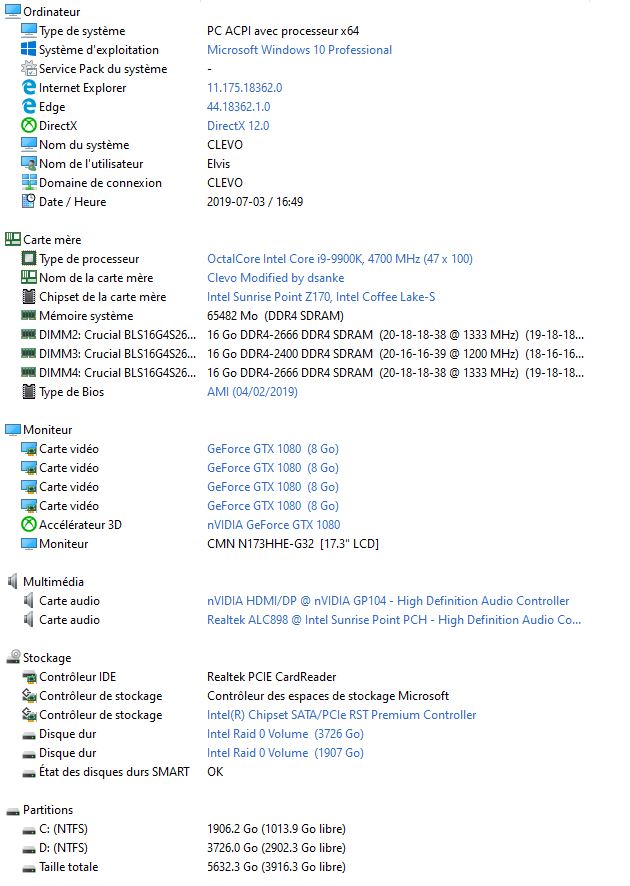
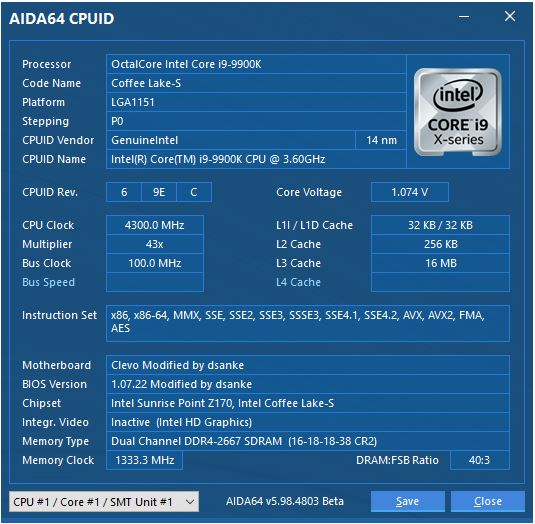
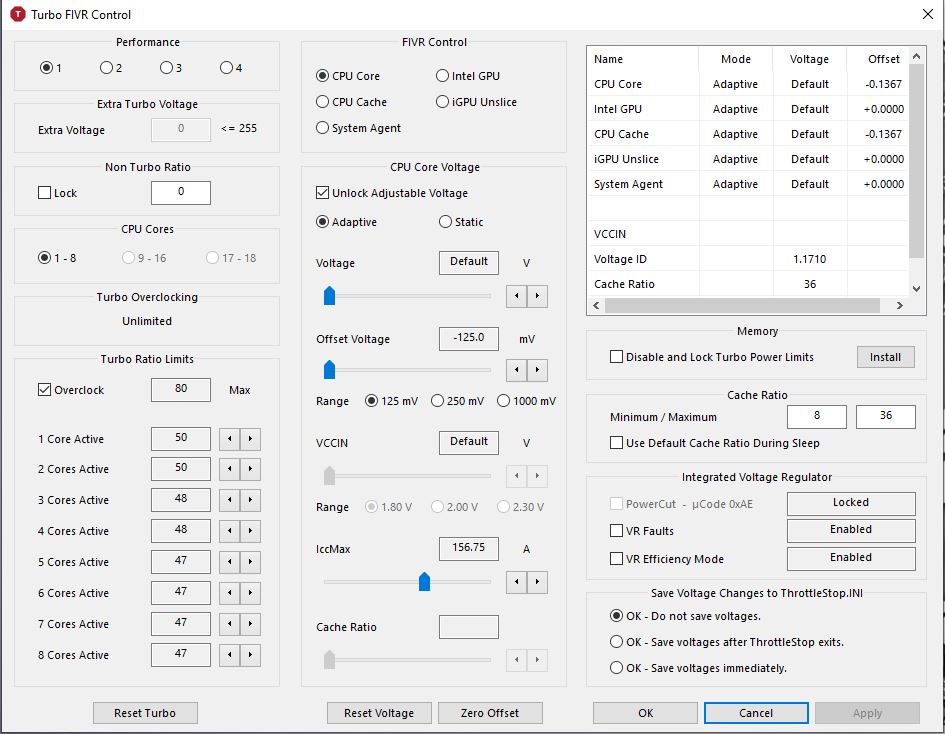
I have a p775dm3 with a 9900k I9 when my processor is fully loaded with the turbo boost the laptop suddenly stops. The problem came from the VR current limit in the default bios, it is over 1000 I to 627 to no longer crash. This setting corresponds to the judgment of the ICC MAX 157 A butterfly valve. It is acceptable for H24 / 7 without risk of damage to the motherboard.
Thanks you for you timeAttached Files:
-
-
why dont you flash the original 870tm1-g bios then?
-
I believe you're asking if it's safe to have a higher IccMax value of 156A for 24/7 operation. I believe it is, as I have this value set all the way to the right value of 255A and have not experienced any ill effects. However, we are on different systems and different processors altogether. Yours being much more capable of actually utilizing the maximum limits of this feature. So, maybe someone else with a 9900K can actually chime in.
-
Push iccmax all the way to the right. Yes it's safe and will avoid throttling the cpu. Let it be like that and change the save settings check mark to Save settings instead of Don't save.
-
hello,
Yes exactly. Sorry for my bad english.
Thanks you for you time -
if i push the icc max beyond 157 the computer will turn off in stress cpu
-
I think you should report that in the throttlestop topic instead of here. They will assist you better there
BTW did you try and undo the undervolt you are doing? Most likely you cut the voltage too much in the offsets
And why do you put the cache ratio from 8 to 36? Put it 8 to 50. You are limiting the cpu to 3.6ghz by doing so..Last edited: Jul 3, 2019 -
I used throttle stop to illustrate my remarks the problem is at the level of VR CURRENT Limit because if I go above 627 the pc suddenly shuts down during a stress CPU. This setting is Safe for 24/7.
-
The shutdown of the pc could very well be an excessive undervolt. Try and delete throttlestop.ini and closing Throttlestop and undo the undervolt you have and test it.
-
I tried reducing the undervolt to -50mV and it was a failure. I try by adjusting the undervolt -0mv but the pc suddenly shuts down during a stress
The only way and adjust the level of VR CURRENT Limit.
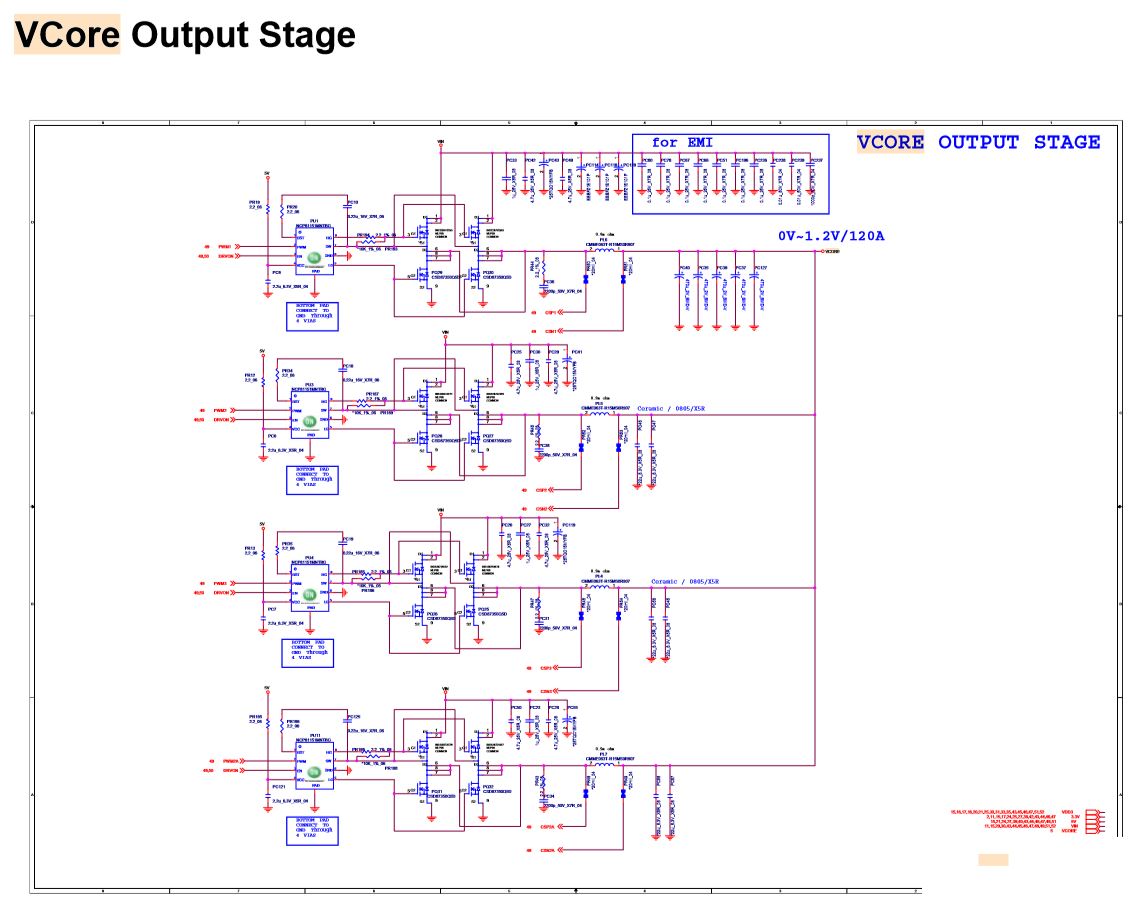
I attached a screenshot of the shematic of v-core and we see well 120 A /1.2 V so 120 * 1.2 = 144W
The p775dm3 card can ensure the electrical current of the CPU?
link of the shematic : https://www.google.com/url?sa=t&rct...5DM3_ESM.pdf&usg=AOvVaw1-RvhPT3QXXR3GIQnPRNAbAttached Files:
-
-
Yes it can. Reduce the undervolt to -0.50mV or keep it stock with no undervolt and test. Did the laptop shutdown!? How are those temperatures!? Did you repaste it recently? Can be a case of excessive temperature and the motherboard shutdown to prevent damage to the cpu. Post a photo of your throttlestop main window and FIVR please
-
Okay, so I finally sat down to flash the BIOS. Removed all the drives from my P870DM-G, then put the BIOS file into the boot folder.
I created the backup file, but for some stupid reason, it won't flash the modded bios file.
I keep getting the error message:
Error 376: Image file "BIOS.bin" not found.
I've renamed the P870DM.bin to BIOS.bin, put it in every folder possible, but it still won't find the file. What am I doing wrong? The backup worked just fine. -
type in BIOS.bin.rom in the command area, do not rename the file though, it should work.
-
Thanks, just tried that, still getting the same error.
I have both the P870DM.bin and the same file renamed to BIOS.bin in my boot folder. -
Is it placed in the efi folder or just the root of the usb?
-
In every single one of those, I thought one of those had to work.
So there's one in the USB root, one in the EFI folder and one in the boot folder. -
If your bios has the all the menus unlocked like mine does (P870DM3) you should be able to increase various power limits and thresholds to the point all the VR limit flags go away.
Of course the potential to introduce hard to troubleshoot problems and kill hardware is amplified from just using Throttlestop for on the fly changes, and it is a real slog testing one or two small settings changes at a time to see what (if anything) is different since info on what a lot of they do is lacking.
If the P775DM3 vcore power delivery is genuinely weaker and the black screen shut offs are caused on a hardware level by something like OCP there's not much you can do about it except set the bios and Throttlestop limits low enough so that it throttles insteadKKthebeast likes this. -
Can you make a copy of the content of the USB and zip or rar it and post here? So we can actually see the content of the USB ? Just copy paste everything and add to winrarKKthebeast likes this.
-
i have the same issue on my P750DM with the 9900k. the cpu is pulling too many amps for the cpu VRMs on the motherboard. so best to find your maximum sweet spot at which the machine does not shut off and then dial in the highest clocks you can reach without VR throttling.
our Z170 systems were just never designed with 8 core cpus in mind, but rather quad cores still, im reaching 4.6 ghz stable on all 16 threads for prolonged heavy loads, not bad for a machine designed for quadcores
Sent from my Xiaomi Mi Max 2 (Oxygen) using TapatalkLast edited: Jul 4, 2019electrosoft, Tryner and KKthebeast like this. -
Dial back the frequency. Lower and stable is better than not functioning. No matter what [insert your wrong here] you can NOT run these CPUs at even stock on our older laptops with out hardware modding
Not without some next level hacker engineering soldering on some Homebrew bs. then thermals (original "meltdown"?) (If that was the case [engineer] we would have jobs at Intel)
BUT! (And I know it sucks... ) Running the chip at the Highest your Mobo can support is hands down the best we can get from these. Does it suck to under utilize a chip? Absolutely. Even on my 270 I can't get stock performance with the 140A limit.
Stock 9900k in CB15 is around 1.7-2k,
https://www.google.com/amp/s/www.techspot.com/amp/review/1744-core-i9-9900k-round-two/
Pushed to only 5.0 all core 2.1-2.2k
https://www.google.com/amp/s/wccfte...nebench-5-ghz-performance-benchmark-leak/amp/
I'm still tweaking it, but 1800+ is awesome for me at 4.4ghz 8core with stock P870KM1-G vapor cooler (thermal grizzly conductanaut, pretty sure i need to order a new CPU fan, its not even blowing 1/3 as hard as either one of the GPU's)
Current setup (probably wrong)
and Waaay better than the 8086k can pull 1.4+K stock
https://www.tweaktown.com/reviews/8672/intel-core-i7-8086k-coffee-lake-review/index3.html
1800 with a overclock of 5200mhz With great cooling
https://www.google.com/amp/s/amp.reddit.com/r/intel/comments/9lwn03/8086k_cinebench_r15/
And desktop mild overclock 5.0 area 9900k/f performance when pushing the 8086k to 6800mhz with LNC 2.1-2.2k
https://community.hwbot.org/topic/188660-achill3us-core-i7-8086k-6800mhz-2248-cb-cinebench-r15/
Sorry for the overkill and limited and random sample size on the sources.
I suppose the point I was Aiming for (through the "word vomit" was, You have an awesome chip, that once dialed in, you should have awesome performance. (Even limited as we are with the power restrictions)
And a few years from now when we upgrade again we could always toss the chip in a what would then be an old 370 and overclock the heck out of it, give it to the kiddo for his lousy 4k gaming while we go full 8k (dreams)
-KK IMHO
Sent from my SM-N950U1 using TapatalkLast edited: Jul 4, 2019joluke likes this. -
Thanks, joluke and DaMafiaGamer, I finally was able to flash the bios (had to type in P870DM.rom). Didn't notice at first the file extension was .rom and not .bin.
Anyway, the process was successful, unplugged the power chord, put it back in just to see if it works and I was greeted by a nice black screen. What are the odds?
Looks like I'm going to have to buy an SPI flasher after all, hehehe.joluke likes this. -
That happened to me. As I posted before and for good measure. (If your laptop supports the FN+key reset try spamming it, then pull the power cord, battery, CMOS battery, hold the power button for a min of 30 secs. (60secs), plug in the power cord, power on, and wait about 5 mins reboot 2x wait to see if it posts, rinse and repeat. If you get lucky like I did you will see that little popup b****ing about the CMOS battery.

Might work might not. Idk. It did for me good sir and I figured I should share in case it helps and saves $
Sent from my SM-N950U1 using Tapatalk -
Tried it, though I have no idea what Fn+D does.
I'll just leave the thing unplugged for a few hours with the BIOS battery pulled and see what happens.
Thanks!
This one is pretty "affordable" (considering I'm only ever going to use it once in my life):
https://www.amazon.de/WINGONEER-EEP...pi+programmer&qid=1562225380&s=gateway&sr=8-3
Will it do the job? -
Yes sir I hope it works to save you a buck!
On the KM1 I'm under the impression it's supposed reset the NVRAM I just kind of like on a MacBook? My friends will correct me if I'm wrong as I expect nothing less.
But then again I'm not a pro just an overzealous do-gooder sharing my version of reality .
.
Sent from my SM-N950U1 using Tapatalk -
That one would require that you did desolder the BIOS chip and clip it. What you need is a solderless spi programmer like this one:
https://www.ebay.com/itm/XGecu-Prog...EPROM-MCU-PIC-AVR-GAL-7-adapter-/192489430193
Programmer Ztl866ii plus. See that clamp on the up right? That will clamp to the chip and flash it on board (you need a seperate computer of course to flash). Hope I helped
-
Or just add this to it? (ask one of these guys if it will work with that)
https://www.amazon.de/NANAO-SOIC8-Sockel-Adapter-Programmierer/dp/B07T3P3MKN
Here is my order from earlier today (plan on trying some other foolery that will end in tears)
Advised from another member
https://i.imgur.com/bGsywiv.jpgLast edited: Jul 4, 2019joluke likes this. -
I'm not sure. We'll have to wait for other replies since i don't have a flasher on my own and I'm a newbie to this programmers stuff
 KKthebeast likes this.
Official Coffee Lake Refresh Thread/BIOS for ALL Clevo Laptops - RTX CARDS NOW SUPPORTED
Discussion in 'Sager and Clevo' started by DaMafiaGamer, Oct 25, 2018.





 )
)